
If you want a no-frills Gaming Wired Keyboard review, this one is easy to place: it focuses on quiet typing, a built-in wrist rest, and simple backlit visibility.
The question is not whether it is flashy.
The question is whether the feature set fits your desk.
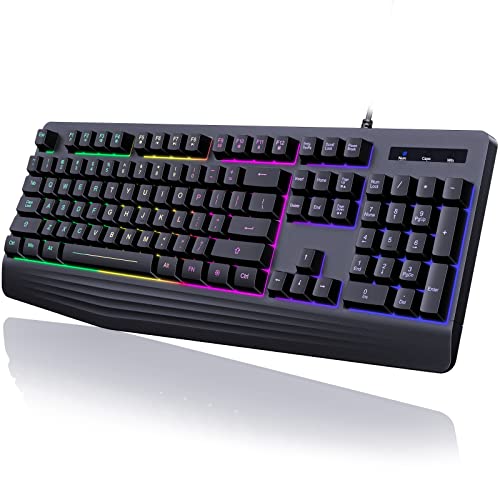
Gaming Keyboard Review Summary
The Gaming Wired Keyboard makes sense for buyers who want a basic full-size keyboard with a few comfort and convenience extras rather than a premium mechanical board.
Its strongest case is simple: it gives you a wrist rest, 104 keys, quiet membrane-style typing, dedicated media controls, and broad plug-and-play compatibility without demanding a learning curve.
It is best suited to casual gamers, office users, students, and anyone who wants a readable keyboard in dim light.
It is less compelling if you want per-key lighting customization, a mechanical switch feel, or a design that is clearly built around enthusiast gaming.
This is a utility-first keyboard, not a showpiece.
Review Scorecard
| Category | Score | Why it scores here |
|---|---|---|
| Typing comfort | 7/10 | Integrated wrist rest and stepped key layout support longer sessions. |
| Gaming utility | 6/10 | 19-key anti-ghosting and WASD/arrow swapping help, but it is still a membrane board. |
| Lighting visibility | 6/10 | Rainbow backlight improves low-light use, but there is no solid color customization. |
| Everyday convenience | 8/10 | 12 media keys and plug-and-play setup fit mixed work and play use. |
| Noise control | 8/10 | The listing emphasizes quiet typing, which is useful in shared spaces. |
| Durability signals | 6/10 | ABS construction and laser-engraved lettering are practical, though not premium. |
| Compatibility | 8/10 | Listed support covers Windows systems and Mac, which broadens the audience. |
Key Features and Specifications of Gaming Keyboard
The Gaming Keyboard is a full-size 104-key wired model with a rainbow backlight, a built-in wrist rest, and membrane-style keys.
The listing positions it as a quiet typing option for gaming and office use, which is important because many shoppers want a single keyboard that can handle both work and play without sounding loud in a shared room.
The lighting is intentionally simple.
You get rainbow backlight effects with steady and breathing modes, brightness adjustment, and the option to turn the lighting off.
There is no solid-color customization, so this is about visibility and atmosphere rather than personalization.
The keyboard also leans on practicality.
It includes 12 dedicated multimedia keys for common controls such as volume, music, email, and calculator access.
For gaming-specific behavior, the listing calls out 19-key anti-ghosting, FN+W to swap WASD and arrow keys, and FN+Win to lock the Windows key.
Key listed facts:
- 104 keys
- Wired USB connection
- Rainbow backlight with steady and breathing modes
- Adjustable brightness and backlight speed
- Integrated ergonomic wrist rest
- 12 multimedia keys
- 19-key anti-ghosting
- FN+W key swap
- FN+Win lock
- ABS construction
- Laser-engraved key legends
- Compatible with Windows and Mac, with a note that multimedia keys are not available on Mac
Pros and Cons of Gaming Keyboard
Pros
- The wrist rest is a meaningful comfort feature for long typing or gaming sessions.
- Quiet membrane keys make it easier to use in offices, dorms, or shared homes.
- The rainbow backlight improves visibility without requiring complicated setup.
- Dedicated media keys are a real convenience for everyday desktop use.
- Plug-and-play compatibility keeps setup simple.
Cons
- The lighting is limited to rainbow styling, so buyers looking for full RGB control will be disappointed.
- It is not a mechanical keyboard, so the feel will not satisfy users chasing tactile switches.
- The gaming features are useful, but still modest compared with more enthusiast-focused boards.
- Mac support appears partial because the multimedia keys are not available on Mac.
Who Should Buy Gaming Keyboard?
Buy this if you want a full-size keyboard that does a lot of everyday work well and adds enough gaming-oriented features to stay useful after hours.
It is a good fit for casual players, budget-conscious shoppers, students, and office users who want backlighting without paying for a more complicated board.
It also makes sense if you care more about comfort and simplicity than about customization.
The wrist rest, quiet keys, media controls, and broad compatibility are the sort of features that matter every day, not just on a spec sheet.
Skip it if you already know you prefer a mechanical keyboard, need per-key lighting control, or want a more premium chassis.
You should also look elsewhere if your main goal is a highly competitive gaming keyboard with advanced software and deeper tuning options.
Gaming Keyboard Typing and Gaming Fit
Quiet Office Use
The quiet typing claim is one of the most practical parts of the listing.
For shared spaces, that matters more than flashy visuals.
A low-noise membrane board can be easier to live with than a louder mechanical option if you type late at night or keep a keyboard on a family desk.
Wrist Rest Comfort
The integrated wrist rest changes the feel of the entire keyboard.
It suggests a focus on long sessions rather than quick demos.
If your hands spend a lot of time on the keyboard, that extra support can be more valuable than RGB effects.
Gaming Responsiveness
The 19-key anti-ghosting and key-swap functions are useful for casual gaming.
They are not a substitute for a high-end esports board, but they do cover the basic pain points that matter when you press several keys at once.
For most non-competitive players, that is enough.
Low-Light Visibility
The rainbow backlight is about function first.
It helps you see the keys in a dark room and gives the keyboard some visual character, but it is not built for extensive customization.
If you want clean illumination rather than a software-driven light show, that tradeoff is acceptable.
Alternatives to Gaming Keyboard
If the feature mix feels close but not quite right, these are the most credible alternatives to compare:
- Logitech K120 wired keyboard for a simpler, no-light baseline.
- Razer Cynosa Lite gaming keyboard if you want a more recognized gaming brand and backlit focus.
- Redragon wired gaming keyboard if you want budget gaming options with a more enthusiast-leaning catalog.
- Corsair K55 wired gaming keyboard if you want a more established multimedia-gaming hybrid.
The right alternative depends on whether you value silence, software features, brand reputation, or a more tactile typing feel.
This Gaming Keyboard is most competitive when your top priorities are basic comfort, simple lighting, and easy day-to-day use.
Is Gaming Keyboard Worth It?
Yes, if you want a practical full-size wired keyboard with a wrist rest, quiet keys, backlighting, and easy compatibility.
It is especially worth a look for casual users who want comfort and convenience more than enthusiast-level gaming features.
No, if you are shopping for a mechanical board, deep lighting control, or a more advanced gaming platform.
The Gaming Keyboard is worth it when you judge it as a functional daily driver with a few well-chosen extras, not as a premium gaming upgrade.