
When it comes to running demanding applications like AutoCAD, choosing the right workstation PC is essential for your productivity. With various options available, you’ll want a machine that balances power and reliability. From compact designs to robust desktops, there’s a workstation suited for your needs. Explore the top picks that can elevate your design projects and help you work more efficiently. What features should you prioritize in your search?
HP Workstation PC Desktop Computer (Renewed)

If you’re a design professional or engineer looking for a powerful workstation for AutoCAD, the HP Workstation PC Desktop Computer (Renewed) stands out with its robust specifications. Featuring an Intel Hexa-Core i5 processor and 32GB DDR4 RAM, it’s optimized for demanding creative applications. The NVIDIA Quadro K1200 4GB GPU accelerates performance in 3D design and video editing. With a 1TB SSD for quick boot times and a massive 4TB HDD for storage, you won’t run out of space. Plus, its extensive connectivity options make it versatile for any project, ensuring you stay productive and efficient.
Best For: Design professionals and engineers seeking a powerful workstation for demanding applications like AutoCAD and 3D design.
Pros:
- High Performance: Equipped with an Intel Hexa-Core i5 processor and 32GB DDR4 RAM, optimized for creative tasks.
- Ample Storage: Features a 1TB SSD for fast boot times and a 4TB HDD for extensive storage capacity.
- Versatile Connectivity: Offers multiple ports, including USB 3.0, USB Type-C, and DisplayPort, catering to a variety of devices.
Cons:
- Renewed Condition: As a renewed product, there may be signs of previous use or limited warranty.
- Weight: Workstation PCs can be heavier than standard desktops, making them less portable.
- Limited Graphics Memory: While the NVIDIA Quadro K1200 is capable, it may not meet the needs of very high-end graphic applications or gaming.
Lenovo ThinkStation P3 Tiny Desktop PC

The Lenovo ThinkStation P3 Tiny Desktop PC stands out as an ideal choice for professionals in engineering and design, thanks to its robust Intel i5-14500 vPro processor and certified GPU. With 16GB DDR5 RAM and a 512GB SSD, it guarantees high productivity and smooth multitasking across applications like AutoCAD and SOLIDWORKS. Its compact design doesn’t compromise on performance, allowing you to expand to two monitors with stunning 8K resolution. Connectivity options include USB-C, HDMI 2.1, and Wi-Fi 6 for fast data transfer. Plus, it runs on Windows 11 Pro, complete with AI-powered Copilot for intelligent assistance.
Best For: The Lenovo ThinkStation P3 Tiny Desktop PC is best for professionals in engineering, design, and STEM fields who require a powerful and compact workstation.
Pros:
- Certified for professional-grade applications like AutoCAD and SOLIDWORKS, ensuring reliability and performance.
- Compact design allows for easy integration into limited workspace environments without sacrificing power.
- Supports dual monitors with up to 8K resolution, enhancing productivity and multitasking capabilities.
Cons:
- Limited upgrade options due to its compact size, which may restrict future enhancements.
- The price point may be higher compared to non-workstation desktops, which might not be suitable for all budgets.
- The reliance on a single GPU may limit performance in extremely demanding graphical tasks compared to larger workstations.
Dell Workstation Desktop Computer – Editing/Design

For professionals in architecture and engineering, the Dell Workstation Desktop Computer stands out as an ideal choice for AutoCAD users. Powered by an Intel i7-9700 processor and 32GB RAM, it handles demanding tasks with ease. The Nvidia Quadro P620 graphics card guarantees smooth rendering and modeling, while the 1TB SSD and 4TB HDD provide ample storage for your projects. With Windows 11 Pro and ISV-certified compatibility, you can seamlessly run software like Adobe and 3DS Max. Connectivity options, including multiple USB ports and DisplayPorts, make it easy to connect your devices. This workstation is built to elevate your design experience.
Best For: Professionals in architecture and engineering who require high-performance computing for software like AutoCAD and 3DS Max.
Pros:
- High-performance Intel i7-9700 processor ensures efficient handling of demanding applications.
- Ample storage capacity with a 1TB SSD for fast boot times and a 4TB HDD for extensive project storage.
- ISV certification guarantees compatibility with popular design and engineering software.
Cons:
- Limited graphics card memory (2GB) may not be sufficient for extremely high-resolution rendering tasks.
- Renewed product status may raise concerns about long-term reliability and warranty support.
- No mention of dedicated gaming performance, which may limit its appeal to users interested in gaming capabilities.
Lenovo ThinkStation P3 Tiny Workstation Desktop

Engineered for professionals in design and engineering, the Lenovo ThinkStation P3 Tiny Workstation Desktop delivers exceptional performance with its Intel Core i7-14700 processor and NVIDIA T400 graphics. Weighing just 3.01 lbs and 96% smaller than traditional desktops, it’s perfect for limited spaces. With 32GB DDR5 RAM and dual 512GB PCIe NVMe SSDs, you’ll experience stability and speed for demanding tasks. You can connect up to five monitors, maximizing your workspace with 4K resolution. Running Windows 11 Pro and equipped with AI-powered Copilot, it’s ideal for architects, engineers, and designers needing reliable, high-performance computing.
Best For: Professionals in design, engineering, and creative fields seeking a compact workstation with high-performance capabilities.
Pros:
- Compact Size: Weighs just 3.01 lbs, making it ideal for limited workspace.
- High Performance: Features a powerful Intel Core i7-14700 processor and NVIDIA T400 graphics for demanding tasks.
- Multi-Monitor Support: Can connect up to five monitors with 4K resolution for an expansive workspace.
Cons:
- Limited Upgrade Options: The small form factor may restrict future upgrades compared to larger desktops.
- Price Point: Higher cost compared to standard desktops may be a consideration for budget-conscious buyers.
- Noise Levels: While compact, the cooling system may generate noise under heavy load.
Lenovo ThinkStation P3 Tiny Desktop PC
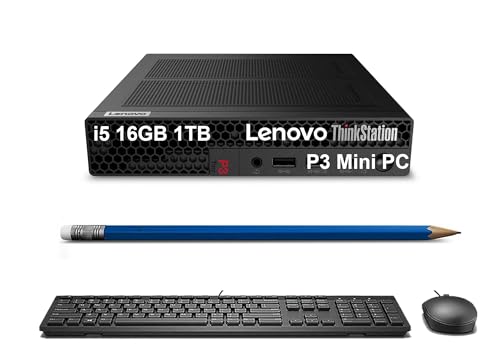
Compact yet powerful, the Lenovo ThinkStation P3 Tiny Desktop PC is an ideal choice for professionals in engineering and creative fields. With its Intel i5-14500 vPro processor and 16GB DDR5 RAM, it runs demanding applications like AutoCAD and SOLIDWORKS smoothly. The 1TB SSD guarantees quick boot times and ample storage for your projects. Plus, its professional-grade GPU and ISV certifications assure reliability. Connectivity is exceptional with multiple USB ports and support for dual monitors at 8K resolution. Running Windows 11 Pro, it’s designed for seamless multitasking and enhanced productivity, making it a smart investment for your workstation needs.
Best For: Professionals in engineering and creative fields seeking a compact yet powerful workstation for demanding applications.
Pros:
- Professional-grade performance with Intel i5-14500 vPro processor and 16GB DDR5 RAM for smooth multitasking.
- Ample storage provided by a 1TB SSD, ensuring quick boot times and sufficient space for projects.
- Exceptional connectivity options with multiple USB ports and support for dual monitors at 8K resolution.
Cons:
- Limited upgradeability compared to larger desktop workstations due to its compact design.
- Potentially higher price point for the workstation compared to standard consumer PCs.
- Fan noise may be noticeable under heavy workloads, which could be distracting in quiet environments.
Dell Optiplex 7010 Desktop Computer (Renewed)
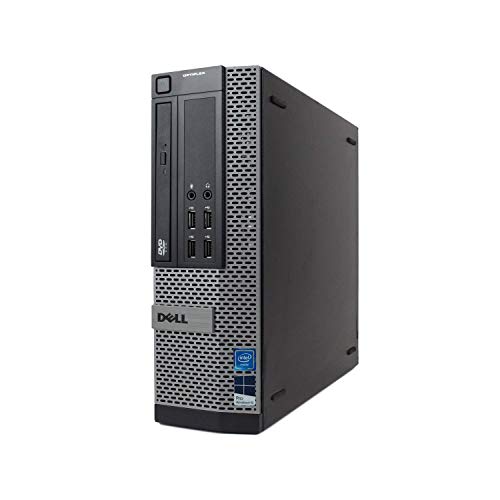
The Dell Optiplex 7010 Desktop Computer (Renewed) stands out as an excellent choice for professionals seeking a reliable workstation for AutoCAD, thanks to its powerful Intel Core i7 processor that delivers impressive performance with a turbo frequency of up to 3.8GHz. With 16GB of DDR3 memory and a 1TB SSD, you’ll enjoy seamless multitasking and ample storage for your projects. It runs on a fresh installation of Microsoft Windows 11 Pro, ensuring you get the latest features without bloatware. Plus, Microsoft Authorized Refurbished (MAR) quality guarantees durability, backed by a 90-day warranty and tech support for peace of mind.
Best For: Professionals and creatives looking for a reliable and powerful workstation for demanding applications like AutoCAD.
Pros:
- Powerful Performance: Intel Core i7 processor with up to 3.8GHz turbo frequency for fast and reliable performance.
- Ample Memory and Storage: 16GB DDR3 memory and 1TB SSD support efficient multitasking and large project storage.
- Quality Assurance: Microsoft Authorized Refurbished (MAR) ensures high standards and includes a 90-day warranty and tech support.
Cons:
- Limited Graphics Capability: May not support high-end graphics cards needed for advanced 3D rendering tasks.
- Older DDR3 Memory: DDR3 memory may not be as fast as newer DDR4 alternatives.
- Refurbished Status: Some users may prefer new systems over refurbished ones despite quality assurances.
ACEMAGIC Mini PC Ryzen 7 7730U (16GB DDR4, 512GB SSD)
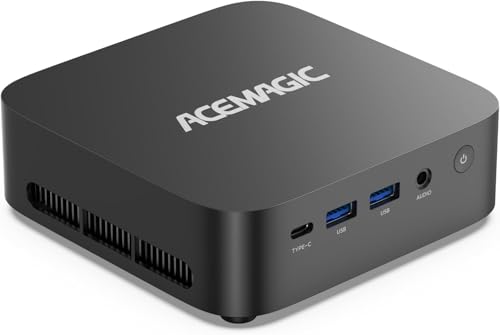
For professionals who need a reliable workstation for AutoCAD, the ACEMAGIC Mini PC Ryzen 7 7730U stands out with its powerful AMD Ryzen 7 7730U processor, which delivers impressive performance improvements over previous models. With 16GB DDR4 RAM and a 512GB SSD, it efficiently handles multitasking, light PS/PR editing, and 1080p gaming. The AMD Radeon RX Vega 8 guarantees smooth gameplay at 60FPS, while triple 4K display support via HDMI 2.0 and DP makes it ideal for multitasking across various applications. Pre-installed with Windows 11 Pro, it’s certified for AutoCAD and offers robust connectivity options, backed by solid tech support.
Best For: Professionals and remote workers seeking a compact yet powerful workstation for multitasking, light gaming, and 4K media editing.
Pros:
- High performance with AMD Ryzen 7 7730U processor, ideal for multitasking and light editing tasks.
- Triple 4K display support allows for enhanced productivity through simultaneous use of multiple applications.
- Robust connectivity options including dual USB 3.2 Gen2 ports for fast data transfer.
Cons:
- Limited gaming performance for high-end titles compared to dedicated gaming rigs.
- Cooling system may not be sufficient for prolonged heavy workloads, potentially leading to thermal throttling.
- Only 512GB SSD storage, which may be insufficient for users with extensive data storage needs.
Beelink SER5 Mini PC with AMD Ryzen 5 5500U

If you’re seeking a powerful yet compact machine for your AutoCAD projects, the Beelink SER5 Mini PC with the AMD Ryzen 5 5500U is an excellent choice. With 6 cores and 12 threads, it can reach speeds up to 4.0GHz, ensuring smooth performance. You’ll appreciate the 16GB DDR4 memory, expandable to 64GB, alongside a 500GB NVMe SSD that can be expanded to 4TB. Its support for 4K triple displays enhances your design experience. Plus, the quiet cooling system keeps it running efficiently. With WiFi 6 and Bluetooth 5.2, connectivity is seamless, making it a reliable workstation for any designer.
Best For: The Beelink SER5 Mini PC is best for designers and professionals seeking a compact yet powerful workstation for tasks like AutoCAD, video editing, and light gaming.
Pros:
- High performance with AMD Ryzen 5 5500U, 6 cores, and 12 threads for smooth multitasking.
- Expandable memory and storage options allow for customization and future upgrades.
- Supports 4K triple displays for enhanced visual experiences, ideal for design and editing work.
Cons:
- Limited built-in graphics performance for more intensive gaming or 3D rendering tasks.
- May require additional peripherals for advanced connectivity options, increasing overall setup cost.
- Compact design may lead to thermal throttling under prolonged heavy loads despite cooling features.
Threadripper PRO 9965WX Workstation Desktop PC

Unmatched performance defines the Threadripper PRO 9965WX Workstation Desktop PC, making it the ideal choice for architects and engineers using AutoCAD. With its 24 cores and 48 threads, it delivers lightning-fast processing at up to 5.4 GHz. The 64GB ECC DDR5 RAM guarantees seamless multitasking, while the 2TB PCIe NVMe Gen5 SSD provides hyper-fast bootup and data transfer. Coupled with an NVIDIA GeForce RTX 5070, you’ll experience smooth visuals even with demanding applications. With a sleek design and lifetime technical support, this workstation meets all your creative needs and exceeds expectations for performance and reliability.
Best For: Architects and engineers using AutoCAD, as well as content creators needing high-performance computing capabilities.
Pros:
- Exceptional processing power with 24 cores and 48 threads for efficient multitasking and high-performance tasks.
- Fast storage solutions with a 2TB PCIe NVMe Gen5 SSD, ensuring quick bootup and rapid data transfer speeds.
- Robust graphics performance from the NVIDIA GeForce RTX 5070, providing smooth visuals for demanding applications.
Cons:
- Higher price point compared to standard desktop PCs, which may not be suitable for budget-conscious users.
- Large physical footprint may require more desk space, limiting placement options.
- May require technical expertise to fully utilize advanced features and performance capabilities.
Lenovo ThinkStation P3 Tiny Workstation Mini Desktop PC
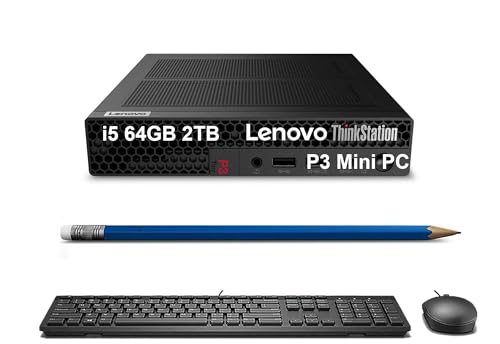
The Lenovo ThinkStation P3 Tiny Workstation Mini Desktop PC stands out as an exceptional choice for professionals in fields like engineering, creative design, and healthcare. With its powerful Intel 14-Core i5-14500 vPro processor and 64GB DDR5 RAM, you’ll enjoy superior performance and reliability. The 2TB SSD guarantees quick boot times and ample storage for demanding applications. Certified for critical software like AutoCAD and SOLIDWORKS, it’s designed to handle your workload efficiently. Plus, its extensive connectivity options and support for dual monitors make multitasking a breeze. This compact workstation is perfect for anyone seeking high productivity in a small footprint.
Best For: Professionals in engineering, creative design, and healthcare who require a compact yet powerful workstation for demanding applications.
Pros:
- Superior performance with Intel 14-Core i5 processor and 64GB DDR5 RAM for efficient multitasking.
- ISV certifications for critical applications like AutoCAD and SOLIDWORKS ensure reliability for professional use.
- Compact design allows for easy placement in small workspaces without sacrificing power.
Cons:
- Limited upgrade options due to its mini desktop form factor.
- May not perform as well for high-end gaming compared to larger workstations with dedicated GPUs.
- The warranty for upgraded components may only apply to specific customers, which could limit support for general users.
Factors to Consider When Choosing a Workstation PC for AutoCAD
When you’re choosing a workstation PC for AutoCAD, there are several key factors to keep in mind. You’ll want to evaluate processor performance, graphics card capabilities, and memory and storage needs. Also, consider software compatibility and connectivity options to guarantee your setup meets all your design requirements.
Processor Performance Requirements
Choosing the right processor for your AutoCAD workstation can greatly impact your workflow, especially since a multi-core processor with 4 to 8 cores is essential for handling complex calculations and rendering tasks. Aim for processors with higher clock speeds, ideally above 3.0 GHz, to boost responsiveness and speed during operations. Look for options from the Intel i5, i7, or AMD Ryzen series, as these are highly recommended for CAD applications due to their strong performance. Confirm the processor supports advanced features like hyper-threading or multi-threading, which enable parallel processing and enhance efficiency. Finally, consider the generation of the processor; newer generations typically provide better performance, energy efficiency, and compatibility with the latest software optimizations, guaranteeing a smoother experience.
Graphics Card Importance
A powerful graphics card is essential for accessing AutoCAD’s full potential, especially when working with intricate 3D models and demanding rendering tasks. Opt for a dedicated graphics card, like those from the NVIDIA Quadro or AMD Radeon Pro series, as they deliver the necessary power for complex visuals. Look for cards with at least 4GB of memory to improve rendering times and handle larger files without lag. Newer architectures enhance real-time visualization and support advanced rendering technologies. Certified graphics cards guarantee compatibility and stability, having undergone rigorous testing with AutoCAD to minimize crashes. Additionally, consider multi-monitor support, which can boost your productivity by allowing you to manage AutoCAD windows across several screens efficiently.
Memory and Storage Needs
To guarantee your workstation PC meets the demands of AutoCAD, it’s essential to focus on both memory and storage specifications. Aim for a minimum of 16GB of RAM, but 32GB or more is ideal for handling complex designs and multitasking seamlessly. Solid State Drives (SSDs) are your best bet for the primary boot device, as they offer faster read/write speeds, reducing loading times considerably. Consider adding a secondary Hard Disk Drive (HDD) for ample storage of large project files and backups without sacrificing performance. Ascertain your workstation supports dual-channel memory configurations for enhanced data processing speeds. Finally, prioritize compatibility with high-capacity storage solutions like NVMe SSDs, which can greatly improve your workflow in AutoCAD.
Software Compatibility Certifications
When selecting a workstation PC for AutoCAD, software compatibility certifications are essential for ensuring smooth operation and reliability. Make sure the workstation is certified for use with independent software vendors (ISV) to guarantee compatibility with critical applications like AutoCAD and SOLIDWORKS. Look for workstations featuring professional-grade GPUs with ISV certifications; these enhance performance and reliability when running demanding design software. It’s important to check if the workstation has been tested for specific software packages, as this reduces the chances of performance issues. Additionally, consider workstations that support the latest operating systems to maintain compatibility with future AutoCAD versions. Finally, verify that the workstation meets the minimum system requirements for ideal performance with your software.
Connectivity Options Available
Having the right software compatibility is only part of the equation for a successful AutoCAD experience; connectivity options play an important role too. Verify your workstation has at least five USB 3.0 ports and USB Type-C options to connect essential peripherals like mice and keyboards. Look for DisplayPort or HDMI outputs to support high-resolution monitors, which are vital for intricate designs. Reliable Ethernet connectivity is a must for updates and online resources. Expandable display outputs for dual or multiple monitors can greatly boost your productivity. Finally, confirm your workstation includes built-in Wi-Fi 6 and Bluetooth capabilities for fast, stable wireless connections to other devices and networks. These features will enhance your overall AutoCAD workflow.