
When it comes to video editing, choosing the right PC can make all the difference in your workflow and final product. Whether you’re just starting on YouTube or looking to upgrade your setup, there are powerful machines available for every budget. From the budget-friendly Dell Optiplex 3050 to high-performance options like the CPU Solutions Express 4K, each model offers something unique. Let’s explore which machines might best suit your editing needs.
HP Workstation Desktop Computer (Renewed)

When it comes to video editing, the HP Workstation Desktop Computer (Renewed) stands out as an exceptional choice for creative professionals. With its Intel Hexa-Core i5 processor and 32GB DDR4 RAM, you’ll experience seamless performance while handling demanding tasks. The NVIDIA Quadro K1200 GPU guarantees smooth rendering and playback in software like Adobe and AutoCAD. Plus, the 1TB SSD allows for rapid boot times and program loading, complemented by an additional 4TB HDD for extensive storage. Its robust connectivity options, including USB 3.0 and DisplayPort, enhance your workflow, making it a reliable machine for all your video editing needs.
Best For: Creative professionals and designers who require a powerful and reliable workstation for video editing and 3D design tasks.
Pros:
- High-performance Intel Hexa-Core i5 processor and 32GB DDR4 RAM for seamless multitasking and demanding applications.
- Ample storage with a 1TB SSD for fast access and an additional 4TB HDD for extensive file storage.
- Wide connectivity options including multiple USB ports and DisplayPort for enhanced workflow and device compatibility.
Cons:
- Limited upgrade options due to the specific workstation design which may restrict future enhancements.
- Older GPU model (NVIDIA Quadro K1200) may not support the latest graphics-intensive applications optimally.
- Renewed status may lead to concerns regarding hardware wear and warranty limitations compared to brand new models.
CPU Solutions Express 4K Video Editing PC

For professional video editors who demand top-tier performance, the CPU Solutions Express 4K Video Editing PC stands out with its powerful Ryzen 9 9950X processor, capable of reaching speeds up to 5.7 GHz. With 16 cores and 32 threads, it handles demanding tasks effortlessly. You’ll appreciate the 64GB DDR5 RAM, expandable to 192GB, ensuring rapid multitasking. The 2TB M.2 NVMe SSD offers quick access to large video files. Coupled with the Quadro RTX 2000 ADA graphics card, you can support multiple high-resolution monitors. Plus, its efficient cooling design keeps everything running smoothly during those long editing sessions.
Best For: Professional video editors looking for high-performance computing to handle 4K video editing tasks efficiently.
Pros:
- High-speed Ryzen 9 9950X processor with 16 cores and 32 threads for seamless multitasking.
- 64GB DDR5 RAM, expandable to 192GB, ensuring rapid application performance.
- Advanced Quadro RTX 2000 ADA graphics card supports multiple high-resolution displays, enhancing workflow.
Cons:
- Higher price point may not be suitable for casual users or hobbyists.
- Limited upgrade options due to mini tower design.
- May require additional investment in high-quality monitors to fully utilize the graphics capabilities.
Video Camera 1080P Camcorder with Night Vision and Accessories
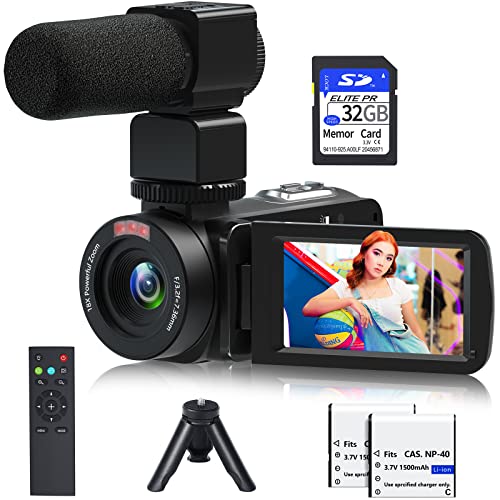
The Video Camera 1080P Camcorder with Night Vision is perfect for beginners and amateurs looking to capture high-quality footage in various settings. With 1080P resolution at 30FPS, it delivers stunning clarity. The 18X digital zoom and IR night vision let you film in low light, making it ideal for events like weddings, parties, or even camping trips. You’ll appreciate the included accessories, like a remote control, mini tripod, and 32GB SD card. Plus, the flexible features, such as time-lapse and slow motion, enhance your creative options. It can even function as a webcam, making it versatile for streaming or video calls.
Best For: Beginners and amateurs looking for an affordable camcorder that offers high-quality video recording in various environments.
Pros:
- Versatile functionality with features like time-lapse, slow motion, and video pause for creative shooting.
- Includes essential accessories such as a remote control, mini tripod, and 32GB SD card, providing great value.
- IR night vision capability allows for filming in low light conditions, making it suitable for various events.
Cons:
- Limited to 30FPS at 1080P resolution, which may not meet the needs of more advanced videographers.
- HDMI cable not included, which could limit immediate connectivity to TVs for playback.
- Only expandable up to 128GB for memory, which might be insufficient for extensive shooting sessions.
Dell Optiplex 3050 SFF Desktop Computer (Renewed)

Looking for a reliable and compact desktop for video editing? The Dell Optiplex 3050 SFF (Renewed) is a solid choice. With an Intel Quad Core i5-6500 processor and 16GB of DDR4 RAM, it handles video editing tasks effortlessly. The 256GB SSD boosts performance, while 4K support guarantees stunning visuals. You’ll appreciate the dual display capability, making multitasking seamless. This refurbished model comes with a minimum 90-day warranty and is certified for quality. It includes a USB keyboard and mouse, plus a USB WiFi adapter to keep you connected. At just 11.77 pounds, it’s perfect for any workspace!
Best For: Those seeking a reliable and compact desktop for video editing and multitasking tasks.
Pros:
- Powerful Performance: Equipped with an Intel Quad Core i5-6500 processor and 16GB DDR4 RAM for smooth video editing.
- 4K Support: Offers stunning visuals with a max screen resolution of 3840 x 2160 pixels.
- Compact Design: Ideal for home or office use with a lightweight build of only 11.77 pounds.
Cons:
- Limited Storage: The 256GB SSD may be insufficient for storing large video files.
- Generic Packaging: May arrive in a generic box, which may not appeal to some buyers.
- Refurbished Condition: As a renewed product, it may have minor cosmetic imperfections.
VETEK 8k Camcorder with Night Vision and Microphone

If you’re a vlogger or photography enthusiast seeking high-quality footage, the VETEK 8K Camcorder is an excellent choice. With stunning 8K video resolution and 48MP images, you’ll capture every detail. Its 18X digital zoom and 270-degree rotating touch screen enhance your shooting experience. The built-in noise reduction and external microphone guarantee crisp audio, while WiFi connectivity allows for easy sharing. You can even use it as a webcam! With various recording modes, image stabilization, and included accessories like a 32GB SD card, this camcorder is perfect for beginners and seasoned creators alike. Get ready to elevate your content!
Best For: The VETEK 8K Camcorder is best for vloggers and photography enthusiasts looking for high-quality video and audio capabilities.
Pros:
- High-resolution 8K video and 48MP images capture stunning detail.
- Built-in noise reduction and external microphone ensure excellent audio quality.
- WiFi connectivity allows for easy media sharing and remote control.
Cons:
- Limited frame rate at 15fps for 8K video may not be suitable for fast-paced action.
- External accessories like a tripod and LED light are not included.
- Relatively lightweight design may affect stability during handheld use.
Video Camera Camcorder for YouTube Vlogging (FHD 1080P, 24.0MP)
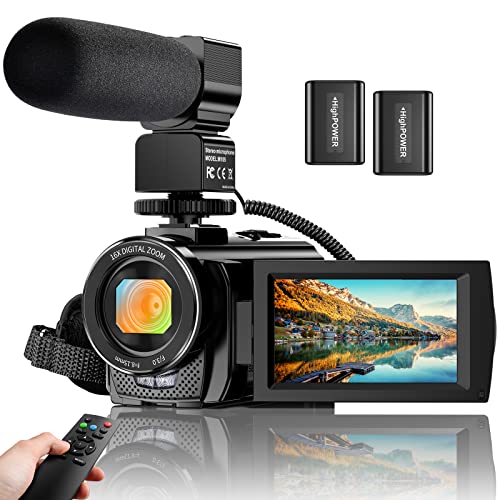
For aspiring YouTube vloggers seeking a reliable camera, the Video Camera Camcorder offers impressive features like 1080p recording at 30fps and a 24.0MP resolution. With an 8 MP CMOS sensor, you’ll capture stunning visuals. Its 16X digital zoom and 3.0-inch rotating screen enhance your shooting flexibility. Plus, built-in and external microphones guarantee crisp audio, reducing background noise. The camera supports face detection and has a handy pause function for seamless editing. Use it for live streaming too by connecting via USB. With two batteries included, you can record while charging, keeping your creativity flowing without interruptions.
Best For: Aspiring YouTube vloggers and content creators who need an affordable, feature-rich camera for high-quality video recording.
Pros:
- High-definition 1080p recording at 30fps and 24.0MP resolution for stunning visuals.
- Versatile 3.0-inch rotating screen and 16X digital zoom for flexible shooting angles.
- Built-in and external microphones enhance audio quality, reducing background noise.
Cons:
- Limited low-light performance due to the 8 MP CMOS sensor.
- Digital zoom may lead to quality loss compared to optical zoom.
- Requires AMCAP software for webcam functionality, which may not be user-friendly for everyone.
Live Video Streaming Kit (Deluxe) for Content Creation

The Live Video Streaming Kit (Deluxe) is an essential tool for content creators who want to elevate their streaming quality with professional-grade equipment. This kit features a 2K 60 FPS webcam, a cardioid microphone, and an adjustable LED flat light. You’ll enjoy sharp video and crystal-clear audio, thanks to the webcam’s auto-focus and the microphone’s noise reduction. Plus, the flexible lighting allows you to customize your setup. Weighing just 3.98 pounds, it’s portable and easy to use on any device—Android, MAC, or Windows. With a 4.5-star rating, it’s a reliable choice for anyone serious about live streaming.
Best For: The Live Video Streaming Kit (Deluxe) is best for content creators and streamers looking for high-quality video and audio equipment to enhance their live streaming experience.
Pros:
- High-quality 2K resolution provides clear and sharp video for professional streaming.
- Cardioid microphone effectively reduces background noise, ensuring crystal-clear audio.
- Adjustable LED lighting allows for customizable illumination, enhancing the overall video quality.
Cons:
- Weight of 3.98 pounds may be slightly heavier for users looking for ultra-portable options.
- Limited compatibility with older operating systems may restrict some users.
- Setup may require adjustment of lighting and angles to achieve optimal results, which can be time-consuming for beginners.
STGAubron Gaming PC Desktop Computer

Equipped with an Intel Core i7 processor that reaches speeds up to 3.9GHz, the STGAubron Gaming PC Desktop Computer is an excellent choice for video editors seeking high-performance capabilities. With 32GB of RAM and a 1TB SSD, you’ll experience smooth multitasking and quick file access. The GeForce GTX 1660 Super guarantees that you can edit videos effortlessly while enjoying 60+ FPS on popular games. Plus, with RGB fans and a stylish design, it adds flair to your workspace. It also includes a gaming mouse and keyboard, making it a complete package for both work and play.
Best For: Video editors, gamers, and professionals looking for a high-performance desktop computer that excels in multitasking and gaming capabilities.
Pros:
- Powerful Performance: Intel Core i7 processor and 32GB RAM ensure smooth multitasking and fast processing speeds.
- Gaming Ready: Capable of running popular games at 60+ FPS, providing an excellent gaming experience.
- Complete Package: Includes RGB gaming mouse and keyboard, along with stylish RGB fans for an appealing setup.
Cons:
- Limited Upgrade Options: The specific hardware configuration may limit future upgrades compared to modular systems.
- No Optical Drive: Lacks a built-in optical drive, which may be inconvenient for some users.
- Weight and Size: The desktop may be bulky, making it less portable than smaller gaming laptops or compact desktops.
Dell Workstation Desktop Computer with Intel i7-9700 and Nvidia Quadro P620

Designed specifically for video editors and creative professionals, the Dell Workstation Desktop Computer combines the power of an Intel i7-9700 processor with the precision of an Nvidia Quadro P620 graphics card. With 32GB of RAM and a 1TB SSD, it guarantees smooth multitasking and fast file access. The 4TB HDD provides ample storage for your projects. You’ll appreciate its compatibility with popular software like Adobe Premiere and After Effects. Connectivity options, including multiple USB ports and DisplayPorts, cater to all your peripherals. Plus, it’s renewed for like-new performance, making it a reliable choice for your editing needs.
Best For: Creative professionals and video editors looking for a powerful workstation that can handle demanding software and multitasking.
Pros:
- High-performance hardware with Intel i7-9700 and Nvidia Quadro P620 for efficient video editing and design tasks.
- Ample storage capacity with a 1TB SSD for fast access and a 4TB HDD for extensive project storage.
- Certified compatibility with popular creative software like Adobe Premiere, Photoshop, and AutoCAD.
Cons:
- Limited graphics memory of 2GB on the Nvidia Quadro P620 may not suffice for high-resolution projects.
- Weight of 11.57 pounds may be cumbersome for users needing a portable solution.
- Renewed product might not have the same warranty or support as a brand new unit.
HP Video Editing CAD 800 G1 Desktop Computer (Renewed)
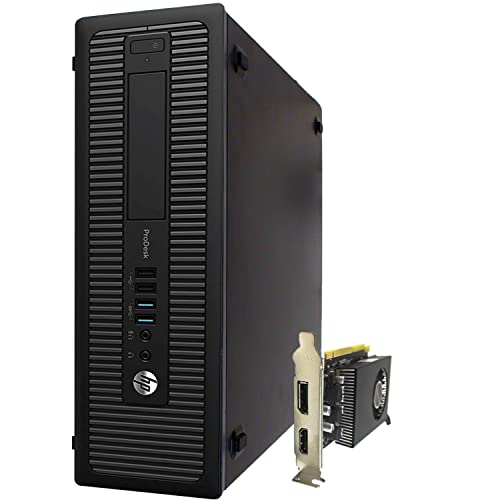
For those who need a powerful machine to handle intensive video editing tasks, the HP Video Editing CAD 800 G1 Desktop Computer (Renewed) stands out with its impressive 32GB DDR5 RAM. You’ll appreciate the Intel Core i7-4570 processor, clocking in at 3.2 GHz, ensuring smooth multitasking. The 480GB SSD allows for quick access to your files, while the massive 10TB HDD provides ample space for your media collections. The AMD Radeon RX 550 graphics card delivers excellent performance for both gaming and video editing. Plus, with built-in WiFi and running on Windows 11, you’ll stay connected and updated effortlessly.
Best For: Content creators and video editors who require a powerful and efficient desktop for demanding tasks.
Pros:
- Impressive performance with Intel Core i7-4570 processor and 32GB DDR5 RAM for seamless multitasking.
- Large storage capacity with a fast 480GB SSD and a massive 10TB HDD for extensive media collections.
- Dedicated graphics card (AMD Radeon RX 550) enhances video editing and gaming experiences.
Cons:
- Renewed condition may raise concerns about long-term reliability compared to new devices.
- Limited upgradability due to the desktop’s design and hardware specifications.
- Potential compatibility issues with certain software applications on Windows 11.
Factors to Consider When Choosing a Video Editing PC for YouTube
When choosing a video editing PC for your YouTube channel, you’ll want to focus on several key factors. Processor performance and graphics card capabilities are essential for smooth editing, while memory capacity and storage solutions will impact your workflow. Don’t forget to take into account the connectivity options available to guarantee your setup meets all your needs.
Processor Performance Requirements
Choosing the right processor for video editing is vital, especially if you’re working with high-resolution content for YouTube. Aim for a processor with at least four cores to manage multiple tasks efficiently and improve rendering times. High clock speeds—ideally above 3.0 GHz—greatly enhance your performance during real-time editing and playback. Look for processors that support hyper-threading, as this effectively doubles the number of threads, benefiting software designed for multi-threading. A large cache size of 16MB or more can improve data retrieval speeds, which is significant during intense editing sessions. Finally, opting for the latest generation processors guarantees better power efficiency and performance optimization, making them a wise investment for your video editing needs.
Graphics Card Importance
A powerful graphics card is a game changer for video editing, especially if you’re working with high-resolution content for YouTube. It accelerates rendering times, allowing you to edit more efficiently and get your videos out faster. Pay attention to the number of CUDA cores; more cores usually mean quicker performance for tasks like effects rendering and color correction. Also, make sure you have enough dedicated video memory (VRAM)—4GB or more is recommended to handle large files and complex projects seamlessly. If you often use multiple monitors, look for a graphics card that supports them, as this can enhance your workflow. Finally, compatibility with your editing software is vital, so choose a card optimized for real-time playback and rendering.
Memory Capacity Necessities
For seamless video editing on platforms like YouTube, aiming for at least 16GB of RAM is essential. This minimum guarantees smooth performance during multitasking and rendering. If you’re handling multiple applications or large video files, consider upgrading to 32GB or even 64GB, as this greatly reduces lag. Opt for DDR4 or DDR5 RAM to benefit from faster data transfer rates, enhancing your editing speed and efficiency. Remember, memory capacity directly impacts rendering and exporting speeds; more RAM allows quicker processing of high-resolution footage. If you’re working with 4K content or planning for future software demands, investing in a system with expandable RAM capabilities is a smart move. It’ll keep your setup relevant as technology evolves.
Storage Solutions Overview
When it comes to video editing, having ample memory is just one piece of the puzzle; storage solutions are equally important. You’ll want a robust setup that combines SSDs for quick boot and program loading with larger HDDs for extensive media storage. An SSD offers faster data access speeds, essential for handling large video files and improving system responsiveness during editing. Aim for at least a 1TB SSD for your primary drive, and consider 4TB or more on HDDs for archiving projects and raw footage. M.2 NVMe SSDs can greatly boost data transfer rates, enhancing your workflow. Finally, look for expandable storage options, allowing you to add internal or external drives as your project needs grow.
Connectivity Options Available
Choosing the right connectivity options is essential for your video editing PC, especially if you’re focused on creating content for YouTube. Make sure your PC has multiple USB 3.0 ports; these allow for faster data transfers with external drives and peripherals, which is critical for handling large video files. Look for HDMI and DisplayPort outputs to support high-resolution monitors, ensuring accurate color representation during editing. A good variety of connectivity options, including USB Type-C, can enhance your workflow efficiency. Built-in Wi-Fi and Bluetooth capabilities streamline connections to wireless devices and cameras. Finally, an Ethernet port is crucial for stable internet connections during uploads and live streaming, ensuring reliability over fluctuating wireless connections.
Operating System Compatibility
A video editing PC’s operating system plays a significant role in determining which editing software you can use. For instance, popular programs like Adobe Premiere and Final Cut Pro have specific OS requirements. Windows 11 Pro is a great choice, as it supports a wide range of applications, providing versatility for your editing needs. Many video editing tools are optimized for 64-bit systems, allowing them to efficiently handle larger amounts of RAM and enhance performance. It’s vital to guarantee your chosen OS aligns with the editing tools you plan to use. Additionally, regular updates and support for your OS can improve stability and security, which are essential for managing large video files and maintaining a smooth editing workflow.