
If you’re juggling multiple computers and peripherals, a USB switch can streamline your setup markedly. These devices let you share printers, keyboards, and more without the hassle of constant unplugging. With various options available, each designed to enhance productivity, it’s essential to choose the right one for your needs. Let’s explore some of the best USB switches on the market and discover how they can transform your workspace.
UGREEN USB 3.0 Switch for Sharing Devices Between Two Computers

If you’re looking to effortlessly share multiple USB devices between two computers, the UGREEN USB 3.0 Switch is an excellent choice. This device lets you connect four USB devices—like keyboards, mice, and printers—between two computers without hassle. With one USB-C and three USB-A ports, it’s compatible with various systems including Windows, macOS, and Linux. You’ll enjoy fast data transfer speeds up to 5Gbps, and using the optional power supply helps maintain stability with high-power devices. Plus, you can switch between devices easily with two modes, all while keeping your desktop neat and organized.
Best For: Those who need to seamlessly share multiple USB devices between two computers without complex setups.
Pros:
- Fast data transfer speeds of up to 5Gbps ensure efficient device performance.
- Compatibility with multiple operating systems including Windows, macOS, Chrome OS, and Linux.
- Two switching modes (Controller and button) offer flexibility and ease of use.
Cons:
- Does not support video transmission, limiting its functionality for monitor sharing.
- Optional power supply is needed for high-power devices, which may be an additional expense.
- Limited to four USB devices, which may not meet the needs of users requiring more connections.
USB 3.0 Switch for Sharing 4 USB Devices Between 2 Computers

For tech-savvy users needing to seamlessly share multiple USB devices between two computers, the USB 3.0 Switch stands out as an ideal solution. With four USB 3.0 ports, you can connect devices like keyboards, mice, printers, and scanners, enjoying data transfer speeds up to 5Gbps. It’s compatible with various operating systems, including Windows, Mac OS, and Linux. Switching between computers is effortless, thanks to the handy button and LED indicator. Plus, you can power high-consumption devices through its USB C power supply slot. With an 18-month warranty and excellent customer support, you’ll have peace of mind using this switch.
Best For: Tech-savvy users who need to share multiple USB devices between two computers efficiently.
Pros:
- High-speed performance with data transfer speeds up to 5Gbps via USB 3.0 ports.
- Wide compatibility with various operating systems, including Windows, Mac OS, and Linux.
- User-friendly design featuring an easy switching button and LED indicator for status updates.
Cons:
- Requires a separate power adapter for high power consumption devices, which is not included.
- Limited to 4 USB devices, which may not be sufficient for users with more peripherals.
- Requires BENFEI USB A to USB A cable for operation, which may not be included in all purchases.
UGREEN USB Switch Selector for Sharing 4 USB Devices

The UGREEN USB Switch Selector stands out as an ideal choice for users needing to share up to four USB 2.0 peripheral devices between two computers with just a single button press. You can easily connect printers, scanners, and keyboards without any hassle. This device is driver-free, ensuring a plug-and-play experience across various operating systems like Windows, Mac, and Linux. To maintain stable connections, especially when using multiple devices, consider connecting it to a power supply. With an LED indicator, you’ll always know which computer is active. Simplify your workspace effortlessly with this efficient USB switch selector.
Best For: Users who need to efficiently share multiple USB devices between two computers without the need for complex setups.
Pros:
- Easy Switching: One-button toggle between two computers simplifies device sharing.
- Wide Compatibility: Works seamlessly with various operating systems including Windows, Mac, and Linux.
- Stable Connections: Ensures reliable connections for multiple USB devices, enhancing productivity.
Cons:
- Limited to USB 2.0: Does not support higher-speed USB standards, which may limit performance for some devices.
- No Video Support: Cannot be used as a KVM switch for monitor or video transmission.
- Optional Power Supply Needed: May require an external power source for optimal performance with multiple devices.
UGREEN USB 3.0 Switch 2 in 2 Out for Sharing Keyboard and Mouse

Looking to streamline your workspace? The UGREEN USB 3.0 Switch 2 in 2 Out lets you easily share a keyboard and mouse between two computers. With data transfer speeds up to 5Gbps, you won’t face slowdowns when switching devices. It’s plug-and-play compatible with Windows, macOS, Chrome OS, and Linux, so you won’t need to fuss with drivers. The one-button switch and LED indicator make toggling between systems a breeze. Plus, the package includes two 5-foot USB cables to get you started right away. Enjoy a more efficient setup without the clutter of multiple peripherals!
Best For: Users who need to share USB devices like keyboards and mice between two computers efficiently.
Pros:
- High-speed data transfer with speeds up to 5Gbps ensures quick file transfers.
- Plug-and-play compatibility with major operating systems eliminates the need for driver installation.
- User-friendly interface with a one-button switch and LED indicator simplifies switching between computers.
Cons:
- Limited to USB data transfer only; does not support video transfer as it is not a KVM switch.
- Requires physical access to the switch to change connections, which may not be convenient for all setups.
- No additional USB ports for extra peripherals, limiting the number of devices that can be connected at once.
UGREEN 2-in-7-Out USB 3.0 Switch for Sharing USB Devices

If you need a reliable solution to share multiple USB devices between two computers, the UGREEN 2-in-7-Out USB 3.0 Switch stands out as an ideal choice. This switch lets you connect up to seven USB devices—including keyboards, mice, and printers—without extra hubs. With data transfer speeds up to 5Gbps and plug-and-play compatibility across various operating systems, you’ll enjoy seamless functionality. It includes a USB-C to USB-A adapter for mixed setups and a power supply for stable performance with high-power devices. Plus, the quick-switch button keeps your workspace organized as you easily toggle between computers.
Best For: Users who need to efficiently share multiple USB devices between two computers without the clutter of extra hubs.
Pros:
- Supports data transfer speeds up to 5Gbps, ensuring quick and efficient file transfers.
- Plug-and-play compatibility with major operating systems like Windows, macOS, Chrome OS, and Linux.
- Includes a power adapter for stable performance with high-power devices, reducing the risk of disconnects.
Cons:
- Does not support video output, so it cannot be used as a KVM switch.
- USB ports are primarily designed for data transfer and are not recommended for charging devices.
- Requires external power for optimal performance, which may limit portability.
SABRENT USB 3.0 Sharing Switch for Multiple Computers (USB-SW30)
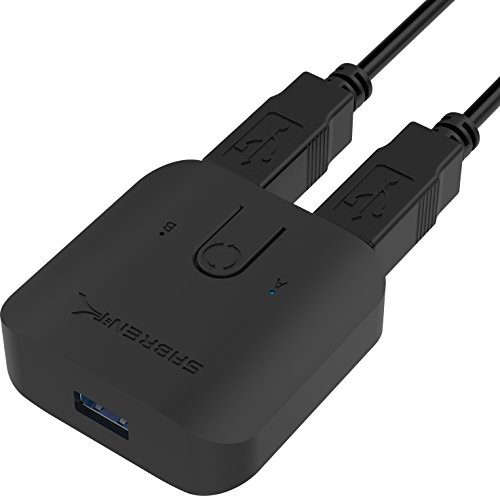
For those juggling multiple computers and peripherals, the SABRENT USB 3.0 Sharing Switch (USB-SW30) offers a seamless solution with its plug-and-play setup. You won’t need any additional drivers, making it incredibly easy to use. With a single button, you can quickly swap between systems, enhancing your workflow. This switch supports multiple peripherals, allowing you to connect various devices without hassle. Plus, enjoy impressive data transfer speeds of up to 5Gbps. LED indicators help you easily distinguish between active computers, ensuring you stay organized. Simplify your setup and boost productivity with this efficient USB sharing switch.
Best For: Users who manage multiple computers and peripherals and seek a streamlined, efficient way to switch between them.
Pros:
- Plug & Play setup: No additional drivers required, making installation straightforward and hassle-free.
- Quick system swapping: A single button allows for easy transition between connected computers.
- High data transfer speeds: Supports speeds of up to 5Gbps for fast data handling.
Cons:
- Limited to USB connections: Only works with USB peripherals, which may not suit all devices.
- Manual switching: Requires physical pressing of a button to switch between systems, which may not be ideal for all users.
- Potential compatibility issues: While it supports multiple peripherals, some specific devices may not function optimally.
UGREEN USB 3.0 Switch Selector for 2 Computers

The UGREEN USB 3.0 Switch Selector is an ideal choice for those who need to efficiently share multiple USB devices between two computers, whether for work or personal use. With four USB 3.0 ports, it supports data transfer speeds up to 5Gbps, making file transfers quick and easy. You can switch between devices using a one-button design with an LED indicator for clear status visibility. It’s plug-and-play compatible with various operating systems, but if your PC has only USB-C ports, a USB C to A adapter is needed. For high-power devices, connect a power supply for stable operation.
Best For: Users who need to share multiple USB devices between two computers seamlessly, enhancing both work and personal productivity.
Pros:
- Easy switching: One-button design with an LED indicator for quick and clear transitions between devices.
- High-speed data transfer: Supports data transfer speeds of up to 5Gbps, making file transfers efficient.
- Wide compatibility: Plug-and-play with Windows, macOS, Chrome OS, and Linux operating systems.
Cons:
- Not a KVM switch: Does not support video transmission, limiting its functionality for users needing video sharing.
- Requires power for high-power devices: Additional power supply may be necessary for stable operation with devices like HDDs and cameras.
- USB-C adapter needed: Users with only USB-C ports must purchase a separate adapter for compatibility.
USB 3.0 Switch for 2 Computers with 3 USB A Ports and 1 USB C Port

Looking to streamline your workspace? The USB 3.0 Switch for 2 Computers with 3 USB A ports and 1 USB C port lets you effortlessly share up to four USB devices between two computers. With a data transfer speed of up to 5Gbps, it’s compatible with multiple operating systems and supports plug-and-play functionality. Choose between two switching modes for convenience, while LED indicators keep you informed on which PC is active. Plus, the USB C port allows for slow charging of mobile devices. Enjoy stability with a dedicated power connector and benefit from up to 24 months of after-sales support.
Best For: Users who need to share multiple USB devices between two computers without video support.
Pros:
- High-speed data transfer of up to 5Gbps, ensuring quick and efficient file transfers.
- Plug-and-play functionality allows for easy setup without the need for driver installation.
- Two switching modes provide flexibility in choosing how to switch between computers for a tidier workspace.
Cons:
- Not a KVM switch, so it cannot share monitors between the two computers.
- USB C port is for data only, lacking video output capabilities.
- High-power devices like hard drives may require a separate power supply for optimal performance.
IOGEAR 4×2 USB 3.0 Peripheral Sharing Switch

Ideal for small office or home office setups, the IOGEAR 4×2 USB 3.0 Peripheral Sharing Switch lets you effortlessly share up to four USB devices between two computers. Compatible with both PC and MAC, it works seamlessly with printers, scanners, and keyboards. Switching between computers is a breeze with just a button press, while the LED indicator keeps you informed of which computer is active. Plus, its hot-plugging support allows you to connect or disconnect devices without powering down. With built-in over-current protection, you can rest easy knowing your devices are safe during operation.
Best For: Small office or home office users looking to efficiently share multiple USB devices between two computers.
Pros:
- Supports multiple devices: Allows sharing of up to four USB devices, enhancing productivity.
- Easy switching: Simple button press to switch between computers, improving user experience.
- Safety features: Includes over-current protection to safeguard connected devices.
Cons:
- Limited to two computers: May not be suitable for users needing to connect more than two computers.
- Potential compatibility issues: While compatible with PC and MAC, some specialized devices may not function optimally.
- Requires desk space: Although it reduces clutter, it still occupies physical space on your desk.
USB 3.0 Switch Selector for 2 Computers, 4 USB Devices Sharing Hub

For those juggling multiple computers and USB devices, the USB 3.0 Switch Selector stands out as a top choice. It lets you effortlessly share four USB 3.0 devices between two computers, simplifying your setup without the hassle of swapping cables. With data transfer speeds up to 5Gbps, it’s ten times faster than USB 2.0, enhancing your productivity. The one-click switching feature, complete with LED indicators, makes changes seamless. Plus, it works with various operating systems without needing drivers. Although it requires a separate power supply for high-power devices, it’s perfect for both home and office use.
Best For: Individuals or professionals using multiple computers who need to share USB devices efficiently without the hassle of constantly swapping cables.
Pros:
- Supports high-speed data transfer up to 5Gbps, significantly improving work efficiency.
- User-friendly design with one-click switching and LED indicators for easy operation.
- Wide compatibility with various operating systems and no need for drivers, simplifying setup.
Cons:
- Requires external power supply for high-power devices, which is not included.
- Limited to four USB devices, which may not be enough for users with more peripherals.
- Physical switching may not be as convenient as automated solutions for some users.
Factors to Consider When Choosing a USB Switch for Peripherals
When choosing a USB switch for your peripherals, you need to take into account several important factors. Think about device compatibility, data transfer speeds, and the number of ports you’ll need. Don’t forget to check the power supply requirements and the type of switching mechanism that works best for you.
Device Compatibility Requirements
Choosing the right USB switch for your peripherals hinges on several key compatibility factors. First, verify the switch works with the operating systems of both computers, as many support Windows, macOS, Chrome OS, and Linux. Next, check the number and types of USB ports available; some switches offer a mix of USB-A and USB-C to fit various devices. It’s also crucial to confirm the switch supports the necessary USB version, like USB 3.0, for peak performance. Look for backward compatibility with older versions, such as USB 2.0, to guarantee broader device functionality. Finally, consider if the switch is driver-free and supports plug-and-play functionality for easier setup and seamless use across multiple devices.
Data Transfer Speeds
Having a USB switch that meets your device compatibility requirements is just the first step; understanding data transfer speeds is equally important. With USB 3.0 technology, you can enjoy speeds up to 5Gbps, enabling quick file transfers and smooth operation of connected devices. Keep in mind that USB 3.0 is backward compatible with USB 2.0, which offers a maximum of 480Mbps. Also, the type of USB ports—whether USB A or USB C—can influence speeds and functionality. For high-power devices like external hard drives, consider a switch with a power supply to avoid disconnections during intense data transfers. Evaluating these data transfer capabilities can greatly enhance your workflow efficiency, especially when sharing peripherals across multiple devices.
Number of Ports
While evaluating USB switches, the number of ports should be a top priority since it dictates how many devices you can connect and share across multiple computers. Common configurations include 4-port switches, ideal for sharing keyboards, mice, printers, and scanners between two computers. Consider a switch that offers a mix of USB A and USB C ports for added versatility with various peripherals. It’s wise to think about your future needs; choosing a switch with extra ports can save you from the hassle of upgrades as new devices emerge. A higher number of ports not only enhances productivity by minimizing cable swapping but also allows multiple peripherals to stay connected simultaneously, streamlining your workflow.
Power Supply Needs
The number of ports you choose for your USB switch plays a significant role in determining your setup’s efficiency, but power supply needs shouldn’t be overlooked. When selecting a USB switch, check if it has a dedicated power supply port. This is vital for high-power devices like external hard drives or printers, which often need more power than standard USB ports provide. If you’re connecting multiple devices simultaneously, an external power adapter is necessary to prevent disconnections. Look for switches with a separate power input for stable operation, especially with cameras or specialized peripherals that require consistent power. While basic devices may work without extra power, high-performance peripherals typically need it to guarantee smooth functionality and avoid lag.
Switching Mechanism Types
When choosing a USB switch for your peripherals, it is vital to evaluate the switching mechanism types available. USB switches generally feature a physical button on the device or a remote controller, giving you easy toggling between connected computers. Some models include LED indicators to show which computer is active, enhancing your experience during shifts. Hot-plugging capability is another important feature, allowing you to connect or disconnect devices without powering down the switch. You might also find switches with multiple modes, enabling you to choose between direct button pressing or using a desktop controller for a cleaner workspace. Ultimately, simplicity is key, as many switches offer plug-and-play functionality with no complex setup required.
User Interface Features
A well-designed user interface can greatly enhance your experience with a USB switch for peripherals. Look for a switch with a one-button design, making it easy to toggle between connected computers for added convenience. LED indicators are vital, as they provide clear visibility of the active computer, allowing you to quickly identify which device is in use. Consider options with multiple switching modes, such as button controls or desktop controllers, to match your workspace setup. Verify the switch offers plug-and-play functionality, so you can use it immediately without extra drivers. Finally, stability indicators are essential; they signal the connection status and help prevent disconnections during operation, guaranteeing a smooth experience.
Size and Portability
User interface features enhance your experience with a USB switch, but size and portability also play a significant role in your overall satisfaction. A compact USB switch is easier to transport, making it perfect for on-the-go setups. If you’re in a crowded workspace or traveling, a smaller model requires less desk space, which is a big plus. Look for designs that can be hidden or mounted, as these options keep your setup organized. Weight matters too; lighter models are more convenient to carry around. Additionally, USB switches with detachable cables make storage and transport simpler, streamlining your setup process. Keep these factors in mind to guarantee you choose a USB switch that fits seamlessly into your lifestyle.
Warranty and Support Options
Considering the warranty and support options is essential when choosing a USB switch for your peripherals. A longer warranty, typically ranging from 18 to 24 months, often signals greater product reliability and boosts your confidence in the purchase. This peace of mind protects you against potential defects or malfunctions.
Equally important is the availability of customer support. Responsive service can help you resolve issues quickly, enhancing your overall experience. Look for USB switches that provide clear customer service channels—like email, chat, or phone support. Additionally, some manufacturers offer detailed documentation and user manuals, which can be invaluable for troubleshooting and maximizing your device’s potential. Prioritizing warranty and support will guarantee a smoother, more satisfying experience with your USB switch.