
If you’re looking to enhance your workspace, USB-C monitor arm mounts could be the solution you need. They not only free up desk space but also improve your ergonomic setup. With various options out there, from heavy-duty models to those designed for ultrawide screens, it’s crucial to find the right fit for your needs. Let’s explore the top choices available and what makes them stand out for a streamlined work environment.
ARES WING Ultrawide Monitor Arm (17 to 49 inch, Heavy Duty)

If you’re looking for a monitor arm that can handle larger screens, the ARES WING Ultrawide Monitor Arm is the perfect choice for you. Designed for 17 to 49-inch monitors, it supports up to 44 lbs, making it ideal for ultrawide flat and curved displays. You’ll appreciate its adjustable features: a +50° to -20° tilt, 180° swivel, and 360° rotation. With a height adjustment range of 8.7 to 18.7 inches and a maximum extension of 22.4 inches, it promotes ergonomic posture. Plus, integrated USB 3.0 ports keep your devices charged and your workspace organized, reclaiming valuable desktop space.
Best For: Those seeking a durable and versatile monitor arm that supports large ultrawide screens for enhanced ergonomics and workspace organization.
Pros:
- Supports a wide range of monitor sizes (17 to 49 inches) and up to 44 lbs in weight.
- Offers extensive adjustability with tilt, swivel, and rotation features for optimal ergonomic positioning.
- Integrated USB 3.0 ports for convenient charging and cable management, maximizing desk space.
Cons:
- Installation may require additional tools or assistance for some users.
- Heavier monitors may limit the range of motion or require more robust mounting solutions.
- Initial setup can be time-consuming, especially for those unfamiliar with monitor arms.
monTEK Single Monitor Arm with USB A/C for 17 to 57 Inch Monitors

The monTEK Single Monitor Arm with USB A/C is perfect for anyone seeking ergonomic comfort and enhanced workspace organization, especially those with larger monitors ranging from 17 to 57 inches. It supports both flat and curved screens and offers full motion capabilities, including a 180° swivel and a height range of 11.3 to 22 inches. With built-in USB-A and USB-C ports, you can easily charge devices while keeping your desk clutter-free. Made from durable steel and aluminum, it ensures stability and longevity. The quick-release VESA plate simplifies installation, so you can set up your workspace in no time.
Best For: Those seeking ergonomic support and enhanced organization for larger monitors, ideal for both work and gaming environments.
Pros:
- Full motion capabilities allow for optimal viewing angles, enhancing comfort during extended use.
- Built-in USB-A and USB-C ports facilitate device charging and data transfer, reducing desk clutter.
- Durable construction from high-quality steel and aluminum ensures long-lasting stability and performance.
Cons:
- VESA mount adapter may be required for certain monitors without compatible holes (not included).
- Installation may require tools and some technical knowledge, which could be challenging for inexperienced users.
- Limited weight capacity of 59.4 lbs might not accommodate heavier monitor models.
HUANUO Single Monitor Arm for 13-49 inch Screens
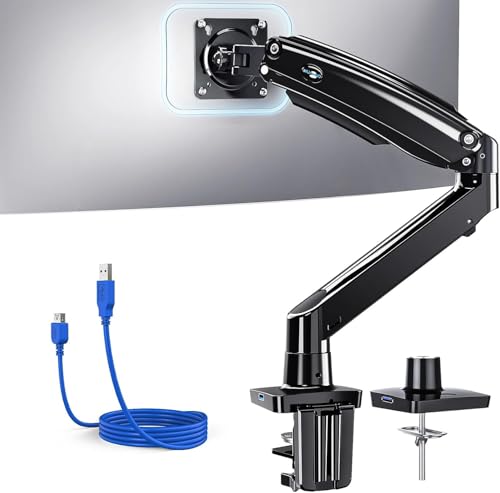
Designed for adaptability, the HUANUO Single Monitor Arm is perfect for students, remote workers, and professionals aiming to create an ergonomic workspace. It supports screens from 13 to 49 inches, making it compatible with 95% of monitors. Enjoy flexible adjustments with a tilt of +85° to -30°, a swivel of 180°, and a 360° rotation. With a height adjustment of 21.1 inches and a 25.6-inch extension, it enhances your viewing comfort. Plus, the built-in USB 3.0 port offers fast data transfer and charging, while integrated cable management keeps your desk clutter-free, promoting a minimalist setup.
Best For: The HUANUO Single Monitor Arm is best for students, remote workers, and professionals seeking to enhance their ergonomic workspace with flexible monitor positioning.
Pros:
- Supports a wide range of monitor sizes from 13 to 49 inches, compatible with 95% of monitors.
- Offers extensive adjustability with tilt, swivel, and rotation options for optimal viewing angles.
- Includes built-in USB 3.0 port for fast data transfer and charging, along with effective cable management.
Cons:
- Installation may require some time and effort, especially for beginners unfamiliar with monitor mounts.
- Limited to solid wood desks for optimal stability, which may restrict compatibility with certain desk types.
- Weight capacity of 26.4 lbs may not support heavier monitors, limiting options for users with larger displays.
monTEK Aluminum Monitor Arm for Ultrawide Screens

For those seeking an elegant solution to enhance their workspace, the monTEK Aluminum Monitor Arm for Ultrawide Screens stands out with its award-winning design and robust construction. This mount supports monitors from 17” to 57” and up to 59.4 lbs, making it perfect for ultrawide and curved displays. With ergonomic adjustments like a +60° to -50° tilt, ±90° swivel, and integrated USB 3.0 ports for fast charging, it keeps your setup clutter-free. Quick installation takes just 10 minutes, and built-in cable management channels ensure a tidy desk. Enjoy the smooth motion and precise control with this stylish monitor arm.
Best For: Professionals and gamers looking for a stylish, ergonomic solution to enhance their workspace with ultrawide or curved monitors.
Pros:
- Award-winning design that combines aesthetics with functionality.
- Ergonomic adjustability allows for optimal viewing angles and comfort.
- Quick installation process with built-in cable management for a clutter-free workspace.
Cons:
- May be overkill for users with smaller monitors or less demanding setups.
- Limited to VESA mounting patterns, which may not be compatible with all monitors.
- The weight capacity may not support some larger or heavier models without proper verification.
ARES WING Heavy Duty Monitor Arm for 17 to 49 Inch Screens

Looking for a heavy-duty solution to elevate your gaming or work setup? The ARES WING Heavy Duty Monitor Arm is your answer, supporting screens from 17 to 49 inches and holding up to 44 lbs. Its ergonomic design offers height adjustments and smooth tilting, swiveling, and rotating for the perfect viewing angle. Plus, it clears over 50% of your desk space with its smart base and integrated USB 3.0 ports for easy charging. Installation is a breeze with two mounting options, and you’ll appreciate the durability backed by extensive testing. With a customer rating of 4.3 stars, it’s a reliable choice.
Best For: Gamers and professionals looking for an adjustable and space-saving monitor arm to enhance their workspace ergonomics.
Pros:
- Ergonomic design allows for height adjustments and smooth movement, improving posture during extended use.
- Smart base design frees up over 50% of desk space and includes integrated USB 3.0 ports for easy device charging.
- Durable construction with industrial-grade gas springs ensures stability and longevity, backed by extensive testing.
Cons:
- Requires a VESA mount adapter for non-VESA monitors, which may add to the overall setup cost.
- Limited to desks with specific thicknesses for C-clamp and grommet mounting options.
- Some users may find the installation process challenging despite the topside installation feature.
monTEK Single Monitor Arm for Ultrawide Screens (MA1007UCBK)

The monTEK Single Monitor Arm (MA1007UCBK) is perfect for anyone using ultrawide screens ranging from 17 to 45 inches. With a maximum load capacity of 35.27 lbs, it’s compatible with VESA 75x75mm and 100x100mm standards, making it versatile for any setup. You’ll appreciate the full motion capabilities—tilt, swivel, and height adjustments—that help reduce neck strain. Its compact design not only saves desktop space but also includes integrated cable management and USB 3.0 ports for easy charging. Plus, the durable aluminum construction ensures longevity, while the easy installation allows you to set it up without hassle.
Best For: Those seeking a versatile and ergonomic solution for mounting ultrawide monitors in office, home, or gaming setups.
Pros:
- Full motion capabilities allow for customizable viewing angles, enhancing comfort and reducing neck strain.
- Compact design with integrated cable management and USB 3.0 ports helps maintain a tidy workspace.
- Durable aluminum construction ensures long-lasting performance and stability.
Cons:
- Maximum load capacity of 35.27 lbs may limit compatibility with heavier monitors.
- Installation may require additional tools or assistance for optimal setup.
- Some users may find the adjustment range insufficient for very high or low desk setups.
AVLT Single 40 Inch Monitor Arm Pole Top Mount
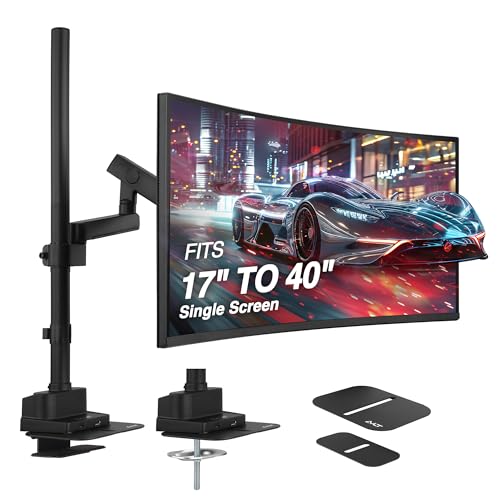
Designed for professionals and gamers alike, the AVLT Single 40 Inch Monitor Arm Pole Top Mount supports ultrawide screens up to 40 inches and 26.4 lbs, making it the perfect choice for anyone seeking an ergonomic workspace. Its adjustable arm elevates your screen from 7.2 to 38.9 inches, allowing you to find the ideal viewing angle with full tilt, swivel, and rotation. The compact C-clamp saves desk space while offering robust stability. Plus, with USB-C and USB-A pass-through ports, you can easily power devices and transfer data, enhancing your workspace efficiency without clutter. Enjoy improved posture and reduced strain during long hours!
Best For: Professionals and gamers seeking an ergonomic workspace with support for ultrawide monitors.
Pros:
- Fully adjustable height and viewing angles enhance comfort and reduce strain.
- Compact design saves valuable desk space while ensuring stability.
- Equipped with USB-C and USB-A ports for convenient device charging and data transfer.
Cons:
- Limited to a maximum weight capacity of 26.4 lbs, which may not support heavier monitors.
- Installation may require additional tools for optimal setup.
- Height adjustment may be less convenient for frequent changes if not positioned properly.
MOUNTUP Single Monitor Mount for Large Screens

For users with large screens seeking versatility and ergonomic comfort, the MOUNTUP Single Monitor Mount is an excellent choice. It supports monitors up to 42 inches, accommodating weights from 4.4 to 33 lbs, and is compatible with popular brands like ASUS and Dell. With a tilt range of +90°/-45°, swivel of 180°, and 360° rotation, you can easily find the perfect viewing angle. The space-saving design includes a detachable cable cover to keep your workspace tidy. Installation is a breeze, taking less than 15 minutes with a drill-free clamp or grommet mount. Plus, it features a USB-A connector for convenient charging.
Best For: Users with large screens seeking an ergonomic monitor mount that offers versatility and space-saving design.
Pros:
- Supports large monitors up to 42 inches and a weight capacity of 33 lbs, compatible with various brands.
- Adjustable features including tilt, swivel, and rotation for optimal viewing angles.
- Easy installation in under 15 minutes with a clear manual and tool-free setup options.
Cons:
- Reinforcement plate required for glass tables, which is not included.
- Limited weight capacity may not suit heavier monitors beyond 33 lbs.
- USB-A connector is an additional feature but may not be necessary for all users.
monTEK Deluxe Monitor Arm with USB A/C for Curved Screens

With its built-in USB 3.0 ports, the monTEK Deluxe Monitor Arm is perfect for tech-savvy users who need seamless device charging and file transfer right at their fingertips. Supporting monitors from 17 to 40 inches, including curved screens, this arm holds up to 26.4 lbs securely. Its scratch-resistant aluminum body ensures durability for up to 20 years, while the tool-free setup makes installation a breeze. You’ll appreciate the ease of adjusting your screen’s position with a simple touch, and dedicated cable management keeps your workspace tidy. Enjoy a sleek design that complements your decor while maximizing functionality!
Best For: Tech-savvy users who require a versatile and durable monitor arm for both flat and curved screens.
Pros:
- Durable construction with scratch-resistant aluminum, ensuring longevity and a sleek appearance.
- Easy installation with tool-free setup and multiple mounting options for different desk thicknesses.
- Convenient USB ports for seamless device charging and file transfer directly from the monitor arm.
Cons:
- Limited weight capacity of 26.4 lbs may not support heavier monitors.
- Adjustment range may not be sufficient for some users’ specific ergonomic needs.
- Requires desk space for mounting, which might not be ideal for very shallow desks.
HUANUO NITROGLIDE™ Dual Monitor Stand (HNDS7)

The HUANUO NITROGLIDE™ Dual Monitor Stand (HNDS7) is an excellent choice for anyone looking to optimize their workspace with dual monitors. Weighing 18.15 lbs, it supports monitors from 13″ to 40″ and offers a remarkable weight capacity of 26.4 lbs per arm. With full motion adjustments and NITROGLIDE technology, you can easily swivel, tilt, and rotate your screens for maximum comfort. The stand features a dual C-clamp design for improved stability and includes two USB ports for charging. Plus, its integrated cable management keeps your workspace neat and organized, earning it rave reviews from satisfied users.
Best For: Those seeking an ergonomic solution to enhance productivity and organization in a dual monitor setup.
Pros:
- Improved Stability: Solid aluminum arms and a dual C-clamp design ensure the stand can support heavier monitors securely.
- Full Motion Adjustments: The NITROGLIDE technology allows for easy swivel, tilt, and rotation for comfortable viewing angles.
- Integrated USB Ports: Two built-in USB ports make it convenient to charge devices without cluttering your workspace.
Cons:
- Weight: At 18.15 lbs, the stand may be heavy for some users to install or reposition easily.
- Monitor Size Limitations: The stand is designed specifically for monitors ranging from 13″ to 40″, which may not accommodate larger displays.
- Desk Thickness Requirement: The mounting options are limited to desks with a thickness of up to 3.54″, which could be restrictive for some setups.
Factors to Consider When Choosing a USB C Monitor Arm Mount
When choosing a USB-C monitor arm mount, you’ll want to consider several key factors that can impact your setup. Think about monitor compatibility, adjustability for ergonomics, and how the mount will manage your space. Additionally, pay attention to installation ease and the durability of materials to ensure long-lasting use.
Monitor Compatibility Requirements
Choosing the right USB-C monitor arm mount requires careful consideration of your monitor’s compatibility. First, ensure the arm supports your monitor’s size; different mounts accommodate screens typically ranging from 17 to 57 inches. Next, check the weight capacity, as it should handle your monitor’s weight, which can vary from 4.4 lbs to over 59 lbs. Also, confirm VESA compatibility by verifying that your monitor has the appropriate mounting holes (75x75mm or 100x100mm) that match the arm’s specifications. Additionally, consider the type of monitor you have—flat or curved—since some arms are specifically designed for ultrawide or curved screens. By addressing these factors, you’ll choose a mount that fits your setup perfectly.
Adjustability and Ergonomics
To ensure a comfortable and efficient workspace, you’ll want to prioritize adjustability and ergonomics in your USB-C monitor arm mount. Look for models that offer full motion capabilities; tilt adjustments from +75° to -30° and swivel options of 180° or more will help you find the optimal viewing angle. Height adjustability is crucial, with some arms providing ranges of up to 26.3 inches to suit different user preferences. Additionally, consider monitor arms that support screen rotation of ±90° for versatile landscape and portrait modes. Ergonomic designs with customizable posture settings can reduce neck and back strain during long hours. Finally, opt for models with smooth gas spring mechanisms, ensuring stability and ease of adjustment for lasting comfort.
Space Management Solutions
As you explore space management solutions for your USB-C monitor arm mount, it’s essential to consider how these mounts can transform your workspace. With integrated cable management systems, you can organize wires and eliminate clutter, reclaiming over 30% more desk space than traditional stands. Many models feature built-in USB ports, allowing seamless charging and data transfer for multiple devices without extra adapters. Adjustable arms elevate screens to optimal heights, enhancing ergonomics while freeing your desktop for other essentials. Look for designs with compact bases that minimize desk footprint, ensuring stability and functionality. Additionally, the ability to mount monitors with various thickness options gives you versatility, enabling you to adapt to different desk styles for a well-organized layout.
Installation and Setup Ease
When selecting a USB-C monitor arm mount, ease of installation can make a significant difference in your overall experience. Look for monitor arms that feature topside-mounted C-clamps or grommet mounts, so you won’t have to crawl under your desk. Many models include a quick-release VESA plate, making it easier to attach or detach your monitor quickly. Ensure the arm fits various desk thicknesses, typically from 0.5 to 2 inches, to suit different setups. Simplified installation is key, so check for labeled components and clear instructions to cut down assembly time. Finally, opt for models that come with all necessary hardware and tools to streamline the process and eliminate additional purchases.
Durability and Material Quality
Once you’ve tackled the installation of your USB-C monitor arm mount, durability and material quality become your next focus. Prioritize mounts made from high-quality materials like aerospace-grade aluminum or industrial-grade steel for enhanced strength and stability. Look for options that have been rigorously tested, ideally for over 20,000 cycles, ensuring they’ll withstand everyday use.
A robust gas spring mechanism is essential as it allows for smooth adjustments and can support significant weights, typically up to 59.4 lbs, without losing stability. Models with built-in cable management are also beneficial, helping to organize cables while preventing wear and tear. Finally, choose a mount with a stable base that accommodates various desk thicknesses, ensuring it remains secure under larger monitors.