
If you’re looking to enhance your workspace with high-quality connectivity, the right USB-C hub can make all the difference. With options that support 10Gbps speeds, these hubs cater to professionals and creatives who need reliable performance. From multiple ports to 4K video output, there’s a solution for every setup. Curious about which hubs stand out? Let’s explore the best options available to elevate your productivity.
Acer 8 in 1 USB C Hub

The Acer 8-in-1 USB C Hub is an ideal choice for professionals and creatives who need versatile connectivity on the go. With its 4K@60Hz HDMI output, you can enjoy stunning visuals for gaming or video calls. You’ll appreciate the dual USB-C (10Gbps) and USB-A (5Gbps) ports for quick file transfers, making it perfect for photographers. The 100W power delivery port guarantees your devices, like MacBook Pro, charge rapidly. Plus, the SD/Micro SD card readers make accessing your media seamless. Compatible with various USB-C devices, this hub truly elevates your connectivity experience, whether you’re at home or on the move.
Best For: Professionals and creatives seeking versatile connectivity solutions for their USB-C devices while on the go.
Pros:
- High-speed data transfer with dual USB-C (10Gbps) and USB-A (5Gbps) ports for efficient file management.
- Supports stunning 4K@60Hz HDMI output for an immersive visual experience during gaming or video conferencing.
- 100W power delivery port allows rapid charging of devices, ensuring you stay powered up during work or travel.
Cons:
- USB-C and USB-A ports are limited to data transfer only and do not support charging or video/audio functions.
- Requires a 100W charger for optimal charging capabilities, which is not included with the hub.
- Compatibility with Android devices may be limited based on the OTG function support.
UGREEN Revodok Pro USB-C Hub 6 in 1 10Gbps 4K 60Hz HDMI

If you’re looking for a versatile USB-C hub that combines speed and functionality, the UGREEN Revodok Pro USB-C Hub is a top choice. With six ports—including two 10Gbps USB-C and two USB-A ports—you’ll enjoy lightning-fast data transfer. The hub supports stunning 4K resolution at 60Hz through its HDMI output, perfect for movies or presentations. Plus, you can charge your devices with its 100W Power Delivery feature. Just remember, the data-only USB-C port doesn’t support video output. Compact and lightweight, this hub fits seamlessly into your tech setup while earning a solid 4.5-star rating from users.
Best For: Users who need a multifunctional hub for fast data transfer, 4K video output, and charging capabilities for their devices.
Pros:
- High-speed data transfer of up to 10 Gbps for efficient file sharing.
- Supports 4K resolution at 60Hz via HDMI, ideal for high-quality video playback.
- 100W Power Delivery allows for charging multiple devices simultaneously.
Cons:
- The USB-C port for 10Gbps data is data-only, lacking video output or charging support.
- Limited to six ports, which may not be enough for users with multiple devices.
- Users must avoid disconnecting the PD charger during data transmission to prevent data loss.
Anker 555 USB-C Hub (8-in-1)

For MacBook Pro users seeking seamless connectivity, the Anker 555 USB-C Hub (8-in-1) stands out with its impressive 85W Power Delivery. This hub features a 4K 60Hz HDMI port, two USB-A ports, and a USB-C data port, allowing you to connect multiple devices effortlessly. Enjoy lightning-fast data transfer speeds of up to 10 Gbps and reliable internet through its Ethernet port. The built-in card reader supports both microSD and SD cards, enhancing your workflow. With its compact design and broad compatibility, this hub is perfect for macOS 12 and newer, ensuring you stay connected wherever you go.
Best For: MacBook Pro users who need versatile connectivity options and high-speed data transfer for enhanced productivity.
Pros:
- Supports 4K video output at 60Hz, providing high-quality visuals for presentations and media.
- Fast data transfer speeds of up to 10 Gbps, making file transfers quick and efficient.
- Compact and lightweight design, making it easy to carry and perfect for on-the-go use.
Cons:
- Limited to HDMI for video output, which may not accommodate all users’ needs for multiple displays.
- Not compatible with Linux, restricting its use for users on that operating system.
- Requires a 100W Power Delivery charger for optimal performance, which may necessitate additional purchases.
Anker 11-in-1 10Gbps Data USB-C Hub

Looking for a versatile solution to enhance your device connectivity? The Anker 11-in-1 10Gbps Data USB-C Hub has you covered. With a 100W USB-C PD-IN port, two 10Gbps USB-C ports, and multiple USB-A options, you can connect all your devices seamlessly. Enjoy lightning-fast data transfer rates—10Gbps is 20 times faster than USB 2.0! Plus, charge your laptop and phone simultaneously, maximizing efficiency. Its 2-in-1 connector guarantees compatibility with various devices. The package includes a 65W power adapter and an 18-month warranty for peace of mind. Upgrade your setup with this essential hub for ultimate connectivity!
Best For: Professionals and tech enthusiasts seeking a multi-functional hub for enhanced connectivity and fast data transfer across various devices.
Pros:
- Versatile Connectivity: Offers multiple ports including USB-C and USB-A, making it compatible with a wide range of devices.
- High-Speed Data Transfer: Supports data transfer rates of up to 10Gbps, significantly improving efficiency for data-heavy tasks.
- Simultaneous Charging: Allows charging of laptops and phones while transferring data, maximizing productivity.
Cons:
- Limited Power Output When Used Simultaneously: When both USB-C charging ports are in use, each provides a maximum output of only 15W.
- Reliance on External Power Adapter: Requires a 65W power adapter for optimal performance, which may add to clutter.
- Size and Portability: The hub may be bulkier compared to simpler adapters, making it less convenient for travel.
P9 PRO USB C Hub 9-in-1 Docking Station
The P9 PRO USB C Hub 9-in-1 Docking Station is perfect for professionals and creatives who need high-speed connectivity and versatile functionality. With 4K@60Hz HDMI support, you’ll enjoy stunning visuals on external displays. The hub features two USB A 3.2 ports for rapid 10Gbps data transfer, alongside two USB A 2.0 ports for peripherals. Plus, the ergonomic design guarantees stability and heat dissipation under 45℃. It’s compatible with a wide range of USB-C devices, making it a great addition to your setup. Just remember to use a suitable power supply for peak performance and avoid unplugging the PD charger during use.
Best For: Professionals and creatives seeking high-speed connectivity and versatile functionality in a compact docking station.
Pros:
- High-speed data transfer: Supports up to 10Gbps with USB A 3.2 ports and 104MB/s for SD/TF ports.
- 4K@60Hz HDMI support: Ideal for stunning visuals on external displays, perfect for work and entertainment.
- Ergonomic design: Aluminum unibody construction ensures stability and effective heat dissipation during operation.
Cons:
- Power supply not included: Requires a suitable power adapter (recommended at least 65W) for optimal performance.
- Limited video output capability: USB-C 3.2 port is dedicated to data transfer only, with no video output or charging.
- Connection stability: Unplugging or plugging in the PD charger while in use may lead to disconnections.
USB C Hub 10Gbps with 4K Video Output and 100W PD Charging

Professionals and multitaskers will find the USB-C Hub with 10Gbps speeds to be an essential tool for enhancing their workflow. This 8-in-1 hub features three USB-C 10Gbps ports and three USB 3.0 5Gbps ports for rapid file transfers, plus a USB-C 4K@60Hz video output that delivers stunning visuals. You can easily connect to multiple displays for presentations or gaming. With 100W Power Delivery, it charges your devices quickly, ensuring they’re ready to go during heavy workloads. Compatible with MacBook Pro, iPad Pro, and all USB-C devices, this hub maximizes your productivity effortlessly.
Best For: Professionals and multitaskers looking to enhance their productivity with fast data transfer, high-resolution video output, and efficient charging capabilities.
Pros:
- Supports high-speed data transfers with multiple ports, making it ideal for large files and gaming setups.
- Enables 4K video output at 60Hz for stunning visuals on external monitors and presentations.
- Provides 100W Power Delivery for rapid charging, ensuring devices are powered during heavy workloads.
Cons:
- Power adapter not included, which may require additional purchase for optimal performance.
- Requires a full-featured USB-C port or Thunderbolt 3/4 support for 4K capability, limiting compatibility with some devices.
- Some users may find the hub bulky or cumbersome to carry for travel purposes.
Selore 5 Ports USB C Hub with 4K@60Hz Video Display

For those who frequently work with high-resolution video or need to connect multiple devices simultaneously, the Selore 5 Ports USB C Hub with 4K@60Hz Video Display stands out as an ideal choice. With a data transfer rate of 10Gbps, you can move large files quickly, making it perfect for gaming and content creation. The hub supports 4K@60Hz output, ideal for streaming and presentations, provided you have a compatible USB-C port. Plus, it offers 100W Power Delivery to charge your laptop while you work. Compatible with various devices, it comes with an 18-month warranty and responsive customer support.
Best For: Professionals and content creators who require high-resolution video output and fast data transfer capabilities.
Pros:
- Supports 4K@60Hz video output, making it ideal for streaming and presentations.
- Offers a high data transfer rate of 10Gbps for quick file transfers, perfect for large files and gaming.
- Provides 100W Power Delivery for charging laptops while in use, enhancing productivity.
Cons:
- Requires a full-featured USB-C port for 4K support, which may not be available on all devices.
- Power adapter not included, requiring additional purchase for full functionality.
- Compatibility may be limited with some older USB-C devices.
YH9AC Powered USB Hub with 12 Ports

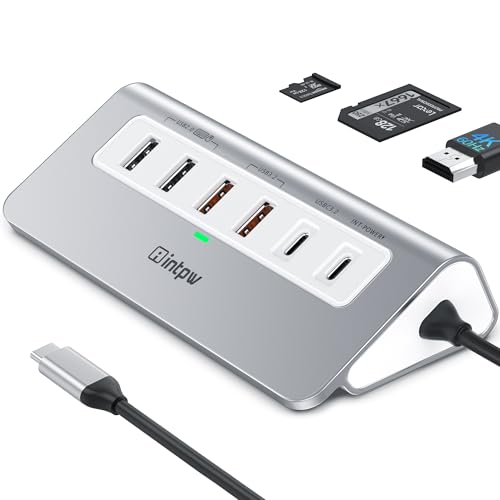
If you’re juggling multiple devices and need a reliable solution, the YH9AC Powered USB Hub with 12 ports is an ideal choice. This hub offers impressive data transfer rates of 10Gbps via USB-C and 5Gbps through USB-A. With two 45W PD fast charging ports, you can power your devices efficiently. Its 65W power adapter guarantees stable performance, while the aluminum design provides durability and aesthetic appeal. The unique angled shape allows easy access, making it perfect for laptops and PCs. Plus, with an 18-month warranty and excellent customer reviews, you can trust the YH9AC to meet your connectivity needs.
Best For: Users who need to connect multiple devices simultaneously and require fast data transfer and charging capabilities.
Pros:
- High data transfer rates of up to 10Gbps via USB-C and 5Gbps via USB-A.
- Two PD 45W fast charging ports for efficient power supply to devices.
- Durable aluminum design with a unique angled shape for easy access and stability.
Cons:
- PD ports do not support data transfer, limiting their functionality to charging only.
- Not suitable for high-power appliances, which may require more robust charging options.
- Custom USB-C devices with thicker ports may need compatibility advice before use.
Acer 10 Gbps USB C Hub, Multiport Adapter with 4 USB C Ports

The Acer 10 Gbps USB C Hub is an excellent choice for anyone needing rapid data transfer and versatile connectivity options. With four USB C 3.2 ports, you can enjoy ultra-fast 10Gbps data transfer, allowing you to move 1GB of files in just one second. It also features a 100W Power Delivery port for efficient charging of your devices. This hub is compatible with a range of devices, including MacBook Pro, iPad Pro, and Galaxy smartphones. Its compact, stylish aluminum design guarantees portability and heat dissipation, making it perfect for your mobile office setup.
Best For: Those who need an efficient and portable solution for rapid data transfer and device charging on the go.
Pros:
- Ultra-fast 10Gbps data transfer allows for quick file transfers.
- 100W Power Delivery port provides efficient charging for connected devices.
- Compact and stylish aluminum design ensures portability and effective heat dissipation.
Cons:
- No video output support limits its use for display purposes.
- Compatibility may not extend to older USB devices without USB C ports.
- Limited to devices with 10Gbps-capable ports for optimal speed.
USB C Video Output Hub with 3 USB-C & 2 USB-A Ports

Need a versatile solution for your devices? The USB C Video Output Hub with 3 USB-C and 2 USB-A ports expands a single USB-C port into nine, making connectivity seamless. With 10Gbps data transfer speeds, you can efficiently synchronize and back up your external devices. Enjoy stunning visuals through the 4K@60Hz HDMI and USB-C DisplayPort, perfect for dual monitor setups. Plus, the 100W power delivery guarantees your devices stay charged. Compatible with a range of devices, including MacBooks and Galaxy S22, this hub’s design meets your connectivity needs without the hassle of disconnections. Enjoy ultimate performance and flexibility!
Best For: Users looking for a multifunctional hub to enhance connectivity and power delivery for their USB-C devices.
Pros:
- Supports high-speed data transfer with 10Gbps for both USB-C and USB-A ports.
- Enables dual monitor functionality with 4K@60Hz HDMI and USB-C DisplayPort for enhanced productivity.
- Offers 100W power delivery, ensuring devices remain charged while in use.
Cons:
- Limited to a maximum of two different screens when used with MacOS due to system restrictions.
- Some computers may only support a maximum 15W output from their USB-C ports, potentially causing disconnections with high-demand peripherals.
- May require additional adapters for certain devices or setups, depending on compatibility.
Factors to Consider When Choosing a USB C Hub with 10GBPS
When choosing a USB-C hub with 10GBPS speeds, you’ll want to take into account several key factors. Think about compatibility with your devices, the data transfer speeds you need, and the power delivery options available. Additionally, evaluate the video output capabilities and the variety of ports to guarantee it meets your specific requirements.
Compatibility With Devices
Choosing a USB-C hub with 10GBPS speeds requires careful consideration of compatibility with your devices. First, verify the hub works with your specific devices, like MacBook Pro, iPad Pro, or Surface laptops, since they may have different port functionalities. Next, check that it supports various operating systems, including macOS, Windows, Linux, and ChromeOS, for seamless connectivity. It’s also important to verify the hub’s compatibility with USB-C specifications like Thunderbolt 3/4 or USB4 to maximize performance. Additionally, confirm the hub’s ports, including USB-A and USB-C, meet your data transfer and charging needs. Finally, look for hubs that explicitly state compatibility with the latest USB standards to guarantee efficient interaction with your modern devices.
Data Transfer Speeds
Understanding data transfer speeds is vital for maximizing the performance of your USB-C hub. With 10Gbps speeds, you can transfer a 1GB file in about one second, drastically cutting down your wait times. This speed is 20 times faster than USB 2.0 and 10 times faster than USB 3.0, making it perfect for professionals handling large files like high-resolution videos or extensive datasets. Verify your devices support USB 3.2 Gen 2 or higher to achieve these impressive transfer rates. Many hubs offer a mix of USB-A and USB-C ports, allowing you to connect multiple devices without sacrificing speed. Be mindful, though, that some USB-C ports may be for charging or video only, impacting overall hub performance.
Power Delivery Options
Power delivery options play an essential role in selecting the right USB-C hub with 10Gbps speeds. You’ll find that these hubs typically offer PD options ranging from 60W to 100W, enabling rapid charging for your devices. A hub with a 100W PD port can provide up to 90W to charge devices like your MacBook Pro while allowing simultaneous data transfer. It’s vital to ascertain your power adapter meets the required wattage to avoid device disconnections. While some hubs support both charging and data transfer, you need to manage power distribution carefully to prevent data loss during heavy use. Finally, check whether the PD ports are dedicated to charging only or can handle data transfer, as this impacts functionality.
Video Output Capabilities
When selecting a USB-C hub with 10Gbps speeds, video output capabilities are just as important as power delivery. Look for hubs that support resolutions up to 4K at 60Hz, ensuring you get high-definition visuals for all your needs, from presentations to gaming. To utilize this capability, your USB-C device must support DisplayPort Alternate Mode (DP Alt Mode) for compatibility with external displays. Many hubs feature HDMI ports for easy connections to monitors and projectors, enhancing versatility. Consider options with multiple video outputs, like HDMI and DisplayPort, allowing you to connect two monitors simultaneously for increased productivity. Finally, make sure your device can handle the bandwidth required for your desired video output.
Port Variety and Layout
Choosing the right USB-C hub with 10Gbps speeds hinges on port variety and layout. You’ll want to evaluate the number and types of ports available, such as USB-C, USB-A, HDMI, and card readers, to fit your device connectivity needs. A hub with multiple USB-C ports lets you transfer data and charge devices simultaneously, boosting efficiency. Look for hubs that combine USB 3.2 (10Gbps) and USB 2.0 (480Mbps) ports to accommodate various devices while maximizing speed. The layout also matters—ensure ports are easily accessible and don’t block adjacent connections, especially in multi-device setups. Additionally, check for features like Power Delivery (PD) to charge devices while they’re in use, particularly with multiple high-power devices connected.
Build Quality and Design
An effective USB-C hub not only excels in port variety but also boasts solid build quality and thoughtful design. Look for hubs crafted from durable materials like aluminum, which enhance aesthetics and improve heat dissipation. If you’re frequently on the move, a compact and portable design will make it easier to slide the hub into your bag. Consider ergonomic features, such as angled designs, to boost accessibility and stability during use. Pay attention to weight; lighter hubs are easier to transport, while heavier ones may provide better stability. Finally, verify the hub supports efficient cable management to keep your workspace organized and free from tangles. These factors contribute to a seamless and enjoyable user experience.