
If you’re looking to streamline your workspace, under desk PC shelves can be a game changer. They not only free up valuable floor space but also help keep your equipment organized and accessible. With various options available, you’ll find designs that enhance functionality and aesthetics. Curious about which shelves stand out regarding durability and features? Let’s explore the top picks that can transform your work environment.
Adjustable Mobile CPU Stand for Most PC Towers

If you’re a student or gamer looking for a practical solution to keep your PC tower off the floor, the Adjustable Mobile CPU Stand is your ideal choice. This stand elevates your PC, protecting it from dust, spills, and moisture. With its dual guardrails, you won’t have to worry about slipping while still having easy access to rear ports. The four smooth-rolling casters guarantee effortless movement, locking securely when needed. Plus, its perforated base enhances airflow, preventing overheating. Adjustable to fit most towers, this stand supports up to 88 lbs, making it perfect for both gaming setups and workstations.
Best For: Students and gamers who need a practical solution to elevate their PC towers and enhance mobility.
Pros:
- Elevates PC off the floor, protecting it from dust, spills, and moisture.
- Smooth-rolling casters allow for easy movement and secure locking.
- Ventilated design promotes airflow, preventing overheating and extending computer lifespan.
Cons:
- Limited weight capacity of 88 lbs may not accommodate larger or heavier gaming setups.
- Adjustability range may not fit all custom-built towers perfectly.
- Requires some floor space for maneuvering, which may be a concern in smaller areas.
VIVO Heavy Duty Under-Desk PC Mount Shelf (Mount-PCSF1)

The VIVO Heavy Duty Under-Desk PC Mount Shelf (Mount-PCSF1) is an excellent choice for anyone looking to maximize floor space while keeping their computer equipment securely stored and easily accessible. This sturdy shelf supports up to 44 lbs and accommodates most PC models up to 20.1 inches in height. With a solid steel frame and an open-frame design, it guarantees ideal airflow for cooling while protecting your devices. You’ll appreciate the easy installation, thanks to the included hardware and step-by-step instructions. Choose between wide (11.5”) and narrow (8.7”) setups for a perfect fit under your desk.
Best For: Individuals and businesses looking to save floor space while securely mounting their PC for easy access and optimal airflow.
Pros:
- Supports up to 44 lbs, making it suitable for a wide range of PC models.
- Open-frame design promotes airflow, helping to keep devices cool.
- Easy installation with all necessary hardware and instructions included.
Cons:
- Requires a desk that can support additional weight, which may limit some users.
- Compatibility limited to PCs up to 20.1 inches in height, which may not fit larger models.
- Design may not match all office aesthetics, as it is a functional rather than decorative item.
JANE EYRE Adjustable PC Tower Stand with Charging Station

For those seeking a versatile solution to organize their workspace, the JANE EYRE Adjustable PC Tower Stand with Charging Station stands out as an ideal choice. Its height adjusts from 23.03″ to 28.3″ with ten settings, ensuring ergonomic comfort. This modern stand isn’t just functional; it features a charging station with dual sockets and USB ports, perfect for powering your devices. With dimensions of 19.2″ x 11.5″, it accommodates multiple gadgets, plus four hooks for gaming headsets. The wheels make it easy to move, while brakes keep it stable. Enjoy a clutter-free workspace that combines style and efficiency!
Best For: The JANE EYRE Adjustable PC Tower Stand with Charging Station is best for gamers, professionals, and students looking to optimize their workspace with ergonomic design and integrated charging solutions.
Pros:
- Height adjustable for personalized ergonomic comfort.
- Integrated charging station with dual sockets and USB ports for convenient power access.
- Includes storage hooks for organizing gaming headsets and other devices.
Cons:
- Load-bearing capacity may limit usage for heavier items at higher settings.
- Requires user assembly and maintenance checks, such as tightening screws.
- Mobility features, while convenient, may not be ideal for all users preferring stationary setups.
Heavy Duty Under Desk PC Holder – Adjustable Computer Tower Holder

Designed for gamers and professionals who require robust support for their PC setups, the Heavy Duty Under Desk PC Holder boasts an impressive load capacity of up to 77 lbs. This adjustable holder fits various PC cases, providing flexibility in height and width to suit your needs. Constructed from solid steel with two support pillars, it guarantees stability and protection for your computer. Plus, with multiple ventilation slots, it promotes ideal cooling for high-performance systems. Installation is a breeze with the included drilling template, and you can buy with confidence thanks to a 30-day money-back guarantee and responsive customer service.
Best For: Gamers and professionals seeking a robust and adjustable under-desk solution for their PC towers.
Pros:
- Supports a heavy load capacity of up to 77 lbs, accommodating various PC tower sizes.
- Constructed from solid steel with protective mats for maximum stability and safeguarding.
- Multiple ventilation slots ensure optimal cooling for high-performance computers.
Cons:
- May require drilling for installation, which could be a drawback for non-DIY users.
- The design might not fit all aesthetic preferences due to its industrial look.
- Limited to under-desk placement, which may not suit all workspace configurations.
Heavy Duty Under Desk PC Holder – Adjustable Computer Tower Mount

If you’re looking to maximize your workspace while ensuring your computer remains safe and secure, the Heavy Duty Under Desk PC Holder is an excellent choice. This adjustable computer tower mount supports loads up to 77 lbs, accommodating various PC cases with ease. Its solid steel construction and two support pillars guarantee stability, while protective mats prevent damage. Ventilation slots enhance cooling, keeping your computer running efficiently. Installation is straightforward with an included drilling template, and you can shop confidently with a 30-day money-back promise. Plus, customer service is ready to assist you if needed!
Best For: Those seeking a sturdy and adjustable solution to securely mount their computer tower under a desk, maximizing workspace efficiency.
Pros:
- High load capacity: Supports up to 77 lbs, accommodating a variety of PC cases.
- Solid construction: Made from durable steel with two support pillars for enhanced stability.
- Easy installation: Comes with a drilling template for straightforward setup.
Cons:
- Limited color options: Available only in white, which may not match all office decors.
- Requires drilling: Installation involves drilling into the desk, which may not be suitable for all users.
- May obstruct legroom: Depending on desk height and placement, it could limit leg space for some users.
VIVO Adjustable Under-Desk PC Mount (MOUNT-PC04B)

The VIVO Adjustable Under-Desk PC Mount (MOUNT-PC04B) is perfect for anyone looking to maximize their workspace while keeping their PC secure and out of the way. This heavy-duty mount supports up to 66 lbs and features an adjustable frame that fits most PC models, with height settings ranging from 16” to 24” and width adjustments from 5” to 10”. Constructed from high-grade steel, it guarantees stability without wobbling. The open-frame design enhances airflow for ideal cooling, while thick inner padding protects your PC from scratches. Enjoy a clutter-free workspace with this efficient and stylish solution!
Best For: Individuals seeking to optimize their workspace by securely mounting their PC under a desk.
Pros:
- Heavy-duty construction supports up to 66 lbs, ensuring durability and stability.
- Adjustable height and width accommodate most PC models, providing a customizable fit.
- Open-frame design promotes airflow, enhancing cooling for prolonged equipment life.
Cons:
- Requires a minimum desktop thickness of 0.75 inches, which may limit compatibility with thinner desks.
- Installation may require additional tools not included in the package, potentially complicating setup.
- Limited to under-desk mounting, which may not suit all users’ preferences or spatial arrangements.
Under Desk PC Mount – Adjustable Clamp-on Holder for Standing Desk

Perfect for anyone with a standing desk, the Under Desk PC Mount features an adjustable clamp-on design that easily attaches to desk legs without any drilling. It fits specific desk leg dimensions, so make sure to measure before buying. The U-clamp design secures your PC, elevating it to avoid kicks, dust, and moisture. With a wide adjustment range, it accommodates most PC cases, ensuring ideal airflow for cooling. Made from high-strength steel, it supports up to 50 lbs and includes non-slip pads to prevent scratches. Installation is straightforward, and it comes with a 6-month guarantee for peace of mind.
Best For: Individuals with standing desks looking for a secure and space-saving solution to mount their PC.
Pros:
- No drilling required: Easy installation with a U-clamp design that securely attaches to desk legs.
- Wide compatibility: Fits most PC cases and offers a greater adjustment range than many competitors.
- Durable construction: Made from high-strength steel, it supports up to 50 lbs and includes non-slip pads to protect your PC.
Cons:
- Specific leg dimensions: Not universal; requires measuring desk legs before purchasing to ensure compatibility.
- Limited height adjustment: While it accommodates a range of PC sizes, it may not fit very tall cases.
- Potential for wobbling: If not installed correctly or if desk legs are not stable, there may be some wobbling.
Under Desk Laptop/Mini PC Storage Mount, CPU Holder

Designed for those who need efficient space management, the Under Desk Laptop/Mini PC Storage Mount is an ideal solution for compact devices like the Dell OptiPlex and Mac Mini. This CPU holder accommodates devices under 1.85 inches thick, ensuring a snug fit. Installation is a breeze with six screws, and you’ll appreciate the included mounting template for precise hole placement. Just make sure your tabletop is at least 0.78 inches thick for secure anchoring. Plus, the soft padding protects your devices from scratches, keeping them safe and sound. Enjoy a clutter-free workspace with this practical storage solution!
Best For: Those seeking an efficient and space-saving solution for mounting compact laptops and mini PCs under their desks.
Pros:
- Easy Installation: Comes with a mounting template and all necessary screws for quick setup.
- Space-Saving Design: Keeps your workspace organized by storing devices out of the way.
- Protective Padding: Soft padding prevents scratches and damage to your devices.
Cons:
- Limited Compatibility: Only fits devices less than 1.85 inches thick.
- Table Thickness Requirement: Requires a minimum tabletop thickness of 0.78 inches for secure mounting.
- Fixed Positioning: Once installed, the mount does not allow for easy repositioning of the device.
VIVO Adjustable Under Desk and Wall PC Mount (MOUNT-PC01)

If you’re looking to save space while keeping your computer case secure and accessible, the VIVO Adjustable Under Desk and Wall PC Mount (MOUNT-PC01) is an ideal solution. This versatile mount lets you position your PC under your desk or on the wall, fitting surfaces with a minimum thickness of 1 inch. Its adjustable frame accommodates most cases, ranging from 3.5 to 7.8 inches wide and 11.5 to 20.5 inches tall. With a 135° swivel feature, accessing ports and cables is effortless. Made of solid steel and supporting up to 22 lbs, it also includes protective padding to prevent scratches.
Best For: Individuals looking to optimize their workspace by securely mounting their PC cases under desks or on walls.
Pros:
- Space-saving design: Allows for efficient use of space by mounting the PC out of the way.
- Adjustable frame: Fits a wide range of PC case sizes, ensuring compatibility with most setups.
- Easy access: The 135° swivel feature provides convenient access to ports and cables.
Cons:
- Weight limit: Supports a maximum of 22 lbs, which may not accommodate larger gaming or workstation PCs.
- Surface requirement: Needs a flat surface with a minimum thickness of 1 inch for proper installation.
- Installation complexity: May require additional tools and effort for secure mounting, especially on walls.
HUANUO Adjustable Monitor Stand Riser
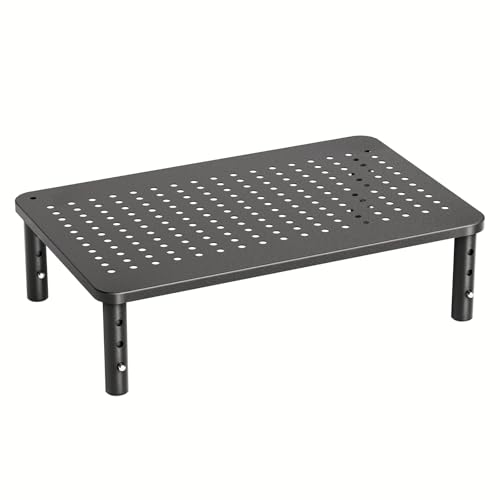
For those seeking an ergonomic workspace solution, the HUANUO Adjustable Monitor Stand Riser offers three height settings—3.94”, 4.72”, and 5.51”—to help you achieve a comfortable viewing position. This stand provides ample storage space underneath for office supplies, enhancing organization. You can stack two units for even more functionality. Made from powder-coated steel, it features a ventilated platform that promotes heat dissipation, keeping your devices cool. Supporting up to 44 lbs, it’s compatible with monitors, laptops, and gaming consoles, and the anti-slip rubber pads guarantee stability. Plus, assembly is a breeze—no tools required!
Best For: Those looking to enhance their ergonomic workspace and organization while keeping devices cool.
Pros:
- Adjustable height settings for personalized ergonomic viewing.
- Ample storage space underneath to keep office supplies organized.
- Easy assembly with no tools required.
Cons:
- Limited to supporting devices weighing up to 44 lbs.
- Height adjustments may not accommodate all users’ preferences.
- Stacking two units may require additional desk space.
Factors to Consider When Choosing an Under Desk PC Shelf
When choosing an under desk PC shelf, you need to evaluate several key factors. Think about the load capacity your setup requires, as well as the adjustable height and width to fit your space. Don’t forget to check for ventilation design, installation ease, and the durability of the materials used.
Load Capacity Requirements
Choosing the right under desk PC shelf involves careful consideration of its load capacity, as it directly impacts the safety and functionality of your setup. Load capacities typically range from 44 lbs to 88 lbs, so you’ll want to verify the shelf can support your computer tower and any extra peripherals. If you have a larger, heavier PC case, opt for heavy-duty shelves designed for continuous loads. Features like solid steel construction and multiple support pillars can enhance stability, preventing tipping or wobbling. Always check the manufacturer’s specifications for load capacity to avoid exceeding limits, which can lead to damage or failure. Prioritize safety to guarantee your workspace remains clutter-free and functional.
Adjustable Height and Width
Adjustable height and width in under desk PC shelves can greatly enhance your workspace ergonomics and functionality. By customizing the height, you can promote better posture, reducing strain during long hours of use. Width adjustability guarantees your shelf can accommodate various PC models, from narrow to wider designs, making it versatile for your needs. Many models offer specific height settings, allowing you to select the best position for your equipment, which also helps with airflow. Look for shelves with easy-to-use mechanisms for quick, tool-free adjustments. Proper flexibility not only maximizes under-desk space but also enhances organization, assuring you have easy access to ports and cables while maintaining a clutter-free workspace.
Ventilation and Cooling Design
Ensuring proper ventilation and cooling design is essential for maintaining your PC’s performance and longevity. When choosing an under desk PC shelf, look for options with an open-frame design or ventilation slots to boost airflow. This prevents overheating, especially for high-performance systems that risk thermal throttling during intense tasks. Perforated bases are particularly effective, facilitating heat dissipation for computers with bottom-mounted power supply units. By maintaining ideal temperature levels, you can prolong the life of your internal components and avoid costly repairs. Also, consider shelves that support various airflow configurations to accommodate different PC case sizes and designs, ensuring maximum cooling efficiency. Your PC will thank you with better performance and durability.
Installation Ease and Options
After you’ve taken ventilation and cooling into account, the next step is to focus on installation ease and options for your under desk PC shelf. Look for shelves that come with clear installation instructions and all the necessary hardware for a quick setup. Adjustable mounting options are a game-changer, as they let you attach the shelf to desk legs or surfaces without drilling. Check that the shelf fits your desk’s thickness requirements, which usually range from 0.75 to 1 inch or more. Many models include a mounting template for precise hole placement, speeding up installation. Additionally, consider designs that allow for both under-desk and wall mounting, giving you versatility based on your workspace layout.
Material Durability and Stability
When selecting an under-desk PC shelf, the material’s durability and stability play essential roles in guaranteeing your setup remains safe and functional. Solid steel construction is often your best bet, as it supports heavy loads without bending or breaking. Look for high-quality shelves that include protective mats or padding to prevent damage to your PC and enhance stability, reducing the risk of slips. Ventilation slots are another key feature, promoting airflow to prevent overheating and extend your computer’s life. Additionally, make sure the shelf has a firm hold or locking mechanism to avoid wobbling during use. Always check the indicated load capacity; opting for higher capacities (44 lbs or more) guarantees compatibility with various PC cases.
Aesthetic and Space Efficiency
A well-chosen under-desk PC shelf not only organizes your workspace but also enhances its visual appeal. Look for a design that complements your existing decor while maximizing vertical space. A sleek, open-frame design promotes airflow, which helps cool your computer equipment while maintaining a clean aesthetic. Carefully consider the shelf dimensions to guarantee it fits snugly under your desk without overcrowding or blocking legroom, creating a tidy environment. Choose materials that match your office style, providing both durability and stability for secure storage. An adjustable shelf can accommodate various devices, allowing you to personalize your workspace while keeping it cohesive and clutter-free. Make your workspace functional and visually appealing with the right under-desk PC shelf.