
If you’re looking to enhance your workspace, a triple monitor mount with gas springs can make all the difference. These mounts provide the flexibility you need for an ergonomic setup while maximizing desk space. With various options tailored for different screen sizes and features like adjustable arms and cable management, you’ll find the perfect fit for your needs. Let’s explore the top contenders that can elevate your multi-monitor experience.
Mount-It! Triple Monitor Mount Desk Stand

If you’re a multitasker who juggles coding, trading, or content creation, the Mount-It! Triple Monitor Mount Desk Stand is a game-changer. It supports three monitors, ranging from 13” to 32”, with each arm holding up to 17.6 lbs. This desk stand boasts a true 3-arm design for stability and smooth gas spring arms that let you adjust your screens effortlessly. You can tilt, swivel, and rotate for ideal ergonomics. Plus, the flexible mounting options and built-in USB ports keep your workspace tidy and efficient. With durable construction and a lifetime warranty, it’s the perfect addition to enhance your productivity.
Best For: Multitaskers in fields like coding, trading, and content creation who need a versatile and stable multi-monitor setup.
Pros:
- Supports a wide range of monitor sizes (13”–32”) and weights (up to 17.6 lbs per arm).
- Smooth gas spring arms allow for easy adjustments to achieve optimal ergonomics.
- Built-in USB-A and USB-C ports enhance connectivity and keep the workspace organized.
Cons:
- Installation may require additional tools or assistance for some users.
- Limited to VESA-compatible monitors (75x75mm or 100x100mm).
- The design may take up more desk space compared to single monitor stands.
MOUNTUP Triple Monitor Stand Mount for Computer Screens

The MOUNTUP Triple Monitor Stand Mount is an excellent choice for professionals and gamers who need to maximize their workspace with multiple screens. It supports up to three monitors, each up to 27 inches, and is built to handle weights between 4.4 and 19.8 lbs. Installation is a breeze with options for C-clamp or grommet mounts, making it compatible with various desk types. You’ll appreciate the fully adjustable arms, allowing for ideal viewing angles. Plus, the integrated cable management keeps your workspace tidy. With a durable design and solid customer support, this mount is a reliable addition to any setup.
Best For: Professionals and gamers looking to maximize their workspace with multiple monitor setups.
Pros:
- Supports up to three monitors with adjustable arms for optimal viewing angles.
- Easy installation with C-clamp or grommet mount options, compatible with various desk types.
- Integrated cable management to reduce clutter and maintain a tidy workspace.
Cons:
- Limited to monitors up to 27 inches, which may not accommodate larger screens.
- Weight capacity per arm ranges from 4.4 to 19.8 lbs, potentially restricting heavier monitor options.
- May require additional tools or assistance for some users during installation.
MOUNT PRO Triple Monitor Desk Mount for Three Screens up to 32 Inch

For professionals and gamers who demand an expansive and efficient workspace, the MOUNT PRO Triple Monitor Desk Mount is an ideal choice. This mount supports three screens up to 32 inches, with each arm capable of holding between 4.4 to 19.8 lbs. Its full motion gas spring arms allow for dynamic height adjustments, 360° rotation, 180° swivel, and 90° tilt for excellent viewing angles. Designed for various monitor sizes, it features a robust aluminum construction for durability. Plus, its integrated cable management keeps your workspace clutter-free, making your setup not only functional but also aesthetically pleasing.
Best For: Professionals and gamers seeking an expansive and adjustable workspace with multiple monitors.
Pros:
- Full motion gas spring arms for dynamic height adjustments and flexible positioning.
- Durable aluminum construction ensures stability and long-lasting use.
- Integrated cable management system helps keep the workspace organized and clutter-free.
Cons:
- May require additional reinforcement for heavier monitors or thin desks.
- Installation might be complex for users unfamiliar with mounting hardware.
- Limited compatibility with monitors that do not adhere to VESA patterns of 75x75mm and 100x100mm.
HUANUO Triple Monitor Mount for 17 to 32 inch Screens

Designed for professionals and gamers alike, the HUANUO Triple Monitor Mount accommodates screens ranging from 17 to 32 inches, making it an ideal choice for those who need to maximize productivity and enhance their viewing experience. This mount elevates your monitors off the desk, creating a spacious workspace while allowing for simultaneous use of all three screens. You can easily adjust the monitors to swivel, tilt, or rotate for superior viewing angles in either landscape or portrait mode. With secure installation options, including C-clamp and grommet mount, you’ll find this mount both versatile and reliable for your setup.
Best For: Professionals and gamers looking to maximize productivity and enhance their multi-monitor viewing experience.
Pros:
- Space-saving design elevates monitors off the desk, creating a clutter-free workstation.
- Adjustable features allow for swivel, tilt, and rotation, providing optimal viewing angles.
- Secure installation options with C-clamp and grommet mount ensure reliable attachment for various desk thicknesses.
Cons:
- Limited weight capacity may not support heavier monitors beyond 17.6 lbs.
- May require additional effort for installation, particularly for those unfamiliar with mounting hardware.
- Some users may find the need for precise VESA hole alignment challenging during setup.
Triple Monitor Mount for Up to 49 Inches

If you’re looking to enhance your workspace with a sleek and efficient setup, the triple monitor mount for up to 49 inches is an excellent choice for gamers, designers, and multitaskers alike. This mount supports ultrawide screens up to 49 inches and two additional monitors up to 35 inches, ensuring ample screen real estate. With fully adjustable arms, you can tilt, swivel, and rotate your monitors for ideal viewing angles. Installation is a breeze with the C-clamp for desks up to 1.8 inches thick. Plus, its integrated cable management keeps your workspace tidy, making it a durable and stylish addition to any desk.
Best For: Gamers, designers, and multitaskers seeking an efficient and organized workspace with multiple monitor support.
Pros:
- Fully adjustable arms with tilt, swivel, and rotation for optimal viewing angles.
- Easy installation with C-clamp compatibility for desks without holes.
- Integrated cable management system keeps workspace organized and professional.
Cons:
- May require sufficient desk space to accommodate multiple monitors.
- Weight capacity may limit the use of heavier monitors.
- Some users may find the installation instructions unclear.
Suptek Triple Monitor Mount (MD8003)

The Suptek Triple Monitor Mount (MD8003) is ideal for professionals and gamers who need to optimize their workspace. This mount fits most flat LCD screens ranging from 17 to 32 inches, supporting up to 22 lbs per arm. Thanks to its gas spring mechanism, you can easily adjust the height, tilt, and swivel for the perfect viewing angle. The space-saving design keeps your desk clutter-free with integrated cable management. You have two mounting options—C-clamp or grommet base—making installation simple. With a solid customer rating of 4.3 stars, it’s a reliable choice for enhancing your setup.
Best For: Professionals and gamers looking to optimize their workspace with a versatile and space-saving triple monitor mount.
Pros:
- Full motion adjustment allows for smooth height adjustment, rotation, tilt, and swivel for the best viewing experience.
- Space-saving design with integrated cable management helps keep your desk organized and clutter-free.
- User-friendly setup with two mounting options (C-clamp and grommet) and an organized hardware kit for easy installation.
Cons:
- Limited to monitors between 17 to 32 inches in size, which may not accommodate larger screens.
- Weight capacity of 22 lbs per arm may not support heavier monitors.
- Installation may require additional tools or assistance for some users.
MOUNT PRO Triple Monitor Mount for Max 32″ Computer Screen

For professionals and gamers seeking a versatile setup, the MOUNT PRO Triple Monitor Mount accommodates screens from 13” to 32”, making it ideal for anyone wanting to enhance their workspace. Each arm supports up to 19.8 lbs and offers full motion capabilities, allowing you to tilt, swivel, and rotate your monitors for optimal viewing angles. With a height adjustable pole extending from 28 to 36.3 inches, you can easily switch between sitting and standing. Plus, its flexible configuration lets you arrange displays in various ways, all while keeping your workspace organized with integrated cable management. Enjoy a tidy, efficient setup!
Best For: Professionals and gamers looking for a versatile and ergonomic triple monitor setup to enhance their workspace.
Pros:
- Full motion capabilities with tilt, swivel, and rotation for optimal viewing angles.
- Height adjustable pole allows easy switching between sitting and standing positions.
- Integrated cable management keeps workspaces organized and tidy.
Cons:
- Not compatible with 1000R curved screens.
- Installation may require specific desk thickness for optimal fitting (0.39-3.15 inches for C-Clamp and 0.39-1.97 inches for grommet base).
- Each arm supports a maximum weight of 19.8 lbs, which may limit heavier monitor options.
WALI Triple Monitor Mount for Screens up to 27 inch

Designed specifically for those who require multiple screens, the WALI Triple Monitor Mount accommodates monitors up to 27 inches, making it an ideal choice for gamers, graphic designers, and multitaskers alike. This mount supports both LCD and LED flat screens, with a maximum weight capacity of 19.8 lbs. You’ll find it easy to install, thanks to the included hardware kit and compatibility with 75 x 75mm or 100 x 100mm mounting holes. Enjoy full adjustability with +35°/-35° tilt, +90°/-90° swivel, and 360° rotation, boosting your productivity and comfort for any task. Plus, you’ll have reliable customer support whenever you need it.
Best For: Gamers, graphic designers, and multitaskers who need multiple screens for enhanced productivity.
Pros:
- Supports up to three monitors, accommodating screens up to 27 inches.
- Fully adjustable with tilt, swivel, and rotation features for optimal viewing angles.
- Sturdy construction ensures stability and durability for long-term use.
Cons:
- Maximum weight capacity of 19.8 lbs may limit larger or heavier monitors.
- Installation may require additional tools not included in the package.
- C-clamp may not fit all desk thicknesses, potentially requiring a grommet base instead.
WALI Triple Monitor Mount for 17-32 Inch Screens
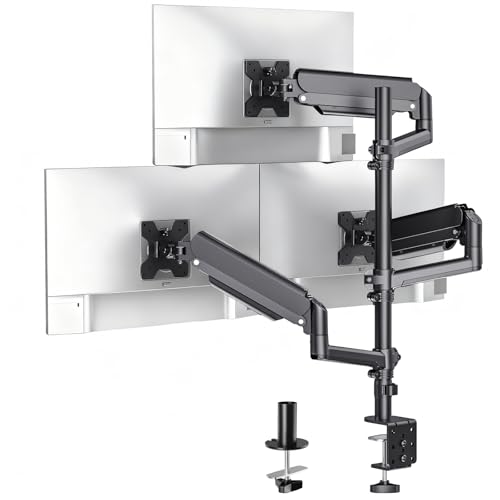
Maximize your workspace efficiency with the WALI Triple Monitor Mount, perfect for professionals and gamers alike who require multiple screens. This mount accommodates 17-32 inch flat and curved displays, supporting up to 19.8 lbs per arm. With full motion gas spring arms, you can tilt, swivel, and rotate for ideal viewing. The 32.1-inch pole extends to 41.4 inches, perfect for both sitting and standing positions. You can choose between a C-Clamp or Grommet base for easy installation. Rated 4.4 stars with US-based support, it’s a reliable choice for enhancing your desk setup.
Best For: Professionals and gamers who need to enhance their workspace with multiple monitor displays.
Pros:
- Full motion gas spring arms allow for easy adjustment in tilt, swivel, and rotation for optimal viewing angles.
- Supports a wide range of monitor sizes (17-32 inches) and weights (up to 19.8 lbs per arm).
- Two versatile mounting options (C-Clamp and Grommet) cater to different desk setups.
Cons:
- Some users may find the installation process complicated depending on their desk type.
- The weight limit per arm (19.8 lbs) may restrict the use of heavier monitors.
- The pole height may not be sufficient for very tall users when standing.
WALI Triple Monitor Mount for 13-27 inch Screens
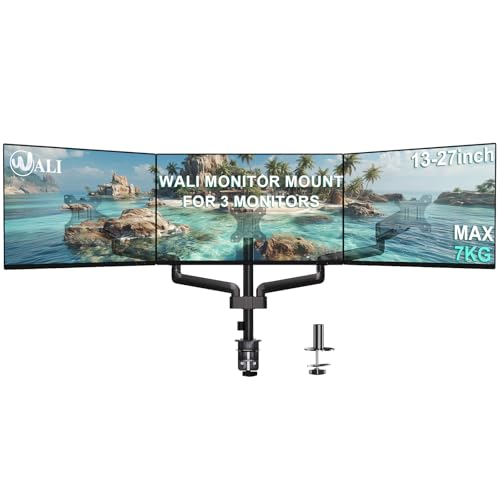
If you’re looking to enhance your productivity with multiple screens, the WALI Triple Monitor Mount for 13-27 inch screens is an excellent choice. This sturdy mount supports LCD and LED monitors up to 27 inches, with a weight capacity of 15.4 lbs per monitor. Its gas spring stand allows you to tilt, swivel, and rotate each screen for ideal viewing angles. Installation is a breeze with compatible mounting holes and both c-clamp and grommet base options. Plus, you’ll benefit from US-based customer support available seven days a week. Elevate your workspace and enjoy seamless multitasking with this versatile mount!
Best For: Those seeking an efficient and adjustable solution for managing multiple monitors in a compact workspace.
Pros:
- Supports three monitors up to 27 inches, enhancing productivity and multitasking capabilities.
- Versatile adjustability with tilt, swivel, and rotation features for optimal viewing angles.
- Easy installation with multiple mounting options and included hardware.
Cons:
- Weight limit of 15.4 lbs per monitor may not accommodate heavier models.
- Limited compatibility with only specific mounting hole sizes (75 x 75mm and 100 x 100mm).
- Gas spring mechanism may require adjustments over time for optimal performance.
Factors to Consider When Choosing a Triple Monitor Mount With Gas Spring
When you’re choosing a triple monitor mount with a gas spring, you need to take into account several key factors. Monitor size compatibility and weight capacity limits are vital for ensuring stability, while VESA mount standards dictate how well your monitors will fit. Don’t forget to check the installation methods and adjustability features to get the most out of your setup.
Monitor Size Compatibility
Choosing the right triple monitor mount means evaluating your monitors’ size compatibility, as it directly impacts your workstation’s functionality. Most models support monitors ranging from 13 to 32 inches, so you’ll want to verify your setup fits within this range. Additionally, check the VESA compatibility, as most mounts use standard patterns like 75x75mm and 100x100mm for secure attachment. It’s also crucial to assess the mount’s adjustability features, such as tilt, swivel, and rotation, to achieve the best viewing angles based on your specific monitor sizes. Finally, if you have flat or curved screens, make sure the mount accommodates your monitor type, which can greatly affect overall compatibility and your viewing experience.
Weight Capacity Limits
Understanding the weight capacity limits is essential for ensuring your triple monitor mount functions effectively and safely. When you select a mount, consider each arm’s weight capacity, which usually ranges from 4.4 lbs to 22 lbs per monitor based on its design. Some mounts can hold individual monitors weighing up to 19.8 lbs, providing the stability you need. Always check the total weight limit for the entire mount; exceeding this can compromise its structural integrity and potentially lead to failure. Remember, different monitor sizes may have varying weight capacities—some may support heavier monitors up to 32 inches while accommodating lighter ones for smaller sizes. Always verify that your combined monitor weights don’t surpass the mount’s specified maximum limit.
VESA Mount Standards
VESA mount standards play a crucial role in guaranteeing your triple monitor setup is both secure and compatible. These standards define specific hole patterns on the back of monitors, with common sizes being 75x75mm and 100x100mm. By adhering to VESA standards, you assure compatibility between your monitors and mounting brackets, allowing for a stable attachment. This universal solution makes it easy to switch or upgrade monitors without facing compatibility issues. Most triple monitor mounts support VESA patterns, so it’s important to verify your monitor’s VESA compatibility before making a purchase. Plus, VESA certification assures that the mount can safely support the weight of your monitors, reducing the risk of accidents or damage in your workspace.
Installation Methods Available
When setting up your triple monitor mount with gas spring, installation methods greatly influence your workspace’s functionality. Most mounts offer two primary options: C-clamp and grommet mount. C-clamp mounts are perfect for desks between 0.39 to 3.15 inches thick, providing a strong grip without drilling. On the other hand, grommet mounts require a pre-drilled hole and suit desks with thicknesses of 0.39 to 1.97 inches. When choosing, consider your desk’s structure and thickness to guarantee a secure fit. Some mounts come with an installation kit that includes all necessary hardware and instructions, making assembly easier. Always verify compatibility with your desk before proceeding to avoid any installation issues.
Adjustability Features Offered
Choosing the right triple monitor mount with gas spring involves more than just installation methods; adjustability features play a significant role in enhancing your workspace. Look for mounts that offer full motion capabilities, allowing tilt angles from ±35° to ±90° for ideal viewing. Adjustable arms with swivel movement of ±90° or more let you easily reorient screens for collaboration or presentations. Consider models with 360° rotation features, enabling effortless switching between landscape and portrait modes. Height-adjustable central poles that extend by a foot or more cater to both sitting and standing work preferences. Finally, gas spring mechanisms guarantee smooth and effortless adjustments for extending, retracting, and height changes, making your setup as flexible as you need it to be.
Cable Management Options
Effective cable management is essential for a tidy workspace, especially when using a triple monitor mount with gas spring. You’ll appreciate how integrated cable management systems can conceal wires behind the mount, enhancing your setup’s aesthetics. Look for mounts that include cable clips or channels, allowing you to route and secure cables along the arms and poles easily. This not only keeps your workspace organized but also minimizes tangling and reduces the risk of cord damage or tripping hazards. Choosing a mount with flexible cable management options guarantees you can adjust monitor positions without disrupting your cable organization. In the end, a clean workspace boosts productivity and creates a more professional environment.
Build Quality Materials
A well-organized workspace not only looks better but also supports productivity, making the choice of materials in a triple monitor mount with gas spring important. Look for mounts made from durable materials like heavy-gauge steel or high-quality aluminum, ensuring stability for your screens. Corrosion-resistant finishes are a must, enhancing longevity against wear and tear. A solid construction should handle weights from 4.4 to 22 lbs per arm, accommodating various monitor sizes. Integrated cable management systems not only keep your workspace tidy but also reflect thoughtful design. Finally, robust installation options, such as a C-clamp or grommet base made from high-grade materials, secure the mount to desks of different thicknesses, providing peace of mind.
Warranty and Support Services
When it comes to selecting a triple monitor mount with gas springs, warranty and support services play a crucial role in your decision-making process. Look for mounts that offer lifetime or multi-year warranties, ensuring you have long-term support. It’s also essential to check if the manufacturer provides customer support services, ideally available seven days a week, to help with installation or technical issues. Evaluate the return policy, as some brands allow returns within a specified period, giving you peace of mind if the product doesn’t meet your expectations. Additionally, consider whether the manufacturer supplies user manuals or assembly instructions to simplify setup. Finally, research the manufacturer’s reputation regarding customer support and warranty claims to gauge reliability and quality.