
If you’re in the market for high-speed storage, you might want to explore the best Thunderbolt NVMe enclosures available today. These enclosures not only offer exceptional performance but also guarantee reliability for your data needs. With various options catering to different requirements, you’ll find something that fits your specifications. Curious about which ones stand out and what factors to take into account before making a choice? Let’s take a closer look.
SABRENT USB4 NVMe SSD Enclosure (Tool-Free, USB 4.0)

The SABRENT USB4 NVMe SSD Enclosure is perfect for creators and mobile power users who demand lightning-fast transfer speeds. With transfer speeds up to 3,900 MB/s via USB4 and 2,700 MB/s using Thunderbolt 3/4, you won’t waste time waiting for files to transfer. Its tool-free installation makes it easy to use with various PCIe NVMe SSD sizes, though it doesn’t support SATA M.2 SSDs. Built from premium aluminum and ABS, it includes an active cooling fan to guarantee stability during large file transfers. This enclosure is optimized for PCIe Gen4 x4 SSDs, delivering performance that meets your needs.
Best For: Creators, editors, and mobile power users who need fast, portable external storage solutions.
Pros:
- Supports lightning-fast transfer speeds up to 3,900 MB/s with USB4 and 2,700 MB/s with Thunderbolt 3/4.
- Tool-free installation makes it easy to set up with various PCIe NVMe SSD sizes.
- Built with premium materials and features an active cooling fan for stability during large file transfers.
Cons:
- Not compatible with SATA M.2 SSDs, limiting options for users with those types of drives.
- Requires a Thunderbolt 3/4 or USB4 port for optimal performance, which may not be available on all devices.
- The premium build may come at a higher price point compared to other enclosures.
OWC Express 1M2 Portable NVMe SSD (Enclosure Only)

Looking for a high-performance solution to elevate your data transfer speeds? The OWC Express 1M2 Portable NVMe SSD enclosure is your answer. With a stunning 40Gb/s capability, it outperforms traditional Thunderbolt enclosures by over 2x, delivering speeds up to 3151MB/s. This compact, aluminum heat sink design guarantees rugged protection and efficient cooling, making it perfect for on-the-go use. Compatible with USB4, Thunderbolt, and USB-C devices, it supports various NVMe M.2 SSD sizes. Plus, it comes with a 40Gb/s USB-C cable and a screwdriver for easy setup, backed by a solid warranty for peace of mind.
Best For: Professionals and creatives seeking ultra-fast data transfer speeds in a portable SSD solution.
Pros:
- Ultra-fast performance with speeds up to 3151MB/s, significantly faster than traditional Thunderbolt enclosures.
- Compact and portable design with a rugged aluminum heat sink for effective cooling and protection on the go.
- Wide compatibility with USB4, Thunderbolt, and USB-C devices, supporting various NVMe M.2 SSD sizes.
Cons:
- Enclosure only; requires a separate NVMe SSD for full functionality.
- Limited to NVMe M.2 SSD types, which may not be suitable for all users.
- Potential heat management concerns if used extensively without adequate ventilation, despite the heat-dissipating design.
UGREEN 40Gbps M.2 NVMe Enclosure (External SSD Case)
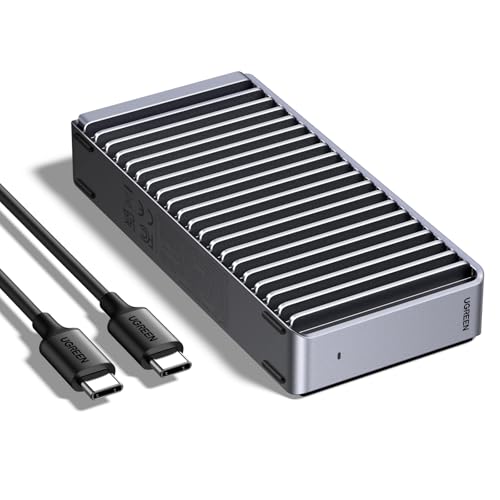
For those seeking lightning-fast data transfer speeds, the UGREEN 40Gbps M.2 NVMe Enclosure stands out as an exceptional choice. With its aluminum double-sided fin heat dissipation design, it guarantees effective cooling while maintaining quiet operation. Compatible with Thunderbolt 4/3 and USB4, this enclosure supports SSDs up to 8TB, reaching speeds of up to 3600MB/s when paired with the right cables. Its ultra-slim design makes it portable, perfect for on-the-go usage. Just remember, it doesn’t support SATA NGFF or mSATA SSDs, but it works seamlessly with a variety of NVMe sizes, including 2230 to 2280.
Best For: Professionals and tech enthusiasts looking for high-speed external storage solutions with excellent heat dissipation.
Pros:
- Maximum speed of 3600MB/s when used with Thunderbolt 4 cables/devices, ensuring rapid data transfer.
- Efficient cooling system with a unique double-sided fin design that promotes quiet operation without fans.
- Supports a variety of NVMe SSD sizes (2230, 2242, 2260, 2280) and is compatible with multiple operating systems (Windows, Mac OS, Linux, Android).
Cons:
- Does not support SATA NGFF or mSATA SSDs, limiting compatibility with certain drives.
- Potential issue with thicker SSDs, as it may require thinner thermal pads for optimal performance.
- SSD not included, necessitating an additional purchase to use the enclosure.
40Gbps M.2 NVME Enclosure with Cooling Fan

With its impressive 40Gbps speed, the M.2 NVMe enclosure equipped with a cooling fan is an ideal choice for professionals and gamers who demand high performance. This USB 4 enclosure supports up to 8TB of storage, making it perfect for large files, storage-intensive games, and lossless-quality films. The built-in cooling fan, along with cooling holes and thermal pads, guarantees optimum performance, while the aluminum alloy casing enhances heat dissipation. Compatible with various USB and Thunderbolt standards, it works seamlessly across Windows, Mac OS, and Linux. Plus, its compact design makes it easy to carry wherever you go.
Best For: Professionals and gamers who require high-speed data transfer and large storage capacity for their demanding applications.
Pros:
- Supports up to 8TB storage capacity, making it ideal for large files and storage-intensive applications.
- Built-in cooling fan and aluminum alloy casing ensure efficient heat dissipation, maintaining optimum performance.
- Wide compatibility with various USB and Thunderbolt standards, as well as support for multiple operating systems (Windows, Mac OS, Linux).
Cons:
- Requires M key NVMe SSDs in size 2280, limiting compatibility with other types of SSDs.
- Portable design may be prone to damage if not handled carefully while on the go.
- Cooling fan may produce noise, which could be distracting in quiet environments.
ACASIS 40Gbps M.2 NVMe SSD Enclosure (TBU405 Pro)

The ACASIS 40Gbps M.2 NVMe SSD Enclosure (TBU405 Pro) stands out as the ideal choice for professionals who demand high-speed data access on the go. With compatibility for Thunderbolt 4/3, USB4, and various M.2 sizes, it suits your needs perfectly. Experience impressive read/write speeds of up to 2805/2734 MB/s, especially with the Samsung 980 Pro. The built-in cooling fan and engineered heat dissipation holes keep your drive stable during heavy workloads. Plus, its compact design makes it incredibly portable, ensuring you can easily take your high-performance storage wherever you need it.
Best For: Professionals who require high-speed, portable storage solutions for video editing and data backup tasks.
Pros:
- High-speed performance with read/write speeds up to 2805/2734 MB/s, enhancing productivity for demanding applications.
- Versatile compatibility with Thunderbolt 4/3, USB4, and various M.2 sizes, making it suitable for a wide range of devices.
- Efficient cooling features including a built-in fan and heat dissipation design, ensuring stable performance during heavy workloads.
Cons:
- Fan activation requires manual switching, which may be inconvenient for some users.
- Limited to M.2 NVMe drives, excluding compatibility with other types of SSDs.
- Premium pricing may not be accessible for budget-conscious consumers looking for basic storage solutions.
Qwiizlab Fanless NVMe Enclosure with Aluminum Chassis

Engineered for high-performance users, the Qwiizlab Fanless NVMe Enclosure stands out with its impressive compatibility and speed. With Thunderbolt 5 support, it delivers blazing-fast sequential speeds of over 6,300MB/s write and 5,900MB/s read. You can use PCIe M.2 SSDs up to 8TB, fully leveraging its PCIe Gen 5 capabilities. The rugged aluminum chassis not only looks sleek but also guarantees efficient heat dissipation without a fan, thanks to its internal copper plate. Included accessories like an Intel-certified Thunderbolt 5 cable and thermal pads make installation a breeze, letting you focus on maximizing your storage performance.
Best For: High-performance users seeking a reliable and fast storage solution with extensive compatibility.
Pros:
- Blazing-fast speeds: Achieves over 6,300MB/s write and 5,900MB/s read for optimal performance.
- Broad compatibility: Supports PCIe Gen 5 and Gen 4 SSDs in various sizes up to 8TB.
- Fanless design: Utilizes aluminum chassis and copper plate for efficient heat dissipation without noise.
Cons:
- Price point: May be more expensive compared to traditional NVMe enclosures.
- Limited to M.2 SSDs: Only compatible with specific SSD formats, which may restrict options for some users.
- Heat management reliance: While fanless operation is quiet, it may not be ideal for users in high-temperature environments.
OWC Express 1M2 Portable NVMe SSD USB4

For professionals and creatives seeking lightning-fast data transfer speeds, the OWC Express 1M2 Portable NVMe SSD USB4 stands out as an exceptional choice. With peak real-world speeds exceeding 6000MB/s, this enclosure supports PCIe Gen 3.0, 4.0, and 5.0 NVMe M.2 SSDs, ensuring maximum performance. It’s compatible with a variety of devices, including Macs, PCs, and iPad Pros. The innovative heat-dissipating design keeps your drive cool, allowing for sustained top speeds. Plus, you can choose between a DIY option or a ready-to-use solution, making it easy to upgrade as your storage needs grow.
Best For: Professionals and creatives seeking high-speed data transfer and flexible storage solutions.
Pros:
- Over 6000MB/s peak speeds deliver exceptional performance for demanding applications.
- Wide compatibility with various devices, including Macs, PCs, iPads, and Chromebooks.
- Innovative heat-dissipating design ensures consistent performance without overheating.
Cons:
- Higher cost compared to traditional SSDs may not be suitable for budget-conscious users.
- Requires careful selection for maximum SSD compatibility, particularly with PCIe Gen 5 NVMe M.2 SSDs.
- DIY option may be complex for users who prefer ready-to-use solutions without assembly.
ACASIS M.2 NVMe SSD Enclosure (TB501 Pro)

With its blazing-fast read/write speeds of up to 6000 MB/s, the ACASIS M.2 NVMe SSD Enclosure (TB501 Pro) stands out as an exceptional choice for content creators and gamers. Supporting Thunderbolt 5 and USB4 V2.0, it guarantees top performance while remaining backward compatible. The JHL9480 chip allows you to harness PCIe 5.0 SSDs, making large file transfers effortless. Its built-in smart cooling fan manages heat effectively, activating when needed. Plus, the tool-less design means setup is a breeze. Just plug it in, and you’re ready to tackle data-heavy tasks with ease and efficiency.
Best For: Content creators, gamers, and professionals seeking high-speed data transfer solutions for large files.
Pros:
- Supports lightning-fast read/write speeds up to 6000 MB/s, making it ideal for demanding tasks.
- Tool-less design allows for easy installation and setup without the need for additional drivers.
- Built-in smart cooling fan helps manage heat effectively, ensuring stability during large file transfers.
Cons:
- Not compatible with Thunderbolt 3 devices, limiting use with older hardware.
- Requires a PCIe 4.0 x4 NVMe 1.4 or higher SSD to achieve speeds exceeding 3000 MB/s, which may necessitate additional investment.
- Normal heating during large file transfers may necessitate proper ventilation for optimal performance.
UGREEN M.2 NVMe SSD Enclosure with Cooling Fan

The UGREEN M.2 NVMe SSD Enclosure stands out for anyone seeking lightning-fast data transfer speeds, boasting up to 7000MB/s when paired with Thunderbolt 5 technology. This enclosure supports M-Key and M&B Key NVMe 2280 SSDs up to 8TB, making it versatile for your storage needs. Constructed from aluminum, it guarantees peak heat dissipation, with a built-in cooling fan that activates at 40°C for enhanced performance. Its ultra-slim design and portable size make it perfect for travel. Compatible with Windows, Linux, and macOS, it’s an excellent choice for those who need reliable and efficient storage solutions.
Best For: Users seeking high-speed storage solutions for data-intensive tasks, such as video editing or large file transfers.
Pros:
- Lightning-fast transfer speeds of up to 7000MB/s with Thunderbolt 5.
- Built-in cooling fan activates at 40°C to prevent overheating during intense usage.
- Compact and portable design makes it easy to carry for on-the-go data access.
Cons:
- Not compatible with M.2 (B-KEY) or (M&B)-KEY SATA NGFF SSDs.
- Requires Thunderbolt 4 or 5 for maximum speed, limiting performance on older interfaces.
- Heavier than some competitors at 12 ounces, which may impact portability for some users.
Plugable M.2 NVMe SSD Enclosure

Plugable’s M.2 NVMe SSD Enclosure stands out as the ideal choice for users seeking a tool-free and driverless solution to access high-speed storage. With USB 3.1 Gen 2 and Thunderbolt compatibility, you’ll enjoy transfer speeds up to 10Gbps. It supports a wide range of M.2 NVMe SSDs, ensuring versatility for your storage needs. Its compact, travel-ready design features an aluminum case with effective heat management, so you won’t have to worry about overheating. Plus, with a 2-year warranty and lifetime support, you can feel confident in your purchase. Experience blazing-fast data transfer with Plugable’s reliable enclosure.
Best For: Anyone needing a tool-free and high-speed solution for accessing M.2 NVMe SSDs across multiple platforms.
Pros:
- Tool-free installation allows for quick and easy setup without additional tools.
- High transfer speeds of up to 10Gbps for efficient data transfer.
- Compact and portable design makes it travel-friendly with effective heat management.
Cons:
- Not compatible with M.2 SATA or other non-NVMe drives, limiting options for some users.
- Performance may vary depending on the specific SSD used.
- Aluminum casing may be prone to scratches or dents over time.
Factors to Consider When Choosing a Thunderbolt NVMe Enclosure
When you’re choosing a Thunderbolt NVMe enclosure, several key factors come into play. You’ll want to take into account transfer speeds, device compatibility, and the cooling mechanisms to guarantee peak performance. Don’t forget about size and portability, as well as how easy the installation process is for you.
Transfer Speed Capabilities
How do you choose the right Thunderbolt NVMe enclosure to maximize your transfer speeds? Look for enclosures that support Thunderbolt 3 or 4, which can achieve speeds up to 2,700 MB/s, or even Thunderbolt 5 for over 6,300 MB/s. If you’re using USB4, you can hit 40Gbps with compatible devices and cables. Prioritize enclosures optimized for PCIe Gen4 x4 SSDs to enhance performance, especially for large file transfers. Keep in mind that real-world speeds may vary; some USB4 enclosures can reach around 3,900 MB/s, while Thunderbolt connections might hit about 3,151 MB/s. Always check for backward compatibility, as older ports might limit speeds to 10Gbps with USB 3.1.
Compatibility With Devices
To guarantee you get the most out of your Thunderbolt NVMe enclosure, it’s crucial to take into account compatibility with your devices. First, verify the enclosure supports the specific M.2 SSD sizes you plan to use, like 2230, 2242, 2260, or 2280. Check for backward compatibility with older USB and Thunderbolt standards, as this impacts connectivity. You’ll also want to verify that it works with your operating system, whether it’s Windows, macOS, or Linux. Additionally, consider compatibility with PCIe generations, such as Gen 3, 4, or 5, since this influences performance. Finally, confirm that the enclosure connects to the ports available on your devices, including Thunderbolt 3, Thunderbolt 4, USB4, and USB-C connections.
Cooling Mechanisms and Design
While choosing a Thunderbolt NVMe enclosure, it is vital to contemplate the cooling mechanisms and design, as they directly impact performance and reliability. Effective cooling is important due to the high speeds and heat generated during data transfers, often exceeding 3,000 MB/s. Many enclosures use active cooling systems, like integrated fans, to maintain ideal temperatures and prevent thermal throttling during prolonged use. Alternatively, passive cooling designs may feature aluminum bodies or heat-dissipating elements for silent operation. Some enclosures even have precision-engineered heat dissipation holes or thermal pads to enhance heat management. The right cooling method can greatly affect the enclosure’s durability and performance, so consider these factors carefully when selecting a device for intensive tasks.
Size and Portability
Considering size and portability is essential when you’re choosing a Thunderbolt NVMe enclosure. You’ll want an enclosure that’s compact and lightweight, easily fitting into your laptop bag or pocket. Look for models supporting various SSD sizes like 2230, 2242, 2260, and 2280, ensuring compatibility without sacrificing portability. Enclosures made from lightweight materials like aluminum not only boost durability but also help with heat dissipation, vital for peak performance on the go. Additionally, consider design elements that promote ease of use, such as tool-free installation and included accessories. If you’re a mobile power user, opt for enclosures with built-in cooling systems to maintain performance stability during large file transfers, ensuring consistent speed and reliability wherever you are.
Installation Process Ease
When selecting a Thunderbolt NVMe enclosure, the ease of installation can greatly enhance your user experience. Look for tool-free installation features that let you easily insert and secure your NVMe SSDs without extra tools. Choose enclosures that support multiple M.2 sizes like 2230, 2242, 2260, and 2280, providing flexibility for various SSD models. Some enclosures offer clear instructions and include tools such as screwdrivers and thermal pads to simplify setup. A plug-and-play design allows you to start using your enclosure immediately, without needing driver installations or complex configurations. If you often upgrade your storage, consider models with quick-release mechanisms for hassle-free SSD swaps. Simplifying the installation process makes your overall experience much smoother.
Build Quality Materials
Build quality materials play an essential role in the performance and longevity of a Thunderbolt NVMe enclosure. High-quality materials like aluminum and ABS not only enhance durability but also promote effective heat dissipation during prolonged use. A rugged aluminum body protects internal components while adding to the enclosure’s aesthetic appeal. When you consider enclosures, look for tool-free designs with sturdy mechanisms, allowing for easy installation and removal of M.2 NVMe SSDs without compromising structural integrity. Integrated cooling systems, such as active cooling fans or advanced heat dissipation designs, help maintain ideal temperatures and prevent thermal throttling under heavy workloads. Finally, the choice of materials affects weight and portability, so choose wisely for convenient travel without sacrificing protection.
Supported SSD Types
Choosing the right Thunderbolt NVMe enclosure often hinges on the types of SSDs it supports. Most enclosures are designed for M-Key PCIe NVMe SSDs, which deliver high-speed performance. You’ll find commonly supported sizes like 2230, 2242, 2260, and 2280, giving you flexibility in storage capacity and form factor. It’s vital to verify compatibility, as many enclosures won’t support SATA M.2 SSDs due to their different interface. If you’re working with large files, look for enclosures that accommodate SSDs up to 8TB. Finally, confirm the enclosure matches the PCIe generation of your SSD, whether it’s Gen 3, Gen 4, or Gen 5, to maximize your performance and transfer speeds effectively.
Warranty and Support Options
As you explore Thunderbolt NVMe enclosures, it’s essential to evaluate the warranty and support options available. Check the warranty period, as many enclosures offer 2 to 3 years of coverage against defects. It’s also wise to look for options that include lifetime technical support, which can be invaluable for troubleshooting throughout the product’s life. If you rely on your storage for critical data, consider manufacturers that provide extended warranties or additional service plans for extra peace of mind. Confirm the warranty covers both the enclosure and any included accessories, like cables, to avoid unexpected costs. Finally, reading customer reviews can reveal the responsiveness and effectiveness of the manufacturer’s support, guaranteeing a reliable user experience.