
As we approach 2026, the landscape of high-performance displays is evolving rapidly. If you’re looking for monitors that combine stunning visuals with lightning-fast connectivity, Thunderbolt 5 options are worth considering. With impressive resolutions and exceptional color accuracy, these monitors cater to both professionals and gamers. But which models stand out? Let’s explore the top contenders that could redefine your workspace and elevate your gaming experience.
LG 32U990A-S 32-Inch Ultrafine 6K Professional Monitor
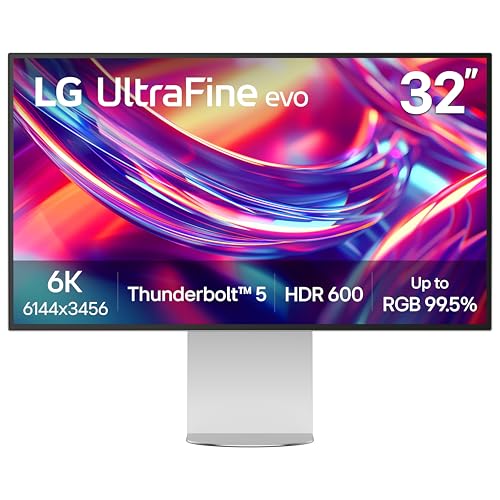
If you’re a creative professional looking to elevate your work, the LG 32U990A-S 32-Inch Ultrafine 6K Professional Monitor is an exceptional choice. With its stunning 6K resolution and 224 PPI pixel density, you’ll experience over 21 million pixels that bring your projects to life. The Nano IPS Black technology and VESA DisplayHDR 600 guarantee remarkable color accuracy and contrast. Plus, Thunderbolt 5 connectivity offers lightning-fast data transfer, perfect for editing 6K videos or photo retouching. Its ergonomic design and virtually borderless screen maximize your workspace, making it a must-have for any serious creator.
Best For: Creative professionals who require high-resolution displays for tasks such as video editing, photo retouching, and 3D sculpting.
Pros:
- Ultra-high 6K resolution with over 21 million pixels for stunning visual clarity.
- Exceptional color accuracy with up to 99.5% Adobe RGB and 98% DCI-P3 coverage, ideal for color-critical work.
- Ergonomic adjustable stand and virtually borderless design enhance comfort and maximize screen space.
Cons:
- Premium price point may not be suitable for casual users or hobbyists.
- Limited to specific use cases, primarily catering to creatives rather than general consumers.
- Requires powerful hardware to fully utilize the 6K capabilities, which may necessitate additional investment.
LG 40-inch Ultrafine 5K2K Curved Monitor (Model 40U990A-W)

The LG 40-inch Ultrafine 5K2K Curved Monitor (Model 40U990A-W) stands out as the ultimate choice for creators and gamers alike, thanks to its impressive 5K2K resolution and Thunderbolt 5 connectivity. This 40-inch curved display offers a stunning 5120 x 2160 resolution with Nano IPS Black technology, ensuring deep blacks and vibrant colors. Its versatile connectivity options include HDMI 2.1, DisplayPort 2.1, and USB-C, allowing seamless multitasking. With a 120Hz refresh rate, built-in speakers, and ergonomic adjustments, you’ll enjoy an immersive experience whether you’re editing videos or gaming. Plus, it’s certified TUV 5-Star Eye Comfort for prolonged use.
Best For: Creators and gamers seeking a high-resolution, immersive experience with advanced connectivity options and ergonomic features.
Pros:
- Ultra-wide 5K2K resolution offers a spacious workspace ideal for video editing and graphic design.
- Versatile connectivity with Thunderbolt 5 and multiple ports enhances multitasking capabilities.
- Built-in gaming features and a 120Hz refresh rate provide smooth gameplay and an edge in competitive gaming.
Cons:
- Weight of 31.1 pounds may require a sturdy desk or mounting solution for optimal placement.
- Higher price point compared to standard monitors might not fit all budgets.
- Limited availability of Thunderbolt 5 devices may restrict full utilization of its connectivity features.
Dell UltraSharp U3225QE 31.5″ 4K Ultra HD Monitor

For professionals seeking a powerful tool to enhance their workflow, the Dell UltraSharp U3225QE 31.5″ 4K Ultra HD Monitor stands out with its vibrant display and expansive screen size. You’ll enjoy stunning visuals with crisp text and sharp images, making multitasking a breeze. Its integrated Thunderbolt hub allows for versatile connectivity, streamlining your workspace and boosting efficiency. With a sleek design and slim bezel, this monitor fits seamlessly into any professional setting. Whether you’re working long hours or enjoying entertainment, the U3225QE enhances productivity while combining functionality and style, making it an excellent choice for your needs.
Best For: Professionals and creatives who require a high-resolution display for multitasking and detailed work.
Pros:
- Exceptional 4K UHD display quality with vibrant colors and sharp images.
- Integrated Thunderbolt hub for versatile connectivity and streamlined workspace.
- Sleek design with a slim bezel that complements any professional environment.
Cons:
- Larger screen size may not fit well in smaller workspaces.
- Higher price point compared to standard monitors.
- Limited adjustable features such as height and tilt options.
BenQ PD2730S 27″ 5K Mac Monitor

Designed specifically for creative professionals, the BenQ PD2730S 27″ 5K Mac Monitor stands out with its stunning 5K resolution, delivering ultra-sharp details and vibrant colors that enhance visual storytelling. With 98% P3 color coverage, you’ll enjoy precise color representation for VFX work. The nano matte panel minimizes reflections, making long hours more comfortable. Thunderbolt 4 compatibility provides up to 90W power and 40Gbps data transfer, while its daisy chain capability expands your workspace effortlessly. Plus, the built-in KVM switch lets you control two systems with one keyboard and mouse, boosting your workflow efficiency. Enjoy ergonomic height adjustments tailored to you!
Best For: Creative professionals seeking high-resolution displays for precise color representation and enhanced visual storytelling.
Pros:
- Ultra-sharp 5K resolution offers incredible detail and smooth gradients, perfect for design and editing work.
- 98% P3 color coverage ensures accurate and vibrant color representation, essential for VFX and visual projects.
- Built-in KVM switch allows seamless control of two systems with one keyboard and mouse, improving workflow efficiency.
Cons:
- Weighty design at 17.5 pounds may require a sturdy desk setup.
- Higher price point compared to standard monitors could be a barrier for budget-conscious buyers.
- Limited return policy may not accommodate all customer preferences for exchanges or refunds.
Samsung 27″ ViewFinity S9 Series 5K Computer Monitor

Elevating your work and entertainment experience, the Samsung 27″ ViewFinity S9 Series 5K Computer Monitor shines with its stunning 5K resolution and impressive color accuracy. With 218 PPI and a 99% DCI-P3 color gamut, you’ll enjoy vibrant visuals and factory-calibrated precision (ΔE < 2). Smart Calibration lets you customize settings directly from your smartphone, while the built-in 4K SlimFit camera enhances video calls. Plus, Thunderbolt 4 and Apple AirPlay compatibility guarantee seamless connectivity. Whether you’re working or gaming, this monitor shifts effortlessly, providing an immersive experience with its Smart TV apps and Samsung Gaming Hub.
Best For: Professionals and creatives seeking high-quality visuals and customization options for both work and entertainment.
Pros:
- Exceptional 5K resolution with vibrant color accuracy (ΔE < 2) for detailed visuals.
- Smart Calibration feature allows easy customization via smartphone for optimal color settings.
- Built-in 4K SlimFit camera enhances video conferencing experiences.
Cons:
- Higher price point compared to standard monitors may not fit all budgets.
- Limited gaming features compared to dedicated gaming monitors.
- May require additional setup for optimal use with certain devices.
Plugable Thunderbolt 4 Dock with 100W Charging (TBT4-UD5)

The Plugable Thunderbolt 4 Dock (TBT4-UD5) stands out as an outstanding choice for professionals seeking seamless connectivity and robust performance. With Thunderbolt 4 speeds of 40Gbps and 100W power delivery, it guarantees your devices stay charged and ready. You can connect dual 4K 60Hz HDMI displays or a single 8K monitor, maximizing your workspace. Its 13-port configuration, including USB and Ethernet options, covers all your connection needs. Compatible with Thunderbolt 4, Thunderbolt 5, and USB4 systems, this dock adapts effortlessly, making it a reliable companion for both Windows and macOS users. Experience exceptional performance and versatility with Plugable.
Best For: Professionals and creatives seeking high-speed connectivity and multiple display options for enhanced productivity.
Pros:
- Versatile connectivity with 13 ports, including dual HDMI outputs for multiple displays.
- High-speed data transfer at 40Gbps, ensuring quick file transfers and device communication.
- Robust power delivery with 100W charging, keeping your devices powered and ready for use.
Cons:
- Limited compatibility with some older USB-C and Thunderbolt 3 devices, which may restrict full functionality.
- Higher price point compared to basic docking stations, which may not be justifiable for casual users.
- Mac compatibility may be limited to single displays on base M1 and M2 systems, which could be a drawback for some users.
Dell UltraSharp U4025QW 40″ Curved Screen LED Monitor

For professionals seeking an immersive viewing experience, the Dell UltraSharp U4025QW 40″ Curved Screen LED Monitor stands out with its stunning 5K2K WUHD resolution. With a 21:9 aspect ratio and a 39.7-inch viewable screen, you’ll enjoy vibrant visuals and sharp details. Brightness reaches 600 nits, making it ideal for well-lit environments. Plus, a quick 5 ms response time guarantees smooth action, whether you’re gaming or watching sports. Connectivity is effortless with USB Type-C, allowing for efficient data transfer. Designed for productivity, this monitor enhances your workflow while providing an exceptional viewing experience across various applications.
Best For: Professionals and gamers seeking an immersive and high-quality viewing experience with vibrant visuals and smooth performance.
Pros:
- Stunning 5K2K WUHD resolution for exceptional clarity and detail.
- High brightness of 600 nits makes it suitable for well-lit environments.
- Quick 5 ms response time ensures smooth visuals for fast-paced action.
Cons:
- Large screen size may require ample desk space for proper setup.
- Curved design may not appeal to all users, depending on personal preference.
- Higher price point compared to standard monitors.
iVANKY 23-in-1 FusionDock Max 2 for Thunderbolt 5

Designed specifically for MacBook users, the iVANKY 23-in-1 FusionDock Max 2 for Thunderbolt 5 stands out with its ability to support triple displays. You can easily connect your MacBook M1-M5 Pro/Max and enjoy dual 6K@60Hz alongside a single 4K@60Hz. With 120Gbps data transfer through three Thunderbolt 5 ports, it guarantees ultra-fast connectivity. Plus, you’ve got ten USB ports and an SD/TF card slot for added convenience. The hybrid cooling system keeps your device running smoothly, while the 24-month warranty offers peace of mind. Just remember, only one Mac can connect at a time—no switching allowed!
Best For: MacBook M1-M5 Pro/Max users looking for high-performance connectivity and multi-display capabilities.
Pros:
- Supports triple displays for enhanced multitasking.
- Ultra-fast 120Gbps data transfer with Thunderbolt 5 ports.
- Hybrid cooling system ensures stable performance during extended use.
Cons:
- Incompatible with Windows and Chrome laptops.
- Only one Mac can connect at a time, limiting versatility.
- Higher price point may not suit budget-conscious users.
ViewSonic VP2788-5K 27″ Mac-Ready Monitor

If you’re a creative professional or a Mac user seeking exceptional color accuracy and high-resolution performance, the ViewSonic VP2788-5K 27″ monitor is an ideal choice. With a stunning 5K resolution (5120x2880p) and Pantone validation, it delivers precise colors for your projects. The Thunderbolt 4 connectivity offers data transfer speeds up to 40 Gbps and supports 100W power delivery. You can also daisy chain for dual setups. Plus, its fully adjustable stand and sleek, frameless design make it a great fit for any workspace. With 100% sRGB and 99% DCI-P3 coverage, your visuals will truly pop.
Best For: Creative professionals and Mac users looking for exceptional color accuracy and high-resolution performance.
Pros:
- Pantone validated for accurate color reproduction, ideal for design work.
- Thunderbolt 4 connectivity enables high-speed data transfer and power delivery.
- Fully adjustable stand and frameless design enhance ergonomics and workspace aesthetics.
Cons:
- Customer rating of 3.7 out of 5 stars may suggest mixed user experiences.
- Heavier weight (14 pounds) may make it less portable.
- Higher price point compared to standard monitors.
Plugable USB C Docking Station for 5 Monitors

The Plugable USB C Docking Station UD-7400PD is an ideal solution for professionals who need to maximize their workspace with multiple high-resolution displays. Supporting up to 5 monitors, you can choose between 3x 8K or 1x 8K with 4x 4K configurations. With 140W laptop and 30W device charging, plus 2.5Gbps Ethernet, it streamlines your multitasking. The docking station features HDMI and USB-C DisplayLink ports, ensuring smooth connectivity on Windows and macOS. It’s built for reliability and ease of use, making it a perfect choice for home offices. Plus, you’ll enjoy lifetime support from dedicated experts.
Best For: Professionals needing to connect multiple high-resolution displays for enhanced multitasking and productivity.
Pros:
- Supports up to 5 high-resolution displays, accommodating various configurations (up to 3x 8K or 1x 8K + 4x 4K).
- Provides robust power delivery with 140W laptop charging and 30W device charging.
- Designed for ease of use with lifetime support from North American connectivity experts.
Cons:
- HDCP video (e.g., Netflix, Hulu) is not supported, limiting streaming options.
- DisplayLink software installation is required for HDMI outputs on Windows and macOS, which may be an extra step for users.
- Compatibility is limited to video-enabled USB-C or Thunderbolt devices running specific operating systems (Windows 10+ or macOS 11+).
Factors to Consider When Choosing a Thunderbolt 5 Monitor
When you’re choosing a Thunderbolt 5 monitor, you need to take into account several key factors. Resolution and display quality are vital for a crisp image, while connectivity options guarantee compatibility with your devices. Don’t forget about color accuracy, ergonomic designs, and refresh rates, as these elements can greatly influence your overall experience.
Resolution and Display Quality
Choosing the right resolution and display quality for your Thunderbolt 5 monitor can greatly enhance your viewing experience. Consider opting for 5K or 6K resolutions, as they deliver ultra-sharp details and smoother gradients compared to standard 4K. High pixel density, like 224 PPI, guarantees vibrant visuals with over 21 million pixels. Display technologies such as Nano IPS and VESA DisplayHDR certification are essential for rich blacks, vivid highlights, and a wide color gamut, enhancing color accuracy. A higher contrast ratio, such as 2000:1, will improve the distinction between light and dark areas, resulting in better picture quality. For creative tasks, look for monitors with up to 99% DCI-P3 color coverage for precise color reproduction.
Connectivity Options Available
After settling on the right resolution and display quality, it’s time to focus on connectivity options that can elevate your Thunderbolt 5 monitor experience. Thunderbolt 5 supports dual 6K displays at 60Hz or a single 8K display, perfect for high-resolution workflows. With data transfer speeds up to 120Gbps, it guarantees quick file transfers for demanding applications. Look for Thunderbolt 5 docks that offer multiple ports, including HDMI 2.1, DisplayPort 2.1, and USB-C, giving you versatility for various peripherals. Daisy chaining capabilities allow you to connect multiple monitors through a single port, simplifying your workspace setup. Plus, compatibility with previous Thunderbolt versions means you can still connect older devices while enjoying the latest features.
Color Accuracy and Gamut
Color accuracy and gamut are vital considerations for anyone serious about their visual work, as they directly impact how your creations are perceived. If you’re a photographer or graphic designer, a monitor with high color accuracy is imperative; look for a ΔE value of less than 2 for precise color reproduction. Additionally, choosing a monitor that covers 99% DCI-P3 or 100% sRGB guarantees you’ll display a wide range of colors vividly. Technologies like Nano IPS Black enhance color depth and contrast, providing deeper blacks and rich highlights. Finally, consider VESA DisplayHDR certification, as it indicates the monitor meets specific standards for brightness and color performance, guaranteeing an overall enhanced viewing experience.
Ergonomic Design Features
When working on visually demanding projects, you’ll want to guarantee your monitor not only delivers outstanding color accuracy but also supports your comfort during long hours of use. Look for ergonomic design features like height adjustment, tilt, swivel, and pivot capabilities. These adjustments let you customize your viewing angles, promoting better posture and reducing neck and back discomfort. A TÜV Rheinland Eye Comfort certified monitor can help minimize eye strain by decreasing flickering and blue light emission, fostering healthier viewing habits. Additionally, consider monitors with a 4-sided virtually borderless design, which enhances aesthetics and maximizes screen space in multi-monitor setups. By prioritizing ergonomic features, you’ll create a more comfortable workspace that boosts productivity and enhances your overall experience.
Refresh Rate and Performance
As you explore the world of Thunderbolt 5 monitors, understanding refresh rate and performance becomes essential for maximizing your visual experience. A refresh rate of 120Hz or higher can greatly enhance the smoothness and responsiveness of visuals, especially in fast-paced activities like gaming or video editing. Monitors boasting higher refresh rates, such as 144Hz or 240Hz, offer a competitive advantage by minimizing motion blur and improving clarity during quick movements. Additionally, performance impacts user experience, reducing eye strain and enhancing visual comfort during extended usage. Look for monitors that support adaptive sync technologies like AMD FreeSync or NVIDIA G-SYNC, which synchronize the refresh rate with your graphics card for seamless frame delivery. Always consider refresh rate alongside resolution and response time for peak performance.
Compatibility With Devices
Choosing a Thunderbolt 5 monitor involves considering its compatibility with your devices to guarantee a seamless experience. These monitors work with both Mac and Windows systems, offering flexible usage across different platforms. With data transfer speeds up to 80 Gbps, you’ll enjoy fast and efficient data handling for demanding tasks. Plus, Thunderbolt 5 lets you daisy chain multiple monitors, enhancing your workspace organization and multitasking capabilities. Many models also support backward compatibility with Thunderbolt 4 and USB4 devices, ensuring they fit well with your existing setup. However, keep in mind that specific models may require Thunderbolt 4 or higher for peak performance, especially for features like dual 6K display support or high power delivery rates.
Price and Value Considerations
Evaluating the price and value of Thunderbolt 5 monitors is essential for making an informed decision. Start by comparing prices with features like resolution, color accuracy, and connectivity options. Higher resolutions, such as 5K or 6K, may cost more but offer superior visual fidelity, which is vital for creative professionals. Don’t overlook additional features like built-in speakers, ergonomic adjustments, or daisy chaining, as these can enhance your experience and productivity. Warranty and customer support also play a role in perceived value; a longer warranty often signals manufacturer confidence. Ultimately, look for a monitor that balances price and features to suit your specific needs, whether for gaming, graphic design, or general use, ensuring you get the best return on investment.