
When it comes to enhancing your workspace, choosing the right Thunderbolt 5 dock can make all the difference. With options like the Anker Prime TB5 and Kensington EQ Pro, you’ll find impressive features designed for seamless connectivity and productivity. These docks offer multiple USB-C ports and robust support for displays, but not all docks are created equal. Let’s explore the top contenders and what sets them apart.
Anker Prime TB5 Docking Station (14-in-1 Thunderbolt 5 Dock)

If you’re a professional or creative who relies on high-resolution displays and fast data transfer, the Anker Prime TB5 Docking Station is your ideal solution. This 14-in-1 Thunderbolt 5 dock supports up to 8K resolution and dual display capabilities, enhancing your workflow. With a lightning-fast 120Gbps transfer speed, you can move a massive 150GB file in just 25 seconds. It also features multiple connectivity options, including USB-C, USB-A, and SD/TF card readers, ensuring you can connect all your devices seamlessly. Plus, with 140W max charging, you can power your laptop and peripherals simultaneously without hassle.
Best For: Professionals and creatives who require high-resolution displays and fast data transfer for their workflow.
Pros:
- Supports up to dual 8K@60Hz displays, ideal for graphic design and video editing.
- Offers a wide range of connectivity options, making it easy to connect multiple devices.
- Fast data transfer speeds of 120Gbps, allowing for quick file transfers.
Cons:
- May be more expensive than simpler docking solutions on the market.
- Requires compatible Thunderbolt 5 or 4 laptops for full functionality.
- The advanced features may be unnecessary for casual users with basic connectivity needs.
Kensington EQ Pro Thunderbolt 5 Dock for MacBook

For professionals seeking enhanced workflow efficiency, the Kensington EQ Pro Thunderbolt 5 Dock is an ideal choice, especially for those using M-Series MacBook models. This dock supports up to 140W Power Delivery and boasts 80Gbps bi-directional bandwidth, making it perfect for creative tasks. You can connect one 8K or two 6K monitors at 60Hz, ensuring stunning visuals. With its 19-in-1 design, including multiple ports and card readers, it simplifies your setup. The Kensington Konnect software also lets you customize functions, while security features keep your devices protected. Plus, you get a 3-year warranty for peace of mind.
Best For: Professionals in creative fields using M-Series MacBook models looking for enhanced workflow efficiency and high-performance connectivity.
Pros:
- Supports high-resolution displays with options for one 8K or two 6K monitors at 60Hz.
- Offers a wide variety of ports and card readers, enhancing connectivity and storage options.
- Customizable features through Kensington Konnect software to streamline tasks and boost productivity.
Cons:
- M.2 SSD for storage expansion is not included and must be purchased separately.
- Security locks for device protection are sold separately, adding to the overall cost.
- The dock is designed primarily for MacBook users, limiting its compatibility with other systems.
Kensington USB-C and Thunderbolt Dock (K37010NA)

The Kensington USB-C and Thunderbolt Dock (K37010NA) stands out as the ideal choice for professionals seeking robust connectivity and high display capabilities. It’s compatible with Windows and MacBooks, including Microsoft Surface 9 and both M1 and M2 MacBook models. You can enjoy stunning 4K Ultra HD on up to two monitors through its HDMI 2.0 and Thunderbolt 3 ports. With a powerful 170W power supply, it delivers 100W for laptop charging while supporting your peripherals. Featuring multiple USB-A and USB-C ports, Gigabit Ethernet, and an audio jack, this dock truly enhances your workspace efficiency. Plus, it comes with three years of coverage!
Best For: Professionals using Windows or MacBooks who require high connectivity and dual display capabilities for their work.
Pros:
- Supports stunning 4K Ultra HD resolution on up to two monitors, enhancing visual productivity.
- Offers a robust 170W power supply, providing up to 100W for charging laptops and additional power for peripherals.
- Includes multiple USB-A and USB-C ports, Gigabit Ethernet, and an audio jack for versatile connectivity options.
Cons:
- Does not include USB-C to HDMI or USB-C to DisplayPort adapters/cables, which may be needed for some setups.
- Maximum dual display support is limited to specific MacBook models, potentially restricting options for users with older devices.
- Larger size may require more desk space compared to smaller docking solutions.
HP USB-C Essential Dock G5 (8 in 1 Adapter)

Looking for a versatile solution to connect all your devices? The HP USB-C Essential Dock G5 is your answer. This compact 8-in-1 adapter, measuring just 4.8 x 4.8 x 1.77 inches and weighing 3.34 pounds, offers a single cable connection for charging and data transfers. With ports for USB-C, USB-A, audio, HDMI, and DisplayPort, you can connect up to three displays simultaneously. It’s compatible with both HP and non-HP devices, reducing cable clutter. Rated 4.3 out of 5 stars, it’s a reliable choice for enhancing your workspace. Plus, enjoy Amazon’s 30-day return policy for peace of mind.
Best For: Professionals and students looking for a compact and versatile docking solution for connecting multiple devices and displays.
Pros:
- Versatile Connectivity: Offers a wide range of ports including USB-C, USB-A, HDMI, and DisplayPort, making it suitable for various devices.
- Compact Design: Lightweight and small dimensions make it easy to transport and fit into any workspace.
- Universal Compatibility: Works with both HP and non-HP USB-C and Thunderbolt-enabled devices, reducing the need for multiple adapters.
Cons:
- Limited to USB-C and Thunderbolt Devices: Only compatible with devices that support USB-C and Thunderbolt, which may exclude some older models.
- Weight: At 3.34 pounds, it may be heavier than some users prefer for portable use.
- Potential for Overheating: Extended use with multiple devices connected might lead to overheating concerns for some users.
Belkin Docking Station Universal USB C Triple Display Docking Station

If you’re a professional needing robust connectivity and versatile display options, the Belkin Docking Station Universal USB C Triple Display Docking Station is an ideal solution. It connects to three external screens, supporting up to 4K resolution via DisplayLink technology. With a single USB-C connection, you’ll find three HDMI ports, two DisplayPort video ports, and five USB-A ports, plus USB-C, Gigabit Ethernet, and audio in/out. It provides up to 85W Power Delivery for efficient laptop charging and includes a 150W power supply. Enjoy data transfer speeds of up to 5Gbps, enhancing your productivity seamlessly with the included USB-C cable.
Best For: Professionals who require extensive connectivity and multi-display setups for enhanced productivity.
Pros:
- Supports connection to three external screens with up to 4K resolution, ideal for multitasking.
- Provides Power Delivery up to 85W, efficiently charging laptops and other devices.
- High-speed data transfer rates of up to 5Gbps, enhancing workflow and productivity.
Cons:
- May require additional setup for optimal performance with certain devices.
- The reliance on DisplayLink technology may introduce additional software requirements.
- Higher price point compared to basic docking stations, which may not suit all budgets.
ASUS Triple 4K Thunderbolt 4 Dock DC500

Designed for professionals needing seamless multitasking, the ASUS Triple 4K Thunderbolt 4 Dock DC500 offers an impressive 12-in-1 connectivity solution. Its sleek black design features an adjustable aluminum stand, ensuring stability on your desk or monitor. With multiple ports, including two HDMI 2.1 outputs, you can connect high-resolution displays effortlessly. You’ll appreciate the high-speed data transfer capabilities via Thunderbolt 4 and 2.5 G Ethernet, making tasks like transferring a 20 GB image file a breeze. Although it has a mixed customer rating, this dock enhances your productivity, catering to creators who rely on detailed multi-display setups.
Best For: Professionals and creators who need a reliable, high-speed docking solution for multitasking with multiple 4K displays.
Pros:
- Versatile connectivity: Offers 12 ports, including two HDMI 2.1 outputs, allowing for multiple device connections.
- High-speed performance: Facilitates quick data transfers via Thunderbolt 4 and 2.5 G Ethernet.
- Stable design: Features an adjustable aluminum stand with a locking knob for added stability on desks or monitors.
Cons:
- Mixed customer ratings: Holds a customer rating of only 3.4 out of 5 stars, indicating varying user satisfaction.
- Heavyweight: Weighs 11.2 ounces, which may be less portable for some users.
- Limited popularity: Ranks #338,324 in Electronics, suggesting it may not be widely recognized or adopted.
KENSINGTON SD4842P USB-C Docking Station with 3 HD Video Outputs

The KENSINGTON SD4842P USB-C Docking Station stands out as an ideal choice for professionals seeking seamless multi-display setups. With three HD video outputs supporting 1080p at 120Hz, you can easily connect multiple monitors. Its 100W power delivery keeps your devices charged while offering five USB ports for all your peripherals. You’ll appreciate the reliable Gigabit Ethernet and audio jack combo port for extensive connectivity. Plus, its eco-friendly design uses 73% post-consumer recycled materials. With a fixed host cable for stability and a generous 3-year warranty, this dock combines performance and security, making it a smart investment for your workspace.
Best For: Professionals seeking a reliable docking station for seamless multi-display setups with extensive connectivity options.
Pros:
- Supports triple HD video outputs at 1080p and 120Hz for enhanced multitasking.
- Eco-friendly design made from 73% post-consumer recycled materials.
- 100W power delivery and five USB ports ensure efficient charging and connectivity for multiple devices.
Cons:
- Limited compatibility with devices not supporting Thunderbolt 4, USB4, or USB-C Alt-Mode.
- Fixed host cable may restrict placement options compared to docks with detachable cables.
- Higher price point compared to basic docking stations with fewer features.
Kensington SD2500T Thunderbolt 3 and USB-C Docking Station
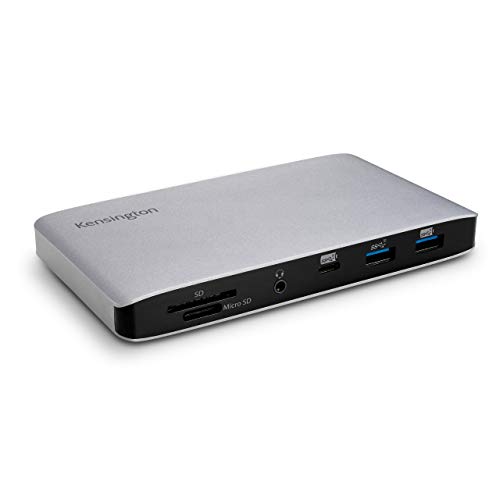
For professionals seeking seamless connectivity, the Kensington SD2500T Thunderbolt 3 and USB-C Docking Station stands out with its impressive transfer speeds of up to 40Gbps. This dock supports dual 4K Ultra HD displays at 60Hz, or an 8K monitor at 30Hz, ensuring crystal-clear visuals. You’ll find various ports, including USB-C and USB-A options, as well as Gigabit Ethernet for reliable networking. With 120W power delivery, it charges your devices efficiently while powering peripherals. Plus, enjoy the added convenience of an SD card reader and a three-year warranty for peace of mind.
Best For: Professionals and creatives who require high-speed connectivity and the ability to support multiple high-resolution displays.
Pros:
- Supports dual 4K Ultra HD displays at 60Hz or an 8K monitor at 30Hz for exceptional visual quality.
- Comprehensive port options including USB-C, USB-A, Gigabit Ethernet, and SD card readers for versatile connectivity.
- Generous 120W power delivery efficiently charges devices while powering additional peripherals.
Cons:
- Requires active adapters or cables for HDMI monitor connections, which may add to overall costs.
- MacBook M1/M2 models are limited to a single external monitor, restricting display capabilities.
- Windows laptops must support Power Delivery to utilize the full charging potential, which may not be the case for all devices.
Kensington SD4880P USB-C 4K Quad Monitor Docking Station

Need a powerful docking solution for high-resolution displays? The Kensington SD4880P USB-C 4K Quad Monitor Docking Station has you covered. It supports single 8K @ 30Hz or quad 4K @ 30Hz resolutions, ensuring stunning visuals. With 10 USB ports, including six USB-A and four USB-C, you’ll enjoy speedy connections and charging options. Plus, the 2.5Gbps Ethernet port enhances your network experience. Its 100W Power Delivery keeps your devices charged, even when your laptop isn’t connected. Made from up to 50% recycled plastic, this dock combines performance with sustainability, making it an excellent choice for any workspace.
Best For: Professionals and creatives who require high-resolution displays and multiple device connections for optimal productivity.
Pros:
- Supports high resolutions up to single 8K or quad 4K, ideal for graphic design or video editing.
- Offers extensive connectivity options with 10 USB ports and a 2.5Gbps Ethernet port for versatile usage.
- Built with sustainable materials, appealing to environmentally conscious users.
Cons:
- Mounting bracket sold separately, which may increase overall setup costs.
- Limited to specific laptop compatibility (USB-C Alt-Mode, Thunderbolt 3/4), potentially restricting user base.
- Requires additional software (DockWorks) for enhanced performance, which may be seen as a downside by some users.
Kensington UH1450P Dual 4K Monitor USB Type C Hub

Offering a compact 7-in-1 design, the Kensington UH1450P Dual 4K Monitor USB Type C Hub is ideal for hybrid workers who want to streamline their workspace without sacrificing performance. Weighing just 5.9 ounces, it’s easy to carry. With dual 1.4++ DisplayPort ports and multiple USB-A and USB-C connections, you can effortlessly connect your devices. Enjoy dual 4K video output and high-speed data transfer at 10Gbps. Plus, it provides up to 85W power delivery for your Thunderbolt 3/4, USB4, and USB-C devices. Compatible with various operating systems, it’s a plug-and-play solution that simplifies your connectivity needs.
Best For: Hybrid workers seeking a compact and efficient solution to enhance their workspace connectivity.
Pros:
- Versatile Connectivity: Features dual 1.4++ DisplayPort ports and multiple USB-A and USB-C connections for a wide range of devices.
- High Performance: Supports dual 4K video output and data transfer speeds up to 10Gbps, ensuring smooth operation.
- Portable Design: Weighs only 5.9 ounces and boasts a compact design, making it easy to carry for on-the-go professionals.
Cons:
- Limited Operating System Compatibility: Only compatible with Windows 10 or above, macOS 11 or above, iPadOS 13 or above, and Samsung DeX.
- No Software Installation: While plug-and-play is convenient, some users may miss additional features that come with dedicated software.
- Return Policy Limitations: Full refunds are only available for damaged or unopened items, which may be a concern for some buyers.
Factors to Consider When Choosing a Thunderbolt 5 Dock With Multiple USB C.
When you’re picking a Thunderbolt 5 dock with multiple USB-C ports, you should first consider compatibility with your devices. You’ll also want to look at the number of ports and their power delivery capacity. Finally, check the display resolution support and data transfer speeds to guarantee they meet your needs.
Compatibility With Devices
Choosing the right Thunderbolt 5 dock for your devices is vital for maximizing connectivity and performance. First, verify the dock’s compatibility with your specific laptop model, as some are optimized for MacBooks or Windows devices, especially those with M-Series chips. Check the supported operating systems; some docks only work with Windows 10 or macOS 11 and up. It’s also important to verify the dock’s ability to connect multiple displays, as compatibility may vary, particularly with dual 4K or single 8K setups. Additionally, look for support for USB-C and Thunderbolt 3 devices, and confirm that the dock offers adequate power delivery, as wattages for charging connected laptops and peripherals can differ markedly.
Number of Ports
Understanding the number of ports on a Thunderbolt 5 dock is key to maximizing your connectivity options. When you’re choosing a dock, consider that they can range from 8 to over 14 ports. Look for multiple USB-C and USB-A ports, as these are essential for connecting various peripherals and charging devices at the same time. It’s also vital to check for multiple video output options, like HDMI and DisplayPort, to support dual or triple monitor setups that boost your productivity. Additionally, if you’re a photographer or professional, seek docks that include card readers and Ethernet ports for quick data transfers and reliable networking. The port distribution should meet your specific connectivity needs without compromising performance.
Power Delivery Capacity
As you explore Thunderbolt 5 docks, power delivery capacity becomes a crucial factor to take into account for seamless device charging and operation. This capacity refers to the maximum power output a dock can provide, which is important for efficiently charging laptops and peripherals. Many Thunderbolt 5 docks offer Power Delivery ratings up to 140W, enabling quick charging for high-performance laptops while powering multiple devices simultaneously. It’s essential to confirm the dock’s PD capacity meets or exceeds your devices’ power requirements to avoid undercharging or performance issues. Higher PD capacity docks can intelligently manage power, allowing devices to negotiate their needs and optimize charging speed, making them ideal for users who rely on various peripherals throughout their workflow.
Display Resolution Support
When evaluating Thunderbolt 5 docks, display resolution support plays a significant role in enhancing your visual experience. Look for docks that can handle up to 8K at 60Hz for single displays, offering exceptional detail and clarity. If you’re aiming for greater productivity, consider models that support dual display setups, allowing for two 8K displays or multiple lower-resolution monitors. Pay attention to the number of video output ports, like HDMI and DisplayPort, as these determine how many external monitors you can connect. For creative professionals, the ability to support various resolutions, including 4K at 60Hz or dual 6K displays, is essential. Finally, verify compatibility with your devices to optimize performance based on your specific hardware.
Data Transfer Speeds
Choosing a Thunderbolt 5 dock with multiple USB-C ports hinges on the data transfer speeds you need for your workflow. With maximum speeds of up to 120 Gbps, Thunderbolt 5 dramatically enhances file transfer efficiency, allowing you to move a 150GB file in just about 25 seconds. If you’re dealing with large data transfers or multitasking, this speed is a game changer. Additionally, some USB-C ports can reach up to 10 Gbps using USB 3.2 Gen 2 specifications, while Thunderbolt 4 offers 40 Gbps, perfect for high-resolution video output. Keep in mind that the type of connection used affects data rates, so choose your dock wisely to guarantee it meets your specific requirements.
Build Quality and Design
High data transfer speeds are just one part of the equation; the build quality and design of a Thunderbolt 5 dock play a significant role in its overall functionality and user experience. When choosing a dock, look for durable materials like aluminum or high-grade plastic to guarantee it withstands daily use. A compact design helps save desk space while allowing easy access to ports and guaranteeing good ventilation. Ergonomic features, such as effective cable management and non-slip bases, can prevent clutter and accidental disconnections. If you plan to move the dock frequently, consider its weight for portability. Additionally, features like secure cable locks and mounting options can protect your investment in shared workspaces from theft or accidental removal.
Cooling Features
As you explore Thunderbolt 5 docks with multiple USB-C ports, don’t underestimate the importance of effective cooling features. These features are essential for maintaining optimal performance during heavy data transfers, preventing overheating that could lead to throttling or hardware damage. Look for docks equipped with advanced cooling systems like heat sinks, fans, or specialized ventilation designs that enhance airflow. Some models even incorporate thermal management technologies that automatically adjust cooling based on usage. A well-cooled docking station can support high power delivery rates, ensuring connected devices receive adequate charging without overheating. This is especially significant when transferring large files at speeds up to 120Gbps, making cooling a crucial factor in your dock’s performance and reliability.
Warranty and Support
When investing in a Thunderbolt 5 dock with multiple USB-C ports, it’s important to contemplate the warranty and support offered by the manufacturer. Evaluate the warranty duration; a longer warranty typically reflects confidence in the product’s durability. Check if the manufacturer provides professional support services, as this can be vital for troubleshooting. Consider the availability of software updates and customer service resources, which can enhance your dock’s functionality over time. Look for coverage details regarding accidental damage or defects, as thorough plans can save you from unexpected costs. Finally, investigate customer feedback on support responsiveness and effectiveness, giving you insight into the quality of assistance you can expect after your purchase.