
If you want a Razer productivity mouse for PC, the best options balance comfort, precision, and day-to-day efficiency. Razer’s lineup includes quiet compact mice, ergonomic shapes, and customizable models built for long work sessions.
This roundup focuses on practical features that matter most for office work, creative tasks, and hybrid setups—so you can choose a mouse that feels fast, dependable, and easy to live with.
Best 10 Razer Productivity Mouse for PC Picks for 2026
Best for Quiet Productivity
Razer Pro Click Mini Wireless Mouse

- Silent mechanical clicks for low-noise work
- Connects to up to 4 devices
- Compact, portable design with 7 programmable buttons
Best For: Quiet office, WFH, and travel-friendly productivity on PC.
Best for Fast, Light Control
Razer Cobra Wired Gaming Mouse

- 58g lightweight body for quick movement
- Gen-3 optical switches with 90M click life
- 8500 DPI sensor with fine 50 DPI tuning
Best For: PC users who want a lightweight wired mouse for accurate work and occasional gaming.
Best Ergonomic Value
Razer DeathAdder Essential Gaming Mouse

- Comfortable ergonomic shape for long PC sessions
- 6,400 DPI sensor with quick sensitivity changes
- Five programmable buttons and durable switches
Best For: PC users who want a comfortable, customizable mouse for work and light gaming.
Best for Ergonomic Speed
Razer DeathAdder V4 Pro Wireless Mouse

- 57g lightweight body reduces hand fatigue
- Ergonomic shape works well for long PC sessions
- High-end sensor and switches keep tracking precise
Best For: PC users who want a comfortable wireless mouse that doubles for productivity and gaming.
Best for Productivity Macros
Razer Basilisk V3 Ergonomic Mouse

- 11 programmable buttons for shortcuts and macros
- HyperScroll tilt wheel for fast or precise scrolling
- Comfortable ergonomic shape with thumb rest
Best For: PC users who want a comfortable Razer mouse for multitasking, macros, and precision work.
Best for Performance-First Users
Razer Viper V3 Pro Wireless Mouse

- 55g ultra-light build for quick, low-effort movement
- 35K sensor and 1-DPI steps for precise tracking
- 8K polling, HyperSpeed wireless, and 95-hour battery
Best For: PC users who want an ultra-light Razer mouse for precise control and fast wireless response.
Best for Wireless Control
Razer Basilisk V3 X HyperSpeed

- 9 programmable controls for shortcuts and macros
- HyperSpeed wireless plus Bluetooth connectivity
- Up to 285 hours of battery life on wireless
Best For: PC users who want a comfortable wireless mouse for multitasking and custom controls.
Best for Customizable Productivity
Razer Basilisk V3 Pro Wireless Mouse
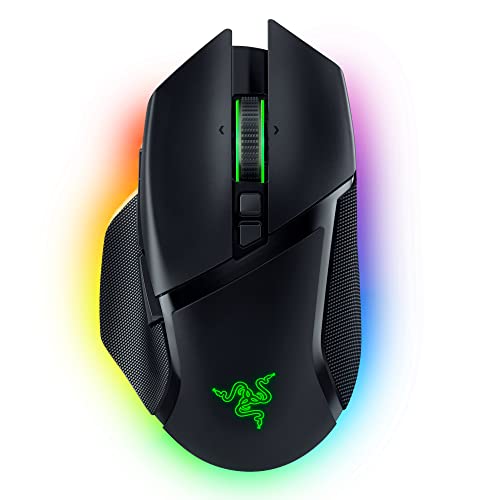
- Ergonomic shape suited to long desktop sessions
- HyperScroll tilt wheel for fast or precise scrolling
- 30K sensor and optical switches for premium responsiveness
Best For: PC users who want a highly customizable ergonomic mouse for work and light gaming.
Best for Fast, Precise Control
Razer Viper V3 HyperSpeed Wireless Mouse

- 82g lightweight body for quick, easy movement
- Focus Pro 30K sensor for highly accurate tracking
- Up to 280 hours of battery life on one AA battery
Best For: PC users who want a responsive wireless Razer mouse for fast navigation and light gaming.
Best for Quiet Productivity – Razer Pro Click Mini Wireless Mouse
If you want a razer productivity mouse for pc that stays quiet, compact, and easy to carry, the Razer Pro Click Mini is a smart fit. It combines silent clicks, flexible scrolling, and multi-device support in a design that works well for office desks, home setups, and travel.
Best For: Professionals and students who need a portable productivity mouse with quiet clicks and easy switching between devices.
Pros:
- Silent mechanical switches help reduce noise in shared workspaces.
- Connects to up to 4 devices for smoother multi-device workflows.
- Compact design makes it easy to pack for commuting or travel.
- 7 programmable buttons add useful shortcuts for work apps and tasks.
Cons:
- Smaller shape may feel cramped for users with large hands.
- Focused more on productivity than gaming-grade features.
For buyers who prioritize quiet operation and portability, this razer productivity mouse for pc offers a strong mix of comfort, customization, and desk-friendly wireless convenience.
Best for Fast, Light Control – Razer Cobra Wired Gaming Mouse
If you want a wired, responsive razer productivity mouse for pc that still feels nimble enough for gaming, the Razer Cobra is a strong pick. Its 58g build, low-drag cable, and precise 8500 DPI sensor make it easy to move quickly across everyday tasks, while the durable optical switches and PTFE feet add a premium feel.
Best For: PC users who want a lightweight wired mouse for accurate pointing, quick navigation, and occasional gaming.
Pros:
- 58g lightweight design feels quick and comfortable for long sessions
- Gen-3 optical switches offer fast clicks and long-term durability
- 8500 DPI sensor with 50 DPI steps for fine sensitivity tuning
- PTFE feet and Speedflex cable help it glide smoothly with minimal drag
Cons:
- Wired-only design may not suit clutter-free desks
- RGB lighting adds flair, but can be unnecessary for pure productivity setups
- Best fit for users who prefer a smaller, lighter mouse shape
The Razer Cobra is a practical choice if you want a razer productivity mouse for pc that prioritizes speed, accuracy, and comfort over extra features. It is especially appealing for users who like a lighter mouse that can handle work during the day and gaming after hours.
Best Ergonomic Value – Razer DeathAdder Essential Gaming Mouse
If you want a dependable razer productivity mouse for pc that still feels comfortable after long sessions, the Razer DeathAdder Essential is an easy pick. Its classic ergonomic shape, 6,400 DPI sensor, and five programmable buttons give you enough control for everyday work, light creative tasks, and after-hours gaming without adding complexity.
Best For: PC users who want an affordable, comfortable mouse with useful customization for work and play.
Pros:
- Comfortable right-handed ergonomic design for long use
- 6,400 DPI sensor with on-the-fly sensitivity changes
- Five programmable buttons for shortcuts and macros
- Mechanical switches rated for up to 10 million clicks
Cons:
- Wired only, so it may feel less flexible on a crowded desk
- Gaming-first design may be more than some office users need
Overall, this is a practical choice if you want a simple, comfortable razer productivity mouse for pc that balances precision, durability, and customization. It is not the most minimal office mouse, but for users who like a gaming-style shape with productivity-friendly controls, it delivers solid everyday value.
Best for Ergonomic Speed – Razer DeathAdder V4 Pro Wireless Mouse
If you want a razer productivity mouse for pc that still feels fast and precise, the DeathAdder V4 Pro is a strong fit. Its 57g body, ergonomic shape, and highly accurate sensor make it comfortable for long work sessions while staying responsive enough for gaming or demanding desktop use.
Best For: PC users who want an ultra-light ergonomic wireless mouse that can handle both productivity and high-performance play.
Pros:
- 57g lightweight design helps reduce fatigue during long PC sessions
- Ergonomic shape suits a relaxed palm grip for work and play
- Focus Pro 45K sensor and optical switches deliver precise, consistent tracking
- Long battery life and wireless efficiency make it practical for daily use
Cons:
- Premium pricing puts it above most office-focused mice
- 8K polling and esports features are overkill for basic productivity
- Fewer productivity extras than dedicated office mice, like extra thumb controls
For buyers comparing a razer productivity mouse for pc, this model stands out for comfort, speed, and wireless performance rather than office-only features. It’s a great pick if you want one mouse that feels excellent all day and still has top-tier hardware under the hood.
Best for Productivity Macros – Razer Basilisk V3 Ergonomic Mouse
If you want a razer productivity mouse for pc that still feels fast and precise, the Razer Basilisk V3 is a strong hybrid pick. Its ergonomic shape, programmable controls, and smooth scrolling make it easier to handle everyday work, long sessions, and quick in-app shortcuts without giving up gaming-grade performance.
Best For: PC users who want a comfortable Razer mouse for multitasking, macros, and precision work.
Pros:
- 11 programmable buttons are useful for macros, shortcuts, and workflow commands
- HyperScroll tilt wheel switches between fast free-spin and precise tactile scrolling
- 26K DPI sensor and optical switches deliver accurate, responsive tracking
- Ergonomic thumb-rest design is comfortable for extended PC use
Cons:
- RGB lighting and gaming features may be more than some office users need
- Wired design may not suit buyers who prefer a cordless desk setup
For a razer productivity mouse for pc, the Basilisk V3 stands out because it combines shortcut-friendly controls with excellent scroll and sensor performance. It is a smart choice if you want one mouse that can handle both work productivity and after-hours gaming.
Best for Performance-First Users – Razer Viper V3 Pro Wireless Mouse
If you want a razer productivity mouse for pc that can also handle fast-paced work, the Viper V3 Pro is built for precision, speed, and reliable wireless use. Its ultra-light 55g shell, high-accuracy sensor, and long battery life make it a strong fit for users who move between everyday desktop tasks and competitive play.
Best For: PC users who want a lightweight Razer mouse with top-tier tracking, fast wireless response, and all-day battery life.
Pros:
- Very light 55g design for effortless movement and reduced hand fatigue
- 35K optical sensor with granular 1-DPI adjustments for precise control
- Up to 8,000 Hz polling and HyperSpeed wireless for responsive performance
- 95-hour battery life is excellent for long work or gaming sessions
Cons:
- Pricier than most mice aimed purely at productivity
- Esports-focused shape may not suit every hand preference
- Fewer productivity extras than office-first mice with extra buttons or grips
For buyers who value speed and accuracy more than desktop extras, this is a compelling razer productivity mouse for pc. It is especially appealing if you want one mouse that feels excellent for focused work and still has the performance ceiling for gaming.
Best for Wireless Control – Razer Basilisk V3 X HyperSpeed
If you want a razer productivity mouse for pc that can handle work and casual gaming, the Basilisk V3 X HyperSpeed is a strong fit. It combines an ergonomic shape, nine programmable controls, and flexible wireless connectivity, so you can keep shortcuts close at hand without cluttering your desk.
Best For: PC users who want a comfortable, button-rich wireless mouse for multitasking, macros, and long sessions.
Pros:
- 9 programmable controls make it easy to assign shortcuts and productivity macros.
- HyperSpeed wireless plus Bluetooth gives you low-latency or multi-device flexibility.
- Long battery life is ideal for all-day use with less charging hassle.
- Ergonomic Basilisk shape supports a comfortable grip for extended PC work.
Cons:
- Designed with a gaming-first feature set, so it may feel more complex than a basic office mouse.
- RGB lighting and extra buttons may be unnecessary if you only need simple point-and-click use.
For shoppers comparing a razer productivity mouse for pc, this model stands out because it delivers real shortcut flexibility without giving up comfort or wireless convenience. It is a better pick if you value macros, multi-device support, and battery life over a minimalist office design.
Best for Competitive Precision – Razer Viper V3 Pro Wireless Mouse
If you want a razer productivity mouse for pc that also excels at fast, accurate cursor control, the Viper V3 Pro is a strong pick. It’s built like a top-tier esports mouse, but its lightweight shell, advanced sensor, and wireless stability can also suit users who prioritize speed and precision over extra office features.
Best For: PC users who want a lightweight Razer mouse with elite tracking, low-latency wireless performance, and long battery life.
Pros:
- 54 g design is easy to move quickly and comfortably
- 35K sensor and 8K polling deliver extremely precise tracking
- 95-hour battery life helps it last through long work or play sessions
- Gen-3 optical switches reduce double-click concerns
Cons:
- Designed primarily for gaming, not office-focused features
- Symmetrical shape may not suit every hand size or grip style
- 8K polling is more than most productivity users need
As a razer productivity mouse for pc, this model makes the most sense for people who value speed, accuracy, and a premium wireless feel over productivity extras like extra buttons or ergonomic sculpting. If that matches your workflow, it’s an excellent high-performance option.
Best for Customizable Productivity – Razer Basilisk V3 Pro Wireless Mouse
If you want a razer productivity mouse for pc that can do double duty for work and play, the Basilisk V3 Pro is a strong pick. Its ergonomic shape, HyperScroll tilt wheel, and highly adjustable controls make it especially useful for long desktop sessions, fast document navigation, and people who like to fine-tune their setup.
Best For: PC users who want an ergonomic, highly customizable wireless mouse with premium scrolling and excellent tracking.
Pros:
- Comfortable right-handed ergonomic shape for all-day use
- HyperScroll wheel switches between free-spin speed and precise tactile scrolling
- 30K optical sensor and Gen-3 optical switches deliver top-tier responsiveness
- Multiple connection modes plus long battery life add flexibility for desk setups
Cons:
- More expensive than typical office mice
- RGB lighting and gaming-focused features may be unnecessary for simple office tasks
- Best features can depend on optional accessories for higher polling rates
For buyers who want one mouse to handle spreadsheets, multitasking, and occasional gaming, this is a compelling razer productivity mouse for pc. It leans premium, but the comfort, scroll control, and customization make it a standout if you spend a lot of time at your desk.
Best for Fast, Precise Control – Razer Viper V3 HyperSpeed Wireless Mouse
If you want a razer productivity mouse for pc that leans more toward speed and accuracy than office ergonomics, the Viper V3 HyperSpeed is a strong pick. Its lightweight body, reliable wireless connection, and high-precision sensor make it a solid fit for users who switch between work and play.
Best For: PC users who want a responsive wireless Razer mouse for fast navigation, multitasking, and occasional gaming.
Pros:
- 82g lightweight design makes quick movements feel effortless.
- Focus Pro 30K sensor delivers very accurate tracking on a wide range of surfaces.
- Up to 280 hours of battery life reduces charging interruptions.
- On-mouse DPI control and programmable buttons add handy flexibility.
Cons:
- Ergonomics are tuned for performance grips, not all-day comfort first.
- Single AA battery design may not appeal to everyone.
- Overkill if you only need a basic office mouse.
The Viper V3 HyperSpeed is a better fit for buyers who value speed, precision, and low-latency wireless performance than for those seeking a traditional productivity shape. For anyone shopping a razer productivity mouse for pc with a performance edge, it stands out as a versatile crossover option.
How We Picked These Razer Productivity Mouse for PC Options
We looked for models that make everyday PC work easier, not just faster. That means comfortable shapes, reliable wireless or wired performance, useful button layouts, and controls that help with scrolling, shortcuts, and multitasking. We also favored mice that offer a strong fit for common productivity needs, from compact travel-friendly designs to fuller ergonomic frames.
Quick Comparison: Which Style Fits Your Workflow?
Compact mice are best if you travel often, work in tight spaces, or want an easy carry option. Ergonomic right-handed designs are better for long desk sessions because they support the hand and wrist more naturally. Symmetrical models can work well if you want a lighter, more versatile shape. If you rely on spreadsheets, editing timelines, or switching between apps all day, prioritize programmable buttons and a wheel with faster scrolling.
Key Buying Factors for Razer Productivity Mouse for PC
Comfort and Shape
A mouse that fits your grip style matters more than raw sensor specs for productivity. Look for a shape that supports your palm, keeps finger reach natural, and reduces fatigue over long sessions.
Click Feel and Noise
Quiet, tactile clicks are ideal for shared offices, home workspaces, and late-night use. If you prefer a crisp response, make sure the buttons still feel precise without being overly stiff.
Buttons and Scrolling
Extra buttons can save time when mapped to copy, paste, back, forward, or app switching. On a Razer Productivity Mouse for PC, scroll wheel behavior is especially important; faster free-spin or tilt-wheel controls can make browsing documents and spreadsheets much smoother.
Connectivity and Battery Life
Wireless models reduce desk clutter and are great for portable setups, but wired mice can be the simplest choice if you never want to think about charging. For wireless options, check battery life and whether the mouse supports USB-C or easy charging habits.
Precision and Sensitivity
High DPI numbers are not automatically better for work, but responsive tracking helps with multiple-monitor setups and fine cursor placement. The best choice is one that feels accurate at your preferred sensitivity.
Who Should Buy Which Razer Productivity Mouse for PC?
Choose a compact mouse if you prioritize portability and a tidy desk. Choose an ergonomic model if you spend many hours at a PC and want better long-term comfort. Choose a customizable mouse if you want shortcuts and scroll controls that speed up daily workflows. For users who split time between work and light gaming, a more versatile Razer Productivity Mouse for PC can deliver both comfort and performance without forcing a compromise.
In the end, the best pick is the one that matches your hand size, desk habits, and workload. Focus on comfort first, then decide which extras—silent clicks, extra buttons, faster scrolling, or wireless freedom—will actually improve your day.