
If you’re looking to enhance your workspace, a quad monitor mount could be the solution you need. These mounts not only save space but also boost your productivity by allowing for a more organized setup. From versatile options like the WALI Quad Monitor Mount to ergonomic designs such as the VIVO Pneumatic Arm, there’s a perfect fit for every need. Let’s explore the best choices available and how they can transform your work environment.
WALI Quad Monitor Mount for 13-27 Inch Screens

If you’re looking to maximize your workspace with a sleek, efficient solution, the WALI Quad Monitor Mount is perfect for you. This mount supports four monitors ranging from 13 to 27 inches, each weighing up to 22 lbs. By elevating your screens, it frees up valuable desk space and keeps your workstation clutter-free. You’ll appreciate the integrated cable management that hides unsightly wires. With adjustable arms that tilt, swivel, and rotate, you can find your ideal viewing angle with ease. Plus, its sturdy steel construction guarantees stability, making setup straightforward with either a C-Clamp or Grommet base option.
Best For: Professionals and gamers looking to optimize their workspace with multiple monitors for enhanced productivity and an organized setup.
Pros:
- Supports multiple monitors: Accommodates up to four screens, enhancing multitasking capabilities.
- Space-saving design: Elevates monitors to create a clutter-free workstation, maximizing desk space.
- Adjustable features: Offers tilting, swiveling, and rotating arms for customizable viewing angles.
Cons:
- Weight limit: Each monitor is restricted to 22 lbs, which may not accommodate heavier screens.
- Desk compatibility: Requires specific desk thickness for installation, potentially limiting options for some users.
- Assembly required: Setup may be challenging for those unfamiliar with mounting hardware.
VIVO Pneumatic Arm Quad Ultrawide Monitor Desk Mount (STAND-V400D)

The VIVO Pneumatic Arm Quad Ultrawide Monitor Desk Mount (STAND-V400D) is an ideal solution for professionals and gamers seeking to maximize their workspace with multiple ultra-wide screens. It supports up to four monitors, including one 49-inch and two 38-inch displays, ensuring a versatile setup. The heavy-duty cast aluminum construction guarantees durability, while the pneumatic arms allow for effortless height adjustments. With a tilt of +55° to -25°, 180° swivel, and 360° rotation, you’ll optimize your viewing angles easily. Plus, the included detachable VESA plates make installation a breeze, so you can focus on productivity without fussing over setup.
Best For: Professionals and gamers looking to enhance their workspace with multiple ultra-wide monitors for improved productivity and immersive experiences.
Pros:
- Supports a versatile setup with up to four ultra-wide screens.
- Easy height adjustments thanks to pneumatic arms for user-friendly operation.
- Durable construction ensures longevity and stability for heavier monitors.
Cons:
- May require a sturdy desk to accommodate the weight of multiple monitors.
- Installation can be complex for those unfamiliar with monitor mounts.
- Limited compatibility with non-VESA compliant monitors.
MOUNTUP Quad Monitor Stand (MU3007)

For those looking to maximize their desk space while enjoying a flexible and ergonomic setup, the MOUNTUP Quad Monitor Stand (MU3007) is an ideal choice. This sturdy mount supports four monitors, each between 17 to 32 inches, with a weight capacity of 17.6 lbs per arm. You can easily adjust the height, tilt, and swivel for the perfect viewing angle, while the 360° rotation allows landscape or portrait orientation. Installation is a breeze with the quick-release VESA plate and your choice of C-clamp or grommet mount. Plus, enjoy peace of mind with a 3-year warranty and responsive customer support.
Best For: Professionals and gamers looking to maximize desk space and enhance their multi-monitor setup with adjustable viewing options.
Pros:
- Flexible Adjustability: Monitors can be easily rotated, tilted, and swiveled for optimal viewing angles.
- Space-Saving Design: The solid base supports four monitors while freeing up valuable desk space.
- Easy Installation: Quick-release VESA plate and mounting options make setup straightforward and efficient.
Cons:
- Weight Limitations: Each arm can only hold up to 17.6 lbs, which may not accommodate heavier monitors.
- Initial Setup Time: Although assembly is simple, it may still take up to 20 minutes to complete.
- Limited Monitor Size Compatibility: Only compatible with monitors ranging from 17 to 32 inches, which may not suit all users’ needs.
VIVO Quad Pneumatic Monitor Mount for 4 Screens (STAND-V400G)
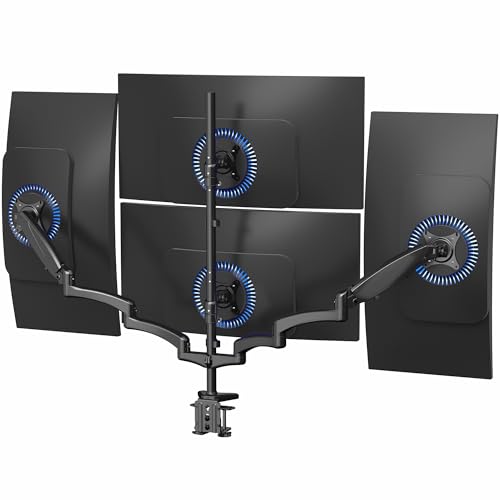
Looking to optimize your workspace with multiple screens? The VIVO Quad Pneumatic Monitor Mount (STAND-V400G) is your solution. Designed for screens up to 32 inches, it supports up to 17.6 lbs per monitor and fits VESA 75x75mm or 100x100mm mounting holes. With dual pneumatic arms, you can easily tilt, swivel, and rotate your monitors for the perfect viewing angle. Its sturdy steel and aluminum construction guarantees stability, while the drill-free, heavy-duty C-clamp makes installation a breeze. This mount saves valuable desk space by allowing you to arrange four monitors seamlessly, boosting your productivity.
Best For: Professionals and gamers seeking an efficient way to manage multiple monitors for enhanced productivity and immersive experiences.
Pros:
- Easy Adjustability: Offers multiple viewing angles with +90° to -90° tilt, 180° swivel, and 360° rotation for personalized comfort.
- Space-Saving Design: Allows for the mounting of four monitors on a single stand, freeing up valuable desk space.
- Sturdy Construction: Made from durable steel and aluminum, ensuring stability and longevity.
Cons:
- Weight Limitation: Each monitor must weigh no more than 17.6 lbs, which may restrict larger models.
- C-Clamp Dependency: Requires a surface thickness of up to 3.25 inches for installation, which may not be suitable for all desks.
- Limited Compatibility: Only fits monitors with VESA 75x75mm or 100x100mm mounting holes, potentially excluding some models.
MOUNT PRO Quad Monitor Stand for 13 to 32 inch Screens

If you’re seeking a versatile solution for multiple screens, the MOUNT PRO Quad Monitor Stand is an excellent choice for users with monitors ranging from 13 to 32 inches. This stand supports up to four monitors, each weighing a maximum of 17.6 lbs, and is compatible with VESA standards. You’ll appreciate its full adjustability, offering +90° to -90° tilt, 180° swivel, and 360° rotation for ideal positioning. Standing at 31.7 inches, it accommodates both sitting and standing workstyles ergonomically. Plus, it fits desk thicknesses of 0.59 to 3.15 inches and includes cable clips to keep your workspace tidy.
Best For: Users needing a versatile and ergonomic solution for multiple monitors ranging from 13 to 32 inches.
Pros:
- Full adjustability with tilt, swivel, and rotation options for optimal monitor positioning.
- Ergonomic design allows for comfortable viewing whether sitting or standing.
- Space-saving with cable management features to maintain a tidy workspace.
Cons:
- May require more desk space when fully set up with four monitors.
- Installation might be challenging for those unfamiliar with monitor mounts.
- Limited to monitors weighing no more than 17.6 lbs, which may exclude some heavier models.
Ergounion Quad Monitor Mount (Holds Screens up to 40 Inches)

The Ergounion Quad Monitor Mount is an excellent choice for professionals and gamers who need a sturdy solution for larger screens. It supports displays up to 40 inches and 25 lbs, ensuring you can mount your favorite monitors securely. With VESA compatibility and two mounting options—C-clamp or grommet—you can easily set it up on various desks. The fully adjustable arms let you swivel, tilt, and rotate your screens, while the hidden cable management keeps your workspace neat. Weighing 23.9 pounds, this mount has a high customer rating, making it a reliable choice for enhancing productivity and conserving desk space.
Best For: Professionals and gamers seeking a sturdy and adjustable mount for multiple large monitors.
Pros:
- Supports up to 40 inches and 25 lbs: Accommodates a wide range of monitor sizes and weights.
- Fully adjustable: Offers swivel, tilt, and rotate capabilities for optimal viewing angles.
- Hidden cable management: Keeps your workspace organized and free of clutter.
Cons:
- Weight: At 23.9 pounds, it may be cumbersome for some users to install.
- Limited desk thickness compatibility: C-clamp and grommet base may not fit all desk types.
- Return policy restrictions: Returns are only accepted for defective or damaged products, which may limit buyer confidence.
WALI Quad Monitor Desk Mount (M004)
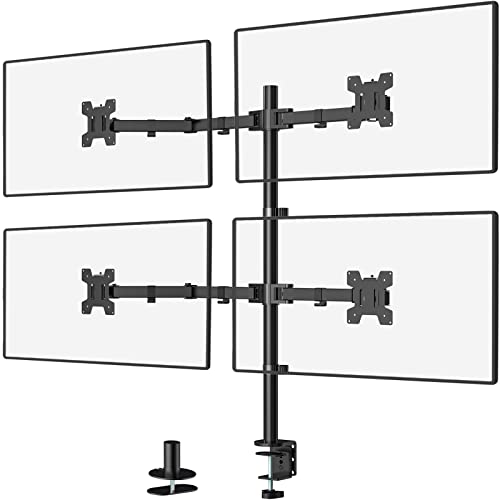
For those needing an efficient workspace solution, the WALI Quad Monitor Desk Mount (M004) stands out with its impressive ability to support up to four monitors, each weighing up to 22 lbs. This mount accommodates monitors up to 27 inches, and its detachable, height-adjustable mount plates facilitate easy customization. With a two-stage locking system and high-grade arms, you can enjoy prime viewing angles with +/-90° tilt and swivel. Plus, the 360° rotation lets you switch between landscape and portrait modes effortlessly. This mount not only enhances productivity but also promotes a comfortable work environment, reducing neck and eye strain.
Best For: Professionals and gamers who require multiple monitors for enhanced multitasking and productivity.
Pros:
- Supports up to four monitors, each up to 27 inches, allowing for a flexible and spacious workstation.
- Adjustable height and viewing angles with +/-90° tilt, swivel, and 360° rotation for ergonomic positioning.
- High customer satisfaction, evidenced by a 4.5 out of 5 stars rating from over 25,000 reviews.
Cons:
- Installation can be complex, requiring careful setup for optimal placement.
- Weight limit of 22 lbs per arm may restrict usage for heavier monitors.
- Desk space required for the mount may not suit all work environments.
WALI Quad Monitor Mount for 17-27 inch Screens

Designed to accommodate 17 to 27 inch screens, the WALI Quad Monitor Mount is perfect for professionals who need an efficient multi-monitor setup. With a maximum weight capacity of 19.8 lbs per screen, this mount supports VESA 75x75mm and 100x100mm mounting holes. You’ll appreciate its adjustment features, offering +20° to -20° tilt and 360° rotation for ideal viewing angles. Built from durable steel, it withstands over 20,000 adjustments, ensuring long-lasting stability. Installation is a breeze with included tools and clear instructions, plus built-in cable management keeps your workspace organized. Enjoy the reliable US-based customer support available seven days a week.
Best For: Professionals and gamers seeking an efficient and adjustable multi-monitor setup for enhanced productivity.
Pros:
- Versatile compatibility with 17-27 inch screens and supports VESA mounting standards.
- Durable steel construction ensures long-lasting stability and can withstand frequent adjustments.
- Built-in cable management keeps your workspace tidy and organized.
Cons:
- Maximum weight capacity of 19.8 lbs per screen may limit heavier monitors.
- Installation may require assistance for accurate alignment and stability.
- Limited grommet mount thickness options might not fit all desk types.
Quad Monitor Stand for 17 to 32 Inch Screens

Finding the right quad monitor stand can transform your workspace, especially if you’re using screens ranging from 17 to 32 inches. The PUTORSEN quad monitor stand supports up to 19.8 lbs per screen and offers universal compatibility with VESA mounting holes. Its full motion articulation allows you to tilt, swivel, and rotate each monitor for maximum viewing. The freestanding base means no drilling or clamps, making it perfect for glass tabletops. Installation is a breeze with detachable VESA heads and included hardware. Plus, you get a 3-year warranty and dedicated tech support to guarantee your satisfaction.
Best For: Individuals seeking a versatile and space-saving solution for mounting multiple monitors in a home or office setup.
Pros:
- Full motion articulation allows for customizable viewing angles with +45° to -45° tilt, 180° swivel, and 360° rotation.
- Freestanding base eliminates the need for drilling or clamps, making it safe for glass tabletops.
- Easy installation with detachable VESA heads and all necessary hardware included for a quick setup.
Cons:
- Weight limit of 19.8 lbs per screen may not be suitable for heavier monitors.
- Limited to VESA 75x75mm or 100x100mm mounting holes, which may not fit all monitor brands.
- Customer rating of 4.3 stars indicates some users may have experienced issues, as reflected in the reviews.
Pholiten Quad Monitor Arm Desk Mount (MD18864)

The Pholiten Quad Monitor Arm Desk Mount (MD18864) is a game-changer for professionals juggling multiple tasks across four screens. This mount supports up to four 32-inch monitors, with a weight capacity of 10kg per screen. Its space-saving design lifts your monitors off the desk, enhancing organization and efficiency. You’ll appreciate the gas spring adjustment, allowing you to customize height and position. With features like ±80° tilt, ±90° swing, and 360° rotation, you can find the perfect viewing angle. Plus, installation is a breeze with C-clamps or grommet options, making it versatile for any workspace.
Best For: Professionals and multitaskers who need an efficient and organized workspace with multiple monitors.
Pros:
- Space-saving design that lifts monitors off the desk, creating more workspace.
- Highly adjustable with gas spring technology for customizable height and position, as well as multiple viewing angles.
- Easy installation options with both C-clamps and grommet mounts included.
Cons:
- May not be suitable for monitors larger than 32 inches.
- Maximum weight capacity of 10kg per screen may limit compatibility with heavier monitors.
- Requires a sturdy desk surface to securely mount the arm.
Factors to Consider When Choosing a Quad Monitor Mount for Desk
When choosing a quad monitor mount for your desk, you need to take into account several key factors. You’ll want to check monitor size compatibility, weight capacity, and adjustability features to guarantee a perfect fit. Additionally, think about the available mounting options and how a space-saving design can benefit your setup.
Monitor Size Compatibility
Choosing the right quad monitor mount means paying close attention to monitor size compatibility. Most mounts fit monitors ranging from 13 to 49 inches, but you’ll need to check the specific model for exact limits. Verify your monitors have VESA mounting patterns of 75x75mm or 100x100mm, as these are standard for most displays. It’s also essential to take into account the maximum combined weight limit for all four monitors, which varies by model. If you have ultra-wide monitors, look for mounts specifically designed for them to accommodate their unique size and weight distributions. By verifying these factors, you’ll guarantee a secure and functional setup that enhances your workspace efficiency.
Weight Capacity Requirements
Confirming your quad monitor mount can handle the weight of your screens is vital for a stable setup. Check the weight capacity of each arm, as monitors typically weigh between 10 and 44 lbs. Most mounts have a specified maximum weight limit per monitor, often ranging from 17.6 lbs to 22 lbs for standard models. It’s important to evaluate the total weight of all your monitors combined, as some mounts have an overall weight capacity that could restrict your setup. Additionally, verify the mount can evenly distribute weight to prevent tipping or sagging. Look for options with adjustable tension settings to accommodate different monitor weights and help maintain ideal positioning throughout your workday.
Adjustability Features Offered
After confirming your quad monitor mount’s weight capacity, it’s time to explore the adjustability features that can enhance your setup. Look for mounts with full motion articulation, allowing you to tilt your monitors from +90° to -90°, swivel up to 180°, and rotate 360°. Adjustable height mechanisms are vital, with some offering up to 31 inches of height adjustment to promote ergonomic viewing and reduce neck strain. Pneumatic arms can make height adjustments effortless, counterbalancing monitor weight for easy repositioning. Additionally, guarantee each monitor arm has individual adjustments for tilt, swivel, and rotation, optimizing the viewing angles. Compatibility with various monitor sizes and weights is also significant, accommodating setups with screens up to 49 inches and weights between 5.5 lbs to 44 lbs.
Mounting Options Available
When it comes to selecting the right quad monitor mount for your desk, you’ll encounter two primary mounting options: C-clamp and grommet base. C-clamp mounts attach to the desk’s edge and work well for desks 0.2 to 3.62 inches thick, giving you flexibility with different styles. On the other hand, grommet mounts fit through a pre-drilled hole, supporting desk thicknesses between 0.39 and 2.56 inches for a more stable setup. Consider that C-clamps may create a visible edge, while grommet mounts provide a cleaner aesthetic. Some mounts even feature detachable VESA plates, making installation and adjustments easier. Your choice can impact both the stability and appearance of your workspace, so weigh your options carefully.
Space-Saving Design Benefits
A space-saving design in quad monitor mounts offers significant advantages for your workspace. By elevating your screens off the desk, you can free up valuable space for other items, reducing clutter and creating a more organized environment. Integrated cable management systems help conceal unsightly wires, enhancing your workstation’s aesthetic appeal. Many mounts are designed to accommodate various desk thicknesses, allowing for flexible placement without extensive modifications. Plus, adjustable height features let you customize monitor positions for better ergonomics, improving comfort during long hours of use. With a quad monitor setup, you’ll benefit from increased screen real estate for multitasking, while the space-saving design guarantees your workspace remains efficient and tidy.
Installation Process Ease
Choosing a quad monitor mount that’s easy to install can save you time and frustration. Look for models that come with clear instructions and all necessary hardware, making the assembly process straightforward. Detachable VESA plates are a great feature; they allow you to mount your monitors quickly and efficiently. Also, consider mounts with multiple installation options, like C-clamps or grommets, to fit different desk thicknesses and setups. Aim for a product that promises a setup time of under 20 minutes to keep disruptions to a minimum. Finally, check customer reviews to gauge the installation experience, as firsthand feedback can provide valuable insights into how easy or challenging the assembly might be.
Material Durability Assessment
Durability is a critical factor to contemplate in a quad monitor mount, as the materials used directly impact its strength and longevity. Look for mounts made from steel or heavy-duty aluminum, as these materials provide superior strength compared to plastic alternatives. A sturdy construction can safely support multiple monitors, with many mounts holding up to 22 lbs per arm without sagging. Corrosion resistance is key, so choose mounts with high-quality finishes to guard against dust and moisture. Additionally, consider those that have undergone rigorous testing, like fatigue tests simulating over 20,000 adjustments, ensuring long-term stability. Ultimately, a solid base with reliable mounting options, such as C-clamps or grommet mounts, further enhances durability by securing the mount firmly to your desk.
Ergonomic Design Considerations
When setting up your workspace, the ergonomic design of a quad monitor mount plays a significant role in your comfort and productivity. Choose a mount that allows height adjustments to fit both sitting and standing positions, promoting better posture and reducing neck and back strain. Look for features like tilt, swivel, and rotation to minimize glare and enhance viewing angles, making long hours more comfortable. Guarantee the mount supports various monitor sizes and weights for customization based on your needs. Integrated cable management systems can keep your workspace tidy, reducing distractions. Finally, consider the mount’s material and construction quality; a sturdy design guarantees stability during adjustments and enhances the longevity of your setup, preventing monitor fatigue over time.