
When it comes to ensuring your power supply is reliable, a good PSU tester is essential. You’ll want a device that offers versatility, accuracy, and ease of use. The right tester can save you time and frustration, allowing you to quickly diagnose voltage issues. As you explore the top options available, consider what features will best suit your needs. Let’s take a closer look at the best PSU tester devices on the market.
Computer PC Power Supply Tester with 1.8” LCD Screen
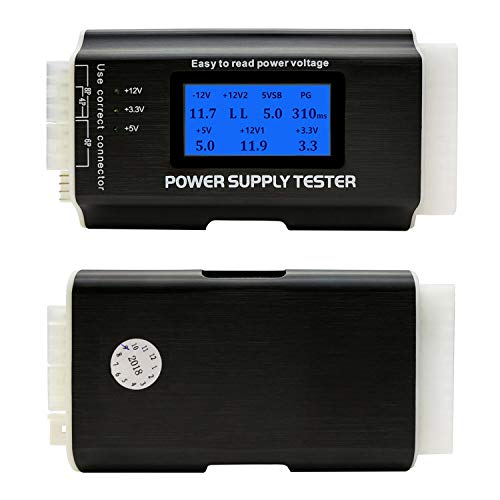
If you’re a DIY enthusiast or a professional looking to guarantee your power supply unit (PSU) is functioning properly, the Computer PC Power Supply Tester with a 1.8” LCD Screen is an excellent choice. This compact device supports various connectors like ATX, SATA, and IDE, making it versatile. Its LCD screen displays outputted voltages clearly, while a beep alarm alerts you if values exceed normal ranges. Weighing just 3.1 ounces, it’s lightweight and easy to carry. Constructed from durable aluminum alloy, it features a protective film to keep the screen scratch-free. With a solid 4.5-star rating, it’s a reliable tool for any technician.
Best For: DIY enthusiasts and professionals who need a reliable tool to test the functionality of power supply units.
Pros:
- Versatile compatibility with multiple connector types including ATX, SATA, and IDE.
- Clear voltage display on the 1.8” LCD screen, making it easy to read test results.
- Lightweight and portable design, constructed from durable aluminum alloy for enhanced durability.
Cons:
- Limited to specific connectors, as it does not support PCI-e 8-pin.
- Beep alarm may be disruptive in quiet environments when testing.
- Screen size may be small for users who prefer larger displays for easier visibility.
Thermaltake Dr. Power III ATX Power Supply Tester

The Thermaltake Dr. Power III ATX Power Supply Tester is a must-have for any tech enthusiast. With support for ATX12V v3.1 and a PCIe 12+4pin connector, it guarantees compatibility with modern power supplies. Its LCD screen displays real-time voltage outputs for +12V, +5V, +3.3V, and +5Vsb, making troubleshooting straightforward. You’ll appreciate the built-in diagnostic system that offers proactive performance assessments. Weighing just 0.33 pounds and featuring precise connector detection, it’s both lightweight and user-friendly. Plus, with a solid 4.8-star rating from customers, you can trust the reliability of this tester for maintaining your power supply.
Best For: Tech enthusiasts and professionals looking for a reliable tool to assess and maintain the performance of modern power supplies.
Pros:
- Real-Time Voltage Display: Easily monitor voltage outputs for various power levels.
- Lightweight and Portable: At only 0.33 pounds, it’s easy to handle and store.
- High Customer Satisfaction: Solid rating of 4.8 stars from 130 reviews indicates reliability.
Cons:
- Limited to ATX12V v3.1: May not be compatible with older power supply standards.
- Corded Electric Only: Lacks battery operation, restricting its portability.
- Return Policy Fees: Additional fees apply for returns due to misrepresented conditions.
Kingwin Digital Power Supply Tester with LCD Screen

For anyone looking to simplify power supply diagnostics, the Kingwin Digital Power Supply Tester with LCD Screen stands out with its thorough testing capabilities. It tests various PSUs, including ATX, ITX, and SATA, providing versatility for different setups. You’ll appreciate its user-friendly plug-and-play design, which is perfect for both beginners and experts. The clear LCD screen offers real-time voltage readouts, ensuring correct voltage delivery across all rails. Quick results help you identify faulty supplies before they damage components. Plus, with built-in safety features and durable aluminum construction, this tester promises reliable performance for the long haul.
Best For: Those looking for an efficient and user-friendly solution to test and diagnose various power supply units in both personal and professional settings.
Pros:
- Comprehensive testing for multiple power supply types including ATX, ITX, and SATA.
- User-friendly plug-and-play design makes it accessible for all skill levels.
- Built-in safety features protect against short circuits and overvoltage, ensuring reliability.
Cons:
- Limited to power supply testing and may not diagnose other computer issues.
- Compact design may make it easy to misplace if not stored properly.
- Some users may prefer more advanced features or additional testing capabilities.
1Pcs 20/24 Pin LCD Power Supply Tester for Computers

Tech enthusiasts and PC builders will find the 20/24 Pin LCD Power Supply Tester an invaluable tool for troubleshooting power supply issues. This compact device connects effortlessly to ATX connectors, allowing you to assess voltage outputs and PG values on its LCD screen. It supports various power supply types, including ATX and BTX, and measures essential voltages like 3.3V, 5V, and 12V. An automatic alarm buzzer alerts you to any faults, ensuring quick diagnostics. With a customer rating of 4.5 stars, this tester’s reliable performance makes it a must-have for anyone serious about maintaining their computer’s power supply.
Best For: Tech enthusiasts and PC builders seeking a reliable tool for diagnosing power supply issues.
Pros:
- Compact and portable design makes it easy to use and store.
- Automatic alarm buzzer alerts users to faults for quick diagnostics.
- Supports multiple power supply types, enhancing versatility.
Cons:
- Limited to testing only ATX, BTX, ITX, and TFX power supplies, which may not cover all types.
- The +3.3V output on SATA interface may vary based on wire configuration, potentially causing confusion.
- Relies on audible alerts which may not be suitable in noisy environments.
PC Computer PSU and Motherboard Tester Tool Diagnostic Analyzer Starter Kit

Diagnosing issues in old desktop PCs and laptops is a breeze with the PC Computer PSU and Motherboard Tester Tool Diagnostic Analyzer Starter Kit. This kit includes everything you need: a large PCI test board, a small laptop test board, a BIOS speaker, and more. It helps you quickly identify problems like no power or boot failures. With its fault-tolerant design, you can safely test 20/24 pin ATX PSUs. Plus, the included user guide makes setup straightforward. Customers love it, rating it 4.5 out of 5 stars, making it a reliable choice for troubleshooting and learning.
Best For: Individuals looking to diagnose and troubleshoot issues in old desktop PCs and laptops, including students in computer classes.
Pros:
- Comprehensive Testing: Includes both large PCI and small laptop test boards for versatile diagnostics.
- User-Friendly: Easy to set up with included user guides and support for troubleshooting.
- Safe Operation: Fault-tolerant design allows for secure testing of ATX PSUs.
Cons:
- Limited Compatibility: May not support all motherboard types or configurations.
- Learning Curve: Beginners might require additional time to fully understand all features.
- Size: Some users may find the size of the test boards cumbersome for certain setups.
SDTC Tech 24-Pin ATX Power Supply Jumper Bridge Tool

The SDTC Tech 24-Pin ATX Power Supply Jumper Bridge Tool is perfect for DIY enthusiasts and professional builders who need to test power supplies without a motherboard. This tool lets you power on your ATX/EPS power supply independently, making it easy to test various components like lights, fans, and hard drives. It’s compatible with both 20 and 24-pin connectors, ensuring versatility. Built with 1007 18AWG cable, it promises reliability during extended use. Whether you’re assembling a PC water cooling system or testing hardware for BTC mining, this bridge tool simplifies the process, allowing you to get accurate results quickly.
Best For: DIY enthusiasts and professional builders who need to test power supplies independently without a motherboard.
Pros:
- Versatile Compatibility: Works with both 20 and 24-pin connectors for various power supplies.
- Reliable Construction: Made with 1007 18AWG cable, ensuring durability during prolonged use.
- Simplified Testing: Allows easy testing of components like lights, fans, and hard drives without motherboard involvement.
Cons:
- Limited Use Case: Primarily designed for testing purposes, may not suit users wanting full system integration.
- No Power Supply Monitoring: Does not provide feedback on power supply performance or stability.
- Requires User Knowledge: Users need to understand how to safely connect and test components without a motherboard.
axGear Power Supply Tester for PC

For PC enthusiasts and professionals seeking reliable power supply testing, the axGear Power Supply Tester stands out with its LCD display that clearly indicates voltage status. It’s compatible with ATX, BTX, and ITX power supplies, making it versatile for various setups. This tester performs essential checks to verify your power supply functions correctly, helping you avoid potential damage to your computer equipment. You’ll appreciate its convenience too—no batteries are needed for operation! With support for 20/24 Pin connectors and SATA HDD connections, it’s an ideal tool for quick functional checks in specialized trades.
Best For: PC enthusiasts and professionals looking for an efficient and reliable tool for testing power supplies.
Pros:
- LCD display for clear voltage status indication.
- Compatible with various power supply formats including ATX, BTX, and ITX.
- No batteries required, enhancing convenience for users.
Cons:
- Limited to testing power supplies only, not other hardware components.
- May not provide advanced diagnostic features for in-depth analysis.
- The tester’s usability might be limited for beginners unfamiliar with power supply functions.
Byi Plug PC Power Supply Diagnostic Tester

If you’re a PC enthusiast or a technician looking for a reliable way to monitor your power supply, the Byi Plug PC Power Supply Diagnostic Tester is an excellent choice. This compact device, measuring 8.54 x 5.39 inches and weighing just 3.34 ounces, supports 20/24 Pin ATX, SATA, IDE, and more. Its intuitive LCD displays output voltage with precision, while the buzzer alerts you to any abnormal values. Simply connect your power supply, power it on, and listen for the beeps. You’ll quickly know if everything’s functioning correctly or if there are issues to address.
Best For: PC enthusiasts and technicians who need a reliable tool for testing and monitoring power supply performance.
Pros:
- Intuitive LCD display provides clear output voltage readings and parameters for easy monitoring.
- Error alerts via buzzer and flashing display quickly notify users of any abnormalities in voltage or PG values.
- Versatile compatibility with various power supply connectors including 20/24 Pin ATX, SATA, and IDE.
Cons:
- Some SATA interfaces may not light up due to varying wire configurations, potentially leading to confusion.
- Limited warranty information available, which may concern some buyers.
- Requires external power supply connections, making it less portable for on-the-go diagnostics.
20+4 Pin LCD Computer Power Supply Tester for SATA IDE HDD ATX ITX Connectors
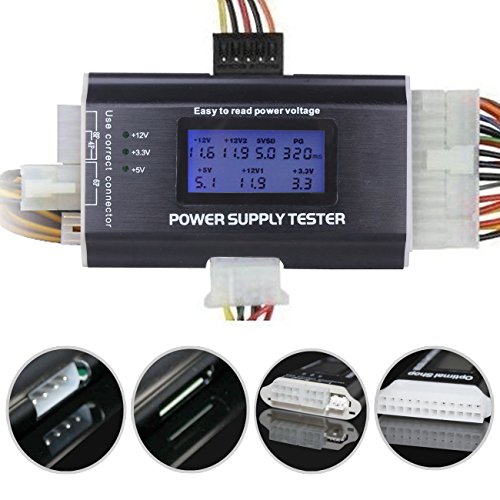
Designed for tech enthusiasts and professionals alike, the 4 Pin LCD Computer Power Supply Tester excels at diagnosing issues in a variety of power supply configurations. This 8-in-1 tester supports multiple connectors, including 20-pin, 24-pin, and SATA, ensuring versatility for your needs. Its lightweight aluminum alloy shell enhances durability and thermal conductivity. The 1.8-inch LCD screen displays output voltages clearly, while an alarm alerts you to any power supply failures. Simply connect the appropriate cables, power it on, and monitor for steady values or warnings. With a 4.5-star rating, it’s a reliable choice for quick diagnostics.
Best For: Tech enthusiasts and professionals seeking a reliable tool for diagnosing power supply issues in various configurations.
Pros:
- Versatile Compatibility: Supports multiple connectors including 20-pin, 24-pin, and SATA for broad usage.
- User-Friendly Display: The 1.8-inch LCD screen provides clear output voltage readings for easy monitoring.
- Durable Design: Made from lightweight aluminum alloy, ensuring durability and good thermal conductivity.
Cons:
- Limited to Diagnostics: Primarily functions as a tester and does not provide repair capabilities for power supplies.
- Buzzer Alerts: The buzzer may be loud or annoying for some users during alerts.
- No Built-in Battery: Requires connection to the power supply for operation, which may limit portability.
Klein Tools RT250 GFCI Outlet Tester with LCD Display

The Klein Tools RT250 GFCI Outlet Tester with LCD Display stands out as an essential tool for electricians and DIY enthusiasts who prioritize safety and efficiency. This tester is designed for standard 3-wire 120V outlets and features a large backlit LCD for easy voltage readings. It displays trip times for GFCI devices, aiding quick troubleshooting, while detecting common wiring faults to guarantee safety. The auto-hold feature retains readings for hard-to-reach outlets, and bright LEDs provide visual indicators of wiring conditions. With a CAT II 135V safety rating, you can trust its reliability across various applications.
Best For: Electricians and DIY enthusiasts seeking a reliable and efficient outlet tester for 3-wire 120V receptacles.
Pros:
- Large backlit LCD display provides clear voltage readings.
- Auto-hold feature makes it easy to record readings from hard-to-reach outlets.
- Bright LED indicators visually signal wiring conditions for quick troubleshooting.
Cons:
- Limited to standard 3-wire 120V outlets, may not be suitable for other configurations.
- May require batteries for operation, which adds to maintenance costs.
- Some users might find it less portable due to its size compared to simpler testers.
Factors to Consider When Choosing a PSU Tester Device
When choosing a PSU tester device, you should consider several key factors to guarantee it meets your needs. Look for compatibility options, voltage measurement accuracy, and a user-friendly interface that makes operation simple. Additionally, durability and alert features can make a significant difference in your testing experience.
Testing Compatibility Options
Choosing the right PSU tester device is essential for effective power supply diagnostics, and there are several key factors to evaluate. First, make sure the tester supports the specific connector types your power supply uses, like ATX, ITX, SATA, and IDE. You’ll also want a device that can handle various pin configurations, including both 20-pin and 24-pin ATX connectors. Testing multiple voltage levels, such as +3.3V, +5V, and +12V, is vital for thorough diagnostics. Additionally, look for compatibility with extra connectors like PCI-e, floppy, and HDD for added versatility. Finally, a good tester should provide real-time voltage readings and alerts for any out-of-range values, helping you quickly pinpoint potential issues with your power supply.
Voltage Measurement Accuracy
Testing compatibility options is just the starting point; ensuring voltage measurement accuracy is equally important for a reliable PSU tester. You want a device that accurately displays voltage levels within a tolerance of +/-0.01V, as this precision helps identify any discrepancies in power output. Correct voltage readings are essential for stable computer operation, preventing damage to components caused by under-voltage or over-voltage conditions. Look for testers that provide real-time voltage readings, allowing you to quickly assess your power supply’s health. High-quality models may also feature audible alarms or visual indicators to alert you when voltage readings stray outside acceptable ranges, enhancing your diagnostic capabilities and ensuring your system runs smoothly.
User-Friendly Interface Design
A user-friendly interface design can greatly enhance your experience with a PSU tester, making it easier to monitor power supply performance. Look for testers with clear, readable LCD screens that display real-time voltage levels and alerts, so you can quickly assess the power supply status. Intuitive controls and plug-and-play functionality are essential, allowing you to operate the tester without needing extensive instructions. Visual indicators like LED lights or audible alarms give immediate feedback, helping you identify faults instantly. Additionally, a compact, lightweight design improves portability, making it simple to carry and store. An organized layout of connection ports guarantees versatility, allowing you to test various power supply types seamlessly. Choose wisely to maximize your efficiency.
Durability and Build Quality
An effective PSU tester not only features a user-friendly interface but also boasts durability and build quality that can withstand regular use. When choosing your tester, opt for devices crafted from durable materials like aluminum alloy, which offer strength and corrosion resistance. Keep in mind that weight often signals build quality; heavier testers usually indicate more robust construction. Look for protective features, such as screen films, to safeguard the LCD display from scratches. A compact design enhances portability, making it easier to carry without sacrificing strength. Finally, guarantee your tester has relevant safety and performance certifications, as these can indicate a higher standard of build quality and reliability, giving you peace of mind during your testing.
Alert Features and Alarms
When selecting a PSU tester, you can’t overlook the importance of alert features and alarms, as they provide critical insights into your power supply’s health. Look for beep alarms that activate when voltage levels exceed normal ranges, giving you immediate feedback. Visual indicators, like LED lights, can quickly signal the status of your voltage outputs, helping you identify issues at a glance. A flashing display often points to faults, while stable readings indicate normal operation. Many testers also feature automatic buzzers for fault detection, enhancing your awareness of critical problems. Finally, make certain your tester includes a PG (Power Good) signal alert, confirming that your power supply is functioning correctly and supplying power to the motherboard.