
If you want a single dock that powers your laptop, adds wired internet, and simplifies your workspace, a Plugable dock with Ethernet is a smart place to start.
From compact USB-C hubs to full-featured Thunderbolt docks, the right choice depends on your monitor setup, charging needs, and device compatibility.
Best 10 Plugable Dock with Ethernet Picks for 2026
Best for Dual 4K Productivity
Plugable Dual DisplayPort & HDMI Dock

- Dual 4K monitor support with HDMI and DisplayPort
- Gigabit Ethernet and six USB 3.0 ports
- USB-C and USB 3.0 host compatibility
Best For: Windows, ChromeOS, and Mac users who need dual monitors and wired networking for office work.
Best for Fast Charging Laptops

- Gigabit Ethernet with 4K 60Hz HDMI
- Up to 140W pass-through charging support
- 10Gbps USB-C, USB-A, and card readers
Best For: USB-C laptop users who need a portable wired-network dock with strong charging support.
Best for Dual-HD Productivity
Plugable UD-3900 Dual HDMI Dock

- Dual HDMI for two-monitor productivity
- Gigabit Ethernet for stable wired networking
- 6 USB ports plus audio jacks
Best For: People who want a simple dock for dual monitors, Ethernet, and extra USB ports.
Best for Reliable Ethernet & 4K

- Gigabit Ethernet for stable wired networking
- Single 4K 60Hz HDMI on supported devices
- 100W pass-through charging with extra USB and card slots
Best For: Great for users who need a compact USB-C hub with ethernet, 4K display support, and daily-use ports.
Best for Dual 4K Mac/Windows
Plugable 7-in-1 USB-C DisplayLink Dock
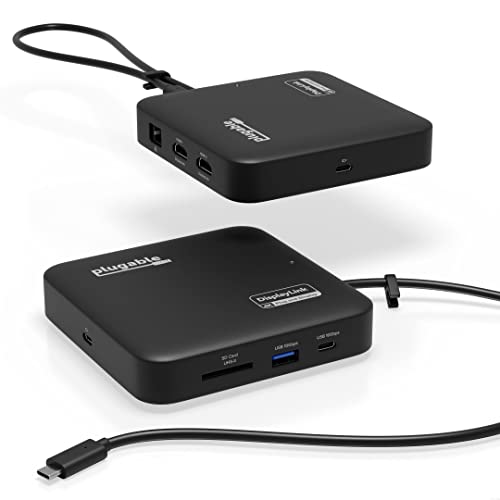
- Dual 4K 60Hz HDMI via DisplayLink
- Gigabit Ethernet, USB-A/USB-C, and SD card slots
- Up to 82W pass-through charging in a compact design
Best For: MacBook and Windows users who want dual monitors, wired Ethernet, and a travel-ready dock.
Best for Mac Dual-Display

- Dual 4K HDMI support on compatible Macs
- Includes Ethernet and 100W laptop charging
- 13 ports with Thunderbolt 4, USB, SD, and audio
Best For: MacBook users who want a driverless dock with Ethernet and external display support.
Best for Dual-Monitor Macs
Plugable 16-in-1 Thunderbolt 4 Dock

- 2.5G Ethernet for faster, more reliable wired internet
- Dual 4K 60Hz output via HDMI or DisplayPort
- 100W charging plus 7 USB ports and card readers
Best For: Users who want one dock for dual monitors, fast Ethernet, and laptop charging.
Best for Triple-Monitor Desks
Plugable 13-in-1 Triple Monitor Dock

- Drives up to three external displays via DisplayLink
- Includes Gigabit Ethernet, SD, and multiple USB ports
- Delivers up to 100W laptop charging plus 20W USB-C charging
Best For: People building a wired, multi-monitor workstation with one USB-C connection.
Best for Dual 4K Productivity – Plugable Dual DisplayPort & HDMI Dock
If you need a plugable dock with ethernet for a desk setup that can drive two external displays, this model is a strong productivity-focused option. It combines DisplayPort and HDMI outputs, six USB 3.0 ports, Gigabit Ethernet, and audio in one compact dock, with support for USB-C and USB 3.0 host connections.
Best For: Windows, ChromeOS, and Mac users who want dual 4K monitor support, wired networking, and lots of USB ports for office work.
Pros:
- Dual 4K output via DisplayPort or HDMI for a clean multitasking setup
- Built-in Gigabit Ethernet plus audio and six USB 3.0 ports
- Works with USB-C and USB 3.0 hosts for flexible compatibility
Cons:
- Does not charge the laptop, so you still need your regular power adapter
- Not a fit for gaming or protected streaming content
- Mac setup requires a driver install
For buyers comparing a plugable dock with ethernet, this one stands out for dual-monitor productivity rather than power delivery or entertainment use. It makes the most sense for office workflows, home workstations, and users who want reliable wired networking with plenty of expansion.
Best for Fast Charging Laptops – Plugable 9-in-1 USB-C Hub
If you want a plugable dock with ethernet that also covers charging, display output, and everyday peripherals, this 9-in-1 hub is a strong all-around choice. It combines Gigabit Ethernet, 4K 60Hz HDMI, and high-wattage pass-through power in a compact design that’s easy to carry between home, office, and class.
Best For: USB-C laptop users who need a portable wired-network dock with strong charging support and a simple plug-and-play setup.
Pros:
- Gigabit Ethernet plus 4K 60Hz HDMI in one compact hub
- Up to 140W input / 125W output pass-through charging with a PD 3.1 EPR charger
- Fast 10Gbps USB-C and dual USB-A ports for accessories and storage
- SD/microSD UHS-II readers add convenient media transfer options
Cons:
- Single-display HDMI only, so it’s not ideal for dual-monitor setups
- Best charging speeds require a compatible PD 3.1 EPR charger and cable
- The built-in cable is short, so it works best close to the laptop
This plugable dock with ethernet stands out for users who want a travel-friendly hub without giving up wired networking or strong power delivery. It’s a practical fit for modern USB-C laptops, especially if you need a reliable desk setup that stays simple.
Best for Dual-HD Productivity – Plugable UD-3900 Dual HDMI Dock
If you want a plugable dock with ethernet that can turn a laptop into a more complete desktop setup, the UD-3900 is built around practical office expansion. It adds dual HDMI outputs, Gigabit Ethernet, audio, and plenty of USB ports through a single USB 3.0 or USB-C connection, making it a straightforward choice for everyday productivity.
Best For: Remote workers, home office users, and Mac or Windows owners who need dual-monitor support plus a reliable wired network connection.
Pros:
- Dual HDMI outputs support two monitors for multitasking.
- Includes Gigabit Ethernet for a stable wired internet connection.
- Offers 6 USB ports plus separate audio jacks for added flexibility.
- Works with Windows, macOS, and ChromeOS with the right driver setup.
Cons:
- Requires DisplayLink drivers, especially on macOS.
- Not designed for gaming or HDCP-protected video playback.
- Does not charge the host laptop.
As a plugable dock with ethernet, the UD-3900 is less about cutting-edge display performance and more about dependable office expansion. If you need a simple dock for dual monitors, wired networking, and lots of USB connectivity, it covers the essentials well.
Best for Reliable Ethernet & 4K – Plugable 7-in-1 USB-C Hub
If you want a practical plugable dock with ethernet for everyday desk use, this 7-in-1 hub covers the essentials without adding much bulk. It combines Gigabit Ethernet, a single 4K 60Hz HDMI output, USB ports, card readers, and pass-through charging in one compact adapter for laptops, tablets, and travel kits.
Best For: Users who need a simple, driverless USB-C hub with wired network access, 4K display support, and enough ports for a mobile or shared workspace.
Pros:
- Gigabit Ethernet delivers stable wired networking for work, school, and travel
- Supports single 4K 60Hz HDMI output on compatible USB-C, USB4, and Thunderbolt systems
- 100W USB-C pass-through charging helps keep laptops powered while in use
- Includes two USB 3.0 ports plus SD and microSD card slots for extra flexibility
Cons:
- Only one external display is supported
- 4K 60Hz depends on host support and the right DisplayPort Alt Mode configuration
- Not the best fit if you need advanced docking features or multiple video outputs
This plugable dock with ethernet is a strong choice if you value dependable wired connectivity and straightforward plug-and-play expansion over a larger full-size dock. It is especially appealing for anyone who wants a compact, travel-friendly hub that still handles office basics well.
Best for Dual 4K Mac/Windows – Plugable 7-in-1 USB-C DisplayLink Dock
If you need a plugable dock with ethernet that can handle a modern work setup, this Plugable 7-in-1 is built for multitasking. It adds dual 4K 60Hz HDMI outputs, Gigabit Ethernet, USB-A/USB-C data ports, SD card support, and laptop charging in a compact dock that works with both macOS and Windows.
Best For: MacBook and Windows users who want reliable dual-monitor support, wired networking, and a travel-friendly dock for productivity.
Pros:
- Dual 4K 60Hz HDMI outputs via DisplayLink for extended dual-monitor setups
- Built-in Gigabit Ethernet plus USB-A, USB-C, and SD card connectivity
- Up to 82W pass-through charging keeps compatible laptops powered
- Compact design is easier to pack than larger desktop docks
Cons:
- Requires a DisplayLink driver for dual-display use, especially on macOS
- Not ideal for HDCP-protected playback, gaming, or 3D rendering
This plugable dock with ethernet stands out most for users who want dual external displays on a MacBook without giving up wired networking or a simple, compact footprint. If productivity and compatibility matter more than raw performance features, it’s a very practical pick.
Best for Mac Dual-Display – Plugable Thunderbolt 4 Dock
If you want a plugable dock with ethernet that feels built for modern Mac setups, this Thunderbolt 4 dock is an easy fit. It combines 100W charging, 13 ports, and plug-and-play compatibility with M4/M5 MacBook Air and Pro models, plus support for dual 4K displays on the right systems.
Best For: MacBook users who want a no-driver docking station with wired networking, dual-monitor support, and enough ports to replace a full desktop hub.
Pros:
- Dual 4K HDMI output on supported Mac systems, with no driver installation required
- Built-in Ethernet, 100W host charging, and 13 total ports for a cleaner desk
- Thunderbolt 4 performance with USB-A, USB-C, SD, and microSD expansion
- Works with M4/M5 Macs and also supports Thunderbolt 4 / USB4 Windows laptops
Cons:
- Not every Mac gets full dual-display support, especially base M1/M2 models
- Best results depend on using a compatible Thunderbolt 4 or USB4 connection
This is a strong pick if you need a plugable dock with ethernet that prioritizes stability, charging, and display flexibility over bargain pricing. It’s especially appealing for Mac users who want a polished, driverless dock for home or office use.
Best for Multi-Monitor Workstations – TobenONE 4-Monitor DisplayLink Dock
If you need a plugable dock with ethernet-style convenience but want far more display output, this TobenONE Docking Station is built for demanding desktop setups. With four HDMI ports, DisplayLink support, and a built-in Ethernet connection, it’s aimed at users who want a single-cable hub for monitors, networking, and peripherals.
Best For: Windows or MacBook users who want to drive multiple external monitors, plug in lots of USB accessories, and keep a stable wired network connection.
Pros:
- Supports up to four HDMI displays with DisplayLink for flexible multi-monitor setups
- Includes Ethernet plus 8 USB ports for a true desktop-dock experience
- 120W power supply helps support busier workstation configurations
Cons:
- DisplayLink setup may require extra software and driver installation
- Overkill if you only need basic charging and one external display
For buyers comparing a plugable dock with ethernet, this model stands out more for monitor expansion than minimalist portability. It makes the most sense when you want a networked, multi-screen workstation in one dock rather than a simple travel accessory.
Best for Dual-Monitor Macs – Plugable 16-in-1 Thunderbolt 4 Dock
If you want a plugable dock with ethernet that can also run a serious dual-monitor setup, this 16-in-1 Thunderbolt 4 model is built for the job. It pairs 2.5Gb Ethernet with dual 4K 60Hz display support, plenty of USB ports, and 100W charging, making it a strong all-in-one hub for modern MacBook and USB4 laptops.
Best For: MacBook Air and Pro users, as well as Windows/USB4 laptop owners, who need reliable dual 4K displays and fast wired networking from one dock.
Pros:
- 2.5G Ethernet is a big step up for fast, stable wired internet.
- Supports dual 4K 60Hz monitors through HDMI or DisplayPort.
- 100W power delivery helps charge a laptop while driving peripherals.
- Loads of extras: 7 USB ports, SD/microSD, and audio.
Cons:
- More dock than basic users need if you only want Ethernet and a few ports.
- Premium feature set means a higher price than simpler USB-C docks.
This plugable dock with ethernet stands out most for people who need a clean desk, fast networking, and a true dual-monitor workflow in one dependable Thunderbolt 4 package.
Best for Triple-Monitor Desks – Plugable 13-in-1 Triple Monitor Dock
If you need a plugable dock with ethernet that can also drive multiple displays, this 13-in-1 station is built for a full desktop-style setup. It adds 3 HDMI outputs, Gigabit Ethernet, SD card support, and enough USB ports to handle everyday peripherals while keeping a laptop charged.
Best For: Users who want a DisplayLink-powered dock for triple monitors, wired networking, and one-cable desk connectivity on Mac, Windows, or ChromeOS.
Pros:
- Supports up to three external monitors, including Macs that normally limit display output
- Gigabit Ethernet plus 4 USB-A ports, SD card reader, audio, and USB-C charging
- Up to 100W laptop charging helps reduce cable clutter at the desk
Cons:
- Mac users must install DisplayLink Manager to enable multi-monitor support
- Does not support protected streaming video playback like Netflix or Hulu
This plugable dock with ethernet is a strong fit if you value expandability over simplicity: it is especially useful for productivity users who want wired internet, lots of ports, and triple-display flexibility from a single USB-C connection.
Best for Thunderbolt Power Users – Plugable Thunderbolt 4 Dock with Ethernet
If you want a plugable dock with ethernet that can do more than basic desk expansion, this Thunderbolt 4 model is built for high-speed laptops, dual displays, and dependable wired networking. It combines 100W laptop charging, Gigabit Ethernet, and a wide port mix in one dock-friendly package.
Best For: Thunderbolt 4, Thunderbolt 5, and USB4 users who need a feature-rich dock with wired internet and dual-monitor support.
Pros:
- Thunderbolt-certified dock with 40Gbps bandwidth and 100W charging
- Supports dual 4K displays or a single 8K monitor on compatible laptops
- Includes Gigabit Ethernet plus 13 total ports for peripherals and storage
- Works with Windows and selected Mac setups, including advanced display support
Cons:
- Full dual-monitor support depends on laptop and OS compatibility
- Base M1/M2 Macs and non-Thunderbolt USB-C systems have display limits
- More expensive than simple USB-C hubs
As a plugable dock with ethernet, this is a strong choice if you need faster Thunderbolt performance, reliable wired networking, and serious monitor flexibility in one workstation dock. It makes the most sense for users who plan to keep a compatible laptop at the center of a multi-display setup.
How We Picked the Best Plugable Dock with Ethernet
We focused on practical docking features that matter most to everyday buyers: stable Ethernet performance, monitor support, charging output, port variety, and compatibility with Windows, Mac, and USB-C or Thunderbolt laptops. We also looked for models that fit different use cases, from travel-friendly hubs to desktop docks built for multi-monitor workstations.
Because a Plugable Dock with Ethernet is often bought to solve more than one problem at once, we prioritized products that balance networking, display expansion, and power delivery without adding unnecessary complexity.
Quick Comparison
Smaller USB-C hubs are best if you want portability, basic charging, and a single external display. Midrange DisplayLink and universal docks make more sense for dual- or triple-monitor setups. Thunderbolt 4 docks are the strongest choice for users who want faster expansion, higher bandwidth, and the cleanest long-term desktop setup.
Key Buying Factors for a Plugable Dock with Ethernet
Port Type and Host Compatibility
Start with your laptop connection. USB-C hubs work well for many modern systems, but Thunderbolt docks are better for high-performance workstations. If you use a Mac, check whether the dock needs DisplayLink drivers for multi-monitor support.
Display Needs
Count your monitors first, then confirm resolution and refresh-rate support. Some docks are ideal for a single 4K display, while others handle dual 4K or even more screens. A Plugable Dock with Ethernet should match your display plan, not force you to compromise later.
Charging Power
Look at wattage carefully. Light laptop users may be fine with 100W power delivery, but larger notebooks and power-hungry setups can benefit from stronger charging headroom.
Ethernet Speed
Gigabit Ethernet is enough for most buyers, but 2.5GbE is worth considering if you move large files, work on fast local networks, or want extra future-proofing.
Who Should Buy Which Plugable Dock with Ethernet?
Choose a compact USB-C hub if you need a travel-ready all-in-one accessory for meetings, a monitor, and wired internet. Pick a DisplayLink dock if your priority is supporting multiple external displays on USB-C laptops. Go with a Thunderbolt 4 dock if you want the most robust Plugable Dock with Ethernet for a permanent desk setup, higher bandwidth, and better expandability. If you use a MacBook Air or Pro and need fewer compromises, Thunderbolt options are usually the most straightforward fit.
In short, match the dock to your laptop’s port, your monitor count, and how much charging and networking speed you actually need. That approach will get you the best value without overbuying.