When it comes to maintaining your PC’s thermal efficiency, choosing the right cleaning wipes is essential. You’ll want a product that effectively removes old thermal paste while ensuring a clean surface for peak performance. With various eco-friendly options available, it’s easier than ever to keep your setup in top shape. But which ones stand out? Let’s explore the top choices that can elevate your thermal management game.
Noctua NA-SCW1, Cleaning Wipes for Thermal Paste (20 pieces)
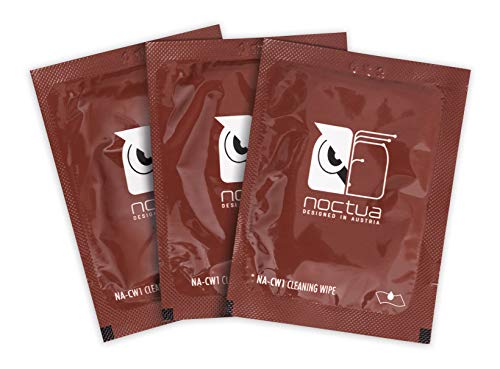
If you’re a PC enthusiast looking to maintain peak thermal performance, the Noctua NA-SCW1 cleaning wipes are your go-to solution. These pre-moistened wipes, packed in a convenient 20-piece set, are designed specifically for removing thermal compounds like Noctua NT-H2 and NT-H1. Their large size of 15×12 cm makes them perfect for cleaning heatsink contact surfaces and heat-spreaders of CPUs and GPUs. You’ll find the cleaning process easy and efficient, thanks to individually packed wipes that guarantee you always have a fresh option ready. Keep your components spotless for ideal heat transfer and performance with these essential wipes.
Best For: PC enthusiasts who want to maintain optimal thermal performance in their systems.
Pros:
- Convenient packaging: Individually packed wipes ensure freshness and ease of use.
- Effective cleaning: Designed specifically for removing thermal compounds, ensuring clean surfaces for better heat transfer.
- Generous size: Large wipes (15×12 cm) provide ample surface area for cleaning CPUs, GPUs, and heatsinks.
Cons:
- Limited quantity: Only 20 wipes may not be sufficient for heavy users or frequent applications.
- Pre-moistened: The custom detergent may not be suitable for all users’ preferences or sensitivities.
- Single-use: Once opened, each wipe is for one-time use, leading to potential waste if not used efficiently.
ARCTIC MX Cleaner – Cleaning Wipes for Thermal Paste
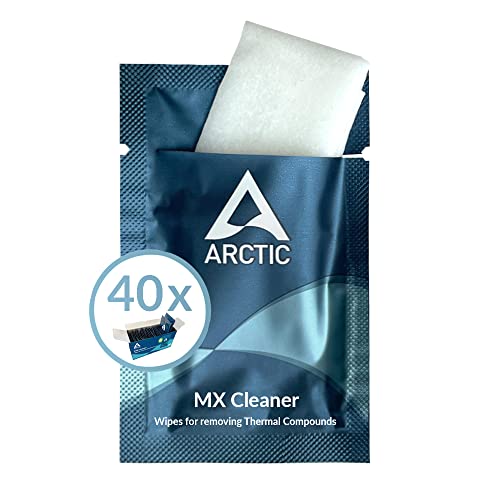
For enthusiasts and professionals looking for an efficient way to clean thermal paste, the ARCTIC MX Cleaner wipes stand out as an ideal choice. Each pack contains 40 individually packaged wipes, measuring 11.5 x 11.5 cm, making them user-friendly and convenient. These wipes dissolve thermal paste effectively and leave no traces behind, thanks to their microfine cellulose cloth. They’re made with 100% biodegradable ingredients, featuring Limonene from citrus peel, which guarantees safety without harmful chemicals. You’ll appreciate their ease of use and eco-friendly design, perfect for maintaining your setup while caring for the environment.
Best For: Enthusiasts and professionals looking for an efficient and eco-friendly solution to clean thermal paste from their devices.
Pros:
- Convenient: Individually packaged wipes prevent drying out and allow for easy handling.
- Effective Cleaning: Dissolves thermal paste efficiently and leaves no residue behind.
- Eco-Friendly: Made from 100% biodegradable materials and free of harmful chemicals.
Cons:
- Limited Quantity: Each pack contains only 40 wipes, which may not be sufficient for larger projects.
- Single Use: Wipes are designed for one-time use, leading to more waste compared to reusable alternatives.
- Scent: The presence of Limonene may have a citrus scent that some users might find overpowering.
OwlTree Thermal Paste Remover Kits (20 Pieces Wipes)

OwlTree Thermal Paste Remover Kits are ideal for PC builders and enthusiasts who demand precision in their thermal management. This kit includes 20 large wipes, a pair of gloves, a spreader, and a spatula, making cleanup effortless. You’ll efficiently remove old thermal compound residues from CPUs, GPUs, and heatsinks, ensuring a spotless surface for reapplication. The wipes are 12cm x 15cm, perfect for easy cleaning and polishing. Packaged in aluminum foil, they stay moist for up to three years, so you won’t have to worry about drying out. With the tools provided, maintaining your setup has never been easier!
Best For: PC builders and enthusiasts seeking efficient and precise thermal management solutions for their components.
Pros:
- Efficiently removes old thermal compound residues from CPUs, GPUs, and heatsinks.
- Includes helpful tools like gloves, a spreader, and a spatula for easy application and cleanup.
- Wipes are large (12cm x 15cm) and packaged to retain moisture for up to three years.
Cons:
- Limited to 20 wipes, which may not be sufficient for larger projects or multiple applications.
- Requires careful handling to avoid tearing the wipes during use.
- Some users may prefer alternative cleaning methods over wipes.
Noctua NT-H2 3.5g, Thermal Computer Paste incl. 3 Cleaning Wipes (3.5g)

Noctua NT-H2 3.5g Thermal Computer Paste, complete with three cleaning wipes, is ideal for enthusiasts and gamers looking to enhance their system’s cooling performance. This premium-grade thermal compound guarantees peak heat transfer from your CPU or GPU to the heatsink, greatly lowering temperatures compared to stock pastes. It’s easy to apply—no spreading required—and compatible with a variety of systems, including AMD Ryzen and Intel Core CPUs. With a lifespan of up to five years on your CPU, it offers excellent long-term stability. Plus, the included cleaning wipes make application and cleanup a breeze, keeping your setup spotless.
Best For: Enthusiasts and gamers seeking to improve their system’s cooling performance with a high-quality thermal paste.
Pros:
- Easy application with no spreading required, saving time and effort.
- Significantly lowers temperatures compared to stock thermal pastes, enhancing overall system performance.
- Includes cleaning wipes for a mess-free application and cleanup.
Cons:
- Limited to 3.5g, which may not be sufficient for multiple high-end CPU applications.
- Some users may find it pricier compared to basic thermal pastes.
- Performance may vary depending on specific hardware configurations and usage scenarios.
Thermal Grizzly Kryonaut Thermal Paste with Cleaning Wipes

If you’re a gaming enthusiast or a professional looking to maximize your system’s cooling efficiency, Thermal Grizzly Kryonaut Thermal Paste with Cleaning Wipes is an excellent choice. This high-performance paste boasts exceptional thermal conductivity, making it ideal for demanding setups, including CPUs, GPUs, and consoles like PS4 and Xbox. The included 12 cleaning wipes (6 wet and 6 dry) guarantee your surfaces are perfectly prepped for application. Plus, the specially designed syringe and spatula allow for precise distribution. With long-lasting performance that withstands temperatures up to 80°C, you’ll enjoy efficient cooling and reliability in your system for the long haul.
Best For: Thermal Grizzly Kryonaut Thermal Paste is best for gaming enthusiasts and professionals seeking optimal cooling performance for high-performance CPUs, GPUs, and gaming consoles.
Pros:
- Exceptional thermal conductivity for efficient heat dissipation in demanding configurations.
- Includes cleaning wipes for easy surface preparation before application, ensuring better adhesion.
- Long-lasting performance that remains effective at temperatures up to 80°C, providing reliability over time.
Cons:
- Price may be higher compared to standard thermal pastes, which could deter budget-conscious users.
- Requires careful application using the syringe and spatula, which might be challenging for inexperienced users.
- Limited quantity (1 gram) may not be sufficient for multiple applications or larger setups.
Noctua NT-H1 Thermal Paste with Spatula and Cleaning Wipes

For those looking to enhance thermal efficiency in their builds, the Noctua NT-H1 thermal paste comes with a spatula and three cleaning wipes, making it an ideal choice. This 3.5g SW Edition paste guarantees superior heat transfer from your CPU or GPU to the heatsink, noticeably lowering temperatures compared to stock pastes. It’s compatible with both air and liquid coolers, perfect for various devices like AMD Ryzen and Intel Core CPUs. With Noctua’s trusted quality, you can expect excellent long-term stability, lasting up to five years on your components. Enjoy easy application and a spotless setup with the included cleaning wipes.
Best For: Those seeking optimal thermal performance for their CPUs and GPUs with easy application and cleaning.
Pros:
- Superior heat transfer efficiency compared to stock thermal pastes.
- Long-lasting stability, with a recommended usage time of up to five years.
- Includes spatula for easy application and cleaning wipes for a tidy setup.
Cons:
- 3.5g pack may only allow for 3 applications on larger CPUs like TR4.
- Some users may prefer larger quantities for multiple applications.
- Slightly higher price point compared to basic thermal pastes.
Thermal Grizzly TG Cleaning Wipes (10 Pcs)

Thermal Grizzly TG Cleaning Wipes (10 Pcs) are the ideal choice for PC builders and enthusiasts who demand pristine surfaces before applying thermal paste. With a dual wipe system, these wipes include both wet and dry options, ensuring thorough cleaning and degreasing of your surfaces. Start by using the wet wipes to remove grease, followed by the dry wipes for a final polish. This method prepares your surfaces for superior bonding with thermal pastes and pads, enhancing their adhesion and overall performance. Keep your setup spotless and ready for peak cooling with these efficient cleaning wipes.
Best For: PC builders and enthusiasts who require a clean surface for optimal thermal paste application.
Pros:
- Thorough Cleaning: Dual wipe system ensures effective degreasing and polishing.
- Enhanced Adhesion: Prepares surfaces for better bonding with thermal materials.
- Convenient Packaging: Comes with both wet and dry wipes for versatile use.
Cons:
- Limited Quantity: Only 10 wipes may not be sufficient for multiple applications.
- Single Use: Wipes are disposable, leading to waste after one use.
- Not Eco-Friendly: The product may not be environmentally sustainable due to being single-use wipes.
ARCTIC MX-6 Thermal Paste for CPU and Graphics Cards

ARCTIC MX-6 Thermal Paste is the ideal choice for gamers and PC builders who demand top-tier performance from their CPUs and graphics cards. With a 20% improvement in thermal performance over MX-4, it guarantees superior heat transfer thanks to its high thermal conductivity. You’ll appreciate its versatility, as it’s perfect for direct-die cooling in GPUs and consoles. Plus, the non-conductive formula eliminates any risk of short circuits during application. With over 20 years of experience, ARCTIC assures quality and reliability, making MX-6 a smart investment for maintaining peak temperatures in your setup.
Best For: Gamers and PC builders seeking high-performance thermal solutions for their CPUs and graphics cards.
Pros:
- 20% better thermal performance compared to MX-4 for superior heat transfer.
- Non-conductive formula eliminates risks of short circuits during application.
- Versatile applications suitable for direct-die cooling in GPUs and consoles.
Cons:
- Only available in a 4 g package, which may not be sufficient for larger builds.
- Requires careful application to avoid air bubbles for optimal performance.
- May be more expensive than some other thermal paste options on the market.
Technical Prep Pads Cleaning Wipes (10PCS)

When tackling the challenging task of cleaning electronic surfaces, the Technical Prep Pads Cleaning Wipes (10PCS) stand out as an essential tool. These ultra-moist, lint-free wipes effectively remove dirt, residue, and thermal paste without leaving marks or causing damage. Their larger size means you can tackle more surface area quickly. With a higher concentration of cleaning liquid, they dry in seconds, ensuring your devices are ready to use right away. Individually wrapped for convenience, you can easily toss them in your bag for on-the-go cleaning, whether it’s for your laptop, phone, or even airplane seats.
Best For: Those looking for a convenient and effective solution to clean electronic devices without causing damage.
Pros:
- Ultra-moist, lint-free material prevents scratches while cleaning.
- Quick drying time allows for immediate use of devices after cleaning.
- Individually wrapped for hygienic, on-the-go convenience.
Cons:
- Limited to 10 wipes per pack, which may not last long for heavy users.
- Higher concentration of cleaning liquid may not suit all cleaning preferences.
- Not suitable for heavy-duty cleaning tasks beyond electronic surfaces.
Thermal Grizzly Kryonaut Extreme Thermal Paste (2 Gram)

For gaming enthusiasts and overclockers, the Thermal Grizzly Kryonaut Extreme Thermal Paste (2 Gram) is an indispensable tool. With its exceptional thermal conductivity of 14.2 W/(m·K), it guarantees ideal heat transfer for your CPU, GPU, and consoles like PS4 and Xbox. The included syringe and applicator make it easy to apply, guaranteeing a smooth distribution. You’ll appreciate its long-lasting performance, stable up to 80 degrees Celsius, which leads to noticeable temperature drops from the first use. Plus, it comes with six wet and six dry cleaning wipes, perfect for prepping surfaces before application.
Best For: Gaming enthusiasts and overclockers seeking high-performance thermal management for their CPUs, GPUs, and gaming consoles.
Pros:
- Exceptional thermal conductivity of 14.2 W/(m·K) ensures optimal heat transfer.
- Long-lasting performance with stability up to 80 degrees Celsius, leading to noticeable temperature reductions.
- User-friendly application with included syringe and applicator, along with cleaning wipes for surface prep.
Cons:
- Limited quantity (2 grams) may not be sufficient for multiple applications or larger setups.
- Some users may find it more expensive compared to standard thermal pastes.
- Requires careful application to avoid excess paste, which can lead to inefficient thermal transfer.
Factors to Consider When Choosing PC Thermal Paste Cleaning Wipes
When you’re choosing PC thermal paste cleaning wipes, consider the size of the wipes and how efficient they are at cleaning. You should also think about whether you want biodegradable options and how safe the chemicals are. Finally, don’t overlook packaging and portability, especially if you plan to use them on the go.
Wipe Size Matters
Choosing the right size of thermal paste cleaning wipes can greatly impact your cleaning efficiency. Larger wipes, like those measuring 15×12 cm, provide ample surface area, allowing you to clean both CPUs and coolers effectively in one swipe. If you prefer a medium size, around 12cm x 15cm strikes a good balance, offering usability without being too bulky for delicate components. On the other hand, smaller wipes, such as 11.5 x 11.5 cm, may require multiple applications to tackle larger surfaces, which can slow you down. Additionally, the wipe size you choose can affect maneuverability in tight spaces within your PC. Opt for a size that guarantees thorough cleaning without risking damage to your valuable components.
Cleaning Efficiency
While many factors influence the cleaning efficiency of thermal paste wipes, the material composition and moisture level stand out as key elements. Microfine cellulose cloths are highly effective for dissolving thermal paste and removing residues. Opt for pre-moistened wipes with specialized cleaning solutions, as they break down thermal compounds more efficiently than dry alternatives. Larger wipes, like 15×12 cm, offer better coverage, allowing you to clean CPUs and heatsinks without needing multiple wipes. Additionally, individually packaged wipes help maintain moisture levels, ensuring each one stays effective for cleaning. By focusing on these factors, you’ll enhance your cleaning routine and keep your PC setup spotless, ensuring peak thermal performance.
Biodegradable Options Available
Biodegradable options for PC thermal paste cleaning wipes are gaining popularity among eco-conscious consumers. These wipes are crafted from natural materials, often featuring plant-based ingredients, making them a more environmentally friendly choice. You’ll appreciate that many biodegradable wipes break down within a few months in composting conditions, greatly reducing landfill waste and environmental impact. Plus, they typically contain no harmful chemicals like benzenes or alcohols, ensuring a safer cleaning process for you and the planet. By opting for biodegradable wipes, you align your cleaning routine with sustainable practices, effectively cleaning thermal paste while minimizing plastic and chemical pollution associated with traditional products. It’s a simple switch that benefits both your setup and the environment.
Chemical Safety Considerations
How can you guarantee your safety while cleaning thermal paste from your PC? Start by checking the ingredient list of cleaning wipes for harmful chemicals like benzenes and alcohols. Opt for wipes with natural ingredients, such as Limonene from citrus peel, which are safer and environmentally friendly. Biodegradable options are also a good choice, as they minimize environmental impact while being safe for your electronics. Be sure the wipes lack abrasive materials that could damage sensitive surfaces. Finally, review safety information to identify any potential allergens or irritants that may affect your skin or respiratory system. Taking these precautions can help guarantee a safer cleaning experience for both you and your setup.
Packaging and Portability
When choosing PC thermal paste cleaning wipes, packaging and portability play essential roles in your cleaning routine. Look for individually packaged wipes to prevent drying out, ensuring each one remains moist until you need it. Larger sizes, like 15×12 cm, give you more surface area, helping you clean multiple components with fewer wipes. If you’re eco-conscious, consider biodegradable options that maintain effective cleaning capabilities while being kinder to the environment. Durable packaging, such as aluminum foil, helps retain moisture and extends shelf life, so your wipes stay usable longer. Finally, opt for compact and lightweight designs, making it easy to store or transport your wipes for on-the-go maintenance and repairs.
Compatibility With Thermal Paste
Selecting the right PC thermal paste cleaning wipes means considering their compatibility with the specific thermal compounds you plan to use. Make certain the wipes effectively dissolve and remove the thermal pastes, whether they’re silicone-based or metal-based. Look for ingredients like Limonene, known to break down various thermal paste residues. The size of the wipes is also important; larger wipes offer more surface area, making it easier to clean heatsinks and chips thoroughly. Opt for individually packaged wipes to keep them moist and ready for action. Finally, consider biodegradable or environmentally friendly options, as they offer good performance while being kinder to the planet. Choosing wisely guarantees your setup stays spotless and efficient.
Additional Cleaning Tools Included
Choosing PC thermal paste cleaning wipes that come with additional tools can greatly enhance your cleaning experience. Look for kits that include gloves, spatulas, or spreaders, making the cleaning and reapplication process smoother. Multiple wipe types, like wet and dry options, guarantee you effectively remove all thermal paste residues. Wipes designed for degreasing can further improve surface preparation, guaranteeing the best thermal paste bonding. Larger wipe sizes can be beneficial for cleaning bigger components, such as heatsinks and CPUs. By selecting a kit that includes these extra items, you’ll find everything you need for a complete thermal paste application process in one convenient package, saving you time and effort while maintaining your setup.