
When you’re looking to enhance the performance and lifespan of your SSDs, the right heatsink can make all the difference. With so many options available, it’s essential to find a solution that combines effective cooling with reliable design. From advanced features like PWM-controlled fans to stylish aesthetics, the best SSD heatsinks cater to various needs. Let’s explore some of the top contenders that can keep your drives cool and efficient under pressure.
Thermalright HR10 2280 PRO Black SSD Heatsink Cooling

If you’re looking for a high-quality cooling solution for your M.2 SSD, the Thermalright HR10 2280 PRO Black SSD Heatsink Cooling is an excellent choice. This heatsink boasts advanced AGHP technology, enhancing heat conduction efficiency with its 4*5mm heatpipes. You’ll appreciate the double-sided cooling design, which reduces temperatures by 10°C-30°C, preventing overheating and throttling. The compact PWM fan operates at impressive speeds of 3500-6000 RPM, ensuring rapid temperature reduction. It supports both single-sided and double-sided SSDs, making it versatile for your setup. With easy installation and a sleek look, this heatsink elevates your SSD performance considerably.
Best For: Gamers and professionals seeking to enhance the cooling performance of their M.2 SSDs to prevent overheating and throttling.
Pros:
- Advanced cooling technology with AGHP and double-sided cooling design significantly reduces temperatures.
- High-speed PWM fan operates at 3500-6000 RPM for rapid heat dissipation.
- Versatile compatibility with both single-sided and double-sided M.2 SSDs.
Cons:
- Not compatible with ITX motherboard back-mounted M.2 interfaces, limiting certain setups.
- Compact fan size may result in higher noise levels at maximum speeds.
- Installation may require additional effort for users unfamiliar with hardware components.
EZDIY-FAB Shield ARGB M.2 SSD Heatsink with 20mm PWM Fan

The EZDIY-FAB Shield ARGB M.2 SSD Heatsink with its integrated 20mm PWM fan is perfect for gamers and heavy workloads looking to maintain peak SSD performance. This heatsink lowers temperatures by 5°C to 30°C, preventing thermal throttling during intense gaming sessions. Its compact design fits snugly in tight builds, while the vibrant ARGB lighting syncs with your motherboard for a stunning visual effect. Built with premium aluminum and durable ball-bearing technology, it promises up to 60,000 hours of lifespan. Compatible with various M.2 SSD sizes, this heatsink guarantees your drive stays cool and efficient under pressure.
Best For: Gamers and professionals who require optimal SSD performance and cooling during intense workloads.
Pros:
- High-performance cooling that effectively lowers SSD temperatures by 5°C to 30°C, preventing thermal throttling.
- Vibrant ARGB lighting adds an aesthetic touch and can be synchronized with compatible motherboards.
- Durable construction with a lifespan of up to 60,000 hours, ensuring long-term reliability.
Cons:
- Requires space in tight builds, which may limit compatibility with some setups.
- Active cooling can generate noise, especially at higher RPMs during intense use.
- Limited to M.2 SSDs, meaning users with other types of drives cannot utilize this heatsink.
Thermalright HR10 2280 PRO SSD Cooler

Designed for gamers and professionals who demand peak performance from their M.2 SSDs, the Thermalright HR10 2280 PRO SSD Cooler stands out with its advanced AGHP technology, which enhances heat conduction efficiency. Weighing just 95g, its stainless steel and aluminum fins guarantee durability and effective heat dissipation. With four 5mm heat pipes and a compact PWM fan spinning at 3500-6000 RPM, this cooler keeps your drives cool during intense gaming sessions. It’s compatible with both single-sided and double-sided 2280 SSDs. The Thermalright HR10 is a solid choice for those seeking reliability and performance in their cooling solutions.
Best For: Gamers and professionals seeking peak performance and reliable cooling for their M.2 SSDs during intense workloads.
Pros:
- Advanced AGHP technology enhances heat conduction efficiency for superior cooling performance.
- Compact design with a lightweight build (95g) makes it easy to install without adding bulk to your system.
- Compatible with both single-sided and double-sided 2280 SSDs, providing versatile cooling options.
Cons:
- Not compatible with ITX motherboard back-mounted M.2 interfaces, limiting installation options for some users.
- Fan speed may be noisy at higher RPMs, which could be a concern in quieter setups.
- Requires a 4PIN PWM fan interface, which may not be available on all motherboards.
EZDIY-FAB Shield ARGB M.2 SSD Heatsink with PWM Fan (1 Pack)

For gamers and content creators seeking superior cooling solutions, the EZDIY-FAB Shield ARGB M.2 SSD Heatsink with PWM Fan is a top choice. It effectively lowers SSD temperatures by 5°C to 30°C, thanks to its integrated PWM fan that adjusts speeds up to 13,000 RPM. Constructed from high-density aluminum, this compact heatsink combines durability with aesthetic appeal, perfect for any setup. Its dual-sided thermal pads and metal base guarantee ideal heat dissipation, preventing performance loss. Plus, the vibrant ARGB lighting syncs seamlessly with your motherboard, making it a stylish addition to your gear while keeping your SSD cool.
Best For: Gamers and content creators who require superior cooling solutions for their M.2 SSDs.
Pros:
- High-performance cooling that reduces SSD temperatures by 5°C to 30°C.
- Integrated PWM fan with adjustable speeds up to 13,000 RPM for efficient thermal management.
- Premium aluminum design with vibrant ARGB lighting that enhances aesthetics and compatibility with motherboard sync.
Cons:
- May not be compatible with SSDs outside the 2280 form factor without adjustments.
- The compact design might limit airflow in extremely tight spaces.
- Advanced cooling features may be overkill for casual users or low-performance SSDs.
WAVLINK Heatsink 880F for M.2 NVMe PCIe and SATA SSD

If you’re looking to enhance the performance and longevity of your M.2 NVMe or SATA SSD, the WAVLINK Heatsink 880F is an exceptional choice. This heatsink supports 2280 NVMe PCIe and SATA SSDs, guaranteeing compatibility with various motherboard types. With an anodized aluminum casing and a unique groove shell design, it maximizes heat dissipation while reducing temperatures by about 18°C. The 7,000 RPM fan delivers superior cooling performance without excessive noise, thanks to its low-noise adapter. Plus, thermal conductive pads facilitate efficient heat transfer, prolonging your SSD’s lifespan and maintaining stable data storage for peak performance.
Best For: Gamers and PC enthusiasts looking to improve the cooling and performance of their M.2 NVMe or SATA SSDs.
Pros:
- Enhances cooling efficiency by up to 35%, reducing the risk of overheating.
- Durable anodized aluminum construction ensures long-lasting performance and resistance to physical damage.
- Low-noise fan operation maintains a quiet computing environment while providing superior cooling.
Cons:
- Not compatible with laptops or gaming consoles like PS5, limiting its use to desktop systems.
- Installation may require additional tools or skills, which could be challenging for beginners.
- The heatsink’s effectiveness may vary depending on the overall airflow and cooling setup of the PC case.
Thermalright HR10 2280 PRO Solid-State Drive with ARGB Display

When you’re looking to maximize the performance and longevity of your high-speed M.2 SSD, the Thermalright HR10 2280 PRO with its built-in ARGB display stands out as a top choice. Its smart fan control and four heat pipes guarantee efficient cooling, maintaining low temperatures during intense workloads. The ARGB display provides real-time monitoring of your SSD’s temperature, usage rates, and read/write speeds, giving you valuable insights. With dimensions tailored for 2280 M.2 SSDs, this cooler enhances stability and extends lifespan. Plus, its intelligent fan system adjusts speed to balance cooling and noise, making it a must-have for any PC enthusiast.
Best For: PC enthusiasts seeking to enhance the performance and longevity of their M.2 SSDs with efficient cooling and real-time monitoring.
Pros:
- Efficient cooling technology with four heat pipes and smart fan control to maintain optimal SSD temperatures.
- Built-in ARGB display for real-time monitoring of temperature, usage rate, and read/write speeds.
- Intelligent fan system dynamically adjusts speed to minimize noise while providing effective cooling.
Cons:
- Not compatible with ITX motherboard back-mounted M.2 interfaces, limiting installation options.
- Requires a 9Pin USB interface on the motherboard for full functionality of monitoring features.
- The additional size and components may not fit in all cases, potentially restricting compatibility with certain setups.
Thermaltake MS-1 M.2 SSD Cooler with Micro Blower Fan
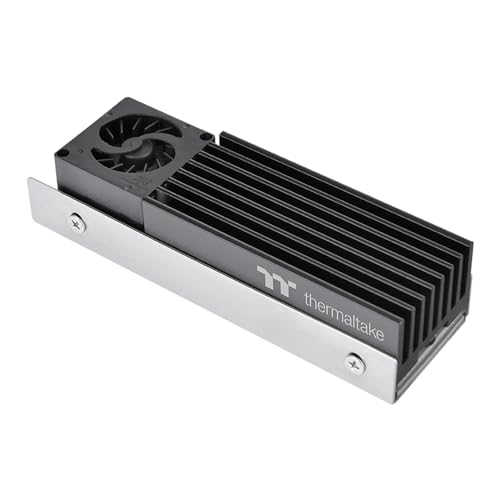
The Thermaltake MS-1 M.2 SSD Cooler with its powerful 20mm micro blower fan is an ideal choice for gamers and content creators looking to maximize their M.2 2280 SSD performance. This cooler features an impressive 8000 RPM fan, ensuring efficient heat dissipation. Its high-quality aluminum heatsink works alongside a Ø6 mm copper heat pipe to keep your SSD cool during intense tasks. The integrated molding enhances durability, while the stainless steel reinforced backplate adds strength and support. With its robust construction and effective cooling technology, the MS-1 helps extend the life and performance of your M.2 SSD.
Best For: Gamers and content creators looking to enhance the performance and longevity of their M.2 2280 SSDs.
Pros:
- Powerful cooling: Features a high-speed 8000 RPM micro blower fan for efficient heat dissipation.
- Robust construction: Made with high-quality aluminum heatsink and stainless steel reinforced backplate for added durability.
- Enhanced performance: Aims to extend the life and performance of M.2 SSDs during intense tasks.
Cons:
- Size constraints: Designed specifically for M.2 2280 SSDs, limiting its compatibility with other sizes.
- Installation complexity: May require additional effort to install compared to simpler cooling solutions.
- Noise potential: Although designed to be silent, the fan’s operation may still produce noticeable noise in quiet environments.
GRAUGEAR M.2 2280 SSD Heatsink with Cooling Fan
![GRAUGEAR M.2 2280 SSD Heatsink, Direct-Touch Heat of Dual Copper Heat Pipes, 25mm Cooling Fan Built-in PWM Control, Aluminum Plate-Fin Design, Thermal Pads incl., 1.34 in Height [G-M2HS03-F]](https://m.media-amazon.com/images/I/41vn1KEj-7L._SL500_.jpg)
For gamers and content creators looking to maximize their SSD performance, the GRAUGEAR M.2 2280 SSD Heatsink with Cooling Fan stands out with its advanced cooling technology. This heatsink features dual copper heat pipes that employ Direct-Touch Heat technology for rapid heat conduction. The 25mm PWM-controlled fan operates at a maximum speed of 8500 RPM, ensuring efficient cooling while maintaining low noise levels. With an aluminum plate-fin design, it can reduce M.2 SSD heat by up to 60%. The package includes thermal pads, screws, and a screwdriver, making installation straightforward and hassle-free. Keep your SSD cool and performant!
Best For: Gamers and content creators seeking to enhance SSD performance and thermal management.
Pros:
- Efficient Cooling: Dual copper heat pipes and a high-speed fan effectively reduce SSD temperatures by up to 60%.
- Quiet Operation: The PWM-controlled fan maintains low noise levels while providing optimal cooling performance.
- Easy Installation: Comes with all necessary components, including thermal pads and a screwdriver for a straightforward setup.
Cons:
- Weight: At 180 grams, it may add noticeable weight to lightweight builds.
- Size Limitations: Designed specifically for M.2 2280 SSDs, limiting compatibility with other SSD form factors.
- Potential Overkill: High-performance cooling may be unnecessary for users with low-demand SSD workloads.
EZDIY-FAB Shield M.2 SSD Heatsink with Built-in PWM Fan

Designed with high-performance users in mind, the EZDIY-FAB Shield M.2 SSD Heatsink features a built-in 20mm PWM fan that actively cools your SSD, guaranteeing peak performance during intense gaming or heavy workloads. With dual-sided thermal pads and a metal base, it effectively lowers temperatures by 5°C to 30°C, preventing overheating. The integrated ball-bearing fan automatically adjusts its speed up to 13,000 RPM, providing efficient cooling tailored to your needs. Constructed from high-density aluminum alloy, its compact design fits snugly in tight spaces, while supporting various M.2 SSD sizes guarantees compatibility, making it a perfect choice for any setup.
Best For: High-performance users seeking efficient cooling solutions for M.2 SSDs during intense gaming or heavy workloads.
Pros:
- Effective cooling: Lowers SSD temperatures by 5°C to 30°C, preventing overheating.
- Smart fan technology: Integrated PWM fan adjusts speed automatically for optimal cooling based on demand.
- Versatile compatibility: Supports various M.2 SSD sizes, including single and double-sided form factors.
Cons:
- Size limitations: Compact design may not fit in all setups, particularly those with limited space.
- Potential noise: The fan can generate noise at higher RPMs, which may be distracting in quieter environments.
- Installation complexity: May require additional effort to install in some configurations, depending on the motherboard layout.
HR10 2280 PRO Black SSD Heatsink Cooler

Cooling enthusiasts and gamers looking for excellent performance will appreciate the HR10 2280 PRO Black SSD Heatsink Cooler. This double-sided heatsink features advanced AGHP technology with four 5mm heatpipes for exceptional thermal conductivity, reducing temperatures by 10°C-30°C depending on your environment. Weighing just 95g, its stainless steel and aluminum design enhances cooling efficiency. The included thermal silicone pad guarantees maximum contact with your M.2 2280 SSD. With a compact size of 90.3mm x 23.7mm x 43.8mm and a 30mm PWM fan spinning at 3500-6500 RPM, it’s a powerful addition to any setup. Enjoy cooler, more performant drives!
Best For: Cooling enthusiasts and gamers seeking superior thermal management for their M.2 2280 SSDs.
Pros:
- Exceptional Cooling Performance: Reduces temperatures by 10°C-30°C, enhancing SSD performance.
- Compact Design: Lightweight and space-efficient, making it suitable for various builds.
- High-Quality Materials: Constructed with stainless steel and aluminum for durability and efficiency.
Cons:
- Compatibility Limitations: Not compatible with ITX motherboard back-mounted M.2 interfaces.
- Fan Noise: The fan may generate noise at higher RPMs.
- Installation Complexity: May require careful installation for optimal thermal pad contact.
Factors to Consider When Choosing a PC SSD Heatsink with Fan
When picking a PC SSD heatsink with a fan, you’ll want to take into account several key factors. Cooling efficiency ratings, compatibility with your SSD type, and fan noise levels all play an essential role in performance. Additionally, material durability and aesthetic design features can enhance both functionality and the look of your setup.
Cooling Efficiency Ratings
While exploring your options for SSD heatsinks with fans, it’s crucial to contemplate cooling efficiency ratings, as they can greatly influence your system’s performance. You’ll find that different models can reduce temperatures by 5°C to 30°C during heavy workloads. Look for advanced cooling technologies like AGHP (Active Heat Pipe), which enhances conduction efficiency through multiple heat pipes. Pay attention to fan speed, too; some PWM fans can reach up to 13,000 RPM, adjusting dynamically based on cooling needs. Finally, consider the thermal conductivity of the materials used, with ratings up to 14.8W/MK for efficient heat transfer. A well-designed heatsink not only prevents overheating but also extends the lifespan of your SSD by maintaining ideal operating temperatures.
Compatibility With SSD Types
Choosing the right SSD heatsink with a fan means ensuring compatibility with various SSD types, which can greatly impact performance and installation ease. Start by checking if the heatsink fits the M.2 interface, particularly the common 22 x 80mm size. You’ll also want to verify support for both single-sided and double-sided SSD configurations, as this can affect how easily you can install it and how well it cools your drive. Some heatsinks accommodate various lengths, like 2230, 2242, and 2260, providing flexibility. Don’t forget to assess compatibility with your motherboard, especially if you have an ITX model with back-mounted M.2 slots. Finally, review the thermal conductivity ratings of the materials for ideal heat dissipation.
Fan Noise Levels
How can you balance effective cooling with minimal noise when selecting a PC SSD heatsink with a fan? Start by checking the fan’s decibel rating; ideally, you want one around 20-30 decibels for quiet operation. Look for ball-bearing fans, as they’re typically quieter and last longer. PWM (Pulse Width Modulation) fans are another great choice since they adjust their speed based on temperature, minimizing noise during low-demand scenarios. Be cautious with smaller fans; while they spin fast, they can generate more noise. Finally, consider the materials used in the fan’s construction, as high-quality bearings and housing can greatly reduce noise levels. By focusing on these factors, you can enjoy effective cooling without excessive fan noise.
Material Durability and Construction
When it comes to selecting a PC SSD heatsink with a fan, material durability and construction play a considerable role in ensuring long-lasting performance. You’ll want to take into account heatsinks made from high-density aluminum alloys for their lightweight strength and excellent thermal conductivity, which helps dissipate heat efficiently. Stainless steel is another option, offering enhanced corrosion resistance and physical durability. Look for anodized or powder-coated finishes that not only protect against scratches but also add durability against environmental factors. Additionally, a robust design with reinforced backplates and integrated molds boosts overall strength. Finally, opt for fans featuring ball-bearing designs, as they can last up to 60,000 hours, greatly enhancing your cooling solution’s longevity.
Aesthetic Design Features
While functionality is essential, the aesthetic design of a PC SSD heatsink with a fan shouldn’t be overlooked. Premium materials like anodized aluminum or powder-coated finishes not only enhance durability but also elevate the visual appeal of your build. If you’re looking to personalize your setup, consider heatsinks with RGB lighting effects. These can create stunning ARGB rainbow displays that synchronize with your motherboard, tying your whole system together. Compact designs are vital, ensuring the heatsink fits seamlessly in tight spaces without sacrificing style. A unique or stylish heatsink can add significant value, contributing to a modern, high-tech look that complements your gaming or workstation environment. Remember, the right heatsink can combine both performance and aesthetics beautifully.
Size and Form Factor
Size and form factor play an essential role in selecting the right SSD heatsink with a fan for your PC. First, confirm the heatsink is compatible with the M.2 form factor, particularly the 2280 size, as it’s the most common. Check the dimensions to verify it fits within your PC case, especially in tight spaces, to prevent interference with other components. Also, consider the weight; heavier heatsinks can stress the SSD and motherboard, leading to potential mechanical issues. Look for designs that promote effective airflow, as compact options often integrate better into smaller builds while cooling adequately. Finally, confirm the heatsink supports both single-sided and double-sided SSD configurations for maximum compatibility.
Installation Ease and Accessibility
Selecting a suitable SSD heatsink with a fan isn’t just about size and compatibility; installation ease and accessibility are equally important. Look for models featuring a plug-and-play interface, like a 4PIN PWM connector, to simplify installation and cut down setup time. A longer fan cable, around 50CM, enhances accessibility, making it easier to route within tight spaces. Verify the heatsink supports both single-sided and double-sided M.2 SSD configurations for broader compatibility. Compact fan sizes, such as 30mm x 30mm, fit snugly in small form-factor builds without blocking other components. Finally, products that come with detailed installation manuals can greatly facilitate the process, especially if you’re not familiar with hardware modifications.
Price and Value Comparison
When it comes to choosing a PC SSD heatsink with a fan, price and value play essential roles. You’ll want to evaluate cost against cooling performance—some models can drop temperatures by 10°C to 30°C, while others may barely make a difference. Durability matters too; heatsinks with ball-bearing fans can run up to 60,000 hours, justifying a higher price. Look for quality materials—aluminum offers better heat dissipation than cheaper plastic. Advanced cooling features, like multiple heat pipes or dual-sided thermal pads, can enhance performance and may warrant a bigger investment. Finally, consider compatibility with various SSD sizes and interfaces, as versatile products provide better long-term value for your setup.