
When it comes to building a silent yet efficient PC, choosing the right fans for your radiator is essential. You want fans that provide ideal airflow without the distracting noise. The market offers a variety of options tailored for quiet operation. From advanced bearings to adjustable speeds, these fans can enhance your system’s performance considerably. Let’s explore the top choices that not only keep your build cool but also maintain a serene environment.
be quiet! Pure Wings 3 120mm PWM High-Speed Case Fan

If you’re looking for a reliable fan that operates quietly while maximizing airflow, the be quiet! Pure Wings 3 120mm PWM High-Speed Case Fan is an excellent choice. Its optimized frame and seven airflow-optimized blades guarantee peak performance, especially on radiators. You can enjoy a whisper-quiet operation, even under demanding conditions, thanks to its low minimum RPM. With a long-lasting rifle bearing rated for 80,000 hours, this fan combines durability with efficiency. Designed in Germany, it meets high standards for quality and performance, making it a top pick for keeping your PC cool without the noise.
Best For: Users seeking a high-performance, quiet case fan for their PC builds, particularly those with radiators.
Pros:
- Optimized for Performance: Designed with an optimized frame and seven airflow-optimized blades for maximum airflow efficiency.
- Quiet Operation: Operates at low RPMs, ensuring minimal noise even during intensive tasks.
- Durable Build: Features a long life rifle bearing with an impressive operating lifetime of 80,000 hours.
Cons:
- Limited Aesthetic Options: The design may not offer customizable RGB lighting options for users looking for visual flair.
- Size Restriction: As a 120mm fan, it may not fit all cases or cooling configurations that require larger fans.
- PWM Control Dependency: Performance is reliant on PWM control, which may not be compatible with all motherboards.
Noctua NF-P12 redux-1700 PWM Cooling Fan

For those seeking a reliable cooling solution without sacrificing noise levels, the Noctua NF-P12 redux-1700 PWM Cooling Fan stands out as an ideal choice. With its 120x120x25 mm dimensions, it operates at 1700 RPM while maintaining a quiet 25.1 dB(A). Thanks to its pressure-optimised blade design, you’ll enjoy strong airflow, perfect for CPU coolers and radiators. Its impressive mean time to failure of over 150,000 hours guarantees longevity. Plus, the 4-pin PWM connector allows for automatic speed control, delivering power when needed and silence at idle. You’ll appreciate the balance of performance and quiet operation this fan provides.
Best For: Users looking for a high-performance cooling fan that balances airflow and low noise levels for CPU cooling and chassis ventilation.
Pros:
- High static pressure and strong airflow due to the pressure-optimised blade design.
- Quiet operation at just 25.1 dB(A), making it suitable for noise-sensitive environments.
- Long lifespan with a mean time to failure of over 150,000 hours, ensuring reliability.
Cons:
- Maximum speed of 1700 RPM may not be sufficient for extreme cooling needs in high-performance setups.
- 4-pin PWM connector may require compatible motherboard support for automatic speed control.
- Streamlined redux edition may lack some premium features found in other Noctua fan models.
ASUS ROG Strix XF120 Whisper-Quiet 4-pin PWM Fan (120mm)

The ASUS ROG Strix XF120 Whisper-Quiet 4-pin PWM fan is perfect for PC enthusiasts seeking a balance between performance and tranquility. With a lifespan of up to 400,000 hours, it’s built to last. Operating between 250 to 1800 RPM, this fan offers peak airflow and static pressure for versatile cooling applications. You’ll appreciate its whisper-quiet operation at just 22.5 dB(A), thanks to the MagLev bearing that minimizes friction and noise. The aerodynamic design reduces turbulence, while anti-vibration pads guarantee a stable, silent experience. Plus, a 5-year warranty ensures its reliability, making it a smart choice for your build.
Best For: PC enthusiasts who prioritize both performance and quiet operation in their cooling solutions.
Pros:
- Whisper-quiet operation at just 22.5 dB(A), ideal for noise-sensitive environments.
- Long lifespan of up to 400,000 hours, ensuring durability and reliability.
- Versatile performance with a wide RPM range (250 to 1800), suitable for various cooling needs.
Cons:
- May be overkill for basic PC builds that don’t require high-performance cooling.
- Higher price point compared to standard fans without PWM functionality.
- Installation may require additional knowledge, especially for optimal fan curve settings.
ARCTIC P12 Slim PWM PST 120mm Case Fans (3 Pack)

Looking for an effective cooling solution without the noise? The ARCTIC P12 Slim PWM PST 120mm Case Fans (3 Pack) are perfect for your needs. With a slim design of just 15 mm, they fit snugly in tight spaces where standard fans won’t. These fans utilize PWM Sharing Technology, allowing adjustable speeds from 300 to 2100 RPM, ensuring efficient cooling while keeping noise levels at a mere 0.3 Sone. Their pressure-optimized design enhances airflow (42.10 CFM) and static pressure (1.45 mmH₂O), making them ideal for radiator setups. Upgrade your cooling game without sacrificing silence!
Best For: Users with compact PC builds or small form factor cases looking for quiet yet efficient cooling solutions.
Pros:
- Slim design allows installation in tight spaces where standard fans cannot fit.
- PWM Sharing Technology provides adjustable speeds for optimal cooling and noise management.
- High static pressure and airflow make these fans suitable for radiator setups and high-resistance cooling scenarios.
Cons:
- Limited to 120mm size, which may not fit all case specifications or preferences.
- Noise level of 0.3 Sone might still be audible in extremely quiet environments.
- Only available in a 3-pack, which may not be necessary for users needing fewer fans.
be quiet! Pure Wings 3 120mm Quiet PWM Case Fan

With its optimized frame and airflow-optimized fan blades, the be quiet! Pure Wings 3 120mm Quiet PWM Case Fan is designed to enhance your radiator’s performance while keeping noise levels down. Operating at a maximum of 1600 RPM, it delivers an impressive airflow capacity of 49.9 cubic feet per minute with a whisper-quiet noise level of just 25.5 decibels. The durable long-life rifle bearing guarantees it lasts up to 80,000 hours. Plus, its sleek German engineering assures reliability and performance. If you’re looking for a quiet and efficient cooling solution, this fan is a top contender.
Best For: Users seeking a quiet and efficient cooling solution for their computer systems, particularly for radiators.
Pros:
- Optimized frame and airflow-optimized fan blades ensure excellent cooling performance while minimizing noise.
- Low minimum RPM operation allows for quiet functionality even during less demanding tasks.
- Long-lasting with a lifespan of up to 80,000 hours due to the durable rifle bearing design.
Cons:
- Maximum rotational speed of 1600 RPM may not be sufficient for high-performance gaming setups requiring more aggressive cooling.
- Noise level, while low, may still be noticeable in extremely quiet environments.
- Limited to 120mm size, which may not fit all cases or cooling needs.
be quiet! Pure Wings 3 140mm Quiet PWM Case Fan
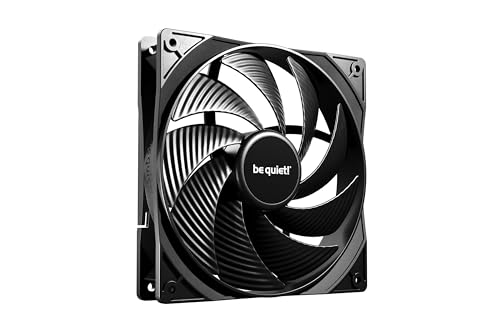
For those seeking ideal cooling performance without the distracting noise, the be quiet! Pure Wings 3 140mm Quiet PWM Case Fan is an excellent choice. Its optimized frame and seven airflow-optimized fan blades guarantee efficient cooling while minimizing sound, even under demanding conditions. You’ll appreciate the low minimum RPM for quieter operation, making it perfect for your build. Plus, with a long-life rifle bearing, this fan boasts an impressive lifespan of 80,000 hours. Designed in Germany, it combines quality and performance, making it a reliable option for any radiator setup. Enjoy a cool, silent PC experience with this fan.
Best For: Those looking for a high-performance cooling solution that operates quietly and efficiently, ideal for silent PC builds.
Pros:
- Optimized frame and airflow-optimized blades enhance cooling performance while minimizing noise.
- Very low minimum RPM allows for quieter operation, making it suitable for noise-sensitive environments.
- Long lifespan of 80,000 hours ensures reliable performance over time.
Cons:
- May not provide the highest airflow compared to some high-RPM fans.
- Limited aesthetic options due to its functional design.
- Installation may require additional considerations for optimal radiator compatibility.
be quiet! Silent Wings Pro 4 Cooling Fan (140mm PWM)

When it comes to achieving premium cooling efficiency in your PC setup, the be quiet! Silent Wings Pro 4 140mm PWM fan is a top choice. With optimized fan blades and a funnel-shaped air outlet, it delivers high air pressure for effective cooling on radiators. You can easily adjust its speed between medium, high, and ultra-high, reaching up to 2400 RPM. Enjoy virtually inaudible operation thanks to its fluid-dynamic bearing and 6-pole fan motor, which minimize vibration. Whether you’re gaming or working, this fan guarantees your system stays cool and quiet, enhancing your overall experience.
Best For: PC enthusiasts and gamers seeking high-performance cooling solutions with minimal noise.
Pros:
- Optimized fan blades provide high air pressure for effective cooling.
- Adjustable speed settings (medium, high, ultra-high) for customized performance.
- Virtually inaudible operation due to fluid-dynamic bearing and reduced vibration.
Cons:
- Maximum speed may be excessive for users with quieter setups.
- Premium price point compared to standard cooling fans.
- Installation may require additional space due to its 140mm size.
CORSAIR RS140 140mm PWM Fans (Dual Pack, Black)

The CORSAIR RS140 140mm PWM Fans are ideal for PC builders who prioritize both performance and quiet operation. With speeds up to 1,700 RPM and airflow reaching 95.5 CFM, they’ll keep your components cool without the noise. The innovative AirGuide Technology employs anti-vortex vanes to direct airflow precisely, optimizing cooling for radiators and heatsinks. Plus, you can daisy-chain multiple fans using a single 4-pin PWM connector for easy control. Thanks to the Magnetic Dome Bearing, these fans minimize noise and friction, ensuring longevity. Available in a sleek black dual pack, they blend seamlessly into any build.
Best For: PC builders who want a high-performance cooling solution that operates quietly and efficiently.
Pros:
- High airflow and speed: Offers up to 95.5 CFM and 1,700 RPM for effective cooling.
- Daisy-chain capability: Allows easy connection of multiple fans with a single 4-pin PWM connector.
- Quiet operation: Features Magnetic Dome Bearing technology that minimizes noise and friction for a longer lifespan.
Cons:
- Size limitation: The 140mm size may not fit in all cases, limiting compatibility.
- Dual pack only: Available only in a dual pack, which may not be suitable for users needing a single fan.
- Black color only: Limited to one color choice, which may not match all build aesthetics.
Noctua NF-A12x25 G2 PWM, Premium-Quality Quiet 120mm PC Fan (Brown)

Engineered for enthusiasts who demand both performance and silence, the Noctua NF-A12x25 G2 PWM fan stands out with its next-gen design that excels in high airflow and static pressure applications. Its state-of-the-art engineering features like the Progressive Bend impeller and Flow Acceleration Channels guarantee superior cooling. With a 4-pin PWM connector, you can enjoy automatic speed control, operating silently at 360 RPM and ramping up to 1800 RPM under load. Installation is a breeze, thanks to included anti-vibration mounts and accessories. Plus, the fan boasts a premium-grade SSO2 bearing for reliability—an excellent choice for your cooling needs.
Best For: Enthusiasts seeking a premium-quality fan that delivers both high performance and quiet operation for their PC cooling needs.
Pros:
- Excellent airflow and static pressure performance, ideal for CPU coolers and water cooling radiators.
- Automatic speed control via 4-pin PWM connection ensures efficient and quiet operation.
- Durable construction with premium-grade SSO2 bearing, providing a long lifespan and reliability.
Cons:
- Higher price point compared to standard fans may deter budget-conscious buyers.
- Slightly heavier than some competitors, which may matter in specific builds.
- Limited RGB or aesthetic options, as it comes only in a brown color scheme.
Thermalright TL-M12Q X3 120mm PC Case Fans (3-Pack)

Looking for a way to keep your gaming rig cool while adding some flair? The Thermalright TL-M12Q X3 120mm PC Case Fans are your ideal solution. With a high airflow of 2000RPM and stunning ARGB infinity-mirror lighting, these fans not only perform well but also enhance your build’s aesthetics. Simplified cable management reduces clutter, while high-quality S-FDB bearings minimize noise and vibration. Plus, the PWM control guarantees speed adjusts automatically based on temperature. Compatible with various setups, these fans come in a convenient 3-pack, offering flexibility in installation. Upgrade your cooling system with style and efficiency!
Best For: Gamers and PC builders looking to enhance both cooling performance and visual aesthetics in their setups.
Pros:
- High airflow performance at 2000RPM ensures efficient cooling for gaming rigs and PC builds.
- Stunning ARGB infinity-mirror lighting adds a dynamic and visually appealing element to any setup.
- Simplified cable management with one cable per fan cluster helps reduce clutter for a cleaner installation.
Cons:
- May require additional connectors for more complex installations beyond the included options.
- RGB effects may not appeal to users who prefer a more minimalist or traditional look.
- Higher RPM might lead to increased noise levels under certain conditions, depending on the system setup.
Factors to Consider When Choosing PC Quiet Fans for Radiators
When you’re picking quiet fans for your radiator, there are key factors to keep in mind. You’ll want to take into account noise levels, airflow, and fan size compatibility to guarantee ideal performance. Additionally, think about bearing types and PWM control features to enhance durability and efficiency.
Noise Level Considerations
Choosing quiet PC fans for radiators requires careful consideration of noise levels to guarantee a peaceful computing environment. Aim for fans that operate at around 22.5 dB(A) or lower to minimize distractions. Look for models employing advanced noise reduction technologies, like anti-vibration pads or specially designed blades, which cut down turbulence and friction noise. Check the fan’s maximum RPM; quieter options typically have a maximum of 1600 RPM or less. Consider fans with PWM (Pulse Width Modulation) features, allowing automatic speed adjustments to balance cooling and noise. Finally, evaluate the bearing type; fluid-dynamic or rifle bearings offer quieter performance and longevity compared to traditional sleeve bearings. Prioritize these factors to create a serene setup.
Airflow and Static Pressure
To guarantee peak cooling performance for your radiator, understanding airflow and static pressure is essential. Airflow, measured in cubic feet per minute (CFM), tells you how much air the fan can move, which is vital for effective cooling. On the other hand, static pressure, measured in mmH₂O, reflects a fan’s ability to push air through the restrictive environment of a radiator. Ideally, you want a balance between high airflow and static pressure. Fans with optimized blade designs can achieve both while keeping noise levels down. Generally, radiator fans feature higher static pressure ratings to overcome the resistance created by fins and tubes. Finally, consider the RPM range; higher RPM can boost airflow and static pressure but might increase noise levels.
Fan Size Compatibility
Selecting the right fan size for your radiator is essential for ideal performance and compatibility. Most radiators typically accommodate standard 120mm or 140mm fans, ensuring a secure fit within the mounting brackets. Pay attention to the fan’s thickness; most radiators work with 25mm thick fans, but slim profiles (15mm) may be needed in tighter spaces. Additionally, check the airflow and static pressure ratings, as radiators require fans that efficiently push air through dense fins. The number of mounting points on your radiator determines how many fans you can install, often ranging from one to three. If your radiator supports dual-fan setups, consider fan size and spacing to avoid obstruction while maximizing cooling performance.
Bearing Type Durability
When it comes to PC fans for radiators, bearing type plays an essential role in durability and performance. You’ll want to evaluate options like rifle bearings, which offer an impressive operating lifetime of around 80,000 hours. For even longer-lasting performance, high-quality fluid-dynamic bearings boast a mean time to failure (MTTF) exceeding 150,000 hours. If you’re looking for quieter operation, magnetic bearings can reduce friction and noise while extending the fan’s lifespan compared to traditional sleeve bearings. Remember, the construction quality matters too; premium-grade materials enhance reliability under high-stress conditions. Regular maintenance combined with the right bearing type can markedly influence noise levels and efficiency, making it imperative to choose wisely for demanding applications like cooling radiators.
PWM Control Features
While considering quiet PC fans for radiators, PWM control features stand out as a key factor for optimizing both cooling efficiency and noise levels. PWM, or Pulse Width Modulation, allows fans to automatically adjust their speed based on temperature. This means you’ll get efficient cooling when needed while enjoying quieter operation during idle times. Fans with PWM control can operate at lower RPMs, notably reducing noise during less demanding tasks. The 4-pin connectors enable precise speed control, leading to smooth changes without abrupt noise fluctuations. High-quality PWM fans typically offer a broad speed range, from 300 to 2100 RPM, catering to various cooling needs while maintaining a quiet environment. Some even include noise reduction algorithms for enhanced performance.
Design and Aesthetics
Choosing quiet PC fans for radiators involves more than just performance; you also want to evaluate design and aesthetics. Look for aerodynamic blade shapes that minimize turbulence while maximizing airflow efficiency. Anti-vibration pads or mounts are essential, as they reduce noise and prevent rattling, enhancing overall quietness. If you’re after visual appeal, consider fans with RGB or ARGB lighting options, allowing you to customize your build’s look. The frame design can greatly impact performance, so opt for fans with funnel-shaped outlets for increased air pressure on radiators. Don’t forget about slim designs that fit in tight spaces, ensuring compatibility with various PC case configurations without sacrificing cooling performance. Your choice can elevate both functionality and style!
Warranty and Reliability
Aesthetic appeal and design are important, but warranty and reliability should also weigh heavily in your decision-making process for quiet PC fans. Look for fans that come with at least a 5-year warranty, signaling the manufacturer’s confidence in their durability. Choose models with a mean time to failure (MTTF) rating over 150,000 hours for long-lasting performance. High-quality bearings, like fluid-dynamic or rifle bearings, enhance longevity and reduce maintenance. A reliable fan maintains consistent performance even under stress, ensuring effective cooling for your radiators. Finally, don’t underestimate the power of customer reviews and industry awards; they can provide valuable insights into a product’s reliability and overall user satisfaction, guiding you to make an informed choice.