
If you’re looking to enhance your PC’s connectivity and performance, exploring the best internal USB hubs can make a significant difference. These hubs not only expand the number of USB ports but also guarantee stable power delivery for your devices. With options ranging from the NZXT Internal USB Hub 3 to the Corsair Internal Hub, each model has unique features that cater to different needs. Curious about which one might be the perfect fit for your setup?
NZXT Internal USB Hub 3 – Expands 4 USB 2.0 Ports

If you’re looking to expand your PC’s connectivity without clutter, the NZXT Internal USB Hub 3 is an excellent choice. This hub gives you four additional USB 2.0 ports, making it perfect for connecting various peripherals. With a single port connecting to your motherboard, installation is a breeze. Its sleek, compact design allows for easy hiding, keeping your setup tidy. Plus, the SATA power connection guarantees a stable power source for all your devices. The user-friendly installation features a magnetic body and 3M dual lock tapes for mounting, making it compatible with any PC while enhancing your overall connectivity.
Best For: Users looking to expand their PC’s USB connectivity in a tidy and efficient manner.
Pros:
- Compact design allows for easy hiding within the PC case.
- User-friendly installation with magnetic body and 3M dual lock tapes.
- Stable power source provided through SATA connection for reliable device performance.
Cons:
- Only expands USB 2.0 ports, limiting speed compared to newer standards.
- Installation may require additional space inside the case, which could be an issue for smaller builds.
- Limited to devices that are compatible with USB 2.0, potentially restricting usage with high-speed peripherals.
Corsair Internal 4-Port USB 2.0 Hub

The Corsair Internal 4-Port USB 2.0 Hub is perfect for PC builders who need to expand their internal connectivity without sacrificing space. With four 9-pin USB 2.0 ports, you’ll enjoy up to 480Mbps bandwidth across multiple devices. This hub easily connects additional USB 2.0 devices like power supplies, AIO CPU coolers, and RGB lighting controllers. Installation is a breeze, thanks to its simple USB 2.0 and SATA connections, and it attaches securely to any magnetic surface in your PC case. Plus, it fits snugly in tight spaces, making it compatible with most Intel and AMD motherboards, including Mini-ITX cases.
Best For: PC builders looking to expand internal USB connectivity without compromising space.
Pros:
- Easy Installation: Attaches securely using simple USB 2.0 and SATA connections.
- Compact Design: Fits in tight spaces, including Mini-ITX cases.
- High Bandwidth: Offers up to 480Mbps bandwidth across four USB 2.0 devices.
Cons:
- Limited to USB 2.0: Does not support faster USB standards like USB 3.0 or USB-C.
- Magnetic Attachment May Not Suit All Cases: Requires a magnetic surface for secure installation.
- Only Four Ports Available: May not be sufficient for users with multiple internal USB devices.
Hyte Powered Internal USB Hub – 4 USB 2.0 Output Headers
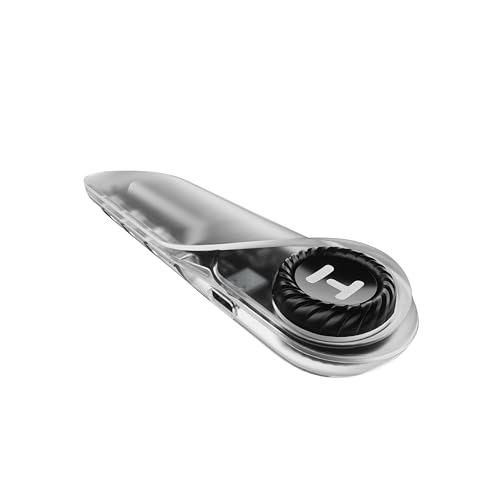
Looking to expand your PC’s USB connectivity? The Hyte Powered Internal USB Hub is an excellent choice, transforming one USB 2.0 header into four powered outputs. Its sleek design features a crystal finish, ensuring it complements your setup while facilitating clean cable management with recessed ports. Installation is a breeze, thanks to extra-strength magnets and an adhesive strip. Plus, an illuminated indicator helps with troubleshooting. Compatible with Windows, macOS, and Linux, this hub is versatile for modern PC builds. With an average rating of 4.6 stars, it’s a reliable option for enhancing your system’s performance.
Best For: Users looking to enhance their PC’s USB connectivity with a sleek and easy-to-install internal hub.
Pros:
- Expands connectivity: Converts one USB 2.0 header into four powered outputs, increasing device connection options.
- Easy installation: Comes with extra-strength magnets and an adhesive strip for hassle-free attachment inside the case.
- Versatile compatibility: Works seamlessly with Windows, macOS, and Linux operating systems.
Cons:
- Limited to USB 2.0: Only supports USB 2.0 outputs, which may not meet the needs of users requiring faster data transfer speeds.
- Weight and size: At 3.17 ounces and its dimensions, it may take up some space inside smaller cases.
- Potential restocking fees: Returns may incur fees if the product condition does not meet the manufacturer’s standards.
Delta EU04 BK Internal USB 2.0 Hub (4-Port Expansion for PC)

For PC enthusiasts seeking to expand their connectivity options without sacrificing space, the Delta EU04 BK Internal USB 2.0 Hub is an ideal solution. This compact hub features one motherboard input port and four USB 2.0 output ports, allowing effortless connections for your peripherals. With a stable SATA power supply, you can directly connect it to your case’s power source, ensuring reliable performance. Installation is a breeze, thanks to its user-friendly design that includes magnetic mounting and 3M dual lock tapes. Plus, it’s compatible with most PC components, making it a versatile addition to your setup.
Best For: PC enthusiasts looking for a compact and efficient way to expand USB connectivity within their computer cases.
Pros:
- Easy installation with magnetic mounting and 3M dual lock tapes.
- Stable power supply through direct SATA connection ensures reliable device performance.
- Compact design fits seamlessly in various PC cases without taking up much space.
Cons:
- Limited to USB 2.0 speeds, which may not be sufficient for newer devices requiring faster data transfer.
- Internal installation may not be suitable for users unfamiliar with building or modifying PCs.
- Compatibility issues may arise with certain older components or peripherals.
Thermalright Internal USB 2.0 Hub X5 for PC Motherboard
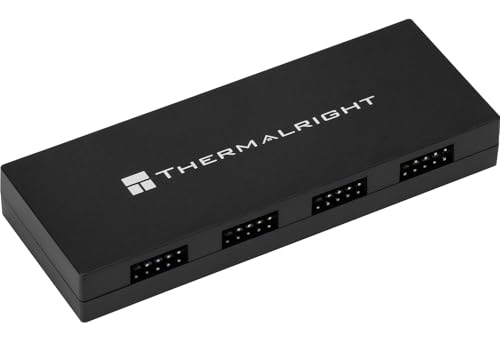
With its magnetic mounting system and compact design, the Thermalright Internal USB 2.0 Hub X5 is an ideal choice for PC builders seeking to expand internal USB connectivity effortlessly. Weighing only 3.2 ounces, it features five USB 2.0 ports with 9-pin connectors, perfect for connecting RGB controllers and fan hubs. The SATA-powered hub guarantees reliable power delivery, maintaining performance for all your devices. Its sleek black finish complements any build while simplifying cable management. Installation requires no tools, making it easy to set up. Enjoy enhanced connectivity and a clutter-free interior with the Thermalright Hub X5, rated 4.4 out of 5 stars by users.
Best For: PC builders looking to expand internal USB connectivity without cluttering exterior ports.
Pros:
- Easy Installation: Magnetic mounting system allows for tool-free setup.
- Compact Design: Space-saving size fits neatly within PC cases.
- Reliable Power Delivery: SATA-powered hub ensures stable performance for connected devices.
Cons:
- Limited to USB 2.0: Only supports USB 2.0 speeds, which may not be suitable for high-speed devices.
- Only Compatible with 9-pin Connectors: Restricts use to specific motherboard headers.
- May Require Additional Cables: Depending on setup, additional SATA power cables may be needed.
ELUTENG PCIe USB 3.0 Expansion Card

The ELUTENG PCIe USB 3.0 Expansion Card is an excellent choice for users needing multiple high-speed USB connections, as it offers seven USB 3.0 Type A ports that operate at a super speed of 5Gbps. This card features a robust power supply and solid capacitors, ensuring stable voltage and long-lasting performance. It’s compatible with various Windows versions, making installation a breeze for most users. Plus, it’s backward compatible with USB 2.0/1.1. With a customer rating of 4.3 out of 5 stars, it’s a reliable option in internal USB port cards, perfect for enhancing your PC’s connectivity.
Best For: Users looking for an efficient way to expand their PC’s USB connectivity with multiple high-speed ports.
Pros:
- Seven USB 3.0 Type A ports providing high-speed connections at up to 5Gbps.
- Robust power supply and solid capacitors ensure stable performance and longevity.
- Easy installation with compatibility across various Windows versions, and no drivers needed for newer versions.
Cons:
- Not compatible with Mac, limiting usage for Mac users.
- Requires drivers for older Windows versions like WIN7/XP, which may complicate installation.
- Limited to PCI-E slots, which may not be available on all motherboards.
Internal USB 2.0 Hub with SATA Power & Magnetic Backplate for PC Modders

PC modders and enthusiasts will appreciate the Internal USB 2.0 Hub designed specifically for expanding connectivity options. This hub takes a single internal 9-pin USB header and transforms it into four, allowing you to power ARGB lighting, PWM fans, and connect LCD AIO coolers seamlessly. With a dedicated SATA power connector, you’ll enjoy stable power delivery, preventing overload on your motherboard headers. The strong magnetic backplate guarantees a tool-free installation, simplifying cable management within your case. Compatible with desktop devices, it supports four devices at 480 Mbps, making it an essential addition to any modded setup.
Best For: PC modders and enthusiasts seeking to expand USB connectivity and power options for their custom setups.
Pros:
- Expands connectivity: Converts a single internal 9-pin USB header into four, allowing for multiple device connections.
- Stable power delivery: The dedicated SATA power connector supports high-power devices, preventing overload on motherboard headers.
- Easy installation: Strong magnetic backplate enables tool-free installation and simplifies cable management within the PC case.
Cons:
- Limited to USB 2.0: Only supports USB 2.0 speeds (480 Mbps), which may not be sufficient for high-bandwidth devices.
- Compatibility: Designed primarily for desktop devices, which may limit usability for other systems.
- Size constraints: Compact dimensions may make it challenging to place in some cases with limited space.
9Pin USB Header Splitter with SATA Power Cable

For users looking to expand their internal USB connectivity, the 9Pin USB Header Splitter with SATA Power Cable is an excellent choice. This adapter transforms one USB 2.0 port into four, making it perfect for connecting various devices like CPUs, WiFi receivers, and RGB lights. At 50cm long, its self-stick design guarantees easy installation with automotive adhesive tape. The extra SATA power connector delivers stable power, preventing short circuits and accidental disconnections. With a solid customer rating of 4.3 stars, it’s clear that this splitter is a reliable addition to your PC setup, enhancing both performance and convenience.
Best For: Users looking to expand their internal USB connectivity and connect multiple devices like CPUs, WiFi receivers, and RGB lights.
Pros:
- Easy installation with self-stick design and automotive adhesive tape.
- Stable power supply through the extra SATA power connector, minimizing short circuit risks.
- Reliable performance with a solid customer rating of 4.3 stars from over 1,000 reviews.
Cons:
- Limited to USB 2.0 speeds, which may not be sufficient for some high-speed devices.
- Length of cable (50cm) may not be ideal for all cases, depending on motherboard layout.
- Adhesive may wear out over time, potentially affecting stability in installation.
Airgoo Internal USB Hub, 9-Pin USB 2.0 Header Splitter
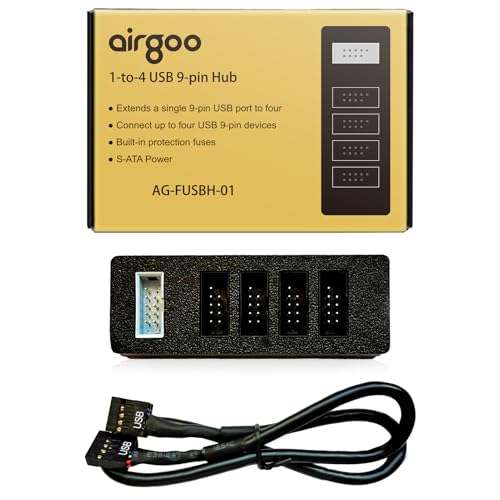
Transforming a single internal USB 2.0 header into four ports, the Airgoo Internal USB Hub is perfect for users who need to connect multiple devices simultaneously without sacrificing performance. This 9-pin USB header splitter utilizes S-ATA power for stable operation, ensuring all four ports function seamlessly. Its magnetic mount allows for easy attachment inside your case, keeping your setup neat. With dimensions of just 3.35 x 1.18 x 0.75 inches, it won’t block airflow or interfere with other components. Plus, it’s plug-and-play, so you can start using it right away without any drivers. Enjoy enhanced connectivity!
Best For: Users who need to connect multiple USB devices to a single internal USB header without compromising performance.
Pros:
- 9-Pin USB Expansion: Easily converts one internal USB header into four, allowing for multiple device connections.
- S-ATA Power Supply: Ensures stable power delivery even when all ports are utilized, preventing performance issues.
- Magnetic Mount Design: Allows for easy installation inside the case, promoting a tidy and organized setup.
Cons:
- Limited to USB 2.0: May not support faster USB 3.0 devices, which could limit performance for high-speed peripherals.
- Size Constraints: While compact, the dimensions may still be restrictive in very tight spaces within some PC cases.
- No Additional Features: Lacks advanced features such as data transfer speed indicators or built-in charging capabilities.
5 Ports Internal USB Hub, USB 2.0 to USB 3.2 Gen 1 Header Adapter

Looking to expand your internal USB capabilities? The Ports Internal USB Hub is your answer with its 5 ports, allowing you to connect multiple devices effortlessly. It features a USB 2.0 to USB 3.2 Gen 1 header adapter, ensuring compatibility with all PC motherboards. You’ll enjoy stable performance thanks to the SATA power connector that provides auxiliary power. Installation is a breeze with the included 11.8-inch cable and double-sided tape. Use it for your CPU, WiFi receiver, cooling fans, or RGB lights, and boost your system’s connectivity without hassle. Get ready for seamless performance!
Best For: Users looking to enhance their PC’s internal USB connectivity with multiple device support.
Pros:
- Expandable Connection: Offers 5 ports for connecting various devices simultaneously.
- Wide Compatibility: Compatible with all PC motherboards, ensuring versatile use.
- Easy Installation: Simple setup with included cable and double-sided tape for secure placement.
Cons:
- USB 2.0 Speed Limitation: Only supports USB 2.0 read/write rates, which may be slower for high-speed devices.
- Limited Port Type: Includes only USB 2.0 (Type A) ports, lacking newer USB type options.
- Power Dependency: Requires a SATA power connection, which may limit installation options in some setups.
Factors to Consider When Choosing a PC Internal USB Hub
When choosing a PC internal USB hub, you need to take into account several key factors. Think about the expansion port count, power supply stability, and compatibility with your motherboard to guarantee a smooth experience. Don’t forget about installation ease and how the hub fits into your overall design aesthetic.
Expansion Port Count
Choosing the right internal USB hub for your PC hinges on the expansion port count, as this number directly affects how many additional devices you can connect at once. Most models offer between 4 to 7 ports, and opting for hubs with 5 or more ports allows you to link multiple peripherals like RGB lighting controllers and storage devices without straining your motherboard’s USB header. Many hubs efficiently convert a single USB header into multiple outputs, such as 1 to 4 or 1 to 5 ports. While USB 2.0 hubs generally provide speeds up to 480 Mbps, make sure to evaluate not just the port count but also how well the hub can maintain stable power for all connected devices.
Power Supply Stability
While an adequate expansion port count is important, power supply stability plays a key role in the performance of your internal USB hub. A stable power supply is essential for ensuring reliable operation of connected devices, helping to prevent malfunctions or data loss. Many USB hubs utilize SATA power connectors, which provide a consistent power source and support multiple devices without overloading your motherboard’s USB header. This stability is especially significant for high-demand devices like RGB lighting controllers and AIO CPU coolers. Look for hubs with dedicated power delivery systems to enhance performance. Additionally, hubs featuring solid capacitors can improve voltage stability, reducing electrical interference and ensuring your peripherals operate smoothly.
Compatibility With Motherboards
Ensuring compatibility with your motherboard is essential for selecting the right internal USB hub. First, check that the hub matches your motherboard’s USB header type, typically a 9-pin for USB 2.0 connections. You’ll also want to verify that it supports both Intel and AMD motherboards to maximize compatibility across different systems. Look for hubs that offer plug-and-play functionality, as this usually indicates broader motherboard compatibility without needing extra drivers. If the hub features SATA power connections, make sure your motherboard has available SATA power sources for stable operation. Finally, consider the physical space within your PC case, as some hubs are specifically designed to fit in tighter spaces, making them ideal for Mini-ITX or compact builds.
Installation Ease
When it comes to installing an internal USB hub, ease of installation can make a significant difference in your overall experience. Look for hubs that feature magnetic mounting systems or adhesive strips for tool-free installation, simplifying the setup process within your PC case. User-friendly installation instructions are essential, ensuring that even if you have minimal technical skills, you can install them successfully. Consider compact models that fit snugly in tight spaces, reducing clutter and making installation easier. Hubs with SATA power connections provide a stable power source, minimizing the hassle of managing multiple power cables. Additionally, color indicators for power status can help you confirm that the hub is receiving power correctly, further streamlining the installation process.
Design and Aesthetics
Design and aesthetics play an essential role in choosing the right internal USB hub for your PC. A sleek, compact design is vital, ensuring the hub fits neatly within various cases without blocking airflow or interfering with other components. Consider magnetic mounting options for a tool-free installation, promoting a clean and organized setup. Recessed ports can help with cable management, maintaining a tidy appearance inside your PC. Additionally, a modern finish enhances the overall look of your build, making the hub visually appealing alongside other components. Finally, pay attention to the hub’s dimensions, especially in tighter spaces like Mini-ITX cases, to avoid any interference with your hardware and maintain a cohesive aesthetic.
Data Transfer Speed
Data transfer speed is an essential factor to take into account when selecting an internal USB hub for your PC. USB 2.0 hubs provide a maximum speed of 480 Mbps, which works well for low-bandwidth devices like keyboards and mice. However, if you connect multiple devices, the total bandwidth is shared, potentially slowing down each device’s performance. On the other hand, USB 3.0 hubs can reach speeds up to 5 Gbps, making them perfect for high-speed peripherals and external hard drives. Keep in mind that the compatibility of your devices with the hub’s data transfer standard is vital. While backward compatibility exists, using a lower standard will limit speeds to that of the slowest device connected.
Cable Management Features
While choosing an internal USB hub for your PC, effective cable management features can make a significant difference in maintaining a clean and organized build. Look for hubs with recessed unidirectional ports, which help keep cables tidy and minimize clutter within your case. Compact designs are essential, as they fit into tight spaces without obstructing airflow or interfering with other components. Consider hubs that come with user-friendly installation methods, like double-sided tape or magnetic attachments, making it easier to manage and relocate cables when needed. Some hubs even feature illuminated indicators, aiding in troubleshooting and ensuring proper power delivery visibility. Prioritizing these features will enhance your overall setup and improve efficiency.
Magnetic Mounting Capability
One key factor to evaluate when choosing a PC internal USB hub is its magnetic mounting capability. This feature allows for tool-free installation, letting you easily attach the hub inside your PC case without screws or adhesives. You can conveniently reposition the hub, optimizing space and cable management based on your unique setup. A strong magnetic base guarantees the hub stays securely in place, minimizing the risk of disconnection or movement during maintenance or transport. Magnetic mounts are especially useful in tight spaces, providing flexible installation options even in compact cases. The ease of installation saves you time and effort, enhancing your overall experience as a PC builder or modder.