
When building your PC, choosing the right case can make all the difference in achieving a tidy and efficient setup. You’ll want a case that not only supports excellent airflow but also simplifies cable management. With so many options available, it can be overwhelming to find the best fit for your needs. Let’s explore ten top-rated PC cases that excel in cable routing, ensuring your build looks as good as it performs.
NZXT H5 Flow Compact ATX Mid-Tower PC Gaming Case

If you’re a gamer looking for a sleek and efficient way to manage your cables, the NZXT H5 Flow Compact ATX Mid-Tower PC Gaming Case is an excellent choice. With its seamless cable management system, you’ll find wide channels, hooks, and straps that make routing and concealing cables a breeze. This case not only supports exceptional GPU cooling but also features ultra-fine mesh panels for optimal airflow, keeping your components cool. Weighing just 17.6 pounds and measuring 16.93 x 8.86 x 18.31 inches, it fits perfectly in any setup. Plus, two pre-installed 120mm Quiet Airflow fans ensure solid performance right out of the box.
Best For: Gamers seeking a compact and efficient case with excellent cable management and airflow.
Pros:
- Exceptional cooling capabilities with perforated PSU shroud and support for large radiators.
- Seamless cable management system for easy routing and concealment of cables.
- Quiet operation with pre-installed 120mm fans for solid out-of-the-box performance.
Cons:
- Limited expansion options due to compact design.
- May require additional fans for optimal cooling in high-performance builds.
- Weight may be heavier than some other compact cases, at 17.6 pounds.
NZXT H9 Flow Large Dual-Chamber ATX Mid-Tower PC Case

The NZXT H9 Flow Large Dual-Chamber ATX Mid-Tower PC Case is an ideal choice for builders who prioritize both aesthetics and effective cable management. Its dual-chamber design keeps your components separate from the PSU and drives, enhancing thermal performance. You’ll love the panoramic tempered glass panel that showcases your build beautifully. With optimized airflow from perforated steel panels and pre-installed fans, cooling high-performance components is a breeze. Plus, the extra-wide channels and built-in Velcro straps make routing cables effortless. This case supports large GPUs and radiators, ensuring compatibility with your dream setup while maintaining a sleek black finish.
Best For: Builders seeking a stylish and efficient case that enhances thermal performance and cable management.
Pros:
- Dual-chamber design improves airflow and organizes components for better cooling.
- Panoramic tempered glass panel allows for an impressive view of your hardware and build.
- Ample fan capacity supports extensive cooling options for high-performance setups.
Cons:
- Limited color options as it is only available in black.
- Size may be cumbersome for those with limited space, as it is a large mid-tower case.
- Pre-installed fans may not suffice for extremely high-end builds, requiring additional cooling solutions.
Lian Li LANCOOL 217 Mid-Tower ATX PC Case
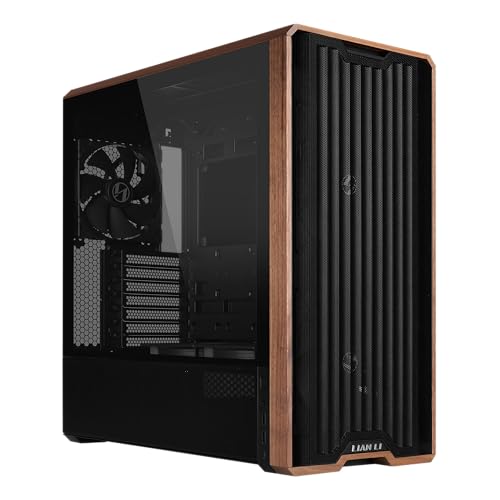
For those who prioritize clean aesthetics and efficient cable management, the Lian Li LANCOOL 217 Mid-Tower ATX PC Case stands out with its innovative back-connect motherboard design. This case features real wood accents, available in dark walnut or light beech, adding a modern touch to your setup. With exceptional airflow from five pre-installed fans, including two 170mm front fans, your CPU and GPU stay cool during intense gaming sessions. The dual power supply configurations allow easy cable management, while the tool-less fan mounting offers customization. Rated 4.7 stars, this case is perfect for anyone seeking both style and functionality.
Best For: Those seeking a stylish and functional PC case with excellent airflow and cable management options.
Pros:
- Exceptional airflow with five pre-installed fans to keep components cool.
- Aesthetically pleasing real wood accents available in dark walnut or light beech.
- Tool-less fan mounting and versatile power supply configurations for easy customization.
Cons:
- The case may be on the heavier side at 23.1 pounds, which could be cumbersome for some users.
- Limited color options may not suit everyone’s taste beyond the wood finishes.
- The price point might be higher compared to other mid-tower cases without wood accents.
CORSAIR 4000D RS ARGB Mid-Tower ATX PC Case

Designed with gamers and PC builders in mind, the CORSAIR 4000D RS ARGB Mid-Tower ATX PC Case stands out for its exceptional airflow and modular customization. With three pre-installed RS ARGB fans and the InfiniRail™ mounting system, you can easily adapt your cooling setup. The case supports powerful hardware, including dual 360mm radiators, while the 3D Y-Pattern Airflow Panel ensures minimal restriction. Measuring 19.17 x 9.41 x 19.13 inches, it’s compatible with various motherboards. Plus, you’ll appreciate the 4.6-star rating from customers, reflecting its popularity and reliability. Enjoy a clean, organized build with this versatile case!
Best For: Gamers and PC builders seeking a high-performance case with excellent airflow and modular customization options.
Pros:
- High Airflow Design: Optimized 3D Y-Pattern Airflow Panel ensures minimal restriction for enhanced cooling.
- Modular Customization: FRAME Modular Case System allows for extensive upgrades and personalized configurations.
- Silent Operation: Includes daisy-chainable RS ARGB PWM fans with Zero RPM mode for quiet performance at low loads.
Cons:
- Weight: At 22.7 pounds, it may be heavier compared to other mid-tower cases.
- Limited Color Options: Only available in black, which may not suit all aesthetic preferences.
- Fan Installation Limitations: While accommodating large fans, additional fan placements may be restricted by the case design.
CORSAIR 3500X RS-R ARGB Mid-Tower PC Case
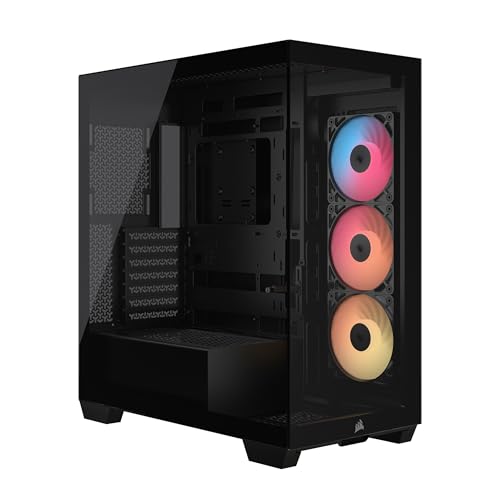
With its sleek black wraparound glass design and impressive cooling capabilities, the CORSAIR 3500X RS-R ARGB Mid-Tower PC Case is perfect for enthusiasts who value aesthetics as much as performance. You’ll enjoy excellent airflow thanks to the three pre-installed RS120-R ARGB fans and the ability to add up to ten more. This case supports various motherboard sizes, including Mini-ITX to EATX, and features compatibility with reverse connection motherboards for a clean look. Plus, the removable tempered glass panels make access to your components easy, ensuring a hassle-free building and maintenance experience. Get ready to showcase your setup!
Best For: Enthusiasts seeking a stylish mid-tower PC case that combines aesthetic appeal with high-performance cooling capabilities.
Pros:
- High cooling capacity with three pre-installed RGB fans and room for additional fans.
- Compatibility with a range of motherboard sizes and reverse connection motherboards for a clean cable management look.
- Easy access to components through removable tempered glass panels for convenient building and maintenance.
Cons:
- Limited to 120mm fan sizes, which may restrict cooling options for some users.
- May require additional purchases for more RGB fans to fully utilize the case’s cooling potential.
- Glass panels can be prone to fingerprints and smudges, requiring regular cleaning to maintain appearance.
Hyte Y70 Mid-Tower Gaming Case (CS-HYTE-Y70-WW)

The Hyte Y70 Mid-Tower Gaming Case (CS-HYTE-Y70-WW) stands out as an exceptional choice for gamers and PC builders who prioritize both aesthetics and efficient cable management. With its modern design available in four colorways, the three-piece panoramic glass showcases your components beautifully. You’ll appreciate the ample cable management space in the rear chamber, complete with labels and reusable Velcro straps. Cooling is a breeze, supporting up to a 360mm radiator and multiple fan configurations. Plus, the floating storage sleds and tool-less panels make building and organizing a cinch. Elevate your setup with this stylish and functional case!
Best For: Gamers and PC builders looking for a stylish mid-tower case with excellent cable management and cooling options.
Pros:
- Premium build quality with high-quality materials and tool-less panels for easy assembly.
- Supports extensive cooling options, including a 360mm radiator and multiple fan configurations.
- Aesthetic design featuring panoramic glass and a luxury color-matched riser for a visually appealing setup.
Cons:
- May be more expensive compared to standard mid-tower cases.
- Limited availability of color options may not suit everyone’s taste.
- Potentially tight space for larger components in the dual chamber setup.
ASUS A31 White ATX Mid-Tower Gaming Case
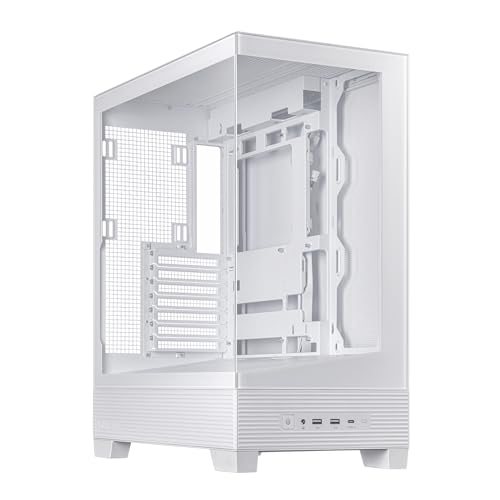
If you’re looking for a case that combines aesthetics and functionality, the ASUS A31 White ATX Mid-Tower Gaming Case is a standout option. Its dual-sided tempered glass panels showcase your components beautifully, while the 8° angled base enhances airflow and ARGB lighting effects. With support for 360mm AIO coolers and a well-optimized airflow design, your system stays cool and stable. Cable management is a breeze, thanks to the BTF hidden connector design and 34mm of routing space behind the motherboard tray. This case makes building easy and stylish, ensuring your setup remains organized and visually striking.
Best For: Gamers and PC builders seeking a stylish and functional case with excellent cooling capabilities and cable management.
Pros:
- Dual-sided tempered glass panels provide a stunning view of internal components.
- Optimized airflow design supports superior cooling performance.
- Easy cable management with BTF hidden connectors and ample routing space.
Cons:
- May be more expensive than basic cases due to premium features.
- Limited cooling options if you choose not to use AIO coolers.
- The glass panels may require regular cleaning to maintain aesthetics.
NZXT H5 Flow 2024 Compact ATX Mid-Tower PC Gaming Case

Designed for gamers and PC builders who value neatness and efficiency, the NZXT H5 Flow 2024 Compact ATX Mid-Tower PC Gaming Case features an exceptional cable management system. With wide channels, hooks, and straps, you’ll find routing and concealing cables a breeze. It also offers impressive cooling with a perforated PSU shroud and supports multiple radiator sizes. The ultra-fine mesh panels ensure optimal airflow, keeping your components cool during intense gaming sessions. Weighing just 13.2 pounds, this sleek white case combines functionality and aesthetics, making it a top choice for your next build. Rated 4.7 stars, it’s a reliable option.
Best For: Gamers and PC builders looking for an efficient and aesthetically pleasing mid-tower case with excellent cooling features.
Pros:
- Exceptional cable management system for neat and organized builds.
- High-performance airflow with ultra-fine mesh panels and pre-installed Quiet Airflow fans.
- Supports multiple radiator sizes for optimal cooling during intense gaming sessions.
Cons:
- Limited USB ports may require additional adapters for more connectivity options.
- Some users may find the white color prone to showing dirt and fingerprints.
- Compact design might limit space for larger components or upgrades.
Hyte Y70 Modern Aesthetic Mid-Tower Gaming Case (CS-HYTE-Y70-BW)

For gamers who value both aesthetics and efficient cable management, the Hyte Y70 Mid-Tower Gaming Case stands out with its dual chamber design. This case features panoramic tempered glass that beautifully showcases your components while keeping cables hidden. With four color options, you can match it to your style. It supports massive cooling configurations, accommodating up to ten fans and a 360mm radiator, ensuring optimal airflow. The included luxury riser cable simplifies GPU installation, and the thoughtful detailing, like reusable Velcro straps, enhances your building experience. Rated 4.8 stars, it’s a favorite among PC builders seeking a clean, organized setup.
Best For: Gamers who prioritize aesthetics, efficient cable management, and optimal cooling configurations in their PC builds.
Pros:
- Unified Modern Aesthetic: Available in four unique colorways to match personal style.
- Cooling Capabilities: Supports up to 10 fans and a 360mm radiator for exceptional airflow.
- Easy GPU Installation: Comes with a luxury riser cable and a dual chamber design for hassle-free setup.
Cons:
- Weight: At 24.3 pounds, it may be heavier compared to other mid-tower cases.
- Limited Space for Storage: The design may restrict space for additional storage drives.
- Price Point: It may be higher in price compared to basic mid-tower cases.
Trunab Computer Desktop Tower Carrying Case (Black)

The Trunab Computer Desktop Tower Carrying Case (Black) is perfect for tech enthusiasts who need a reliable way to transport their ATX or M-ATX computer setups. Weighing only 3.04 pounds, it features a main compartment designed specifically for desktop towers, along with multiple pockets for your accessories. The internal foam padding and water-resistant outer layer ensure your gear stays protected during transit. With an adjustable padded shoulder strap and a top handle, carrying it is a breeze. Plus, the buckle chest strap prevents slipping, making this case a smart choice for anyone on the go.
Best For: Tech enthusiasts who need a reliable and portable solution for transporting their ATX or M-ATX computer setups.
Pros:
- Spacious main compartment specifically designed for desktop towers and accessories.
- Durable construction with tear-resistant and water-resistant materials for all-around protection.
- Comfortable carrying options with an adjustable padded shoulder strap and top handle.
Cons:
- Limited color options, as it only comes in black.
- May not fit oversized or unconventional computer towers due to size limitations.
- The weight may be slightly heavier than some ultra-light alternatives on the market.
Factors to Consider When Choosing a PC Case With Cable Routing
When you’re picking a PC case for optimal cable routing, you’ll want to consider several key factors. Think about the cable management features, case dimensions, and cooling system compatibility, as these can greatly impact your build’s performance and appearance. Plus, don’t forget to evaluate the aesthetic design and build quality to ensure you get a case that looks great and lasts.
Cable Management Features
A well-designed cable management system can make a significant difference in the aesthetics and functionality of your PC build. Look for cases with wide channels, hooks, and straps that facilitate efficient cable routing and concealment. Extra-wide channels help you organize cables easily, reducing clutter and improving airflow. Consider back-connect designs that hide cables behind the motherboard tray, creating a cleaner look and minimizing visible mess. Tool-less mounting options are a bonus, simplifying installation and making adjustments easier during upgrades or maintenance. By choosing a case with effective cable management features, you’ll enhance airflow, which is crucial for maintaining optimal cooling performance in high-performance builds, ensuring your system runs smoothly.
Case Dimensions and Size
Choosing a PC case with effective cable routing means considering case dimensions and size. The dimensions directly affect compatibility with various motherboard sizes like ATX, M-ATX, and Mini-ITX, ensuring everything fits properly. A larger case typically offers more space for cable management systems, allowing for organized routing of cables through wider channels and hooks. Height and width measurements are crucial since they determine the maximum size of cooling solutions, influencing airflow. The internal layout, including depth, impacts cable routing around components like GPUs and PSUs, preventing obstruction. Lastly, the weight of the case can affect portability and stability, making it easier to manage and secure cables during your build process.
Cooling System Compatibility
Selecting the right cooling system compatibility is crucial for maintaining optimal performance in your PC build. Make sure your case can accommodate the radiator sizes you plan to use, like up to 360mm in front and 240mm on top. Opt for cases that offer multiple fan mounting options and come with pre-installed fans to boost airflow. Designs featuring perforated panels or ultra-fine mesh can enhance airflow while minimizing dust buildup. Verify that your case supports various cooling solutions, including all-in-one (AIO) coolers and custom liquid cooling systems, for effective thermal management. Lastly, choose cases with dedicated space and channels for cable routing to avoid obstructing airflow and keep your interior setup clean and organized.
Aesthetic Design Options
When it comes to aesthetic design options in PC cases, the right choice can elevate your build from ordinary to extraordinary. Look for features like dual-sided tempered glass panels that showcase your components and lighting effects beautifully. A panoramic view with seamless glass paneling enhances the visual appeal, making your setup a focal point. Consider modern materials, such as real wood accents or sleek metal finishes, to add sophistication to your build. Additionally, modular cable management systems with Velcro straps can keep your cables tidy, reducing clutter and enhancing the overall aesthetic. Don’t forget about angled designs and unobstructed airflow features; these not only improve cooling but also boost the visual impact of your case.
Build Quality Materials
A stunning aesthetic can only go so far without solid build quality materials backing it up. When choosing a PC case, consider materials like steel, aluminum, and tempered glass. These not only enhance durability and appeal but also protect your components effectively. High-quality cases often offer better thermal performance thanks to improved airflow management and structural integrity. If portability matters, aluminum’s lighter weight could be a key factor. Premium materials also feature finishes that resist scratches and wear, keeping your case looking sharp over time. Lastly, high-quality construction typically includes precise tolerances and well-designed cable management systems, making assembly easier and ensuring a cleaner internal layout.