
When it comes to assembling your PC, choosing a case with built-in fans can significantly impact both cooling efficiency and overall aesthetics. With so many options available, it’s essential to find the right balance between style and functionality. From sleek designs to impressive airflow, some cases stand out more than others. Curious about which models can elevate your setup while keeping your components cool? Let’s explore the top contenders in this category.
MUSETEX ATX PC Case with 7 PWM ARGB Fans

If you’re looking for a powerful cooling solution for your gaming rig, the MUSETEX K2 ATX PC Case with its 7 PWM ARGB fans is an excellent choice. This mid-tower case features an innovative air duct design that ensures effective heat dissipation. You’ll appreciate the customizable light modes and fan speeds, allowing you to optimize cooling performance. The stunning 270° panoramic dual tempered glass showcases your components beautifully, while magnetic dust filters keep everything clean. With ample connectivity options and a user-friendly installation layout, it’s perfect for high configurations. Plus, its solid customer support adds peace of mind.
Best For: Gamers and PC builders seeking a stylish and efficient cooling solution for high-performance setups.
Pros:
- Effective Cooling: Equipped with 7 PWM ARGB fans and an innovative air duct design for optimal heat dissipation.
- Aesthetic Appeal: Features a stunning 270° panoramic dual tempered glass design to showcase components.
- User-Friendly: Easy installation layout and ample connectivity options enhance overall user experience.
Cons:
- Weight: At 15 pounds, it may be heavier compared to some other mid-tower cases.
- Limited Fan Expandability: Although it supports up to 10 fans, this may not be sufficient for extreme gaming setups.
- Dust Management: While it has magnetic dust filters, regular maintenance is still required to keep it clean.
Lian Li V100 ATX Mid-Tower PC Case

For gamers and PC enthusiasts seeking an ideal blend of aesthetics and performance, the Lian Li V100 ATX Mid-Tower PC Case stands out with its pre-installed four 120mm ARGB PWM fans. With a maximum airflow of 61.47 CFM and a noise level ranging from 26.5 to 30.8 dBA, it keeps your components cool while operating quietly. The sleek tempered glass display platform showcases your build, enhanced by a vibrant 26-LED ARGB strip. Toolless panel removal simplifies access to components, while compatibility with ATX and Micro-ATX motherboards ensures you’re ready for high-performance upgrades. Upgrade your setup with the Lian Li V100!
Best For: Gamers and PC enthusiasts looking for a stylish and efficient mid-tower case with advanced cooling features.
Pros:
- Pre-installed four 120mm ARGB PWM fans for optimized airflow and cooling performance.
- Toolless panel removal allows for easy access to internal components and simplifies the build process.
- Integrated ARGB strip and tempered glass display platform enhance aesthetics and showcase custom builds.
Cons:
- Limited to ATX and Micro-ATX motherboard compatibility, which may not suit all users.
- Maximum CPU cooler height support of 178mm may restrict some high-performance cooler options.
- Noise levels can reach up to 30.8 dBA, which might be noticeable in quieter environments.
MUSETEX ATX PC Case with 6 PWM ARGB Fans

The MUSETEX ATX PC Case with 6 PWM ARGB Fans is an excellent choice for gamers and PC builders seeking optimal cooling and eye-catching aesthetics. With its polygonal mesh design and tempered glass side panel, it enhances airflow and showcases your components. The six adjustable PWM ARGB fans ensure efficient cooling while keeping noise levels low. You’ll appreciate the user-friendly design, allowing easy access for cleaning and installation. Plus, it supports multiple storage options and offers customizable RGB lighting with 16.8 million colors. This case not only performs well but also elevates the style of your gaming setup.
Best For: Gamers and PC builders looking for a stylish case that maximizes cooling efficiency and supports customization.
Pros:
- Pre-installed 6 PWM ARGB fans provide excellent cooling performance while minimizing noise.
- User-friendly design with a tempered glass side panel allows for easy access to components for cleaning and installation.
- Customizable RGB lighting offers 16.8 million colors, enhancing the aesthetic appeal of your gaming setup.
Cons:
- Limited space for additional components may restrict upgrades for some users with extensive hardware needs.
- Potential cable management challenges due to the compact design, which could affect airflow if not organized properly.
- Weight of the case may be a concern for those who frequently move their PC setup.
GAMDIAS ATX Mid Tower Gaming PC Case with Tempered Glass

Gamers seeking a blend of style and functionality will find the GAMDIAS ATX Mid Tower Gaming PC Case with Tempered Glass an ideal choice. Its sleek stealth black design and full-sized tempered glass cover let you show off your components in style. With a mesh front panel, it ensures superior air intake, while four built-in 120mm ARGB fans enhance cooling. This case supports various motherboard sizes and offers ample storage options. The front I/O includes USB 3.0, USB 2.0, and HD Audio, making it perfect for modern gaming setups. Upgrade your rig with this case for optimal airflow and aesthetic appeal.
Best For: Gamers who want a stylish and functional case that supports optimal cooling and showcases their components.
Pros:
- Spacious design accommodates various motherboard sizes and offers multiple storage options.
- Excellent airflow with a mesh front panel and four built-in ARGB fans for superior cooling performance.
- Tool-free installation makes it easy to access and upgrade components.
Cons:
- Limited CPU cooler height restriction may not accommodate larger coolers for high-performance builds.
- Tempered glass can be prone to fingerprints and smudges, requiring regular cleaning to maintain aesthetics.
- Front I/O ports may not be sufficient for users with multiple USB devices or peripherals.
FOIFKIN F600 ATX Mid-Tower Gaming PC Case

With its dual-chamber design and seven pre-installed ARGB PWM fans, the FOIFKIN F600 ATX Mid-Tower Gaming PC Case is an excellent choice for enthusiasts who prioritize cooling and aesthetics in their builds. The fully transparent tempered glass showcases your hardware, while the 270° panoramic panel enhances visibility. This case supports various motherboard sizes and accommodates GPUs up to 400mm. Plus, its super cooling system allows for installation of three 360mm radiators. With a solid weight of 17.6 pounds and multiple USB ports, it combines functionality and style seamlessly, making it a top contender for your next gaming rig.
Best For: The FOIFKIN F600 ATX Mid-Tower Gaming PC Case is best for gaming enthusiasts seeking exceptional cooling performance and stylish hardware visibility.
Pros:
- Dual-chamber design enhances thermal performance and simplifies cable management.
- Pre-installed with 7 ARGB PWM fans, providing excellent cooling and customizable lighting options.
- Supports various motherboard sizes and GPU lengths, ensuring compatibility with a wide range of components.
Cons:
- Heavier weight at 17.6 pounds may make it less portable for some users.
- Limited storage options with only one HDD and two SSD slots may not suffice for users with extensive storage needs.
- Tempered glass panels may be prone to fingerprints and smudges, requiring regular cleaning to maintain visibility.
ANSAITE Mid-Tower Gaming PC Case (H09)

For those seeking a balance between aesthetics and performance, the ANSAITE Mid-Tower Gaming PC Case (H09) stands out with its impressive array of 9 PWM ARGB fans. This case features a stunning 270° panoramic tempered glass side panel, enhancing airflow and your setup’s visual appeal. The dual-channel airflow design ensures efficient cooling for both CPU and GPU, while magnetic dust filters keep everything clean. With ample connectivity options, including USB3.2 Type-C, and a well-optimized internal layout, you can easily customize and install components. Plus, RGB fans can be controlled via your motherboard, making it a stylish, functional choice for gamers and office users alike.
Best For: The ANSAITE Mid-Tower Gaming PC Case (H09) is best for gamers and office users seeking a cost-effective solution that combines aesthetics with high-performance cooling.
Pros:
- Stylish Design: The panoramic tempered glass side panel and customizable RGB fans enhance the visual appeal of any setup.
- Efficient Cooling System: Equipped with 9 PWM ARGB fans and a dual-channel airflow design, it ensures optimal cooling for CPU and GPU.
- Ample Connectivity: Features multiple USB ports, including USB3.2 Type-C, enhancing functionality for various devices.
Cons:
- Limited GPU Support: Supports graphics cards only up to 400mm, which may not accommodate some high-end models.
- Fan Control Dependency: RGB control relies on a compatible motherboard, which may not be available for all users.
- Size Constraints: As a mid-tower case, it may not offer as much space for extensive cooling setups compared to larger cases.
MONTECH XR-B ATX Mid-Tower PC Gaming Case

The MONTECH XR-B ATX Mid-Tower PC Gaming Case stands out as an ideal choice for those seeking a blend of aesthetic appeal and robust cooling performance. Its sleek black design, complete with a wood-grain I/O interface and full-view dual tempered glass panels, makes it a stylish addition to any setup. You’ll appreciate the pre-installed 3x120mm ARGB PWM fans, ensuring your system stays cool during intense gaming. With support for high-end GPUs and a 360mm radiator, the XR-B caters to serious gamers and professionals alike, providing excellent performance and customization options. Plus, it’s dust-filtered for optimal airflow.
Best For: The MONTECH XR-B ATX Mid-Tower PC Gaming Case is best for serious gamers and professionals looking for a stylish and efficient cooling solution for high-performance setups.
Pros:
- Stylish Design: Features a sleek black finish with a wood-grain I/O interface and full-view tempered glass panels.
- Effective Cooling: Comes pre-installed with 3x120mm ARGB PWM fans and supports up to 9 fans for optimal airflow.
- High Compatibility: Accommodates high-end GPUs and a 360mm radiator, making it versatile for advanced gaming and computing systems.
Cons:
- Weight: At 14.46 pounds, it may be heavier compared to other mid-tower cases.
- Limited Color Options: Currently available only in black or white finishes, which may not suit all aesthetic preferences.
- Fan Speed Limitations: Maximum fan speed of 1500 RPM may not be sufficient for extreme overclocking scenarios.
NZXT H9 Flow RGB Mid-Tower PC Case
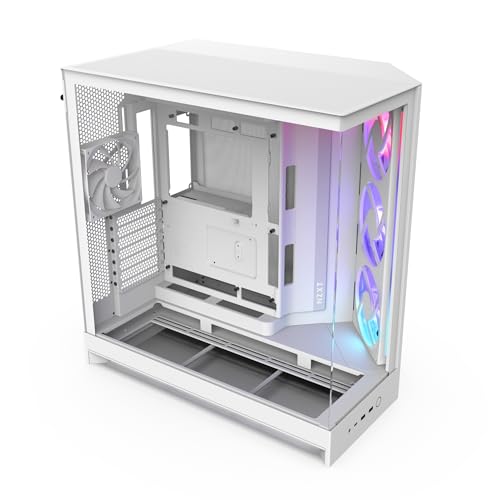
Designed for gamers and PC enthusiasts who value both aesthetics and performance, the NZXT H9 Flow RGB Mid-Tower PC Case stands out with its dual-chamber layout, enhancing thermal efficiency and cable management. The panoramic tempered glass panels provide a stunning view of your build, while optimized airflow from perforated steel panels and strategically placed fans ensures cool operation. It supports up to nine fans and accommodates large radiators, making it perfect for high-end setups. With extra-wide cable management channels and built-in Velcro straps, keeping your system tidy is effortless, letting you focus on what matters—your gaming experience.
Best For: Gamers and PC enthusiasts seeking a visually appealing case with exceptional thermal performance and cable management.
Pros:
- Dual-chamber design enhances thermal efficiency and simplifies cable management.
- Panoramic tempered glass panels provide an impressive view of the internal components.
- Supports extensive cooling options with a capacity for up to nine fans and large radiators.
Cons:
- Size may be cumbersome for users with limited space for a mid-tower case.
- Potential for dust accumulation due to open perforated panels, requiring regular cleaning.
- RGB fans and lighting may not appeal to users preferring a more minimalist aesthetic.
NZXT H5 Flow Compact ATX Mid-Tower Gaming Case

Gamers seeking a compact yet powerful solution will find the NZXT H5 Flow Compact ATX Mid-Tower Gaming Case an excellent choice. With dimensions of 16.93 x 8.86 x 18.31 inches and a weight of 17.6 pounds, this black case offers exceptional GPU cooling thanks to its perforated PSU shroud. You’ll appreciate the large radiator support for up to 360mm in front and 240mm on top. Pre-installed with two 120mm Quiet Airflow fans, it ensures optimal airflow. Plus, the seamless cable management system keeps your setup tidy. With a stellar 4.7-star rating, it’s a top contender in the market.
Best For: Gamers seeking a compact yet powerful mid-tower case with excellent cooling and cable management features.
Pros:
- Exceptional GPU cooling with a perforated PSU shroud for optimal airflow.
- Large radiator support allows for extensive cooling options with up to 360mm in front and 240mm on top.
- Seamless cable management system for easy routing and concealment of cables, keeping your setup organized.
Cons:
- The compact size may limit compatibility with larger components or cooling systems.
- Only includes two pre-installed fans, which may not be sufficient for some high-performance builds without additional fan purchases.
- Weight of 17.6 pounds might be a consideration for those needing a more portable option.
FOIFKIN F300 ATX Mid-Tower Gaming PC Case

If you’re looking for a sleek and functional gaming PC case, the FOIFKIN F300 ATX Mid-Tower is a standout choice. With its stunning 270° panoramic tempered glass panel, it showcases your build beautifully. Pre-installed with four non-LED RGB fans, this case supports up to ten 120mm fans or three 360mm liquid coolers for optimal cooling. It fits ATX, M-ATX, and ITX motherboards, with ample space for a 400mm GPU and a 170mm CPU cooler. Plus, it offers a variety of ports, including Type-C 3.0. With a solid customer rating and warranty support, the FOIFKIN F300 is a reliable option.
Best For: Gamers and PC builders seeking a stylish and functional case that offers excellent cooling options and ample space for high-performance components.
Pros:
- Stunning Design: Features a 270° panoramic tempered glass panel for enhanced visibility of your build.
- Excellent Cooling Support: Can accommodate up to 10 x 120mm fans or 3 x 360mm liquid coolers, ensuring optimal airflow.
- Versatile Compatibility: Supports various motherboard sizes (ATX, M-ATX, ITX) and has generous space for GPUs and CPU coolers.
Cons:
- Weight: At 16.85 pounds, the case may be heavier compared to other options in the market.
- Limited Storage Options: Only allows for 1 HDD and 1 SSD mount or 2 HDDs, which may not be sufficient for users with extensive storage needs.
- Non-LED Fans: Pre-installed fans do not feature LED lighting, which may not appeal to users looking for customizable RGB effects.
Factors to Consider When Choosing a PC Case With Built-in Fans
When you’re picking a PC case with built-in fans, consider several key factors that can impact your setup. Cooling efficiency is crucial for performance, but you’ll also want to think about noise levels and how the case looks in your space. Compatibility with your components and options for future upgrades are just as important to ensure your system runs smoothly.
Cooling Efficiency Importance
Cooling efficiency plays a pivotal role in your PC’s overall performance and longevity, especially during demanding tasks like gaming or rendering. When choosing a case, look for models with multiple built-in fans, ideally seven or more PWM ARGB fans, to significantly enhance airflow. A well-designed case featuring mesh panels and strategically placed fans can improve air intake and exhaust, which is crucial for keeping temperatures low. High airflow cases can boost cooling performance by up to 76% compared to non-ventilated designs, making them essential for effective heat dissipation. By prioritizing cooling efficiency, you not only protect your components from overheating but also ensure smoother performance during intense workloads, ultimately extending the life of your PC.
Fan Noise Levels
How can you enjoy a peaceful gaming experience while keeping your PC cool? When choosing a PC case with built-in fans, pay close attention to fan noise levels measured in decibels (dBA). Aim for fans that operate between 20-30 dBA for a quieter environment. Look for hydraulic bearing fans, as they tend to produce less noise than sleeve bearing fans. While higher RPM fans provide better cooling, they often exceed 30 dBA, which can be distracting. Consider cases with PWM technology, enabling fans to adjust speed based on temperature, reducing noise during low loads. Lastly, optimize fan placement for better airflow; properly positioned fans can run at lower speeds and therefore minimize noise, enhancing your gaming experience.
Aesthetic Appeal
While choosing a PC case with built-in fans, you shouldn’t overlook its aesthetic appeal, which can elevate your gaming or workstation setup. A visually striking case often features tempered glass panels, offering a panoramic view of your components and lighting effects. Many modern cases come with customizable RGB lighting, allowing you to match your setup’s color scheme or mood. The design, including color, shape, and materials, significantly impacts its visual impact, ranging from sleek minimalist styles to bold, aggressive designs. Additionally, cases that prioritize airflow can enhance their appearance, utilizing mesh panels and innovative structures. The arrangement of internal components, including fans and RGB lighting, can create a stunning focal point in your gaming space.
Compatibility With Components
When selecting a PC case with built-in fans, compatibility with your components is crucial. First, ensure the case supports your motherboard size—whether ATX, Micro-ATX, or Mini-ITX—to guarantee a proper fit. Next, check the GPU clearance; many cases accommodate high-performance graphics cards up to 400mm long. Don’t overlook the CPU cooler height, as some cases limit it to 160mm to 178mm, which could restrict your cooling options. Additionally, consider your storage needs by verifying the number and configuration of supported SSDs and HDDs. Finally, look for cases with good airflow design and pre-installed fans, as this significantly enhances thermal performance and extends the lifespan of your components.
Expandability Options
After ensuring compatibility with your components, the next step is to explore expandability options in your PC case. Look for models that support additional fan installations to boost airflow and cooling performance. Make sure the case can accommodate various fan sizes, enabling you to customize cooling based on your needs. Check compatibility with liquid cooling solutions; having space for radiators alongside built-in fans can significantly enhance thermal management for high-performance setups. Consider the total number of fan mounting locations, as more slots allow for better airflow management. Lastly, evaluate the case design, including features like removable dust filters and unobstructed airflow paths, which help maintain the effectiveness of both built-in and additional fans.
Cable Management Features
Choosing a PC case with built-in fans means you should also pay attention to its cable management features. Look for cases that offer wide channels, built-in Velcro straps, and tie-down points. These elements simplify routing and concealment, leading to a cleaner build. The internal layout design plays a crucial role as well; it should allow for easier installation and reduced clutter around critical components. Tool-less panel removal makes access to internal parts a breeze, enhancing cable organization during assembly. Consider cases with dedicated cable management compartments too. They separate cables from other components, improving airflow and making maintenance easier. A well-designed cable management system not only keeps your build tidy but also boosts cooling performance by minimizing airflow obstructions.
Material Quality
Material quality plays a vital role in the longevity and performance of your PC case, especially when built-in fans are involved. Opting for robust materials like steel or aluminum ensures durability, while plastic alternatives may not provide the same level of protection. If aesthetics matter, consider tempered glass side panels, which not only look great but also resist scratches and shattering better than standard glass. High-quality materials improve thermal conduction, enhancing cooling efficiency with built-in fans. Keep in mind that weight can affect portability; heavier cases indicate sturdiness, while lighter options are easier to transport. Additionally, better finishes resist fingerprints, dust, and corrosion, ensuring your case remains looking good and functioning well over time.