
If you’re serious about gaming and streaming, having the right motherboard can make all the difference. With 10GB Ethernet, you can guarantee faster data transfer and a more stable connection, essential for those intense gaming sessions. In this guide, we’ll explore the top motherboards that not only enhance performance but also offer advanced features. Let’s find out which options stand out and why they might be the perfect fit for your setup.
ASUS ProArt X870E-CREATOR WiFi Motherboard

The ASUS ProArt X870E-CREATOR WiFi Motherboard stands out as an ideal choice for creative professionals and gamers seeking top-tier performance and connectivity. With its AMD AM5 socket, it seamlessly supports Ryzen 9000, 8000, and 7000 Series processors. You’ll appreciate the robust 16+2+2 power stages, ensuring stability under heavy loads. Plus, the dual USB4 ports and impressive 10 Gb Ethernet enhance your connectivity. The board’s AI technologies, like AI Overclocking and Cooling, elevate your experience, while the DIY-friendly design simplifies upgrades. Security features, including USB port management, keep your system safe, making this motherboard a thorough solution for your needs.
Best For: Creative professionals and gamers looking for high performance and advanced connectivity features.
Pros:
- Robust power delivery with 16+2+2 power stages ensures system stability during demanding tasks.
- Advanced AI technologies like AI Overclocking and AI Cooling optimize performance and thermal management.
- Extensive connectivity options including dual USB4 ports and 10 Gb Ethernet enhance usability and speed.
Cons:
- Higher price point compared to standard motherboards may not suit budget-conscious users.
- Size and form factor may limit compatibility with smaller cases.
- Complex features may require a learning curve for users unfamiliar with advanced motherboard functionalities.
ASUS Pro WS B850M-ACE SE AMD AM5 MicroATX Business Motherboard

For professionals seeking a reliable and high-performance motherboard, the ASUS Pro WS B850M-ACE SE stands out with its robust features tailored for advanced AI workloads. This MicroATX board supports AMD Ryzen 9000/8000/7000 Series and EPYC processors, ensuring compatibility with powerful components. With dual PCIe 5.0 x16 slots and two M.2 slots, you’ll enjoy lightning-fast connectivity. The inclusion of 10 Gb and 2.5 Gb LAN ports enhances your networking capabilities, perfect for demanding tasks. Plus, its server-grade remote management empowers IT support, making it an ideal choice for business environments that demand reliability and performance.
Best For: Professionals and businesses seeking a reliable, high-performance motherboard for advanced AI workloads and seamless remote management.
Pros:
- Supports the latest AMD Ryzen and EPYC processors for powerful performance.
- Dual PCIe 5.0 x16 slots and two M.2 slots for enhanced connectivity and speed.
- Server-grade IPMI remote management for efficient IT support and monitoring.
Cons:
- Limited to MicroATX form factor, which may not fit all custom builds.
- Price point may be higher compared to standard motherboards.
- Requires Windows 10 or 11, limiting operating system options.
ASUS ProArt Z890-CREATOR WIFI ATX Motherboard

Designed for content creators and professionals, the ASUS ProArt Z890-CREATOR WIFI ATX Motherboard stands out with its robust 10 Gb and 2.5 Gb Ethernet networking capabilities. You’ll appreciate the Intel® Core™ Ultra Processor Series 2 compatibility and impressive memory support of DDR5, reaching speeds of up to 9066 MHz. With five M.2 slots and dual Thunderbolt 5 ports, your connectivity options are extensive. AI features like overclocking and cooling guarantee peak performance. Weighing in at 5.94 pounds and measuring 3.4 x 14 x 11 inches, it’s a powerful, compact choice for your creative endeavors.
Best For: Content creators and professionals seeking a high-performance motherboard with advanced networking and AI features.
Pros:
- Impressive memory support with DDR5 speeds of up to 9066 MHz for enhanced performance.
- Extensive connectivity options including five M.2 slots and dual Thunderbolt 5 ports.
- AI technologies such as AI Overclocking and AI Cooling II for optimized system performance.
Cons:
- Weighty design at 5.94 pounds, which may be cumbersome for some builds.
- Limited compatibility to Intel® Core™ Ultra Processor Series 2, excluding other processor types.
- Potentially high price point compared to other motherboards in the market.
TP-Link 10GB PCIe Network Card (TX401)

Offering lightning-fast speeds of up to 10 Gbps, the TP-Link 10GB PCIe Network Card (TX401) is an ideal choice for gamers and professionals who demand superior network performance. This PCIe adapter guarantees smooth data transmissions for both internet access and local transfers, making it 10 times faster than standard Gigabit adapters. It’s compatible with multiple Windows versions and Linux, plus it supports various data rates. The included 1.5 m CAT6A Ethernet cable boosts performance, while the Quality of Service (QoS) technology prioritizes your gaming needs. With a 2-year warranty and 24/7 technical support, you’re well-covered.
Best For: Gamers and professionals seeking high-speed network performance for seamless online gaming and efficient data transfers.
Pros:
- Supports speeds up to 10 Gbps, providing significantly faster connections than standard Gigabit adapters.
- Includes a CAT6A Ethernet cable, enhancing performance for optimal data transmission.
- Quality of Service (QoS) technology reduces network congestion, prioritizing gaming and streaming activities.
Cons:
- May require additional configuration for optimal performance in certain network setups.
- Limited to PCIe slots, which may not be available on all motherboards, especially older models.
- Higher price point compared to standard Gigabit network cards.
ASUS ROG Crosshair X870E Extreme Gaming Motherboard

The ASUS ROG Crosshair X870E Extreme Gaming Motherboard stands out for gamers and content creators seeking unparalleled performance and connectivity. With its AMD AM5 socket, you can harness the power of Ryzen 9000, 8000, and 7000 Series processors, while DDR5 memory support guarantees blazing speed. Advanced AI features like AI Overclocking and AI Networking II simplify performance tuning. Its robust power solution and optimized thermal design keep everything cool during intense gaming sessions. Plus, with 10Gb Ethernet, Wi-Fi 7, and extensive connectivity options, you’ll enjoy seamless online experiences. Personalization options, including RGB lighting, make it a stylish choice for your build.
Best For: Gamers and content creators seeking high-performance computing with advanced AI features and extensive connectivity options.
Pros:
- Supports the latest AMD Ryzen processors and DDR5 memory for superior performance.
- Advanced AI features simplify overclocking and system optimization.
- Robust power and thermal solutions ensure stability during demanding tasks.
Cons:
- Higher price point compared to standard motherboards may not suit budget builds.
- Complex features may require a learning curve for novice users.
- Limited availability of certain high-end features for casual users.
ASUS ROG Maximus Z690 Formula ATX Motherboard
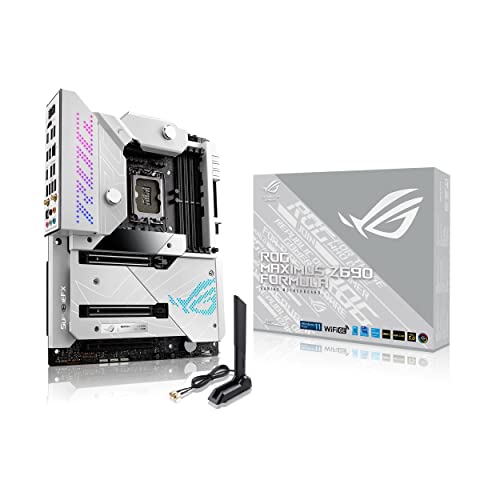
For gamers and content creators seeking top-tier performance, the ASUS ROG Maximus Z690 Formula ATX Motherboard stands out with its impressive 10Gb Ethernet capability. It features an Intel LGA 1700 socket, supporting 12th Gen Intel Core processors and Windows 11. With 12 rear USB ports, onboard Wi-Fi 6E, and Thunderbolt 4, connectivity is a breeze. You’ll appreciate the robust power solution with 20+1 teamed power stages and optimized thermal management using VRM heatsinks. ASUS-exclusive tools like AI Overclocking and Two-Way AI Noise-Cancelation guarantee effortless configuration, making this motherboard a fantastic choice for serious gamers and streamers alike.
Best For: Gamers and content creators looking for high-performance components and advanced connectivity options.
Pros:
- Robust power solution with 20+1 teamed power stages for stable performance.
- Comprehensive connectivity options including 10Gb Ethernet, Wi-Fi 6E, and Thunderbolt 4.
- Intelligent control features like AI Overclocking and Two-Way AI Noise-Cancelation for easy configuration.
Cons:
- Premium pricing may not be suitable for budget-conscious users.
- The advanced features might be overwhelming for casual users or beginners.
- Limited compatibility with older hardware due to the LGA 1700 socket and DDR5 support.
NICGIGA 6 Port 10Gbps Ethernet Switch

Designed for gamers and content creators, the NICGIGA 6 Port 10Gbps Ethernet Switch delivers unmatched speed and reliability for high-demand applications. With a configuration of 2 x 10Gb RJ45 ports and 4 x 2.5Gb Base-T ports, it’s perfect for connecting devices like 10G NAS, WiFi7 routers, and gaming PCs. You’ll experience 2.5 times faster performance than traditional Gigabit switches, boasting a 60Gbps switching capacity. Its plug-and-play setup means no complicated configuration is needed. Plus, the durable metal case and fanless design guarantee silent operation. With a one-year warranty and lifetime support, you’re set for seamless connectivity.
Best For: Gamers and content creators seeking high-speed and reliable network performance for demanding applications.
Pros:
- 2.5x faster performance compared to traditional Gigabit switches, enhancing data transfer speeds.
- Plug-and-play setup allows for easy installation without the need for complex configurations.
- Durable metal case with fanless design ensures silent operation and longevity.
Cons:
- Unmanaged switch means limited control over network configurations and settings.
- Limited number of ports (6 in total) may not be sufficient for larger setups or networks.
- No advanced features like VLAN support or QoS for prioritizing network traffic.
ASUS TUF Gaming X870-PLUS WiFi Motherboard

With its robust power delivery system and cutting-edge AI features, the ASUS TUF Gaming X870-PLUS WiFi Motherboard is perfect for gamers and content creators seeking top-tier performance. This ATX motherboard supports AMD Ryzen 7000, 8000, and 9000 Series processors, featuring a 16+2+1 power stage design for efficient power management. You’ll appreciate the DDR5 memory support and four PCIe 5.0 M.2 slots for high-speed storage. Connectivity options include Wi-Fi 7 and 2.5Gb LAN, ensuring lag-free online gaming and streaming. Plus, ASUS-exclusive AI technologies like AI Overclocking enhance your system’s performance effortlessly.
Best For: Gamers and content creators seeking high-performance computing with advanced AI capabilities.
Pros:
- Supports the latest AMD Ryzen 7000, 8000, and 9000 Series processors for superior performance.
- Features advanced connectivity options like Wi-Fi 7 and 2.5Gb LAN for seamless online experiences.
- Equipped with ASUS-exclusive AI technologies for effortless overclocking and system optimization.
Cons:
- ATX form factor may not fit in smaller cases, limiting compatibility.
- Premium features and specifications may come at a higher price point compared to entry-level motherboards.
- Requires DDR5 memory, which could be more expensive and harder to find than older memory types.
ASUS ProArt X870E-CREATOR WiFi Motherboard
The ASUS ProArt X870E-CREATOR WiFi Motherboard stands out as an excellent choice for creative professionals and gamers who demand high-performance capabilities. With its AMD X870E chipset and AM5 socket, it supports the latest Ryzen 7000, 8000, and 9000 series processors. You’ll appreciate the next-gen PCIe 5.0 x16 slot, 16+2+2 power stages, and DDR5 memory support for unmatched speed. Its optimized thermal design, AI overclocking, and built-in Wi-Fi 7 guarantee seamless performance. Plus, with dual USB4 ports and high-speed Ethernet options, you’ll enjoy extensive connectivity for all your demanding applications.
Best For: Creative professionals and gamers seeking high-performance capabilities with advanced technology and extensive connectivity options.
Pros:
- Supports the latest AMD Ryzen 9000, 8000, and 7000 series processors for powerful performance.
- Features PCIe 5.0 x16 slot and DDR5 memory support for unmatched speed and efficiency.
- Includes built-in Wi-Fi 7 and dual USB4 ports for enhanced connectivity and network capabilities.
Cons:
- High-end features may come at a premium price point, making it less accessible for budget-conscious users.
- The complexity of features might overwhelm casual users or those unfamiliar with advanced hardware setups.
- Limited compatibility with older AMD processors due to the AM5 socket design.
ASUS Pro WS Z890-ACE SE Motherboard

For professionals and enthusiasts seeking unparalleled performance and connectivity, the ASUS Pro WS Z890-ACE SE motherboard stands out with its robust 10Gb and 2.5Gb LAN options. Built on the Intel LGA1851 socket, it accommodates Intel Core Ultra processors, ensuring exceptional efficiency. With 16+2+1+2 power stages and ProCool II connectors, it delivers stability for demanding tasks. You’ll benefit from two PCIe 5.0 slots for next-gen graphics and multiple M.2 slots for speedy storage. Plus, AI overclocking and cooling features make optimizing performance effortless. This motherboard is designed to future-proof your setup, perfect for advanced AI computing and high-performance applications.
Best For: Professionals and enthusiasts who require high performance and advanced connectivity for demanding applications.
Pros:
- Exceptional LAN options with 10Gb and 2.5Gb for high-speed networking.
- Multiple PCIe 5.0 slots and M.2 slots for next-gen graphics and fast storage solutions.
- AI overclocking and cooling features simplify performance optimization.
Cons:
- May be overkill for casual users or basic computing needs.
- Higher price point compared to standard motherboards.
- Limited compatibility with older Intel processors due to LGA1851 socket.
Factors to Consider When Choosing a Motherboard With 10GB Ethernet
When you’re choosing a motherboard with 10GB Ethernet, you need to take into account several key factors. Make certain it’s compatible with your processor and check the availability of expansion slots. Don’t forget about the power delivery system, connectivity options, and thermal management features to guarantee peak performance.
Compatibility With Processors
Choosing a motherboard with 10GB Ethernet requires careful attention to processor compatibility, especially since different processors demand specific socket types and support. Make certain the motherboard’s socket matches your chosen processor, like AMD AM5 for Ryzen 9000, 8000, and 7000 Series, or Intel LGA1851 for Intel Core Ultra processors. It’s also essential to check if the motherboard supports the generation of your processor, as newer chipsets often deliver better performance. Confirm the power delivery system meets your processor’s requirements for stable performance under load. Finally, verify the motherboard’s BIOS compatibility, as updates might be necessary. Look for boards that explicitly mention support for both your processor and 10GB Ethernet to maximize your performance in high-speed networking scenarios.
Expansion Slot Availability
Having the right expansion slots is vital for maximizing the potential of a motherboard with 10GB Ethernet. Look for multiple PCIe slots to accommodate additional cards, enhancing your system’s performance. Opt for motherboards featuring PCIe 5.0 slots, as these provide the latest bandwidth for faster network cards, considerably boosting data transfer rates. Dedicated M.2 slots supporting PCIe 4.0 or 5.0 are also important; they allow for high-speed storage devices that complement your 10GB Ethernet capabilities. Verify your motherboard has enough lanes to use 10GB Ethernet alongside other high-bandwidth components, like GPUs or extra network cards. Finally, choose a suitable form factor—ATX, MicroATX, etc.—to avoid overcrowding and guarantee ideal configuration.
Power Delivery System
A strong power delivery system is essential for ensuring your motherboard with 10GB Ethernet performs reliably, especially under heavy loads. Look for motherboards featuring high-quality power stages and capacitors, as these components enhance system longevity and reliability. A 16+2 power stage configuration, for example, indicates a robust capability to support demanding processors and high-performance components. Additionally, advanced cooling solutions like heatsinks and thermal pads are vital to prevent overheating during intense gaming sessions or heavy tasks. Ensuring compatibility with efficient power connectors, such as ProCool II, can further boost your power delivery system by providing better voltage stability and thermal management, ultimately leading to a smoother and more efficient gaming or streaming experience.
Connectivity Options Offered
When it comes to selecting a motherboard with 10GB Ethernet, connectivity options play a crucial role in meeting your networking needs. Look for motherboards that feature multiple high-speed Ethernet ports, including both 10Gb and 2.5Gb connections, to guarantee versatility. Make certain it has PCIe 5.0 slots, as they deliver the bandwidth necessary for high-performance Ethernet cards. USB ports also matter; opt for those with USB 20Gbps and USB4 support for enhanced data transfer rates. Additionally, consider motherboards that include advanced networking features like Quality of Service (QoS) to prioritize critical applications. Finally, verify compatibility with various processors and memory types to maximize your system’s overall performance when utilizing 10GB Ethernet.
Thermal Management Features
While evaluating motherboards with 10GB Ethernet, it’s essential to prioritize thermal management features to guarantee reliable performance. Effective thermal designs often include integrated heatsinks and heat pipes that efficiently dissipate heat. Look for high-conductivity thermal pads, as they improve heat transfer between components, ensuring stable performance during heavy data transmission. Advanced solutions may incorporate multiple layers of PCB design, distributing heat to prevent hotspots. Some motherboards even have dedicated cooling components specifically for high-speed network interfaces, keeping ideal operating temperatures during intensive tasks. A robust thermal management system is vital to prevent thermal throttling, which can negatively impact your 10GB Ethernet connections during demanding applications. Choose wisely to maximize your gaming and streaming experience!