
If you’re looking to optimize your workspace, finding the right monitor arm with USB hubs can make a significant difference. These innovative solutions not only enhance ergonomics but also provide convenient access to charging and data transfer. With so many options available, identifying the best fit for your setup can be challenging. Let’s explore some top contenders that can elevate your office experience and help you maintain a clutter-free environment.
CTA White Monitor Arm Mount for 23″ to 35″ Monitors

If you’re looking for a versatile and stylish solution for your workspace, the CTA White Monitor Arm Mount is perfect for monitors ranging from 23″ to 35″. Weighing just 7 lbs. 10 oz., it supports monitors up to 19.8 lbs and offers flexible height adjustments from 6.8” to 17.1”. With a 360-degree swivel and 180-degree tilt, you can easily switch between portrait and landscape orientations. Plus, it features two USB 3.0 ports for charging your devices and cable management clips to keep your workspace tidy. This mount combines functionality and aesthetics, making it a top choice for any setup.
Best For: Anyone seeking a stylish and functional monitor mount that accommodates monitors between 23″ and 35″ for an organized workspace.
Pros:
- Adjustable height and flexible mounting options for personalized comfort.
- Dual USB 3.0 ports for convenient device charging.
- Effective cable management system to maintain a clutter-free desk.
Cons:
- Limited to monitors weighing up to 19.8 lbs, which may exclude heavier models.
- Installation may require tools for permanent screw mounting.
- Some users may prefer additional features like built-in lighting or extra USB ports.
HUANUO Single Monitor Arm for 13-49 inch Screens
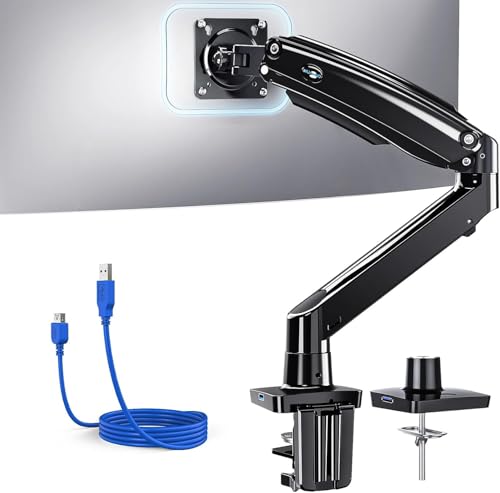
The HUANUO Single Monitor Arm is an excellent choice for remote workers and professionals who crave an ergonomic workspace. It supports screens ranging from 13 to 49 inches and is compatible with 95% of monitors. You’ll appreciate its flexible adjustments—tilting, swiveling, and rotating to find your perfect angle. With built-in USB 3.0 ports for fast data transfer and integrated cable management, you’ll reclaim valuable desk space. Made from durable aerospace-grade aluminum, it withstands daily use and holds your monitor steady during intense typing. Installation is a breeze, thanks to included mounts and tools, ensuring a hassle-free setup.
Best For: Remote workers, students, and professionals seeking an ergonomic and space-efficient monitor setup.
Pros:
- Flexible adjustments for optimal viewing angles with tilt, swivel, and rotation capabilities.
- Built-in USB 3.0 port for fast data transfer and charging, enhancing workspace efficiency.
- Durable construction with aerospace-grade aluminum, ensuring stability and longevity.
Cons:
- May require a solid wood desk without crossbars for optimal installation and stability.
- Initial setup may be challenging for users unfamiliar with monitor mounts.
- Limited to a maximum weight capacity of 26.4 lbs, which may not support heavier monitors.
Single Monitor Mount for 13-49 Inch Screens

For those looking to optimize their workspace, the single monitor mount accommodates screens ranging from 13 to 49 inches, making it an ideal choice for both home office setups and gaming stations. It supports displays up to 24 lbs, ensuring stability with its aerospace-grade aluminum structure. You can easily adjust the height, tilt, and swivel for the perfect viewing angle. Plus, the built-in USB 3.0 hub keeps your peripherals connected, enhancing efficiency. This mount also frees up 20% more desk space compared to traditional stands, while integrated cable management keeps your workspace neat and organized.
Best For: Individuals seeking to enhance their home office or gaming setup with an adjustable and space-saving monitor mount.
Pros:
- Versatile Compatibility: Supports a wide range of screen sizes from 13 to 49 inches, accommodating various user needs.
- Ergonomic Adjustability: Offers multiple viewing angles with height adjustment, tilt, and swivel features for comfort during prolonged use.
- Built-in Connectivity: Includes a USB 3.0 hub for easy connection of peripherals, helping to reduce desk clutter.
Cons:
- Weight Limit: Can only support screens up to 24 lbs, which may not accommodate heavier monitors.
- Installation Complexity: May require additional tools or expertise for setup, especially for users unfamiliar with mounting systems.
- Limited to Single Monitor: Designed for only one monitor, which may not meet the needs of users looking for a dual-monitor setup.
ARES WING Ultrawide Monitor Arm with USB A/C

Designed specifically for ultrawide monitors, the ARES WING Ultrawide Monitor Arm with USB A/C is an exceptional choice for those looking to enhance their workspace. It supports screens from 17 to 49 inches and holds up to 44 lbs, perfect for both flat and curved displays. With impressive adjustability, you can tilt, swivel, and rotate your monitor to find the ideal viewing angle while reducing neck strain. The integrated USB 3.0 ports keep your devices charged and organized, freeing up desktop space. Built from high-quality materials, it promises durability and reliable performance for years to come.
Best For: Those who use ultrawide monitors and seek an ergonomic solution to optimize their workspace.
Pros:
- Versatile Compatibility: Supports a wide range of monitor sizes (17 to 49 inches) and both flat and curved designs.
- Enhanced Ergonomics: Features adjustable height, tilt, swivel, and rotation, allowing users to customize their viewing angles to reduce strain.
- Smart Connectivity: Integrated USB 3.0 ports for convenient charging and data transfer while keeping the workspace organized.
Cons:
- Weight Limitations: Maximum load capacity of 44 lbs may not accommodate heavier ultra-wide monitors.
- Installation Complexity: Some users may find the installation process challenging, despite available support.
- Desk Space Requirement: Requires adequate desk space for proper installation, particularly with the arm extension.
HUANUO NITROGLIDE Dual Monitor Stand (HNDS7)

If you’re seeking a robust solution for dual monitors, the HUANUO NITROGLIDE Dual Monitor Stand (HNDS7) stands out with its impressive weight capacity of 26.4 lbs per arm. Weighing 18.15 lbs, this sturdy stand features solid aluminum arms and a larger base for enhanced stability. You’ll appreciate the full motion adjustments, allowing you to swivel, tilt, and rotate your monitors easily. Plus, it includes two USB ports for charging devices, keeping your workspace organized. With its integrated cable management system, you can say goodbye to clutter. Customers love it, giving it a 4.6 out of 5 stars!
Best For: Those seeking a durable and adjustable dual monitor stand to enhance workspace organization and ergonomics.
Pros:
- Full motion adjustments for optimal viewing angles and comfort.
- Integrated USB ports for convenient device charging.
- Sturdy construction with solid aluminum arms and an efficient cable management system.
Cons:
- Heavier weight may make installation more challenging.
- Limited to VESA compatible monitors, which may restrict options.
- Price point may be higher compared to basic monitor stands.
monTEK Single Monitor Arm with USB for Ultrawide Screens (MA1007UCBK)

The monTEK Single Monitor Arm with USB for Ultrawide Screens (MA1007UCBK) is perfect for anyone who needs to maximize their workspace while enjoying full motion adjustability. Supporting screens from 17 to 45 inches, it holds up to 35.27 lbs with ease. You’ll appreciate the ergonomic design, allowing you to tilt, swivel, and rotate your monitor for optimal viewing. Plus, the compact base saves desk space, while the integrated USB 3.0 ports simplify charging and data transfer. Installation is a breeze, thanks to the included C-clamp and grommet mounts. Durable construction ensures consistent performance for your workspace needs.
Best For: Those seeking an ergonomic and space-saving solution for ultrawide monitors in office, home, or gaming setups.
Pros:
- Supports a wide range of monitor sizes (17 to 45 inches) and weights (up to 35.27 lbs).
- Full motion capabilities for customizable viewing angles and reduced neck strain.
- Compact design with integrated USB 3.0 ports for efficient cable management and device charging.
Cons:
- May require specific desk types for optimal installation with C-clamp or grommet mounts.
- Some users may find the installation process complex if they are not familiar with mounting hardware.
- Limited to VESA-compatible monitors, which may exclude certain screen models.
ARES WING Heavy Duty Monitor Arm for 17 to 49 Inch Screens

For gamers and professionals alike, the ARES WING Heavy Duty Monitor Arm stands out with its impressive compatibility, supporting screens from 17 to 49 inches and holding up to 44 lbs. Its ergonomic design includes an 18-inch extended column, allowing height adjustments up to 26.3 inches. The gas spring system enables smooth tilting, swiveling, and rotation for the perfect viewing angle. With integrated USB 3.0 ports, it keeps your workspace organized and efficient. Choose between C-clamp and grommet mount options for easy installation. Built for durability, ARES WING is a reliable choice for enhancing your gaming or work setup.
Best For: Gamers and professionals looking for a versatile and ergonomic monitor arm that supports large screens and enhances workspace efficiency.
Pros:
- Supports a wide range of monitor sizes from 17 to 49 inches, accommodating various setups.
- Ergonomic design with adjustable height and smooth movement for optimal viewing angles.
- Integrated USB 3.0 ports for convenient charging and data transfer, promoting an organized workspace.
Cons:
- Requires VESA mount adapter for non-VESA monitors, which may add extra cost.
- Installation may be challenging for some users despite the topside installation feature.
- Heavy-duty design may not be necessary for smaller or lighter monitors, leading to potential over-specification.
monTEK Dual Monitor Mount for 17 to 35 Inch Monitors

Designed to accommodate a wide range of monitor sizes, the monTEK Dual Monitor Mount is perfect for anyone looking to optimize their workspace, whether you’re a professional working from home or a passionate gamer. This mount supports monitors from 17 to 35 inches, with a weight capacity of 35.27 lbs. Its adjustable features, including tilting and height adjustments, help reduce neck strain and eye fatigue. Plus, the integrated USB ports and cable management keep your setup tidy. Installation is a breeze with included hardware, and the durable aluminum construction ensures longevity. Enjoy a more organized workspace with this versatile mount!
Best For: Professionals working from home, gamers, and anyone looking to optimize their dual monitor setup.
Pros:
- Adjustable features allow for personalized positioning to reduce neck strain and eye fatigue.
- Durable aluminum construction ensures longevity and stability for heavier monitors.
- Integrated USB ports and cable management help maintain a clean and organized workspace.
Cons:
- Weight capacity may be limiting for those with heavier monitors or additional accessories.
- Installation may require additional tools not included in the package.
- Limited compatibility with monitors that do not meet VESA standards.
monTEK Dual Monitor Arm with USB (MA1011UCWH-D)

If you’re seeking a monitor arm that combines versatility and convenience, the monTEK Dual Monitor Arm with USB (MA1011UCWH-D) is an excellent choice. It supports 17-35″ screens, holding up to 24.2 lbs per arm, ensuring your monitors are secure. With adjustable tilt, swivel, and rotation, you can position your screens for optimal viewing and comfort. The compact design saves desk space, while integrated cable management keeps your workspace tidy. Plus, built-in USB ports provide easy charging and data transfer. Made from high-grade aluminum, this durable arm promises stability and smooth adjustments, making it a perfect addition to your setup.
Best For: Those seeking an ergonomic and space-saving solution for dual monitor setups in office, home, or gaming environments.
Pros:
- Versatile Compatibility: Supports a wide range of monitor sizes (17-35″) and weights (up to 24.2 lbs per arm).
- Ergonomic Adjustability: Offers multiple adjustments for optimal screen positioning, reducing neck strain and improving comfort.
- Integrated Features: Includes built-in USB ports for convenient charging and data transfer, along with effective cable management.
Cons:
- Installation Required: May require time and effort for setup, depending on desk compatibility.
- Weight Limitations: The maximum weight capacity per arm (24.2 lbs) may not accommodate heavier monitors.
- Potential for Over-tightening: Users must be cautious not to over-tighten during installation, which could impact movement.
monTEK Single Monitor Arm with USB A/C for 17 to 57 Inch Curved Screens

The monTEK Single Monitor Arm with USB A/C is perfect for those who need flexibility and ergonomic comfort while using large screens, as it supports monitors ranging from 17 to 57 inches and up to 59.4 lbs. Its full motion capabilities, including a +75° to -75° tilt and 180° swivel, allow you to customize your viewing angle easily. You’ll appreciate the built-in USB-A and USB-C ports for seamless charging and data transfer. Plus, the integrated cable management keeps your workspace tidy, while the durable construction ensures long-lasting performance. Installation is a breeze with labeled components and multiple mounting options.
Best For: Those seeking ergonomic support and versatility in monitor positioning for large screens, ideal for both work and gaming environments.
Pros:
- Full motion capabilities allow for customizable viewing angles with tilt, swivel, and rotation adjustments.
- Integrated USB-A and USB-C ports facilitate convenient charging and data transfer for devices.
- Durable construction from high-quality materials ensures long-lasting performance and stability.
Cons:
- VESA mount adapter may be required for monitors lacking compatible mounting holes (not included).
- Installation might be challenging for those unfamiliar with mounting hardware.
- Limited weight capacity of 59.4 lbs may not accommodate very heavy monitors.
Factors to Consider When Choosing a Monitor Arm With USB Hub
When you’re choosing a monitor arm with a USB hub, several key factors will influence your decision. You’ll want to consider monitor size compatibility, weight capacity, and adjustability features to ensure it meets your needs. Don’t forget about the mounting options and cable management solutions that can keep your workspace neat and organized.
Monitor Size Compatibility
Choosing a monitor arm with a USB hub requires careful consideration of your monitor’s size compatibility. Most monitor arms support sizes ranging from 13 to 49 inches, making them versatile for various setups, whether at home, in the office, or for gaming. You’ll want to ensure that the monitor arm fits VESA mount standards, typically 75×75 mm or 100×100 mm, to properly attach your monitor. Additionally, consider the height adjustment capabilities, which can vary significantly, with some arms allowing adjustments up to 26.3 inches. Flexibility in adjustments like tilt, swivel, and rotation can enhance your comfort, allowing you to find the optimal viewing angle for different monitor sizes and your personal preferences.
Weight Capacity Considerations
Weight capacity plays a crucial role in selecting a monitor arm with a USB hub. When you’re choosing one, make sure it supports your monitor’s weight, as options range from 4.4 lbs to 59.4 lbs. Most monitor arms have a specified maximum weight capacity, typically between 19.8 lbs and 44 lbs, so check compatibility carefully. Higher weight capacities often mean better stability and durability, allowing for smoother adjustments without sagging. If you’re using a dual or multi-monitor setup, consider the combined weight, as some arms can support over 26.4 lbs per arm. Don’t forget to factor in any additional accessories like webcams or speakers to avoid exceeding the weight limit and ensure everything stays secure and functional.
Adjustability Features
To ensure your monitor arm meets your specific needs, it’s essential to consider its adjustability features. Look for a monitor arm that offers a height adjustment range between 6.8 to 26.3 inches to fit various user preferences and desk setups. Flexible tilt options, such as +85° to -30°, allow for optimal screen positioning, reducing neck strain. Additionally, swivel capabilities of ±90° and a 360° rotation enhance usability, making it easy to switch between landscape and portrait modes. Adjustable arm extensions, often reaching up to 25.6 inches, help you position the monitor at your desired distance while maximizing desk space. Lastly, consider those with built-in USB hubs for convenient connectivity, streamlining your workspace organization.
Mounting Options Available
When selecting a monitor arm with a USB hub, understanding the available mounting options is crucial for ensuring a secure and aesthetically pleasing setup. You’ll typically encounter two main types: C-clamp and grommet. C-clamp mounts are easier to install and don’t require drilling, making them great for quick setups. On the other hand, grommet mounts offer a more permanent solution if your desk has pre-existing holes, providing a cleaner look. Some monitor arms also feature a detachable VESA plate, allowing for hassle-free monitor installation and removal. Before making your purchase, ensure the mounting options are compatible with your desk type and thickness to guarantee proper installation and support for your workspace.
Cable Management Solutions
After you’ve chosen the right mounting option for your monitor arm, the next consideration is how it manages cables. Effective cable management can reclaim up to 30% more desk space by organizing and routing cables neatly. Look for monitor arms that include integrated cable management systems to keep wires out of sight, enhancing workspace efficiency and reducing clutter. Some models even feature cable clips along the arm for customized routing, preventing tangling and ensuring a tidy appearance. Plus, the built-in USB ports offer convenient access for charging devices and transferring data, minimizing the need for additional cables scattered across your desk. A well-designed cable management solution boosts aesthetics and enhances productivity by reducing distractions caused by messy cables.
USB Hub Specifications
Choosing the right monitor arm with a USB hub involves several key factors that can enhance your workspace. First, consider the number of USB ports available; having two or more can streamline your device connections for charging and data transfer. Look for USB specifications like USB 3.0 support, which allows for faster data transfer speeds—up to 5 Gbps—compared to USB 2.0. Check the types of USB ports included, ensuring compatibility with your devices; USB-A and USB-C ports offer versatile options. Additionally, assess the placement of the USB ports on the arm for easy access. Finally, ensure the design incorporates built-in cable management to keep cords organized, minimizing desk clutter while maximizing functionality.
Durability and Materials
Although you might focus on features like USB ports and adjustability, the durability and materials of a monitor arm with a USB hub are equally crucial. Look for monitor arms made from aerospace-grade aluminum or high-quality steel; these materials offer enhanced durability and stability, ensuring long-lasting performance, even under heavy loads. Many models undergo rigorous testing, confirming their resilience over time. Check the weight capacity, as some support up to 44 lbs for larger screens. A robust construction minimizes wobbling, maintaining screen stability during adjustments, which is vital for an ergonomic setup. Additionally, durable gas springs allow for smooth adjustments and extend the arm’s lifespan by reducing wear and tear from frequent use.
Installation Ease and Support
When you’re setting up your workspace, installation ease and support can significantly impact your overall experience with a monitor arm that features a USB hub. Look for monitor arms that include all necessary hardware and clear instructions, which can reduce setup time by up to 30%. Consider options with multiple mounting methods, like C-clamps and grommet mounts, ensuring compatibility with various desk styles and thicknesses. Quick-release VESA plates simplify attaching and detaching monitors, making adjustments efficient. It’s also crucial to choose models from manufacturers that offer responsive customer support for any installation inquiries. Lastly, designs that allow easy topside installation can save you from crawling under the desk, making the process smoother in tight workspaces.