
If you’re looking to enhance your workspace, a good monitor arm desk mount can make a significant difference. It not only helps you organize your desk but also promotes better posture and reduces strain. With various options available, from single to dual monitor setups, you’ll find the right fit for your needs. Let’s explore some of the top choices that could transform your work environment.
WALI Single Monitor Mount, Gas Spring Adjustable Arm for 17-34 inch Screens

If you’re looking for a versatile and ergonomic solution for your workspace, the WALI Single Monitor Mount is an excellent choice for anyone with screens ranging from 17 to 34 inches. This gas spring adjustable arm supports flat screens up to 26.4 lbs and curved screens up to 19.8 lbs. With a full range of motion, you can swivel, tilt, and rotate your monitor, promoting better posture and reducing strain. Installation is straightforward with clamp or grommet methods, and it fits most monitor brands thanks to standard mounting holes. Plus, US-based customer support is available to help with any questions.
Best For: Individuals seeking an ergonomic and adjustable monitor mounting solution for screens between 17 to 34 inches.
Pros:
- Full adjustability allows for optimal positioning with swivel, tilt, and rotation features.
- Easy installation with two mounting options: clamp and grommet.
- Compatible with most monitor brands due to standard mounting hole patterns.
Cons:
- Limited to screens weighing up to 26.4 lbs for flat monitors and 19.8 lbs for curved monitors.
- May require additional tools for installation not included in the package.
- Some users may find the gas spring tension adjustment challenging to set up correctly.
HUANUO Single Monitor Mount (Adjustable Vesa Mount for 13 to 32 Inch Monitors)

The HUANUO Single Monitor Mount is an excellent choice for professionals and gamers alike who need a reliable and ergonomic solution for their 13 to 32-inch monitors. It accommodates weights from 4.4 to 19.8 lbs and features VESA compatibility for easy installation. With a tilt range of -50° to +85°, ±90° swivel, and 360° rotation, you can easily adjust your screen to the perfect angle. The sturdy design guarantees stability, having passed 20,000 motion tests. Plus, installation is a breeze, taking just 3 minutes with two mounting options available. Upgrade your workspace with this versatile monitor arm!
Best For: Professionals and gamers seeking an ergonomic and adjustable monitor solution for screens between 13 to 32 inches.
Pros:
- Full adjustability allows for optimal viewing angles with tilt, swivel, and rotation features.
- Sturdy construction ensures stability and durability, having passed extensive motion tests.
- Quick installation process takes only 3 minutes with two mounting options for versatility.
Cons:
- Limited to monitors weighing between 4.4 to 19.8 lbs, which may exclude heavier models.
- Requires a clear underside for grommet mounting, which may not be possible in all setups.
- Potential compatibility issues with monitors that do not have standard VESA mounting patterns.
monTEK Single Monitor Arm for 17-40″ Ultrawide Screens
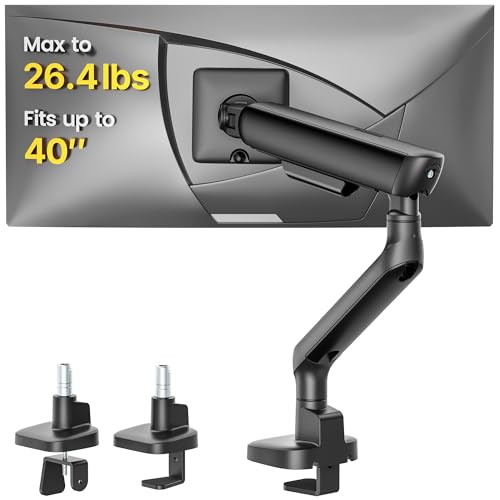
Looking for a versatile monitor arm that accommodates both flat and curved screens? The monTEK Single Monitor Arm supports 17–40″ ultrawide displays and holds up to 24.2 lbs. With full VESA compliance and impressive adjustability—from -45° to +60° tilt to 180° rotation—you can customize your screen’s position for maximum comfort. Its compact design frees up desk space while built-in cable management keeps your workspace tidy. Made from durable aluminum, it guarantees long-term stability without sagging. Plus, installation is a breeze with included hardware and responsive customer support at your service. Enjoy a more organized, ergonomic workspace with the monTEK arm!
Best For: Professionals and gamers looking for a versatile and ergonomic solution to elevate their 17-40″ ultrawide monitors for improved workspace organization and comfort.
Pros:
- Fully adjustable with tilt, swivel, and rotation options for personalized screen positioning.
- Compact design that frees up desk space and includes built-in cable management for a neat appearance.
- Durable aluminum construction ensures stability and longevity without sagging.
Cons:
- May require additional effort for installation, depending on desk type.
- Limited weight capacity of 24.2 lbs may not accommodate heavier monitors.
- Only compatible with VESA 75×75mm and 100×100mm mounting patterns, limiting use with non-compliant screens.
WALI Heavy Duty Single Monitor Arm (GSM001XLN)

For gamers and home office enthusiasts alike, the WALI Heavy Duty Single Monitor Arm (GSM001XLN) stands out with its ability to support a wide range of monitor sizes from 17 to 49 inches. With a max load of 33 lbs, it accommodates flat, curved, and ultrawide monitors effortlessly. Thanks to gas spring technology, you’ll enjoy Zero-Drift stability, ensuring your monitor stays in place. It offers full adjustability with ±75° tilt, ±90° swivel, and 360° rotation for ideal comfort. Plus, it elevates your monitor up to 20.79 inches, freeing desk space and keeping cables organized. It’s perfect for a streamlined workspace.
Best For: Gamers and home office users seeking an ergonomic and space-saving monitor setup.
Pros:
- Zero-Drift stability with gas spring technology keeps your monitor securely in place.
- Fully adjustable with tilt, swivel, and rotation features for personalized comfort.
- Maximizes desk space by elevating monitors and integrating cable management.
Cons:
- Not compatible with Samsung Odyssey G9 models due to non-standard VESA and weight limits.
- Requires a solid wood or composite desktop for optimal installation.
- May not accommodate monitors outside the specified size and weight limits.
HUANUO Dual Monitor Stand for 13–32″ Screens

If you’re juggling multiple tasks or enjoy gaming, the HUANUO Dual Monitor Stand is an ideal choice for 13–32″ screens. This fully adjustable mount supports two monitors, each weighing between 4.4 to 19.8 lbs. With a tilt range of +85°/-50°, swivel capabilities, and 360° rotation, you can customize your setup for ergonomic viewing. Plus, it lifts monitors up to 16.2 inches, reducing neck and back strain. The dual C-clamp installation guarantees stability, while built-in cable management keeps your workspace neat. Enjoy a modern, organized environment that enhances productivity and comfort with the HUANUO Dual Monitor Stand.
Best For: The HUANUO Dual Monitor Stand is best for gamers and multitaskers who require an ergonomic and adjustable solution for dual monitor setups.
Pros:
- Fully adjustable with tilt, swivel, and rotation options for personalized viewing angles.
- Space-saving design lifts monitors off the desk, maximizing workspace efficiency.
- Sturdy installation with dual C-clamp mounting ensures stability and reduces wobbling.
Cons:
- Limited to wooden desks; not compatible with plastic or glass surfaces.
- Weight restrictions may not accommodate heavier monitors beyond 19.8 lbs.
- Installation complexity might be challenging for some users without prior experience.
VIVO Height Adjustable Monitor Desk Stand (STAND-V001O)

The VIVO Height Adjustable Monitor Desk Stand (STAND-V001O) is ideal for anyone seeking a versatile and ergonomic workspace solution. This stand supports monitors from 17 to 32 inches, accommodating weights between 4.4 and 19.8 lbs with VESA 75x75mm or 100x100mm mounting. You’ll love the mechanical spring adjustment, allowing you to easily customize your monitor’s position without tools. Enjoy a +90° to -90° tilt, 180° swivel, and 360° rotation for perfect viewing angles. Installation is a breeze with all necessary hardware included, and the heavy-duty C-clamp maximizes your desk space. Transform your workspace effortlessly with this innovative stand!
Best For: Individuals seeking an ergonomic and adjustable monitor stand to enhance their workspace efficiency and comfort.
Pros:
- Versatile Compatibility: Supports a wide range of monitor sizes (17 to 32 inches) and weights (4.4 to 19.8 lbs).
- Customizable Viewing Angles: Features mechanical spring adjustment for easy tilt, swivel, and rotation.
- Space-Saving Design: Elevates the monitor to reclaim valuable desk space while maintaining a clean workspace.
Cons:
- Limited Weight Capacity: May not support heavier monitors beyond the 19.8 lbs limit.
- Clamp Installation: Requires adequate desk thickness for secure mounting, which may not be compatible with all desk types.
- Adjustment Mechanism Complexity: Some users may find the mechanical spring adjustment challenging to fine-tune initially.
Acer Fully Adjustable Monitor Mount for 17 to 34 Inch Screens

Acer’s Fully Adjustable Monitor Mount is perfect for anyone looking to optimize their workspace with a versatile and ergonomic solution. Supporting monitors from 17 to 34 inches and weighing up to 19.8 lbs, it fits various setups. The ergonomic design enhances posture, reducing eye and neck strain. With full motion adjustability, you can easily tilt, swivel, and rotate your monitor to your preferred position. Its sturdy construction, tested for durability, guarantees stability without sagging. Plus, installation is a breeze, taking just five minutes. Choose between C-clamp or grommet mounts for flexible options that suit your desk.
Best For: Those seeking an ergonomic and adjustable monitor solution to enhance their home or office workspace.
Pros:
- Ergonomic design helps improve posture and reduce strain on the eyes and neck.
- Full motion adjustability allows for customizable positioning with tilt, swivel, and rotation features.
- Sturdy construction ensures stability for larger monitors, having passed extensive durability tests.
Cons:
- Limited compatibility with specific desk types, not suitable for desks with double shelves or curved edges.
- Weight range may not support monitors heavier than 19.8 lbs.
- Installation may require basic tools and adjustment for optimal tension based on monitor weight.
MOUNTUP Single Monitor Desk Mount (up to 32 inch)

For those with screens up to 32 inches, the MOUNTUP Single Monitor Desk Mount is an excellent choice to enhance your workspace. It supports monitors weighing between 4.4 to 17.6 lbs and is compatible with various brands. You’ll appreciate its full motion capabilities, allowing you to rotate, swivel, and tilt your monitor for ideal viewing angles. Installation is a breeze with drill-free options, taking less than 15 minutes. Plus, the built-in cable management keeps your desk tidy, freeing up over 80% of your desktop space. With MOUNTUP’s 3-year support, you can rest assured your monitor is safe and secure.
Best For: Those looking to optimize their workspace with a versatile and space-saving monitor mount for screens up to 32 inches.
Pros:
- Full motion capabilities allow for easy adjustment of monitor angles.
- Quick and easy installation with drill-free options and clear instructions.
- Built-in cable management helps keep the workspace organized and clutter-free.
Cons:
- Not compatible with 1000R/1500R/1800R curved screens.
- Limited to monitors weighing between 4.4 to 17.6 lbs.
- Desk thickness restrictions for mounting options may not suit all setups.
VIVO Ultrawide Monitor Arm Desk Mount (STAND-V001)

Designed for ultrawide monitor enthusiasts, the VIVO Ultrawide Monitor Arm Desk Mount (STAND-V001) offers exceptional flexibility and support. It accommodates screens from 13 to 38 inches, with a weight capacity of 22 lbs, ensuring compatibility with most monitors. You can easily adjust the arm for +90° to -90° tilt, 360° swivel, and height up to 16 inches. Installation is a breeze, thanks to the heavy-duty desk clamp that fits desks up to 3.25 inches thick. Plus, with integrated cable management, your workspace stays organized and clutter-free. Enjoy the freedom to position your monitor in portrait or landscape orientation effortlessly!
Best For: Ultrawide monitor enthusiasts seeking a versatile and adjustable desk mount for screens up to 38 inches.
Pros:
- Fully adjustable: Offers +90° to -90° tilt, 360° swivel, and height adjustments up to 16 inches for optimal viewing angles.
- Easy installation: Toolless desk clamp and optional grommet mount make setup quick and straightforward.
- Cable management: Integrated clips keep power and AV cables organized for a tidy workspace.
Cons:
- Weight limit: Maximum weight capacity of 22 lbs may not support heavier ultrawide monitors.
- Desk thickness limitation: The clamp only fits desks up to 3.25 inches thick, which may not suit all workstations.
- VESA compatibility required: Users must verify VESA compatibility (75x75mm or 100x100mm) before purchasing to ensure proper fit.
Suptek Fully Adjustable Gas Spring Monitor Mount

The Suptek Fully Adjustable Gas Spring Monitor Mount stands out for its remarkable gas spring arm, making it an ideal choice for users who prioritize flexibility and ergonomic comfort. It accommodates monitors ranging from 17 to 32 inches, supporting up to 22 lbs. With impressive adjustability, you can extend it up to 22.24 inches or adjust the height by 15.74 inches for your preferred sitting or standing position. Enjoy full motion capabilities with 360° rotation, ±80° tilt, and ±180° swivel for superior viewing. Installation is a breeze, thanks to the included manual and hardware kit, and you can choose between C-clamp or grommet mounting options.
Best For: Users seeking an ergonomic and adjustable monitor mount that enhances flexibility and viewing comfort while working.
Pros:
- Fully adjustable gas spring arm allows for easy height and position changes, accommodating both sitting and standing preferences.
- Wide compatibility with monitors ranging from 17 to 32 inches, supporting up to 22 lbs.
- Simple installation process with a detailed manual and organized hardware kit, along with two mounting options (C-clamp and grommet).
Cons:
- Weight limit of 22 lbs may not be suitable for heavier monitors.
- Requires desk thickness consideration for proper installation, as it accommodates desks up to 3.85 inches thick.
- Potential learning curve for users unfamiliar with adjustable mounts and their functionalities.
Factors to Consider When Choosing a Monitor Arm Desk Mount
When you’re choosing a monitor arm desk mount, consider a few key factors to guarantee you get the right fit. You’ll want to check screen size compatibility, weight capacity, and available mounting options. Also, think about how adjustable the arm is and how complex the installation process might be.
Screen Size Compatibility
Selecting the appropriate monitor arm desk mount isn’t just about aesthetics; it’s essential to take into account screen size compatibility. Monitor arms typically support screens from 13 to 49 inches, so you need to verify your monitor falls within this range. Most mounts also adhere to standard VESA mounting patterns of 75x75mm or 100x100mm, which is important for compatibility. Additionally, consider whether your monitor is flat or curved, as some mounts are specifically designed for curved screens and may have different weight limits. Finally, check the mount’s adjustability features to guarantee it accommodates your height and tilt preferences, enhancing your ergonomic experience. Making the right choice can lead to a more organized and comfortable workspace.
Weight Capacity Considerations
Choosing a monitor arm desk mount involves more than just screen size compatibility; weight capacity is equally important. You need to confirm that the mount can support the combined weight of your monitor(s) to avoid sagging or instability. Most monitor arms are designed to hold specific weight ranges, typically between 4.4 to 33 lbs, accommodating various monitor types. Always verify the mount’s weight capacity against your monitor’s weight, as exceeding this limit can cause damage or failure. If you have a heavier monitor, like an ultrawide or curved model, look for mounts with higher capacities, often ranging from 19.8 lbs up to 33 lbs. Always check the manufacturer’s specifications for safe use.
Mounting Options Available
Two primary mounting options are available for monitor arm desk mounts: C-clamp and grommet mounts. C-clamp mounts attach easily to the edge of your desk, making installation straightforward. They typically accommodate desk thicknesses ranging from 0.39 to 4.53 inches. On the other hand, grommet mounts require a hole drilled into your desk for a more permanent setup, supporting thicknesses of 0.59 to 3.54 inches. When choosing between them, consider your desk type and material—most mounts work best with wood. Also, verify there’s enough clearance beneath your desk for grommet installation; obstructions like cross beams or panels can complicate things. Selecting the right mounting option is essential for a secure and efficient workspace.
Adjustability Features Offered
When you’ve decided on the right mounting option for your monitor arm desk mount, the next step is considering the adjustability features that enhance your workspace. Look for monitor arms with full motion capabilities, including tilt, swivel, and rotation, to customize your viewing angles and improve ergonomic comfort. A height adjustment feature is essential, allowing you to raise or lower the screen for ideal sitting or standing positions. Some models offer extensive tilt ranges, reducing neck strain by positioning the screen perfectly. Make sure to choose a design that allows for easy tension adjustment based on monitor weight, ensuring stability and smooth movement. Finally, monitor arms with over 19 inches of extension can maximize your desk space and keep things organized.
Installation Process Complexity
Although the installation process for monitor arm desk mounts can vary widely, understanding the factors involved can make your setup much smoother. Some models feature a one-piece design that lets you set up in as little as three minutes, while others might take up to 15. You’ll find various installation methods, like C-clamp and grommet mounting, so you can choose what fits your desk best. Make sure you check the desk thickness compatibility, as some mounts need specific ranges, typically between 0.39 to 4.53 inches. Additionally, detailed instructions and hardware kits are essential for a secure mount. Finally, be prepared for tension adjustments based on your monitor’s weight, which may add extra steps to your installation process.
Build Quality and Durability
Choosing a monitor arm desk mount involves careful consideration of build quality and durability, as these factors greatly impact its performance and longevity. Look for mounts made from high-grade materials like steel or aluminum, guaranteeing strength and stability over time. Check if the arm has passed rigorous testing, such as 20,000 motion tests, which confirms reliable long-term use. Pay attention to the weight capacity; a higher limit often reflects better build quality and the ability to support larger screens without sagging. Additionally, evaluate features like gas spring technology for enhanced stability and ease of use. Finally, verify the mounting components, like clamps and grommets, are robust and compatible with various desk types to avoid wobbling during use.