
If you’re new to building PCs, choosing the right liquid cooling kit can feel overwhelming. You want something that cools effectively, installs easily, and looks great. With so many options available, it’s essential to know which kits are beginner-friendly and reliable. Let’s explore the top 10 liquid cooling kits that can help you maintain a cool and quiet system, ensuring your gaming experience is both enjoyable and efficient.
Thermalright Frozen Prism240 Black ARGB CPU Liquid Cooler

If you’re a beginner looking to enhance your CPU cooling while adding a touch of style to your setup, the Thermalright Frozen Prism240 Black ARGB CPU Liquid Cooler is an excellent choice. Its flat copper base water block and 240mm aluminum fin cold plate ensure exceptional cooling efficiency. With a fourth-generation pump that reaches speeds of 3300 RPM, you’ll enjoy low-resistance and long-lasting performance. Plus, the stunning 5V ARGB lighting syncs beautifully with your motherboard, creating a captivating display. Installation is straightforward, supporting a variety of Intel and AMD sockets, making it a hassle-free upgrade for your rig.
Best For: Those seeking an effective and visually appealing CPU cooling solution for both gaming and general use.
Pros:
- Excellent cooling performance with a flat copper base and 240mm aluminum fin cold plate.
- Attractive 5V ARGB lighting that can be synchronized with your motherboard for a stylish setup.
- Simple installation process compatible with a wide range of Intel and AMD sockets.
Cons:
- May require additional RGB software for full lighting customization.
- Larger size may not fit in smaller cases or setups.
- Pump noise could be noticeable at higher RPMs, especially in quiet environments.
DIY 240mm Water Cooling Kit for CPU/GPU
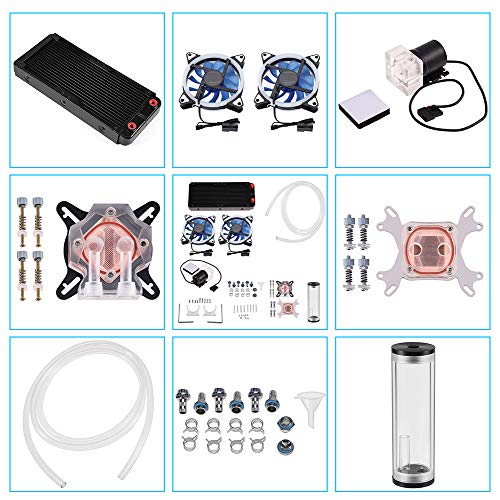
The DIY 240mm Water Cooling Kit is ideal for beginners who want to enhance their computer’s performance without overwhelming complexity. This kit includes a CPU/GPU block, pump, reservoir, LED fans, and more, ensuring you have everything needed for an efficient cooling system. With its universal compatibility, it fits various platforms and offers easy installation. The 240mm heat sink and two low-noise LED fans provide exceptional heat transfer, while the 9W pump delivers a robust 600L/H flow rate. Plus, adjustable fan and pump speeds optimize cooling for overclocked processors, keeping your system stable and quiet.
Best For: Beginners looking to enhance their computer’s cooling performance with a user-friendly water cooling kit.
Pros:
- Complete kit includes all necessary components for easy installation.
- Exceptional cooling performance with low noise operation, ideal for overclocked systems.
- Universal compatibility with various platforms and tube sizes.
Cons:
- May require additional research for first-time users unfamiliar with water cooling systems.
- Limited to specific tube sizes; may not fit all custom setups.
- Ranked #398 on best sellers list, indicating lower popularity compared to competitors.
Thermalright Aqua Elite 360 ARGB CPU Water Cooler

For anyone looking to elevate their CPU cooling game without the hassle, the Thermalright Aqua Elite 360 ARGB CPU Water Cooler is an excellent choice. Compatible with both AMD and Intel platforms, it features three PWM fans that adjust speeds up to 1550RPM, ensuring efficient cooling. Its copper base and 360mm aluminum fin plate provide superior heat dissipation, while the pump can reach speeds of 6400RPM. Plus, with customizable ARGB lighting and a quiet operation of ≤25.6 DBA, it enhances your build’s aesthetics without disturbing your gaming or work sessions. Installation is straightforward, making it perfect for beginners.
Best For: Gamers and PC enthusiasts seeking a high-performance, customizable cooling solution for their CPU.
Pros:
- Efficient Cooling: Features a high-quality copper base and 360mm aluminum fin plate for superior heat dissipation.
- Customizable Aesthetics: Offers ARGB lighting to match your build’s theme and preferences.
- Quiet Operation: Operates at a noise level of ≤25.6 DBA, ensuring minimal disturbance during gaming or work sessions.
Cons:
- Size Requirement: Requires a case width greater than 250mm, which may not fit in smaller cases.
- Installation Complexity: While installation is straightforward, it may still be challenging for absolute beginners.
- Pump Noise at High Speed: While generally quiet, the pump may produce noticeable noise at maximum speeds.
Thermalright Frozen Infinity 360 Black CPU Water Cooler

Looking for an efficient cooling solution that’s easy to install? The Thermalright Frozen Infinity 360 Black CPU Water Cooler might be just what you need. With its impressive 360 AIO design and triple TL-M12 PWM fans, it delivers excellent cooling performance while keeping noise levels down to just 28.2 dB(A). This cooler is compatible with a variety of AMD and Intel CPUs, ensuring flexibility for your build. Plus, the pre-installed fan and conduit pipe make setup a breeze. With a stylish infinity mirror and ARGB lighting, it not only cools but also enhances your rig’s aesthetics.
Best For: Gamers and PC enthusiasts looking for an efficient and aesthetically pleasing cooling solution for their high-performance builds.
Pros:
- Excellent Cooling Performance: High-speed water pump and fans effectively dissipate heat, maintaining optimal CPU temperatures.
- Quiet Operation: Running noise is kept to a minimum at just 28.2 dB(A), making it suitable for quiet environments.
- Easy Installation: Pre-installed fans and included conduit pipe simplify the setup process, ensuring compatibility with a wide range of CPU models.
Cons:
- Size Constraints: The large 360mm radiator may not fit in smaller cases, limiting compatibility for some builds.
- Potential for RGB Overload: The ARGB lighting may not appeal to all users, especially those preferring a more understated aesthetic.
- Weight: At 5.19 pounds, it may add noticeable weight to the build, which some users might find cumbersome.
Iota L36 BK AIO CPU Cooler Liquid 360mm

When seeking an efficient cooling solution for your CPU, the Iota L36 BK AIO CPU Cooler stands out with its robust 360mm design and digital temperature display. This cooler supports TDPs up to 300W and is compatible with both Intel and AMD platforms. Its floating visual design and ARGB lighting create an impressive aesthetic. The 360mm aluminum radiator, paired with a supercharged pump, ensures effective cooling while keeping noise levels low at ≤29dB(A). Plus, you can monitor real-time temperatures and switch between Celsius and Fahrenheit. Installation is a breeze, and it comes with a three-year warranty for peace of mind.
Best For: Gamers and PC enthusiasts looking for high-performance cooling with customizable aesthetics.
Pros:
- Efficient Cooling: The 360mm aluminum radiator and supercharged pump provide excellent thermal management for high TDP processors.
- Aesthetic Appeal: The floating visual design and ARGB lighting enhance the overall look of the PC build.
- Real-Time Monitoring: The digital temperature display allows users to easily monitor CPU/GPU temperatures in real-time.
Cons:
- Size Consideration: The 360mm design may not fit in all cases, requiring compatibility checks before purchase.
- Installation Complexity: While installation is described as simple, some users may find mounting large coolers challenging.
- Noise Levels at Max RPM: Although designed to be quiet, fan noise can increase significantly when operating at maximum speed (up to 29dB(A)).
PCCOOLER 360mm AIO Liquid CPU Cooler
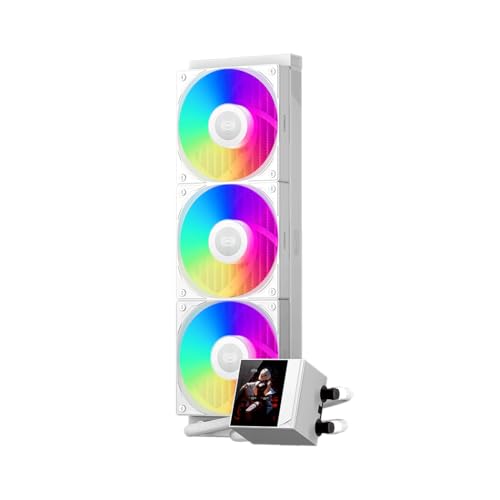
The PCCOOLER 360mm AIO Liquid CPU Cooler stands out with its 2.4-inch IPS display, making it an excellent choice for gamers and PC builders who want real-time monitoring of their CPU temperatures. Its high-performance pump runs at 2600 RPM while maintaining a quiet 15 dBA noise level. With three 120mm F5 ARGB fans, airflow reaches an impressive 90.56 CFM. This cooler is compatible with various Intel and AMD sockets, ensuring versatility. Plus, the sleek design features a CNC aluminum water block and customizable ARGB lighting, allowing you to sync it with your existing RGB setup. Installation is straightforward, thanks to universal mounting brackets.
Best For: Gamers and PC builders looking for high-performance cooling with real-time temperature monitoring.
Pros:
- High-performance pump with a quiet operation at 15 dBA.
- Impressive airflow of 90.56 CFM with customizable ARGB fans.
- Compatible with a wide range of Intel and AMD sockets for versatile installation.
Cons:
- Larger size may limit compatibility with smaller cases.
- Requires motherboard software for optimal fan speed adjustments.
- The 39.8 dBA noise level at maximum fan speed may be noticeable in quiet environments.
SAMA L60 360mm AIO Liquid CPU Cooler
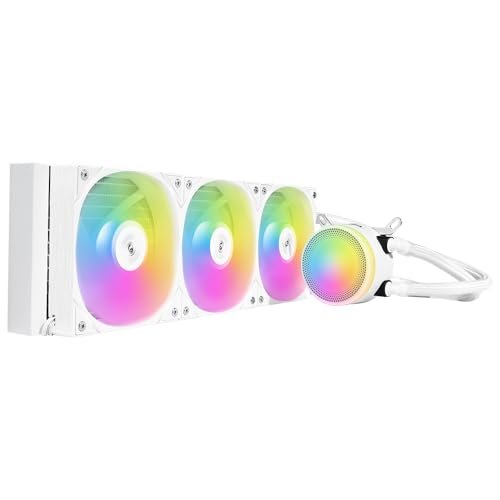
For gamers and enthusiasts seeking an efficient cooling solution, the SAMA L60 360mm AIO Liquid CPU Cooler stands out with its impressive performance and sleek design. It features a 27mm thick aluminum radiator and 380mm tubes for optimal heat dissipation. The 1.5mm thick copper base and 20mm internal water channels enhance thermal conductivity, while the 120mm PWM ARGB fans deliver airflow up to 83 CFM at a noise level of just ≤34.8dB-A. With compatibility across various Intel and AMD sockets, plus customizable RGB lighting, the SAMA L60 combines durability, performance, and aesthetic appeal, making it perfect for your gaming rig.
Best For: Gamers and PC enthusiasts looking for a high-performance cooling solution with customizable RGB lighting.
Pros:
- Efficient Cooling: Features a 27mm thick aluminum radiator and 1.5mm thick copper base for superior heat dissipation.
- Low Noise Operation: Maintains a quiet performance with noise levels as low as ≤30dB-A from the pump.
- Wide Compatibility: Compatible with multiple Intel and AMD sockets, making it versatile for various builds.
Cons:
- Size Considerations: The 360mm radiator may not fit in smaller cases, limiting installation options.
- RGB Configuration: Customization of RGB lighting may require additional software, which can be inconvenient for some users.
- Price Point: As a premium product, it may be on the higher end of the budget for casual gamers.
PCCOOLER AIO CPU Cooler (CPS GT360 Black)

Looking for a reliable cooling solution that’s beginner-friendly? The PCCOOLER AIO CPU Cooler (CPS GT360 Black) is a fantastic choice. Its vibrant 3.5-inch IPS display shows system info and customizable animations, keeping you informed and entertained. With a low-noise ceramic pump and a 14-channel radiator, it excels at heat dissipation while maintaining a quiet operation. The durable dual ball bearing fan delivers impressive airflow at 3000 RPM, ensuring optimal cooling. Plus, installation is a breeze thanks to the quick-latch waterblock bracket. It’s compatible with various AMD and Intel sockets, making it a versatile option for your system.
Best For: Beginners looking for an easy-to-install and efficient cooling solution for their CPU.
Pros:
- Customizable 3.5-inch IPS display for vibrant visuals and system monitoring.
- Low noise operation at just 15 decibels, making it suitable for quiet environments.
- Universal compatibility with various AMD and Intel sockets for versatile use.
Cons:
- The weight of 5.19 pounds may be considered heavy for some builds.
- Limited to a maximum rotational speed of 3000 RPM, which may not satisfy extreme overclockers.
- Installation may still pose challenges for users unfamiliar with AIO coolers despite the quick-latch design.
Cooler Master MasterLiquid 360L Core AIO Liquid Cooler (MLW-D36M-A18PZ-R1)

A standout feature of the Cooler Master MasterLiquid 360L Core AIO Liquid Cooler (MLW-D36M-A18PZ-R1) is its compatibility with both AMD Ryzen AM5/AM4 and Intel LGA1700/1200 sockets, making it an ideal choice for beginners building a versatile and efficient gaming or workstation setup. Its sleek, minimalist design enhances ARGB lighting, while the Gen S Dual Chamber Pump ensures precise heat targeting and improved water flow. With optimized PWM fans, you’ll enjoy enhanced airflow at just 27.2 decibels. The included CryoFuze thermal paste guarantees stable performance, making this cooler a reliable and stylish addition to your build.
Best For: The Cooler Master MasterLiquid 360L Core AIO Liquid Cooler is best for gamers and PC builders seeking an efficient, stylish cooling solution compatible with both AMD and Intel platforms.
Pros:
- Versatile Compatibility: Supports both AMD Ryzen and Intel LGA sockets, catering to a wide range of builds.
- Quiet Operation: Optimized PWM fans provide efficient airflow at a low noise level of just 27.2 decibels.
- Enhanced Cooling Performance: Features a Gen S Dual Chamber Pump and a larger radiator surface for superior heat dissipation.
Cons:
- Size Limitations: The 360mm radiator may not fit in smaller cases, limiting compatibility for compact builds.
- Installation Complexity: AIO coolers can require more effort to install compared to traditional air coolers, which may deter beginners.
- Weight Consideration: At 2.2 pounds, it adds some weight to the build, which may be a concern for portability.
Thermalright Stream Vision 360 Black CPU Liquid Cooler

The Thermalright Stream Vision 360 Black CPU Liquid Cooler stands out with its impressive 3.5’’ LCD display, making it an eye-catching choice for anyone eager to elevate their gaming or workstation setup. This 360mm AIO cooler features a high-performance magnetic suction pump and a 60mm embedded fan that enhances heat dissipation while minimizing noise. With PWM temperature control and optimized fan design, you’ll enjoy efficient cooling at up to 2400 RPM. It’s compatible with various AMD and Intel platforms, and the customizable display themes through TRCC software let you personalize your setup. Installation is straightforward, ensuring you get cooling quickly and efficiently.
Best For: Gamers and PC enthusiasts looking for an efficient, customizable cooling solution with a visually appealing display.
Pros:
- High-performance cooling with a magnetic suction pump and optimized fan design for reduced noise.
- Customizable LCD display allows for personalized themes and visual effects.
- Compatible with a wide range of AMD and Intel platforms for versatile installation.
Cons:
- Installation may require additional steps for AMD users due to the need for the original motherboard backplane.
- The size (360mm) may not fit in all PC cases, limiting compatibility for some builds.
- The noise level, while relatively low, may still be audible in very quiet environments.
Factors to Consider When Choosing a Liquid Cooling Kit for Beginners
When choosing a liquid cooling kit, you’ll want to consider several key factors. Think about cooling performance metrics, compatibility with your hardware, and how complex the installation process will be. Don’t forget to factor in noise levels and the aesthetic design that fits your setup.
Cooling Performance Metrics
Choosing a liquid cooling kit involves understanding several key performance metrics that can greatly impact your system’s efficiency. First, consider the pump speed, measured in RPM; higher speeds, up to 6400 RPM, mean better fluid circulation and heat dissipation. Radiator size is another crucial factor—larger models, like 360mm, offer more surface area for effective heat exchange than smaller ones. Also, check the fan specifications, including maximum RPM and airflow capacity (CFM), as these determine how well air moves across the radiator. Don’t overlook noise levels, measured in decibels (dBA); quieter operation under 30 dBA enhances your experience. Finally, the thermal conductivity of materials like copper in the water block can significantly affect cooling performance and longevity.
Compatibility With Hardware
To ensure your liquid cooling kit works seamlessly with your setup, it’s crucial to consider compatibility with your hardware. Start by confirming that the kit supports your CPU socket type, whether it’s Intel LGA 115x or AMD AM4/AM5. Next, check your case dimensions to make sure the radiator size, like 240mm or 360mm, fits without obstruction. Don’t forget to verify compatibility with your motherboard, especially for features like ARGB lighting synchronization that often requires a 5V 3-pin connection. Additionally, assess the power requirements of the pump and fans to ensure your power supply can deliver adequate wattage. Lastly, consider if the kit includes the necessary mounting hardware and instructions tailored for your specific configuration.
Installation Complexity Level
After confirming your liquid cooling kit’s compatibility with your hardware, the next step is assessing the installation complexity. Look for kits that provide detailed installation instructions and video guides to make the setup easier. Kits featuring universal mounting brackets and pre-applied thermal compound can significantly cut down on the hassle. Ensure your chosen kit includes all necessary fasteners for various CPU platforms, as this will simplify installation. Opt for liquid coolers with intuitive designs that allow for easy component connection, even if you don’t have advanced technical skills. Remember, installation complexity can vary; all-in-one (AIO) solutions are often less complicated than DIY kits that require more steps and assembly. Choose wisely to make your experience smoother.
Noise Level Considerations
While you might prioritize cooling performance, noise levels are just as crucial when selecting a liquid cooling kit. Noise can vary widely; some models operate as quietly as 15 dBA, while others hit 39.8 dBA under load. Pay attention to the pump’s noise level, as high-performance pumps can reach around 35.2 dBA. Fan design matters too—look for options with S-FDB bearings that reduce friction and vibration for quieter operation. Additionally, consider the maximum fan speeds, which can reach up to 3000 RPM and increase noise if not managed well. Effective noise control features, like temperature-controlled fan speeds, can help you balance cooling efficiency and a peaceful computing experience, ensuring your PC stays cool and quiet.
Aesthetic Features and Design
When you choose a liquid cooling kit, aesthetic features and design can elevate your gaming rig beyond mere functionality. Look for options with ARGB lighting to customize your setup and sync with other RGB components for a cohesive look. The cooler’s design, including pump and radiator size, plays a significant role in your build’s overall appearance, with sleek, modern designs often preferred. Transparent acrylic reservoirs and tubing showcase coolant flow, while unique shapes and finishes add flair. Consider materials like aluminum and copper, which impact both cooling performance and visual quality. Customizable display features, like LCD screens, can provide real-time system information and animations, giving an interactive edge to your cooling solution’s design.
Budget and Value Assessment
Establishing a budget before diving into liquid cooling kits is crucial, as it sets the stage for your choices and helps you avoid overspending. Prices can range from $60 to over $200, so pinpointing your budget ensures you focus on the right options. Look closely at the components included, like pump quality, radiator size, and fan specs, as these affect cooling efficiency and longevity. Balance performance with cost, especially if you plan to overclock. Don’t overlook warranty and customer support, which add value by protecting your investment. Lastly, research user reviews and performance benchmarks to confirm the effectiveness of kits within your budget, ensuring you get the best value for your money.