
If you’re looking to boost your workspace comfort, a quality keyboard tray can be a game changer. It can help reduce strain on your wrists and shoulders, making long hours at your desk more manageable. With various options available, from adjustable ergonomic designs to space-saving models, finding the right fit for your setup can transform your work environment. Let’s explore the top ten keyboard trays that can enhance your comfort and productivity.
VIVO Large Under Desk Keyboard Tray (MOUNT-KB05E)

If you’re looking for an ergonomic solution to enhance your typing experience, the VIVO Large Under Desk Keyboard Tray (MOUNT-KB05E) is an excellent choice. This slide-out platform measures 27″ x 11″ and supports up to 11 lbs, making it perfect for your keyboard, mouse, and small accessories. Its space-saving design keeps your workspace organized while extending 8.5″ from the desk edge. Installation is a breeze with adjustable clamps, and it’s compatible with desks up to 1.25” thick. Plus, its ergonomic angles reduce wrist and shoulder stress, earning it a solid 4.4-star rating from over 12,000 satisfied customers.
Best For: The VIVO Large Under Desk Keyboard Tray is best for individuals seeking an ergonomic and space-efficient typing solution for their home or office workspace.
Pros:
- Ergonomic design helps reduce wrist and shoulder stress during typing.
- Space-saving design keeps the desktop organized by storing the keyboard and mouse below the desk.
- Easy installation with adjustable clamps and all necessary hardware included.
Cons:
- Limited compatibility with desks thicker than 1.25” or beveled edge desktops.
- Weight capacity of 11 lbs may not accommodate larger or heavier keyboards and accessories.
- Slide-out feature may require adjustment to ensure smooth operation over time.
HUANUO Adjustable Ergonomic Under Desk Keyboard Tray

The HUANUO Adjustable Ergonomic Under Desk Keyboard Tray is an excellent choice for anyone seeking improved comfort and efficiency while working at their desk. With dimensions of 25″W x 9.84″D and a weight of 10 lbs, it fits most setups. You’ll enjoy 360-degree adjustability, allowing height changes up to 6.3 inches and tilting for ideal comfort. The sliding mechanism conveniently stores the tray under the desk when not in use. Plus, the included wrist rest enhances your typing experience. Just make sure your desk meets the installation requirements for a perfect fit. Transform your workspace with this ergonomic solution!
Best For: Individuals seeking an ergonomic and adjustable solution to enhance comfort and efficiency while working at their desk.
Pros:
- 360-degree adjustability allows for personalized height and angle settings.
- Space-saving design enables the tray to slide under the desk, freeing up workspace.
- Includes a wrist rest to promote better wrist posture during typing.
Cons:
- Requires a minimum desk width clearance of 25 inches, which may not fit all desks.
- Installation may be challenging if there is a crossbar under the desk.
- Desk thickness must be greater than 0.6 inches, limiting compatibility with thinner desks.
AX WABER Keyboard Tray Under Desk Pull Out (AX01WB01)

Looking for a space-saving solution that enhances your desk setup? The AX WABER Keyboard Tray Under Desk Pull Out (AX01WB01) is perfect for you. Its slide-out platform measures 27.3” (32.5” with clamps) x 11”, keeping your keyboard and mouse tucked away. This tray promotes ergonomic typing angles, reducing wrist and shoulder strain, and extends up to 5.7” from the desk edge. Installation is a breeze with sturdy C-clamps that fit desks up to 1.9” thick, and it supports up to 11 lbs. Plus, you’ll enjoy friendly tech support for any questions you may have!
Best For: Individuals looking to optimize their workspace while maintaining ergonomic comfort during typing.
Pros:
- Space-saving design keeps keyboard and mouse out of the way, maximizing desk space.
- Ergonomic features help reduce wrist and shoulder strain by promoting comfortable typing angles.
- Easy installation with sturdy C-clamps, making it compatible with various desk thicknesses.
Cons:
- Weight limit of 11 lbs may not accommodate heavier gaming keyboards or accessories.
- Incompatibility with beveled edge desktops limits installation options for certain desk styles.
- Requires 32.5” space for clamp installation, which may not fit all desk setups.
BONTEC Under Desk Keyboard Tray (KMT01)

For those seeking to optimize their workspace, the BONTEC Under Desk Keyboard Tray (KMT01) offers an ideal solution with its space-saving pull-out design. Measuring 25.6 x 11.8 inches, it easily fits under your desk, enhancing ergonomic comfort and reducing wrist strain. Installation is a breeze, thanks to tool-free C-clamps that accommodate desks up to 1.57 inches thick. Just verify your desk has a flat underside, as it won’t work with curved edges or crossbars. This tray supports standard keyboards and mice, making it perfect for your office, remote workstation, or gaming setup while keeping your space tidy and organized.
Best For: Those looking to optimize their workspace with an under desk solution that enhances ergonomic comfort and organization.
Pros:
- Easy, tool-free installation with C-clamps that fit a variety of desk thicknesses.
- Space-saving design helps reduce wrist strain and keeps the workspace tidy.
- Suitable for standard keyboards and mice, ideal for office and gaming setups.
Cons:
- Not compatible with desks that have curved edges, beveled surfaces, or crossbars underneath.
- Limited to supporting up to 11 lbs, which may not accommodate heavier or specialized keyboards.
- Height clearance limitations make it unsuitable for vertical mice or split ergonomic keyboards.
Fellowes Office Suites Underdesk Keyboard Drawer, Black/Silver (9140305)

Designed with ergonomics in mind, the Fellowes Office Suites Underdesk Keyboard Drawer (Model 9140305) is perfect for anyone seeking to optimize their workspace. This keyboard drawer moves your keyboard and mouse off the desktop, providing three adjustable heights to suit your comfort. Made from 100% recycled materials, it’s not just durable but also eco-friendly. Installation is straightforward, requiring just 23.5 inches of width and 14.5 inches of depth beneath your desk. With a secure keyboard stopper and smooth ball-bearing glide tracks, it enhances both functionality and aesthetics. Plus, it’s lightweight, making it easy to handle and install.
Best For: Individuals looking to improve their workspace ergonomics by freeing up desk space and adjusting keyboard height for comfort.
Pros:
- Eco-friendly: Made from 100% recycled materials, promoting sustainability.
- Adjustable height: Offers three height settings to accommodate different user preferences.
- Smooth operation: Features ball-bearing glide tracks for easy movement of the keyboard and mouse.
Cons:
- Space requirement: Needs a minimum of 23.5 inches in width and 14.5 inches in depth for installation, which may not fit all desks.
- Limited mouse placement: The mouse platform can only be mounted on one side or stowed, which might restrict usage options.
- Lightweight: While easy to handle, the lightweight design may raise concerns about stability during use.
VIVO Extra Long Clamp-on Computer Keyboard and Mouse Under Desk Slider Tray

The VIVO Extra Long Clamp-on Computer Keyboard and Mouse Under Desk Slider Tray is perfect for anyone seeking to maximize their workspace while maintaining comfort. Measuring 34 x 11 inches, it easily accommodates your keyboard, mouse, and small accessories, keeping them out of the way. You’ll appreciate the comfortable typing angles it promotes, helping to relieve wrist and shoulder stress. With sturdy C-clamps, installation is simple and won’t damage your desk. Just verify your desk thickness is no more than 1.25 inches and you have enough length for proper fit. Elevate your workspace with this efficient tray!
Best For: Individuals looking to optimize their desk space while enhancing ergonomic comfort during typing.
Pros:
- Extra long design accommodates both keyboard and mouse, freeing up desk space.
- Ergonomic typing angles help reduce wrist and shoulder strain for more comfortable use.
- Easy installation with sturdy C-clamps that don’t damage the desk surface.
Cons:
- Limited desk compatibility as it only fits desks up to 1.25 inches thick.
- Requires sufficient length on the desk (at least 39.4 inches) for proper installation.
- Not suitable for desktops with beveled edges, limiting its versatility.
HUANUO Adjustable Ergonomic Keyboard Tray Under Desk

If you’re looking to enhance your workspace ergonomics, the HUANUO Adjustable Ergonomic Keyboard Tray is a fantastic choice. Measuring 25″W x 9.84″D, it accommodates most keyboards and mice while supporting up to 11 lbs. You can install it on flat desk bottoms or cross beams, making it versatile for various desk types. The tray features a smooth sliding mechanism, ensuring it lasts through 20,000 cycles. With a height adjustment of 6.3″ and a full 360° swivel, you can customize your setup for comfort. Installation is straightforward, with clear instructions and all necessary accessories included.
Best For: Individuals seeking to improve their ergonomic setup while working at a desk, particularly in home office environments.
Pros:
- Versatile installation options for various desk configurations, including flat bottoms and cross beams.
- Smooth sliding mechanism with a durable metal roller track tested for 20,000 cycles, ensuring longevity.
- Ergonomic adjustability with height and swivel features for tailored comfort during seated or standing work.
Cons:
- Weight limit of 11 lbs may restrict use with heavier keyboards or additional accessories.
- Requires a minimum desk thickness of 0.6″, which may not be suitable for all desks.
- Space requirement of 2.56″ on the desk edge for full retraction, which may limit placement options.
VIVO Adjustable Computer Keyboard & Mouse Platform Tray (MOUNT-KB03B)

Looking for a keyboard tray that prioritizes comfort and ergonomics? The VIVO Adjustable Computer Keyboard & Mouse Platform Tray (MOUNT-KB03B) is your solution. It installs easily under standard desks, allowing for ideal typing angles. With supportive rubber padding and five height adjustments, it minimizes wrist soreness during long work sessions. This universal tray, measuring 25 x 10 inches, fits most keyboards and mice and offers full side-to-side rotation. Just remember to check your desk’s thickness and consider a spacer bracket for height-adjustable desks. Assembly is straightforward, making it a hassle-free addition to your workspace.
Best For: Individuals seeking an ergonomic solution to enhance typing comfort while working at a desk.
Pros:
- Adjustable height settings and supportive rubber padding reduce wrist soreness.
- Easy installation under standard desks with full side-to-side rotation.
- Universal compatibility with most keyboards and mice, measuring 25 x 10 inches.
Cons:
- Requires a spacer bracket for height-adjustable desks, which is sold separately.
- Minimum desktop thickness requirement of 5/8 inches may limit compatibility with some desks.
- The total weight of 10 lbs may require a sturdy desk to support the mounted tray.
Kensington Ergonomic Slide-Out Keyboard Tray (K60004US)
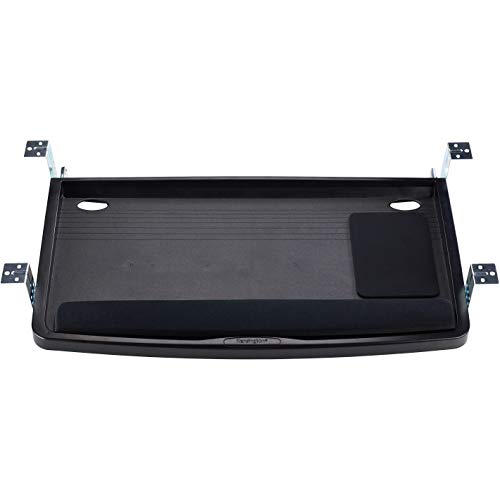
Designed for comfort and ease, the Kensington Ergonomic Slide-Out Keyboard Tray (K60004US) is ideal for anyone seeking to enhance their workspace ergonomics. This extra-wide tray measures 24.5” x 11.75”, accommodating your keyboard, mouse, and wrist rest. With the SmartFit personal comfort color system, you can quickly adjust the height to suit your needs. It fits all keyboard sizes, including oversized models, ensuring versatility. Plus, built-in cable management keeps your workspace tidy. TAA compliant, this tray blends functionality with style, making it a perfect addition to your desk setup. Upgrade your comfort and productivity today!
Best For: Individuals seeking to improve their workspace ergonomics while accommodating various keyboard sizes and setups.
Pros:
- Versatile Design: Fits all keyboard sizes, including oversized and ergonomic models.
- Ergonomic Adjustment: Quick height adjustments using the SmartFit personal comfort color system enhance user comfort.
- Organized Workspace: Built-in cable management features help keep the workspace tidy and clutter-free.
Cons:
- Limited Depth: The tray’s depth of 11.75″ may not accommodate larger wrist rests or additional accessories comfortably.
- Installation Required: May require assembly or installation under the desk, which could be a hassle for some users.
- Size Constraints: The extra-wide design might not be suitable for smaller desks or compact workspaces.
Klearlook Keyboard Tray Under Desk with 360° Rotation

The Klearlook Keyboard Tray Under Desk with 360° Rotation is perfect for anyone seeking an ergonomic solution that maximizes workspace efficiency. Its adjustable tilt angle helps you find the best typing position, reducing strain during long work sessions. The C-clamp fixture saves valuable desktop space, while the 360° swivel feature makes storage a breeze. You’ll appreciate the convenient drawer for small items and dedicated phone slot, keeping your workspace organized. Built from robust materials, this tray minimizes wobbling, ensuring stability. With a generously sized platform and an integrated mouse pad, it’s ideal for both work and leisure.
Best For: Those looking for an ergonomic keyboard tray that enhances workspace organization and minimizes clutter.
Pros:
- Ergonomic design with adjustable tilt angle promotes a comfortable typing experience, reducing strain.
- Space-saving C-clamp fixture and 360° swivel capability optimize desktop area and allow for easy storage.
- Includes convenient storage options such as a drawer for small items, a phone slot, and a headphone hanger.
Cons:
- Height is not adjustable, which may limit customization for some users.
- May require a sturdy desk to ensure stability with the C-clamp fixture.
- Integrated mouse pad might not be suitable for all mouse types or preferences.
Factors to Consider When Choosing a Keyboard Tray Under Desk
When choosing a keyboard tray for your desk, you’ll want to contemplate several key factors. Ergonomic design, size, and weight capacity can greatly impact your comfort and productivity. Plus, think about installation requirements and how the tray will fit into your workspace for a more efficient setup.
Ergonomic Design Features
Choosing a keyboard tray with ergonomic design features can greatly enhance your comfort during long hours of typing. Look for trays that promote comfortable typing angles, reducing wrist and shoulder strain. Adjustable height settings are essential, allowing you to customize the tray for both sitting and standing positions. Some models even offer tilting capabilities, helping you find the most comfortable wrist angle while typing. Incorporating wrist rests can further enhance support and minimize the risk of repetitive strain injuries. Additionally, trays with sliding mechanisms let you access your keyboard and mouse easily, keeping your workspace organized and clutter-free. Prioritizing these ergonomic features will help create a more comfortable and productive work environment.
Size and Compatibility
Finding the right size and compatibility for your keyboard tray is essential to guarantee it fits seamlessly under your desk. First, check the tray’s dimensions, which typically range from 25 to 34 inches in width. You’ll also want to confirm that your desk’s thickness is between 1.25 to 1.9 inches for proper installation. Don’t forget to measure the clearance beneath your desk; some trays need a minimum width of 25 to 39.4 inches. Additionally, be aware that many trays aren’t compatible with beveled or curved desk edges, which can impact stability. Finally, make sure the tray accommodates your keyboard and mouse, as most are designed for standard sizes and weights up to approximately 11 lbs.
Weight Capacity Limits
After ensuring that your keyboard tray fits well under your desk, the next key factor to evaluate is its weight capacity. Most models can typically support between 10 to 11 lbs, which should be sufficient for your keyboard and mouse. Exceeding this limit can lead to structural failure, causing the tray to sag or detach from your desk and potentially damaging your equipment. Look for trays with reinforced designs or materials, as these often offer higher weight capacities. Always check the manufacturer’s specifications to confirm compatibility with your keyboard and accessories. A stable and secure tray that effectively supports the weight enhances ergonomic benefits, reducing the risk of strain during use.
Installation Requirements
When selecting a keyboard tray, it’s important to take into account the installation requirements to guarantee a smooth setup. First, check your desk’s clearance; you’ll need at least 23.5 to 35 inches in width and 11 to 14.5 inches in depth. Next, confirm the desk thickness compatibility, as most trays require between 0.6 to 1.9 inches and may not fit well on beveled edges. Make sure the installation method suits your desk’s structure; some trays need flat surfaces, while others can work with crossbars if height allows. Also, verify that you have all necessary hardware and instructions, and check the weight capacity, typically up to 11 lbs, to make certain it can support your keyboard and accessories.
Space-Saving Solutions
Choosing the right under-desk keyboard tray can transform your workspace by maximizing efficiency and freeing up valuable surface area. These trays hold your keyboard, mouse, and accessories below the desktop, allowing you to keep your workspace tidy. Many models slide in and out easily, providing quick access to your typing equipment while saving space. Space-saving trays typically extend only a few inches from the desk edge, optimizing usability without sacrificing legroom or comfort. Most support weights up to 11 lbs and fit various keyboard sizes, guaranteeing compatibility with standard office equipment. When selecting a tray, pay attention to installation requirements like minimum desk width and clearance to make sure it works effectively without hindering your movement or other equipment.
Adjustability Options
Maximizing your workspace isn’t just about saving space; it’s also about guaranteeing comfort and usability. When choosing a keyboard tray, consider options with height adjustments to cater to both sitting and standing positions, enhancing your ergonomic comfort. Look for trays that offer tilt and swivel adjustments, allowing you to customize the angle for ideal typing posture and reduced strain. Some trays come with a sliding mechanism, letting them retract under your desk for added flexibility when not in use. Confirm the tray supports a full range of movement, like 360-degree rotation or tilting, to create a more personalized workspace. Finally, check the weight capacity to verify it can support your keyboard, mouse, and accessories without sacrificing stability.