If you’re looking to build a high-performance PC in 2026, the right case can make all the difference. Hybrid airflow PC cases offer a perfect blend of cooling efficiency and stylish design. With models like the CORSAIR 4000D RS and LIAN LI LANCOOL 207 leading the pack, you’ll want to consider various factors that impact both aesthetics and functionality. Let’s explore the top contenders that promise to elevate your gaming experience.
CORSAIR 4000D RS ARGB Mid-Tower ATX PC Case

If you’re looking for a PC case that combines stylish design with exceptional airflow, the CORSAIR 4000D RS ARGB Mid-Tower ATX case is a perfect choice. Its high airflow design features three pre-installed RS fans and an innovative InfiniRail™ mounting system, making customization easy. You can fit powerful graphics cards and even dual 360mm radiators without a hitch. Plus, the 3D Y-Pattern Airflow Panel ensures minimal restriction while optimizing airflow. With a sleek black finish and a weight of just 22.7 pounds, this case not only performs well but also enhances your setup’s aesthetic. It’s a top-tier option for any builder.
Best For: Gamers and PC builders seeking a high-performance case with excellent airflow and customization options.
Pros:
- High airflow design with three pre-installed RS fans for optimal cooling performance.
- Modular customization options allow for extensive upgrades and personal configurations.
- Compatibility with powerful graphics cards and cooling solutions, including dual 360mm radiators.
Cons:
- Limited color options, as it is only available in black.
- Weight of 22.7 pounds may be heavier compared to other mid-tower cases.
- Potential learning curve for users new to modular case systems and fan installation.
CORSAIR 4000D RS Frame Mid-Tower PC Case

The CORSAIR 4000D RS Frame Mid-Tower PC Case stands out for gamers and PC builders who prioritize airflow and customization. Its modular design lets you personalize your setup with upgrades like an aluminum motherboard tray and extra USB ports. With compatibility for multiple 360mm radiators and flexible fan placement through the InfiniRail Fan Mounting System, cooling is efficient. The case includes three high-performance CORSAIR RS PWM fans that operate quietly. Plus, the 3D Y-Pattern Airflow Panel ensures optimal airflow while maintaining a sleek appearance. You’ll appreciate the clean lines and cable management options that enhance both aesthetics and functionality.
Best For: Gamers and PC builders who value high airflow and customization options for their setups.
Pros:
- Modular design allows for extensive customization and upgrades.
- Efficient cooling with three high-performance CORSAIR RS PWM fans and flexible fan placement.
- Sleek aesthetics with clean lines and options for cable management enhance overall appearance.
Cons:
- Limited out-of-the-box fan options, as it only includes three fans.
- Size may not fit in smaller spaces due to its mid-tower design.
- Potentially higher cost compared to basic PC cases with fewer features.
CORSAIR 6500D Airflow Mid-Tower ATX PC Case

For enthusiasts seeking a perfect blend of airflow and aesthetics, the CORSAIR 6500D Airflow Mid-Tower ATX PC Case stands out with its fully mesh paneling and dual chamber design. This case supports up to 13x 120mm or 9x 140mm fans, providing extensive cooling options to keep your components chill. You’ll appreciate the compatibility with reverse connection motherboards, allowing for a clean build and efficient cable routing. With space for four storage drives and a modern front panel I/O featuring USB 3.2 Gen-2 Type-C, it’s both practical and stylish. Customize your setup effortlessly with this impressive case.
Best For: The CORSAIR 6500D Airflow Mid-Tower ATX PC Case is best for PC enthusiasts who prioritize airflow, aesthetics, and customization in their builds.
Pros:
- Exceptional airflow with fully mesh paneling and support for up to 13x 120mm or 9x 140mm fans.
- Organized dual chamber layout allows for clean cable management and efficient cooling.
- Modern front panel I/O includes USB 3.2 Gen-2 Type-C for easy connectivity.
Cons:
- Size may be too large for compact setups or smaller desks.
- Additional cooling components may be necessary for optimal performance, increasing overall cost.
- Building in the case might require a learning curve for beginners due to its various features and configurations.
LIAN LI LANCOOL 207 Compact ATX RGB Gaming Computer Case
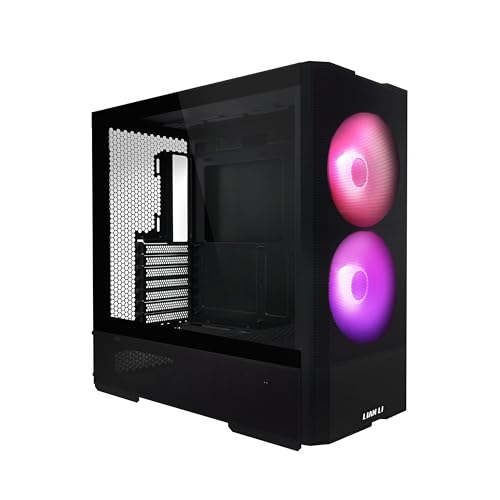
Designed with gamers in mind, the LIAN LI LANCOOL 207 Compact ATX RGB Gaming Computer Case stands out due to its impressive cooling capabilities and stylish aesthetics. Its M-ATX chassis supports ATX compatibility while housing up to a 360mm radiator. You’ll benefit from two 140mm ARGB front fans and two 120mm PWM bottom fans, optimized for excellent airflow. The sleek tempered glass side panel showcases your components, while the pre-installed anti-sag bracket keeps your GPU secure. With a front-mounted PSU and ample USB ports, the LANCOOL 207 combines form and function seamlessly, making it a top choice for your gaming rig.
Best For: Gamers looking for a stylish and efficient ATX case that offers excellent cooling and airflow features.
Pros:
- Ample Cooling Options: Equipped with multiple fans and support for a 360mm radiator for enhanced cooling.
- Stylish Design: Tempered glass side panel allows for a sleek look that showcases your components.
- GPU Support: Comes with a pre-installed anti-sag bracket for secure GPU placement, accommodating graphics cards up to 410mm in length.
Cons:
- Weight: At nearly 20 pounds, it may be heavier than some users prefer for transport.
- Limited PSU Length: Supports power supplies only up to 160mm, which may limit some high-performance options.
- Potential Cable Management Challenges: The front-mounted PSU might complicate cable management for some builds.
Montech X3 Mesh ATX Mid-Tower Gaming Case

With its high airflow design and impressive cooling capabilities, the Montech X3 Mesh ATX Mid-Tower Gaming Case is an ideal choice for gamers seeking performance without breaking the bank. It features triple front 140mm fans, ensuring massive air intake alongside pre-mounted top and rear ventilation. You’ll appreciate the six fixed RGB-lit fans that enhance your setup’s aesthetics, easily controlled with an LED button. The full panoramic tempered glass panels showcase your battle system beautifully. Plus, the unique side swivel design and zero drill-hole construction provide safety and convenience, making it a standout option in the gaming case market.
Best For: Gamers looking for an affordable yet high-performance gaming case with excellent cooling and aesthetic features.
Pros:
- High airflow design with triple 140mm front fans for superior cooling.
- Full panoramic tempered glass panels for showcasing RGB lighting and system components.
- Unique side swivel tempered glass design for easier access and maintenance.
Cons:
- RGB lighting is fixed and not addressable, limiting customization options.
- May require additional fans for optimal cooling in high-performance setups.
- Limited space for larger components due to mid-tower size.
NZXT H9 Flow Large Dual-Chamber ATX Mid-Tower Airflow PC Case

The NZXT H9 Flow Large Dual-Chamber ATX Mid-Tower Airflow PC Case stands out as an ideal choice for PC enthusiasts seeking optimal cooling and sleek aesthetics. Its dual-chamber design separates components, enhancing thermal performance and cable management. With perforated steel panels and pre-installed F140Q and F120Q fans, airflow remains efficient for high-performance setups. You can support up to ten fans and large radiators, ensuring compatibility with powerful GPUs. The spacious design features easy cable management with wide channels and Velcro straps, keeping your build tidy. Available in black, it brings a modern touch to any gaming rig.
Best For: PC enthusiasts seeking optimal cooling and aesthetics for high-performance gaming builds.
Pros:
- Dual-chamber design enhances thermal performance and simplifies cable management.
- Supports up to ten fans and large radiators, making it ideal for powerful components.
- Easy cable management features, including wide channels and Velcro straps, keep builds organized.
Cons:
- Limited color options, as it is only available in black.
- May be overkill for budget builds that do not require extensive cooling capabilities.
- Size may be cumbersome for smaller spaces, as it is a large mid-tower case.
NZXT H3 Flow Micro-ATX PC Case

For those seeking a compact yet powerful solution, the NZXT H3 Flow Micro-ATX PC case stands out as a top choice in hybrid airflow design. Its optimized airflow features, including ultra-fine steel mesh panels and a PSU shroud, ensure maximum ventilation while keeping dust at bay. You can easily fit high-performance components, with space for full-sized GPUs up to 377mm. The case supports significant cooling options, accommodating up to seven fans and various radiator configurations. Weighing just 10.58 pounds, it’s both lightweight and efficient. With a stellar customer rating of 4.8 stars, it’s clearly a favorite among enthusiasts.
Best For: Gamers and PC builders looking for a compact case that maximizes airflow and supports high-performance components.
Pros:
- High-airflow design with ultra-fine steel mesh for optimal cooling and dust filtration.
- Supports full-sized GPUs up to 377mm, accommodating powerful graphics cards.
- Lightweight at just 10.58 pounds, making it easy to transport and manage.
Cons:
- Limited space for additional cooling options if front fans are installed.
- May not accommodate larger radiators if multiple cooling components are used simultaneously.
- The black finish may not appeal to users looking for more color or customization options.
Okinos Air Cross Walnut Wood ATX Mid Tower PC Case

If you’re looking for a PC case that combines style and performance, the Okinos Air Cross Walnut Wood ATX Mid Tower PC Case stands out with its premium walnut wood accents and dual-channel airflow design. Weighing just 17.6 pounds, it features a spacious interior for your components, including support for a 360mm radiator. Pre-installed with 3×140mm and 2×120mm fans, it delivers impressive airflow at 116.8 CFM. The tool-free design makes upgrades easy, while the adjustable GPU bracket ensures your graphics card stays secure. With a 4.7-star rating and a 30-day return policy, it’s a solid choice for any build.
Best For: PC enthusiasts and gamers looking for a stylish case that combines aesthetic appeal with excellent cooling performance.
Pros:
- Premium walnut wood accents add a touch of elegance to any setup.
- Dual-channel airflow design with high airflow fans ensures effective cooling for high-performance components.
- Tool-free design allows for easy installation and upgrades, making it user-friendly.
Cons:
- Heavier than some competitors at 17.6 pounds, which may be a consideration for portability.
- Limited color options with only a black finish available, which may not suit all tastes.
- Higher price point compared to standard plastic or metal cases, reflecting its premium materials and features.
Lian Li V100 ATX Mid-Tower PC Case

Designed for gamers and PC enthusiasts who demand top-notch cooling and aesthetic appeal, the Lian Li V100 ATX Mid-Tower PC Case stands out with its pre-installed 4 x 120mm ARGB PWM fans. These fans achieve impressive airflow and pressure, keeping your components cool and quiet. The integrated 26-LED ARGB strip syncs with your motherboard, enhancing your setup’s visual appeal. With toolless panel removal, you’ll enjoy easy access for upgrades and maintenance. Plus, it supports large GPUs and tall CPU coolers, ensuring compatibility with high-performance components. Elevate your gaming experience with the Lian Li V100’s optimized airflow and stylish design.
Best For: Gamers and PC enthusiasts seeking a stylish case with excellent cooling performance and easy accessibility.
Pros:
- Pre-installed 4 x 120mm ARGB PWM fans provide effective cooling and customizable lighting.
- Toolless panel removal allows for quick access to internal components for upgrades and maintenance.
- Supports large GPUs and tall CPU coolers, accommodating high-performance builds.
Cons:
- The case may be more expensive compared to basic PC cases without RGB features.
- Limited space for additional cooling options beyond the pre-installed fans.
- The aesthetic design may not appeal to those preferring a more minimalist look.
Hyte X50 Air Gaming PC Case

The Hyte X50 Air Gaming PC Case stands out as an ideal choice for gamers who prioritize both aesthetics and performance. Its modern ATX mid-tower design features a micro mesh panel and tempered acoustic glass, all in a sleek pitch-black finish. With optimized airflow, low-pressure intake keeps your components cool while minimizing noise. You’ll appreciate the direct airflow to your graphics card and the option to install up to three extra thick 120mm fans. Plus, the chassis design reinforces rigidity and includes smart cable management features, making installation a breeze. Experience superior thermal performance with the Hyte X50.
Best For: Gamers seeking a stylish and high-performance PC case that prioritizes airflow and cooling efficiency.
Pros:
- Optimized airflow design enhances cooling and minimizes noise levels.
- Tempered acoustic glass provides a sleek aesthetic while showcasing internal components.
- Easy cable management and installation with thoughtfully placed tie-down points and routing channels.
Cons:
- Limited color options, available only in pitch black.
- Requires additional fans for optimal cooling performance, which may incur extra costs.
- Mid-tower size may not accommodate larger components or advanced cooling solutions as effectively as larger cases.
Factors to Consider When Choosing a Hybrid Airflow PC Case
When choosing a hybrid airflow PC case, you’ll want to think about several key factors. Airflow design efficiency and cooling system compatibility are crucial for optimal performance. Additionally, consider your component compatibility requirements and how much noise you’re willing to tolerate.
Airflow Design Efficiency
Choosing a hybrid airflow PC case hinges on understanding airflow design efficiency. Effective airflow is vital for maintaining optimal temperatures, ensuring your CPU and GPU stay cool. Look for cases with perforated steel panels and strategically placed fans to reduce resistance and promote unobstructed air intake and exhaust. A high airflow design often features multiple fan mounting options and supports large radiators, giving you flexibility in your cooling setup. Additionally, consider cases with a dual-chamber layout that separates components like the power supply from the main chamber, enhancing airflow and improving cable management. Finally, optimal airflow relies on the right combination of fan placement, size, and speed, so choose a case that maximizes these elements for the best cooling potential.
Cooling System Compatibility
Compatibility is crucial in selecting a hybrid airflow PC case, as it directly impacts your cooling system’s efficiency. Ensure the case supports multiple fan configurations to maximize both intake and exhaust airflow. Look for various radiator mounting options, allowing you to install larger or multiple cooling radiators for improved thermal management. High-performance fans with PWM control and Zero RPM modes can significantly reduce noise during low-load conditions, so check for their inclusion. Also, consider cases with optimized airflow designs, like perforated or mesh panels, to enhance air movement throughout the chassis. Lastly, evaluate compatibility with different motherboard layouts, including support for reverse connection motherboards, which can boost cable management and airflow efficiency within your setup.
Customization and Upgrades
After ensuring your cooling system is well-matched with your hybrid airflow PC case, the next step involves exploring customization and upgrade options. Look for cases featuring a FRAME Modular Case System, allowing extensive customization tailored to your preferences. Consider options that support multiple radiator configurations and fan placements to enhance cooling efficiency, especially for high-performance components. Evaluate the availability of additional USB ports or upgraded motherboard trays for better connectivity and functionality. Select cases that offer side fan mounting or improved cable management features to keep your build organized. Lastly, ensure compatibility with reverse connection motherboards for enhanced aesthetics and flexible cable routing. These factors will help create a personalized and efficient setup.
Component Compatibility Requirements
Selecting the right hybrid airflow PC case is crucial for ensuring your components fit and function seamlessly. First, check the case’s compatibility with your motherboard dimensions—whether it’s ATX, Micro-ATX, or Mini-ITX. Next, look for maximum GPU length support; many cases accommodate graphics cards up to 410mm, which is essential for high-performance builds. Also, consider cooling options, including the number of fans and radiator compatibility, to maintain effective thermal management. Evaluate cable management features like dedicated routing channels and tie-down points to keep your build organized. Lastly, ensure the case has adequate airflow design elements, such as perforated panels and optimized fan placement, to promote efficient cooling for all internal components.
Noise Level Considerations
When building your hybrid airflow PC, it’s just as important to consider how noise levels will affect your overall experience. Fan design plays a significant role here; PWM fans often operate in a “Zero RPM mode” at low loads, minimizing sound. The type of bearing in your fans also matters—hydraulic bearings tend to generate less noise than sleeve bearings. Additionally, case design features like sound-dampening materials and airflow optimization can help reduce noise. Remember, the RPM of your fans directly impacts noise levels; while higher RPM fans offer better airflow, they can also increase sound, measured in decibels (dBA). Aim for a balance between cooling efficiency and noise output to create a comfortable computing environment.
Build Quality and Materials
While you might be tempted to focus solely on aesthetics when choosing a hybrid airflow PC case, the build quality and materials play a crucial role in your system’s performance and durability. Opt for cases made of sturdy materials like steel and tempered glass, as they not only enhance strength but also look great. High-quality cases often allow for tool-less panel removal, making assembly and upgrades a breeze. Pay attention to airflow; mesh panels typically offer better ventilation than solid ones. A solid structure minimizes vibrations and noise, improving overall component performance. Plus, premium materials can elevate your setup’s aesthetic with features like RGB lighting and customizable layouts, making your build visually stunning while ensuring efficient cooling.