
A high-end gaming PC should do more than post impressive specs. It needs the graphics power for your target resolution, a processor that keeps pace, and a build you can live with and upgrade.
These 10 desktops span RTX 5070 Ti, RTX 5080, and RTX 5090 configurations. Use the buying guide below to narrow the field by how you play, what else you do, and where your budget makes the biggest difference.
Best 10 High End Gaming PC Picks for 2026
Balanced 4K Pick
Skytech King 95 Ryzen 7 9850X3D and RTX 5080

- Ryzen 7 9850X3D and RTX 5080 16GB
- 32GB DDR5-6000 and 2TB NVMe SSD
- 360mm AIO; Wi-Fi 5
Best For: Gaming-focused buyers seeking an RTX 5080 tower with 2TB of storage
Storage-Heavy Pick
Horizon Autherium Dragon RGB i9 and RTX 5070

- 64GB RAM and Windows 11 Pro
- 1TB NVMe SSD plus 4TB HDD
- RTX 5070 OC 12GB; 360mm AIO
Best For: Large game libraries and memory-heavy multitasking
Gaming CPU Pick
STORMCRAFT Phantom 9800X3D and RTX 5080

- Ryzen 7 9800X3D and RTX 5080 16GB
- 32GB DDR5-6000 and 2TB Gen4 SSD
- 850W Gold PSU; two-year parts warranty
Best For: Gamers seeking a 9800X3D and RTX 5080 prebuilt
Maximum-Spec Pick
Skytech Blaze 5 Ryzen 9 9950X3D and RTX 5090

- 16-core Ryzen 9 9950X3D; RTX 5090 32GB
- 64GB DDR5-6000 and 4TB Gen4 SSD
- Wi-Fi 7; one-year parts and labor warranty
Best For: RTX 5090 gaming and demanding productivity workloads
Best for Showcase Builds
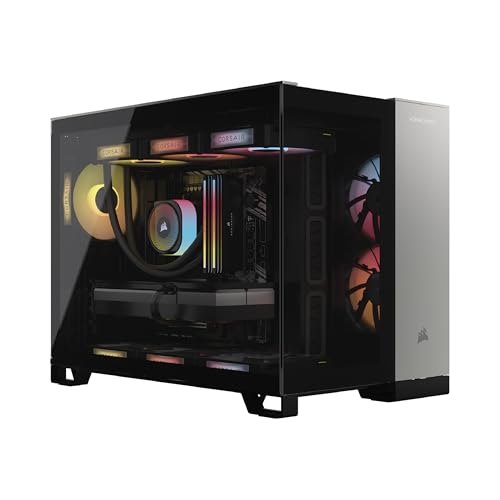
- Core i9-14900KF and RTX 5080
- 32GB DDR5-6000 and 2TB SSD
- 240mm liquid cooler and nine RGB fans
Best For: RGB-focused builds with RTX 5080 graphics
Best for 1440p Gaming
- Ryzen 7 9800X3D and RTX 5070 Ti
- 32GB DDR5-6000 and 2TB Gen4 SSD
- 360mm liquid cooling
Best For: Detailed 1440p gaming with a Ryzen 7 9800X3D
Best AMD and RTX 5080 Pairing

- Ryzen 7 9800X3D and RTX 5080
- 32GB DDR5-6400 and 2TB NVMe SSD
- 360mm liquid cooler and front USB-C
Best For: An AMD gaming CPU paired with RTX 5080 graphics
Best All-Rounder
MSI Aegis ZS Ryzen 9 9900X and RTX 5080
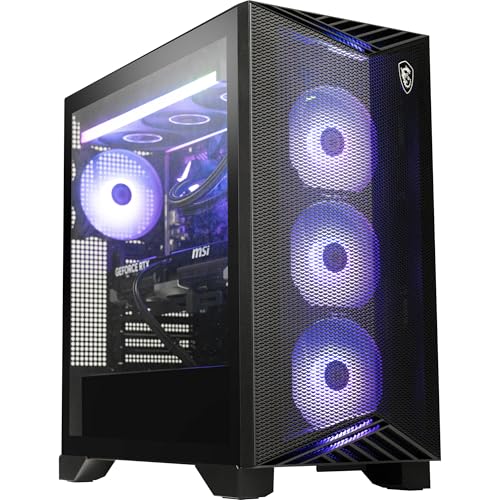
- 12-core Ryzen 9 and RTX 5080
- 32GB DDR5-6000 and 2TB SSD
- 360mm liquid cooling and Wi-Fi 7
Best For: A ready-to-use gaming tower with Windows 11 Pro
Best Gaming-Focused CPU

- Ryzen 7 9800X3D and RTX 5080
- 32GB DDR5-6400 and 2TB SSD
- White case with 360mm liquid cooling
Best For: A gaming-focused build with a white showpiece chassis
Best Storage Bundle
MSI Aegis ZS2 Ryzen 9 and RTX 5080

- Ryzen 9 9900X and RTX 5080 GDDR7
- 2TB internal SSD plus 1TB docking station
- 360mm cooling and Wi-Fi 7
Best For: Gamers who will use bundled external storage
Balanced 4K Pick – Skytech King 95 Ryzen 7 9850X3D and RTX 5080
This high end gaming pc pairs a Ryzen 7 9850X3D with an RTX 5080 for buyers who want a strong gaming-focused configuration without stepping up to an RTX 5090 system. It also includes 32GB of DDR5-6000 memory and a 2TB NVMe SSD.
Best For: Gamers who want an RTX 5080 desktop with ample fast storage and a showcase-style case.
Pros:
- Ryzen 7 9850X3D and RTX 5080 with 16GB GDDR7.
- 32GB DDR5-6000 RAM and a 2TB NVMe SSD.
- 360mm liquid CPU cooler, included keyboard and mouse, and no preinstalled bloatware.
Cons:
- Wi-Fi 5 is an older wireless standard than those offered on some newer desktops.
- Graphics card brand and additional video ports may vary.
The King 95 makes sense if the CPU-GPU pairing is your priority. Check the available display connections for your monitor setup, since the listing only promises one HDMI and one DisplayPort output.
Storage-Heavy Pick – Horizon Autherium Dragon RGB i9 and RTX 5070
This high end gaming pc prioritizes memory, storage capacity, and connectivity: the Horizon Autherium Dragon RGB lists 64GB of RAM, a 1TB NVMe SSD plus a 4TB hard drive, and Windows 11 Pro. Its RTX 5070 OC has 12GB of graphics memory.
Best For: Buyers who keep large game and media libraries and also want 64GB of RAM for work alongside gaming.
Pros:
- 64GB RAM and 5TB total storage across an SSD and HDD.
- Windows 11 Pro, USB-C, Ethernet, Wi-Fi, and Bluetooth.
- 360mm liquid cooler and stated three-year parts and five-year labor warranties.
Cons:
- Only 1TB of the advertised 5TB is SSD storage; the remaining 4TB is a hard drive.
- The RTX 5070 OC has less graphics memory than the RTX 5080 and 5090 configurations in this roundup.
Choose this configuration for its RAM, library space, and Pro operating system rather than for the strongest graphics specification here. Confirm the exact Core i9 model if CPU generation matters to your purchase; the supplied listing does not specify it.
Gaming CPU Pick – STORMCRAFT Phantom 9800X3D and RTX 5080
This high end gaming pc combines a Ryzen 7 9800X3D and RTX 5080 with 32GB of DDR5-6000 memory and a 2TB Gen4 NVMe SSD. The STORMCRAFT Phantom is a straightforward choice if you want those core gaming components in a prebuilt tower.
Best For: Buyers seeking a 9800X3D and RTX 5080 configuration with a longer stated parts warranty than a one-year plan.
Pros:
- Ryzen 7 9800X3D and RTX 5080 with 16GB GDDR7.
- 32GB DDR5-6000 RAM and a 2TB Gen4 NVMe SSD.
- 360mm liquid cooler, 850W Gold-certified power supply, and two-year parts warranty.
Cons:
- The supplied listing specifies HDMI output but does not establish a DisplayPort configuration.
- 32GB of installed RAM may require an upgrade for buyers specifically seeking 64GB.
The Phantom’s listed components make it a focused gaming option, with three years of labor coverage and lifetime technical support also stated. Verify the GPU’s display outputs before ordering if your monitors require DisplayPort.
Maximum-Spec Pick – Skytech Blaze 5 Ryzen 9 9950X3D and RTX 5090
This high end gaming pc has the most substantial listed GPU and memory configuration in this roundup: an RTX 5090 with 32GB GDDR7, 64GB of DDR5-6000 RAM, and a 4TB Gen4 NVMe SSD. Its Ryzen 9 9950X3D also provides 16 CPU cores for buyers who game and run demanding productivity workloads.
Best For: Buyers who want an RTX 5090 desktop with substantial RAM and all-SSD storage for gaming and demanding work.
Pros:
- Ryzen 9 9950X3D and RTX 5090 with 32GB GDDR7.
- 64GB DDR5-6000 RAM and a 4TB Gen4 NVMe SSD.
- X870 motherboard, Wi-Fi 7, Bluetooth, and 360mm liquid CPU cooler.
Cons:
- Parts and labor warranty lasts one year.
- Graphics card brand and video ports beyond the promised HDMI and DisplayPort connections may vary.
The Blaze 5 is the configuration to consider when GPU capacity, RAM, and SSD space matter more than keeping the specification modest. It includes Windows 11 Home, so buyers who specifically need Pro should factor that into their decision.
Best for Showcase Builds – Corsair Vengeance i5100
If you want a high end gaming pc that doubles as a display piece, the Corsair Vengeance i5100 pairs an RTX 5080 with a Core i9-14900KF in a glass-sided, dual-chamber case. Its 32GB of DDR5 memory and 2TB SSD provide ample room for a game library and everyday multitasking.
Best For: Buyers who want RTX 5080 graphics, extensive RGB lighting, and a carefully coordinated cooling setup.
Pros:
- RTX 5080 graphics and a Core i9-14900KF.
- 240mm liquid CPU cooler plus nine RGB fans.
- 32GB DDR5-6000 memory, 2TB SSD, and a two-year manufacturer warranty.
Cons:
- At 36.5 pounds, it is not especially convenient to move.
- Its elaborate RGB and glass-panel design may not suit a subdued setup.
The i5100 is the visual standout of this group: consider it when the case, lighting, and cooling presentation matter alongside the hardware.
Best for 1440p Gaming – Skytech King 95
The Skytech King 95 takes a gaming-focused approach to a high end gaming pc, combining a Ryzen 7 9800X3D with an RTX 5070 Ti. Skytech positions this configuration for detailed 1440p play, while 32GB of DDR5-6000 memory and a 2TB Gen4 NVMe SSD cover demanding games and a sizable library.
Best For: Players prioritizing the Ryzen 7 9800X3D and detailed 1440p gaming over an RTX 5080.
Pros:
- Ryzen 7 9800X3D and 16GB RTX 5070 Ti pairing.
- 360mm liquid CPU cooler and 32GB DDR5-6000 memory.
- 2TB Gen4 NVMe SSD, included keyboard and mouse, and a one-year parts-and-labor warranty.
Cons:
- RTX 5070 Ti rather than the RTX 5080 found in the other two systems.
- Graphics-card brand and some port configurations may vary.
Choose the King 95 if its CPU-first configuration matches your games; check the seller’s current graphics-card and port details if those specifics affect your setup.
Best AMD and RTX 5080 Pairing – Thermaltake Reactor 9880
The Thermaltake Reactor 9880 combines a Ryzen 7 9800X3D and an RTX 5080 for buyers seeking a high end gaming pc built around AMD’s gaming-oriented processor. It also includes 32GB of DDR5-6400 memory, a 2TB NVMe SSD, and a 360mm closed-loop liquid cooler.
Best For: Buyers who want the Ryzen 7 9800X3D and RTX 5080 together in a prebuilt tower.
Pros:
- Ryzen 7 9800X3D and RTX 5080 configuration.
- 32GB DDR5-6400 memory and 2TB NVMe storage.
- 360mm liquid cooling, perforated side panels, and front USB-C.
Cons:
- One-year warranty, shorter than the Corsair system’s stated two-year coverage.
- At 21.91 kg, the tower is heavy to relocate.
The Reactor 9880 is the direct fit when both an AMD gaming CPU and RTX 5080 are on your checklist; its panoramic glass front and airflow-focused side panels add a distinctive case design.
Best All-Rounder – MSI Aegis ZS Ryzen 9 9900X and RTX 5080
The MSI Aegis ZS is a high end gaming pc for buyers who want a powerful desktop with useful extras already included. It pairs a 12-core Ryzen 9 9900X with an RTX 5080, 32GB of DDR5-6000 memory, and a 2TB NVMe SSD.
Best For: Gamers who want strong graphics, ample storage, and Windows 11 Pro in a ready-to-use tower.
Pros:
- RTX 5080 with 16GB of graphics memory and a 12-core Ryzen 9 processor.
- 32GB DDR5-6000 RAM and a 2TB NVMe SSD.
- 360mm liquid cooling, Wi-Fi 7, and an included keyboard and mouse.
Cons:
- At 37 pounds, the tower is not especially convenient to move.
- The included keyboard and mouse may not replace your preferred gaming peripherals.
Its balanced specifications and included essentials make it a straightforward pick if you want to start gaming without assembling a system. Check that its 19.4-by-19-by-9.1-inch case fits your space.
Best Gaming-Focused CPU – Thermaltake Reactor 9880S
The Thermaltake Reactor 9880S puts a Ryzen 7 9800X3D and RTX 5080 at the center of a high end gaming pc. Its white chassis combines tempered-glass front panels, perforated side panels, and a 360mm closed-loop liquid cooler.
Best For: Buyers prioritizing a gaming-focused CPU and a display-worthy white tower.
Pros:
- Ryzen 7 9800X3D and RTX 5080 with 16GB of graphics memory.
- 32GB DDR5-6400 memory and a 2TB NVMe M.2 SSD.
- 360mm liquid cooling and a chassis with perforated side panels.
Cons:
- The listed front-panel connections include just two USB-A ports, though there is also a USB-C port.
- External speakers are required for audio playback.
Choose this model if the CPU, cooling setup, and white case design matter more to you than extensive front-panel connectivity. It ships with Windows 11 and Wi-Fi.
Best Storage Bundle – MSI Aegis ZS2 Ryzen 9 and RTX 5080
The MSI Aegis ZS2 is a high end gaming pc built around a 12-core Ryzen 9 9900X, an RTX 5080 with 16GB GDDR7, and 32GB of DDR5 memory. Its advertised 3TB total combines a 2TB PCIe SSD with 1TB of storage in an included docking station.
Best For: Gamers who want a powerful tower plus bundled external storage and accessories.
Pros:
- Ryzen 9 9900X, RTX 5080 16GB GDDR7, and 32GB DDR5 RAM.
- 2TB internal PCIe SSD plus a docking station with 1TB of storage.
- 360mm liquid cooling, Wi-Fi 7, Windows 11 Pro, and an included keyboard and mouse.
Cons:
- The advertised 3TB is not all internal PC storage.
- The supplied details list differing dimensions and weights, so confirm the tower’s size before ordering.
This bundle is most compelling if you will use the docking station and its extra storage. If you need 3TB installed inside the tower, plan around the listed 2TB internal SSD instead.
How We Picked the Best High End Gaming PC
We focused on the configurations listed for each desktop: GPU and CPU pairing, memory, storage, and stated features such as liquid cooling or Wi-Fi 7. Those specifications help identify which systems suit different buyers, but they do not establish real-world frame rates, noise levels, or build quality. Before ordering, confirm the exact components and warranty on the retailer’s current listing; prebuilt specifications can vary.
Quick Comparison: Which Tier Fits?
For buyers who want a capable premium desktop without automatically paying for the fastest GPU, the RTX 5070 Ti systems are a sensible place to start. The RTX 5080 makes up most of this roundup and offers a middle ground for demanding games and high-resolution displays. The RTX 5090 configuration is the option to examine if you want the highest GPU tier listed here and can justify its cost.
CPU choices matter too. The Ryzen 7 9800X3D and 9850X3D configurations are especially relevant to gaming-focused buyers. Systems with a Ryzen 9 9900X or 9950X3D, or a Core i9, may appeal if demanding non-gaming work is also part of your day. Compare actual application requirements rather than assuming a higher CPU tier improves every game.
Key Buying Factors for a High-End Gaming PC
Match the GPU to Your Monitor
Start with your display’s resolution, refresh rate, and the games you play. A faster graphics card has the most practical value when your monitor and settings can use it. Check independent benchmarks for your specific games, particularly if ray tracing or demanding visual settings are priorities.
Check Memory and Storage Details
Most selected systems list 32GB of RAM, while two list 64GB. For gaming alone, compare price and upgradeability before paying extra for more memory; 64GB is easier to justify for substantial creation or multitasking workloads. Storage ranges from 2TB to 5TB as advertised, but capacity alone does not tell you how it is configured. Verify drive type and available expansion slots, especially where a listing mentions a separate docking station.
Look Beyond the Headline Parts
Ask for the power supply’s wattage and model, cooling layout, motherboard details, case dimensions, and included connections. These affect thermals, future upgrades, and whether the PC fits your space. Also check warranty coverage and support terms, not just component names.
Who Should Buy Which High End Gaming PC?
Choose an RTX 5070 Ti configuration if you want to keep spending in check while buying a gaming-oriented CPU. Look at the RTX 5080 options if you want more GPU headroom; then distinguish them by price, CPU, cooling, storage, and support. Consider the RTX 5090 Skytech if maximum graphics performance is your priority. If gaming shares time with heavy productivity work, compare the Ryzen 9 and Core i9 systems against your software’s needs before deciding.