
When it comes to gaming, having a reliable charging station for your controllers is essential. You want something that not only keeps your gear powered up but also fits seamlessly into your setup. From multi-device chargers to sleek designs with RGB lighting, there’s a lot to take into account. Let’s explore the top options available today to guarantee your controllers are always ready for action.
KDD Charging Station for Multiple Devices

If you’re a gamer with multiple devices, the KDD Charging Station for Multiple Devices is the perfect solution for you. This 6-in-1 design features four charging ports, a controller stand, and a headphone holder, helping you reduce cable clutter and keep your gaming area organized. With three USB A and one USB C port, it charges smartphones and tablets without needing a wall plug. The station automatically detects devices for ideal charging speeds, while the sturdy base and soft protective pads guarantee stability and prevent scratches. Plus, its fire-resistant shell and multi-protection system keep your gear safe during charging.
Best For: Gamers and tech enthusiasts looking for an organized and efficient charging solution for multiple devices.
Pros:
- Versatile charging: Four ports (3 USB A and 1 USB C) allow simultaneous charging of various devices without needing a wall plug.
- Enhanced organization: Includes a dedicated controller stand and headphone holder to reduce cable clutter and keep the gaming area tidy.
- Safety features: Built-in multi-protection system and fire-resistant materials ensure safe charging for all connected devices.
Cons:
- Limited to four devices: While it accommodates multiple devices, only four can be charged at once.
- Detachable parts: The detachable controller holder may not be as sturdy for all types of controllers.
- Size constraints: The design may take up more desk space compared to simpler charging solutions.
KDD Headphone & Controller Stand with Wireless Charging

For gamers who crave an organized and stylish setup, the KDD Headphone & Controller Stand with Wireless Charging is an ideal choice. This versatile stand features a rotatable headset holder and can store one headset and up to four controllers, keeping your gear tidy. With nine lighting modes, including vibrant color options, it enhances your gaming space. You’ll appreciate the wireless charging capability, plus two USB ports and one Type-C port for additional devices. Made from durable, fire-proof plastic, it guarantees safety while being easy to assemble in just 30 seconds. Upgrade your setup with this sleek and functional accessory!
Best For: Gamers seeking an organized and stylish setup for their headsets and controllers.
Pros:
- Versatile design that accommodates one headset and up to four controllers.
- Multiple lighting modes enhance the gaming atmosphere.
- Durable, fire-proof construction ensures safety and longevity.
Cons:
- Not compatible with iPhone for wireless charging.
- Limited to one headset storage, which may be insufficient for some users.
- Assembly requires handling multiple parts, which may not appeal to everyone.
PS5 Controller Charger with Fast Charging AC Adapter and Dual Charging Station

The PS5 Controller Charger with Fast Charging AC Adapter and Dual Charging Station is ideal for gamers who want efficiency and style in their gaming setup. This upgraded charger allows you to power up two DualSense or DualSense Edge controllers simultaneously. With fast charging capabilities, your DualSense Edge gets fully charged in just 2 hours and DualSense controllers in 3 hours. The bright LED indicator keeps you informed about the charging status. Plus, its unique robot helmet-inspired design adds flair to your space. Safety features protect against over-current and short circuits, ensuring your gear stays safe while charging.
Best For: Gamers seeking a stylish and efficient charging solution for their DualSense controllers.
Pros:
- Fast charging capability, fully charging DualSense Edge controllers in 2 hours and DualSense controllers in 3 hours.
- LED charging indicator provides clear status updates on charging progress.
- Unique robot helmet-inspired design adds a decorative touch to any gaming setup.
Cons:
- The charger may take up additional space on your gaming setup.
- Only compatible with DualSense and DualSense Edge controllers, limiting its use for other devices.
- The audible beeps for charging initiation may be disruptive for some users in quiet environments.
Gaming Headphones Stand with Charging Station and RGB Light Modes

Gamers seeking a stylish and functional solution for their setup will appreciate the Gaming Headphones Stand with Charging Station and RGB Light Modes. This stand not only holds your headphones securely but also features 10 dynamic RGB light modes to enhance your gaming atmosphere. With one USB 2.0 port for data transfer and two Type-C ports for charging, it keeps your gear powered up efficiently. Its easy assembly takes under 30 seconds, and the detachable design makes it portable. Plus, the anti-slip pads guarantee everything stays in place, keeping your desk organized and clutter-free.
Best For: Gamers looking for an organized, stylish headphone stand that enhances their gaming setup with RGB lighting and charging capabilities.
Pros:
- Stylish design with 10 RGB light modes to create an immersive gaming atmosphere.
- Multiple charging options with USB 2.0 and Type-C ports, allowing for efficient power management.
- Quick and easy assembly in under 30 seconds, plus a detachable design for portability.
Cons:
- Limited charging compatibility as the Type-C ports are not compatible with Apple devices.
- Only holds one headphone, which may not suit gamers with multiple headsets.
- RGB lights may be distracting for some users during intense gaming sessions.
Upgraded Controller Charger Station with Rechargeable Battery Packs for Xbox One/Series X|S

If you’re an avid Xbox One or Series X|S player, the upgraded controller charger station with rechargeable battery packs is a game-changer. It includes two 5520mWh battery packs, offering 18-25 hours of gameplay after just a 4-5 hour charge. With dual charging docks and four battery back covers, it’s perfect for multiple controllers. The LED indicators keep you informed—green means charged, while red shows it’s still charging. With built-in safety features, you can leave your controllers docked worry-free. This eco-friendly solution not only saves you money but guarantees your controllers are always ready for your next gaming session.
Best For: Xbox One and Series X|S gamers looking for a reliable and eco-friendly charging solution for their controllers.
Pros:
- Convenient dual charging dock allows for simultaneous charging of two controllers.
- Long-lasting rechargeable battery packs provide extensive gameplay without frequent interruptions.
- Built-in safety features protect against overcharging and overheating, ensuring safe usage.
Cons:
- Charging time of 4-5 hours may be lengthy for users needing quick power-ups.
- Limited to Xbox controllers, making it unsuitable for users with other gaming systems.
- The LED indicators may be too bright for some users during nighttime gaming sessions.
Controller Charging Dock for Switch Pro & Xbox Series X|S

Perfect for busy gamers who own both a Switch Pro and an Xbox Series X|S, the Controller Charging Dock offers a convenient dual-port charging solution. You can charge two controllers simultaneously, ensuring you’re always ready for your next gaming session. It features removable USB Type-C adapters for easy drop-in charging, minimizing wear on your controllers. Just remember, it’s not compatible with PowerA or Luna controllers, so double-check your model before purchasing. The front LED indicator lets you know when your controllers are charging or fully charged. With built-in protection, you’ll enjoy stable charging without worrying about damage.
Best For: Busy gamers who own both a Switch Pro and an Xbox Series X|S, seeking a convenient way to charge their controllers simultaneously.
Pros:
- Dual-port charging station allows simultaneous charging of two controllers, saving time.
- Removable USB Type-C adapters minimize wear on controllers and allow for easy drop-in charging.
- Front LED indicator provides clear status on charging progress, enhancing user experience.
Cons:
- Not compatible with PowerA, Luna, or other 3rd-party controllers, limiting usability for some gamers.
- Recommended power supply is not included, which could lead to additional costs for users.
- Charging may be slow or intermittent if used with low-power USB ports, causing frustration during use.
OIVO PS5 Controller Charger with Fast Charging AC Adapter
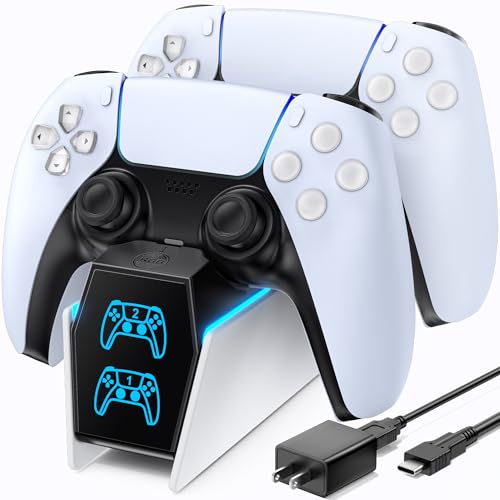
For those who own a PlayStation 5, the OIVO PS5 Controller Charger with Fast Charging AC Adapter is an essential accessory that streamlines your gaming experience. With its ability to charge two PS5 DualSense controllers simultaneously, you’ll never run out of power mid-game. The copper connector ports allow for a swift 2.0-hour charging time, ensuring your controllers are ready when you are. Its stylish design not only organizes your gear but also features an on/off switch to save power. Plus, the bright LED indicators keep you informed about charging status, adding a sleek aesthetic to your gaming setup.
Best For: Gamers who frequently play on PlayStation 5 and require a reliable, efficient charging solution for their controllers.
Pros:
- Fast charging capability: Charges controllers in just 2.0 hours, allowing for minimal downtime.
- Simultaneous charging: Can charge up to 2 controllers at once, ensuring you always have a backup ready.
- User-friendly design: Features an on/off switch and LED indicators for easy monitoring of charging status.
Cons:
- Limited compatibility: Designed specifically for PS5 controllers, which may not suit users with other gaming consoles.
- Requires AC power: Needs to be plugged in, limiting portability compared to smaller charging solutions.
- Initial setup: Users must remember to remove the anti-scratch film before use, which could be overlooked.
OIVO PS4 Controller Charging Dock Station

The OIVO PS4 Controller Charging Dock Station is an excellent choice for gamers who want a quick and efficient way to power up their Dualshock 4 controllers. It charges your controllers in just 1.8 hours, thanks to its updated copper contactor for fast charging. You can plug it into various power sources, including your PS4, Slim, Pro, PC, or a wall adapter. LED indicators keep you informed with blue lights for fully charged controllers and red for charging in progress. Plus, built-in safety features protect against overcharging and circuit issues, ensuring your gear stays safe while powering up.
Best For: Gamers looking for a fast and reliable charging solution for their PS4 Dualshock 4 controllers.
Pros:
- Charges controllers in just 1.8 hours for quick turnaround.
- Versatile power supply options, compatible with multiple devices.
- Built-in safety features to protect against various charging hazards.
Cons:
- Adapter for wall power source is not included.
- Limited to PS4 Dualshock 4 controllers; not compatible with other controller models.
- Requires space for the dock on gaming setup.
Controller Charger Dock for Nintendo Switch – 6 in 1 Charging Station

If you’re a Nintendo Switch enthusiast with multiple controllers, the Controller Charger Dock stands out as an essential accessory. This 6 in 1 charging station lets you charge up to 4 Joy-Cons and 2 Pro Controllers simultaneously, keeping your gaming gear organized and ready to go. Simply plug your controllers into the dock, making sure to use a 5V 2A plug for peak performance. You’ll appreciate the clear charging status indicators, with red lights for Joy-Cons and green for Pro Controllers. Just remember, it’s not compatible with Switch 2 Joy-Cons or third-party controllers, so stick to the official gear.
Best For: Nintendo Switch enthusiasts with multiple controllers looking for an efficient charging solution.
Pros:
- Charges multiple controllers simultaneously: Supports charging for 4 Joy-Cons and 2 Pro Controllers at the same time.
- Clear charging indicators: Red and green lights provide easy visibility of charging status for Joy-Cons and Pro Controllers.
- Space-efficient design: Helps keep controllers organized and saves space in your gaming setup.
Cons:
- Limited compatibility: Not compatible with Switch 2 Joy-Cons or any third-party controllers.
- Requires specific power supply: Needs a 5V 2A plug to function properly, which may not be included.
- Not suitable for all controller types: Excludes NES controllers and PowerA pro controllers from use.
Tilted Nation 3 in 1 Gaming Headset and Controller Stand for PS5 and Xbox Series X

Designed specifically for gamers who own both a PS5 and Xbox Series X, the Tilted Nation 3 in 1 Gaming Headset and Controller Stand serves as an all-in-one charging station, controller holder, and headphone stand. With its dynamic RGB lighting and sleek design, it not only enhances your gaming setup but also keeps your gear organized. The 4-port USB 3.0 hub allows you to charge extra controllers or connect peripherals effortlessly. Plus, the magnetic USB-C adapter makes charging Xbox controllers a breeze. Say goodbye to desk clutter and enjoy a tidy gaming space with this versatile accessory.
Best For: Gamers who own both a PS5 and Xbox Series X and want a functional and organized gaming setup.
Pros:
- Versatile Functionality: Combines charging station, controller holder, and headphone stand in one unit.
- Dynamic Lighting: Features RGB lighting with multiple modes to enhance gaming ambiance.
- Efficient Charging: Includes a 4-port USB 3.0 hub for charging extra controllers and connecting peripherals.
Cons:
- Size Limitations: May not accommodate larger headsets or accessories.
- Weight: At 1.64 pounds, some users might find it less stable on lighter desks.
- Limited Compatibility: The magnetic USB-C adapter is designed specifically for Xbox controllers, which may not suit other brands.
Factors to Consider When Choosing a Gaming Controller Charging Station
When you’re choosing a gaming controller charging station, several factors can make a big difference in your experience. You’ll want to contemplate options like charging capacity, compatibility with your controllers, and any safety features that come with it. Don’t forget to think about the design and ease of use, too—these details can enhance your gaming setup considerably.
Charging Capacity Options
Choosing the right gaming controller charging station involves several key factors, especially when it comes to charging capacity options. First, think about how many controllers you need to charge at once. Some stations can handle multiple controllers, while others are limited to one or two. Next, pay attention to charging speeds; faster options can reduce your downtime considerably, with some stations fully charging controllers in just 1.8 to 3 hours. Also, check the power supply requirements, as higher voltage stations may charge more quickly. Finally, look for features like LED indicators to keep track of your controllers’ charging status. These elements will help you make an informed choice and guarantee your gear is always ready to go.
Compatibility With Controllers
Making sure your gaming controller charging station is compatible with your specific controllers is crucial for a seamless gaming experience. Many stations cater to particular brands, like Xbox, PlayStation, or Nintendo Switch, so double-check your controller model before purchasing. Some docks might not support third-party controllers, which can limit your options. If you want to charge multiple controllers at once, look for dual-port stations, but confirm that your controllers are compatible for maximum efficiency. Additionally, consider charging stations with removable adapters or connectors to enhance compatibility across different controller models. Finally, pay attention to the charging methods available; verify the station supports the charging port type, whether it’s USB Type-C or USB-A, for hassle-free use.
Safety Features Included
While selecting a gaming controller charging station, it is vital to prioritize safety features that protect your investment. Look for charging stations with built-in protection chips to guard against over-current, over-voltage, and short-circuiting. This guarantees your controllers charge safely. Consider models that offer a multi-protection system to prevent overheating and extend the lifespan of both the charger and your controllers. A fire-resistant outer shell made from hardened plastic can further reduce risks associated with flammable materials. Opt for stations with LED indicators to monitor charging status and prevent overcharging. Finally, evaluate the ease of use with drop-in designs, which minimize damage risks while providing secure connections for efficient charging.
Design and Aesthetics
A gaming controller charging station isn’t just a functional accessory; it’s a statement piece that can enhance your entire gaming setup. When choosing one, consider how its design fits with your console’s aesthetic. Look for sleek, modern styles that complement your gear. If you want to elevate the ambiance, RGB lighting features can add a dynamic flair, allowing for customizable color schemes that match your mood. A compact layout helps keep your desk organized, providing efficient storage for controllers and headsets. Durability is essential, so opt for materials that resist wear and are fire-safe. Finally, verify the design allows easy access to controllers and charging ports for quick grabs during intense gaming sessions.
Ease of Use
Choosing the right gaming controller charging station goes beyond just aesthetics; ease of use is a key factor that can greatly enhance your gaming experience. Look for stations that offer easy drop-in charging, so you won’t struggle with alignment or complicated setups. Models with clear LED indicators make it simple to check charging status at a glance—red for charging and green for fully charged. If you’ve got multiple controllers, opt for stations that can charge several at once, minimizing downtime. Safety is also essential, so choose designs with built-in protections against over-current and short-circuits. Finally, evaluate assembly requirements; simpler designs that set up quickly and without tools will improve your overall experience.
Additional Functionalities Offered
When considering a gaming controller charging station, you’ll want to explore additional functionalities that can elevate your setup. Look for models with built-in USB hubs, allowing you to charge multiple devices or connect peripherals at once. Integrated headphone holders or stands are also handy, providing a space for your headsets and reducing clutter. If you enjoy aesthetics, some stations come with RGB lighting options, letting you customize your gaming environment. For ultimate convenience, consider docks with wireless charging capabilities, eliminating the hassle of cables. Ultimately, prioritize safety features like over-current protection and short-circuit prevention, ensuring your devices stay safe while charging. These added functionalities can greatly enhance your gaming experience.