
As you plan your next build, the choice of a full tower PC case becomes essential. The best options of 2026 promise not just spacious interiors but also innovative cooling solutions and stylish designs. You’ll find cases that maximize airflow and support high-performance components, all while enhancing your setup’s aesthetic appeal. Curious about which cases made the cut and what features set them apart? Let’s explore the top contenders.
Antec Flux Pro Full-Tower E-ATX PC Case

If you’re a gamer or content creator seeking a spacious and versatile setup, the Antec Flux Pro Full-Tower E-ATX PC Case is your ideal choice. With its high-airflow front panel featuring walnut wood accents, it combines style and functionality. You’ll appreciate the six pre-installed PWM fans and the capability to support up to 12 fans or even dual radiators. The innovative iShift PSU mount and dual temperature display keep your components cool and organized. Plus, with ample connectivity options, including USB 3.0 and Type-C ports, this case meets all your needs for a powerful and efficient workstation.
Best For: Gamers and content creators looking for a spacious, stylish, and highly functional PC case that supports extensive cooling options.
Pros:
- High-airflow front panel with walnut wood accents adds a premium aesthetic.
- Supports up to 12 fans and dual radiator setups for optimal cooling performance.
- Innovative features like the iShift PSU mount and dual temperature display enhance organization and efficiency.
Cons:
- Full-tower size may be too large for smaller setups or limited spaces.
- Premium materials may increase the overall cost compared to basic cases.
- Installation of multiple fans and radiators could be complex for novice builders.
NZXT H9 Flow RGB+ Large Dual-Chamber ATX Mid-Tower PC Case

The NZXT H9 Flow RGB+ Large Dual-Chamber ATX Mid-Tower PC Case is perfect for enthusiasts who demand both aesthetic appeal and superior cooling performance. Its dual-chamber design keeps your components separate from the PSU and drives, enhancing thermal efficiency and cable management. The panoramic tempered glass panels let you showcase your build in style. With support for up to nine 140mm fans and a 420mm radiator, cooling high-performance components is a breeze. Plus, built-in cable management features make routing easy. It’s also back-connect ready for seamless integration with motherboards like ASUS BTF and MSI Project Zero, ensuring a clean look.
Best For: PC enthusiasts seeking a stylish and efficient case that enhances cooling performance and cable management.
Pros:
- Dual-chamber design improves thermal performance and simplifies cable management.
- Panoramic tempered glass panels provide an elegant view of your build.
- Supports extensive cooling options with up to nine fans and a large radiator.
Cons:
- Limited space for larger motherboards due to its mid-tower design.
- Potentially complex installation for users unfamiliar with cable management techniques.
- RGB fans may require additional software for full customization, which can add complexity.
Antec C8 ARGB Full-Tower E-ATX PC Case

For gamers and PC builders seeking a blend of aesthetics and functionality, the Antec C8 ARGB Full-Tower E-ATX PC Case stands out with its dual-chamber design and seamless tempered glass panels. You’ll appreciate the pre-installed 160mm and 140mm Tranquil ARGB PWM fans, ensuring your components stay cool. Plus, the case supports thick 360mm radiators, giving you unmatched cooling flexibility. With interchangeable fan brackets, you can customize airflow to fit your needs. Compatible with RTX 40 series graphics cards, it’s perfect for high-performance builds. And don’t forget the Type-C connectivity for your modern peripherals—it’s designed for the future!
Best For: Gamers and PC builders looking for a stylish and high-performance case with excellent cooling capabilities.
Pros:
- Dual-chamber design enhances airflow and cable management.
- Pre-installed ARGB fans provide effective cooling and customizable lighting.
- Compatible with RTX 40 series graphics cards for powerful gaming setups.
Cons:
- Large size may not fit in smaller spaces.
- Price point may be higher compared to more basic cases.
- Limited color options for the case’s exterior design.
Gaming PC Case with 6 PWM ARGB Fans and Dual Tempered Glass

Designed for gamers seeking both performance and style, the H2 Gaming PC Case stands out with its six pre-installed PWM ARGB fans that assure peak cooling during intense gaming sessions. You’ll appreciate the ample space to accommodate powerful hardware like 420mm GPUs and 360mm liquid radiators. With dual tempered glass panels, your setup will shine while maintaining a sleek appearance. External connectivity options, including a Type-C port and USB 2.0 slots, make it easy to connect peripherals. Plus, its durable design guarantees a comfortable workspace, blending practicality with aesthetic appeal for both gaming and daily tasks.
Best For: Gamers and PC enthusiasts looking for a stylish and functional case that offers superior cooling and ample space for high-performance components.
Pros:
- Superior Cooling: Equipped with six pre-installed PWM ARGB fans for optimal airflow during gaming.
- Ample Space: Supports high-performance components like 420mm GPUs and 360mm liquid radiators, allowing for powerful builds.
- Aesthetic Appeal: Dual tempered glass panels provide a stunning view of your setup while maintaining a sleek and modern look.
Cons:
- Full Tower Size: The full tower design may take up more desk space compared to smaller cases.
- Weight: The inclusion of dual tempered glass panels can add to the overall weight, making it less portable.
- Potential Overheating: While it offers great cooling, the case may still require additional fans for extreme gaming setups or overclocking.
Antec Performance Full Tower PC Gaming Case
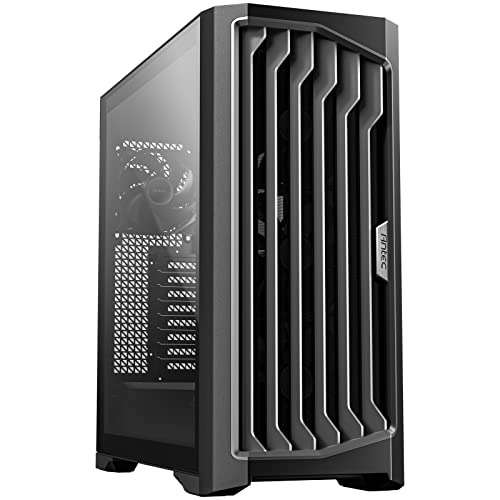
If you’re a gamer looking for a robust and stylish case, the Antec Performance Full Tower PC Gaming Case stands out with its impressive RTX40 compatibility. It features a high airflow mesh front panel and four Storm T3 PWM fans, ensuring ideal cooling and airflow. The temperature display keeps you informed about your system’s status, while Antec iUnity provides instant specs data. With dual 4mm tempered glass side panels, you can showcase your build beautifully. Plus, the Type-C 10Gbps port and included cable covers enhance connectivity and cable management, making your gaming setup both functional and visually appealing.
Best For: Gamers seeking a stylish and high-performance full tower case that supports the latest RTX40 graphics cards.
Pros:
- High airflow mesh front panel and four Storm T3 PWM fans provide excellent cooling and airflow.
- Dual 4mm tempered glass side panels allow for an aesthetically pleasing showcase of your gaming build.
- Type-C 10Gbps port enhances connectivity options for modern peripherals.
Cons:
- Full tower size may not be suitable for smaller setups or limited space.
- Weight could be a concern for those needing to transport their PC frequently.
- Price point may be higher compared to mid-range cases, which could deter budget-conscious buyers.
Thermaltake View 600 TG Full Tower Case

The Thermaltake View 600 TG Full Tower Case stands out for gamers and PC builders who prioritize aesthetics and performance. With a sleek black finish and triple tempered glass panels, it beautifully showcases your components. You can install up to ten fans for maximum cooling, plus it supports radiators up to 420mm. The spacious interior allows for easy assembly and impressive GPU clearance of 480mm. With a rotatable PCIe slot tray, you can configure your GPU vertically or horizontally. Hidden connector support and enhanced cable management make for a cleaner build, ensuring both functionality and style in your setup.
Best For: Gamers and PC builders who seek a stylish case with ample cooling options and easy component installation.
Pros:
- Supports up to ten fans and 420mm radiators for exceptional cooling performance.
- Features triple tempered glass panels for an attractive display of components.
- Spacious interior and enhanced cable management simplify assembly and create a cleaner build.
Cons:
- Requires a 90-degree riser cable for vertical GPU configuration, which is sold separately.
- Limited PSU clearance of 220mm may restrict certain high-end power supply options.
- The full tower size may not fit well in smaller spaces or setups.
Silverstone Technology WS380-E Workstation Chassis

For professionals demanding high expandability in their computing systems, the Silverstone Technology WS380-E Workstation Chassis stands out as an exceptional choice. You’ll appreciate its support for up to 8 hot-swappable drive trays, accommodating both 2.5/3.5 SAS/SATA SSDs and HDDs. The backplane efficiently handles 8-port SAS/SATA drives with 12 Gb/s Mini-SAS HD SFF-8643 + SGPIO. Plus, it’s compatible with E-ATX and SSI-EEB motherboards, allowing flexible system configurations. With options for ATX and 2U redundant power supplies, reliable power management is guaranteed. Front I/O ports include a USB Type-C and two USB 3.0 ports for seamless connectivity.
Best For: Professionals and businesses requiring a highly expandable workstation for advanced computing tasks.
Pros:
- High expandability with support for up to 8 hot-swappable drive trays, accommodating various storage needs.
- Versatile compatibility with E-ATX and SSI-EEB motherboards, allowing for diverse system configurations.
- Modern connectivity options featuring a USB Type-C port and two USB 3.0 ports for enhanced data transfer.
Cons:
- Larger form factor may not be suitable for compact workspaces or smaller setups.
- Potentially higher cost due to premium features and build quality.
- Limited to specific power supply types, which may restrict options for some users.
MUSETEX ATX PC Case with 7 PWM ARGB Fans

Designed with gamers and PC enthusiasts in mind, the MUSETEX ATX PC Case boasts an impressive 7 pre-installed PWM ARGB fans that guarantee your high-end hardware remains cool while showcasing vibrant lighting effects. This case supports ATX, Micro-ATX, and Mini-ITX motherboards, offering ample space for GPUs up to 415mm and CPU coolers up to 166mm. You’ll appreciate the upgraded I/O panel with a Type-C port and the magnetic dust filters that keep your system clean. With its dual tempered glass design, the K2 not only enhances airflow but also lets you proudly display your components and custom lighting.
Best For: Gamers and PC enthusiasts looking for a stylish case with excellent cooling capabilities and customizable lighting options.
Pros:
- Exceptional Cooling: Features 7 pre-installed PWM ARGB fans for optimal airflow and temperature management.
- Spacious Compatibility: Supports a wide range of motherboard sizes and high-end components, including GPUs up to 415mm.
- User-Friendly Design: Upgraded I/O panel with Type-C port and magnetic dust filters for easy access and maintenance.
Cons:
- Limited Expansion: While expandable to 10 fans, the case may still be restrictive for users requiring extensive cooling setups.
- Weight: The dual tempered glass design adds weight, making it less portable for frequent movers.
- Price Point: Higher-end design and features may come at a premium compared to simpler cases.
VEVOR PC Gaming Case, Full-Tower with High-Airflow Panel

If you’re a gamer seeking a spacious and efficient cooling solution, the VEVOR PC Gaming Case stands out with its high-airflow panel design. It supports various motherboard sizes, including E-ATX and Mini-ITX, and accommodates GPUs up to 410 mm. With room for multiple storage options, like 3 SSDs and 1 HDD, you’ll enjoy flexible expansion. Equipped with 3 x 140 mm PWM fans, it guarantees ideal cooling during intense sessions. Crafted from durable SPCC steel and tempered glass, it minimizes vibration. Plus, its dust filters keep your components clean, maintaining peak performance throughout your gaming adventures.
Best For: Gamers who need a spacious case with excellent cooling capabilities and flexible storage options.
Pros:
- Supports a wide range of motherboard sizes, ensuring compatibility with various builds.
- Exceptional cooling system with multiple fan support, keeping temperatures low during gaming.
- Durable construction with tempered glass and SPCC steel, enhancing stability and reducing vibration.
Cons:
- Full-tower size may be too large for compact setups or limited spaces.
- Installation of additional fans may add to overall costs.
- Some users may find the design less aesthetically pleasing compared to other cases on the market.
Antec C8 Full-Tower E-ATX PC Case

The Antec C8 Full-Tower E-ATX PC Case stands out with its exotic wooden front panel, making it a striking choice for enthusiasts who value both aesthetics and functionality. Its seamless edge design and tempered glass panels showcase your build beautifully. With a dual-chamber layout, you can keep cables organized and components cool. You’ll appreciate the cooling support, accommodating three 140mm fans or two 160mm fans, plus the ability to install thick 360mm radiators on multiple sides. Compatible with RTX 40 graphics cards, this case also features Type-C connectivity, ensuring your setup is modern and efficient.
Best For: Enthusiasts seeking a stylish and functional full-tower case to showcase high-performance builds and manage cooling efficiently.
Pros:
- Unique exotic wooden front panel enhances aesthetic appeal.
- Ample cooling support with space for multiple fans and radiators.
- Dual-chamber design promotes better cable management and airflow.
Cons:
- Fans are not included, requiring additional purchases for optimal cooling.
- The large size may not fit in all gaming or office setups.
- Premium materials and design may come at a higher price point.
Factors to Consider When Choosing a Full Tower PC Case
When you’re picking a full tower PC case, you’ll want to evaluate several key factors. Think about cooling system efficiency, compatibility with your components, and how the design fits your style. Don’t forget about cable management options and potential for future upgrades, as these can greatly impact your overall experience.
Cooling System Efficiency
Choosing a full tower PC case requires careful consideration of cooling system efficiency, especially since effective cooling is essential for maintaining peak performance. Look for cases that support multiple fans—some can accommodate up to 12 or even dual radiators. Pre-installed fans, like 140mm or 160mm models, enhance airflow and keep temperatures down during heavy use. Innovative designs with multi-directional vents and optimized airflow paths help maintain consistent temperatures throughout the chassis. Additionally, the ability to install removable cooling brackets allows you to customize your cooling setup according to your specific hardware needs. Advanced cooling options, such as ARGB fans and temperature monitoring displays, not only improve aesthetics but also provide real-time feedback on your system’s thermal management.
Compatibility With Components
Considering compatibility with your components is vital for a successful full tower PC build. First, verify the case supports your motherboard form factors, whether E-ATX, ATX, or Micro-ATX. Next, check the GPU clearance, as many high-end graphics cards reach lengths of up to 480mm—make certain your case can accommodate that. Also, be mindful of the CPU cooler height limit; many cases support coolers up to 175mm tall, which is essential for effective thermal management. Look for cases that allow multiple radiator placements, ideally supporting up to a 420mm radiator for superior cooling. Finally, evaluate drive support to confirm your case can fit all the hard drives or SSDs you plan to install, especially if you want hot-swappable trays.
Design and Aesthetics
While functionality is essential in a full tower PC case, the design and aesthetics play a significant role in creating an appealing setup. Look for models that feature dual-chamber designs, as these not only enhance thermal performance but also streamline your build’s look. Tempered glass panels offer a stunning view of your components, adding to the overall aesthetic. Pay attention to the materials; high-quality metal, glass, and wood elevate the case’s visual appeal and durability. Customizable RGB lighting lets you express your personal style with vibrant colors. Also, consider cases with removable panels for easy assembly and maintenance, while optimized vent layouts promote effective airflow, ensuring your setup not only looks good but performs well too.
Cable Management Options
A well-organized cable management system can greatly enhance your full tower PC build, complementing its design and aesthetics. When choosing a case, look for extra-wide channels and built-in Velcro straps that help you route cables neatly. Tie-down points are essential for securing cables, preventing clutter, and ensuring a clean look. Many cases also offer removable cable covers, which conceal pathways and boost visual appeal. Consider designs with dedicated compartments that separate power supply cables from other components, improving airflow and reducing heat. Finally, integrated I/O panels with multiple ports simplify cable routing and keep essential connections accessible. With these features, you’ll not only achieve a tidy build but also optimize performance and cooling.
Expansion and Upgrade Potential
When selecting a full tower PC case, it’s vital to prioritize expansion and upgrade potential to ensure your build remains relevant over time. Look for a case that supports multiple motherboard sizes, like E-ATX, ATX, and Micro-ATX, accommodating future upgrades. Verify there’s ample space for longer graphics cards, ideally supporting GPUs up to 420mm, for those high-performance needs. Multiple fan and radiator mounting options are important too; cases that allow for up to 12 fans or large radiators will enhance your cooling capabilities considerably. Additionally, flexible drive bay configurations for SSDs and HDDs will help increase storage as your needs grow. Finally, check for compatibility with newer power supplies and advanced cooling systems to adapt to future hardware.
Connectivity Features Available
Choosing the right connectivity features can greatly enhance your overall PC experience. Look for full tower cases that include USB 3.0 and Type-C ports to guarantee you can connect modern peripherals and enjoy faster data transfers. Ideally, you’ll want at least two USB 2.0 and two USB 3.0 ports for a variety of connectivity options. Integrated audio jacks for headphones and microphones are essential if you often game or video conference. Additionally, consider cases with dedicated reset and lighting control buttons for convenient access. Front I/O panels should be designed for easy access, offering a range of ports to accommodate all your devices and accessories. Prioritizing these features will markedly improve your setup.