
If you’re serious about flight simulation, choosing the right yoke can make all the difference in your experience. Whether you’re looking for realism or a robust set of features, the market in 2026 offers several compelling options. From Logitech’s extensive controls to Thrustmaster’s authentic Boeing replica, there’s something for every enthusiast. But how do you decide which one suits your needs best? Let’s explore the top contenders and what sets them apart.
Logitech G PRO Flight Yoke System for PC

The Logitech G PRO Flight Yoke System is perfect for both aspiring and seasoned pilots looking to elevate their flight simulation experience. With 75 programmable controls, including a POV hat and 14 buttons, you’ll develop muscle memory and enjoy intuitive handling. Its robust stainless steel shaft guarantees smooth, precise control, enhancing your virtual flying accuracy. The system connects easily via a 5.9 ft USB cable for the yoke and a 4.92 ft PS/2 cable for the throttle quadrant, compatible with multiple Windows versions. Plus, it includes desk clamps for secure mounting, making installation a breeze. Get ready to soar!
Best For: Aspiring and seasoned pilots seeking an immersive and intuitive flight simulation experience.
Pros:
- Realistic Controls: Offers 75 programmable controls, enhancing muscle memory and intuitive handling during virtual flying.
- Durable Build: Constructed with a robust stainless steel shaft for smooth, precise control and long-lasting performance.
- Easy Installation: Comes with desk clamps for secure mounting and is compatible with multiple Windows versions.
Cons:
- Limited Compatibility: Requires optional software for certain flight simulation programs like Microsoft Flight Simulator and X-Plane.
- Cable Lengths: The 5.9 ft USB and 4.92 ft PS/2 cables may not be long enough for all setups.
- Weight: The robust build may make the yoke system heavier and less portable for users with limited space.
Turtle Beach VelocityOne Flight Universal Control System

For avid flight simulation enthusiasts looking for an all-in-one control solution, the Turtle Beach VelocityOne Flight Universal Control System stands out as the ultimate choice. Compatible with Xbox and Windows PCs, it features a true-to-life 180° yoke handle with a non-contact hall effect sensor. The modular throttle quadrant offers customizable lever handles and buttons, while integrated rudder and brake controls enhance your experience. You’ll appreciate the dedicated pitch trim wheel for precise adjustments and the full-color flight management display for easy configuration. Designed for titles like Microsoft Flight Simulator 2020 and 2024, it’s perfect for any setup with its secure clamping system.
Best For: Avid flight simulation enthusiasts seeking a comprehensive and user-friendly control system for Xbox and Windows PCs.
Pros:
- High-quality, true-to-life 180° yoke handle with non-contact hall effect sensor for precise control.
- Modular throttle quadrant with customizable lever handles and buttons for a personalized experience.
- Full-color flight management display simplifies configuration and enhances user interaction.
Cons:
- May require a larger setup space due to its all-in-one design.
- Compatibility may be limited to specific flight simulation titles, potentially excluding other games.
- Initial setup and configuration might be complex for new users unfamiliar with flight controls.
Honeycomb Alpha Flight Controls Yoke & Switch Panel for Flight Simulator

Designed with aviation enthusiasts in mind, the Honeycomb Alpha Flight Controls Yoke & Switch Panel offers an immersive experience that truly replicates real-life flying. With a solid steel shaft and 180° rotation, you’ll enjoy precise control and minimal deadzone for accurate maneuvers. The integrated switch panel features essential controls, including an ignition switch and various light switches, enhancing your cockpit experience. Plus, the multi-function yoke handles come loaded with buttons and switches for full functionality. Mount it securely with heavy-duty clamps or use the micro-suction pad for versatility. Compatible with popular flight simulators, it’s a must-have for serious sim pilots.
Best For: The Honeycomb Alpha Flight Controls Yoke & Switch Panel is best for aviation enthusiasts and serious flight simulator pilots seeking a realistic flying experience.
Pros:
- Realistic flight control with a dampened, self-centering mechanism and minimal deadzone for precise maneuvers.
- Integrated switch panel with essential controls, including an ignition switch and various light switches for enhanced cockpit functionality.
- Versatile mounting options with heavy-duty clamps or a strong micro-suction pad for clamp-free use on thicker tabletops.
Cons:
- Price point may be higher compared to basic flight control setups, making it less accessible for casual users.
- Compatibility limitations may exist with certain flight simulation software outside of the major platforms.
- Learning curve for new users who may need time to familiarize themselves with the controls and features.
Thrustmaster TCA Yoke PACK Boeing Edition (Compatible with Xbox Series X/S, PC)

Experience the thrill of flying with the Thrustmaster TCA Yoke PACK Boeing Edition, ideal for both Xbox Series X/S and PC gamers. This officially licensed Boeing yoke and throttle quadrant replicates the Boeing 787, offering a 1:1 scale design with a durable metal structure. You’ll appreciate the ergonomic feel and the suspended PENDUL_R mechanism for authentic control. With adjustable yoke springs and 35 action buttons, you can customize your flying experience. The iconic Boeing autopilot feature simplifies altitude and heading control. Plus, it seamlessly integrates into Microsoft Flight Simulator, making it a must-have for serious flight enthusiasts.
Best For: Flight simulation enthusiasts seeking an authentic Boeing flying experience on Xbox Series X/S and PC.
Pros:
- High-quality, durable metal construction ensures longevity and balanced weight distribution.
- Ergonomic design and adjustable yoke springs provide a comfortable and customizable flying experience.
- Officially licensed Boeing features, including autopilot, enhance realism and ease of use during flight simulation.
Cons:
- May be considered expensive for casual gamers or those new to flight simulation.
- Requires Microsoft Flight Simulator for full functionality, which is sold separately.
- Some users may find the learning curve steep if they are not familiar with flight controls.
Logitech G PRO Flight Yoke System for PC

The Logitech G PRO Flight Yoke System stands out as an ideal choice for serious flight simulation enthusiasts seeking a professional-grade experience. With 75 programmable controls, including 14 button controls and a POV hat switch, you’ll have all the customization you need. The stainless steel yoke shaft and separate three-axis lever throttle guarantee durability and precision. Plus, the integrated USB 2.0 hub simplifies connectivity. Compatible with various Windows versions, this system features an LCD display for easy monitoring. Whether you’re flying solo or with friends, the Logitech G PRO Flight Yoke enhances your virtual flying experience like never before.
Best For: Serious flight simulation enthusiasts seeking a professional-grade experience.
Pros:
- 75 programmable controls offer extensive customization options.
- Durable stainless steel yoke shaft ensures longevity and precision.
- Integrated USB 2.0 hub simplifies the connection of additional peripherals.
Cons:
- Primarily designed for PC users, limiting compatibility with other systems.
- The price point may be high for casual gamers or beginners.
- Setup and configuration may require time and technical knowledge.
Honeycomb Aeronautical Alpha Flight Controls Yoke & Switch Panel

For those serious about flight simulation, the Honeycomb Aeronautical Alpha Flight Controls Yoke & Switch Panel stands out with its realistic full 180° yoke rotation. You’ll appreciate the solid steel shaft and dual linear ball bearings that guarantee smooth control. With a dampened, self-centering mechanism, you’ll experience minimal to no dead zone, enhancing your flying precision. The switch panel includes essential controls like master and alternator switches, plus a 5-position ignition switch. Thanks to its dual mounting solution, you can easily attach it using clamps or the powerful 3M Micro-Suction Pad, making your setup convenient and secure.
Best For: The Honeycomb Aeronautical Alpha Flight Controls Yoke & Switch Panel is best for serious flight simulation enthusiasts, flight students, and pilots seeking a realistic experience.
Pros:
- Realistic full 180° yoke rotation enhances flying simulation.
- Solid construction with a steel shaft and dual linear ball bearings ensures smooth and precise control.
- Versatile dual mounting solution provides flexible installation options.
Cons:
- May be considered expensive compared to basic flight control options.
- The physical size may require adequate desk space for setup.
- Limited compatibility with some older flight simulation software.
Thrustmaster TCA Yoke Boeing Edition (Compatible with Xbox Series X/S, PC)

Pilots and flight simulation enthusiasts will appreciate the Thrustmaster TCA Yoke Boeing Edition for its authentic design and functionality. Officially licensed by Boeing, it’s inspired by the Boeing 787, providing a 1:1 scale ergonomic replica. The PENDUL_R mechanism replicates the pendular sensation of the Dreamliner, offering an 8.3-inch range of travel. With a sturdy metal internal structure and adjustable springs, it guarantees smooth, flexible motion. You’ll enjoy 18 customizable action buttons and two additional axes, making maneuvers like takeoffs and landings precise. Plus, it integrates seamlessly with Xbox Series X/S and PC for an immersive experience.
Best For: Flight simulation enthusiasts and pilots seeking an authentic and immersive flying experience with a realistic yoke design.
Pros:
- Authentic Design: Officially licensed by Boeing, closely resembling the Boeing 787 for true-to-life simulation.
- Smooth Control: PENDUL_R mechanism and adjustable springs ensure a fluid and responsive flying experience.
- Customizable Features: Comes with 18 action buttons and additional axes for customizable maneuvers, enhancing gameplay.
Cons:
- Price Point: May be considered expensive for casual gamers or those new to flight simulation.
- Limited Compatibility: While compatible with Xbox Series X/S and PC, it requires separate purchase of rudder systems for a complete setup.
- Size and Space: The yoke may require significant desk space and may not be suitable for smaller gaming setups.
MOZA Flight Controls MFY YOKE Flight Simulator Flightstick
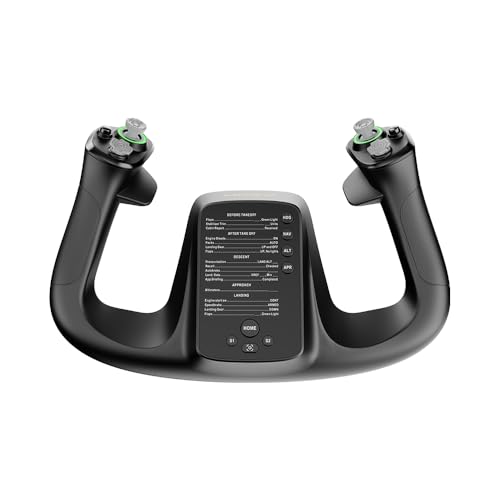
With a 180° rotation and 34 configurable inputs, the MOZA Flight Controls MFY YOKE Flight Simulator Flightstick caters to serious flight simulation enthusiasts seeking precision and versatility. Crafted from durable PA66 composite materials, it features an ergonomic design that guarantees comfort during long sessions. Weighing just 1.3 kg (4.41 pounds), it’s easy to handle. The drift-free control assures accuracy, while customizable RGB lighting lets you personalize your setup. You can manage various flight functions, including elevator trim and autopilot, seamlessly. If you’re looking for a reliable and adaptable flightstick, the MFY YOKE is an excellent choice.
Best For: Serious flight simulation enthusiasts seeking precision and versatility in their flight controls.
Pros:
- Drift-free control ensures precision and accuracy during flights.
- Ergonomic design provides comfort for extended gaming sessions.
- Customizable RGB lighting allows for personal setup customization.
Cons:
- Limited to a 180° rotation, which may not satisfy all users.
- Weighs 1.3 kg (4.41 pounds), potentially making it less portable.
- Product warranty details are not readily available.
Logitech G Pro Flight Rudder Pedals

The Logitech G Pro Flight Rudder Pedals are an excellent choice for flight simulation enthusiasts seeking precision and control. With smooth, accurate self-centering rudder control, you’ll enhance your flying experience considerably. The Adjustable Tension Dial lets you customize the response, whether you’re piloting a small aircraft or a heavy jet. Plus, the Differential Toe Brakes provide essential control for landing and taxiing, ensuring accurate maneuvering on the runway. Compatible with Windows 7, 8, 8.1, and 10, these pedals connect easily via USB 2.0, making them a fantastic addition to your flight simulator setup.
Best For: Flight simulation enthusiasts seeking precision and customizable control in their simulation experience.
Pros:
- Smooth, accurate self-centering rudder control enhances flying precision.
- Adjustable Tension Dial allows customization for different aircraft types.
- Differential Toe Brakes provide essential control for landing and taxiing.
Cons:
- Only compatible with Windows operating systems (7, 8, 8.1, and 10).
- Requires an internet connection for optional software download.
- May feel bulky or heavy for some users at 2.3 kg.
Honeycomb Alpha LITE Compact Yoke for Flight Simulation
![Honeycomb Alpha LITE - compact yoke for flight simulation, 180 rotation, programmable buttons, sturdy steel shaft, clear design perfect for sim beginners, plug & fly with MSFS 2024 [video game] [video game]](https://m.media-amazon.com/images/I/419hJ63LHAL._SL500_.jpg)
For those new to flight simulation, the Honeycomb Alpha LITE Compact Yoke stands out as an ideal choice. It features a 180° rotation and a sturdy steel shaft, ensuring durability while providing a plug-and-fly experience with Microsoft Flight Simulator 2020 and 2024. You’ll appreciate its realistic controls and self-centering mechanism, which minimizes dead zones for precise handling. Intuitive navigation is enhanced with a left POV switch, two rocker switches, and four programmable buttons. Constructed from high-quality materials, this yoke guarantees longevity, making it perfect for both beginners and seasoned pilots keen to elevate their flying experience.
Best For: The Honeycomb Alpha LITE Compact Yoke is best for beginners in flight simulation who seek a user-friendly and durable control system.
Pros:
- Realistic flight controls enhance the simulation experience for users.
- Plug-and-fly compatibility with Microsoft Flight Simulator 2020 and 2024 ensures easy setup.
- Durable construction from high-quality materials guarantees longevity and reliability.
Cons:
- Limited advanced features may not satisfy experienced pilots looking for more complex controls.
- Compact design may feel restrictive for users accustomed to larger yokes.
- No built-in display for additional information or settings may limit ease of use during flight.
Factors to Consider When Choosing a Flight Simulator Yoke
When choosing a flight simulator yoke, you’ll want to take into account several key factors. Control features and compatibility with your simulation software can make a big difference in your experience. Additionally, think about the build quality, ergonomics, and installation options to guarantee comfort and durability during your flights.
Control Features and Flexibility
Choosing a flight simulator yoke involves careful consideration of control features and flexibility to enhance your flying experience. Look for a yoke that offers 75 or more programmable controls to allow extensive customization. Multiple control features, like button controls, POV hat switches, and adjustable throttle levers, can greatly boost realism. A self-centering mechanism and minimal dead zone are essential for precise maneuvers during flight. Additionally, integrated rudder and brake controls play an important role in aircraft handling during takeoffs and landings. Opt for yokes that include extra axes and switches, such as pitch trim wheels and customizable lever handles, to accommodate a wider range of aircraft operations, ensuring you have all the tools needed for an immersive experience.
Build Quality and Durability
While evaluating flight simulator yokes, build quality and durability should be at the forefront of your decision-making process. Look for construction materials like stainless steel or metal components, as these greatly enhance longevity and withstand frequent use. A robust internal structure improves weight distribution, providing a stable and realistic flying experience. Features such as dual linear ball bearings and dampened mechanisms guarantee smooth operation and reduce wear over time, giving you precise control. Adjustable tension dials let you customize resistance, impacting the feel during extended use. Additionally, yokes with strong clamping systems or versatile mounting options prevent unwanted movement, further boosting durability and enhancing your overall experience. Prioritize these factors to guarantee a lasting investment in your flight simulation journey.
Compatibility With Simulation Software
Understanding compatibility with simulation software is essential for maximizing your flight experience. First, make sure the yoke you choose works well with the specific software you plan to use, like Microsoft Flight Simulator, X-Plane, or Prepar3D. Check the official compatibility lists from the software developers, as these outline which hardware performs best. It’s also wise to select yokes that integrate seamlessly with the latest software versions, since updates can impact compatibility. Additionally, look for yokes that come with extra software or drivers to boost functionality and mapping options across various titles. Finally, verify the operating system requirements, since some yokes only support certain Windows or macOS versions for effective operation.
Mounting and Installation Options
When selecting a flight simulator yoke, consider how the mounting and installation options can greatly impact your experience. Many yokes come with desk clamps or suction pads, ensuring stable attachment to various setups. Look for dual mounting solutions that allow both clamp and clamp-free options, accommodating different desk thicknesses. Some yokes feature a modular design, offering customizable arrangements for flexibility in mounting. Also, evaluate the weight and size of the yoke; heavier models may need more robust mounting to prevent movement during use. Finally, prioritize yokes with easy installation and straightforward setup processes, as this can markedly enhance your overall experience and reduce the time you spend getting ready to fly.
Ergonomics and User Comfort
Choosing the right flight simulator yoke goes beyond just mounting options; ergonomics and user comfort play a significant role in your overall experience. An ergonomic design is essential for those long flights, reducing hand and wrist strain while enhancing control during your simulated sessions. Look for yokes with adjustable tension and customizable features, so you can set the resistance to your liking, improving comfort. Materials that offer a good grip and a soft touch can make complex maneuvers feel more manageable. Models with a self-centering mechanism help maintain control and reduce fatigue, allowing you to return the yoke to a neutral position effortlessly. Finally, adequate weight distribution enhances stability, ensuring you can fly comfortably for extended periods.
Programmable Functions and Customization
A quality flight simulator yoke should offer extensive programmable functions and customization options to enhance your flying experience. Look for yokes with a high number of programmable controls—some feature up to 75 functions, giving you flexibility during simulations. Multiple control switches, like POV hats and buttons, provide quick access to essential flight functions, improving your overall experience. Evaluate yokes with configurable throttle knobs and levers that mimic specific aircraft controls, adding realism to your flight. Additionally, yokes with multiple operating modes let you switch between different configurations, accommodating various flight scenarios. Finally, customization options like adjustable tension for control sensitivity can greatly enhance your comfort and precision while flying.