
When you’re looking to boost your PC’s storage capabilities, choosing the right external NVMe enclosure is essential. You want something that not only offers speed and performance but also fits your budget. With so many options available, it’s easy to feel overwhelmed. From tool-free designs to advanced connectivity, understanding the features can make all the difference. Let’s explore the top ten enclosures that combine efficiency and value for your needs.
SABRENT USB C NVMe Enclosure for M.2 SSDs

If you’re looking for a reliable and efficient way to upgrade your storage, the SABRENT USB C NVMe Enclosure for M.2 SSDs is an excellent choice. This enclosure supports various sizes, including 2230 to 2280, and accommodates up to 8TB of storage. Its tool-free design lets you install your SSD easily, while the reinforced ABS frame and aluminum alloy top guarantee durability and effective heat dissipation. With USB 3.2 Gen 2, you’ll enjoy speeds up to 10Gbps. Plus, its slim, lightweight build makes it perfect for creators and gamers seeking portability without sacrificing performance.
Best For: Creators, gamers, and users needing a portable and high-performance storage solution.
Pros:
- Tool-free design allows for easy installation of M.2 NVMe SSDs without the need for screws.
- High-speed performance with USB 3.2 Gen 2, delivering up to 10Gbps for fast data transfers.
- Durable construction with a reinforced ABS frame and aluminum alloy top for effective heat dissipation.
Cons:
- Not compatible with M.2 SATA SSDs, limiting options for some users.
- Size limitations restrict support to specific M.2 sizes (2230, 2242, 2260, 2280).
- No additional power source means it may not be suitable for very high-performance SSDs under heavy workloads.
UGREEN SSD Enclosure, Tool-Free USB C External Adapter/Reader

The UGREEN SSD Enclosure is perfect for tech enthusiasts who need a reliable and speedy solution for their NVMe SSDs. Supporting M and B&M keys, it accommodates sizes from 2230 to 2280 and boasts a maximum capacity of 8TB. With USB 3.2 Gen2, you’ll enjoy impressive data transfer rates of up to 10Gbps, while still being backward compatible with previous USB versions. Its tool-free design makes installation effortless, and it works seamlessly across various operating systems. Plus, its ultra-slim aluminum build and silicone case guarantees durability, making it an ideal choice for on-the-go storage solutions.
Best For: Tech enthusiasts and professionals seeking a reliable and fast external solution for NVMe SSD storage.
Pros:
- Easy tool-free installation with plug and play functionality.
- High data transfer rates of up to 10Gbps with USB 3.2 Gen2.
- Durable and portable design with an ultra-slim aluminum enclosure and silicone case.
Cons:
- Not compatible with SATA NGFF SSD or mSATA SSD.
- Requires a specific USB C 3.2 GEN2 data cable for achieving maximum speeds.
- Limited to M and B&M key SSDs, which may exclude some SSD models.
Sabrent USB 3.2 Type-C Tool-Free Enclosure for M.2 SSDs

Designed for tech enthusiasts and professionals who need quick and reliable data access, the Sabrent USB 3.2 Type-C Tool-Free Enclosure for M.2 SSDs allows you to swap out drives without any tools. Its ultra-slim aluminum case and ABS frame make it portable and durable, perfect for on-the-go usage. Supporting both SATA and NVMe SSDs in sizes 2242, 2260, and 2280, it offers versatility. With USB 3.2, you’ll enjoy data transfer speeds up to 10Gbps, achieving rates of up to 1000MB/s. Plus, its plug-and-play functionality means no additional drivers are required, making it user-friendly.
Best For: Tech enthusiasts and professionals needing a portable and tool-free solution for quick SSD swaps.
Pros:
- Tool-free installation for easy SSD changes.
- Ultra-slim aluminum case and ABS frame for portability and durability.
- High data transfer speeds of up to 10Gbps, compatible with both SATA and NVMe SSDs.
Cons:
- May not support M.2 SSD sizes outside of 2242, 2260, and 2280.
- USB 3.2 performance may be limited by the host device’s specifications.
- Lack of external power supply may not suit all use cases, especially for high-capacity SSDs.
SABRENT USB4 NVMe SSD Enclosure (EC-U4TN)

For creators and mobile power users seeking lightning-fast storage solutions, the SABRENT USB4 NVMe SSD Enclosure (EC-U4TN) stands out with its impressive transfer speeds of up to 3,900 MB/s. This enclosure supports tool-free installation for various PCIe NVMe SSDs, ensuring a hassle-free setup. While it’s not compatible with SATA M.2 SSDs, it works seamlessly with Thunderbolt 3, Thunderbolt 4, USB4, and USB-C on both Windows and macOS. Constructed from premium aluminum and ABS, it includes an integrated active cooling fan, providing stability during large file transfers and making it perfect for intensive tasks.
Best For: Creators, editors, and mobile power users seeking fast, portable external storage solutions.
Pros:
- Supports impressive transfer speeds up to 3,900 MB/s with USB4.
- Tool-free installation makes setup quick and easy for various PCIe NVMe SSDs.
- Integrated active cooling fan ensures stability during large file transfers.
Cons:
- Not compatible with SATA M.2 SSDs, limiting options for some users.
- Performance may vary depending on the SSD used and the connection type.
- Requires a compatible port (Thunderbolt 3/4, USB4, USB-C) for optimal performance.
ASUS ROG STRIX Arion Aluminum M.2 NVMe SSD External Enclosure
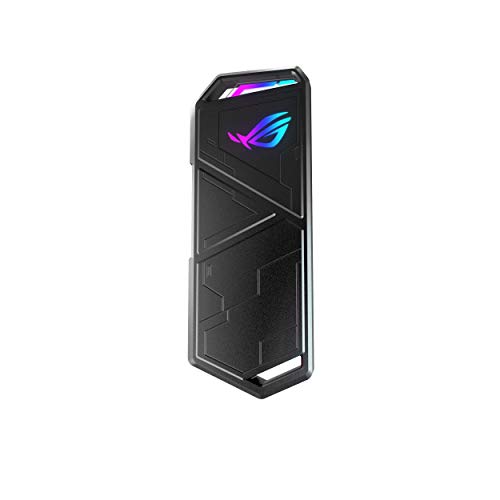
If you’re a gamer or a creative professional looking for speed and style, the ASUS ROG STRIX Arion Aluminum M.2 NVMe SSD External Enclosure is a standout choice. This sleek aluminum alloy case supports various M.2 PCIe NVMe SSDs, ensuring compatibility with sizes from 2230 to 2280. With USB Type-C 3.2 Gen 2 connectivity, you can enjoy lightning-fast transfer speeds up to 10 Gbps. Plus, it features ASUS Aura Sync RGB lighting, allowing you to customize your setup’s look. Thermal pads efficiently dissipate heat, keeping your SSD cool during intense gaming sessions or creative tasks.
Best For: Gamers and creative professionals seeking a high-speed, stylish external SSD solution.
Pros:
- Supports multiple M.2 sizes (2230, 2242, 2260, 2280) for versatile compatibility.
- Lightning-fast transfer speeds up to 10 Gbps with USB Type-C 3.2 Gen 2 connectivity.
- Customizable RGB lighting with ASUS Aura Sync for a personalized aesthetic.
Cons:
- M.2 NVMe SSD not included, requiring an additional purchase.
- Aluminum construction may be prone to scratches over time.
- Limited to M.2 PCIe SSDs, excluding other types of external drives.
SSK M.2 NVME SATA SSD Enclosure

The SSK M.2 NVME SATA SSD Enclosure stands out with its improved RTL9210B chip, making it an excellent choice for users seeking high-speed data transfer. With USB 3.2 Gen 2, you can achieve speeds up to 10Gbps, transferring an HD movie in just two seconds. It supports M-Key and B+M Key SSDs in sizes 2242, 2260, and 2280. The durable aluminum alloy shell guarantees effective heat dissipation, while its slim design makes it easy to carry. Plus, it’s compatible with multiple operating systems and features plug-and-play functionality, so you can get started without fuss.
Best For: Users looking for a high-speed external storage solution that supports NVMe and SATA SSDs for data-intensive tasks.
Pros:
- Supports high data transfer speeds up to 10Gbps with USB 3.2 Gen 2 technology.
- Durable aluminum alloy shell provides effective heat dissipation and enhances portability.
- Plug-and-play functionality allows for easy setup without needing additional drivers.
Cons:
- Not compatible with M.2 PCIe AHCI SSDs or other non-M.2 form factor SSDs.
- Requires formatting of new SSD media before use, which may be inconvenient for some users.
- Limited compatibility with only specific SSD sizes (2242, 2260, 2280) and connectors (M-Key/B+M Key).
FIDECO M.2 NVMe SSD Enclosure, USB 3.2 Gen 2 Adapter

Offering seamless compatibility with various M.2 NVMe SSD sizes, the FIDECO M.2 NVMe SSD Enclosure stands out as an excellent choice for tech enthusiasts and professionals seeking efficient data transfer solutions. With USB 3.2 Gen 2 support, you’ll enjoy impressive speeds of up to 10Gbps, markedly minimizing wait times. Its sandwich-style design allows for tool-free installation, enhancing thermal management for cooler operation. Plus, its compact design, complete with a USB C to USB C cable and USB A adapter, makes it perfect for travel. Compatible with Windows, Mac OS, and Linux, it’s a reliable option for all your data needs.
Best For: Tech enthusiasts and professionals seeking efficient data transfer solutions with high-speed performance.
Pros:
- Supports multiple M.2 NVMe SSD sizes (2230, 2242, 2260, 2280) for versatile use.
- Tool-free installation with a sandwich-style design simplifies SSD setup and enhances thermal management.
- Compact and portable design includes USB C to USB C cable and USB A adapter, making it ideal for travel.
Cons:
- Does not support M.2 SATA SSDs, limiting compatibility with certain SSD types.
- New SSDs require initialization for recognition, which may be inconvenient for some users.
- Maximum speed is theoretical; actual performance may vary based on other factors like SSD specifications and system limitations.
Sokiwi M.2 NVMe SATA SSD Enclosure Adapter

For those looking for a seamless and efficient way to enhance their storage capabilities, the Sokiwi M.2 NVMe SATA SSD Enclosure Adapter stands out with its tool-free installation. Supporting M-Key and B+M Key SSDs up to 2TB, this adapter delivers impressive speeds of up to 10Gbps for NVMe drives. Its aluminum alloy design guarantees excellent heat dissipation while being slim and durable. You’ll appreciate the Plug & Play and Hot-Swapping features, making it compatible with multiple operating systems like Windows and Mac OS. Plus, transferring an HD movie only takes 2-5 seconds, making your tasks quicker than ever.
Best For: Users seeking a fast, reliable, and easy-to-install solution for expanding storage with M.2 NVMe or SATA SSDs.
Pros:
- Tool-free installation allows for quick and easy setup.
- Supports high-speed transfers of up to 10Gbps for NVMe SSDs.
- Durable aluminum alloy design ensures effective heat dissipation.
Cons:
- Limited to M.2 SSD formats; not compatible with mSATA or non-M.2 SSDs.
- Maximum storage capacity is capped at 2TB.
- Actual transfer speeds may vary depending on the SSD and system performance.
ASUS ROG Strix Arion M.2 NVMe SSD Enclosure

Looking for a sleek and efficient way to enhance your storage capabilities? The ASUS ROG Strix Arion M.2 NVMe SSD Enclosure supports various M.2 PCIe NVMe SSDs, making it a versatile choice. With USB-C 3.2 Gen 2×1, you can enjoy blazing transfer speeds up to 10 Gbps. Plus, its innovative screwdriver-free installation saves you time and hassle. Constructed from durable aluminum alloy, it also includes thermal pads for effective heat dissipation. You’ll appreciate the dual USB-C cables for easy connectivity and the stunning ASUS Aura Sync lighting effects that add a futuristic touch to your setup.
Best For: Users looking for a stylish and efficient external storage solution compatible with various M.2 PCIe NVMe SSDs.
Pros:
- High-speed data transfer: Supports USB-C 3.2 Gen 2×1 for speeds up to 10 Gbps.
- Easy installation: Innovative screwdriver-free setup for user convenience.
- Durable and cool: Constructed from aluminum alloy with thermal pads for effective heat dissipation.
Cons:
- Limited to specific SSD sizes: Only compatible with M.2 SSDs in 2230, 2242, 2260, and 2280 form factors.
- Potential for overheating: While it includes thermal pads, heavy usage may still lead to overheating issues.
- Price point: May be more expensive compared to basic SSD enclosures without advanced features.
ORICO M.2 NVMe SSD Enclosure (USB 3.1 Gen 2)

The ORICO M.2 NVMe SSD Enclosure (USB 3.1 Gen 2) stands out as an excellent choice for tech enthusiasts who crave high-speed data transfer and versatility. With its support for M.2 SSDs up to 8TB, you can harness read/write speeds exceeding 900 MB/sec, thanks to the Realtek RTL 9210 control chip. Its compact design makes it portable, while the aluminum construction guarantees durability and heat dissipation. Plus, it’s hot-swappable and compatible with Windows, Mac, and Linux, making setup a breeze. You’ll appreciate the included USB-C cables, simplifying connections to your devices and enhancing your data storage experience.
Best For: Tech enthusiasts looking for high-speed data transfer and versatile storage solutions.
Pros:
- Supports M.2 SSDs up to 8TB, offering high storage capacity.
- Compact and portable design makes it easy to carry and use on the go.
- Compatible with multiple operating systems (Windows, Mac, Linux) and features hot-swappable functionality.
Cons:
- Not compatible with M.2 SATA SSDs or M.2 PCIe AHCI SSDs.
- New SSDs require formatting before use, which may be inconvenient for some users.
- Some users may find the aluminum construction prone to scratches.
Factors to Consider When Choosing an External NVMe Enclosure for PC
When picking an external NVMe enclosure, you’ll want to evaluate a few key factors. Make sure it’s compatible with your SSD type and offers the data transfer speeds you need. Don’t overlook installation ease, portability, and cooling features, as these can greatly impact your overall experience.
Compatibility With SSD Types
How do you guarantee that your external NVMe enclosure is the right fit for your SSD? First, make sure the enclosure supports your specific M.2 SSD type, like PCIe NVMe or SATA, since they aren’t interchangeable. Next, check for compatibility with key types (M, B, or B&M) to avoid mismatches. It’s also essential to verify the SSD size; most enclosures accommodate specific dimensions like 2230, 2242, 2260, or 2280. Additionally, confirm that the enclosure isn’t limited by capacity, as many options support up to 8TB or more. Finally, look for enclosures that explicitly state compatibility with your operating system to guarantee seamless integration. Following these steps will help you find the perfect fit for your needs.
Data Transfer Speed
What factors should you consider to maximize data transfer speeds with your external NVMe enclosure? First, look for enclosures that utilize USB 3.2 Gen 2 technology, which can reach speeds up to 10Gbps. If you’re aiming for even higher speeds, consider models compatible with USB4 or Thunderbolt 3/4, achieving rates up to 3,900 MB/s. Remember, the actual transfer speed may vary depending on your NVMe SSD’s speed, the USB port type, and your computer’s performance. Additionally, opt for enclosures that support UASP (USB Attached SCSI Protocol) for better efficiency during transfers. Finally, verify the enclosure is backward compatible with older USB standards to maintain peak performance across various devices.
Installation Ease
Maximizing data transfer speeds is important, but the installation process of your external NVMe enclosure shouldn’t be overlooked. Look for tool-free designs that let you install SSDs quickly, without needing screws or extra tools. Verify the enclosure supports various M.2 SSD sizes, like 2230, 2242, 2260, and 2280, so you can use different models. Plug-and-play functionality is a must; it simplifies setup across operating systems without requiring driver installation. Clear installation instructions or visual aids can also make the process smoother. Finally, consider enclosures with hot-swapping capability, allowing you to replace or remove SSDs without shutting down your system. These features can greatly enhance your installation experience and overall satisfaction.
Portability and Design
When you’re choosing an external NVMe enclosure, portability and design play essential roles in guaranteeing you can easily transport your data without hassle. Look for a slim and lightweight model that easily fits in your bag. Enclosures made from durable materials like aluminum alloy not only improve heat dissipation but also enhance portability. Tool-free installation is vital, allowing you to swap SSDs quickly without needing extra tools. Many portable options come with built-in thermal pads to maintain peak performance during heavy use. Additionally, consider enclosures with multiple connectivity options, like USB-C and USB-A cables, to confirm compatibility with various devices. This flexibility can make your data access much more convenient when you’re on the move.
Cooling and Heat Management
Effective cooling and heat management are essential for ensuring your external NVMe enclosure performs at its best, especially during intense data transfers or heavy workloads. Excessive heat can lead to throttling, reducing speeds and affecting overall performance. Look for enclosures that incorporate thermal pads or active cooling systems, like fans, to enhance heat dissipation. The choice of materials also matters; enclosures made from aluminum alloy often dissipate heat better, keeping your SSD cooler. Monitoring the SSD’s temperature during operation can help you catch potential overheating issues early. By selecting an enclosure with built-in thermal management features, you’ll not only maintain consistent performance levels but also prolong the lifespan of your SSD.
Security Features
Choosing the right external NVMe enclosure involves considering several important security features to protect your data. Look for enclosures that utilize advanced chipsets, like the RTL9210, offering short-circuit and over-current protection to enhance data safety. Security features such as UASP (USB Attached SCSI Protocol) and TRIM support can improve transfer speeds while maintaining your drive’s health. Some enclosures come equipped with multi-protection systems, safeguarding against data loss during power surges or unexpected disconnections. A reliable build quality is essential to protect against physical damage and manage heat dissipation effectively. Additionally, consider enclosures that offer encryption features, adding extra layers of security for your sensitive data stored on the SSD. Prioritize these aspects to guarantee your data remains safe.
Price and Warranty Options
While evaluating external NVMe enclosures, it’s essential to take into account both price and warranty options to guarantee you get the best value for your investment. Prices can range from around $20 to over $100, depending on features, brand reputation, and performance. Make sure to check the warranty length, which typically spans from one to five years, offering peace of mind about durability. Some warranties include customer support, which can be invaluable for troubleshooting. Also, consider whether the warranty covers just manufacturing defects or includes accidental damage, as this affects your long-term usability. Reading customer reviews helps you assess performance and durability, giving you a clearer picture of value versus price.