
If you want smooth gameplay capture, low-latency passthrough, or a cleaner creator setup, an elgato 4k capture card can make a big difference. The right model depends on your resolution goals, platform, and whether you need internal PCIe performance or a simple external USB option.
This roundup focuses on practical choices for streamers, console players, and anyone recording video with less hassle. Below, you’ll find the best options for different budgets and use cases, plus a simple buying guide to help you choose fast.
Best 10 Elgato 4K Capture Card Picks for 2026
Best for High-End Pass-Through

- 8K60 passthrough with 4K60 HDR10 capture
- HDMI 2.1, VRR, and ultra-low latency support
- Great fit for PS5, Xbox Series X|S, and dual-PC streaming
Best For: Streamers and dual-PC gamers who want top-tier passthrough and low-latency capture.
Best for DSLR Webcam Use
Elgato Cam Link 4K Capture Card

- Turns a DSLR or mirrorless camera into a webcam
- Plug-and-play with OBS, Zoom, Discord, and more
- Low-latency output for smooth live video
Best For: Creators who want an easy, reliable way to use a dedicated camera as a webcam for streaming, calls, or recording.
Best for HDMI 2.1 Console Capture

- HDMI 2.1 with 4K60 capture
- Up to 240Hz passthrough support
- Ultra-low latency for console streaming
Best For: PC streamers and console creators who want high-refresh HDMI 2.1 capture.
Best for USB-C Devices
UGREEN USB-C 2K 30FPS Capture Card

- USB-C-focused capture for Switch, Steam Deck, Quest 3, and phones
- Captures up to 2K/30fps or 1080p/60fps
- 100W passthrough charging helps keep handhelds powered
Best For: USB-C handheld gamers and streamers who need capture plus charging in one compact device.
Best for 8K Passthrough
Elgato 4K Pro Internal Capture Card

- 8K60 passthrough with 4K60 HDR10 capture
- HDMI 2.1 and VRR passthrough support
- Great for OBS, Streamlabs, and dual-PC setups
Best For: Streamers and console players who want flagship passthrough performance and low-latency capture.
Best for Easy Plug-and-Play
Acer USB 3.0 4K HDMI Capture Card

- 4K input with 1080p/60Hz capture
- Mic-in jack for live commentary
- Plug-and-play with broad device support
Best For: Streamers and gamers who want a simple, portable capture card with easy setup.
Best Budget HDMI Capture Card
4K HDMI Capture Card with Mic-In

- 1080p60 capture for smooth streaming and recording
- Plug-and-play USB 3.0 setup with no driver needed
- HDMI loop-out plus mic-in for gameplay and commentary
Best For: Budget-conscious streamers and console players who need an easy, reliable capture card.
Best for Budget Streaming

- Captures up to 2K/30fps with 4K/30Hz pass-through
- USB-A and USB-C support for flexible setup
- Plug-and-play design with HDMI loop-out
Best For: Streamers and gamers who want a simple, affordable capture card for 1080p60 and 2K30 recording.
Best Value 4K Pass-Through
Redragon VC321 4K Capture Card
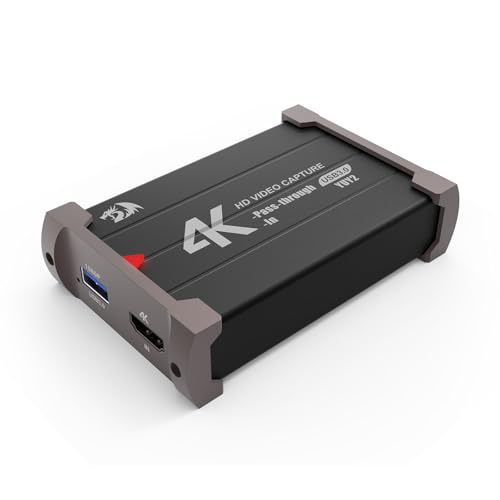
- 1080p 60fps capture with 4K 30fps input
- Zero-latency HDMI pass-through
- Plug-and-play on Windows and Mac
Best For: Streamers and gamers who want a simple, budget-friendly capture card for console or DSLR use.
Best for Multi-Device Compatibility
UGREEN 2K/1080P HDMI Capture Card

- 4K input with 2K/30Hz and 1080p/60FPS capture
- USB-A and USB-C support for broad device compatibility
- Low-latency, driver-free setup for streaming and recording
Best For: Streamers and creators who want a flexible capture card for multiple devices and simple plug-and-play use.
Best for High-End Pass-Through – Elgato 4K Pro Capture Card
If you want an elgato 4k capture card that can keep up with modern consoles and a high-end PC, the 4K Pro is built for exactly that job. It offers 8K60 passthrough, 4K60 capture, VRR support, and ultra-low latency so you can game and stream without giving up picture quality.
Best For: Streamers and dual-PC users who need top-tier passthrough, HDR support, and smooth capture from PS5, Xbox Series X|S, or a gaming PC.
Pros:
- 8K60 passthrough with 4K60 HDR10 capture keeps gameplay sharp while recording
- HDMI 2.1 and VRR support help reduce tearing and preserve high-frame-rate play
- Ultra-low latency makes it a strong fit for live streaming and dual-PC setups
- Works with major apps like OBS, Streamlabs, Zoom, and Twitch Studio
Cons:
- Internal card design is less convenient than a simple external plug-in
- Premium features are more than casual streamers may need
- Best results depend on a compatible HDMI 2.1 setup
The Elgato 4K Pro stands out as a serious elgato 4k capture card for users who care about passthrough quality as much as recording quality. If you want a future-ready card for demanding gaming and streaming setups, this is one of the strongest options.
Best for DSLR Webcam Use – Elgato Cam Link 4K Capture Card
If you want an elgato 4k capture card that turns a DSLR, mirrorless camera, or camcorder into a polished webcam, Cam Link 4K is the straightforward pick. It plugs into USB 3.0, works with popular apps like OBS, Zoom, and Discord, and delivers low-latency video for streaming, meetings, and recording.
Best For: Creators who want an easy, reliable way to use a dedicated camera as a webcam for streaming, calls, or recording.
Pros:
- Supports up to 1080p60 and compatible 4K capture workflows
- Very simple plug-and-play setup on PC, Mac, and iPad
- Low-latency output keeps audio and video in sync
- Works with DSLR, mirrorless, camcorder, action cam, and some iPhone setups
Cons:
- Requires a compatible camera and clean HDMI output
- 4K60 support is limited to specific camera/model combinations
- Not a full-featured capture solution for every gaming console setup
For anyone shopping an elgato 4k capture card mainly to upgrade webcam quality, this is one of the easiest paths from camera to computer. It is especially appealing if you value clean setup, broad app support, and dependable latency more than advanced capture features.
Best for HDMI 2.1 Console Capture – AVerMedia Live Gamer 4K 2.1
If you want an elgato 4k capture card alternative that goes beyond basic 4K60 recording, this AVerMedia internal PCIe model is built for next-gen console capture with HDMI 2.1 support, ultra-low latency, and refresh rates up to 240Hz. It’s a strong fit for streamers who also want to preserve high-frame-rate gameplay without sacrificing clean capture quality.
Best For: PC streamers and console creators who need HDMI 2.1 capture, 4K60 recording, and support for high-refresh gameplay.
Pros:
- HDMI 2.1 support with 4K60 capture and ultra-low latency
- Works with PS5, Xbox Series X/S, PS4 Pro, Xbox One X, and Switch
- Supports refresh rates up to 240Hz plus ultra-wide resolutions
Cons:
- Internal PCIe install requires opening your PC
- Overkill if you only need simple 1080p or casual recording
For buyers comparing an elgato 4k capture card, this AVerMedia card stands out for console-ready HDMI 2.1 features and high-refresh flexibility. If you want a more advanced internal solution for modern gaming setups, it’s a compelling pick.
Best for USB-C Devices – UGREEN USB-C 2K 30FPS Capture Card
If you want an elgato 4k capture card alternative for USB-C sources rather than HDMI consoles, this UGREEN model is built for Switch, Steam Deck, Quest 3, iPad, and USB-C phones. It captures up to 2K at 30fps or 1080p at 60fps, while also adding 100W passthrough charging to keep handhelds powered during long sessions.
Best For: Streamers and handheld gamers who need a USB-C capture card with passthrough charging and broad device support.
Pros:
- Supports USB-C input devices with plug-and-play setup
- Offers up to 2K/30fps capture and 1080p/60fps output
- Includes 100W PD charging for Switch and Steam Deck
- Works with Windows, Mac, iPadOS, and Quest 3 via Meta HDMI Link
Cons:
- Does not support HDMI sources like PS5, Xbox, or PS4
- 4K is input-only, not 4K recording
- Requires compatible USB-C/USB 3.0 host hardware for best results
As an elgato 4k capture card alternative, this is a smart pick if your setup is centered on USB-C devices and you care more about portability, charging, and simple operation than full HDMI console support.
Best for 8K Passthrough – Elgato 4K Pro Internal Capture Card
If you want an elgato 4k capture card that can keep up with next-gen consoles and a high-end streaming PC, the 4K Pro is built for serious gameplay capture. It supports 8K60 passthrough, 4K60 HDR10 recording, and ultra-low latency, making it a strong fit for creators who want smooth play while streaming or recording.
Best For: Streamers and dual-PC users who want top-tier passthrough performance, HDR capture, and flexible integration with OBS and other broadcast apps.
Pros:
- 8K60 passthrough with 4K60 HDR10 capture
- HDMI 2.1 support with VRR passthrough for smoother gameplay
- Works with OBS, Streamlabs, Twitch Studio, Zoom, and more
- Ultra-low latency is ideal for live commentary and fast gameplay
Cons:
- Internal PCIe install is less convenient than external capture cards
- Features may be more than casual streamers need
- Renewed listing may matter to buyers who prefer brand-new hardware
This elgato 4k capture card stands out most for users who want flagship-level passthrough and capture specs in a flexible streaming setup. If you need strong console support and room to grow, it’s a compelling pick.
Best for Easy Plug-and-Play – Acer USB 3.0 4K HDMI Capture Card
If you want an elgato 4k capture card alternative that’s simple to set up, this Acer USB 3.0 capture card is built for fast plug-and-play use. It accepts 4K input and outputs smooth 1080p at 60Hz, making it a practical choice for streaming, recording, and live commentary without adding much complexity.
Best For: Streamers, gamers, and creators who want an easy, portable capture card with mic-in support and wide device compatibility.
Pros:
- 4K input with 1080p/60Hz capture for smooth streaming and recording
- Mic-in jack makes voice commentary easier without extra adapters
- Plug-and-play operation with no drivers or external power needed
- Works with PS5, PS4, Switch2, Xbox, PC, Mac, and Android
Cons:
- Not a true 4K capture output device
- Best suited to users who are fine with 1080p capture rather than higher-resolution recording
This is a solid pick if you mainly want convenience and broad compatibility over advanced pro features. For buyers comparing an elgato 4k capture card, it stands out as a straightforward, budget-friendly option for everyday gameplay capture and basic streaming setups.
Best Budget HDMI Capture Card – 4K HDMI Capture Card with Mic-In
If you want an affordable elgato 4k capture card alternative for streaming or recording, this HDMI-to-USB 3.0 model covers the basics well. It captures up to 1080p60, supports a wide range of HDMI sources, and is simple to set up for OBS, Twitch, YouTube, or console gameplay.
Best For: Streamers and casual creators who want a low-cost, plug-and-play capture card for consoles, cameras, and OBS.
Pros:
- Plug-and-play setup with no driver or external power required
- 1080p60 capture is solid for streaming and recording everyday content
- HDMI loop-out helps reduce gameplay delay while you play
- Mic-in support adds commentary without extra audio gear
Cons:
- Not a true 4K capture solution for high-end recording
- Output tops out at 2K30, so it is not ideal for advanced passthrough setups
- Mic input only works with a 3.5mm TRS standard microphone headset
For shoppers comparing an elgato 4k capture card to a cheaper option, this one makes sense if 1080p streaming is enough and you want easy compatibility more than top-tier specs. It is a practical pick for beginners, budget builds, and everyday console capture.
Best for Budget Streaming – UGREEN 4K HDMI Capture Card
If you want an elgato 4k capture card alternative without paying for extra headroom you may not use, this UGREEN model is built for simple streaming and recording from consoles or PCs. It captures up to 2K/30fps and passes through 4K/30Hz, so it’s a practical pick for gameplay, live demos, and everyday content creation.
Best For: Streamers and gamers who want an easy plug-and-play capture card with HDMI loop-out and wide device compatibility.
Pros:
- USB-A and USB-C support makes it easy to connect to laptops, PCs, and capture setups.
- HDMI loop-out provides low-latency local preview while recording or streaming.
- Plug-and-play design with no external power or driver install for most systems.
- Works with major platforms like Switch 2, PS5, Xbox Series X, Mac, and Windows.
Cons:
- Does not record true 4K, so it is not a full replacement for a 4K capture-first workflow.
- PS4 and PS5 require HDCP to be turned off.
- Not compatible with Fire TV Stick.
This is a smart value option if you mainly need smooth 1080p60 or 2K30 capture and don’t need the higher-end features of an elgato 4k capture card. It gives you the essentials for streaming and monitoring without adding much setup complexity.
Best Value 4K Pass-Through – Redragon VC321 4K Capture Card
If you want an affordable alternative to an elgato 4k capture card for streaming or recording, the Redragon VC321 covers the basics well: 4K 30fps input, 1080p 60fps capture, and HDMI pass-through for gameplay on a second display. It’s a practical choice for console players, beginners, and creators who need a simple USB 3.0 capture card without a complicated setup.
Best For: Streamers and gamers who want a straightforward, budget-friendly capture card for PS5, Xbox, Switch, or DSLR input.
Pros:
- 1080p 60fps capture with 4K 30fps input support
- Zero-latency HDMI pass-through for real-time play
- Plug-and-play setup with Windows and Mac compatibility
- Works with common apps and consoles, including OBS, PS5, Xbox, and Switch
Cons:
- Not a true 4K capture solution for recording
- Best suited for basic streaming rather than advanced production workflows
- Performance depends on your software and system setup
For buyers comparing it against an elgato 4k capture card, the VC321 makes the most sense if you value easy setup and solid 1080p streaming over higher-end capture features. It’s a sensible entry-level pick, especially when price matters more than premium extras.
Best for Multi-Device Compatibility – UGREEN 2K/1080P HDMI Capture Card
If you want a flexible, easy-to-use alternative to an elgato 4k capture card, this UGREEN model is built for everyday streaming and recording rather than ultra-high-end production. It accepts 4K input, outputs up to 2K/30Hz, and still supports smooth 1080p/60FPS capture, making it a practical pick for gameplay, camera feeds, and general content creation.
Best For: Streamers and creators who need broad device support, low-latency capture, and simple plug-and-play setup across laptops, PCs, tablets, and phones.
Pros:
- 4K input with 2K/30Hz and 1080p/60FPS capture options
- USB-A and USB-C connectors for wide compatibility
- Low-latency USB 3.0 performance for live streaming
- Driver-free support for major OSes and common streaming apps
Cons:
- Not a true 4K capture-output card
- HDMI input only, with no bidirectional signal support
- Some devices require HDCP off or newer iPadOS versions
As a value-focused pick, it covers the core needs most buyers expect from an elgato 4k capture card without pushing into premium pricing. If your priority is reliable streaming compatibility and easy setup, this UGREEN card makes a strong case.
How We Picked These Elgato 4K Capture Card Options
We prioritized capture quality, passthrough support, latency, software compatibility, and overall value. For an Elgato 4K Capture Card, the biggest differences usually come down to internal versus external design, supported frame rates at 1080p, 1440p, and 4K, and how well the device handles HDR or high-refresh gameplay.
We also looked for models that fit common creator needs: console streaming, PC recording, DSLR webcam use, and simple plug-and-play setups. That means the list includes premium cards for demanding users as well as budget-friendly options for casual streamers.
Quick Comparison
Internal PCIe capture cards are best if you want the most stable performance and the cleanest desktop setup. External USB capture cards are easier to move between machines and are usually simpler for beginners. If you’re mainly streaming console gameplay, focus on passthrough and low latency. If you’re using a camera as a webcam, prioritize USB simplicity and reliable 1080p60 or 4K capture.
Key Buying Factors for Elgato 4K Capture Card
Passthrough and Output Resolution
Make sure the card supports the resolution and refresh rate you actually play at. A strong Elgato 4K Capture Card should offer at least 4K passthrough if you want to play on a 4K display while capturing separately.
Internal Vs. External
Choose internal PCIe for maximum consistency and fewer cables. Choose external USB if you want portability, easier setup, or compatibility with laptops and compact workstations.
Latency and HDR Support
Low latency matters for gameplay feel, especially with fast shooters or rhythm games. HDR support is useful if you want to preserve richer console visuals, but only if your editing and streaming workflow can handle it properly.
Software and Compatibility
Check support for OBS, streaming apps, console platforms, and camera devices before you buy. A capture card is only as useful as its software stability and system compatibility.
Resolution Versus Use Case
Not everyone needs 4K60 capture. For many streamers, 1080p60 is more than enough, while 4K input or passthrough may be the real priority. Pay for performance you’ll actually use.
Who Should Buy Which Elgato 4K Capture Card?
Buy a premium internal card if you stream regularly, want the best PC-based workflow, or need high-end passthrough for modern consoles. Choose an external card if you’re a beginner, need a flexible setup, or plan to use a laptop or multiple devices.
If your main goal is turning a DSLR or camcorder into a webcam, a simple external Elgato 4K Capture Card-style option is usually the better fit. If you mainly play Nintendo Switch or other consoles and want easy recording without extra complexity, a budget USB capture card can be enough. For creators who want the cleanest upgrade path, internal PCIe models remain the strongest long-term choice.