
When it comes to color accuracy, having the right calibration device for your monitor can make all the difference. Whether you’re a photographer, designer, or videographer, achieving true-to-life colors is vital for your work. With options like the Datacolor SpyderExpress and Calibrite Display Pro HL, you’ll find tools that cater to various needs and preferences. But how do you choose the best one for your setup? Let’s explore the top contenders and what to take into account.
Datacolor SpyderExpress

If you’re a photographer, graphic designer, or content creator looking for precise color representation, the Datacolor SpyderExpress is an excellent choice. This color calibrator guarantees your digital and print work displays lifelike colors. It supports the latest displays, including Liquid Retina XDR, and offers quick calibration in just 90 seconds. You’ll appreciate features like ambient light adjustment and multi-display profiling, enhancing your workflow. The simple setup allows you to connect and calibrate up to three displays easily. For best results, recalibrate before editing to maintain true-to-life color accuracy. Experience consistent, professional results with the SpyderExpress.
Best For: Photographers, graphic designers, and content creators who require precise color calibration for their digital and print work.
Pros:
- Quick calibration time of just 90 seconds, allowing for efficient workflow.
- Supports the latest display technologies, including Liquid Retina XDR.
- Simple setup process and the ability to calibrate up to three displays per workstation.
Cons:
- May require recalibration before each editing session for optimal accuracy.
- Limited to the capabilities of the connected displays, which may vary in quality.
- Some advanced features may not be fully utilized by casual users.
Calibrite Display Pro HL Monitor Calibration Colorimeter

The Calibrite Display Pro HL Monitor Calibration Colorimeter is an excellent choice for professionals in photography and design who require precise color accuracy on high-luminance displays. With its advanced HL sensor, it measures brightness up to 3000 nits, ensuring accurate profiling for LCD, mini LED, and OLED screens. The included Calibrite PROFILER software allows you to adjust white point, luminance, and gamma easily. Plus, it supports multiple monitor setups, making it ideal for creative studios. With features like Quick Check and uniformity tools, you can trust your monitor’s output for critical projects, giving you consistent and reliable results every time.
Best For: Professionals in photography and design who require precise color accuracy on high-luminance displays.
Pros:
- Accurate brightness measurement up to 3000 nits, suitable for modern LCD, mini LED, and OLED displays.
- Calibrite PROFILER software offers extensive customization options for white point, luminance, and gamma.
- Supports multiple monitor profiling, ensuring consistent color output across different workstations.
Cons:
- May be overkill for casual users or those with standard displays.
- Requires installation of software, which could be complex for less tech-savvy individuals.
- The price point may be higher compared to basic calibration tools.
datacolor SpyderPro Monitor Calibration

For professionals working with high-end displays, the datacolor SpyderPro Monitor Calibration stands out with its ability to calibrate ultra-bright screens like QD-OLED and Mini-LED, ensuring color accuracy even at brightness levels up to 12,000 nits. You’ll appreciate the 3D LUT export feature for consistent color across various monitors. The Device Preview Plus lets you compare original and calibrated images side by side, enhancing your workflow. Plus, with integrated Content Credentials, you can verify your edits and maintain authenticity. Sync it with a light meter for precise ambient conditions, making your calibration process even more reliable.
Best For: Professionals and creatives who work with high-end displays and require precise color calibration for their projects.
Pros:
- Supports calibration of ultra-bright displays, ensuring accuracy in vibrant color representation.
- Features 3D LUT export for consistent color across various monitors and color spaces.
- Integrates Content Credentials for enhanced content authenticity and verifiable edit history.
Cons:
- May be overkill for casual users or those with standard displays and lower brightness needs.
- Requires additional light meter for optimal ambient lighting calibration, adding to overall cost.
- The advanced features may have a learning curve for users unfamiliar with professional calibration tools.
Calibrite Display 123 Monitor Calibration Colorimeter

Designed specifically for photographers and creators, the Calibrite Display 123 Monitor Calibration Colorimeter simplifies the calibration process with its user-friendly 1 2 3 software workflow. Its compact design and adjustable counterweight make it easy to position on your screen. With support for up to two displays, you can guarantee color accuracy across your multi-screen workspace. The device corrects common monitor color shifts, delivering truer tones and reliable contrast. Plus, the built-in comparison view lets you instantly see calibration improvements, making regular maintenance straightforward for consistent results. Get ready to enhance your color editing with this essential tool!
Best For: Photographers and creators seeking an easy and accurate way to calibrate their monitors for color-accurate editing.
Pros:
- User-Friendly: The guided 1 2 3 software workflow simplifies the calibration process, making it accessible for all skill levels.
- Dual Display Support: Capable of calibrating up to two monitors, ensuring consistent color accuracy across multi-screen setups.
- Instant Comparison View: Built-in feature allows users to quickly see calibration improvements, facilitating regular maintenance.
Cons:
- Limited to Two Displays: May not meet the needs of users with more than two monitors.
- USB C Connection Only: Users with older USB connections may require an adapter for compatibility.
- Compact Size May Limit Stability: The small design might make it less stable on certain monitor types without careful placement.
datacolor Spyder Monitor Calibrator for Graphic Designers and Photographers

Calibration that meets the demands of graphic designers and photographers is essential for achieving true color representation, and the Datacolor Spyder Monitor Calibrator excels in this regard. This device quickly calibrates OLED and LED screens, taking only 90 seconds for initial setup. Its intuitive software offers preset options for beginners, while customizable settings cater to professionals. The integrated ambient light sensor adjusts your display’s brightness and contrast based on your environment, ensuring consistent accuracy. With its DevicePreview TM Beta feature, you can see how your work will look on different devices, boosting your color confidence and enhancing your digital workflows.
Best For: Graphic designers, photographers, and content creators seeking accurate color representation on their displays.
Pros:
- Intuitive software with preset options makes it user-friendly for beginners.
- Fast calibration process (90 seconds) allows for quick adjustments and workflow efficiency.
- Integrated ambient light sensor ensures display settings are optimized for varying lighting conditions.
Cons:
- May require periodic recalibration depending on ambient light changes, which could interrupt workflow.
- Customization options may be overwhelming for novice users seeking simplicity.
- Limited to specific display types, which may not cover all user setups.
Calibrite Display Plus HL Monitor Calibration Colorimeter

The Calibrite Display Plus HL Monitor Calibration Colorimeter stands out for professionals working with Mini LED and OLED displays, particularly those needing to calibrate ultra-bright screens. With a high luminance sensor measuring up to 10,000 nits, it guarantees accurate HDR calibration. You’ll appreciate the Calibrite PROFILER software, which offers basic and advanced modes for precise adjustments of white point, contrast ratio, and gamma. It also supports Rec.709 and BT.1886 standards, enhancing your video production workflow. Weighing just 4.9 ounces and compact in size, it’s perfect for on-the-go calibration, making it an essential tool for any serious colorist.
Best For: Professionals working with Mini LED and OLED displays who require precise calibration for ultra-bright screens.
Pros:
- High luminance sensor capable of measuring up to 10,000 nits for accurate HDR calibration.
- Calibrite PROFILER software offers both basic and advanced modes for detailed adjustments.
- Lightweight and compact design makes it ideal for on-the-go calibration.
Cons:
- Limited warranty with a standard return policy only applicable within 30 days of purchase.
- Relatively high price point compared to basic calibration tools.
- Requires software installation which may not appeal to all users.
Datacolor Spyder X Pro Monitor Calibrator

If you’re a first-time user looking to achieve accurate color representation on your monitor, the Datacolor Spyder X Pro is an excellent choice. This intuitive calibrator guarantees precise color for your photographic images, making it perfect for beginners. With its groundbreaking lens-based color engine, you’ll enjoy enhanced accuracy across multiple monitors. The one-click calibration takes just a minute or two, and the automatic room-light monitoring adjusts profiles for varying lighting conditions. Plus, the SpyderProof feature lets you easily compare your display before and after calibration. With a 4.3-star rating from nearly 5,000 reviews, it’s a trusted option.
Best For: The Datacolor Spyder X Pro is best for first-time users seeking easy and accurate color calibration for their monitors.
Pros:
- Intuitive one-click calibration process makes it user-friendly for beginners.
- Groundbreaking lens-based color engine provides enhanced color accuracy across multiple monitors.
- Automatic room-light monitoring ensures optimal performance under varying lighting conditions.
Cons:
- Requires 4 AA batteries, which may need regular replacement.
- The calibration process may take slightly longer if used in highly variable lighting.
- Some advanced users may find the predefined calibration targets limiting for their specific needs.
Calibrite Photo Kit with Display Pro HL Monitor Calibration Colorimeter

For photographers and digital artists seeking precision in their work, the Calibrite Photo Kit with Display Pro HL Monitor Calibration Colorimeter stands out as a top choice. This kit combines the powerful Display Pro HL with the ColorChecker Passport Photo 2, providing custom camera profiles and accurate monitor calibration for modern displays like mini LED and OLED. With Calibrite PROFILER software, you can easily establish a reliable workflow that minimizes color guesswork. The Display Pro HL guarantees your editing matches the final output, while the ColorChecker helps maintain consistent white balance and exposure, giving you control and confidence in your color representation.
Best For: Photographers and digital artists who require precise color accuracy and reliable monitor calibration for their editing processes.
Pros:
- High-accuracy calibration: The Display Pro HL provides precise calibration for modern displays, ensuring color accuracy during photo editing.
- Comprehensive workflow integration: Combines camera profiling and monitor calibration, simplifying the editing process and reducing color guesswork.
- User-friendly software: Calibrite PROFILER software offers presets and customizable targets for easy setup and consistent results.
Cons:
- Price point: The kit may be considered expensive for hobbyists or casual photographers.
- Learning curve: New users may need time to familiarize themselves with the calibration software and processes.
- Compatibility limitations: While it supports modern displays, some older monitor models may not be fully compatible with the Display Pro HL.
Calibrite ColorChecker Passport Photo 2 Portable Color Calibration Kit
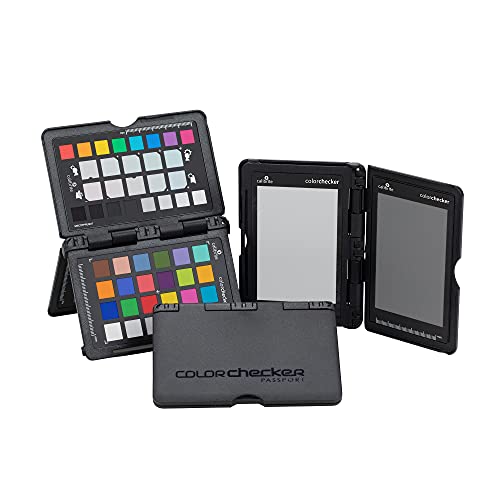
Photographers and videographers seeking to enhance their color accuracy will find the Calibrite ColorChecker Passport Photo 2 indispensable. This portable calibration kit features a 4-target set perfect for exposure control, custom white balance, and camera profiling. The folding protective case and lanyard guarantee you can access it quickly on the go. With Calibrite PROFILER software, you can create tailored DNG and ICC profiles for consistent color across various cameras. By establishing a reliable white point, you’ll reduce color casts and save time during editing. Elevate your workflow with this essential tool to achieve stunning color fidelity in your projects.
Best For: Photographers and videographers looking for precise color calibration and consistency in their work.
Pros:
- Portable design with a folding protective case and lanyard for easy access.
- Custom profiling capabilities with Calibrite PROFILER software for tailored color accuracy.
- Time-saving features that enhance workflow by reducing color correction during editing.
Cons:
- Requires software installation which may not be user-friendly for all users.
- Additional cost for the calibration software may be needed if not already owned.
- Limited to specific workflows, primarily benefiting those focused on color accuracy in photography and videography.
Datacolor Spyder X Elite Monitor Calibration

The Datacolor Spyder X Elite is an ideal choice for expert photographers and motion imagemakers seeking precise color calibration for their monitors. It calibrates in just one to two minutes, thanks to its groundbreaking lens-based color engine, delivering superior accuracy across various displays. You’ll appreciate features like room-light monitoring and automatic profile changes, which enhance screen color and white balance. The intuitive design guides you through calibration with a step-by-step assistant and expert console. Plus, with SpyderProof functionality, you can easily evaluate display quality using full-screen images, ensuring your setup stays compatible with evolving monitor technologies.
Best For: Expert photographers and motion imagemakers seeking precise color calibration for their monitors.
Pros:
- Quick calibration process, taking only one to two minutes.
- Advanced lens-based color engine provides enhanced accuracy across multiple displays.
- Intuitive design with step-by-step guidance and evaluation tools like SpyderProof.
Cons:
- May be considered expensive compared to basic calibration tools.
- Requires a certain level of technical understanding for optimal use.
- Limited customer support options for troubleshooting issues.
Factors to Consider When Choosing a Color Calibration Device for Monitor
When choosing a color calibration device for your monitor, you need to take into account several key factors. Look at compatibility with your display type, calibration speed, and the software features offered. Don’t forget to evaluate user experience and any additional functionality that might enhance your setup.
Compatibility With Display Types
Choosing the right color calibration device is essential, especially if you work with various display types like LCD, OLED, and Mini-LED. Make sure the device supports a wide range of technologies, including ultra-bright displays exceeding 10,000 nits, which is vital for HDR content creation. Compatibility with specific technologies like Apple Liquid Retina XDR will enhance the calibration’s effectiveness, ensuring accurate color representation. If you use multiple monitors, opt for a calibrator that allows simultaneous calibration to maintain consistent color across your workspace. Finally, check that the device’s software receives regular updates to include the latest display technologies and calibration features, maximizing the device’s performance and longevity in your workflow.
Calibration Speed and Efficiency
Calibration speed and efficiency play an essential role in ensuring your workflow remains seamless, especially in fast-paced environments. Some devices can achieve edit-ready color in as little as 90 seconds, allowing for quick adjustments when time is of the essence. If you work with ultra-bright displays, look for tools that can calibrate brightness levels up to 12,000 nits for detailed color representation. Many modern calibration tools streamline the process with intuitive workflows, making them user-friendly even for beginners. Advanced colorimeters also offer rapid recalibration alerts based on ambient light changes, ensuring peak performance. Plus, the ability to quickly calibrate multiple displays from one workstation can greatly enhance productivity, especially in collaborative settings where consistent color output is essential.
Software Features and Support
Effective calibration tools don’t just focus on speed; they also come equipped with powerful software features that enhance usability and accuracy. Look for software that offers both Basic and Advanced modes, letting you choose between quick adjustments or in-depth configurations based on your experience level. It’s essential to have ambient light adjustment features to maintain accurate colors in varying lighting conditions. Check for multi-display profiling capabilities to guarantee consistent color management across all your monitors. Validation and uniformity tools can verify calibration performance, minimizing errors. Finally, opt for calibration software that includes device preview features, allowing you to visualize your work across different devices and settings before final output, assuring your results are always spot-on.
User Experience and Setup
When it comes to selecting a color calibration device for your monitor, user experience and setup play an essential role in ensuring a smooth process. Look for devices that offer a simple setup, usually involving just software downloads and straightforward calibration steps. Intuitive software interfaces can markedly reduce the learning curve, making it easier for both novices and experienced users. Features like guided workflows streamline the calibration process, helping you achieve accurate color results without fussing over intricate settings. Speed is another factor; devices that calibrate in under two minutes improve efficiency, especially for professionals. Finally, check if the device allows saving profiles and supports multiple displays, which helps maintain consistent color across your workspace.
Additional Functionality and Tools
Choosing the right color calibration device involves more than just basic calibration; consider additional functionalities that enhance your workflow. Look for devices that offer ambient light adjustment to guarantee accurate color representation, regardless of lighting conditions. Tools like profile validation and uniformity checks are essential for confirming your monitor’s performance and maintaining consistent color accuracy across various displays. Customizable presets are beneficial in collaborative environments, making sure everyone gets consistent results. Features allowing before-and-after evaluations let you visually compare calibration improvements, boosting your confidence in color accuracy during editing. Finally, integration with tools like light meters helps capture ambient lighting for precise calibration, making your setup adaptable to different environments.