
A reliable connection matters when your home office depends on video calls, cloud apps, and fast uploads. The right cable modem can reduce bottlenecks and help your network stay stable during busy workdays.
This roundup focuses on speed tier, compatibility, and whether you need a modem-only setup or an all-in-one gateway.
Best 10 Cable Modem for Home Office Picks for 2026
Long Reach Phone Line

- 15-foot RJ11 cord adds placement flexibility
- Compatible with phones, DSL modems, and fax machines
- Shielding and gold-plated connectors help reduce interference
Best For: Home office users needing extra reach for RJ11 devices
Multi-Gig Upgrade Pick

- Up to 2.5Gbps download and 1Gbps upload support
- Mid/high-split DOCSIS 3.1 for faster cable plans
- 2.5GbE port supports multi-gig router setups
Best For: Fast cable plans and upload-heavy home office work
Reliable Standalone Modem

- DOCSIS 3.1 modem supports plans up to 2Gbps
- Two Gigabit Ethernet ports for router connections
- Compact modem-only design helps save space
Best For: Users who want a standalone modem for a home office router setup
All-in-One Desk Saver
NETGEAR C7000 Cable Modem Router

- Modem and router combo reduces desk clutter
- Works with Xfinity and Cox cable service
- Dual-band Wi-Fi 5 with up to 1800 sq ft coverage
Best For: Small home offices that want one box for cable internet and Wi-Fi
Multi-Gig Starter Pick
Hitron CODA56 2.5Gbps DOCSIS 3.1 Modem

- DOCSIS 3.1 modem with 2.5 Gbps Ethernet
- Works with cable providers like Xfinity, Spectrum, and Cox
- No WiFi included; router required
Best For: Cable-based home offices that want a high-speed modem and already have a separate router
Upload-Speed Upgrade
NETGEAR Nighthawk CM2500 Mid/High-Split Modem

- Up to 2 Gbps download and 1 Gbps upload
- Two Gigabit ports with link aggregation
- Works with Xfinity, Spectrum, and Cox
Best For: Home offices that need stronger upload speeds for conferencing and file transfers
Budget Reliable Pick
ARRIS SB8200 DOCSIS 3.1 Cable Modem

- DOCSIS 3.1 modem for cable plans up to 1 Gbps
- Two Gigabit Ethernet ports
- No WiFi included; router required
Best For: Home offices needing a simple wired modem for standard cable internet
Budget DOCSIS 3.0 Pick
NETGEAR CM500 Cable Modem for Up to 400 Mbps
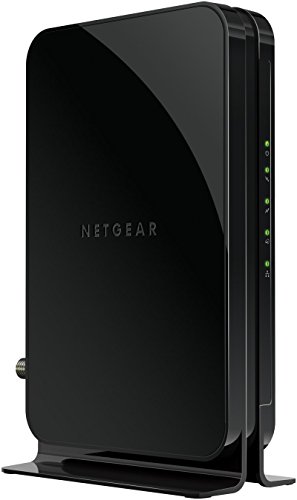
- DOCSIS 3.0 modem-only design
- One Gigabit Ethernet port
- Compatible with Xfinity and Cox
Best For: Simple modem-only setups that want to cut rental fees
All-in-One WiFi 6 Upgrade
NETGEAR Nighthawk CAX30 Modem Router Combo

- DOCSIS 3.1 plus WiFi 6 in one unit
- Four Gigabit Ethernet ports and USB 3.0
- Coverage up to 2,000 sq. ft.
Best For: Users who want a single modem-router combo for work and WiFi
High-Speed Standalone Choice
Motorola MB7621 Cable Modem for Up to 900 Mbps
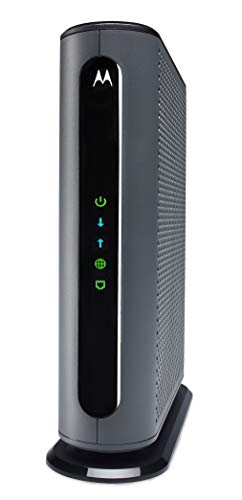
- Rated for cable speeds up to 900 Mbps
- Works with any separate WiFi router
- Compatible with Xfinity, Spectrum, and Cox
Best For: Fast modem-only home office setups with an existing router
Long Reach Phone Line – 15ft RJ11 Cord for Modems
If you need a cable modem for home office setup but your gear is awkwardly placed, this 15-foot RJ11 telephone cord helps extend the connection without crowding your desk. It’s designed for landline phones, DSL modems, fax machines, and answering machines that use a standard RJ11 jack.
Best For: Home office users who need a longer RJ11 cord for a modem, phone, or fax machine.
Pros:
- 15-foot length gives you more placement flexibility and helps reduce clutter.
- Works with standard RJ11 devices, including phones, DSL modems, and fax machines.
- Gold-plated connectors and shielding are made to help minimize interference.
- Flexible, tangle-resistant design is built for daily indoor use.
Cons:
- It is a telephone cord, not a cable internet modem.
- Limited to RJ11-compatible equipment.
For simple line extension in a home office, this cord is a practical add-on when you need more reach and a cleaner setup. It’s best suited to people who already have compatible RJ11 equipment and just need reliable distance.
Multi-Gig Upgrade Pick – NETGEAR CM3000 Cable Modem
For a cable modem for home office use, the NETGEAR Nighthawk CM3000 is built for very fast DOCSIS 3.1 service and higher upload demands. It supports major U.S. providers and is aimed at users who want multi-gig internet performance for streaming, video calls, file uploads, and remote access.
Best For: Home offices on fast cable plans that need stronger upload and multi-gig-ready performance.
Pros:
- Supports up to 2.5Gbps download speeds and 1Gbps upload speeds.
- Mid/high-split DOCSIS 3.1 design is made for today’s fastest cable internet tiers.
- Includes a 2.5GbE port for multi-gig router connections or link aggregation with two Gigabit ports.
- Compatible with major providers including Xfinity, Spectrum, Cox, and others.
Cons:
- Modem only, so you still need a separate router for Wi-Fi.
- Made for use in the U.S. only.
This is a strong pick if your home office depends on fast uploads and low-lag responsiveness. It’s especially compelling when you want a modem that can keep up with newer cable tiers and a high-performance router setup.
Reliable Standalone Modem – ARRIS SB8200 DOCSIS 3.1
If you’re shopping for a cable modem for home office internet and want a straightforward standalone unit, the ARRIS SURFboard SB8200 keeps the setup simple. It’s a DOCSIS 3.1 modem for cable plans up to 2Gbps, with two Gigabit Ethernet ports and support for major U.S. providers.
Best For: Home office users who want a compact modem-only setup with room to pair their own Wi‑Fi router.
Pros:
- DOCSIS 3.1 performance supports plans up to 2Gbps.
- Two 1GbE ports give you flexibility for router connections.
- Compact design with discreet LED indicators keeps the footprint small.
- Compatible with Cox, Xfinity, and Spectrum, and certified across major U.S. providers.
Cons:
- Modem only, so Wi‑Fi requires a separate router or mesh system.
- Not compatible with fiber, DSL, or satellite services.
The SB8200 is a practical pick if you want to own your equipment and avoid rental fees. It fits well in a home office where a compact, router-ready modem is more useful than an all-in-one unit.
All-in-One Desk Saver – NETGEAR C7000 Cable Modem Router
For a cable modem for home office setups where you want fewer boxes on the desk, this renewed NETGEAR Nighthawk C7000 combines a cable modem and Wi‑Fi router in one unit. It works with major cable providers like Xfinity and Cox and is aimed at cable plans up to 800Mbps.
Best For: Small home offices that want an all-in-one modem/router combo for cable service.
Pros:
- Combines modem and Wi‑Fi router in one device to simplify setup.
- Supports major cable providers including Xfinity and Cox.
- Dual-band Wi‑Fi 5 with 1800 sq ft coverage.
- Includes parental controls, Alexa compatibility, and multiple ports.
Cons:
- Not compatible with Verizon, Spectrum, AT&T, CenturyLink, DSL, or bundled voice service.
- Limited to cable plans up to 800Mbps.
This combo unit makes sense when convenience matters more than maximizing top-end speed. For a home office that needs a cleaner, simpler network without separate hardware, it’s an easy way to consolidate gear.
Multi-Gig Starter Pick – Hitron CODA56 2.5Gbps DOCSIS 3.1 Modem
If you need a cable modem for home office use and your internet plan is on a cable provider, the Hitron CODA56 is built for straightforward high-speed performance. It supports DOCSIS 3.1 and a 2.5 Gbps Ethernet port, but it is modem-only, so you will need a separate router to create WiFi and connect multiple devices.
Best For: Home offices on Xfinity, Spectrum, or Cox that want a multi-gig cable modem and already have, or plan to buy, a separate WiFi router.
Pros:
- DOCSIS 3.1 support with up to 2.5 Gbps service capability
- 2.5 Gbps Ethernet port for faster wired connections
- Compatible with major cable providers like Xfinity, Spectrum, and Cox
- May help reduce modem rental fees
Cons:
- No built-in WiFi, so a separate router is required
- Will not work with fiber, DSL, satellite, or fixed wireless internet
- Only one device can connect directly without additional networking gear
For a home office on compatible cable service, this modem makes sense if you want faster wired performance and plan to pair it with your own router. Just confirm your provider and speed tier before buying, since it is strictly for cable internet.
Upload-Speed Upgrade – NETGEAR Nighthawk CM2500 Mid/High-Split Modem
The NETGEAR Nighthawk CM2500 is a cable modem for home office setups that care about faster uploads as much as downloads. Its mid/high-split DOCSIS 3.1 design supports up to 2 Gbps down and 1 Gbps up, making it a strong fit for video conferencing, large file uploads, and remote access use cases on supported cable networks.
Best For: Home offices on compatible cable service that want higher upload speeds for conferencing, cloud work, and file transfers.
Pros:
- Mid/high-split DOCSIS 3.1 design for faster upload performance
- Supports up to 2 Gbps download and 1 Gbps upload speeds
- Two Gigabit Ethernet ports with link aggregation support
- Works with major cable providers including Xfinity, Spectrum, and Cox
Cons:
- Not compatible with Xfinity Voice plans
- Requires a separate router for WiFi
- Made for use in the US only
If your home office depends on uploads, remote access, or smoother video calls, this modem is tailored to that need. It is a practical choice for cable customers who want to prepare for faster service tiers and pair the modem with a capable router.
Budget Reliable Pick – ARRIS SB8200 DOCSIS 3.1 Cable Modem
The ARRIS SB8200 is a straightforward cable modem for home office users who want a proven DOCSIS 3.1 option without WiFi built in. It supports cable internet plans up to 1 Gbps and includes two Gigabit Ethernet ports, which makes it a solid wired choice for a desktop, router setup, or other Ethernet-connected office gear.
Best For: Home offices on cable internet that want a simple, wired modem with dual Ethernet ports and no extra wireless features.
Pros:
- DOCSIS 3.1 support for cable plans up to 1 Gbps
- Two 1-Gigabit Ethernet ports
- Compatible with major cable providers like Xfinity, Cox, and Spectrum
- No cable digital voice support to complicate setup
Cons:
- No built-in WiFi, so a separate router is required
- Not compatible with fiber, DSL, or satellite internet
- Refurbished unit rather than new
For a home office that mainly needs a dependable wired modem, the SB8200 keeps things simple. It is best suited to standard cable plans and users who already have a router they want to keep using.
Budget DOCSIS 3.0 Pick – NETGEAR CM500 Cable Modem for Up to 400 Mbps
If you want a cable modem for home office use without paying a monthly rental fee, the NETGEAR CM500 is a straightforward DOCSIS 3.0 option. It pairs with your own WiFi router and gives you one Gigabit Ethernet port for a direct wired connection to a computer or router.
Best For: Home offices on Xfinity or Cox plans that want a simple modem-only setup.
Pros:
- Compatible with major providers including Xfinity and Cox
- One Gigabit Ethernet port for a wired connection
- Can replace rented equipment and reduce monthly fees
- Works with any separate WiFi router
Cons:
- DOCSIS 3.0 is older than newer 3.1 models
- Only one Ethernet port on the modem itself
- Speed support varies by carrier plan and provider
For a basic home office internet setup, the CM500 focuses on the essentials: provider compatibility, a wired Ethernet port, and no built-in WiFi to complicate the setup. It is best when you already have a router and want a cost-conscious modem-only upgrade.
All-in-One WiFi 6 Upgrade – NETGEAR Nighthawk CAX30 Modem Router Combo
The NETGEAR Nighthawk CAX30 is a cable modem for home office users who want one device to handle both internet access and WiFi. With DOCSIS 3.1, WiFi 6, and AX2700 speeds, it is designed for a cleaner setup with fewer boxes and strong wireless coverage.
Best For: Home offices that want an all-in-one modem and WiFi 6 router with wired ports.
Pros:
- Combines a DOCSIS 3.1 modem and WiFi 6 router in one unit
- Four Gigabit Ethernet ports plus one USB 3.0 port
- Coverage listed up to 2,000 sq. ft. with up to 25 devices
- Supports major cable providers like Xfinity, Spectrum, and Cox
Cons:
- Not compatible with Verizon, AT&T, CenturyLink, or DSL services
- Does not support bundled voice service
- An all-in-one design offers less separation than a modem and router pair
This is a practical pick if you want to simplify your home office network and keep both wired and wireless devices connected from a single box. It also adds app-based setup and built-in security features, which can be useful for day-to-day management.
High-Speed Standalone Choice – Motorola MB7621 Cable Modem for Up to 900 Mbps
The Motorola MB7621 is a cable modem for home office setups that need a dependable standalone modem for faster cable plans. It pairs with any WiFi router, gives you a single Ethernet port, and is rated for actual cable internet service speeds up to 900 Mbps.
Best For: Home offices that already have a router and want a fast modem-only upgrade.
Pros:
- Supports cable plans up to 900 Mbps
- Compatible with major providers including Xfinity, Spectrum, and Cox
- Pairs with any WiFi router for flexible setups
- May help reduce monthly rental charges
Cons:
- No built-in WiFi router
- No telephone call capability
- Only one Ethernet port on the modem
If you want a no-frills modem that can keep up with faster cable service, the MB7621 is a strong fit for a wired home office foundation. It is a solid choice when you prefer to keep your router separate and focus on performance and compatibility.
How We Picked the Best Cable Modem for Home Office
For a Cable Modem for Home Office use, we prioritized provider approval, plan compatibility, DOCSIS version, and whether the model supports enough headroom for daily work plus streaming or backups. We also considered whether the device is modem-only or includes built-in Wi-Fi, since that affects flexibility and upgrade value.
Quick Comparison
If you already have a strong Wi-Fi router, a modem-only unit is usually the best long-term choice. If you want fewer devices and simpler setup, a modem/router combo can be convenient, but it is harder to upgrade piece by piece. For most home offices, DOCSIS 3.1 offers better future-proofing than DOCSIS 3.0.
Key Buying Factors for a Cable Modem for Home Office
Speed Plan Match
Choose a modem that supports your internet tier with room to spare. If your plan is close to the modem’s ceiling, you may see congestion or need another upgrade sooner.
DOCSIS Version
DOCSIS 3.1 is the safer pick for modern cable plans, especially if you want stronger performance on faster service tiers. DOCSIS 3.0 can still work well for moderate speeds, but it is less future-ready.
Provider Compatibility
Always confirm that the modem is approved by your cable provider and for your exact service area. Compatibility lists matter more than marketing claims, especially with mid/high-split networks and newer speed offerings.
Ports and Setup Style
Look for the Ethernet ports you need, plus any 2.5 GbE support if you have a multigig plan or a high-performance router. If your office already uses a separate router, a modem-only model is usually the cleanest setup.
Home Office Features
For work calls and VPN use, stability matters more than raw peak speed. A good Cable Modem for Home Office use should be dependable, easy to reboot, and sized for your current and near-future bandwidth needs.
Who Should Buy Which Cable Modem for Home Office?
Choose a modem-only DOCSIS 3.1 model if you want the best mix of performance and upgrade flexibility. Pick a combo unit if you want a simpler all-in-one setup and do not plan to customize your network. Select a DOCSIS 3.0 modem only if your plan is modest and your provider still supports it well. If you are unsure, match the modem to your internet speed first, then decide whether built-in Wi-Fi is actually useful for your office layout.