
If you want a cleaner desk and a faster work setup, a BenQ PD USB-C monitor for work can do both. One cable can handle display, charging, and everyday connectivity.
Below, we focus on the models that make the most sense for productivity, creative tasks, and Mac or PC workflows in 2026.
Best 9 Benq Pd USB C Monitor for Work Picks for 2026
Best for Color-Accurate USB-C Workflows
BenQ PD2706U 27" 4K USB-C Monitor

- 90W USB-C for single-cable laptop charging and display
- Factory-calibrated IPS panel with wide P3 color coverage
- KVM and work modes help streamline multi-device workflows
Best For: Designers and professionals who want accurate color plus an easy USB-C desk setup.
Best for USB-C Simplicity
BenQ GW2786TC 27" USB-C Office Monitor

- Single-cable USB-C with 65W charging
- Ergonomic stand with height, tilt, pivot, and swivel
- 100Hz panel plus eye-care features for workday comfort
Best For: People who want a clean, comfortable USB-C monitor for everyday office work.
Best 27-Inch USB-C Gaming Hybrid
BenQ MOBIUZ EX271Q 27” 2K 180Hz Monitor

- 65W USB-C PD for one-cable laptop use
- KVM plus HDMI/DP for multiple devices
- 2K 180Hz panel with 95% P3 color
Best For: Hybrid workers who want a work-ready USB-C monitor that also plays well for gaming.
Best for Mac Workflows
BenQ PD2706QN 27” 2K QHD USB-C Monitor

- 90W USB-C for charging and display over one cable
- Factory-calibrated IPS panel with wide color coverage
- 100Hz and ergonomic stand improve daily work comfort
Best For: Mac users and creative professionals who want a color-accurate USB-C monitor for work.
Best USB-C Entertainment Pick
BenQ EW270Q 27" QHD 200Hz USB-C Monitor

- 65W USB-C Power Delivery for one-cable laptop charging
- 200Hz QHD panel with 90% P3 color for smooth, vivid visuals
- Dual 5W speakers add convenience for mixed-use desks
Best For: People who want a USB-C monitor for work that also excels at movies, streaming, and casual gaming.
Best for Coders
BenQ RD280U 28.2” Programming Monitor

- 3:2 4K display for more vertical code space
- 90W USB-C with KVM for tidy work setups
- Eye-care and Nano Matte panel for long sessions
Best For: Developers and knowledge workers who want a comfort-first USB-C monitor for long workdays.
Best for MacBook Color Matching
BenQ MA320U 32” 4K Mac Monitor

- Mac-tuned color with P3 wide gamut
- Dual USB-C with up to 90W charging
- 32-inch 4K workspace with ergonomic stand
Best For: MacBook Pro and Air users who want a large 4K monitor with accurate color and easy USB-C docking.
Best for USB-C Desk Setup
BenQ GW2486TC 24" USB-C Office Monitor
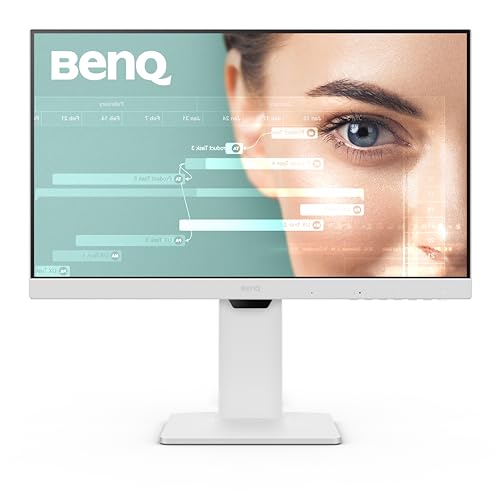
- USB-C with 60W power delivery
- Eye-care features for long work sessions
- Compact 24-inch IPS display for everyday productivity
Best For: People who want a tidy, USB-C office monitor for work, study, and video calls.
Best Heavy-Duty Pick
BenQ MA270UP 27" 4K Mac Monitor

- Mac-tuned P3 color for Apple devices
- Dual USB-C with 90W laptop charging
- Height, tilt, swivel, and pivot adjustment
Best For: MacBook Pro and Air users who want accurate color and a simple one-cable desk setup.
Best for Color-Accurate USB-C Workflows – BenQ PD2706U 27" 4K USB-C Monitor
If you want a benq pd usb c monitor for work that prioritizes image accuracy, single-cable convenience, and a tidy desk setup, the PD2706U is built for exactly that. Its 4K IPS panel, wide P3 coverage, and 90W USB-C make it especially appealing for creatives, Mac users, and anyone who switches between focused office work and visual tasks.
Best For: Designers, content creators, and professionals who need reliable color, USB-C charging, and an easy one-cable workspace.
Pros:
- 90W USB-C handles display, data, and laptop charging with one cable
- Factory-calibrated IPS panel with strong P3 and sRGB coverage
- KVM support helps control two PCs with one keyboard and mouse
- Built-in color and workflow modes suit design, CAD, and office use
Cons:
- Not the cheapest option if you only need a basic office monitor
- 27-inch 4K scaling may require some users to adjust text size settings
- Color-focused features add value, but also make it more specialized than simple productivity displays
The PD2706U stands out as a benq pd usb c monitor for work when accuracy matters as much as convenience. If your workflow benefits from clean docking, dependable calibration, and a monitor that can double as a hub, this is an easy model to shortlist.
Best for USB-C Simplicity – BenQ GW2786TC 27" USB-C Office Monitor
If you want a practical benq pd usb c monitor for work that keeps your desk uncluttered, the BenQ GW2786TC is built around one-cable USB-C connectivity, a 27-inch IPS panel, and office-friendly extras like height adjustment and eye-care features. It’s a straightforward pick for coding, email, document work, and general productivity.
Best For: Office workers, students, and remote professionals who want a clean USB-C setup with solid everyday comfort.
Pros:
- USB-C carries video, audio, and up to 65W charging over one cable
- 100Hz refresh rate makes scrolling and window movement feel smoother
- Height, tilt, pivot, and swivel adjustments improve ergonomic comfort
- Eye-care tools like Brightness Intelligence help reduce eye strain
Cons:
- 1080p resolution is fine for work, but not ideal for maximum text sharpness
- Not a color-critical display for creative professionals
- Built-in mic is useful, but not a replacement for a dedicated headset
Overall, this is a sensible benq pd usb c monitor for work if your priority is convenience, comfort, and a tidy desk rather than premium resolution or creator-grade color performance.
Best 27-Inch USB-C Gaming Hybrid – BenQ MOBIUZ EX271Q 27” 2K 180Hz Monitor
If you want a benq pd usb c monitor for work that can also pull double duty for gaming after hours, the BenQ MOBIUZ EX271Q is a flexible 27-inch 2K option. Its 65W USB-C input, KVM switch, and wide-gamut panel make it useful for a desk with a laptop, desktop, and console in the mix.
Best For: Hybrid buyers who need one monitor for office work, laptop charging, and smooth gaming in the same setup.
Pros:
- 65W USB-C PD supports single-cable laptop connection and charging
- KVM, DP 1.4, and HDMI 2.0 make multi-device switching easy
- 27-inch 2K, 180Hz, and 1ms specs deliver sharp, fast motion
- 95% P3 and HDR 400 improve color and contrast for content-heavy use
Cons:
- Gaming-first tuning may be more than a pure office user needs
- USB-C power delivery is solid, but not as high as some laptop-centric displays
- Premium features can push the price above basic productivity monitors
As a benq pd usb c monitor for work, the EX271Q stands out if you want one screen that handles productivity, charging, and entertainment without sacrificing speed. It is a stronger fit for mixed-use desks than for buyers who only need a plain office monitor.
Best for Mac Workflows – BenQ PD2706QN 27” 2K QHD USB-C Monitor
If you want a benq pd usb c monitor for work that balances color accuracy, clean desk connectivity, and everyday productivity, the PD2706QN is a strong fit. Its 27-inch QHD IPS panel, factory calibration, and 90W USB-C input make it especially appealing for Mac and mixed-work setups where one cable should handle display, charging, and simple desk management.
Best For: Designers, analysts, and Mac users who need a sharp, color-accurate USB-C monitor for all-day work.
Pros:
- 90W USB-C supports single-cable laptop connection and charging
- QHD IPS panel with 95% P3 and 100% sRGB/Rec.709 coverage
- Factory-calibrated and uniformity-focused for more consistent color
- 100Hz refresh rate adds smoother scrolling and cursor movement
Cons:
- Not a gaming-focused display despite the higher refresh rate
- 27-inch 1440p is sharp, but not as dense as 4K options
For shoppers comparing a benq pd usb c monitor for work, this model stands out as a practical creator-friendly office display rather than a flashy all-rounder. It brings the right mix of ports, calibration, and screen quality for users who care about reliable day-to-day visuals and a tidy workspace.
Best USB-C Entertainment Pick – BenQ EW270Q 27" QHD 200Hz USB-C Monitor
If you want a benq pd usb c monitor for work that also handles after-hours streaming and light gaming, the BenQ EW270Q is a practical hybrid. It pairs 2K resolution, 90% P3 color, and 65W USB-C charging in a single-cable setup, while the 200Hz panel and built-in speakers make it feel more like an all-in-one desk upgrade than a basic office display.
Best For: Users who want USB-C charging, strong color, and a monitor that can switch from work to movies without fuss.
Pros:
- 65W USB-C Power Delivery simplifies laptop docking with one cable.
- 200Hz refresh rate keeps motion very smooth for gaming and video.
- 90% P3 color coverage and QHD resolution deliver crisp, vivid visuals.
- Dual 5W speakers reduce the need for external audio on a busy desk.
Cons:
- Not the most work-first, productivity-focused design for color-critical office tasks.
- Built-in speakers are convenient, but won’t replace a good external setup.
For buyers weighing a benq pd usb c monitor for work, this model stands out more for its balance of laptop charging, sharp image quality, and entertainment-friendly features than for pure office minimalism. It is a strong pick if your monitor needs to do double duty.
Best for Coders – BenQ RD280U 28.2” Programming Monitor
If you want a benq pd usb c monitor for work that prioritizes text clarity, comfort, and a clean one-cable desk setup, the BenQ RD280U is built for long coding sessions. Its 3:2 4K panel gives you more vertical space for documents and code, while the Nano Matte finish helps cut glare in bright offices.
Best For: Developers, analysts, and remote workers who spend long hours in code, spreadsheets, or document-heavy workflows and want a USB-C monitor designed for comfort.
Pros:
- 3:2 4K resolution offers extra vertical workspace for code and documents
- Nano Matte panel and eye-care features help reduce glare and fatigue
- 90W USB-C, KVM, and VESA support make it practical for modern workstations
- MoonHalo backlight adds subtle ambient lighting for late-night work
Cons:
- Programming-focused design may be overkill for casual office use
- Not as wide as ultrawide displays for side-by-side multitasking
- Premium feature set can push the price above basic USB-C monitors
For buyers comparing a benq pd usb c monitor for work, the RD280U stands out if your priority is comfort and productivity rather than pure screen width. It’s a strong match for users who read and write a lot more than they game or edit video.
Best for MacBook Color Matching – BenQ MA320U 32” 4K Mac Monitor
If you want a benq pd usb c monitor for work that feels purpose-built for Mac, the BenQ MA320U stands out with Mac-focused color tuning, dual USB-C, and clean single-cable connectivity. Its 32-inch 4K panel gives you plenty of room for spreadsheets, timelines, and side-by-side windows without feeling cramped.
Best For: MacBook Pro and Air users who want a larger 4K display with accurate color, easy USB-C docking, and simple on-device control from the keyboard.
Pros:
- Mac color matching and P3 wide gamut help keep work visuals consistent
- Dual USB-C ports with up to 90W charging make desk setup simple
- Brightness and volume can be adjusted directly from the MacBook keyboard
- Height, tilt, swivel, and pivot adjustments improve all-day comfort
Cons:
- Best experience is geared toward Mac users, so Windows-first buyers may not use every feature
- 32-inch size may feel large for very small desks
For Mac users who want a benq pd usb c monitor for work with an emphasis on color accuracy and frictionless USB-C docking, this is a strong fit. It’s less about flashy extras and more about making a MacBook feel properly expanded for everyday productivity.
Best for USB-C Desk Setup – BenQ GW2486TC 24" USB-C Office Monitor
If you want a practical benq pd usb c monitor for work, the BenQ GW2486TC is built around a simple 24-inch 1080p IPS panel with USB-C convenience, eye-comfort features, and a clean office-friendly design. It is a strong fit for everyday productivity, coding, and dual-duty workstations where one cable and a tidy desk matter more than extra bells and whistles.
Best For: Remote workers, students, and coders who want a compact USB-C monitor with charging and eye-care features.
Pros:
- USB-C connection with up to 60W power delivery helps reduce cable clutter.
- IPS 1080p display delivers solid viewing angles for work and browsing.
- Eye-care and brightness intelligence features are useful for long sessions.
- Built-in noise-canceling mic adds convenience for calls on supported devices.
Cons:
- 1080p resolution is fine for 24 inches, but not as sharp as 1440p options.
- Mic functionality depends on USB-C-connected laptops or external PCs.
Overall, this is a sensible benq pd usb c monitor for work if you value comfort, USB-C simplicity, and a compact footprint over higher-end resolution or creator-focused extras.
Best Heavy-Duty Pick – BenQ MA270UP 27" 4K Mac Monitor
If you want a benq pd usb c monitor for work that feels purpose-built for MacBook use, the BenQ MA270UP is an easy fit. It combines a 27-inch 4K panel, Mac color tuning, and one-cable USB-C docking to streamline a clean, productive desk setup.
Best For: MacBook Pro and Air users who want accurate-looking colors, simple cable management, and convenient on-monitor controls for everyday office work.
Pros:
- Mac-tuned P3 wide color gamut helps content look consistent with Apple devices
- Dual USB-C ports with 90W power delivery make single-cable laptop docking simple
- Brightness and volume control from the Mac keyboard is a nice workflow upgrade
- Height, tilt, swivel, and pivot adjustments support a comfortable workstation
Cons:
- Designed mainly around Mac workflows, so non-Mac buyers may not use all the extras
- 4K at 27 inches is great for clarity, but may feel small without scaling preferences dialed in
- Not a specialized gaming monitor if that is part of your work setup needs
For buyers who want a benq pd usb c monitor for work and value easy Mac integration over flashy extras, the MA270UP stands out as a polished productivity pick. It is especially compelling if you want accurate color, strong charging, and a desk-friendly single-cable setup.
How We Picked the Best Benq Pd USB C Monitor for Work
We focused on monitors that fit real work use: USB-C power delivery, reliable image quality, office-friendly ergonomics, and features that reduce setup clutter. We also looked at resolution, panel type, color support, and whether the model is better suited to general office work, coding, or creative tasks.
Quick Comparison
For a straightforward Benq Pd USB C Monitor for Work, 27-inch 4K models are the most balanced choice. If you need more space for code or timelines, larger 32-inch screens or higher-aspect programming displays can be better. For basic office use, 1080p options keep costs down, while Mac-focused models emphasize color consistency and easy USB-C docking.
Key Buying Factors for BenQ PD USB-C Monitor for Work
Power Delivery and Connectivity
Look for at least 65W USB-C if you plan to charge a laptop through the monitor. If you use a MacBook Pro or another power-hungry laptop, 90W USB-C is a safer choice. Dual USB-C or built-in USB hubs are useful if you connect accessories often.
Resolution and Screen Size
For sharp text and multitasking, 27-inch 4K is an excellent all-around pick. QHD can be a sweet spot for users who want more performance headroom or slightly larger UI elements. If you work with long documents, spreadsheets, or code, a 3:2 programming monitor can show more vertical content at once.
Color and Panel Quality
If your work involves design, photo editing, or accurate content review, prioritize factory calibration, wide color gamut support, and uniformity features. For general productivity, IPS panels usually provide the best mix of viewing angles and consistency.
Ergonomics and Eye Comfort
Height adjustment, tilt, and low-blue-light or flicker-reduction features matter more than many buyers expect. If you spend full workdays at your desk, these features improve comfort and help you maintain a better posture.
Who Should Buy Which Benq Pd USB C Monitor for Work?
If you want the best all-around Benq Pd USB C Monitor for Work, choose a 27-inch 4K model with 90W USB-C. If you are mostly in email, documents, and web apps, a 24- or 27-inch 1080p USB-C office monitor is a practical value pick. Mac users who care about easy color matching should lean toward the Mac-focused 4K models. Developers and technical users may prefer the RD-series style displays for extra vertical space and work-focused modes.
For mixed use, think first about your laptop charging needs, then your desk size, and finally whether you value color accuracy, coding comfort, or simple office efficiency most.