
If you’re looking to maximize performance in a compact form factor, barebone PCs can be a game changer. These systems offer a unique blend of customization and power, catering to both gaming enthusiasts and professionals. With options featuring the latest processors from Intel and AMD, you’ll find plenty of potential for multitasking and specialized tasks. Let’s explore the top contenders that can elevate your computing experience and see what makes each one stand out.
MINISFORUM UM870 Slim Mini PC Barebone

The MINISFORUM UM870 Slim Mini PC Barebone is perfect for power users who demand high performance in a compact form factor. With an AMD Ryzen 7 8745H processor and Radeon 780M graphics, you’ll experience capabilities comparable to a GTX 1650, making it ideal for heavy computing and multitasking. You can enhance its performance further by upgrading to 96GB of DDR5 RAM and up to 4TB of PCIe 4.0 SSD storage. Plus, its triple display support allows you to multitask efficiently on high-resolution screens. With advanced connectivity options, this mini PC meets all your demands for speed and versatility.
Best For: Power users seeking high performance in a compact mini PC for heavy computing and multitasking.
Pros:
- Exceptional processing power with AMD Ryzen 7 8745H and Radeon 780M graphics, suitable for demanding applications.
- Expandable storage options with support for up to 96GB of DDR5 RAM and 4TB of PCIe 4.0 SSD storage.
- Triple display support enhances productivity by allowing multitasking on high-resolution screens.
Cons:
- Barebone design requires additional components (RAM and storage) to be fully functional, increasing overall cost.
- Limited to integrated graphics capabilities compared to higher-end discrete GPU solutions for extreme gaming or professional graphics work.
- Compact size may lead to thermal management challenges under heavy workloads, requiring careful attention to cooling solutions.
MINISFORUM UN1290 Barebone Mini PC with Intel Core i9-12900HK

Looking for a powerhouse in a compact form? The MINISFORUM UN1290 Barebone Mini PC with the Intel Core i9-12900HK is your go-to solution. With 14 cores and 20 threads, this mini PC delivers lightning-fast performance, reaching up to 5.0 GHz. You’ll enjoy stunning visuals thanks to Intel Iris Xe Graphics and UHD 4K support across three displays. Plus, its dual-channel DDR4 memory and PCIe 4.0 SSD slot guarantee smooth multitasking. Designed for gamers and business pros alike, the UN1290 combines performance and customization, making it a perfect fit for anyone needing a high-performance mini PC.
Best For: The MINISFORUM UN1290 is best for gamers and business professionals seeking a compact yet powerful mini PC solution for high-performance tasks.
Pros:
- High Performance: Equipped with an Intel Core i9-12900HK and Intel Iris Xe Graphics, providing exceptional speed and graphics capabilities.
- Multiple Display Support: Can connect up to three displays for enhanced multitasking and productivity.
- Customizable Options: Offers personalized customization for business buyers, catering to specific needs.
Cons:
- Barebone Configuration: Requires additional components like RAM and storage to be fully operational, which may be inconvenient for some users.
- Size Limitations: While compact, the mini PC may not have the same cooling capabilities as larger systems, potentially affecting performance during intense workloads.
- Higher Price Point: The advanced features and performance may come at a premium cost compared to standard mini PCs.
MINISFORUM AI Mini PC M1-1295 with Intel Core i9-12950HX

For professionals and gamers seeking unparalleled performance in a compact form factor, the MINISFORUM AI Mini PC M1-1295 with Intel Core i9-12950HX stands out as an exceptional choice. With its advanced hybrid architecture, you’ll experience flagship-level performance and smooth operation across applications. It supports up to 96GB of dual DDR4 memory and offers dual M.2 SSD slots for rapid storage expansion, perfect for demanding tasks. The efficient cooling system guarantees prime temperature control, while connectivity options like USB 3.2 and Wi-Fi 6E enhance your multitasking experience. Its sleek design fits seamlessly in any workspace, backed by a 3-year warranty.
Best For: Professionals and gamers seeking high-performance computing in a compact and stylish form factor.
Pros:
- Flagship-level performance with Intel Core i9-12950HX, ensuring smooth operation across applications.
- Rapid storage expansion capabilities with dual M.2 NVME SSD slots, supporting up to 8TB.
- Efficient cooling system featuring advanced heat dissipation technology for optimal temperature control.
Cons:
- Limited to dual DDR4 memory, which may not meet the needs of users requiring faster memory options.
- Compact size may limit upgradeability in terms of additional components.
- Higher price point compared to entry-level mini PCs, which may be a consideration for budget-conscious buyers.
MINISFORUM M1-1295 Mini PC with Intel Core i9-12950HX
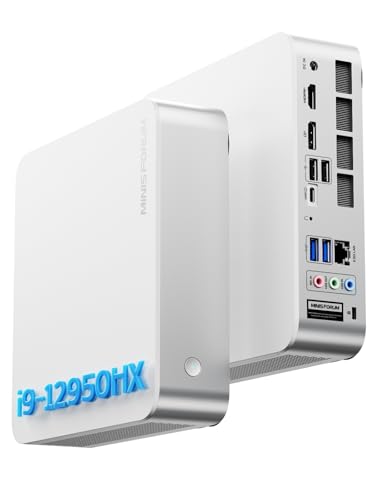
Packed with an Intel Core i9-12950HX processor, the MINISFORUM M1-1295 Mini PC is ideal for power users who demand high performance in a compact form factor. With 16 cores and 24 threads, it reaches speeds of up to 5.0GHz, ensuring smooth operation for any task. You can expand storage up to 8TB and connect up to three 4K displays for enhanced productivity. The advanced cooling system keeps everything running efficiently, while connectivity options like 2.5GbE Ethernet and Wi-Fi 6E deliver fast and reliable performance. This mini PC is designed for those who require both power and versatility.
Best For: Power users and professionals seeking high performance and versatility in a compact mini PC.
Pros:
- Strong Performance: Equipped with an Intel Core i9-12950HX processor featuring 16 cores and 24 threads for exceptional multitasking capabilities.
- Expandable Storage: Supports up to 8TB of storage with dual M.2 PCIe 4.0 SSD slots, ideal for large files and applications.
- Multiple Display Support: Can connect up to three 4K displays, enhancing productivity for creative tasks and multitasking.
Cons:
- Price Point: May be more expensive than standard mini PCs due to its high-performance components.
- Size Limitations: While compact, it may still be larger than ultra-compact mini PCs, which could be a consideration for space-constrained environments.
- Cooling Noise: The advanced cooling system, while effective, could generate more noise compared to quieter alternatives.
MINISFORUM 790S7 Mini Gaming PC with AMD Ryzen 9 7940HX
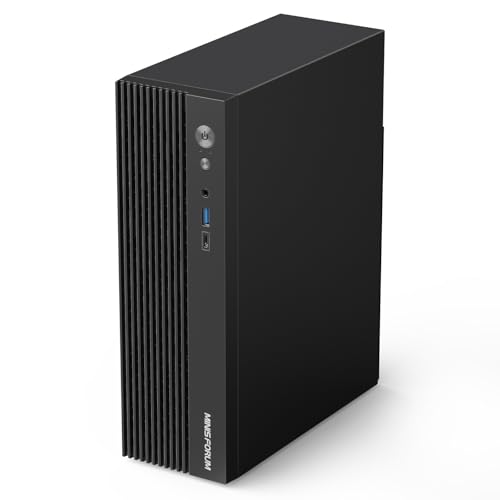
The MINISFORUM 790S7 Mini Gaming PC, featuring the powerful AMD Ryzen 9 7940HX, is an ideal choice for gamers and content creators seeking a compact yet robust system. With 16 cores and 32 threads, it handles demanding tasks effortlessly, reaching boost speeds up to 5.2 GHz. You’ll appreciate the triple video outputs, supporting stunning 4K and 8K resolutions for immersive gaming and productivity. Connectivity is extensive, including USB-C and HDMI 2.1 ports. Plus, with upgradeable storage options, it adapts to your needs. Just remember, the barebone version requires a separate graphics card and WiFi card for full functionality.
Best For: Gamers and content creators looking for a powerful, compact PC with excellent performance and upgradeability.
Pros:
- Powerful AMD Ryzen 9 7940HX processor with 16 cores and 32 threads for exceptional multitasking and performance.
- Triple video output capabilities including support for stunning 4K and 8K resolutions for immersive gaming and productivity.
- Extensive connectivity options with multiple USB ports and audio jacks to meet diverse needs.
Cons:
- Barebone version requires additional purchases for a graphics card and WiFi card for full functionality.
- Compact size may limit cooling options compared to larger systems, potentially affecting performance under heavy loads.
- No pre-installed storage means users must invest in an SSD for the operating system.
ASUS NUC 15 Pro Tall Barebones Mini PC

Designed for professionals and creators seeking a powerful yet compact solution, the ASUS NUC 15 Pro Tall Barebones Mini PC boasts an Intel Series 1 Core 3 100U processor that delivers AI-optimized performance. You can expand your system with up to 96GB DDR5 RAM and connect to four 4K displays through HDMI 2.1 and Thunderbolt 4. Enjoy ultra-fast connectivity with Intel Wi-Fi 7 and Bluetooth 5.4. Its compact, tool-less chassis allows quick upgrades, while the MIL-STD-810H certification guarantees durability. Plus, the eco-friendly design reflects a commitment to sustainability, making it a smart choice for any workspace.
Best For: Professionals and creators seeking a high-performance, compact mini PC solution for multitasking and advanced display capabilities.
Pros:
- AI-optimized performance enhances efficiency and speed for demanding applications.
- Supports up to four 4K displays, making it ideal for multitasking and creative work.
- Tool-less chassis design allows for easy upgrades and customization.
Cons:
- Limited built-in graphics may not meet the needs of high-end gaming or graphics-intensive tasks.
- Barebones configuration requires additional components like RAM and storage, increasing initial setup costs.
- Compact size may limit expansion options compared to larger desktop PCs.
ASRock DeskMini B760 Ultra-Compact Mini-PC Barebone System

For users seeking a versatile and powerful solution in a small footprint, the ASRock DeskMini B760 Ultra-Compact Mini-PC Barebone System stands out. This complete mini-PC kit includes a chassis and motherboard, but you’ll need to add your CPU, memory, storage, and operating system. It’s compatible with 14th, 13th, and 12th Gen Intel Core processors and supports up to 64GB of DDR4 memory, perfect for multitasking. With M.2 slots for NVMe SSDs and high-speed USB connectivity, you’ll enjoy quick data transfer. Its ultra-compact design fits seamlessly in home offices or media centers, making it an excellent choice for space-constrained environments.
Best For: Users seeking a powerful yet compact mini-PC solution for home offices, media centers, or space-constrained environments.
Pros:
- Supports the latest 14th, 13th, and 12th Gen Intel Core processors for high performance.
- Dual DDR4 slots allow for up to 64GB of memory, enhancing multitasking capabilities.
- Ultra-compact design makes it ideal for limited space without sacrificing functionality.
Cons:
- Requires additional components like CPU, memory, and storage, which may increase overall cost.
- Limited to a maximum of 65W TDP for processors, potentially restricting high-performance options.
- Lacks built-in WiFi and Bluetooth unless additional modules are purchased separately.
ASUS NUC 15 Pro Slim Barebones Mini PC

If you’re seeking a powerful yet compact solution for your workspace, the ASUS NUC 15 Pro Slim Barebones Mini PC stands out with its Intel Series 2 Core 7 240H processor. You can upgrade it to a whopping 96GB DDR5 RAM, thanks to its dual storage design and tool-less chassis. Enjoy lightning-fast connectivity with Intel Wi-Fi 7 and Thunderbolt™ 4 support. This mini PC allows you to connect up to four 4K displays effortlessly. Built for durability, it’s MIL-STD-810H certified and features an advanced cooling system, making it perfect for demanding environments while also being eco-friendly.
Best For: Professionals and creatives seeking a powerful, compact mini PC for demanding tasks and multi-display setups.
Pros:
- High performance with Intel Core 7 processor and support for up to 96GB DDR5 RAM.
- Exceptional connectivity options including Intel Wi-Fi 7 and Thunderbolt™ 4 for seamless data transfer.
- Durable design with MIL-STD-810H certification, making it suitable for extreme conditions.
Cons:
- Barebones setup requires additional components like RAM and storage for full functionality.
- Higher price point compared to standard mini PCs without advanced features.
- Limited integrated graphics may not satisfy users with intensive gaming or graphic design needs.
MINISFORUM AI X1-255 Mini PC Barebone with AMD Ryzen 7 255

The MINISFORUM AI X1-255 Mini PC Barebone, featuring the powerful AMD Ryzen 7 255, is an ideal choice for professionals who demand high performance in a compact form factor. With 8 cores and 16 threads, you’ll enjoy seamless multitasking and smooth HD graphics for heavy office tasks, light gaming, and multimedia editing. It supports up to 64 GB of DDR5 RAM and dual M.2 PCIe 4.0 SSDs for expansive storage. Connectivity options are robust, including USB4 and 2.5G LAN. Plus, the efficient cooling system keeps noise to a minimum, ensuring a productive workspace without distractions.
Best For: Professionals and content creators who require high performance and multitasking capabilities in a compact mini PC.
Pros:
- Excellent multi-threaded performance with AMD Ryzen 7 255 and 8 cores/16 threads.
- Supports high-speed DDR5 RAM and dual M.2 PCIe 4.0 SSDs for expansive storage options.
- Robust connectivity options including USB4, 2.5G LAN, and support for multiple displays.
Cons:
- Does not support hot swapping for storage devices.
- Requires specific compatibility for OCuLink connections and eGPU docks.
- Slightly noisy under full load with a maximum of 45dB.
ASUS NUC 15 Pro Tall Barebones Mini PC
Designed for professionals and content creators, the ASUS NUC 15 Pro Tall Barebones Mini PC stands out with its powerful Intel Series 2 Core Ultra 7 255H processor and integrated Intel Arc 140T Graphics. You can boost performance by supporting up to 96GB DDR5 RAM and utilizing dual storage capabilities. With Intel Wi-Fi 7, enjoy transfer rates up to 2.4X faster, while Bluetooth 5.4 enhances audio quality. Connect up to four 4K displays effortlessly via HDMI 2.1 and Thunderbolt 4. Built for durability, it features a MIL-STD-810H certification, ensuring reliability even in extreme conditions.
Best For: Professionals and content creators seeking high-performance computing with advanced graphics capabilities.
Pros:
- Powerful processor and graphics: Features an Intel Series 2 Core Ultra 7 255H processor and integrated Intel Arc 140T Graphics for enhanced performance.
- High memory capacity: Supports up to 96GB DDR5 RAM, making it ideal for demanding applications and multitasking.
- Excellent connectivity options: Offers Intel Wi-Fi 7 and Bluetooth 5.4 for fast data transfer and improved audio quality, plus the ability to connect up to four 4K displays.
Cons:
- Barebones setup: Requires additional components like RAM and storage to be fully operational, which may not suit all users.
- Price point: As a premium device, it may be more expensive than entry-level mini PCs.
- Potential overkill for casual users: The advanced features and performance may be excessive for basic computing needs.
Factors to Consider When Choosing a Barebone PC Compact
When you’re picking a compact barebone PC, you’ll want to evaluate several key factors. Performance capabilities, expandability options, and connectivity features can greatly impact your experience. Plus, don’t forget about cooling solutions and the overall design and size, as these elements play an essential role in how well the system fits your needs.
Performance Capabilities
Choosing a compact barebone PC hinges on understanding its performance capabilities, as these factors can make or break your computing experience. First, look for a powerful processor with a suitable architecture and core count; high-end models can feature up to 14 cores and 20 threads, ideal for multitasking. Next, consider the integrated graphics—options like AMD Radeon or Intel Iris Xe can enhance gaming and multimedia performance. Don’t overlook memory support; high-speed DDR4/DDR5 with capacities up to 96GB guarantees efficient data processing. Multiple M.2 slots for SSDs are essential for rapid storage expansion and responsiveness. Finally, check for display output capabilities, especially for multi-monitor setups that can support multiple 4K or even 8K displays, boosting productivity.
Expandability Options
Performance capabilities are just one piece of the puzzle; expandability options play a vital role in ensuring your compact barebone PC can grow with your needs. Look for systems with multiple RAM slots, like dual DDR4 or DDR5 SO-DIMM slots, which can support up to 96GB or more. M.2 PCIe slots for SSDs are essential too, allowing you to expand storage notably, often up to 8TB. Additional SATA drive bays offer even more versatility for traditional HDDs or SSDs. Don’t overlook PCIe slots, as they let you add dedicated graphics cards or other expansion cards, boosting performance for gaming and specialized tasks. Consider these features to future-proof your compact setup effectively.
Connectivity Features
While selecting a compact barebone PC, connectivity features are vital for maximizing functionality. Look for models that offer advanced options like USB4, enabling high-speed data transfers up to 40 Gbps and supporting 8K displays. Multiple display outputs, such as HDMI, DisplayPort, and USB-C, are essential for setting up multi-monitor configurations to boost your productivity. High-speed networking options, like 2.5GbE LAN and Wi-Fi 6E, guarantee faster internet speeds and lower latency for a seamless online experience. Additionally, consider Bluetooth 5.3 or later for improved connectivity with wireless devices and better audio quality. Finally, verify the presence of expansion slots, like M.2, for future upgrades that enhance your PC’s connectivity capabilities.
Cooling Solutions
When selecting a compact barebone PC, effective cooling solutions play an essential role in preventing overheating, especially during intensive tasks that push high-performance processors to their limits. Advanced cooling systems often feature multiple heat pipes and high-efficiency fans to enhance airflow and heat dissipation, ensuring stable performance under load. You should also consider models that utilize phase-change materials and improved thermal architectures to manage temperature effectively while keeping noise levels low. A well-designed cooling solution can maintain full-load noise levels below 45dB, creating a quieter environment for you. Remember, the choice of cooling technology greatly influences the longevity and reliability of components, particularly in compact systems with limited airflow. Prioritize cooling for peak performance and durability.
Design and Size
Choosing the right design and size for a compact barebone PC is vital, especially if you’re working with limited space. These systems typically occupy just a fraction of a traditional desktop’s volume—some as little as 7%—making them perfect for tight areas. Look for tool-less chassis designs, which allow for quick upgrades and maintenance without needing extra tools. VESA mount compatibility can add versatility, letting you mount the PC behind a monitor or on a wall. Pay attention to high-quality finishes, like nanoscale precision machining, that enhance aesthetic appeal for both home and office settings. Finally, advanced cooling systems with multiple heat pipes and turbine fans are essential for keeping noise levels low while efficiently dissipating heat.