
If your workstation powers demanding creative, engineering, or business workloads, the right UPS can prevent crashes, corruption, and downtime when the power dips.
This roundup focuses on APC models that balance clean output, battery backup, and practical outlet coverage for modern desktops and peripherals.
Best 9 Apc Ups for Workstation Picks for 2026
Best for Workstation Power
APC Back-UPS Pro 1500VA/900W Sine Wave UPS

- True sine wave output for active PFC workstation PSUs
- 900W capacity supports a full desktop setup with headroom
- LCD, AVR, and replaceable battery add practical value
Best For: Workstation users who need clean backup power for a full PC setup and short outages.
Best for AVR Voltage Protection
APC UPS 1500VA Backup for Workstations

- 1500VA / 865W capacity for desktop work setups
- AVR helps stabilize minor voltage swings
- 10 outlets with battery backup and surge-only split
Best For: Workstations that need steady voltage correction and reliable short-term backup.
Best for Small Spaces
APC Back-UPS 425VA/255W Battery Backup

- Compact, wall-mountable design for tight work areas
- 4 battery-backed outlets plus 2 surge-only outlets
- Good short-term backup for routers, modems, and low-power office gear
Best For: Small workstations and network equipment that need compact backup power.
Best Cloud-Monitored Pick
APC Smart-UPS 1500VA SmartConnect

- 1500VA/1000W pure sine wave output
- SmartConnect cloud monitoring and alerts
- AVR helps protect battery life
Best For: Workstations and small office rigs that need clean backup power and remote monitoring.
Best for Home Office Backup
APC Back-UPS BE850G2 850VA/450W

- Up to 35 minutes of runtime at 100W
- 6 battery-backed outlets plus 3 surge-only outlets
- 2 USB-A ports and user-replaceable battery
Best For: Home office users who need dependable backup for a workstation and networking gear.
Best Sinewave Protection
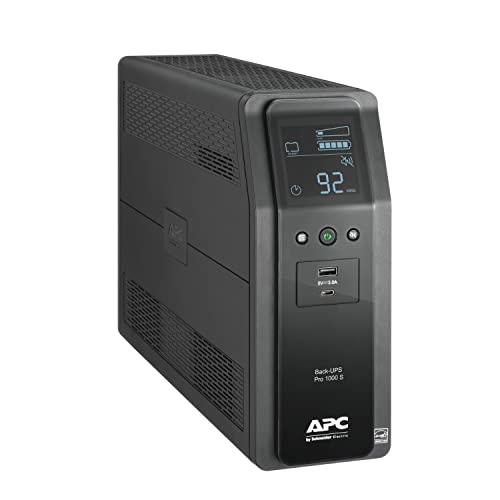
- 1000VA/600W backup for desktops, monitors, and network gear
- Sinewave output with AVR helps protect sensitive workstation hardware
- 10 outlets plus USB-C/USB-A charging for a complete desk setup
Best For: Workstation users who want clean sinewave backup power and a flexible outlet layout.
Best for Compact Home Office Backup
APC Back-UPS 650VA/390W 8-Outlet UPS

- 650VA / 390W capacity for essential workstation devices
- 8 outlets with 4 battery backup and 4 surge-only
- RJ45 protection plus user-replaceable battery support
Best For: Home workstations and light office setups that need basic backup power and surge protection.
Best for Routers and Light Workstations

- Enough backup for a basic workstation and router
- 5 battery-backed outlets plus 2 surge-only outlets
- Replaceable battery helps reduce long-term costs
Best For: Home office users needing short backup power for a workstation and networking gear.
Best for High-Load Workstations

- 900W output supports demanding desktop workstations
- AVR helps handle brownouts and surges without draining battery
- 5 battery backup outlets plus 5 surge-only outlets
Best For: Power users who need reliable UPS protection for a workstation and networking gear.
Best for Workstation Power – APC Back-UPS Pro 1500VA/900W Sine Wave UPS
If you need an apc ups for workstation use, the APC Back-UPS Pro BR1500MS2 is built for serious desktop rigs, home offices, and gaming PCs that can’t afford flaky power. Its true sine wave output, AVR, and 900W capacity make it a strong fit for active PFC power supplies and other sensitive gear.
Best For: Workstation users running a full PC setup, monitor, router, and NAS who want clean battery backup with enough capacity to save work and ride through short outages.
Pros:
- True sine wave output is ideal for modern workstation and gaming power supplies
- 1500VA/900W capacity gives solid headroom for demanding desktop setups
- AVR helps smooth out brownouts and voltage swings without draining the battery
- LCD display makes it easy to check load, runtime, and battery health at a glance
Cons:
- Not a fit for very large multi-PC or server-class power demands
- Bulky compared with smaller UPS units for basic peripherals
- Premium features put it above entry-level budget models
This is a smart apc ups for workstation buyers who want more than just surge protection: it adds cleaner power, useful runtime visibility, and enough output to support a serious desk setup with confidence.
Best for AVR Voltage Protection – APC UPS 1500VA Backup for Workstations
If you want an apc ups for workstation that can smooth out unstable power as well as cover short outages, the APC BR1500G is a practical pick. Its 1500VA/865W capacity, AVR, and Active PFC compatibility make it a solid fit for desktop rigs, monitors, and network gear that need steady protection.
Best For: Workstations that need strong battery backup plus automatic voltage regulation for everyday power fluctuations.
Pros:
- 1500VA / 865W capacity suits many single-PC workstation setups
- AVR helps correct voltage dips and surges without using battery power
- 10 outlets with both battery-backed and surge-only protection
- Replaceable battery and optional external battery pack support
Cons:
- External battery pack sold separately
- Bulkier than compact UPS units
- Runtime is still limited for high-load systems
For buyers comparing an apc ups for workstation, this model stands out more for power conditioning and practical outlet layout than for portability. It is a dependable middle-ground choice if you want cleaner power and enough backup time to save work and shut down safely.
Best for Small Spaces – APC Back-UPS 425VA/255W Battery Backup
If you need a compact apc ups for workstation essentials rather than a full desktop tower backup, the APC Back-UPS BE425M is a practical choice. It focuses on keeping your router, modem, VoIP gear, or a low-power home office setup online long enough to ride out brief outages and shut down safely.
Best For: Small workstations and network gear that need basic battery backup, surge protection, and a space-saving design.
Pros:
- Compact, wall-mountable design fits neatly in tight spaces
- 4 battery-backed outlets plus 2 surge-only outlets for essential devices
- Provides short runtime for low-power equipment during outages
- Includes 3-year warranty and $75,000 equipment protection
Cons:
- 255W capacity is too limited for most desktops, monitors, or gaming PCs
- Best suited for low-power electronics rather than heavier workstation loads
For buyers prioritizing footprint over raw power, this apc ups for workstation use makes sense when the goal is continuity for networking and lightweight office devices. It is not a high-capacity UPS, but it delivers the basics reliably where they matter most.
Best Cloud-Monitored Pick – APC Smart-UPS 1500VA SmartConnect
If you want an apc ups for workstation use that goes beyond basic battery backup, the APC Smart-UPS SMT1500C is a strong fit. It pairs a 1500VA/1000W pure sine wave output with AVR, which helps keep a desktop workstation, monitor, and related gear running through sags, surges, and brief outages.
Best For: Workstations and small office setups that need clean power, remote monitoring, and dependable runtime.
Pros:
- Pure sine wave output is well-suited for sensitive workstation power supplies.
- SmartConnect adds cloud monitoring, alerts, and firmware updates.
- AVR helps reduce battery wear during frequent voltage fluctuations.
- Includes strong APC warranty coverage and connected-equipment protection.
Cons:
- More expensive than basic standby UPS units.
- Only 8 outlets, so larger multi-device setups may need power planning.
For buyers comparing an apc ups for workstation reliability, this model stands out for its clean sine wave power and remote management features. It’s a smart choice if you care about uptime, battery health, and being able to check UPS status without standing next to the desk.
Best for Home Office Backup – APC Back-UPS BE850G2 850VA/450W
If you need an apc ups for workstation use, the APC Back-UPS BE850G2 is a practical pick for keeping a desktop, router, modem, and NAS online long enough to save work and shut everything down safely. It balances runtime, outlet count, and everyday convenience without taking over your desk.
Best For: Home office users who want reliable battery backup for a workstation, networking gear, and a few essential accessories.
Pros:
- 850VA/450W capacity offers up to 35 minutes of runtime at 100W.
- 6 battery-backed outlets plus 3 surge-only outlets cover a full workspace.
- Includes 2 USB-A charging ports for phones and tablets.
- User-replaceable battery and 3-year warranty add long-term value.
Cons:
- Not ideal for higher-wattage workstations or heavy gaming rigs.
- USB charging shares limited power, so it’s not a fast charger.
For most buyers comparing an apc ups for workstation protection, this model stands out as an easy, all-in-one backup for short outages and safer shutdowns. It is especially well suited to home offices that need dependable coverage for both the computer and internet connection.
Best Sinewave Protection – APC Back-UPS Pro 1000VA
If you need an apc ups for workstation use, the APC Back-UPS Pro 1000VA is a solid fit for protecting a desktop setup, network gear, and other essential peripherals. Its sinewave output, AVR, and LCD status display make it especially practical for home offices and workstations that need stable power and clear runtime info.
Best For: Workstation users who want clean sinewave backup power, enough outlets for a full desk setup, and built-in charging for everyday devices.
Pros:
- 1000VA/600W capacity is well-suited to desktop PCs, monitors, routers, and storage devices
- Sinewave output and AVR help protect sensitive workstation hardware from unstable power
- 10 outlets plus USB-C and USB-A charging add flexibility for a busy desk setup
- LCD screen shows load, runtime, and system status at a glance
Cons:
- Runtime is good for short outages, not extended whole-day backup
- Heavier than smaller UPS models, so it takes more space under a desk
This is a strong apc ups for workstation buyers who value clean power and practical outlet layout more than maximum runtime. For a serious home office or desktop workstation, it delivers the right mix of protection, monitoring, and convenience.
Best for Compact Home Office Backup – APC Back-UPS 650VA/390W 8-Outlet UPS
If you need an apc ups for workstation setups that also cover your router and small office gear, this 650VA APC Back-UPS is a practical middle-ground pick. It adds battery backup for essential devices, surge protection for the rest, and enough runtime to save work or ride out short outages.
Best For: Home workstations, Wi‑Fi/network gear, and light office setups that need dependable backup power without taking up much space.
Pros:
- 650VA / 390W capacity is a solid fit for a single workstation and key peripherals
- 8 outlets with both battery-backed and surge-only ports help organize multiple devices
- RJ45 Ethernet protection and APC reliability add useful protection for home office networks
Cons:
- Not ideal for power-hungry desktops, gaming rigs, or multi-monitor high-load setups
- Runtime is limited when supporting heavier workstation draws
- Replacement battery is sold separately
For an apc ups for workstation use where uptime matters more than advanced features, this model covers the essentials well. It’s a straightforward choice if you want enough backup time to save files, keep internet access alive, and protect connected electronics from everyday power issues.
Best for Routers and Light Workstations – APC Back-UPS BE600M1 600VA
If you need a practical apc ups for workstation use, the APC BE600M1 is a straightforward option for keeping a desktop, monitor, and networking gear alive long enough to ride out brief outages. It combines battery backup with surge protection and adds USB charging, making it useful in a home office where staying connected matters as much as saving your work.
Best For: Home office users who want backup power for a workstation, Wi‑Fi router, and a few essential peripherals without paying for a larger UPS.
Pros:
- 600VA/330W capacity is enough for light workstation and network backup
- 5 battery-backed outlets plus 2 surge-only outlets for better desk organization
- USB charging port helps keep a phone powered during outages
- Replaceable battery can lower long-term ownership costs
Cons:
- Not intended for high-end workstations or heavy gaming PCs
- Runtime is short, so it’s mainly for safe shutdown and internet continuity
- Limited capacity means you’ll need to prioritize only essential devices
For a compact apc ups for workstation setups, this model makes sense when your goal is protection, connectivity, and orderly shutdown rather than long battery runtime. It’s a solid fit for basic productivity systems and network gear, especially if you value simple upkeep and a trusted brand name.
Best for High-Load Workstations – APC Back-UPS Pro 1500VA, 900W
If you need an apc ups for workstation use, the APC Back-UPS Pro 1500VA is a strong fit thanks to its 900W capacity, AVR support, and enough outlets to cover a full desktop setup plus network gear. It is built to ride through short outages, smooth out brownouts, and keep a productive workstation online long enough to save work and shut down cleanly.
Best For: Power users who want dependable battery backup for a desktop workstation, monitors, router, and storage devices.
Pros:
- 1500VA / 900W capacity suits demanding desktops and multi-device setups
- AVR helps stabilize voltage without constantly dipping into battery power
- 5 battery-backed outlets plus 5 surge-only outlets for flexible device coverage
- Replaceable battery and 3-year warranty add long-term value
Cons:
- Not the best choice if you need very long runtime during extended outages
- Heavier, bulkier design than smaller home-office UPS units
- Battery replacement is sold separately
For an apc ups for workstation setups, this model stands out as a practical middle ground between home-office convenience and serious desktop protection. It is especially appealing if you run a high-draw PC, want clean voltage regulation, and need enough outlets to protect the whole desk.
How We Picked the Best Apc Ups for Workstation Use
For Apc Ups for Workstation setups, we prioritized sine wave output or workstation-friendly line-interactive designs, enough wattage for real desktop loads, and AVR to smooth minor voltage swings. We also looked at outlet count, USB charging, runtime expectations, and compatibility with active PFC power supplies commonly found in modern PCs.
Quick Comparison: What Matters Most
Not every UPS serves the same role. Smaller models are best for saving your work and shutting down safely, while larger 1000VA to 1500VA units are better for keeping a full workstation, monitor, and networking gear online long enough to ride out brief outages. If you need software-friendly management, SmartConnect-equipped options add extra visibility and alerts.
Key Buying Factors for Apc Ups for Workstation
Wattage Matters More Than VA
VA is useful, but watt rating tells you how much real load the UPS can support. Match the UPS to your actual PC, monitor, and accessory power draw with headroom to spare.
Waveform and Compatibility
Many modern workstations use active PFC power supplies, which typically benefit from a pure sine wave UPS. If your system is higher end or sensitive, this is one of the most important filters.
Runtime and Shutdown Window
Decide whether you want enough time to save files and shut down gracefully or enough backup to keep working through short interruptions. Runtime depends on load, so a UPS that looks large on paper may still provide only a few minutes under a heavy workstation.
Outlets and Device Mix
Look for enough battery-backed outlets for your tower, monitor, modem, NAS, or docking station. Keep surge-only devices separate if needed so your battery reserve goes where it matters most.
Ports, Alerts, and Placement
USB-C or USB-A charging can be handy on a desk, while an LCD helps you monitor load and battery status at a glance. Also check physical size and cord length before buying, especially for tight office layouts.
Who Should Buy Which Apc Ups for Workstation?
Choose a smaller APC UPS if you mainly want protection for a compact home office, router, or single PC and only need enough battery to save work. Step up to a 1000VA or 1500VA model if your workstation includes a power-hungry desktop, dual monitors, storage devices, or you want more comfortable runtime.
If you run critical business systems, content creation rigs, or a workstation that cannot afford abrupt shutdowns, a pure sine wave APC model is usually the safest long-term choice. For lighter setups, a basic Back-UPS can deliver strong value without overbuying capacity you will not use.