
If you need a cleaner desk and a better multi-screen workflow, the right dock can make a big difference. An Anker USB-C dock for dual monitors can turn one laptop connection into a full workstation with displays, Ethernet, storage, and charging.
Below, we focus on practical options for everyday productivity, home offices, and travel-friendly setups so you can quickly match the right dock to your laptop and monitor needs.
Best 10 Anker USB C Dock for Dual Monitors Picks for 2026
Best for Dual HDMI
Anker 8-in-1 USB-C Dual Monitor Dock

- Dual HDMI output for two external displays
- 85W USB-C pass-through charging support
- Ethernet, USB-A, SD, and microSD included
Best For: Windows, ChromeOS, and USB-C laptop users who want a compact dual-monitor docking hub.
Best for Thunderbolt 5 Power Users
Anker Prime TB5 Docking Station

- Dual 8K support on compatible Thunderbolt 5 Windows laptops
- 14-in-1 port selection with TB5, USB-C, USB-A, Ethernet, and card readers
- 140W charging plus active cooling for heavy workloads
Best For: Thunderbolt 5 laptop users who need dual-monitor support, fast charging, and a full-featured desktop dock.
Best for Dual-Display Workstations
Anker 10-in-1 Dual 4K HDMI Hub

- Dual HDMI outputs for two-monitor setups
- Up to 85W pass-through charging
- Ethernet, SD card, and USB-A/USB-C data ports
Best For: Laptop users who want a compact dual-monitor dock with charging and wired connectivity.
Best for Triple 4K Workstations

- 3 HDMI outputs for dual or triple monitor setups
- 10Gbps USB ports plus SD/microSD card readers
- 100W charging and Gigabit Ethernet in one dock
Best For: Windows users who want a feature-rich dock that can scale beyond dual monitors.
Best for Dual-Monitor Expansion

- Dual HDMI + DisplayPort for flexible monitor setups
- 10 Gbps USB-C and USB-A ports for faster transfers
- 85W pass-through charging plus Ethernet and card readers
Best For: Laptop users who want a single dock for dual monitors, charging, and everyday desk connectivity.
Best Dual-Display Value
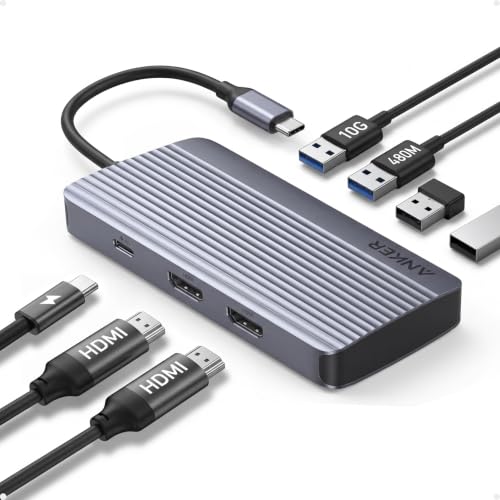
- Dual HDMI output for two 1080p@60Hz displays
- 10Gbps port for quick file transfers
- Up to 85W laptop charging via USB-C
Best For: Users who want a simple dual-monitor dock with solid charging and fast data speeds.
Best for Triple-Display Setups
Anker 14-in-1 Triple Display Dock

- Dual 4K HDMI plus VGA for flexible multi-monitor setups
- 14-in-1 design adds USB, Ethernet, SD/microSD, and audio ports
- 80W pass-through charging with broad USB-C laptop support
Best For: People who want a feature-rich dock for dual monitors and the option to add a third display.
Best Dual-4K for Windows Laptops
UGREEN 7-in-1 Dual Monitor Dock

- Dual 4K@60Hz HDMI for compatible Windows setups
- 10Gbps USB-A and USB-C ports for fast peripherals
- 100W PD pass-through in a compact aluminum body
Best For: Windows users who need dual external monitors, fast data ports, and single-cable charging.
Best for Dual HDMI – Anker 8-in-1 USB-C Dual Monitor Dock
If you need an anker usb c dock for dual monitors that keeps the setup simple, this Anker 8-in-1 hub is a practical pick. It gives you two HDMI outputs, Ethernet, card readers, and pass-through charging from a single USB-C port, making it useful for workstations that need more than just display expansion.
Best For: Windows, ChromeOS, and USB-C laptop users who want a compact dual-monitor dock with wired networking and everyday productivity ports.
Pros:
- Two HDMI ports support dual displays up to 4K at 30Hz on both screens
- 85W pass-through charging helps power your laptop while the dock is connected
- Includes Ethernet, USB-A ports, and SD/microSD card readers for flexible use
- Works with USB-C, USB4, and Thunderbolt systems that support DP Alt Mode
Cons:
- On Mac, both external monitors mirror the same image
- Requires a 100W USB-C charger and USB-C cable for full power delivery setup
- Not compatible with Linux
For buyers comparing an anker usb c dock for dual monitors, this model stands out for straightforward multiport expansion and reliable everyday connectivity rather than flashy extras. It is especially appealing if you want a clean desk setup with two displays, wired internet, and charging all routed through one dock.
Best for Thunderbolt 5 Power Users – Anker Prime TB5 Docking Station
If you need an anker usb c dock for dual monitors and you’re running a Thunderbolt 5 or 4 laptop, this Anker Prime dock is built for high-bandwidth setups. It combines dual-display support, fast 140W charging, and a wide port selection in one desktop hub, making it a strong choice for creators and multitaskers who want fewer dongles.
Best For: Thunderbolt 5 laptop users who want a high-end dock with dual monitor support, fast charging, and plenty of expansion.
Pros:
- Supports dual 8K displays on compatible Thunderbolt 5 Windows laptops
- 14-in-1 layout with TB5, USB-C, USB-A, Ethernet, SD/TF, and audio
- 140W upstream charging helps power demanding laptops
- Active cooling helps maintain performance during heavy use
Cons:
- Overkill if you only need basic USB-C docking
- Dual-display support is limited on some Mac and USB-C/DP Alt Mode laptops
- Does not support external USB-A hubs
For buyers who want an anker usb c dock for dual monitors with top-tier bandwidth and room to grow, this is more of a performance dock than a budget convenience pick. It makes the most sense when your laptop can take advantage of Thunderbolt 5 and you want a future-proof desktop setup.
Best for Dual-Display Workstations – Anker 10-in-1 Dual 4K HDMI Hub
If you need an anker usb c dock for dual monitors that balances display output, ports, and charging, this Anker hub is built for everyday desk setups. It supports two external screens, adds Ethernet and SD card access, and gives you enough data ports for accessories without crowding your laptop’s USB-C connection.
Best For: Dell, ThinkPad, and other USB-C laptop users who want a compact dock for dual 4K monitors plus wired networking and pass-through charging.
Pros:
- Dual HDMI outputs support two monitors at up to 4K/30Hz each.
- Up to 85W pass-through charging keeps your laptop powered while docked.
- Includes Ethernet, SD card reader, and multiple USB-A/USB-C data ports.
- Works with USB-C, USB4, and Thunderbolt laptops for broad compatibility.
Cons:
- Dual-monitor support on macOS mirrors the same image on both displays.
- The USB-C data port does not support charging.
- No Linux support.
For buyers comparing an anker usb c dock for dual monitors, this model stands out as a practical all-in-one option rather than a simple display adapter. It is a strong fit if you want two external screens, steady power delivery, and enough expansion ports to replace a basic office dock.
Best for Triple 4K Workstations – Selore 13-in-1 3 HDMI Dock
If you want an anker usb c dock for dual monitors alternative that can also handle a more demanding desk setup, this Selore dock is built for that jump. It adds three HDMI outputs, fast USB expansion, wired Ethernet, SD/microSD access, and 100W charging in one plug-and-play hub.
Best For: Windows laptop users who want a dual- or triple-monitor dock with strong port variety and simple setup.
Pros:
- Three HDMI ports support flexible mirror or extended display setups.
- Includes 10Gbps USB-A/USB-C ports for quick file transfers and peripherals.
- 100W PD charging and Gigabit Ethernet keep a workstation streamlined.
- SD and microSD slots are handy for creators and photographers.
Cons:
- Mac users may not get true triple extended displays due to system limits.
- Triple-monitor output requires a USB-C port with DisplayPort Alt Mode or Thunderbolt support.
Overall, this is a strong pick if your anker usb c dock for dual monitors search has grown into a need for more display flexibility and more built-in ports. It makes the most sense for Windows owners who want a single dock to power a busy, multi-screen setup.
Best for Dual-Monitor Expansion – Anker 11-in-1 USB-C Dock
If you need an anker usb c dock for dual monitors that also keeps your workspace flexible, this Anker 11-in-1 hub is a strong fit. It combines HDMI and DisplayPort output, fast data ports, Ethernet, card readers, and pass-through charging in one compact dock, making it useful for everyday office setups and travel desks.
Best For: Laptop users who want a single USB-C dock for dual monitors, wired networking, and high-speed peripheral connections.
Pros:
- HDMI and DisplayPort support dual displays up to 2K@60Hz with a DP 1.4 laptop
- Two 10 Gbps data ports plus extra USB-A ports for fast accessories and transfers
- 85W pass-through charging helps power the laptop while the dock stays connected
- Includes Ethernet, AUX, SD, and microSD for a well-rounded desk setup
Cons:
- macOS mirrors both external monitors instead of extending them independently
- Pass-through charging requires your own charger
- Not compatible with Linux
For buyers comparing anker usb c dock for dual monitors options, this model stands out for its balanced mix of display outputs and practical connectivity rather than flashy extras. It is a smart choice if you want reliable dual-screen support and enough ports to replace a basic laptop setup.
Best for Dual 4K Windows Setups – Anker Nano 8-in-1 Dual Monitor Dock
If you need an anker usb c dock for dual monitors that focuses on high-resolution output and fast everyday connectivity, this Anker Nano dock is built for a clean desktop upgrade. It supports dual 4K at 60Hz on compatible Windows laptops, adds three 10Gbps data ports, and includes SD/TF card readers for quick file access.
Best For: Windows users who want a compact USB-C dock with dual 4K monitor support, fast data ports, and laptop charging in one station.
Pros:
- Dual HDMI outputs support up to 4K@60Hz on compatible Windows laptops
- Three 10Gbps data ports help with fast transfers and peripherals
- 85W pass-through charging keeps supported laptops powered during use
- Built-in SD/TF card slots are useful for photographers and creators
Cons:
- macOS mirrors displays instead of extending to two independent monitors
- 100W charger and compatible cable are required for full charging performance, and they are not included
- Dual 4K support depends on the host laptop’s USB-C/DP 1.4 DSC compatibility
For buyers comparing an anker usb c dock for dual monitors, this one stands out for Windows-friendly dual 4K output and a strong mix of speed, charging, and card-reader utility. It is a practical pick if you want a compact dock that covers both display expansion and high-speed accessory needs.
Best for Multi-Monitor Windows Setups – Selore 10-in-1 Dual Monitor Dock
If you need an anker usb c dock for dual monitors alternative that can push beyond a basic two-screen setup, this Selore dock is built for Windows productivity. It offers dual HDMI plus DisplayPort and VGA, so you can tailor the connection to your monitors while adding wired Ethernet, USB data ports, and up to 100W USB-C power delivery.
Best For: Windows users who want flexible multi-monitor output, wired networking, and a single-cable desk setup for work or trading.
Pros:
- Supports up to three external displays on Windows, including dual HDMI and DP output.
- Includes Gigabit Ethernet, USB-A, USB-C data, and 100W PD input for a cleaner desk.
- Handy monitor control button makes it easy to wake, sleep, or switch display modes.
- Wide port mix with HDMI, DP, and VGA helps match newer and older monitors.
Cons:
- macOS only mirrors displays, so it is not ideal for Mac users wanting extended screens.
- Full multi-display support depends on a USB-C/Thunderbolt port with DisplayPort Alt Mode.
As a practical pick for a workspace hub, this dock stands out when you want more display flexibility than a typical anker usb c dock for dual monitors setup can provide. It is especially appealing if you want wired internet, multiple peripherals, and one dock to handle both power and screen expansion.
Best Dual-Display Value – Anker 7-in-1 USB-C Hub
If you want an anker usb c dock for dual monitors that keeps the setup simple, this 7-in-1 hub is built for everyday productivity. It supports dual HDMI output at 1080p@60Hz, includes a 10Gbps data port for fast file transfers, and offers up to 85W output for laptop charging from a 100W input.
Best For: Office users, students, and remote workers who need a straightforward dual-monitor dock with fast charging and reliable USB-C compatibility.
Pros:
- Dual HDMI support makes it easy to run two external displays at 1080p@60Hz
- 10Gbps transfer speed is handy for moving large files and accessories quickly
- 85W pass-through charging helps power the laptop while the dock is in use
- Works with USB-C, USB4, and Thunderbolt laptops on major operating systems
Cons:
- Not compatible with Linux
- Wall charger is not included
For buyers comparing anker usb c dock for dual monitors options, this model stands out for balancing price, charging, and display support without adding unnecessary complexity. It is a practical pick if you mainly want dependable dual-screen output and fast everyday connectivity.
Best for Triple-Display Setups – Anker 14-in-1 Triple Display Dock
If you need an anker usb c dock for dual monitors that can also stretch to a third screen, this Anker docking station is built for heavy multitasking. It combines dual 4K HDMI outputs, a 1080p VGA port, and a broad mix of USB, Ethernet, and card-reader connections, making it a practical hub for desk-based laptop setups.
Best For: Users who want one dock for dual 4K monitors, an optional third display, and plenty of everyday connectivity.
Pros:
- Dual 4K HDMI plus VGA support gives you flexible multi-monitor options.
- 14 ports cover data, Ethernet, SD/microSD, audio, and accessories.
- 80W pass-through charging helps keep a compatible laptop powered.
- Works with USB-C, USB4, and Thunderbolt Windows and Mac laptops.
Cons:
- Wall charger is not included, so you’ll need your own USB-C power adapter.
- MacOS mirrors external displays instead of extending them individually.
- Not compatible with Linux.
For buyers comparing an anker usb c dock for dual monitors, this model stands out for its flexible display outputs and full-size port selection. It’s a strong pick if you want a single dock that can handle work peripherals now and a more complex monitor setup later.
Best Dual-4K for Windows Laptops – UGREEN 7-in-1 Dual Monitor Dock
If you want an anker usb c dock for dual monitors alternative with strong display output and fast wired expansion, this UGREEN dock is built around dual 4K@60Hz HDMI, 10Gbps USB ports, and 100W pass-through charging. It’s a practical fit for Windows laptops with full-function USB-C or Thunderbolt support when you need a compact desk setup.
Best For: Windows laptop users who want dual 4K external monitors plus fast data ports in one USB-C dock.
Pros:
- Dual HDMI outputs support 4K@60Hz for a clean dual-monitor setup on compatible laptops
- Includes 10Gbps USB-A and USB-C ports for fast peripherals and file transfers
- 100W PD charging helps keep a laptop powered through one cable
- Compact aluminum design is easy to place on a desk or carry between workspaces
Cons:
- macOS is limited to mirror mode, so it’s not ideal for two extended external displays on a Mac
- Needs a compatible USB-C/Thunderbolt port and DP1.4 support to reach full display performance
- Charging cable and power adapter are not included
This is a solid choice if your priority is monitor output first and you’re comparing anker usb c dock for dual monitors options for a Windows workstation. If your laptop supports the required video standards, it delivers strong value in a simple 7-in-1 layout.
How We Picked the Best Anker USB C Dock for Dual Monitors
We focused on docking stations that balance video stability, power delivery, port selection, and ease of setup. For dual-monitor use, the most important factors are whether your laptop supports display output over USB-C, whether the dock can drive the resolutions and refresh rates you need, and whether it provides enough charging for your machine.
We also weighed real-world convenience: Ethernet for stable networking, enough USB ports for peripherals, and SD or microSD slots for content transfer. A strong Anker USB C Dock for Dual Monitors should feel like a simple desktop upgrade, not another cable-management project.
Quick Comparison
Compact 7-in-1 and 8-in-1 docks are usually the best fit for light office use and travel. Midrange 10-in-1 and 11-in-1 options tend to offer the best balance of display support, charging, and connectivity for most people. Larger 13-in-1 and 14-in-1 stations are better if you need more ports, multiple display outputs, or a more permanent workstation setup.
Key Buying Factors for an Anker USB-C Dock for Dual Monitors
Display Support
Check whether the dock supports dual extended displays on your operating system. Some laptops, especially certain Mac models, have display limitations that matter more than the dock itself. Also confirm whether the dock uses HDMI, DisplayPort, or both, and whether it supports 4K at 60Hz if image clarity matters.
Power Delivery
Look for enough wattage to charge your laptop while you work. Ultrabooks may be fine with 65W to 85W, while larger productivity laptops can benefit from 100W or more. If the dock cannot supply enough power, you may still need your original charger.
Port Mix and Speed
Think about what you actually plug in every day. USB-A ports help with mice, keyboards, and drives, while USB-C data ports are useful for newer accessories. Ethernet is valuable for video calls and file transfers, and SD card readers are a must for photographers and creators.
Size and Use Case
Smaller docks suit portable setups and hybrid workers. Larger stations make more sense for dedicated desks, especially if you want a more permanent Anker USB C Dock for Dual Monitors with fewer compromises on connectivity.
Who Should Buy Which Anker USB C Dock for Dual Monitors?
If you want a simple office dock with dual display support, choose a compact 7-in-1 or 8-in-1 model. If you need more ports and better flexibility, a 10-in-1 or 11-in-1 dock is the sweet spot for most users. If your setup demands triple displays, extra USB connections, or a more advanced workstation hub, move up to the larger 13-in-1 or 14-in-1 options.
For the best results, match the dock to your laptop’s USB-C or Thunderbolt capabilities, then choose the smallest model that still covers your everyday workflow.