
Editing 8K footage can strain a desktop long before the final export. Smooth playback depends on the codec, effects, storage speed, and whether your editing software can use the system’s hardware acceleration.
These 10 desktops span compact workstations, conventional towers, and a high-core-count option. The right choice depends less on the biggest specification and more on how you edit.
Best 10 8k Video Editing Desktop Picks for 2026
Professional Graphics Pick
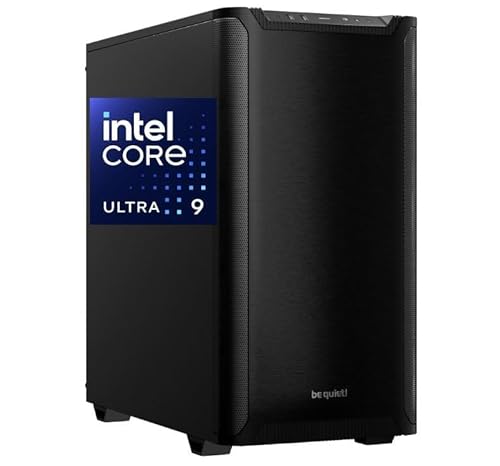
- RTX 2000 Ada with 16GB memory
- 64GB DDR5 and 2TB NVMe SSD
- Four Mini DisplayPort outputs
Best For: Professional-driver workflows and multi-monitor editing
Compact Memory Pick

- 128GB shared LPDDR5x memory
- USB4 V2 and dual 10GbE
- HDMI 2.1 output up to 8K60
Best For: Compact editing, AI work, and memory-heavy timelines
Renewed Workstation Pick

- RTX A4500 with 16GB memory
- 4TB NVMe SSD plus 4TB HDD
- Renewed; 90-day limited warranty
Best For: Professional graphics and mixed fast/archive storage
Storage-Rich Pick
Adamant Core Ultra 7 and RTX 5080 Workstation

- 24-core Core Ultra 7 270K
- 96GB DDR5 and RTX 5080 16GB
- Two 4TB Samsung NVMe SSDs
Best For: Editors prioritizing fast internal project storage
Multi-Display Pick
CPU Solutions Core Ultra 9 Editing Workstation
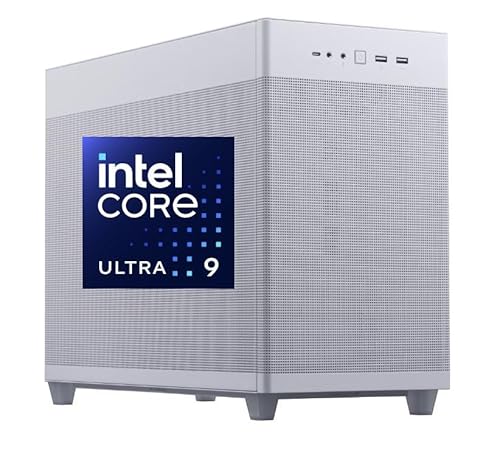
- 24-core Core Ultra 9 285K
- RTX 2000 Ada with 16GB ECC memory
- Up to four displays; 2TB NVMe SSD
Best For: Editors building a multi-monitor workstation
Ryzen X870 Build
Adamant Ryzen 9 9950X RTX 5080 Workstation

- 16-core Ryzen 9 9950X
- RTX 5080 with 16GB graphics memory
- 64GB DDR5 and 8TB NVMe storage
Best For: Editors who prefer a Ryzen 9 and ASUS X870 PRIME build
Intel PRIME Build
Adamant Core Ultra 9 285K RTX 5080 Workstation
- 24-core Core Ultra 9 285K
- ASUS Z890 PRIME motherboard
- 64GB DDR5 and 8TB NVMe storage
Best For: Intel-focused editors who prefer an ASUS Z890 PRIME build
Professional Graphics Pick – CPU Solutions VidCore Ultra 9
If your 8k video editing desktop needs professional graphics drivers and multiple display outputs, the VidCore pairs a Core Ultra 9 285K with an RTX 2000 Ada and 64GB of DDR5 RAM. Its 2TB NVMe SSD provides space for active projects, though large media libraries may need additional storage.
Best For: Editors who prioritize professional GPU drivers and a multi-monitor workspace.
Pros:
- RTX 2000 Ada has 16GB of dedicated graphics memory and four Mini DisplayPort outputs.
- 24-core Core Ultra 9 285K, 64GB DDR5 RAM, and a 2TB NVMe SSD.
- Liquid cooling, Windows 11 Pro, and a one-year parts-and-labor warranty.
Cons:
- The included SSD is smaller than the 8TB storage configurations elsewhere in this roundup.
- Mini DisplayPort connections may require adapters for other monitor inputs.
This is a sensible fit when application-focused graphics support matters more than maximizing included storage. Confirm your editor’s GPU requirements and plan for separate archive space if needed.
Compact Memory Pick – MINISFORUM MS-S1 MAX
The MS-S1 MAX is an unusual 8k video editing desktop option: a compact workstation with a 16-core Ryzen AI Max+ 395, integrated RDNA 3.5 graphics, and 128GB of shared LPDDR5x memory. It suits editors balancing complex timelines with AI or 3D work, provided their software performs well with integrated graphics.
Best For: Space-conscious creators who want abundant unified memory and fast external connectivity.
Pros:
- 128GB of unified memory gives the CPU and GPU a large shared pool.
- USB4 V2, dual 10GbE, Wi-Fi 7, and HDMI 2.1 output rated up to 8K at 60Hz.
- Dual M.2 slots and a PCIe x16 slot offer expansion options.
Cons:
- Integrated graphics may not suit workflows that specifically require a dedicated NVIDIA GPU.
- The supplied specifications do not clearly identify a preinstalled operating system.
Its memory and connections are compelling for a small workstation, but an 8K-capable display output does not guarantee smooth 8K editing. Check software compatibility and the seller’s OS configuration before buying.
High-Capacity Power Pick – Adamant Custom Ultra 9 RTX 5080
For buyers seeking an 8k video editing desktop with substantial local project storage, this Adamant Custom tower combines a Core Ultra 9 285K, GeForce RTX 5080 16GB, 64GB DDR5 RAM, and two 4TB Samsung 990 PRO NVMe SSDs. It is the strongest storage-and-dedicated-GPU combination listed here.
Best For: Editors who want a high-end dedicated GPU and ample fast internal storage for active media.
Pros:
- RTX 5080 with 16GB GDDR7 graphics memory.
- Two 4TB NVMe SSDs provide 8TB of installed solid-state storage.
- 360mm liquid cooler, 1200W power supply, and three-year parts-and-labor warranty.
Cons:
- 64GB of RAM may warrant an upgrade for especially memory-heavy projects.
- No separate hard-drive archive storage is listed.
This configuration favors demanding GPU work and keeping sizable projects on fast local drives. Before ordering, check that its display connections and your editing applications match your workflow.
Renewed Workstation Pick – Dell Precision 3660
This renewed Dell Precision 3660 is an 8k video editing desktop candidate for buyers who prefer a professional NVIDIA GPU and a mix of fast and bulk storage. It pairs a Core i9-13900K and RTX A4500 16GB with 64GB of RAM, a 4TB NVMe SSD, and a separate 4TB hard drive.
Best For: Editors comfortable buying renewed hardware who want professional graphics and built-in archive capacity.
Pros:
- RTX A4500 provides 16GB of dedicated graphics memory.
- 4TB NVMe SSD plus 4TB HDD separates fast project storage from bulk files.
- Windows 11 Pro, Wi-Fi, and Bluetooth are listed.
Cons:
- Renewed condition comes with a listed 90-day limited warranty.
- The hard drive is less suitable than the SSD for active high-bitrate media.
The storage arrangement is practical if you keep current projects on the SSD and move archives to the HDD. Confirm the unit’s condition and return terms, as well as your software’s GPU needs, before purchasing.
Storage-Rich Pick – Adamant Core Ultra 7 and RTX 5080 Workstation
If your 8k video editing desktop needs room for active projects and media, this Adamant build pairs a 24-core Intel Core Ultra 7 270K and GeForce RTX 5080 16GB with 96GB of DDR5 memory and two 4TB Samsung 990 PRO NVMe SSDs.
Best For: Editors who want substantial fast internal storage alongside a dedicated GPU.
Pros:
- 8TB of NVMe storage across two SSDs.
- 96GB DDR5 RAM and a GeForce RTX 5080 with 16GB of graphics memory.
- Windows 11 Pro, Wi-Fi 7, and a three-year parts-and-labor warranty.
Cons:
- No hard drive is listed for separate bulk archival storage.
- Memory-heavy workflows may eventually need more than the installed 96GB.
The dual-SSD setup is its clearest advantage: it offers ample fast working space without an immediate storage upgrade. Check whether your archive strategy calls for additional drives.
Multi-Display Pick – CPU Solutions Core Ultra 9 Editing Workstation
This 8k video editing desktop combines a 24-core Intel Core Ultra 9 285K, 64GB of DDR5 RAM, a 2TB NVMe SSD, and an NVIDIA RTX 2000 Ada with 16GB of ECC graphics memory. The listing also specifies support for up to four displays, making it worth considering for a spread-out editing workspace.
Best For: Editors who need multiple high-resolution monitors and professional graphics in a ready-to-use Windows workstation.
Pros:
- RTX 2000 Ada graphics with 16GB of ECC memory.
- Supports up to four displays, with listed output of up to 7680 × 4320 at 60 Hz.
- Includes eight USB ports, Windows 11 Pro, and a three-year warranty.
Cons:
- The 2TB SSD may fill quickly with large source files.
- 64GB of installed RAM is less than the other two systems in this roundup.
Its display connectivity and stated professional-graphics focus distinguish it. Budget for more storage if you keep several large projects on the workstation at once.
Heavy Multitasking Pick – Adamant 64-Core Threadripper PRO Workstation
For an 8k video editing desktop intended to handle demanding work alongside other memory-intensive tasks, this Adamant configuration offers a 64-core AMD Ryzen Threadripper PRO 9985WX, 256GB of DDR5 ECC registered RAM, and a GeForce RTX 5080 with 16GB of graphics memory.
Best For: Editors whose workflows can use high core counts and substantial ECC memory.
Pros:
- 64-core Threadripper PRO processor and 256GB of installed ECC RAM.
- Combines a 2TB Samsung 990 PRO NVMe SSD with an 8TB hard drive.
- RTX 5080 16GB, Windows 11 Pro, and a three-year parts-and-labor warranty.
Cons:
- Only 2TB of its listed storage is NVMe SSD space; the remaining 8TB is on a hard drive.
- California buyers are instructed to contact the seller before purchase.
This is the most memory-rich configuration here and adds bulk storage for completed media. Keep active footage and caches on the NVMe drive when fast access matters.
Intel TUF Build – Adamant Core Ultra 9 285K RTX 5080 Workstation
For an 8k video editing desktop, this Adamant Custom tower pairs a 24-core Intel Core Ultra 9 285K with an RTX 5080 featuring 16GB of graphics memory. Its 64GB of DDR5 and two 4TB Samsung 990 PRO NVMe SSDs provide substantial memory and fast storage for large projects.
Best For: Editors who want an Intel-based workstation with an ASUS Z890 TUF motherboard and generous built-in SSD capacity.
Pros:
- 24-core Core Ultra 9 285K and RTX 5080 16GB.
- 64GB DDR5 and 8TB total NVMe SSD storage.
- 360mm liquid cooler, Windows 11 Pro, and a three-year parts-and-labor warranty.
Cons:
- 64GB is the installed RAM, not the listed 192GB maximum.
- No HDD is included if you want a separate hard-drive archive.
The TUF motherboard is the distinguishing detail here; otherwise, the appeal is the combination of high-end components and substantial SSD storage in a ready-to-use tower.
This AMD-based 8k video editing desktop combines a 16-core Ryzen 9 9950X, an RTX 5080 with 16GB of graphics memory, and 64GB of DDR5. Two 4TB Samsung 990 PRO NVMe SSDs give editors 8TB of installed solid-state storage.
Best For: Editors seeking a Ryzen 9 workstation with ample SSD space and an ASUS X870 PRIME motherboard.
Pros:
- 16-core Ryzen 9 9950X and RTX 5080 16GB.
- Two 4TB Samsung 990 PRO SSDs and 64GB DDR5.
- 360mm liquid cooler, Windows 11 Pro, and a three-year parts-and-labor warranty.
Cons:
- 64GB is installed despite a listed 192GB RAM maximum.
- The listing gives the tower dimensions as 30 × 20 × 30 inches, so check your available space.
Choose this one if you prefer the stated Ryzen 9 and X870 PRIME combination. Its storage, graphics card, and installed memory closely match the Intel options in this roundup.
If you want an Intel-based 8k video editing desktop with an ASUS Z890 PRIME motherboard, this Adamant Custom configuration pairs a 24-core Core Ultra 9 285K with an RTX 5080 16GB. It also includes 64GB of DDR5 and two 4TB Samsung 990 PRO NVMe SSDs.
Best For: Editors who favor the Z890 PRIME motherboard while shopping for a high-spec Intel workstation.
Pros:
- 24-core Core Ultra 9 285K with dedicated RTX 5080 graphics.
- 8TB total Samsung NVMe SSD storage and 64GB DDR5.
- 360mm liquid cooler, Wi-Fi 7, and a three-year parts-and-labor warranty.
Cons:
- No HDD is included for a separate hard-drive archive.
- Comes with 64GB of RAM installed, below its listed 192GB maximum.
This build shares its CPU, GPU, memory, and storage specifications with the TUF-based Intel option. The stated Z890 PRIME motherboard is the clearest point to compare when choosing between them.
How We Picked These 8k Video Editing Desktops
We compared the listed processors, memory, storage, graphics information, and form factors against common editing demands: decoding source footage, building effects-heavy timelines, exporting, and managing large media libraries. We also considered expandability and whether the available specifications make the system easy to assess. These are specification-based comparisons, not claims of hands-on benchmark testing. GPU details are missing from some listings, so confirm the exact configuration before buying.
Quick Comparison
For a conventional tower, the CPU Solutions Core Ultra 9 systems and Adamant Core Ultra 9 builds offer 24-core processors and listed 64GB memory configurations. The Adamant Core Ultra 7 configuration lists 96GB, which may suit buyers prioritizing memory headroom. The Ryzen 9 9950X Adamant build pairs a 16-core CPU with a listed 8TB capacity. Dell’s Precision 3660 listing specifies an RTX A4500, 64GB RAM, and both SSD and hard-drive storage. The MINISFORUM MS-S1 MAX stands out for its compact size and listed 128GB unified memory, while the Threadripper PRO 9985WX configuration targets buyers who need substantially more cores and 256GB ECC memory.
Key Buying Factors for an 8k Video Editing Desktop
Codec Support and Graphics
Check your camera formats against your editor’s hardware-decoding support. A powerful CPU does not guarantee smooth playback of every 8K codec. For GPU-heavy color grading, noise reduction, or compositing, verify the graphics card model and its video memory; do not assume a listing’s “8K” label establishes real-world timeline performance. Integrated graphics and discrete workstation GPUs serve different needs.
Memory and Storage
64GB RAM is a sensible starting point for many 8K projects, but complex effects, multicam edits, and concurrent applications can justify 96GB, 128GB, or more. Plan for fast SSD space for active footage, caches, and exports, plus separate capacity for archives and backups. Check how much listed storage is solid-state rather than treating total terabytes as interchangeable.
Expansion and Total Cost
Before ordering, confirm available memory slots, M.2 bays, PCIe slots, ports, cooling, power-supply capacity, and the installed GPU. Compact systems can save desk space but may limit upgrades. Factor in displays, external storage, and a backup plan.
Who Should Buy Which 8k Video Editing Desktop?
Choose a Core Ultra 9 or Ryzen 9 tower if you want a general-purpose editing workstation with room to tailor components. Consider the listed Dell configuration if a specified RTX A4500 and mixed SSD/HDD storage meet your software and capacity needs. The MINISFORUM is worth examining when footprint and memory capacity matter more than internal expansion. Reserve the Threadripper PRO system for demanding multitasking or workloads that can use its high core count and large ECC memory pool. Across all 10 listings—including the repeated Adamant Core Ultra 9 configurations—compare the exact GPU, storage, warranty terms, and seller configuration before deciding.