
In 2026, the right monitor can transform your work environment and enhance productivity. With stunning 5K resolution and precise color accuracy, these displays cater to creative professionals like you. Whether you’re designing graphics or editing videos, the latest technology offers ergonomic features and connectivity options that fit seamlessly into your workflow. Curious about which models stand out this year? Let’s explore the top contenders that could redefine your workspace.
ASUS ProArt Display 27” 5K HDR Professional Monitor (PA27JCV)

The ASUS ProArt Display 27” 5K HDR Professional Monitor (PA27JCV) is a top choice for creative professionals who demand exceptional color accuracy and detail in their work. With its stunning 27-inch 5K resolution (5120 x 2880) and IPS panel offering 178° wide-view angles, your visuals come alive. You’ll appreciate its wide color gamut—99% DCI-P3 and 100% sRGB—ensuring precision in every project. Plus, it’s Calman Verified and factory pre-calibrated to ΔE < 2, so you can trust the colors. The USB-C PD 96W provides convenient power delivery, and the 3-year warranty adds peace of mind for your investment.
Best For: Creative professionals seeking exceptional color accuracy and detail in their visual projects.
Pros:
- Stunning 5K resolution provides incredible detail for graphic design, video editing, and photography.
- Wide color gamut coverage (99% DCI-P3 and 100% sRGB) ensures precision and vibrancy in colors.
- Factory pre-calibrated to ΔE < 2, guaranteeing reliable color accuracy straight out of the box.
Cons:
- Higher price point compared to standard monitors may not suit all budgets.
- Limited built-in speakers may require external audio solutions for a complete setup.
- USB-C connectivity may not be compatible with all devices without additional adapters.
KTC 5K Monitor 27 Inch

For creative professionals who demand precision, the KTC 5K Monitor 27 Inch stands out with its impressive 99% DCI-P3 and 100% sRGB color coverage. You’ll appreciate the dual mode capabilities, offering 5K@60Hz and 2K@160Hz resolutions for versatile performance. With HDR400 and a brightness of 500 cd/m², your visuals will be vibrant and detailed. The monitor also features advanced eye care technology, reducing strain during long hours. Connectivity options, including USB-C PD65W and multiple ports, guarantee seamless integration with your devices. Ideal for design and video editing, this monitor elevates your work experience remarkably.
Best For: Creative professionals in design and video editing who require precise color accuracy and high resolution.
Pros:
- Exceptional color performance with 99% DCI-P3 and 100% sRGB coverage for lifelike visuals.
- Dual mode capabilities allow for versatile resolution options (5K@60Hz and 2K@160Hz).
- Advanced eye care technology minimizes strain during extended use.
Cons:
- Higher price point compared to standard monitors may not suit all budgets.
- Limited refresh rate options at higher resolutions may restrict gaming performance.
- Heavy weight may require a sturdy desk or dedicated mount for optimal stability.
ASUS ProArt Display 32” 4K HDR QD-OLED Professional Monitor (PA32UCDM)

Designed for creative professionals, the ASUS ProArt Display 32” 4K HDR QD-OLED Monitor (PA32UCDM) delivers stunning visuals and remarkable color accuracy. Its ultra-slim 31.5-inch 4K UHD panel boasts a 240 Hz refresh rate and an impressive 0.1 ms response time, ensuring smooth performance. With a peak brightness of 1000 nits and VESA DisplayHDR True Black 400, you’ll experience exceptional contrast. The monitor supports true 10-bit color depth and covers 100% sRGB and 99% DCI-P3, achieving world-leading ∆E < 1 color performance. Plus, Thunderbolt 4 connectivity and a 3-year warranty guarantee reliability and versatility in your workflow.
Best For: Creative professionals seeking exceptional color accuracy and smooth performance in their visual work.
Pros:
- Superior color performance with ∆E < 1, ensuring precise color representation.
- High refresh rate of 240 Hz and 0.1 ms response time for seamless visuals and reduced motion blur.
- Multiple HDR format support and Thunderbolt 4 connectivity for versatile compatibility.
Cons:
- The ultra-slim design may not be as sturdy as bulkier monitors.
- Higher price point compared to standard monitors, which may not be budget-friendly for all users.
- Limited to a specific audience, primarily benefiting creatives rather than casual users.
KTC 27 Inch 5K Monitor (H27P3)

Professionals seeking unparalleled clarity and color accuracy will find the KTC 27 Inch 5K Monitor (H27P3) an exceptional choice. With a stunning 5120 x 2880 resolution and a high brightness of 500 cd/㎡, your visuals will pop with lifelike detail. You’ll appreciate the 135% sRGB color gamut and HDR 400 support for vibrant images. Plus, its dual mode offers flexibility with 60Hz at 5K or 120Hz at 2K. Eye-Care features like Blue Light Reduction keep fatigue at bay. With versatile connectivity options and a three-year warranty, this monitor is perfect for work, gaming, and entertainment alike.
Best For: Professionals and gamers seeking superior visual fidelity and color accuracy for work and entertainment.
Pros:
- Exceptional 5K resolution (5120 x 2880) provides stunning clarity and detail.
- Versatile dual mode allows for flexible refresh rates of 60Hz at 5K and 120Hz at 2K.
- Eye-Care features such as Blue Light Reduction and Flicker-Free technology help reduce eye fatigue during long use.
Cons:
- Higher price point compared to standard monitors with lower resolutions.
- Limited to a maximum brightness of 500 cd/㎡, which may not suffice in very bright environments.
- Connectivity options may require additional adapters for some older devices.
INNOCN 40 Inch 5K Ultrawide Monitor (40C1U)

The INNOCN 40 Inch 5K Ultrawide Monitor (40C1U) stands out as an exceptional choice for graphic designers, video editors, and anyone who demands high-quality visual fidelity. With a stunning 5120 x 2160p resolution and 100Hz refresh rate, it delivers vibrant colors and sharp details. The ultra-slim design and height-adjustable stand enhance your workspace, while the extensive connectivity options, including USB Type-C and HDMI 2.1, guarantee compatibility with all your devices. Plus, features like blue light reduction make long hours enjoyable. With a solid 4.2-star rating, this monitor truly elevates your work experience.
Best For: Graphic designers, video editors, and anyone seeking high-quality visual fidelity in their workspace.
Pros:
- Exceptional 5120 x 2160p resolution and 100Hz refresh rate for vibrant colors and sharp details.
- Extensive connectivity options, including USB Type-C and HDMI 2.1, ensuring compatibility with various devices.
- Blue light reduction and flicker-free technology for enhanced comfort during long hours of use.
Cons:
- Weighs 34.1 pounds, which may be cumbersome for some users to mount or move.
- Limited to a 1-year warranty, which may not be sufficient for some consumers.
- Higher price point compared to standard monitors may deter budget-conscious buyers.
Dell UltraSharp U4025QW 40″ Curved Screen LED Monitor

For those who crave an immersive viewing experience, the Dell UltraSharp U4025QW 40″ Curved Screen LED Monitor stands out as a top choice. With its stunning 5K2K WUHD resolution and a 21:9 aspect ratio, you’ll enjoy vibrant visuals that make work and play a delight. The 39.7-inch curved display enhances your field of view, while 600 nits brightness guarantees clarity even in well-lit environments. Plus, with a quick 5 ms response time, it’s perfect for action films, sports, and gaming. Its USB Type-C connectivity also simplifies data transfer, making it a reliable choice for productivity.
Best For: Professionals and gamers seeking an immersive and vibrant viewing experience with a large curved display.
Pros:
- High Resolution: Stunning 5K2K WUHD resolution provides exceptional image clarity.
- Enhanced Viewing Experience: The 39.7-inch curved design offers a wider field of view for an immersive experience.
- Quick Response Time: With a response time of 5 ms, it’s ideal for fast-paced content like action films and gaming.
Cons:
- Size: The large screen may require ample desk space.
- Price: Higher price point compared to standard monitors.
- Limited Connectivity Options: Primarily relies on USB Type-C, which may not suit all users.
Samsung 32″ UJ59 Series 4K UHD Computer Monitor

Experience stunning visuals with the Samsung 32″ UJ59 Series 4K UHD Computer Monitor, designed for creative professionals who demand high color accuracy and detail. With a 3840×2160 resolution, its VA panel supports a billion shades, enhancing your photo and video editing. AMD FreeSync technology guarantees smooth gaming with reduced tearing, while low input lag keeps your gameplay responsive. You’ll love the multitasking capabilities too; Picture-by-Picture allows dual device connections without compromising quality. The sleek design and slim bezels fit seamlessly into any workspace, making it an excellent choice for both work and play. Elevate your experience today!
Best For: Creative professionals and gamers seeking high color accuracy, immersive visuals, and multitasking capabilities in a sleek monitor.
Pros:
- Supports a billion shades for exceptional color accuracy in photo and video editing.
- AMD FreeSync technology reduces image tearing and stuttering for a smoother gaming experience.
- Picture-by-Picture and Picture-in-Picture features enhance multitasking by allowing connection of multiple devices.
Cons:
- VA panel may have slower response times compared to other panel types like IPS, potentially affecting fast-paced gaming.
- Limited ergonomic adjustments may not satisfy all users’ preferences for height or tilt adjustments.
- The monitor’s weight and size may require a sturdy desk or mount for optimal setup.
Gawfolk 40-inch Ultrawide 5K Gaming Monitor
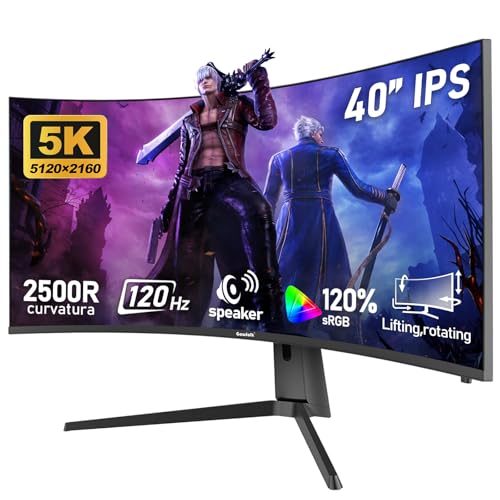
Professionals seeking an immersive workspace will find the Gawfolk 40-inch Ultrawide 5K Gaming Monitor an exceptional choice. With its stunning 5120 x 2160 resolution and 21:9 aspect ratio, you’ll enjoy crystal-clear visuals and vibrant colors, thanks to 120% sRGB accuracy. The 120Hz refresh rate and 1ms response time guarantee smooth performance, perfect for multitasking or light design work. Plus, the monitor’s adjustable height and curved design provide ergonomic comfort. Connectivity options like HDMI and DisplayPort make it easy to connect your devices. Backed by a 12-month warranty and high customer ratings, this monitor is a solid investment for your workspace.
Best For: Professionals looking for an immersive and high-quality workspace with excellent multitasking capabilities.
Pros:
- Exceptional resolution of 5120 x 2160 and 120% sRGB color accuracy for vibrant visuals.
- Smooth performance with a 120Hz refresh rate and 1ms response time, ideal for gaming and design tasks.
- Ergonomic features including adjustable height and curved design for comfortable viewing.
Cons:
- Weighty design at 20.9 pounds, which may require a sturdy desk or mount.
- Non-VESA mounting compatibility could limit wall mounting options.
- Higher price point compared to standard monitors, which may not fit all budgets.
CRUA 40” 5K Ultrawide Curved Gaming Monitor

The CRUA 40” 5K Ultrawide Curved Gaming Monitor stands out with its impressive 120Hz refresh rate, making it an excellent choice for gamers and creative professionals alike. With a stunning 5120 x 2160 resolution and a 21:9 aspect ratio, you’ll enjoy immersive visuals and exceptional color accuracy. The 2500R curvature enhances your viewing experience, while AMD FreeSync technology guarantees tear-free gameplay. Ergonomics are prioritized with adjustable height, tilt, and swivel options. Plus, connectivity is a breeze with multiple HDMI and DisplayPort options. If you’re looking to elevate your work and play, this monitor is definitely worth considering.
Best For: Gamers and creative professionals seeking an immersive and high-performance display experience.
Pros:
- High Refresh Rate: The 120Hz refresh rate enhances fast-paced gaming and provides smooth visuals.
- Exceptional Color Accuracy: With 120% sRGB coverage and a 2000:1 contrast ratio, colors are vibrant and true to life.
- Ergonomic Adjustability: Features like height adjustment, tilt, and swivel allow for comfortable viewing angles.
Cons:
- Weight: At 27.6 pounds, it may be cumbersome to mount or adjust without proper support.
- Price Point: Higher-end features may come with a premium price, making it less accessible for budget-conscious buyers.
- Limited Built-in Audio: While it has built-in speakers, they may not provide the audio quality that audiophiles desire.
LG 40-inch Ultrafine 5K2K Curved Monitor

For creators and multitaskers seeking an immersive visual experience, the LG 40-inch Ultrafine 5K2K Curved Monitor stands out with its stunning 5120 x 2160 resolution. This world’s first 5K2K monitor features a curved 40” display, offering an ultra-wide workspace perfect for video editing and graphic design. With Nano IPS Black technology and a 2000:1 contrast ratio, you’ll enjoy deep blacks and vibrant highlights. Thunderbolt 5 connectivity supports fast data transfer and dual displays, while built-in gaming features enhance your experience. Ergonomic adjustments and TUV 5-Star Eye Comfort certification guarantee comfort during long work sessions.
Best For: Creators, multitaskers, and gamers who need a high-resolution display for professional and immersive experiences.
Pros:
- Ultra-wide 5K2K resolution provides ample workspace for complex tasks like video editing and graphic design.
- Thunderbolt 5 connectivity allows for fast data transfer and supports dual displays for enhanced productivity.
- Built-in gaming features such as a 120Hz refresh rate and AMD FreeSync Premium Pro ensure smooth gameplay.
Cons:
- High price point may be a barrier for casual users or those on a budget.
- Weight of 31.1 pounds could make it difficult to mount or reposition without assistance.
- Limited adjustability options compared to some competitors, which may affect ergonomics for certain users.
Factors to Consider When Choosing a 5k Monitor for Professionals
When choosing a 5K monitor, you need to take into account several key factors that directly impact your work quality. Resolution and clarity are essential, but don’t overlook color accuracy standards and refresh rates that suit your needs. Additionally, make sure to evaluate connectivity options and eye care features to enhance your overall experience.
Resolution and Clarity
Choosing a 5K monitor means prioritizing resolution and clarity, which are fundamental for professionals in fields like graphic design, video editing, and photography. A 5K monitor typically offers a resolution of 5120 x 2880 pixels, delivering four times the pixel density of a Full HD display. This increased pixel density sharpens images and reveals finer details, essential for precision work. Additionally, the higher resolution allows you to view more content simultaneously, enhancing your multitasking capabilities and workflow efficiency. With 5K clarity, you’ll see more accurate representations of colors and textures, which is critical for color-sensitive tasks. Many 5K monitors also support wide color gamuts and HDR, enriching your visual experience with vibrant colors and improved contrast.
Color Accuracy Standards
While selecting a 5K monitor, understanding color accuracy standards is essential for professionals who rely on precise color representation. Look for monitors with a Delta E (ΔE) value of less than 2, ensuring colors appear true to life. Professional-grade monitors typically cover wide color gamuts, like 99% DCI-P3 and 100% sRGB, which are vital for design and video editing tasks. Opt for true 10-bit color depth to experience over a billion colors, leading to smoother shifts and richer details. Additionally, consider monitors with hardware calibration technologies to maintain accuracy over time. Finally, wide-view IPS panels provide consistent color performance from various angles, ideal for collaborative environments where multiple viewers are engaged.
Refresh Rate Importance
Understanding the refresh rate of a 5K monitor is essential, as it directly impacts your visual experience. Measured in hertz (Hz), a higher refresh rate means smoother motion and less motion blur. For most tasks, 60Hz is standard, but if you’re into gaming, video editing, or graphic design, you’ll want at least 120Hz for a more fluid experience. Monitors with 240Hz are ideal for fast-paced gaming, giving you a competitive edge with reduced input lag. Additionally, keep an eye on response times; lower numbers (1ms to 3ms) help minimize ghosting effects, ensuring clarity during rapid movements. Finally, consider adaptive sync technologies like AMD FreeSync and NVIDIA G-SYNC, which dynamically optimize refresh rates for enhanced performance.
Connectivity Options Available
When selecting a 5K monitor for professional use, connectivity options play a crucial role in ensuring seamless integration with your devices. Look for monitors with USB-C ports, as they provide power delivery and data transfer capabilities, streamlining your setup. Check for multiple HDMI and DisplayPort options to maximize compatibility with various devices. USB-A ports are essential too; they let you connect peripherals like keyboards and mice, enhancing your workspace efficiency. Support for Thunderbolt connections can be a game-changer, offering faster data transfer rates and daisy chaining for multiple displays. Finally, assess the monitor’s adaptability with various resolutions and refresh rates, ensuring it meets the demands of your specific professional applications.
Eye Care Features
How can you guarantee your comfort during long work sessions with a 5K monitor? Look for eye care features that prioritize your visual health. Monitors with Flicker-Free technology greatly reduce eye strain, making those extended hours more bearable. Additionally, hardware Low Blue Light technology minimizes blue light emissions, helping to protect your sleep patterns and reduce eye fatigue. DC Dimming technology can also enhance your experience by adjusting brightness levels without flickering, ensuring a stable visual output. Many professional models come with built-in eye care certifications, confirming they meet standards for reducing eye strain. Investing in a monitor with these features will enhance your productivity while keeping your eyes comfortable and healthy throughout the day.
Size and Ergonomics
Choosing the right size and ergonomics for a 5K monitor is vital, especially if you spend long hours in front of the screen. Typically, a 5K monitor should be 27 inches or larger, giving you ample workspace for multitasking and detailed design work. Ergonomics play an important role, so look for adjustable stands that let you modify height, tilt, and swivel to minimize neck and eye strain. The ideal viewing distance is between 20 to 30 inches, ensuring best pixel density and clarity. Consider ultra-wide monitors (21:9 aspect ratio) for side-by-side application display, enhancing productivity without needing dual screens. Curved monitors can also improve immersion and comfort, making them perfect for extended creative tasks.
Calibration Capabilities
Calibration capabilities are indispensable for professionals who rely on accurate color representation in their work. Look for monitors that achieve a Delta E of less than 2, ensuring minimal color deviation. Advanced calibration technologies, like hardware calibration, let you adjust colors directly within the monitor, enhancing your workflow efficiency. Some models even support Calman verification, aligning with industry color accuracy standards. Monitors boasting wide color gamut coverage, such as 99% DCI-P3 and 100% sRGB, are essential for tasks like graphic design and video editing, where precise color reproduction is critical. Remember, regular calibration is key to maintaining optimal performance, as environmental changes and prolonged use can impact color output and overall display quality.
Warranty and Support
When investing in a 5K monitor, it’s imperative to take into account the warranty and support options that come with it. Look for a warranty period of at least three years, which gives you peace of mind regarding potential defects or performance issues. Many manufacturers also provide complimentary customer support with guaranteed response times, ensuring you get quick resolutions to any technical difficulties. Some monitors even offer perks like limited-time access to software tools, enhancing your purchase’s value. Consider extended warranty options for longer coverage and always check the manufacturer’s reputation for support services. Timely and effective assistance can be vital for you as a professional, so choose wisely to protect your investment.