
If you’re looking to enhance your workspace, a quality 4-monitor mount with adjustable arms can make a significant difference. These mounts provide the flexibility you need to customize your viewing angles and improve your productivity. With various options available, from sturdy freestanding designs to versatile desk mounts, you’ll find something that fits your setup perfectly. Let’s explore the top picks that can transform your workspace and elevate your multitasking experience.
MOUNTUP Quad Monitor Stand (MU3007)

If you’re looking to maximize your desk space while enjoying the flexibility of multiple monitors, the MOUNTUP Quad Monitor Stand (MU3007) is an excellent choice. This sturdy mount supports four monitors from 17 to 32 inches, with a weight capacity of 17.6 lbs per arm. You can easily adjust the height, tilt, and swivel for ideal viewing angles, plus rotate your screens between landscape and portrait. Installation takes under 20 minutes, thanks to the quick-release VESA plates and included hardware. With a solid base and cable clips, you’ll keep your workspace organized and clutter-free. Enjoy enhanced productivity with this versatile stand!
Best For: Those needing an efficient and adjustable solution for mounting multiple monitors to enhance productivity in a compact workspace.
Pros:
- Versatile Compatibility: Supports a wide range of monitor sizes (17 to 32 inches) and VESA patterns for flexible setup.
- Enhanced Adjustability: Allows for 360° rotation, height adjustment, and tilting options for optimal viewing angles.
- Space-Saving Design: Solid base and cable management clips help keep your desk organized and free of clutter.
Cons:
- Weight Limit Per Arm: Each arm can only hold up to 17.6 lbs, which may limit the choice of heavier monitors.
- Assembly Time: While installation is straightforward, it may still take up to 20 minutes, which could be a downside for some users.
- Limited Color Options: The design may not suit all aesthetic preferences, as it typically comes in a standard color.
WALI Quad Monitor Mount for 13-27 Inch Screens (M004S)

The WALI Quad Monitor Mount (M004S) is an excellent choice for professionals and gamers who need to efficiently manage multiple screens, as it supports four monitors ranging from 13 to 27 inches, each weighing up to 22 lbs. With adjustable arms that tilt, swivel, and rotate, you can easily find your ideal viewing angle. It elevates your monitors to free up desk space and features integrated cable management for a tidy workspace. The sturdy steel frame guarantees stability, while the versatile mounting options offer compatibility with various desk thicknesses. Plus, US-based customer support is available seven days a week for assistance.
Best For: Professionals and gamers who need to efficiently manage multiple monitors for enhanced productivity and immersive experiences.
Pros:
- Supports up to four monitors, allowing for expansive multi-tasking and improved workflow.
- Adjustable arms provide customizable positioning for optimal viewing angles.
- Integrated cable management keeps your workspace organized and clutter-free.
Cons:
- May require significant desk space due to the size and number of monitors supported.
- Installation may be complex for users unfamiliar with mounting hardware.
- Limited to specific monitor sizes and weights, which may not accommodate all setups.
MOUNT PRO Quad Monitor Stand for 13 to 32 inch Screens

For professionals and gamers alike who need an efficient workspace, the MOUNT PRO Quad Monitor Stand is an excellent choice, accommodating four monitors ranging from 13 to 32 inches. Each monitor can weigh up to 17.6 lbs, ensuring stability and support. You’ll appreciate the full adjustability, with +90° to -90° tilt, 180° swivel, and 360° rotation, allowing for versatile positioning. Its ergonomic design reaches a height of 31.7 inches, perfect for both sitting and standing setups. Plus, it fits desk thicknesses from 0.59 to 3.15 inches, and includes cable clips to keep your workspace tidy. Assembly is quick and simple!
Best For: Professionals and gamers who require an efficient and ergonomic multi-monitor setup.
Pros:
- Full adjustability with +90° to -90° tilt, 180° swivel, and 360° rotation for versatile monitor positioning.
- Ergonomic height of 31.7 inches accommodates both sitting and standing work styles.
- Includes cable clips for organized cords, promoting a tidy workspace.
Cons:
- May require additional effort to manage four monitors effectively due to space constraints.
- Compatibility limited to monitors within the 13 to 32-inch range and weight limit of 17.6 lbs each.
- Assembly may still take time despite labeled parts and clear instructions.
WALI Freestanding Quad Monitor Mount (GMF004)

Looking to maximize your workspace? The WALI Freestanding Quad Monitor Mount (GMF004) is your perfect solution. It fits 17-27 inch monitors, supporting up to 22 lbs each. With fully adjustable arms, you can swivel, tilt, and rotate your screens for ideal viewing angles, while the sliding mounting holes accommodate various sizes. Its sturdy glass base enhances stability and promotes ergonomic posture, reducing eye and neck strain. Whether you’re in an office, home, or school, this mount adapts effortlessly. Plus, with US-based support available, you’re never alone in your workspace enhancement journey. Get ready to elevate your setup!
Best For: Those looking to optimize their workspace with multiple monitor setups for enhanced productivity and ergonomic comfort.
Pros:
- Fully adjustable arms with swivel, tilt, and rotation capabilities allow for customized viewing angles.
- Sturdy glass base provides stability and promotes better posture, reducing eye and neck strain.
- Compatible with a wide range of monitor sizes (17-27 inches) and supports up to 22 lbs per screen.
Cons:
- The weight of the mount (16.72 lbs) may be cumbersome for some users to set up.
- Requires a flat surface for the freestanding design, which may not be suitable for all workspaces.
- Limited to monitors with specific mounting hole patterns (75x75mm or 100x100mm).
VIVO Quad Pneumatic Monitor Mount for 4 Screens
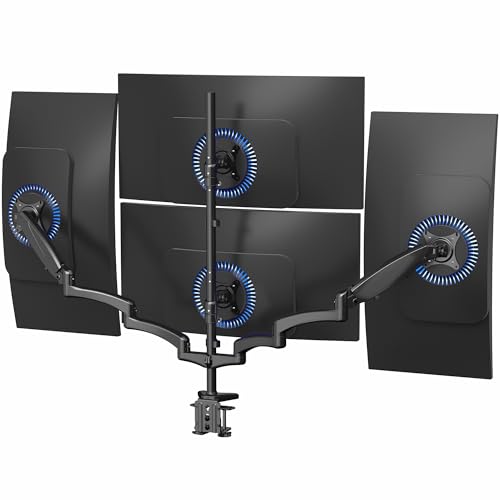
If you need a reliable solution for mounting multiple monitors, the VIVO Quad Pneumatic Monitor Mount is designed specifically for setups with four screens up to 32 inches each. This sturdy mount supports up to 17.6 lbs per monitor and is compatible with VESA 75x75mm or 100x100mm mounting holes. Thanks to dual side pneumatic arms, you’ll enjoy smooth adjustments, including +90° to -90° tilt, 180° swivel, and 360° rotation. Installation is a breeze with the included hardware, and the drill-free C-clamp keeps your workspace tidy. Save desk space while maximizing your productivity with this efficient monitor mount.
Best For: Professionals and gamers who require a multi-monitor setup for enhanced productivity and immersive experiences.
Pros:
- Versatile Adjustability: Offers a wide range of motion with +90° to -90° tilt, 180° swivel, and 360° rotation for optimal screen positioning.
- Space-Saving Design: Frees up desk space by securely mounting four monitors on a single stand.
- Easy Installation: Comes with all necessary hardware and instructions for a hassle-free setup without the need for drilling.
Cons:
- Weight Limit: Each monitor is limited to a maximum weight of 17.6 lbs, which may not accommodate heavier screens.
- Clamp Installation: Requires a sturdy surface for the C-clamp, which may not be suitable for all desk types.
- Limited Screen Size: Designed for screens up to 32 inches, which may not meet the needs of users with larger monitors.
VIVO Pneumatic Arm Quad Ultrawide Monitor Desk Mount (STAND-V400D)

The VIVO Pneumatic Arm Quad Ultrawide Monitor Desk Mount (STAND-V400D) is an ideal choice for professionals and gamers who require an expansive and flexible workspace. This mount supports up to four ultra-wide screens, including one up to 49 inches and two up to 38 inches, while ensuring durability with its heavy-duty cast aluminum construction. You’ll appreciate the pneumatic arms that allow effortless height adjustments, optimizing your viewing angles with +55° to -25° tilt, 180° swivel, and 360° rotation. Installation is a breeze, thanks to detachable VESA plates and included hardware, making it perfect for any workstation setup.
Best For: Professionals and gamers seeking a versatile and space-efficient monitor setup with the ability to support multiple ultra-wide screens.
Pros:
- Heavy-duty construction ensures durability and stability for large monitors.
- Flexible adjustability with pneumatic arms allows for easy height and angle adjustments.
- Simple installation process with detachable VESA plates and included hardware.
Cons:
- Limited weight capacity for individual arms may restrict the use of heavier monitors.
- Desk clamp compatibility may not suit all desk thicknesses, particularly thicker surfaces.
- Potential for clutter due to multiple monitor setups requiring additional cable management.
VIVO Quad Monitor Desk Mount (STAND-V104A)

For professionals who need to maximize their workspace, the VIVO Quad Monitor Desk Mount (STAND-V104A) is an ideal solution. It supports screens from 13 to 32 inches and holds up to 22 lbs each, making it versatile for various setups. With fully adjustable arms offering +15° to -15° tilt, 180° swivel, and 360° rotation, you can customize each monitor’s position. This mount keeps your desk clutter-free, enhancing multitasking for projects or data analysis. Installation is straightforward, thanks to the drill-free C-clamp or optional grommet mount. Plus, cable clips guarantee an organized appearance, making it a top choice for any workspace.
Best For: Professionals and teams looking to enhance their workspace efficiency with a versatile quad monitor setup.
Pros:
- Fully adjustable arms for customized monitor positioning.
- Space-saving design keeps desks clutter-free, ideal for multitasking.
- Easy installation with drill-free options and included cable management.
Cons:
- May require significant desk space for installation.
- Weight limit of 22 lbs per monitor may not accommodate heavier screens.
- Assembly may be complex for some users without prior experience.
Quad Monitor Mount for 17-32 Inches – Fully Adjustable Heavy Duty 4 Monitor Arm Desk Mount

Need a solution to maximize your workspace with multiple monitors? The Quad Monitor Mount for 17-32 inches is your answer. This heavy-duty arm supports up to four monitors, each weighing up to 22 lbs, ensuring stability and durability. With VESA compatibility and options for clamp or grommet mounting, it fits most desks. You’ll love the adjustable features, allowing tilt, swivel, and rotation for perfect viewing angles. Plus, it saves over 80% of your desktop space, making multitasking effortless. Included cable ties keep your workspace tidy. Elevate your productivity with this versatile monitor mount!
Best For: Professionals and gamers who need a stable and adjustable solution for managing multiple monitors efficiently.
Pros:
- Fully adjustable with tilt, swivel, and rotation for optimal viewing angles.
- Saves over 80% of desktop space, promoting a clutter-free workspace.
- Compatible with both clamp and grommet mounting options, fitting a variety of desk sizes.
Cons:
- May be challenging to install for those unfamiliar with mounting hardware.
- Requires a sturdy desk to support the weight of four monitors.
- Limited to monitors within the 17-32 inch range, which may not accommodate larger screens.
VIVO Quad Monitor Free-Standing Mount (STAND-V004F)

If you’re looking to maximize your workspace with multiple screens, the VIVO Quad Monitor Free-Standing Mount (STAND-V004F) stands out as an ideal choice. This sturdy mount supports four 13 to 30-inch monitors, each weighing up to 17.6 lbs, giving you flexibility and stability. You can easily adjust the tilt, swivel, and rotation, plus switch between portrait and landscape orientations. With a heavy-duty base and integrated cable management, your setup stays organized and secure. Assembly is straightforward, thanks to the included hardware and instructions. It’s a solid option for enhancing productivity in any workspace.
Best For: Those looking to optimize their workspace with multiple monitors for enhanced productivity and organization.
Pros:
- Fully adjustable with tilt, swivel, and rotation capabilities for personalized viewing angles.
- Sturdy design with a heavy-duty base ensures stability and safety for multiple screens.
- Easy assembly with included hardware and clear instructions for quick setup.
Cons:
- Limited to screens between 13 to 30 inches, which may not accommodate larger monitors.
- Weight capacity of 17.6 lbs per screen may restrict usage with heavier displays.
- May require significant desk space due to its size and base dimensions.
monTEK Quad Monitor Stand Mount for 4 Screens (17”-32”)
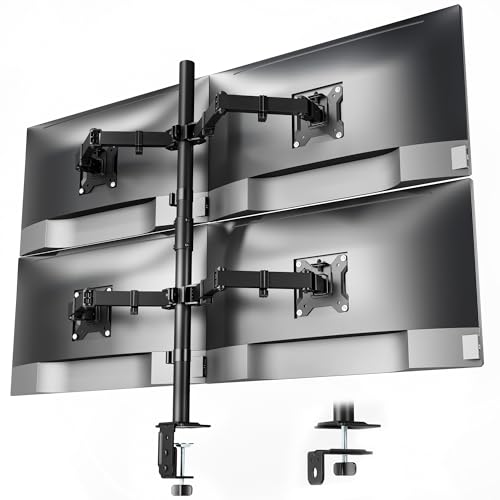
The monTEK Quad Monitor Stand Mount is ideal for professionals and gamers who require multiple screens for enhanced productivity and immersive experiences. It supports four displays ranging from 17” to 32”, with each arm holding up to 22 lbs. Its space-saving design declutters your desk, while integrated cable organizers keep your setup tidy. Enjoy ergonomic adjustability with a full range of motion—tilt, swivel, and rotate your monitors effortlessly to reduce strain. Installation is a breeze with included C-clamp or grommet options, and you can have everything set up in about 20 minutes. Elevate your workspace with this sturdy, stylish mount.
Best For: Professionals and gamers who need multiple screens for enhanced productivity and immersive experiences will find the monTEK Quad Monitor Stand Mount ideal.
Pros:
- Space-saving design declutters desks and enhances usable workspace.
- Ergonomic adjustability allows for a full range of motion, reducing neck and eye strain.
- Easy installation with C-clamp or grommet options and quick-release VESA plates.
Cons:
- May require significant desk space to accommodate four monitors.
- Each arm supports a maximum weight of 22 lbs, which may limit monitor options.
- Initial assembly may be challenging for those unfamiliar with mounting hardware.
Factors to Consider When Choosing 4 Monitor Mounts With Adjustable Arms
When choosing 4 monitor mounts with adjustable arms, you’ll want to take into account several key factors. Screen size compatibility and weight capacity are essential to guarantee your monitors fit securely. Additionally, look into adjustability features, mounting options, and how space-efficient the setup will be in your workspace.
Screen Size Compatibility
Choosing a 4 monitor mount means considering screen size compatibility to guarantee a seamless setup. Most mounts support screen sizes ranging from 13 to 32 inches, so you’ll want to verify your monitors fall within this range. Check for VESA mounting hole compatibility, typically 75x75mm or 100x100mm, to properly attach your screens. Additionally, consider the adjustability features of the arms, like tilt, swivel, and rotation, which can greatly enhance your viewing angles and reduce strain on your neck and eyes. It’s also essential to accommodate the maximum height and extension needed for ideal ergonomic positioning in your workspace. With these factors in mind, you’ll create a comfortable and efficient multi-monitor environment.
Weight Capacity
Understanding weight capacity is essential for a successful 4 monitor mount setup. When you select a mount, check the weight capacity of each arm, usually between 17.6 to 22 lbs per monitor. This guarantees your screens are safely supported. Keep in mind that the combined weight of all four monitors should not exceed the total load capacity, often requiring a mount rated for over 88 lbs for heavier setups. Exceeding these limits can cause instability, damage your monitors, and lead to wear on the mount’s mechanisms. Don’t forget to include the weight of additional accessories, like cables and extra arms, in your calculations. Always verify your monitor’s weight against the mount’s specifications for peak performance and safety.
Adjustability Features
Adjustability features are essential for maximizing the functionality of your 4-monitor setup. Look for mounts that offer tilt angles ranging from +90° to -90°. This allows you to customize your viewing angle for comfort and reduced glare. Swivel capabilities of up to 180° make it easy to reposition monitors for collaboration or presentations without moving the entire mount. Additionally, consider mounts with 360° rotation, enabling you to switch between landscape and portrait orientations effortlessly. Height adjustment options along the center pole let you position monitors at eye level, promoting ergonomic viewing and reducing neck strain. Some models even feature non-hole height adjustment systems, allowing precise monitor alignment without extra tools. These features enhance your workspace’s flexibility and comfort.
Mounting Options
When it comes to selecting a 4-monitor mount with adjustable arms, you’ll want to contemplate various mounting options that best fit your workspace. Consider whether you prefer a C-clamp or grommet mount, as their compatibility with your desk’s thickness and structure can impact stability. C-clamp mounts typically fit desks ranging from 0.2 to 3.94 inches thick, while grommet mounts require specific hole sizes, usually between 0.39 to 2.95 inches. Look for mounts with detachable designs for easier monitor attachment and quick adjustments. Verify the base design provides stability, especially when supporting multiple heavy monitors. Don’t forget integrated cable management features; they’re essential for keeping your workspace organized and functional, enhancing both aesthetics and usability.
Space Efficiency
Choosing the right 4-monitor mount can greatly enhance your workspace’s space efficiency, especially if you’re looking to maximize every inch of your desk. A quad monitor mount can save over 80% of desktop space by lifting your monitors off the surface, creating a clutter-free workstation. Look for designs that include integrated cable management systems to neatly conceal and organize wires, improving the overall look of your setup. Adjustable arms allow you to position monitors at ideal viewing angles without taking up additional desk space. With options for vertical stacking or horizontal alignment, you can efficiently use available space while ensuring ergonomic comfort. A solid base design further supports multiple arms, freeing up valuable real estate for other essentials.
Stability and Construction
A sturdy 4-monitor mount is vital for maintaining stability and guaranteeing your setup remains secure. When choosing one, look for high-grade steel or aluminum construction to support your monitors effectively. Each arm should have a weight capacity of 17.6 lbs to 22 lbs to prevent sagging. A heavy-duty base design is essential for free-standing mounts, reducing the risk of tipping during adjustments. Integrated cable management systems help organize wires and minimize clutter, contributing to overall stability. Additionally, consider mounts with adjustable options like C-clamp or grommet mounts to guarantee compatibility with various desk thicknesses, which enhances your setup’s stability. Prioritizing these factors will help you create a reliable and organized workspace.
Assembly Process
Stability and construction are just the beginning; the assembly process plays a significant role in your experience with a 4-monitor mount. Most quad monitor mounts come with clear instructions and all necessary hardware, allowing you to set up quickly—often within 20 minutes. Look for models with detachable VESA plates, as they simplify monitor attachment and removal, enhancing convenience during installation. Additionally, consider mounts offering multiple mounting options, like C-clamp or grommet mounts, which accommodate various desk thicknesses for customizable installation. Before starting, verify all parts are labeled and included in the package to avoid any delays. Most mounts are designed for user-friendly assembly, typically requiring no specialized tools beyond what’s provided in the hardware kit.
Cable Management Solutions
How can effective cable management transform your workspace? It can enhance aesthetics by concealing and organizing wires, eliminating clutter around your monitors. When choosing a quad monitor mount, look for models with integrated cable clips or channels that keep cords neatly aligned and prevent tangling. Adjustable arms often allow you to route cables along them, further streamlining your setup. Some mounts even come with reusable cable ties or management sleeves, giving you the flexibility to customize your organization. Proper cable management not only improves visual appeal but also enhances safety by minimizing trip hazards from loose cables on your desk. Investing in a good cable management solution is essential for a clean and efficient workspace.