
Buying your first scanner can be overwhelming, especially when specs, software, and object size limits all start to matter at once. This roundup focuses on beginner-friendly options that make it easier to get reliable scans without a steep learning curve.
Whether you want to scan small parts for 3D printing, capture larger objects, or use wireless handheld scanning, these picks are aimed at helping new users choose with confidence.
Best 10 3d Scanner for Beginners Picks for 2026
Entry-Level NIR Scanner
3DMakerpro Fox for Small to Medium Objects

- Up to 0.07mm accuracy with NIR light
- Markerless tracking and anti-shake help stability
- Supports 40mm to 1200mm objects and common export formats
Best For: Beginners who can handle a learning curve and want a practical desktop scanner
Wireless Beginner Pick
Creality Ferret Pro with WiFi 6

- Up to 0.1mm accuracy with 30FPS scanning
- WiFi 6 and anti-shake tracking simplify workflow
- Supports Android, iPhone, and PC use
Best For: Beginners who want wireless handheld scanning and broad device compatibility
High-Detail Starter Scanner
3DMakerpro Seal Lite for Small Objects

- Up to 0.02mm accuracy for fine detail
- Designed for 10mm to 300mm indoor scanning
- Includes JMStudio tools plus tripod and turntable
Best For: Beginners focused on small, indoor objects and fine detail
Easy Color Scanner
Creality Ferret SE for PC Users
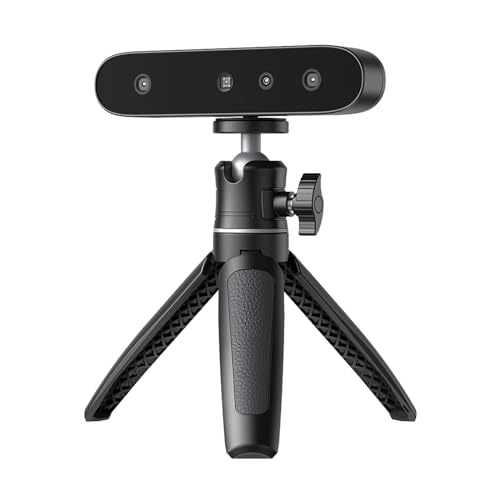
- Anti-shake tracking helps steady handheld scans
- 24-bit full-color capture with a 2MP camera
- Scans black and metal objects without spraying
Best For: Beginners who want an easy PC-only scanner with color capture
Premium AI 3D Scanner

- Up to 0.03 mm single-frame accuracy
- AI segmentation helps clean up scans
- Five modes for indoor and outdoor use
Best For: Beginners who want premium accuracy and room to grow
Entry-Level Medium-Format Scanner

- Designed for beginners and hobbyists
- 0.07 mm accuracy and 0.10 mm resolution
- Markerless AI tracking and JMStudio workflow
Best For: Beginners who want an approachable handheld scanner for everyday projects
Standard AI 3D Scanner

- High accuracy for printing and modeling
- AI segmentation reduces cleanup effort
- Five scan modes cover many object types
Best For: Beginners who want a versatile scanner with premium-level features
Editor Pick
3DMakerpro Moose Lite Premium Kit

- 0.05mm claimed accuracy, 0.1mm resolution
- AI visual tracking with JMStudio workflow
- Lightweight 250g body with quiet operation
Best For: Beginners who want detailed scans for medium objects
Best Beginner-Friendly Wireless

- Beginner-focused setup with quick start guidance
- WiFi 6 wireless scanning across phone and PC
- 0.1mm accuracy with full-color capture
Best For: Entry-level users who want portable wireless scanning
Most Versatile Starter

- WiFi 6 wireless scanning and PC-to-mobile streaming
- Dual structured light and laser scan modes
- Up to 0.05mm accuracy, outdoor scans up to 20,000 lux
Best For: Beginners who want a flexible scanner for tougher materials and outdoor use
Entry-Level NIR Scanner – 3DMakerpro Fox for Small to Medium Objects
If you want a 3d scanner for beginners and are willing to learn the workflow, the 3DMakerpro Fox is built as an accessible path into desktop scanning. Its markerless tracking, NIR light, and support for small to medium objects make it practical for 3D printing, STEM projects, and DIY prototyping.
Best For: Beginners who want an entry-level scanner for small to medium objects and can handle a learning curve.
Pros:
- Up to 0.07mm accuracy with safe NIR light for face and body scanning.
- Markerless tracking and anti-shake help simplify setup and improve stability.
- Works on objects from 40mm to 1200mm, with export options like OBJ, STL, PLY, and ASC.
- JMStudio includes scanning, editing, fusion, and export tools in one workflow.
Cons:
- Results depend on patience and a real learning curve.
- Best use assumes some CAD or 3D modeling knowledge for refinement and slicing.
- Requires a capable PC, with a dedicated GPU strongly recommended.
The Fox is a sensible starter option if you want a beginner-friendly scanner without expecting instant, plug-and-play perfection. It offers a strong feature set for the price, but it still rewards users who take time to practice and learn the software.
Wireless Beginner Pick – Creality Ferret Pro with WiFi 6
The Creality CR-Scan Ferret Pro is a strong 3d scanner for beginners if you want faster setup and more flexibility from the start. With WiFi 6 transmission, anti-shake tracking, and support for iOS, Android, and PC, it is aimed at users who want a smoother path into handheld scanning.
Best For: Beginners who want a wireless handheld scanner with broad device support and easy scanning behavior.
Pros:
- Up to 0.1mm accuracy, 0.16mm resolution, and 30FPS scanning speed.
- WiFi 6 bridge offers faster, more stable wireless data transfer.
- Anti-shake tracking and one-shot imaging help improve scan success rates.
- Supports OBJ, STL, and PLY export, plus outdoor scanning in ambient light up to 30,000 lux.
Cons:
- Not ideal for highly reflective, transparent, or very dark surfaces.
- Best wireless use depends on compatible mobile devices and the bridge accessory.
- Performance requirements are specific, especially for Windows, macOS, Android, and iPhone use.
This is a good pick if you value mobility and fewer setup headaches more than maximum resolution. For beginners, the mix of wireless convenience and anti-shake support makes it easier to get usable scans without feeling overly technical.
High-Detail Starter Scanner – 3DMakerpro Seal Lite for Small Objects
If your 3d scanner for beginners shopping list is focused on small objects and fine detail, the 3DMakerpro Seal Lite stands out with its blue LED structured light and very high claimed accuracy. It is designed for indoor use and smaller items, making it a specialized option for users who want detailed scans and are willing to practice.
Best For: Beginners who want to scan small objects with high detail and can work indoors with a capable PC.
Pros:
- Up to 0.02mm accuracy for capturing tiny dents and edge textures.
- Small-format scanning covers objects from 10mm to 300mm.
- JMStudio adds visual tracking, error correction, auto-alignment, and export tools.
- Includes tripod and turntable, which can help with stable scanning.
Cons:
- Indoor use is suggested, so it is less flexible than outdoor-friendly options.
- Monochrome texture only, so it does not capture full color.
- Has a learning curve and needs a relatively powerful PC to run smoothly.
Seal Lite is best viewed as a detail-first scanner rather than a casual all-around choice. Beginners who are patient and focused on small items may appreciate its precision, but the software and hardware requirements make it less forgiving than simpler models.
Easy Color Scanner – Creality Ferret SE for PC Users
The Creality CR-Ferret SE is a practical 3d scanner for beginners who want simple start-up, handheld convenience, and full-color capture. Its anti-shake tracking and one-shot imaging are designed to make scanning more forgiving, while the color camera helps produce lifelike models for compatible PC workflows.
Best For: Beginners who want an easy-to-start PC scanner with color capture and stable handheld scanning.
Pros:
- Anti-shake tracking helps compensate for unsteady hands.
- 24-bit full-color scanning with a 2MP camera captures original object colors.
- Can scan black and metal objects without spraying, which is useful for cars and parts.
- Lightweight at 105g and designed for simple start-up with a click.
Cons:
- PC scanning only, so it is less flexible than mobile-capable models.
- Does not include a battery handle.
- Performance details still require a compatible Windows setup with at least 8GB RAM.
Ferret SE is a straightforward entry point if you want color scanning and easy handling without paying for wireless features. It makes sense for beginners who plan to stay on a PC and want a lighter, more approachable scanner for everyday projects.
Premium AI 3D Scanner – Revopoint POP 4
If you want a 3d scanner for beginners that still leaves room to grow, the Revopoint POP 4 is a strong premium pick. It combines high accuracy, fast scanning, and AI-assisted cleanup, so new users can get usable results without fighting post-processing as much.
Best For: Beginners who want a beginner-friendly scanner that can also handle serious 3D printing, reverse engineering, and outdoor scanning projects.
Pros:
- Single-frame accuracy up to 0.03 mm, with multiple scan modes for detailed capture.
- AI object segmentation can identify and track the target while filtering background noise.
- Five scanning modes cover small parts, large objects, dark surfaces, and reflective materials.
- Wireless scanning support and live cross-screen preview add convenience in the field.
Cons:
- Several advanced features are aimed at more experienced workflows.
- Outdoor scanning may require the separately sold outdoor filter for best results in bright light.
Overall, the POP 4 is the most capable option here if you want a 3d scanner for beginners that can scale into more demanding work. It is especially appealing if you care about accuracy, versatility, and cleaner scans with less manual sorting.
Entry-Level Medium-Format Scanner – 3DMakerpro Fox
The 3DMakerpro Fox is a practical 3d scanner for beginners who want an easier way into medium-format scanning. Its entry-level positioning, markerless AI tracking, and bundled JMStudio software make it a straightforward choice for hobbyists who want decent detail without a steep learning curve.
Best For: New users and hobbyists who want accessible handheld scanning for 3D printing, modeling, and basic inspection.
Pros:
- Entry-level design is aimed directly at beginners and hobbyists.
- 0.07 mm accuracy and 0.10 mm resolution are strong for this class.
- Markerless AI visual tracking helps the scanner relock quickly if you lose your position.
- JMStudio combines scanning, editing, and optimizing in one workflow.
Cons:
- It is positioned for medium-format scanning, so very large projects may need a different tool.
- Still expects you to learn handheld scanning technique for best results.
For beginners who want a simpler path into scanning, the Fox focuses on the essentials: usable detail, software support, and a forgiving tracking system. It is a solid middle ground if you want something more capable than the most basic starter scanners.
Standard AI 3D Scanner – Revopoint POP 4
The standard Revopoint POP 4 is a strong 3d scanner for beginners if you want premium features without moving into the more expensive accessory bundle. It offers the same core scan performance, AI segmentation, and multi-mode flexibility as the premium version, making it a very capable option for learning and growing into more advanced jobs.
Best For: Beginners who want advanced scanning features, strong accuracy, and a versatile setup for printing or modeling.
Pros:
- High-end accuracy specs support detailed 3D printing and reverse engineering.
- AI object segmentation helps keep scans cleaner and reduces background noise.
- Five scanning modes handle small, large, dark, and reflective objects.
- Wireless WiFi 6 support adds convenience for live preview and mobile control.
Cons:
- Some outdoor functionality depends on separately sold accessories.
- Advanced feature set may be more than a very casual beginner needs.
If you want a beginner-friendly scanner that still feels close to pro-level capability, the POP 4 standard is an easy recommendation. It is especially compelling when you value versatility, accuracy, and a smoother path from beginner to advanced use.
Editor Pick – 3DMakerpro Moose Lite Premium Kit
If you want a 3d scanner for beginners that still aims at fine detail, the 3DMakerpro Moose Lite Premium Kit is built around simple AI tracking and high claimed precision. It combines handheld portability with JMStudio’s scan, edit, and optimize workflow, which can help new users move from capture to print-ready models without juggling too many tools.
Best For: Beginners who want a lightweight scanner for medium objects and detailed 3D printing projects.
Pros:
- 0.05mm claimed accuracy and 0.1mm resolution for detailed scans
- AI visual tracking and point-cloud processing make scanning more approachable
- JMStudio combines scanning, editing, and optimizing in one workflow
- Lightweight 250g design with no fan noise
Cons:
- Best suited to medium objects rather than very tiny subjects
- Workflow still depends on learning scanning software basics
Overall, this is a strong pick if your priority is getting detailed results without moving straight into a heavy professional setup. Its software integration and AI assistance make it one of the more beginner-friendly ways to start scanning for printing or display.
Best Beginner-Friendly Wireless – Creality CR-Scan Ferret Pro
The Creality CR-Scan Ferret Pro is a practical 3d scanner for beginners because it emphasizes easy setup, wireless scanning, and cross-platform support. With WiFi 6, anti-shake tracking, and full-color capture, it aims to make the first few scans less frustrating for entry-level users, DIY creators, and 3D printing hobbyists.
Best For: New users who want a portable, wireless scanner that works across phone and PC workflows.
Pros:
- Designed for beginners with quick start guidance and simple practice
- Wireless scanning via WiFi 6 with Android, iOS, Windows, and macOS support
- 0.1mm claimed accuracy and 24-bit full-color scanning
- Very lightweight at 105g and includes a travel-friendly kit
Cons:
- Not suited to very small or highly detailed objects like jewelry
- Best results require avoiding reflective, transparent, or very dark surfaces
For beginners who value convenience over maximum detail, Ferret Pro is an easy model to recommend. Its wireless workflow, broad device support, and included accessories make it feel ready to use without much extra setup.
Most Versatile Starter – Revopoint INSPIRE 2
If you are shopping for a 3d scanner for beginners but want room to grow, the Revopoint INSPIRE 2 offers a flexible mix of wireless scanning, dual scanning modes, and guided software. It is positioned to handle more challenging surfaces and outdoor conditions than many starter models, while still keeping the unit lightweight and portable.
Best For: Beginners who want a portable scanner that can handle more demanding materials and environments.
Pros:
- Built-in WiFi 6 supports wireless mobile scanning and PC-to-mobile streaming
- Dual scanning modules cover structured light and multi-line laser modes
- Up to 0.05mm accuracy and 0.03mm precision for detailed models
- Works outdoors up to 20,000 lux and weighs only 190g
Cons:
- Revo Design is sold separately and supports Windows only
- More capable feature set may feel more complex than the simplest starter scanners
INSPIRE 2 stands out if you want a beginner-friendly scanner that does not box you into one type of project. Its surface handling, outdoor support, and software workflow make it a strong stepping stone for users planning to tackle a wider range of scans.
How We Picked the Best 3d Scanner for Beginners
For this roundup, we prioritized models that are easier to set up, forgiving in day-to-day use, and practical for first-time owners. We looked at scan accuracy, tracking stability, software simplicity, object-size flexibility, and whether the scanner is a good fit for common beginner tasks like 3D printing and hobby modeling.
We also considered features that reduce frustration, such as anti-shake tracking, wireless operation, and support for a wide range of materials and surfaces. A strong 3d Scanner for Beginners should help you get usable results quickly, not just look good on paper.
Quick Comparison
In general, handheld scanners are the most flexible choice if you want to scan objects of different sizes. Desktop or compact models tend to be easier for smaller items and more controlled setups. Higher-resolution scanners are useful for detailed parts, but newer users often benefit more from stable tracking and simple workflow than from chasing the lowest possible accuracy spec.
If your main goal is 3D printing, choose a scanner that balances detail with ease of cleanup in your software. If you plan to scan larger objects or move around a workspace, wireless and anti-shake features can make the learning curve much easier.
Key Buying Factors for a 3d Scanner for Beginners
Ease of Setup and Software
Look for scanner software that guides you through calibration, capture, and export with minimal manual tweaking. A clean workflow matters more than advanced controls when you are starting out.
Tracking Stability
Anti-shake tracking, marker-free scanning, and reliable frame alignment help prevent failed scans. Beginners usually get better results from scanners that are forgiving when hand movement is not perfect.
Object Size and Scan Range
Choose a scanner based on what you actually want to digitize. Small-format models are better for miniatures, figurines, and parts, while medium-format and flexible handheld scanners handle larger objects more comfortably.
Accuracy and Detail
More accuracy is helpful for fitment, reverse engineering, and printable parts, but it is only one part of the equation. A slightly less precise scanner that is easier to use may produce better real-world results for a beginner.
Lighting and Surface Support
Some scanners handle dark, glossy, or textured surfaces better than others. If you plan to scan black plastic, reflective finishes, or mixed materials, this should be near the top of your checklist.
Who Should Buy Which 3d Scanner for Beginners?
If you want the easiest entry into scanning for 3D printing, choose a beginner-focused handheld model with stable tracking and broad object support. If your projects are small and detail-heavy, a higher-accuracy compact scanner makes more sense. If you need more freedom around the workspace, wireless scanning is worth the upgrade.
For most first-time buyers, the best choice is the scanner that matches your object size, your workspace, and how much time you want to spend learning the workflow. That approach will matter more than chasing one standout spec.