
If you’re considering a 240mm AIO liquid cooler in 2026, you’ve got some impressive options. The market has evolved, offering coolers that not only excel in performance but also cater to aesthetic preferences. Each model brings unique features that could enhance your gaming or productivity setup. Curious about which coolers made the cut and what sets them apart? Let’s explore the top contenders.
ARCTIC Liquid Freezer III Pro 240 mm AIO CPU Cooler

If you’re looking for a powerful and efficient cooling solution for your CPU, the ARCTIC Liquid Freezer III Pro 240 mm AIO CPU Cooler is an excellent choice. It features a 240 mm radiator and an optimized design that enhances heat dissipation, extending your CPU’s lifespan. With compatibility for Intel LGA1851, LGA1700, and AMD AM5, AM4 sockets, it fits most setups. The ARCTIC P12 Pro fan operates quietly at low speeds while delivering high performance under load. Plus, its integrated cable management keeps your build clean, with just one visible cable connecting to your motherboard for a sleek appearance.
Best For: The ARCTIC Liquid Freezer III Pro 240 mm AIO CPU Cooler is best for gamers and PC builders looking for high-performance cooling solutions that maintain a clean aesthetic.
Pros:
- Optimized design enhances heat dissipation, extending CPU lifespan.
- Quiet operation at low speeds and high performance under load with ARCTIC P12 Pro fan.
- Integrated cable management for a cleaner and more organized build.
Cons:
- Installation may require additional effort compared to air coolers.
- Larger radiator size may not fit in all cases, limiting compatibility.
- Premium price point compared to basic air coolers.
CORSAIR Nautilus 240 RS ARGB Liquid CPU Cooler

The CORSAIR Nautilus 240 RS ARGB Liquid CPU Cooler stands out as the ideal choice for gamers and content creators seeking powerful cooling performance without the noise. With its 240mm AIO design and whisper-quiet operation at just 20 dBA, you’ll enjoy enhanced performance without distraction. Its efficient pump and convex cold plate maximize CPU contact, ensuring peak thermal management. Featuring two RS120 ARGB fans, you get strong airflow and static pressure, plus customizable lighting via your motherboard. The easy installation and daisy-chain capability simplify your setup, letting your CPU reach its full potential with minimal fuss.
Best For: Gamers and content creators seeking high-performance cooling with minimal noise interference.
Pros:
- Whisper-quiet operation at just 20 dBA, enhancing the user experience.
- Strong airflow and static pressure from two RS120 ARGB fans, improving thermal management.
- Easy installation with pre-applied thermal paste and daisy-chain capability for simplified wiring.
Cons:
- Limited compatibility with specific Intel and AMD CPU socket types.
- ARGB control requires a compatible motherboard, which may limit customization options for some users.
- AIO design may not appeal to users who prefer custom cooling solutions.
Thermalright Aqua Elite 240 V3 Water Cooling CPU Cooler

Designed for gamers and PC enthusiasts seeking top-tier cooling performance, the Thermalright Aqua Elite 240 V3 Water Cooling CPU Cooler excels with its fourth-generation pump head and unique octagonal design. Compatible with both AMD and Intel platforms, it features a 240mm black aluminum fin heat sink and protective mesh water pipe. The dual TL-C12B-S V2 fans deliver impressive airflow while operating quietly. With customizable ARGB lighting and easy installation, you’ll enjoy both aesthetics and efficiency. The pump’s longevity of up to 40,000 hours guarantees your system stays cool during intense sessions, making it a solid choice for any build.
Best For: Gamers and PC enthusiasts seeking efficient cooling performance and customizable aesthetics in their builds.
Pros:
- High cooling efficiency with a fourth-generation pump and unique octagonal design for enhanced heat dissipation.
- Quiet operation with fans that produce noise levels as low as 23 dBA while maintaining good airflow.
- Customizable ARGB lighting that syncs with other components for an improved visual experience.
Cons:
- Size limitations may not fit in smaller cases due to the 240mm radiator requirement.
- Potential complexity during installation for users unfamiliar with water cooling systems.
- Higher price point compared to traditional air coolers, which may not be justifiable for all users.
Aqua Elite 240 V6 ARGB Liquid CPU Cooler
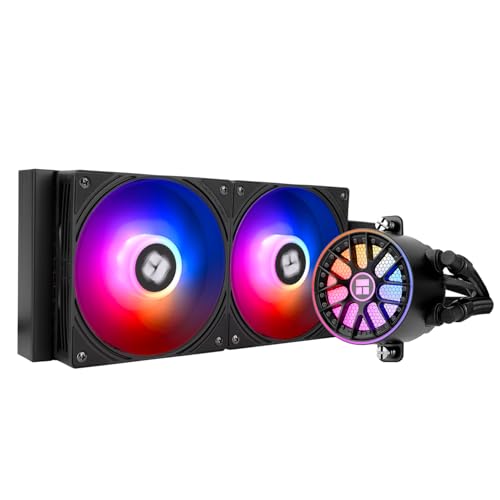
For gamers and PC enthusiasts seeking high-performance cooling solutions, the Aqua Elite 240 V6 ARGB Liquid CPU Cooler stands out with its efficient airflow output of up to 70.84 CFM. This 240mm AIO cooler offers compatibility with both AMD and Intel sockets, guaranteeing versatility for your build. Its enhanced heat dissipation features a robust 240mm radiator, effectively cooling the latest CPUs. The ARGB lighting adds a stunning aesthetic, easily synchronized with your motherboard. Plus, the stable FDB magnetic bearings assure a long fan life. Installation is straightforward, thanks to included accessories and detailed guidance, making it a smart choice for any setup.
Best For: Gamers and PC enthusiasts seeking a high-performance cooling solution for their builds.
Pros:
- Efficient airflow output of up to 70.84 CFM for optimal cooling.
- Stunning ARGB lighting that can be synchronized with the motherboard.
- Easy installation with included mounting accessories and guidance.
Cons:
- AMD installation requires the original backplane from the motherboard.
- Takes up space in the case due to the 240mm radiator size.
- May be overkill for users with lower performance CPUs.
Factors to Consider When Choosing a 240MM AIO Liquid Cooler
When you’re picking a 240mm AIO liquid cooler, several key factors can impact your decision. You’ll want to take into account cooling performance metrics, noise levels, and how easy it is to install. Plus, make certain it’s compatible with your CPU and check out the fan features and design to verify it meets your needs.
Cooling Performance Metrics
Choosing the right 240mm AIO liquid cooler hinges on several cooling performance metrics that can considerably affect your system’s efficiency. First, consider the maximum airflow output, measured in CFM, which guarantees effective heat dissipation from your CPU. Next, pay attention to the pump speed, expressed in RPM; higher speeds generally improve coolant flow and cooling efficiency under load. Additionally, the design of the cold plate plays an essential role in heat transfer; optimized designs enhance thermal conductivity and minimize hotspots. Finally, evaluate the radiator size and surface area, as larger radiators dissipate heat more effectively, especially during intensive tasks. These factors combined will help you select a cooler that meets your performance needs.
Noise Levels Comparison
Cooling performance metrics are just one piece of the puzzle; noise levels also play a considerable role in your experience with a 240mm AIO liquid cooler. You’ll find that noise levels can vary greatly, with some models operating as low as 20 dBA, making them whisper-quiet. Many coolers incorporate advanced fan technologies, such as magnetic bearings and optimized blade designs, to minimize noise while ensuring effective airflow. Look for models featuring PWM (Pulse Width Modulation) control, which adjusts fan speed based on CPU temperature, delivering quieter performance under light loads. Typically, noise levels range from 20 dBA to 23 dBA, and higher-end models often excel in low-speed operation, creating a more stable and distraction-free computing environment.
Installation Ease
Considering the variety of 240mm AIO liquid coolers available, installation ease is an essential factor that can greatly impact your overall experience. Look for coolers that come with pre-applied thermal paste; this saves time and simplifies the setup. Models that offer clear installation instructions and video tutorials can make the mounting process smoother, especially if you’re new to liquid cooling. Additionally, consider options with daisy-chain capabilities for fan connections, as they help minimize wiring clutter. Verify the cooler includes necessary mounting accessories compatible with both Intel and AMD sockets for versatility. Finally, evaluate the design for easy access to screw holes and mounting points, making your installation straightforward and hassle-free.
Compatibility With CPUS
Compatibility with your CPU is vital when selecting a 240mm AIO liquid cooler. First, verify the cooler matches your CPU socket type, like Intel LGA1700, LGA1851, or AMD AM4/AM5. Each cooler has specific mounting features, so check that it supports the necessary brackets or adapters for your CPU platform. Also, consider the cooler’s thermal performance in relation to your CPU’s TDP (Thermal Design Power) rating to prevent overheating. It’s important to choose a cooler that offers optimized contact pressure and heat dissipation tailored for your CPU architecture. By taking these factors into account, you can guarantee a perfect fit and efficient cooling performance for your system.
Fan Features and Design
When selecting a 240mm AIO liquid cooler, fan features and design play an important role in ensuring peak performance. Look for dual fans that can operate at speeds up to 1500 RPM or higher, providing ideal cooling. High static pressure and airflow ratings, typically around 66-70 CFM, are vital for effective heat dissipation, especially under load. Many coolers utilize PWM (Pulse Width Modulation) control, allowing fans to adjust their speed automatically based on CPU temperature, reducing noise while maximizing efficiency. Additionally, consider fans with magnetic bearings, as they can greatly lower noise levels and enhance longevity. These features collectively contribute to a quieter and more effective cooling solution for your system.
Aesthetic Options Available
While performance is essential, the aesthetic appeal of a 240mm AIO liquid cooler shouldn’t be overlooked. Many models come equipped with ARGB lighting, allowing you to synchronize colors and effects with your system’s components for a stunning visual experience. You’ll find customizable lighting options, including manual adjustments and pre-set effects, enhancing your build’s overall look. The design of these coolers varies, with sleek black aluminum radiators and fans that fit seamlessly into modern setups. Transparent or semi-transparent fan blades and pump covers can showcase RGB lighting effects, adding a dynamic touch. Investing in a cooler with good cable management features will help reduce clutter, creating a cleaner appearance within your PC case.
Cable Management Solutions
Effective cable management is vital for maintaining a clean and efficient PC build, especially with a 240mm AIO liquid cooler. Good management reduces clutter, improves airflow, and enhances the overall aesthetic. Look for integrated cable management solutions that offer daisy-chaining capabilities, allowing multiple fans to connect through one header, which minimizes visible cables. Some coolers simplify your setup with a single visible cable connection for radiator fan PWM cables, making your system look sleek. Proper cable routing is important too; make certain that cables don’t obstruct fans or airflow pathways, as this can interfere with cooling performance. Many AIO coolers feature pre-installed or integrated cable management systems, making installation easier and more efficient for you.
Price and Budget Considerations
Establishing a budget for your 240mm AIO liquid cooler is essential, especially since prices can vary widely based on brand and features. Start by determining a budget range that aligns with your performance needs. Consider the cost-to-performance ratio; it’s vital to get a cooler that efficiently handles heat, particularly if you plan to overclock your CPU. Don’t overlook additional features like ARGB lighting or advanced fan technology, as these can enhance both aesthetics and cooling efficiency. Also, assess warranty options and customer support, since a longer warranty often means better value. Finally, factor in long-term savings from reduced noise and improved cooling, which can contribute to the longevity of your CPU and cooler.