
Finding a capable color printer on a $300 budget does not mean settling for poor results or complicated setup. This roundup compares compact dye-sublimation photo printers, refillable-tank all-in-ones, and specialty craft machines for different printing needs.
Whether you want instant 4×6 photos, low-cost everyday documents, or custom stickers and labels, the best choice depends on print format, connectivity, running costs, and how often you plan to print.
Best 10 Sublimation Printers Under 300 Picks for 2026
Best Portable Pick
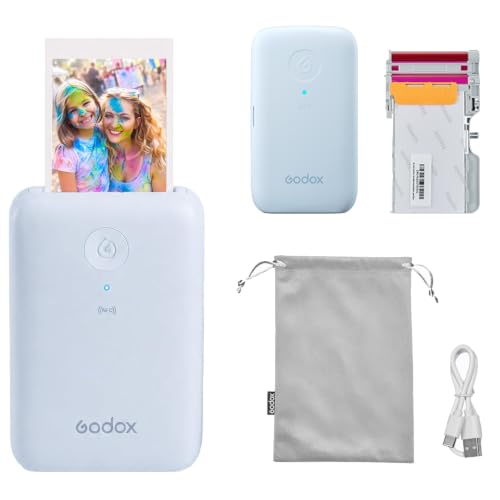
- Portable 3 x 4-inch dye-sublimation printing
- Bluetooth and NFC smartphone connectivity
- Rechargeable battery and laminated prints
Best For: Travel, parties, and compact instant photos
Best 4x6 Bundle

- Standard 4 x 6-inch photo output
- Includes 108 sheets and two ribbons
- Wi-Fi printing with protective lamination
Best For: Home users printing larger photo batches
Best Supply Bundle

- Includes 180 sheets and five cartridges
- 4 x 6-inch, 300-dpi sublimation photos
- Built-in Wi-Fi hotspot supports five devices
Best For: Families and frequent home photo printing
Cartridge-Free Pick

- Refillable EcoTank ink system
- Print, scan, and copy functions
- Wireless connectivity and high resolution
Best For: Home users wanting an economical all-in-one printer
Portable Dual-Format Pick
Liene Amber M110 Photo Printer

- Prints 4x6 photos and 3x3 stickers
- Thermal-dye-sublimation color output
- Includes 80 sheets and two cartridges
Best For: Portable smartphone photo printing and stickers
Compact Wi-Fi Pick

- Compact 4x6-inch dye-sublimation printer
- Direct built-in Wi-Fi connection
- Includes 54 sheets and one ink ribbon
Best For: Home photo printing in a small footprint
Best All-in-One Pick

- Prints and cuts stickers in one device
- AI-assisted image extraction and precision cutting
- 300 DPI laminated, waterproof output
Best For: DIY crafters making custom stickers, labels, and gifts
Best Starter Bundle

- Includes 100 sheets and three cartridges
- Direct Wi-Fi hotspot connection
- Water-resistant, scratch-resistant laminated photos
Best For: Families and casual users printing 4x6 photos
Best Compact Value
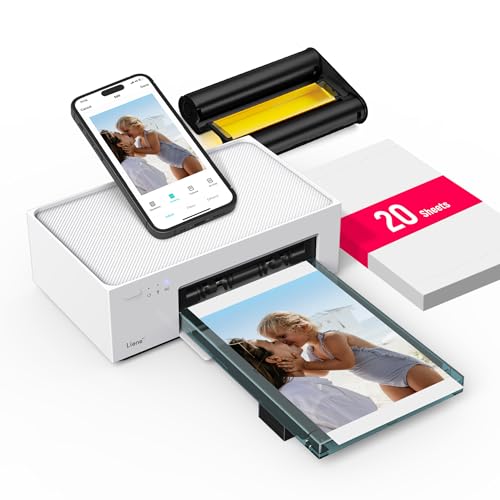
- Compact 4x6 thermal-dye-sublimation printing
- Built-in Wi-Fi hotspot for direct connections
- Includes 20 sheets and one cartridge
Best For: Casual home users printing smartphone photos and ID pictures
Best Portable Pick – Godox P100 Photo Printer
If you want sublimation printers under 300 for quick, portable snapshots, the Godox P100 is built around convenience. It produces 3 x 4-inch, 300-dpi color photos from a smartphone using Bluetooth or NFC, with an app for basic personalization.
Best For: Travelers, parties, and smartphone users who want small instant prints.
Pros:
- Compact 320-gram design with a rechargeable USB-C battery
- Bluetooth and NFC pairing simplify wireless printing
- Automatic lamination helps resist dust, water, and fingerprints
- Godox Cam app includes filters, stickers, frames, collages, and ID presets
Cons:
- Maximum print size is limited to 3 x 4 inches
- Print speed is listed at approximately one color page per minute
The P100 is a strong fit when portability matters more than print size. Its all-in-one cartridge and wireless setup make it practical for casual photo printing away from a desk.
Best 4×6 Bundle – HPRT CP4100-W Photo Printer
Among sublimation printers under 300, the HPRT CP4100-W stands out as a practical 4 x 6-inch desktop option. It uses Wi-Fi printing and includes 108 sheets of photo paper plus two ribbons, giving you supplies for immediate use.
Best For: Home users who want standard-size photos and a generous starter bundle.
Pros:
- Prints standard 4 x 6-inch photos at 300 dpi
- Includes 108 sheets and two ribbons
- Thermal dye-sublimation printing adds vivid color
- Automatic lamination helps protect prints from dust, fingerprints, and water
Cons:
- Requires a power connection rather than a built-in rechargeable battery
- Setup involves the Heyphoto app, Wi-Fi, paper, and ribbon loading
The CP4100-W makes sense for regular home photo printing when you prefer 4 x 6-inch output and included consumables. Its Wi-Fi workflow is convenient, though the initial setup has several steps.
Best All-in-One Alternative – Epson EcoTank ET-2803
The Epson EcoTank ET-2803 is not a dye-sublimation photo printer, but it may suit shoppers comparing sublimation printers under 300 with broader home-office needs. Its refillable ink tanks, scanner, copier, Wi-Fi, and support for multiple paper sizes make it more versatile than a dedicated snapshot printer.
Best For: Homes, students, and offices needing printing, scanning, and copying in one device.
Pros:
- Cartridge-free refillable ink-tank design
- Includes a flatbed scanner and copying functions
- Supports Wi-Fi, USB, AirPrint, voice printing, and the Epson Smart Panel app
- Handles sizes from 4 x 6 inches through legal and user-defined media
Cons:
- Uses inkjet technology rather than dye sublimation
- It is larger and less portable than the dedicated photo printers here
Choose the ET-2803 when flexibility and potentially lower replacement-ink frequency matter more than sublimation-specific output. It is the most capable general-purpose machine in this group, but it is not the direct choice for dye-sublimation printing.
Best Supply Bundle – Liene M100 4×6 Photo Printer
For shoppers seeking sublimation printers under 300 with supplies included, the Liene M100 bundle is designed for sustained 4 x 6-inch photo printing. It includes 180 sheets and five ink cartridges, while its built-in Wi-Fi hotspot lets compatible devices connect directly without relying on a home network.
Best For: Families and home users who want a large starter supply of standard-size photo media.
Pros:
- Produces vibrant 4 x 6-inch dye-sublimation prints at 300 dpi
- Bundle includes 180 sheets and five ink cartridges
- Built-in Wi-Fi hotspot supports direct connections and up to five devices
- Protective finishing helps resist water, scratches, and fading
Cons:
- Designed for 4 x 6-inch prints rather than multiple media sizes
- Uses cartridges and paper specific to the bundle and printer system
The M100 is a compelling choice when included supplies and direct wireless connectivity are priorities. Its standard 4 x 6-inch format works well for albums, gifts, and everyday family photos.
Cartridge-Free Pick – Epson EcoTank ET-2400
If you are comparing sublimation printers under 300, the Epson EcoTank ET-2400 is worth considering for home users who also need everyday color printing. Its refillable ink-tank design, wireless connectivity, and all-in-one functionality make it a practical option for printing, scanning, and copying.
Best For: Home users and small offices that prioritize low-frequency refills and multipurpose printing.
Pros:
- Cartridge-free EcoTank system uses refillable ink bottles.
- Includes enough ink to print up to 4,500 black-and-white or 7,200 color pages under stated conditions.
- Combines printing, scanning, and copying with Wi-Fi and USB connectivity.
- Prints at up to 5760 x 1440 dpi for sharp text and colorful graphics.
Cons:
- It is an inkjet printer rather than a dedicated thermal-dye-sublimation photo printer.
- Color print speed is listed at up to 5 pages per minute.
- Duplex printing is manual.
The ET-2400 stands out for economical, longer-running home printing rather than specialty photo sublimation. Choose it when an all-in-one printer and refillable ink system matter more than compact photo printing.
Portable Dual-Format Pick – Liene Amber M110 Photo Printer
Among sublimation printers under 300, the Liene Amber M110 is a compact choice for smartphone photo printing. Its thermal-dye-sublimation process supports both 4×6-inch photos and 3-inch square stickers, while Bluetooth pairing and app controls keep the setup simple.
Best For: Phone users who want portable, finished-looking photos and square stickers for sharing or keepsakes.
Pros:
- Supports both 4×6-inch and 3×3-inch sticker paper through a dual-tray design.
- Thermal-dye-sublimation printing produces vibrant photos with a water-, scratch-, fingerprint-, and fade-resistant laminated surface.
- Bluetooth pairs in about 13 seconds and supports multiple connected devices.
- Includes 60 4×6-inch sheets, 20 3-inch square sticker sheets, and two cartridges.
Cons:
- Maximum print size is limited to 4×6 inches or 3×3 inches.
- It is print-only and does not provide scanning or copying.
- It relies on Liene-compatible cartridges and paper.
The M110 is best suited to casual photo output rather than general document printing. Its dual media support and protective photo finish make it especially convenient for mobile snapshots, stickers, and small keepsakes.
Compact Wi-Fi Pick – YOTON YP01 Photo Printer
For shoppers comparing sublimation printers under 300, the YOTON YP01 offers a compact dye-sublimation setup for 4×6-inch photos. Built-in Wi-Fi connects directly with compatible phones without requiring an outside network, and the included paper and ribbon make it ready for initial prints.
Best For: Home users who want a small 4×6 photo printer with direct Wi-Fi and durable-looking prints.
Pros:
- Compact design measures about 7.1 x 4.9 x 2.2 inches and weighs about 970 grams.
- Dye-sublimation printing delivers vivid color and detailed photo texture.
- Built-in Wi-Fi enables direct phone connections, even without internet access.
- Includes 54 sheets of 4×6-inch paper, one ink ribbon, a cassette, and charger.
Cons:
- Supports only 4×6-inch photo output.
- One ribbon prints approximately 40–50 photos, according to the supplied notes.
- It is a print-only device with no scanning or copying functions.
The YP01 is a straightforward choice for small spaces and occasional photo printing. Its direct Wi-Fi and included supplies add convenience, while the 4×6-inch limitation makes it less flexible for larger or varied media.
Best All-in-One Pick – PixCut S1 Sticker Printer
If you want sublimation printers under 300 that can do more than standard photo printing, the Liene PixCut S1 combines thermal dye-sublimation printing with automated sticker cutting. Its 300 DPI output, smartphone app, and AI-assisted workflow make it a practical choice for custom labels, stickers, and small gifts.
Best For: DIY crafters who want one device for printing and precision-cutting stickers, labels, and photo-based projects.
Pros:
- Prints and cuts in one streamlined workflow.
- Uses AI image extraction for edge-following cuts.
- Produces 300 DPI, 16.7-million-color prints.
- Creates laminated, waterproof, and scratch-resistant stickers.
Cons:
- Its sticker-cutting features may be more than needed for simple photo printing.
- At 6.2 pounds, it is less portable than a basic compact photo printer.
The PixCut S1 stands out when versatility matters. It is a strong option for shoppers who want sublimation printing plus integrated cutting, with app-based design tools and no subscription requirement.
Best Starter Bundle – M100 4×6 Photo Printer
Among sublimation printers under 300, this Liene M100 bundle is convenient for shoppers who want to start printing immediately. It includes 100 sheets of 4×6 photo paper and three color cartridges, while its built-in Wi-Fi hotspot supports direct printing from phones without relying on a home network.
Best For: Families and casual photographers who want a ready-to-use 4×6 instant photo printer with extra consumables included.
Pros:
- Includes 100 sheets of photo paper and three cartridges.
- Produces vibrant, laminated prints resistant to water, scratches, fingerprints, and fading.
- Supports up to five simultaneous device connections.
- Works with iOS, Android, Windows, and Mac devices.
Cons:
- Maximum media size is limited to 4×6 inches.
- Uses Liene proprietary cartridges.
- Requires attention to cartridge placement and print-head cleaning if smudges appear.
This M100 package is appealing if included supplies are a priority. Its direct Wi-Fi connection and app editing tools make everyday photo printing straightforward, though it is designed specifically for compact 4×6 output.
Best Compact Value – M100 20-Sheet Photo Printer
For shoppers comparing sublimation printers under 300 for occasional home use, this compact Liene M100 offers simple 4×6 photo printing with thermal dye-sublimation technology. It includes 20 sheets and one cartridge, plus a built-in Wi-Fi hotspot for direct connections from phones and other devices.
Best For: Home users who want an affordable, compact printer for quick smartphone photos, ID pictures, and small print batches.
Pros:
- Creates vibrant 4×6 photos with a protective layer against water, scratches, and fading.
- Connects directly through its built-in Wi-Fi hotspot.
- Supports up to five connected devices.
- Works with iOS, Android, Windows, laptops, and PCs.
Cons:
- Includes only 20 sheets and one cartridge.
- Prints only up to 4×6 inches.
- Requires Liene photo paper and cartridge supplies.
This version is a sensible choice when you want the M100’s core printing features without the larger starter bundle. Its limited media size and included supplies make it better suited to casual photo printing than high-volume use.
How We Picked the Best Sublimation Printers Under 300
We selected these models by comparing their intended use, print technology, supported media sizes, wireless features, included supplies, portability, and overall value. The list includes dedicated photo printers for fast 4×6-inch prints, EcoTank all-in-ones for broader home use, and a specialty cutting machine for sticker and label projects.
Because “sublimation printer” can describe different types of compact thermal photo printers, we focused on practical results for shoppers: photo quality, setup, convenience, supply availability, and the cost of continuing to print after the included paper or cartridges run out.
Quick Comparison
- Best for portable photo printing: Choose a compact Bluetooth or Wi-Fi photo printer that can travel easily and print directly from a phone.
- Best for frequent home printing: Epson EcoTank models are better suited to documents and occasional photos because their refillable tanks can reduce ink costs.
- Best for bundled value: Liene and similar photo printers that include paper and cartridges can be convenient for getting started immediately.
- Best for stickers and labels: A printer-and-cutter such as the Liene PixCut S1 is designed for craft projects rather than ordinary photo printing.
Key Buying Factors for Sublimation Printers Under $300
Print Size and Media Compatibility
Check whether the printer is limited to 4×6-inch photos or supports multiple paper sizes. Dedicated photo printers are convenient but less flexible, while all-in-one models may handle letter-size documents and other media.
Connectivity and Mobile Apps
Bluetooth is useful for direct phone printing at short range, while Wi-Fi usually provides more flexibility across phones, tablets, and computers. Confirm that the companion app supports your operating system and preferred sharing method.
Running Costs
Compare the price of replacement paper, ribbons, ink cartridges, or bottle refills—not just the printer’s purchase price. Bundled supplies can make one model a better initial value, but frequent users should prioritize affordable, readily available consumables.
Portability and Workflow
Compact photo printers work well for events, dorm rooms, scrapbooks, and travel. If you need scanning, copying, document printing, or larger print jobs, a tank-style all-in-one is usually the more practical choice.
Image Quality and Durability
Look for stated resolution, protective photo coatings, and media designed for the printer. Dye-sublimation photo printers generally produce smooth, colorful snapshots, while craft-focused machines add cutting and design functions rather than replacing a general-purpose printer.
Who Should Buy Which Sublimation Printers Under 300?
Choose a portable photo printer if you mainly print phone photos, want quick 4×6 snapshots, or need a compact device for parties and travel. Choose an EcoTank all-in-one if you also print schoolwork, forms, recipes, or household documents and want a larger ink supply.
Choose a bundled Liene, HPRT, YOTON, or Godox option if convenience and included photo media matter most. Choose the PixCut S1 if your priority is making stickers, labels, and personalized craft projects. Before buying, verify paper size, app compatibility, replacement-supply pricing, and whether the product meets your definition of sublimation printing.