
Preserving a family archive takes more than simply digitizing a few snapshots. The right scanner can help you convert prints, documents, albums, and oversized originals into organized digital files while protecting fragile source material.
These 10 photo scanners cover the main archival workflows, including high-volume batch scanning, detailed flatbed capture, portable digitization, and large-format work. Use the guide below to match scanner type, resolution, speed, and software to your collection.
Best 10 Photo Scanners for Archival Collections Picks for 2026
Best High-Volume Pick

- Batch-scans up to 36 photos
- Captures photo fronts and backs
- Wi-Fi, restoration tools, and cloud backup
Best For: Large archival collections and high-volume family photo digitization
Best Simple Photo Feeder

- Scans 4-by-6 photos in about two seconds
- Supports photos up to 8 by 10 inches
- Includes one-click image enhancement
Best For: Straightforward USB scanning of standard-size photo prints
Best Compact All-Rounder

- Compact design for small workspaces
- Duplex scans at up to 30 ppm
- Handles photos, documents, cards, and receipts
Best For: Mixed photo-and-document collections in compact work areas
Best Detail-Focused Flatbed

- 4800 dpi optical resolution
- Flatbed handles photos, artwork, and books
- One-click faded-photo color restoration
Best For: Detailed scans of individual and delicate archival originals
Best Portable Pick
HPPS100 Mobile Photo and Document Scanner

- USB-powered, 3-ounce portable design
- Scans photos and documents from 2 × 2.9 to 8.5 × 14 inches
- Includes HP WorkScan editing and cleanup tools
Best For: Small, mobile scanning jobs at home, work, or in the field
Best for Everyday Use
Epson ES-400 II Duplex Document Scanner

- 50-sheet feeder for batch scanning
- Duplex capture and OCR-enabled searchable PDFs
- Automatic crop, skew, blank-page, and background correction
Best For: High-volume document-heavy archival workflows
Best Photo-Focused Pick
AMBIR Photo Scanner with Cleaning Kit

- 300 or 600 dpi scanning for printed photos
- Handles small, standard, and panoramic photo sizes
- Includes cleaning tools, carrier sheet, and photo organization software
Best For: Mixed-size photo preservation and personal archival collections
Best Slim Archive Scanner

- 4800 x 4800 dpi resolution
- Color restore and dust removal
- USB-C power and data
Best For: Standard-size photos and documents in space-conscious home archives
Best Easy Photo Restoration Scanner

- 4800 dpi optical resolution
- One-click faded-photo restoration
- Removable high-rise lid
Best For: Photo restoration and mixed home archive scanning
Best Large-Format Archive Scanner
VIISAN VF3120 A3 Flatbed Scanner
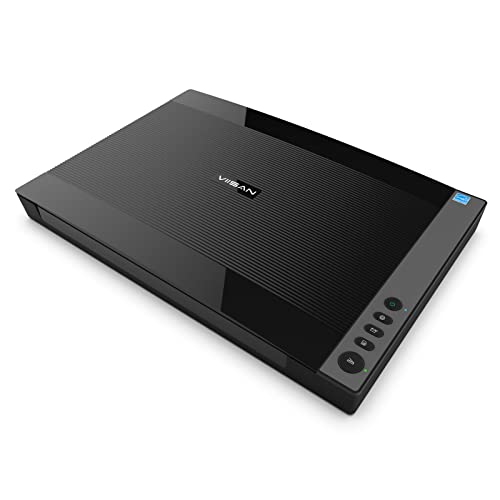
- A3-size scanning area
- 1200 dpi and 48-bit color
- Auto-scan for books and albums
Best For: Large photos, books, artwork, and album pages
Best High-Volume Pick – Epson FastFoto FF-680W
For large archival collections, the Epson FastFoto FF-680W is built to digitize photos quickly without giving up useful preservation features. It can batch-scan up to 36 photos, capture both sides in one pass, and save at resolutions suited to sharing, archiving, or enlarging.
Best For: Families, historians, and archivists digitizing thousands of mixed-size photos and related documents.
Pros:
- Scans photos at up to 1 photo per second at 300 dpi and supports batches of up to 36.
- Duplex scanning captures handwritten notes on the back of photos in the same scan.
- Includes auto enhancement, color restoration, red-eye reduction, de-skew, cropping, and rotation.
- Offers Wi-Fi, USB, OCR document scanning, and Dropbox or Google Drive backup.
Cons:
- The automatic feeder is less suited to unusually fragile or highly delicate originals than careful flatbed handling.
- Its larger 11.7-by-11.7-by-6.9-inch footprint requires dedicated desk space.
The FF-680W is the strongest choice here when throughput matters most. Its carrier sheet and SafeTouch technology add helpful protection, while 600 dpi TIFF and 1200 dpi options support more preservation-focused workflows.
Best Simple Photo Feeder – Plustek ePhoto Z300
The Plustek ePhoto Z300 offers a straightforward way to work through photo archives without repeatedly lifting a scanner lid. It supports common photo sizes from 3-by-5 through 8-by-10 inches, with 300 and 600 dpi settings and quick single-photo feeding.
Best For: Users who want an uncomplicated USB scanner for steadily digitizing standard-size prints.
Pros:
- Scans a 4-by-6 photo in about two seconds and an 8-by-10 photo in about five seconds at 300 dpi.
- Supports 3-by-5, 4-by-6, 5-by-7, and 8-by-10 photos, plus letter and A4 paper.
- CCD sensor and optical resolution up to 600 dpi provide useful detail for everyday archival copies.
- Image enhancement tools can restore faded photos with a click.
Cons:
- USB connectivity limits placement and does not provide wireless scanning.
- Photos must be inserted one at a time, so it lacks the batch-feeding convenience of the Epson FastFoto.
The Z300 is a practical middle ground between a flatbed and a high-end feeder. It is especially appealing when ease of use and consistent single-photo scanning matter more than duplex capture or wireless workflows.
Best Compact All-Rounder – ScanSnap iX1300
The ScanSnap iX1300 is a compact option for archival collections that include more than photographs. Its duplex feeder handles documents, cards, receipts, and photos, while Wi-Fi or USB connectivity makes it easy to send scans to computers, mobile devices, and cloud services.
Best For: Small workspaces and collections combining photos with paperwork, cards, and other document types.
Pros:
- Space-saving 4.5-by-11.7-by-3.3-inch design fits compact desks.
- Scans duplex documents at up to 30 pages per minute with automatic de-skew, color optimization, and blank-page removal.
- Handles thick items and plastic cards in addition to documents and photos.
- Works over Wi-Fi or USB and can send scans to computers, mobile devices, and cloud services.
Cons:
- Its supplied notes do not identify a photo-specific restoration feature or a resolution above 600 dpi.
- The automatic feeder may be less appropriate for especially fragile originals than a flatbed scanner.
The iX1300 makes the most sense when an archive includes varied materials and desk space is limited. It prioritizes workflow convenience and organization over specialized high-resolution photo restoration.
Best Detail-Focused Flatbed – Epson Perfection V19 II
For photo scanners for archival collections where careful placement and image detail are priorities, the Epson Perfection V19 II is a strong flatbed choice. Its 4800 dpi optical resolution, removable high-rise lid, and Easy Photo Fix technology suit photos, artwork, books, and other originals that should be scanned individually.
Best For: Detailed scans of individual photos, artwork, book pages, and delicate or bulky originals.
Pros:
- 4800 dpi optical resolution supports detailed scans and enlargement.
- Flatbed design scans photos, artwork, illustrations, books, and documents up to 8.5 by 11.7 inches.
- Easy Photo Fix restores color to faded photos with one click.
- Removable high-rise lid helps accommodate thicker originals, and USB power improves portability.
Cons:
- Handles one item at a time, making it slower for very large collections.
- USB-only connectivity does not offer wireless placement or direct cloud workflows.
The V19 II is the best fit when scan detail and gentle, controlled placement matter more than speed. It is less efficient for thousands of loose prints, but its high optical resolution and flatbed format are well suited to selected archival originals.
Best Portable Pick – HPPS100 Mobile Photo and Document Scanner
For photo scanners for archival collections that need to stay compact and travel-ready, the HPPS100 is a lightweight USB sheetfed option. It scans one side at a time at up to 15 pages per minute and supports photos, receipts, cards, and documents in several file formats.
Best For: Home users, mobile researchers, and small collections requiring occasional photo and document digitization without a bulky desktop setup.
Pros:
- Compact 3-ounce design with USB-powered operation.
- Supports photo and document media from 2 × 2.9 inches to 8.5 × 14 inches.
- HP WorkScan software includes cropping, image optimization, background cleanup, and size detection.
- Compatible with Windows and macOS.
Cons:
- Simplex scanning captures only one side per pass.
- A 10-sheet standard capacity is better suited to small batches than large collections.
- The supplied details list 300 dpi scanning, despite the product description mentioning up to 1200 dpi resolution.
The HPPS100 makes the most sense when portability and simple setup matter more than high-volume throughput. Its sheetfed design is convenient for loose prints and paperwork, but archival projects involving many delicate or unusual originals may benefit from a dedicated flatbed-style workflow.
Best for Everyday Use – Epson ES-400 II Duplex Document Scanner
The Epson ES-400 II is a desktop document scanner suited to organized batches of archival paperwork and standard-size prints. Its 50-sheet feeder, duplex scanning, and automatic image adjustments can streamline digitization when speed and file management are priorities.
Best For: Offices, libraries, and home archivists processing substantial stacks of documents alongside compatible photos.
Pros:
- 50-sheet Auto Document Feeder supports larger batches.
- Duplex scanning captures both sides efficiently.
- ScanSmart software supports previews, cloud sharing, automatic file naming, and searchable PDFs with OCR.
- Auto crop, blank-page removal, background removal, skew correction, and double-feed detection assist workflow quality.
Cons:
- At 3.7 kg and 11.6 × 11.6 × 6.9 inches, it is not a portable option.
- The supplied specifications list 300 dpi resolution and 8-bit color depth, limiting detail compared with dedicated photo scanners.
- The product is primarily categorized as a document scanner.
The ES-400 II is a practical productivity choice for archival collections dominated by paper records and routine-size originals. It offers strong batch-processing features, but users prioritizing maximum photographic detail should compare it with a photo-focused scanner.
Best Photo-Focused Pick – AMBIR Photo Scanner with Cleaning Kit
For photo scanners for archival collections centered on family prints and varied image sizes, the AMBIR bundle combines 300 or 600 dpi scanning with tools for cleaning and protecting originals. It also includes software for organizing, importing, and editing a growing digital photo archive.
Best For: Photo archivists digitizing mixed-size prints, panoramic images, and delicate photographs while building an organized personal collection.
Pros:
- Offers 300 dpi and 600 dpi resolution options for detailed photo scans.
- Handles sizes from 1 × 1 inch through 8 × 10 inches plus panoramic images up to 12 inches.
- Includes a blower, microfiber cloth, anti-static brush, and protective carrier sheet.
- Picture Studio supports albums, tags, notes, favorites, imports, and image editing.
Cons:
- USB connectivity requires a computer-based setup.
- Its photo-focused design may be less convenient for large batches of ordinary documents.
- The supplied details do not specify scan speed or feeder capacity.
The AMBIR is the most purpose-built option here for preserving and organizing printed photographs. Its resolution choices, cleaning kit, carrier sheet, and collection-management software make it especially appealing when image care and long-term accessibility matter more than document throughput.
Best Slim Archive Scanner – Canon CanoScan LiDE 400
Canon CanoScan LiDE 400 Slim Scanner, 7.7" x 14.5" x 0.4", Document & Photo Scanner, Black
Check Price On AmazonFor photo scanners for archival collections, the Canon CanoScan LiDE 400 is a compact flatbed option with 4800 x 4800 dpi resolution, color-restoration and dust-removal enhancements, and USB-C data and power through one cable. Its slim design is useful when desk space is limited.
Best For: Home archivists digitizing standard-size photos, documents, and multi-page projects.
Pros:
- 4800 x 4800 dpi resolution supports detailed photo scans.
- Color restore and dust removal can improve older images.
- EZ Buttons, auto scan mode, and PDF controls simplify common workflows.
- USB-C combines power and data in one cable.
Cons:
- Its standard sheet capacity is one item at a time.
- The flatbed is designed around letter- and photo-size media rather than oversized originals.
- It requires a USB connection.
The LiDE 400 is a practical choice for organized, everyday archival scanning when image detail and a small footprint matter more than large-format capacity.
Best Easy Photo Restoration Scanner – Epson Perfection V39 II
The Epson Perfection V39 II suits photo scanners for archival collections when simple restoration is a priority. It combines 4800 dpi optical resolution with one-click Easy Photo Fix, one-touch scanning, and a removable high-rise lid for books or thicker originals.
Best For: Families and small archives restoring faded photos while scanning documents, artwork, and books.
Pros:
- 4800 dpi optical resolution provides clear, detailed scans.
- Easy Photo Fix restores color to faded photos with one click.
- Removable high-rise lid accommodates books and thicker materials.
- ScanSmart supports oversized-image stitching and cloud-storage workflows.
Cons:
- Scanning is limited to one sheet at a time.
- It connects through USB rather than a wireless connection.
- Its compact flatbed is not intended for large-format originals.
Choose the V39 II if an approachable interface and straightforward faded-photo restoration are central to your digitization workflow.
Best Large-Format Archive Scanner – VIISAN VF3120 A3 Flatbed Scanner
For oversized material, the VIISAN VF3120 is one of the more specialized photo scanners for archival collections. Its A3 flatbed handles originals up to about 11.98 x 16.8 inches, including books, albums, artwork, and magazines, while auto-scan and four-panel controls support repeated work.
Best For: Libraries, schools, studios, and archives digitizing A3-size pages, albums, books, and artwork.
Pros:
- A3 scanning area supports originals up to approximately 11.98 x 16.8 inches.
- 1200 x 1200 dpi optical resolution and 48-bit color depth support detailed color work.
- Frameless design accommodates books, albums, magazines, and thick flat items.
- Auto-scan and one-touch scan, email, print, and PDF buttons improve throughput.
Cons:
- Its large footprint requires substantially more workspace.
- The CIS sensor is intended for flat paper images, not three-dimensional items.
- On Windows, 1200 dpi requires the supplied ViiScan software; WIA is limited to 600 dpi.
The VF3120 is the strongest fit here for large archival originals, provided you have room for its A3 chassis and are comfortable using the appropriate software for maximum resolution.
How We Picked the Best Photo Scanners for Archival Collections
We focused on scanners that suit real preservation projects rather than occasional office copying. Our selection considers optical resolution, scan speed, color capability, paper handling, connection options, software, size, and the type of originals each model can safely process. Flatbed scanners are represented for delicate, thick, or unusual items, while sheet-fed models are included for large batches of loose photographs and documents.
We also considered workflow efficiency. Automatic feeding, duplex scanning, wireless connectivity, dust-cleaning accessories, and bundled organization software can make a major difference when an archive contains hundreds or thousands of items.
Quick Comparison
| Scanner type | Best suited to | Main advantage |
|---|---|---|
| High-speed photo feeder | Large collections of loose prints | Fast batch scanning and automatic file handling |
| Flatbed photo scanner | Fragile, thick, or valuable originals | Careful placement and detailed image capture |
| Compact sheet-fed scanner | Portable or space-limited setups | Small footprint and simple operation |
| Large-format flatbed | Scrapbooks, books, artwork, and oversized pages | Accommodates originals beyond standard letter size |
Key Buying Factors for Photo Scanners for Archival Collections
Scanner Type and Original Condition
Choose a flatbed for brittle photographs, curled prints, mounted images, albums, and materials that should not pass through rollers. A sheet-fed scanner is more efficient for clean, loose prints, but feeding mechanisms may be unsuitable for torn, sticky, or highly delicate originals.
Optical Resolution
For standard prints, 600 dpi optical resolution is usually sufficient for preservation and reprinting. Higher resolutions can help with small photographs, cropping, restoration, or enlargements, but they create larger files and slower workflows. Avoid judging quality by interpolated resolution alone.
Speed and Batch Handling
If you have hundreds of photographs, look for automatic feeding, reliable multi-page handling, and software that can separate scans into individual files. Duplex speed matters more for documents than single-sided prints, but it can be valuable for archival packets and records.
Color, Software, and File Formats
Prioritize accurate color capture and software that supports dust removal, cropping, rotation, blank-page detection, and searchable document creation when needed. Save archival masters as TIFF or high-quality PNG where appropriate, then create smaller JPEG copies for sharing.
Connectivity and Storage
USB is dependable for a dedicated workstation, while Wi-Fi can simplify household or office sharing. Confirm operating-system compatibility and plan a backup strategy before scanning: keep at least one additional copy on a separate drive or cloud service.
Who Should Buy Which Photo Scanners for Archival Collections?
Choose the Epson FastFoto FF-680W or a similar high-speed feeder when your priority is digitizing a large collection of loose family prints quickly. The Plustek ePhoto Z300 is a straightforward choice for users focused primarily on standard photo sizes and simple operation.
For careful, high-detail work on valuable or delicate photographs, the Epson Perfection V19 II, Epson Perfection V39 II, or Canon CanoScan LiDE 400 flatbeds are better fits. A flatbed is also preferable when originals vary in thickness or condition.
The ScanSnap iX1300, Epson WorkForce ES-400 II, and HPPS100 make more sense when photo scanning is part of a broader document workflow. Select the AMBIR bundle if its cleaning accessories and compact approach match your needs, and consider the 3120 A3 model for books, artwork, scrapbooks, or other oversized materials.