
A charging dock can make a wireless gaming mouse easier to use every day by keeping it topped up between matches while adding a clean, organized look to your desk.
We compared 10 options across weight, sensor specifications, connectivity, controls, battery features, and dock design to help PC gamers choose a practical match for their play style.
Best 10 Gaming Mice with Charging Dock for PC Picks for 2026
Ultra-Light 8K Pick

- 56g ambidextrous design
- PAW3950 sensor with up to 8K polling
- TFT-screen RGB charging dock
Best For: Competitive PC gaming and high-speed FPS play
Screened Dock Value

- 65g right-handed ergonomic shape
- Dual OLED status screens
- RGB dock and tri-mode connectivity
Best For: Everyday PC gaming with visible settings and battery status
Balanced Charging Base

- 66g lightweight ergonomic body
- 12,000 DPI PAW3311 sensor
- RGB magnetic charging base
Best For: Flexible PC gaming and multi-device use
OLED Dock Convenience

- 65g ergonomic right-handed design
- Dual OLED screens for key status data
- Five programmable buttons and onboard memory
Best For: Organized PC setups and mixed gaming-productivity use
Lightweight Docked Precision

- 66g design with PAW3311 sensor and up to 12,000 DPI
- Magnetic RGB charging base
- Bluetooth, 2.4GHz, and USB-C modes
Best For: FPS and MOBA players seeking a lightweight, flexible mouse
MMO Control Station

- 12 programmable buttons for MMO and MOBA controls
- 19,000 DPI sensor with 1,000Hz polling
- Magnetic dock and up to 67 hours of battery life
Best For: MMO and MOBA players who prioritize buttons and customization
Compact Tri-Mode Value

- 62g build with PAW3311 sensor and up to 24,000 DPI
- Magnetic RGB dock stores the wireless receiver
- 2.4GHz, Bluetooth 5.0, and USB-C connectivity
Best For: PC and laptop users wanting lightweight multi-device flexibility
Best Lightweight Tri-Mode Pick

- 59g lightweight design
- Magnetic RGB charging dock
- Tri-mode connectivity with up to 22,000 DPI
Best For: PC gamers seeking a lightweight, flexible rechargeable mouse
Best Cross-Device Value
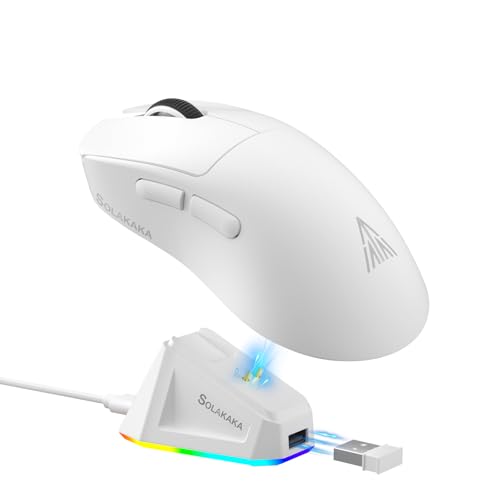
- 62g lightweight body
- RGB magnetic charging base
- Up to 24,000 DPI and three connection modes
Best For: Multi-device users wanting a customizable rechargeable mouse
Best Grip-Focused Option

- Includes anti-slip grip tape
- 62g ergonomic design
- RGB dock with tri-mode connectivity
Best For: Gamers prioritizing grip stability and flexible PC/Mac use
Ultra-Light 8K Pick – AJAZZ AJ159 APEX
For shoppers seeking gaming mice with charging dock for PC, the AJ159 APEX stands out with a 56g ambidextrous design, tri-mode connectivity, and a high-end PAW3950 sensor. Its magnetic RGB dock includes an integrated receiver and a TFT screen for viewing settings and battery status.
Best For: Competitive FPS and MOBA players who want very high polling performance, low weight, and an information-rich charging dock.
Pros:
- PAW3950 sensor supports up to 42,000 DPI and 8,000Hz polling in wireless mode.
- Lightweight 56g ambidextrous shell with a sweat-resistant tactile finish.
- Magnetic RGB dock includes a customizable TFT display and integrated receiver.
- Tri-mode Bluetooth, 2.4GHz wireless, and USB-C wired connectivity.
Cons:
- The advanced feature set may be more than casual users need.
- Its listed maximum sensitivity and polling features may require software configuration to use fully.
The AJ159 APEX is the strongest performance-oriented option in this group, especially if you value an ultra-light shell and detailed dock controls. It is a compelling choice for PC gamers who want a premium specification set without giving up convenient drop-on charging.
Screened Dock Value – EPOMAKER NEX Lite
The EPOMAKER NEX Lite is a practical choice among gaming mice with charging dock for PC, combining a 65g right-handed shape with tri-mode connectivity and a dock that doubles as an RGB control point. OLED screens on both the mouse and dock show key settings without requiring driver software.
Best For: Right-handed PC users who want visible battery, DPI, connection, and polling information at a moderate performance level.
Pros:
- PAW3311 sensor offers up to 12,000 DPI, 300 IPS, and 35G acceleration.
- Dual OLED screens display DPI, battery percentage, connection mode, and polling rate.
- Tri-mode 2.4GHz, Bluetooth 5.0, and USB-C connectivity.
- Five programmable buttons, online software, onboard memory, and up to 55 hours of battery life.
Cons:
- Its right-handed design is less suitable for left-handed users.
- The online configuration software recommends Chrome for best compatibility.
The NEX Lite emphasizes convenience and clear status visibility rather than extreme specifications. Its screens and dock make it a useful everyday gaming and productivity mouse for medium-to-large right hands.
Balanced Charging Base – AJAZZ AJ139 V2 MC
If you want gaming mice with charging dock for PC without moving into extreme polling rates, the AJAZZ AJ139 V2 MC offers a balanced package. It pairs a 66g right-handed design with a PAW3311 sensor, 500mAh battery, RGB magnetic base, and three connection modes.
Best For: PC gamers who want a lightweight, adaptable mouse with straightforward dock charging and broad device compatibility.
Pros:
- Adjustable sensitivity reaches 12,000 DPI with 300 IPS and 35G acceleration.
- 66g lightweight ergonomic body helps reduce fatigue during longer sessions.
- Magnetic RGB charging base keeps the mouse stored and ready to use.
- Supports Bluetooth, 2.4GHz wireless, and USB-C wired modes.
Cons:
- The 1,000Hz polling rate is lower than the AJ159 APEX’s stated 8,000Hz rate.
- Its right-handed shape may not suit left-handed players.
The AJ139 V2 MC is a sensible middle-ground option: lightweight enough for gaming, flexible across connection types, and easy to keep charged. Choose it when reliable everyday performance matters more than flagship sensor specifications.
OLED Dock Convenience – EPOMAKER NEX Lite
This EPOMAKER NEX Lite is another strong contender among gaming mice with charging dock for PC, offering a compact 65g right-handed design and a dock with adjustable RGB effects. Its mouse and dock screens provide at-a-glance information for settings and power.
Best For: Medium-to-large right-handed users who want programmable controls, onboard settings storage, and a dock that also works as a desktop display.
Pros:
- PAW3311 optical sensor supports six DPI levels from 400 to 12,000.
- Mouse and dock OLED displays show performance and connection information.
- Five programmable buttons support macros and custom assignments.
- Battery life is rated for up to 55 hours, with 2.4GHz, Bluetooth, and wired modes.
Cons:
- It is designed for right-handed use rather than ambidextrous handling.
- Online software setup may be less convenient for users who prefer a dedicated desktop application.
With its dual-screen presentation and programmable controls, this NEX Lite focuses on usability as much as gaming performance. It is a good fit for a tidy PC setup where quick charging and visible status information are priorities.
Lightweight Docked Precision – AJAZZ AJ139 V2 MC
If you want gaming mice with charging dock for PC, the AJAZZ AJ139 V2 MC combines a lightweight 66g build with a magnetic RGB charging base. Its PAW3311 sensor, adjustable sensitivity, and three connection modes make it a flexible choice for everyday gaming.
Best For: FPS and MOBA players who want a lightweight, versatile mouse with dock charging.
Pros:
- PAW3311 optical sensor with sensitivity up to 12,000 DPI, 300 IPS tracking, and 35G acceleration.
- Lightweight 66g ergonomic design helps reduce wrist strain during extended sessions.
- Magnetic RGB charging base keeps the mouse topped up between games.
- Supports Bluetooth, 2.4GHz wireless, and USB-C wired connectivity.
Cons:
- Its six-button layout offers fewer controls than MMO-focused mice.
- Driver-based customization may be needed for fine DPI and button adjustments.
The AJ139 V2 MC is a practical pick when low weight and connection flexibility matter most. The charging dock adds convenience without giving up wired connectivity when needed.
MMO Control Station – ASUS ROG Spatha X
Among gaming mice with charging dock for PC, the ASUS ROG Spatha X stands out for MMO and MOBA control. It pairs 12 programmable buttons with a 19,000 DPI sensor, dual-mode operation, and a magnetic dock designed for fast recharging.
Best For: MMO and MOBA players who need extensive button customization and a large right-handed shape.
Pros:
- Twelve programmable buttons, including six strategically positioned side buttons.
- 19,000 DPI optical sensor and 1,000Hz polling rate support precise tracking.
- Magnetic dock charging and up to 67 hours of battery life with RGB off.
- Hot-swappable ROG switches and included replacement switches extend customization options.
Cons:
- At 168g, it is substantially heavier than lightweight gaming mice.
- The large right-handed design may not suit smaller hands or left-handed users.
- Compatibility details focus on Windows 10 and Windows 11 PCs.
The Spatha X is built for players who value controls and customization over minimum weight. Its dock, fast-charging support, and switch system make it a feature-rich option for long PC gaming sessions.
Compact Tri-Mode Value – SOLAKAKA SM822
The SOLAKAKA SM822 is a practical entry in gaming mice with charging dock for PC, offering a 62g body, tri-mode connectivity, and a magnetic RGB charging base. Its PAW3311 sensor can reach up to 24,000 DPI through software adjustments.
Best For: PC and laptop users who want a lightweight dock-charging mouse with broad device compatibility.
Pros:
- Lightweight 62g design with a contoured shape intended to support a stable grip.
- Tri-mode connectivity includes 2.4GHz, Bluetooth 5.0, and USB-C wired modes.
- PAW3311 sensor supports 1,000Hz response, 300 IPS tracking, and software-adjustable DPI up to 24,000.
- Magnetic RGB charging dock can hold the wireless receiver for easier setup.
Cons:
- Five-button layout provides fewer controls than MMO-oriented alternatives.
- Customization software supports Windows and must be run in wired mode.
- The supplied notes do not specify battery runtime.
The SM822 offers a strong balance of low weight, flexible connectivity, and dock convenience. It is especially appealing if you use the same mouse across a PC, laptop, or other compatible devices.
Best Lightweight Tri-Mode Pick – ATTACK SHARK X11 White
If you want gaming mice with charging dock for PC, the white ATTACK SHARK X11 combines a 59g design with a magnetic RGB charging dock and three connection options. Its PAW3311 sensor supports up to 22,000 DPI, while the rechargeable battery is rated for up to 65 hours.
Best For: PC gamers who want a very light, right-handed mouse with dock charging, Bluetooth flexibility, and programmable controls.
Pros:
- Very lightweight 59g construction for quick movement and reduced fatigue.
- Magnetic RGB dock provides convenient charging and a USB 2.0 port.
- Tri-mode connectivity supports 2.4GHz wireless, Bluetooth, and USB-C wired use.
- PAW3311 sensor offers up to 22,000 DPI, 1,000Hz polling, and 300 IPS tracking.
Cons:
- Its ergonomic shape is specified for medium-to-large right hands, so it may not suit smaller users.
- Customization software is intended for configuring the five programmable buttons and settings, which may require setup.
The X11 is a strong fit if low weight and flexible connectivity matter most. The charging dock keeps the desk organized, while the sensor and adjustable controls cover both competitive play and everyday PC use.
Best Cross-Device Value – SOLAKAKA SM822
The SOLAKAKA SM822 is one of the gaming mice with charging dock for PC that also works across laptops, tablets, phones, and Macs. It combines a 62g body, magnetic RGB charging base, tri-mode connectivity, and a PAW3311 sensor with software-adjustable sensitivity up to 24,000 DPI.
Best For: Users who switch between a Windows PC and other devices and want a lightweight rechargeable mouse with customizable buttons.
Pros:
- Supports 2.4GHz, Bluetooth 5.0, and USB-C wired connections.
- Magnetic RGB charging dock can hold the receiver for a cleaner setup.
- 62g body and contoured shape are designed to reduce fatigue during extended use.
- Five programmable buttons and software support macros, DPI, and polling-rate adjustments.
Cons:
- The driver software supports Windows only and should be run in wired mode.
- The listed DPI presets begin at 800 DPI, with finer adjustments handled through software.
Choose the SM822 when compatibility and convenience are priorities. Its dock simplifies charging and receiver storage, while the three connection modes make it practical for a mixed-device workspace.
Best Grip-Focused Option – ATTACK SHARK X11 Black
For PC shoppers comparing gaming mice with charging dock for PC, this black ATTACK SHARK X11 adds anti-slip grip tape to the familiar lightweight design. It also includes a magnetic RGB dock, tri-mode connectivity, and a PAW3311 sensor rated up to 22,000 DPI.
Best For: Gamers who want extra hand stability, flexible wired and wireless connections, and a dock that stores the receiver.
Pros:
- Included sweat-resistant grip tape can improve control and hand stability.
- 62g ergonomic design supports palm, claw, and fingertip grip styles.
- RGB charging dock provides convenient charging and receiver storage for 2.4GHz use.
- PAW3311 sensor offers 300 IPS, 35G acceleration, and 1,000Hz polling.
Cons:
- The mouse has five buttons, which may be limiting for users who need many extra inputs.
- Driver-based customization is listed as compatible with Windows and Mac, but software details may vary by operating system.
The black X11 stands out for the included grip tape, making it appealing for players whose hands slip during longer sessions. It retains the practical dock and tri-mode design, so it can also serve as a general-purpose PC or Mac mouse.
How We Picked the Best Gaming Mice with Charging Dock for PC
We focused on the features that matter most in daily PC gaming: sensor capability, wireless stability, connection modes, weight, button layout, battery capacity, charging convenience, and overall versatility. We also separated lightweight mainstream designs from larger MMO-oriented mice, since comfort and control priorities can differ significantly.
Specifications such as DPI and polling rate can help describe a mouse, but they do not automatically determine accuracy or comfort. Shape, grip compatibility, software support, and reliable wireless performance are equally important. Product listings and manufacturer specifications should be checked for the latest firmware, included accessories, and regional differences before purchase.
Quick Comparison
- Best for lightweight play: Models around 56–62g are easier to move quickly and may suit claw or fingertip grips.
- Best for extra controls: The ASUS ROG Spatha X provides a much larger button layout for MMO and MOBA commands.
- Best for flexibility: Tri-mode mice can switch among 2.4GHz wireless, Bluetooth, and wired operation, depending on the model.
- Best for desk convenience: RGB or magnetic charging docks provide a visible home for the mouse and simplify charging between sessions.
Key Buying Factors for Gaming Mice with Charging Dock for PC
Shape, Weight, and Grip
Choose a shape that matches your hand size and grip style before prioritizing headline specifications. Lightweight mice are generally appealing for competitive shooters, while heavier, larger designs can feel more substantial and offer room for additional buttons. Ambidextrous shapes may work for more users, but they do not always provide the same thumb support as an ergonomic right-handed design.
Sensor and Responsiveness
Modern optical sensors in this roundup offer more than enough resolution for most players. Adjustable DPI is useful for switching between sensitivity profiles, but smooth tracking, consistent lift-off behavior, low click latency, and a stable 2.4GHz connection matter more in practice. Consider polling-rate support if you play competitive games and your PC can handle the added USB and processing demands.
Connectivity and Charging
A dock is most convenient when it charges reliably without requiring precise placement. Check whether the dock uses magnetic alignment, whether a receiver can be stored in it, and whether the mouse can be used while charging. Tri-mode connectivity adds flexibility for laptops and multiple devices, while wired fallback can be valuable if the battery runs low during a session.
Buttons, Software, and Battery
Extra buttons are helpful for MMO abilities, productivity shortcuts, and push-to-talk controls, but they can also increase weight and complicate the shape. Review software compatibility, onboard profile storage, lighting controls, and battery claims. Real-world runtime varies with polling rate, screen features, RGB lighting, and usage.
Who Should Buy Which Gaming Mice with Charging Dock for PC?
Competitive FPS players should prioritize a lightweight shell, dependable 2.4GHz wireless, a comfortable shape, and a sensor with consistent tracking. MMO and MOBA players may prefer a larger mouse with programmable side buttons, even if it weighs more. Multi-device users should choose a tri-mode model with Bluetooth and wired backup. Desk setup enthusiasts will appreciate a dock with strong alignment, visible charging status, and lighting that matches their peripherals. If you frequently forget to charge accessories, a docked wireless mouse is likely more useful than a slightly lighter model without one.