
The right USB-C cable can make a major difference when moving large files, connecting fast external SSDs, or powering modern laptops and phones. However, USB-C is only the connector shape—not a guarantee of high-speed data.
This roundup compares 10 USB-C cables for data transfer across key speed classes, connector types, lengths, power ratings, and display capabilities, so you can choose a cable that matches your devices without overpaying for unused specifications.
Best 10 USB C Cables for Data Transfer Picks for 2026
Best 20Gbps Value

- Up to 20Gbps USB 3.2 Gen 2x2 transfers
- 4K@60Hz video and 100W PD charging
- Braided 3FT two-pack with 36-month warranty
Best For: Everyday transfers, SSDs, monitors, and charging
Best USB4 Performance

- 40Gbps data transfer with USB4 support
- 8K@60Hz video and Thunderbolt compatibility
- Up to 240W charging with braided construction
Best For: USB4 workstations, docks, SSDs, and high-resolution displays
Best USB-A Compatibility
- Up to 10Gbps data transfer
- Supports charging up to 3A
- Lifetime warranty and broad device compatibility
Best For: USB-A computers, SSDs, phones, and car connections
Best Long USB4 Option

- 40Gbps USB4 and Thunderbolt transfer speeds
- Supports 8K, dual 4K, and 4K@144Hz displays
- 240W PD 3.1 charging and 4-foot reach
Best For: Docks, SSDs, multi-monitor workstations, and longer desktop runs
Best Overall

- 20Gbps data transfer
- 4K@60Hz video support
- Up to 100W charging
Best For: A versatile cable for fast transfers, displays, and charging
Fastest Transfer

- 40Gbps transfer rate
- Up to 8K@60Hz video
- Up to 240W charging
Best For: USB4 and Thunderbolt users moving large files quickly
Best Two-Pack

- Two 6-foot cables
- 20Gbps data transfer
- 4K@120Hz video support
Best For: Multi-device setups needing longer cables and a spare
Fastest Long-Reach Pick

- 10Gbps USB 3.1 Gen 2 data transfer
- 6-foot braided nylon construction
- Easy-to-spot red finish with lifetime warranty
Best For: High-speed syncing when you need extra cable length
Simple Certified Value

- USB-IF certified USB-A to USB-C design
- 480Mbps data transfer speed
- 15W charging with a compact 3-foot length
Best For: Routine charging and basic file syncing
Compact High-Speed Pick

- 10Gbps USB 3.1 Gen 2 transfer speed
- Designed for portable SSDs and car systems
- Braided nylon with aluminum port housing
Best For: Short, fast connections for drives, phones, and cars
Best 20Gbps Value – 3FT USB-C Data Cable 2-Pack
For shoppers comparing usb c cables for data transfer, this 3-foot, two-pack offers USB 3.2 Gen 2×2 performance up to 20Gbps, along with 4K video output and 100W charging. It is a practical choice for USB-C laptops, phones, SSDs, and compatible monitors, though actual speeds depend on the connected devices.
Best For: Everyday high-speed file transfers, USB-C SSDs, portable monitors, and multi-purpose charging setups.
Pros:
- Supports data transfer speeds up to 20Gbps and works with USB4 and Thunderbolt 3 devices.
- Handles 4K at 60Hz video output when the source port supports DisplayPort Alt Mode.
- Includes 100W PD charging, braided construction, reinforced connectors, and a 36-month warranty.
Cons:
- Video output requires a compatible USB-C port with DP Alt Mode.
- Actual transfer and charging performance varies by device, charger, and cable connection.
This is a well-rounded two-pack for users who want one USB-C cable for storage, displays, and charging. Its 20Gbps ceiling is lower than USB4 cables, but it should cover most everyday high-speed transfer needs.
Best USB4 Performance – Acer 40Gbps USB4 Cable
This Acer USB4 cable is aimed at demanding setups that need fast data movement, high-resolution video, and high-wattage charging in one connection. Among usb c cables for data transfer, it stands out with up to 40Gbps bandwidth and compatibility with Thunderbolt 4 and 3 devices.
Best For: USB4 and Thunderbolt workstations, high-resolution monitors, SSDs, docks, and compatible laptops.
Pros:
- Supports up to 40Gbps data transfer for large files and high-speed storage.
- Supports up to 8K at 60Hz video, including 4K at 60Hz and 2K at 165Hz modes.
- Offers up to 240W charging with a braided design and aluminum alloy casing.
Cons:
- Maximum data, display, and charging performance requires compatible host devices and accessories.
- It is a single 3.3-foot cable rather than a multi-pack.
Choose this model when your setup can take advantage of USB4 or Thunderbolt bandwidth. It is more capability than many basic phones or USB-C peripherals require, but its 40Gbps and 8K support make it a strong fit for advanced desktop systems.
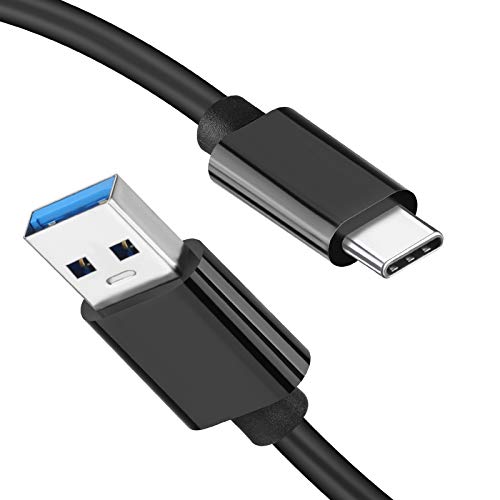
Best USB-A Compatibility – USB-A to USB-C 10Gbps Cable
If your computer, charger, or car still uses USB-A, this cable provides a straightforward way to connect USB-C devices. It supports up to 10Gbps data transfer, making it a useful option among usb c cables for data transfer when you need USB-A-to-USB-C connectivity rather than USB-C on both ends.
Best For: USB-A computers, external USB-C SSDs, Android devices, compatible phones, and Android Auto or CarPlay connections.
Pros:
- Supports data transfer speeds up to 10Gbps, substantially faster than USB 2.0.
- Provides charging up to 3A and works with many phones, tablets, SSDs, cameras, and game devices.
- Reinforced connectors, flexible TPE, and a stated lifetime warranty add practical value.
Cons:
- Does not support video output.
- Uses USB-A on one end, so it cannot provide USB-C-to-USB-C features or USB4 speeds.
- OnePlus phones are listed as unsupported.
This is the sensible pick for older laptops, desktop ports, and vehicle USB-A connections. It sacrifices video support and higher USB-C performance, but its 10Gbps transfer rate and broad compatibility make it useful for storage and device syncing.
Best Long USB4 Option – Silkland 40Gbps 4FT Cable
The Silkland cable combines a 4-foot length with USB4 and Thunderbolt compatibility, giving users more reach without dropping its headline 40Gbps transfer rate. It is a strong contender among usb c cables for data transfer for docks, SSDs, laptops, and professional display setups.
Best For: USB4 or Thunderbolt docks, external SSDs, multi-monitor workstations, and users who need a little extra cable length.
Pros:
- Delivers up to 40Gbps data synchronization and supports USB4, Thunderbolt 4, and Thunderbolt 3.
- Supports single 8K at 60Hz, 4K at 144Hz, or dual 4K at 60Hz displays.
- Offers up to 240W PD 3.1 charging with an E-Marker chip and durable braided construction.
Cons:
- Full performance depends on compatible USB4 or Thunderbolt devices, chargers, and displays.
- The manufacturer recommends cables under 5 feet for stable docking performance, so this 4-foot length may not suit every layout.
For users who want USB4 speed plus useful reach, this cable is a balanced choice. Its 4-foot length remains within the maker’s docking recommendation while supporting demanding storage, display, and charging applications.
Best Overall – ZeroneTeck 20Gbps USB-C Cable
For shoppers comparing USB C cables for data transfer, this 3-foot ZeroneTeck cable combines 20Gbps performance with 4K@60Hz video support and up to 100W charging. It is a practical single-cable option for compatible laptops, SSDs, monitors, phones, and tablets.
Best For: Users who want fast file transfers, USB-C monitor connectivity, and high-power charging in one cable.
Pros:
- Supports data transfer speeds up to 20Gbps and is backward compatible with USB 3.1, USB 3.0, and USB 2.0.
- Supports 4K@60Hz video output when connected devices support DP Alt Mode.
- Offers up to 100W charging with an integrated E-Marker chip.
- Includes graphene shielding, tinned copper wiring, and a stated 3-year warranty.
Cons:
- Maximum 20Gbps speeds require compatible devices on both ends.
- 4K video requires USB-C DP Alt Mode support from the device.
- Its 3-foot length may be limiting for some desk setups.
This is a well-rounded choice when data transfer is the priority but charging and display support also matter. Verify your devices’ USB-C specifications before expecting the maximum performance.
Fastest Transfer – Anker USB4 40Gbps Cable
Among USB C cables for data transfer, Anker’s 3.3-foot USB4 cable stands out with up to 40Gbps bandwidth. It also supports high-resolution displays and up to 240W charging when paired with compatible equipment.
Best For: Users transferring large files between USB4 or Thunderbolt-compatible computers, drives, and accessories.
Pros:
- Supports data transfer speeds up to 40Gbps.
- Can support up to 8K@60Hz or 4K@144Hz display output.
- Supports up to 240W charging with a compatible charger and device.
- Tested to withstand up to 5,000 bends and includes an 18-month warranty.
Cons:
- Maximum performance depends on compatible USB4 or Thunderbolt hardware.
- The 3.3-foot length may not suit longer cable runs.
- Its advanced specifications may be unnecessary for basic charging or routine transfers.
This is the strongest pick for demanding transfer workloads and high-end display setups. To benefit from 40Gbps speeds, confirm that the connected devices and ports support USB4 or Thunderbolt 4/3.
Best Two-Pack – VoroDcip 20Gbps USB-C Cables
This two-pack is a flexible option for shoppers seeking USB C cables for data transfer across multiple workstations or devices. Each 6-foot cable supports up to 20Gbps transfers, 4K@120Hz video, and up to 100W charging.
Best For: Users who need two long cables for SSDs, laptops, monitors, phones, or tablets.
Pros:
- Includes two 6-foot USB-C cables for convenient reach and spare coverage.
- Supports up to 20Gbps data transfer with compatible USB-C 3.2 Gen 2×2 devices.
- Supports 4K@120Hz, 2K@240Hz, and 1080p@240Hz video output when supported by the devices.
- Provides up to 100W PD charging and uses a braided nylon design with an aluminum shell.
Cons:
- Maximum transfer and video rates require compatible ports and DP Alt Mode support.
- A 6-foot cable may be more length than needed for compact setups.
- The stated warranty is 18 months, shorter than some alternatives.
The two-pack offers strong value for multi-device setups, especially where extra length is useful. Check both the source and display specifications before relying on the highest refresh rates.
Fastest Long-Reach Pick – 6-Foot Red 10Gbps Cable
If you want USB C cables for data transfer that are easy to spot and long enough for desk, travel, or meeting-room use, this 6-foot USB-A to USB-C cable is a strong fit. It supports up to 10Gbps data transfer and uses a braided nylon exterior for added durability.
Best For: Users who need high-speed file syncing, extra reach, and an easy-to-identify cable.
Pros:
- Supports up to 10Gbps data transfer through USB 3.1 Gen 2.
- Six-foot length provides flexibility for desks, travel, and charging areas.
- Red, double-braided nylon design is easy to identify and rated for extensive bending and plugging use.
- Supports up to 3.1A charging and includes a lifetime warranty.
Cons:
- Uses USB-A on the host end, so it is not a USB-C-to-USB-C cable.
- Actual transfer performance depends on the connected devices and ports.
This is the most versatile choice here for shoppers prioritizing speed and reach. Its bright color and reinforced construction are practical extras, while broad compatibility covers phones, tablets, Android Auto, CarPlay, and other USB-C devices.
Simple Certified Value – 3-Foot USB 2.0 Cable
For basic USB C cables for data transfer, charging, and everyday device connections, this 3-foot Amazon Basics cable keeps things straightforward. It is USB-IF certified and supports data speeds up to 480Mbps, making it suitable for routine photo, music, and file transfers.
Best For: Everyday charging and standard-speed data transfer between USB-A chargers, computers, phones, and tablets.
Pros:
- USB-IF certified for connecting USB-C devices to standard USB-A ports.
- Supports data transfer speeds up to 480Mbps.
- Provides charging up to 15W and 5V/3A for compatible devices.
- Compact 3-foot length and broad device compatibility make it convenient for routine use.
Cons:
- Much slower for data transfer than the 10Gbps cables in this roundup.
- Charging is limited for USB Power Delivery-enabled devices.
- Shorter length may be restrictive in some setups.
This cable is a sensible low-complexity option when you do not need high-speed external-drive transfers. Its USB-IF certification, familiar USB-A-to-USB-C format, and one-year warranty make it well suited to everyday charging and syncing.
Compact High-Speed Pick – 3-Foot White 10Gbps Cable
This compact USB-A to USB-C cable is a practical choice among USB C cables for data transfer when you want 10Gbps performance without a long cord. Its 3-foot length, braided white exterior, and compatibility with portable SSDs, CarPlay, and Android Auto suit mobile and desktop setups.
Best For: Fast syncing with portable SSDs, phones, and in-car systems where a shorter cable is preferable.
Pros:
- Supports up to 10Gbps data transfer with USB 3.1 Gen 2.
- Works with portable SSDs such as the Samsung T7, as well as CarPlay and Android Auto.
- 22AWG copper core supports up to 3A charging.
- Braided nylon exterior and aluminum port housing provide a durable, polished design.
Cons:
- Does not support video output.
- Three-foot length may not reach comfortably across larger setups.
- USB-A connector limits compatibility with USB-C-only chargers and computers.
Choose this model when data speed and portability matter more than maximum reach. It offers the same headline 10Gbps class as the longer high-speed option, but its shorter profile is better suited to portable drives and vehicle connections.
How We Picked the Best USB C Cables for Data Transfer
We focused on the specifications that directly affect real-world file transfers: advertised bandwidth, USB generation, connector configuration, cable length, charging support, video capability, and certification claims. The selection includes USB4 and 40Gbps cables for demanding storage and docking setups, 20Gbps USB 3.2 Gen 2×2 options for fast external drives, and 10Gbps or USB 2.0 cables for everyday devices.
We also included both USB-C to USB-C and USB-A to USB-C designs. That matters because the cable must match the ports on both devices, and the slowest port or standard in the connection determines the practical limit.
Quick Comparison
- Best for maximum bandwidth: USB4 and Thunderbolt-compatible 40Gbps cables.
- Best for fast external SSDs: USB 3.2 Gen 2×2 cables rated for 20Gbps.
- Best general-purpose option: A 10Gbps USB-C cable with suitable power support.
- Best for older computers: USB-A to USB-C cables, available in 10Gbps or 480Mbps versions.
- Best for reach: Six-foot cables, provided the longer length fits your speed and power needs.
Key Buying Factors for USB-C Cables for Data Transfer
Speed and USB Standard
Check the stated data rate rather than relying on the USB-C name. USB 2.0 supports up to 480Mbps, USB 3.2 Gen 2 commonly reaches 10Gbps, and Gen 2×2 can reach 20Gbps when both connected devices support it. USB4 and compatible Thunderbolt connections can reach 40Gbps.
Connector Type and Device Compatibility
A USB-C to USB-C cable is required for many modern laptops, phones, docks, and SSD enclosures. USB-A to USB-C is useful for older desktops, chargers, and hubs, but it cannot deliver USB4 speeds through a USB-A port. Always verify the host and accessory ports before buying.
Power and Display Support
High-wattage ratings such as 100W or 240W describe charging capability, not data speed. Likewise, 4K, 8K, or dual-display support depends on the cable and the devices’ video protocols. Choose these features only if your setup requires them.
Length and Construction
Short cables are convenient for desks and portable drives, while six-foot models provide flexibility for workstations. Braided jackets and reinforced connectors may improve durability, but a rugged exterior does not automatically indicate faster data performance.
Who Should Buy Which USB C Cables for Data Transfer?
Choose a 40Gbps USB4 or Thunderbolt-compatible cable if you regularly move large video projects, use a fast NVMe enclosure, or connect a high-performance dock. A 20Gbps USB 3.2 Gen 2×2 model is a strong fit for compatible external SSDs at a lower cost. For routine backups, phones, peripherals, and general file transfers, a dependable 10Gbps cable is usually sufficient. Pick a USB-A to USB-C cable when your computer or charger has USB-A, and choose a 480Mbps model only for basic charging and modest data needs.