
The right condenser microphone can make voiceovers sound clearer, fuller, and more professional without requiring a complicated studio. This roundup compares 10 strong options for beginners, creators, home studios, and experienced recording artists.
We’ve included convenient USB microphones alongside XLR models that offer greater flexibility, so you can match sound quality, connectivity, and features to your recording setup and budget.
Best 10 Condenser Microphone for Voice Overs Picks for 2026
Studio Vocal Specialist
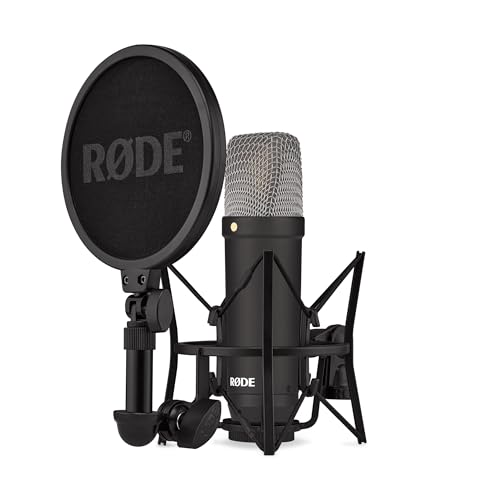
- Exceptionally low 4.5 dBA self-noise
- Cardioid XLR design focuses on vocals
- Includes shock mount, pop filter, and cable
Best For: Interface-based voice-over and vocal recording
Complete USB Starter Kit
MAONO AU-A04H USB Microphone Kit
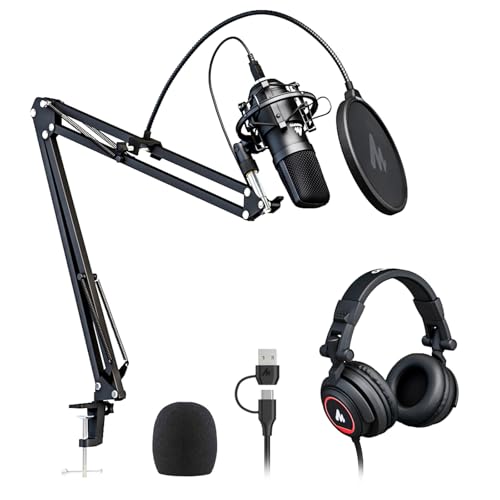
- Plug-and-play USB connection
- Includes headphones and recording accessories
- 192kHz/24-bit chipset with cardioid pickup
Best For: Beginner computer-based voice-over recording
Proven Home-Studio Value
Audio-Technica AT2020 XLR Microphone
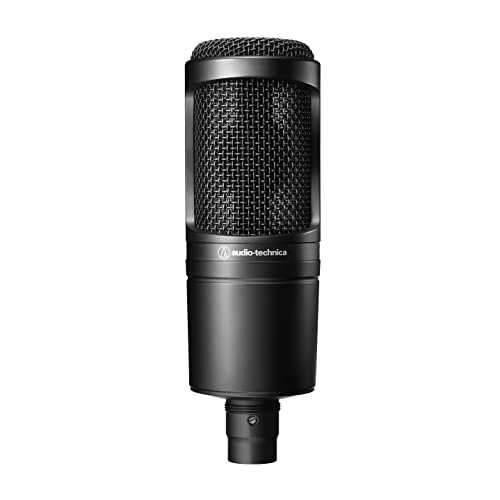
- Cardioid pattern helps isolate the speaker
- Wide dynamic range and high SPL handling
- Includes stand mount, adapter, and pouch
Best For: Project and home studios with an XLR interface
Flexible Noise-Reduction USB Pick
ZealSound K66 USB Podcast Microphone

- Noise Reduction Mode for common background sounds
- Zero-latency headphone monitoring
- USB-C and Lightning adapters included
Best For: Multi-device podcasting, streaming, and voice overs
Best Overall
Shure SM4 XLR Studio Condenser Microphone Kit

- Smooth, detailed voice reproduction
- Integrated pop filter and RF shielding
- Includes shock mount and carrying case
Best For: Home studios and XLR voice-over setups
Best USB Option
Sennheiser Profile USB Condenser Microphone

- Plug-and-play USB-C connection
- Warm sound suited to human voice
- Built-in controls and table stand
Best For: Computer-based voice-over recording
Best Budget XLR Kit
Tascam TM-80 Large-Diaphragm Condenser
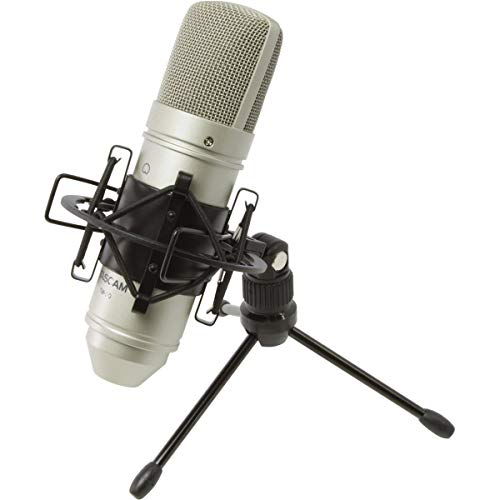
- Affordable home-recording design
- Includes cable, stand, and shock mount
- Cardioid pickup for focused vocal capture
Best For: Entry-level XLR voice-over studios
Best Complete Kit
FIFINE T669 USB Voice-Over Microphone

- Plug-and-play USB recording
- Cardioid capsule for focused voice capture
- Includes boom arm, shock mount, and double pop filter
Best For: Home voice-over recording with included mounting accessories
Best Compact Desk Setup
TONOR TC-777 USB Voice-Over Microphone

- Compact tripod-based desktop design
- Cardioid pickup with pop filter and shock mount
- Plug-and-play support for computers and consoles
Best For: Beginner voice-over creators using a small desk setup
Best for Flexible Pickup Patterns
Blue Yeti USB Voice-Over Microphone

- Four selectable pickup patterns
- Onboard gain, mute, and headphone controls
- Blue VO!CE software for vocal effects
Best For: Creators recording voice overs alongside podcasts and streaming
Studio Vocal Specialist – RØDE NT1 Signature Series
The RØDE NT1 Signature Series is a strong condenser microphone for voice overs when you want a studio-oriented XLR setup with exceptionally low self-noise. Its cardioid pattern focuses on the speaker, while the included shock mount, pop filter, and XLR cable help complete the recording chain; you will still need an audio interface.
Best For: Voice-over artists, vocalists, and streamers building an interface-based home studio.
Pros:
- Very low 4.5 dBA self-noise for clean recordings.
- Cardioid pickup helps reject room sound.
- Includes SM6 shock mount, pop filter, XLR cable, and dust cover.
- Covered by a 10-year warranty with registration.
Cons:
- Requires an audio interface and phantom power setup.
- Not a direct USB plug-and-play microphone.
Choose the NT1 Signature if recording quality and a quiet signal matter more than setup simplicity. It is particularly well equipped for controlled vocal recording, but beginners should budget for an interface.
Complete USB Starter Kit – MAONO AU-A04H USB Microphone Kit
The MAONO AU-A04H is a convenient condenser microphone for voice overs if you want a ready-to-use USB package. It connects directly to a computer without extra drivers or an external sound card and includes headphones, a stand, shock mount, pop filter, windscreen, clamp, and USB cable.
Best For: Beginners recording voice overs, podcasts, streams, and calls on a computer.
Pros:
- Plug-and-play USB connection for computers and Linux systems.
- Supports up to 192kHz/24-bit sampling.
- Cardioid pickup is suited to focused speech recording.
- Includes monitoring headphones and a broad set of mounting accessories.
Cons:
- USB connectivity offers less studio-routing flexibility than an XLR setup.
- The 30Hz–16kHz response is narrower than some studio vocal microphones.
This kit emphasizes convenience and value rather than a modular studio workflow. It is a practical starting point for creators who want to record quickly with one bundled purchase.
Proven Home-Studio Value – Audio-Technica AT2020 XLR Microphone
The Audio-Technica AT2020 is a dependable condenser microphone for voice overs in a project or home studio. Its cardioid pattern reduces sound from the sides and rear, while the low-mass diaphragm, wide dynamic range, and high SPL handling support versatile vocal recording through an XLR interface.
Best For: Home-studio users seeking a proven XLR microphone for speech, vocals, and general recording.
Pros:
- Cardioid pattern improves isolation from unwanted room sound.
- Wide dynamic range and high SPL handling support varied sources.
- Low-mass diaphragm provides extended response and quick transients.
- Includes a stand mount, thread adapter, and protective pouch.
Cons:
- Requires phantom power and an audio interface.
- Does not include a shock mount, pop filter, or XLR cable.
The AT2020 is a sensible choice when you want a straightforward, established studio microphone and already have compatible recording hardware. Its accessories are limited, so factor those additions into the setup cost.
Flexible Noise-Reduction USB Pick – ZealSound K66 USB Podcast Microphone
The ZealSound K66 is a versatile condenser microphone for voice overs when you need simple USB recording across desktop and mobile devices. Its cardioid capsule focuses on the voice, while selectable noise reduction, built-in monitoring, gain and volume controls, and included USB-C and Lightning adapters support flexible content creation.
Best For: Podcasters, streamers, and voice-over creators working across computers, tablets, and phones.
Pros:
- Plug-and-play compatibility with Windows, Mac, PS4, PS5, and supported mobile devices.
- Noise Reduction Mode targets keyboard, fan, air-conditioner, and background noise.
- Zero-latency headphone monitoring with dedicated volume control.
- Includes USB-C and Lightning adapters for mobile recording.
Cons:
- USB design is less suited to traditional interface-based studio routing.
- Noise reduction is an operating mode that may not suit every vocal sound.
The K66 stands out for hands-on controls and cross-device convenience. It is a useful option for creators who record in changing environments and want monitoring and noise-control features built into the microphone.
Best Overall – Shure SM4 XLR Studio Condenser Microphone Kit
The Shure SM4 is a strong choice if you want a condenser microphone for voice overs with an XLR setup and a cleaner recording workflow. Its uniform cardioid pattern, integrated pop filter, proximity-effect control, and RF interference shielding are designed to keep spoken audio clear and consistent.
Best For: Home-studio voice-over recording, podcasting, and creators who already use an audio interface.
Pros:
- Large sweet spot helps produce more consistent close-miked vocals.
- Integrated pop filter and woven mesh Faraday cage help reduce plosives, rumble, and interference.
- Includes a shock mount, magnetic pop filter, stand adapter, and carrying case.
- Handles sound levels up to 140 dB without distortion.
Cons:
- Requires phantom power and an audio interface.
- The 2.5-pound all-metal construction may be less convenient for lightweight setups.
The SM4 is especially practical for voice-over work when you want mix-ready sound and useful accessories in one kit. Its XLR connection makes it better suited to a traditional studio chain than a direct-to-computer setup.
Best USB Option – Sennheiser Profile USB Condenser Microphone
The Sennheiser Profile makes a convenient condenser microphone for voice overs when you want to connect directly to a computer. Its USB-C plug-and-play design, cardioid pickup pattern, and built-in controls simplify recording while its warm, natural voicing emphasizes the human voice.
Best For: PC and Mac users recording voice overs, streams, or podcasts without an audio interface.
Pros:
- USB connection offers straightforward setup with compatible computers.
- Warm, natural sound is designed to add body and presence to speech.
- Includes a table stand for compact desktop placement.
- Provides mute, gain, mix, volume, and headphone-jack controls.
Cons:
- USB connectivity is less suitable for an existing XLR studio chain.
- Its supplied 1.2-meter USB-C cable may limit placement distance.
For creators who value speed and hands-on control, the Profile removes much of the setup associated with traditional studio microphones. The included stand also makes it a practical desktop option for voice-over and streaming work.
Best Budget XLR Kit – Tascam TM-80 Large-Diaphragm Condenser
The Tascam TM-80 is a straightforward condenser microphone for voice overs for home recording, offering an XLR connection and a cardioid pickup pattern at a budget-oriented position. The included stand, cable, and shock mount make it easier to assemble a basic recording setup.
Best For: Home recordists who need an affordable XLR microphone kit for speech and general vocal recording.
Pros:
- 18mm aluminum diaphragm and cardioid pattern suit vocals and acoustic instruments.
- Internal circuitry is designed to reduce noise and distortion.
- Includes a tabletop stand, six-foot XLR cable, and elastic shock mount.
- 136 dB maximum SPL allows use with louder sources as well as voice.
Cons:
- Requires a compatible audio interface or other XLR setup.
- Does not list an integrated pop filter, so additional plosive control may be useful for close voice work.
The TM-80 is a sensible starting point for an XLR home studio, particularly when you want the basic accessories included. Its cardioid design can help focus capture on the speaker, while the shock mount helps reduce handling and stand rumble.
Best Complete Kit – FIFINE T669 USB Voice-Over Microphone
If you want a straightforward condenser microphone for voice overs, the FIFINE T669 is a practical USB setup for computer-based recording. Its cardioid capsule focuses on sound from the front, while the included boom arm, shock mount, and double pop filter help you get started without buying a separate accessory package.
Best For: Home voice-over recording, podcasting, dubbing, and users who want an adjustable boom-arm kit.
Pros:
- Plug-and-play USB connection works with PCs and laptops without additional drivers.
- Cardioid pickup helps reduce unwanted sound from behind the microphone.
- Includes a sturdy boom arm, shock mount, double pop filter, and long USB cable.
- Supports USB Type-A and USB Type-C connections through the included cable.
Cons:
- Not compatible with Xbox.
- The included boom arm requires desk mounting and setup.
The T669 stands out as an all-in-one option for new voice-over creators. Its included positioning hardware and pop filtering make it especially convenient for a home desk, although users seeking a compact tabletop-only microphone may prefer a simpler design.
Best Compact Desk Setup – TONOR TC-777 USB Voice-Over Microphone
The TONOR TC-777 is a compact condenser microphone for voice overs, calls, and podcasting. Its USB plug-and-play design keeps setup simple, while the cardioid pickup pattern, pop filter, and small tripod make it well suited to a desktop recording space.
Best For: Beginners who need a compact tabletop microphone for voice overs, streaming, meetings, and podcasting.
Pros:
- USB 2.0 plug-and-play connection requires no additional drivers or assembly.
- Cardioid pickup captures sound in front while suppressing unwanted background noise.
- Includes a foldable tripod, mini shock mount, and adjustable pop filter.
- Works with Windows, Mac, PS4, PS5, Zoom, Skype, and Discord.
Cons:
- Not compatible with Xbox.
- The included 1.9 m cable may offer less reach than a boom-arm setup.
Choose the TC-777 when desk space and ease of use matter more than a full-size mounting arm. Its compact accessories and one-click mute and volume controls provide a convenient starting point for casual or home voice recording.
Best for Flexible Pickup Patterns – Blue Yeti USB Voice-Over Microphone
The Blue Yeti is a versatile condenser microphone for voice overs when you also want options for podcasts, streaming, meetings, or music recording. Its three-capsule array offers four pickup patterns, and onboard gain, mute, headphone-volume, and monitoring controls make it easy to manage recordings directly from the microphone.
Best For: Creators who want one USB microphone for voice overs and multiple recording configurations.
Pros:
- Offers cardioid, omnidirectional, bidirectional, and stereo pickup patterns.
- Built-in controls include gain, mute, headphone volume, and pattern selection.
- Supports no-latency headphone monitoring for real-time audio tracking.
- Blue VO!CE software adds broadcast-style effects, modulation, and HD audio samples.
Cons:
- Its 3.2-pound desktop design is heavier than the compact options here.
- USB Type-A connectivity may be less convenient for devices without that port.
The Blue Yeti is the strongest choice when flexibility is a priority. Its multiple patterns and onboard controls can support varied recording situations, though a user focused only on front-facing voice overs may not need all of those features.
How We Picked the Best Condenser Microphone for Voice Overs
We focused on microphones suited to spoken-word recording, including narration, podcasts, videos, e-learning, and streaming. Our selection considers pickup pattern, connection type, monitoring features, included accessories, reputation, ease of setup, and suitability for untreated home environments. The list includes both USB models for simplicity and XLR microphones for users who already have—or plan to add—an audio interface.
Because voiceover quality depends heavily on room acoustics and microphone technique, we prioritized practical performance rather than specifications alone. A good microphone should capture speech clearly while fitting the user’s workflow and available equipment.
Quick Comparison
| Best For | Recommended Type | Why It Works |
|---|---|---|
| Simple computer recording | USB condenser | Connects directly to a computer and often includes headphone monitoring |
| Home-studio flexibility | XLR condenser | Works with an audio interface and can integrate with upgraded recording gear |
| New creators | USB kit | May include a stand, shock mount, pop filter, or other useful accessories |
| Professional narration | Studio condenser | Can provide detailed, polished sound when paired with a suitable room and interface |
Key Buying Factors for a Condenser Microphone for Voice Overs
USB or XLR Connection
USB microphones are the easiest choice for computers, laptops, and quick production. XLR microphones generally offer more long-term flexibility, but they require an audio interface, microphone cable, and a stand or boom arm. Check your existing equipment before choosing.
Pickup Pattern and Room Sound
Cardioid microphones primarily capture sound from the front and reduce some sound from behind. They are usually the most practical choice for voiceovers, but they cannot eliminate room reflections. A quiet room with soft furnishings can matter as much as the microphone itself.
Monitoring and Controls
Built-in headphone outputs, mute buttons, gain controls, and volume controls can make USB recording more convenient. These features are especially useful for live narration, streaming, and troubleshooting recording levels.
Accessories and Placement
A pop filter helps reduce plosive sounds, while a shock mount can limit vibration. Position the microphone slightly off-axis and keep a consistent distance—often around 6 to 12 inches—while adjusting gain to avoid clipping.
Who Should Buy Which Condenser Microphone for Voice Overs?
Choose a USB model if you want fast setup for podcasts, videos, gaming, or home voiceovers. Choose an XLR model if you already own an interface or want a system that can grow with your studio. Choose a bundled kit if you need essential accessories immediately. For professional narration, prioritize a quiet recording space, reliable monitoring, and a microphone whose tonal character suits your voice rather than choosing by price alone.