
The best audio interface for iPad Pro can turn Apple’s tablet into a capable mobile recording, podcasting, or streaming studio. The right model depends on whether you need microphone preamps, instrument inputs, stereo connectivity, loopback, or a compact setup for travel.
We’ve selected 10 options ranging from simple guitar and microphone interfaces to premium USB-C models, covering different budgets and workflows without limiting the comparison to one type of creator.
Best 10 Audio Interface for Ipad Pro Picks for 2026
Best for Streaming

- Stereo RCA inputs for mixers and studio gear
- Direct monitoring and loopback support
- Works with iPad apps such as Zoom and Instagram
Best For: Live streaming, podcasting, and stereo mobile recording
Best for Solo Musicians
Focusrite Scarlett Solo 4th Gen

- One XLR mic preamp and one Hi-Z instrument input
- 24-bit/192kHz recording with 120dB dynamic range
- Includes several recording programs and plugins
Best For: Recording vocals and guitar or another instrument
Best Budget 2-Input Option

- Two XLR/TRS combo inputs with 48V phantom power
- 24-bit/192kHz recording and USB-C bus power
- Direct monitoring, loopback, and 3.5mm headphone output
Best For: Home recording with microphones or instruments
Best for Vintage-Style Tone

- Vintage mode emulates the character of 610 preamps
- Supports up to 24-bit/192kHz recording
- Works with iPad, iPhone, Mac, and Windows
Best For: Musicians and podcasters wanting vintage-style preamp color
Best Streaming Control

- Two XMAX-L mic preamps with phantom power
- Stereo loopback streams for calls and backing tracks
- Integrated effects and Stream Mix mode
Best For: iPad-compatible streaming and podcasting setups
Best Portable Guitar Pick

- Compact 24-bit/48kHz guitar recording
- USB-C cable included for compatible iPads
- Direct monitoring and amp/pedal connectivity
Best For: Mobile guitar recording and silent practice
Best Compact Pick

- Dual 3.5mm microphone inputs
- TRS/TRRS auto-sensing setup
- USB-C and Lightning cables included
Best For: Mobile recording with compact microphones
Best Traditional Input Value

- Two combo XLR/line/instrument inputs
- Phantom power for condenser microphones
- Zero-latency USB/Direct monitoring
Best For: Podcasts and instrument recording
Best Premium Sound
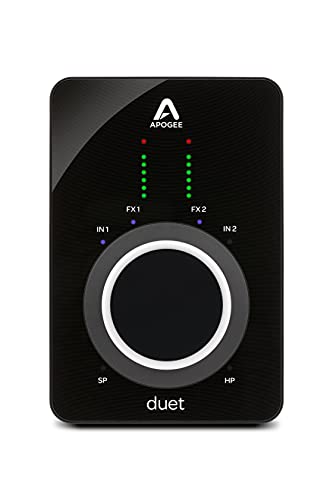
- Up to 96 kHz recording
- 65 dB gain with 48V phantom power
- Onboard ECS processing and travel case
Best For: Professional-quality mobile recording
Best for Streaming – IK Multimedia iRig Stream
The IK Multimedia iRig Stream is a practical audio interface for iPad Pro users who want to stream, podcast, or record stereo audio from mixers and other studio gear. Its RCA inputs, loopback support, and direct headphone monitoring make it especially suited to app-based content creation.
Best For: Live streaming, podcasting, and routing stereo audio into an iPad Pro.
Pros:
- Stereo RCA inputs connect mixers, keyboards, audio players, and similar gear.
- Direct headphone monitoring helps prevent latency and echo.
- Loopback allows music from a smartphone or tablet to be combined with your performance.
- Works with apps including Clubhouse, Instagram, and Zoom.
Cons:
- RCA connectivity is less flexible than combo XLR/TRS inputs for microphones and instruments.
- The supplied notes list multiple connection options, so the appropriate cable or adapter may be needed for a particular iPad Pro setup.
Choose the iRig Stream when streaming workflow and stereo source connectivity matter more than traditional microphone and guitar recording. Its compact 2.4-ounce design also suits mobile setups.
Best for Solo Musicians – Focusrite Scarlett Solo 4th Gen
The Focusrite Scarlett Solo 4th Gen is a strong audio interface for iPad Pro users recording one microphone and one instrument. It combines a 120dB dynamic range, 24-bit/192kHz recording, Air mode, and a substantial software bundle in a compact two-channel design.
Best For: Songwriters and solo musicians recording vocals and guitar or another Hi-Z instrument.
Pros:
- Provides one XLR microphone preamp and one Hi-Z instrument input.
- Air mode adds presence and harmonic drive to vocals and guitars.
- Supports up to 24-bit/192kHz recording with a stated 120dB dynamic range.
- Includes Pro Tools Intro+, Ableton Live Lite, Cubase LE, and Hitmaker Expansion.
Cons:
- Only two input channels are provided, limiting larger recording sessions.
- The supplied package includes a USB A-C cable, so an iPad Pro connection may require the appropriate USB-C setup.
For a musician seeking an audio interface for iPad Pro, the Scarlett Solo is well matched to straightforward vocal-and-instrument recording. Its included software also helps turn the interface into a broader starter studio.
Best Budget 2-Input Option – PIYONE Q2 Alloy Red
The PIYONE Q2 Alloy Red offers a simple two-input option for iPad Pro recording setups that need XLR/TRS connectivity, phantom power, and high-resolution capture. Its USB-C design, loopback function, and direct monitoring target mobile and home creators who want a feature-rich interface without an external power supply.
Best For: Home recording, mobile creators, and users connecting microphones or instruments through combo inputs.
Pros:
- Two XLR/TRS combo inputs support microphones and Hi-Z instruments.
- Supports 24-bit/192kHz recording and 48V phantom power for condenser microphones.
- USB-C bus power avoids a bulky external power supply.
- Direct monitoring, loopback, and a 3.5mm headphone jack support flexible monitoring.
Cons:
- The supplied operating-system detail lists Windows, so iPad Pro compatibility should be confirmed before purchase.
- At 0.74 kg, it is less lightweight than the smallest mobile interfaces.
The Q2 Alloy Red is appealing when an audio interface for iPad Pro needs two full combo inputs and onboard controls. However, because the supplied notes specifically identify Windows support, verify mobile compatibility and cabling for your iPad Pro before relying on it.
Best for Vintage-Style Tone – Universal Audio Volt 2
The Universal Audio Volt 2 is a two-channel audio interface for iPad Pro users who want high-resolution recording and a vintage-inspired preamp mode. It supports iPad and iPhone recording, while its LUNA and UAD-related software ecosystem adds tools for recording and mixing.
Best For: Musicians, podcasters, and mobile creators seeking Vintage-mode preamp coloration and two-channel recording.
Pros:
- Vintage mode is designed to provide the character of UA’s classic 610 preamps.
- Records at up to 24-bit/192kHz with crystal-clear converters.
- Supports Mac, Windows, iPad, and iPhone recording.
- Includes access to LUNA and additional software, plugins, instruments, tips, and tutorials.
Cons:
- iPad use requires an external Volt power supply.
- iPads with Lightning require an Apple Lightning to USB Camera Adapter.
- At 650 g, it is less travel-friendly than ultra-compact mobile interfaces.
The Volt 2 is a good fit for creators who value a more characterful recording option and a broader desktop-to-mobile workflow. Plan for the required power supply and, where applicable, Lightning adapter when building an iPad Pro setup.
Best Hybrid Creator Pick – MAONO P2 Dual XLR Interface
If you need an audio interface for iPad Pro that can also support computer recording and mobile streaming, the MAONO P2 offers unusually flexible connectivity. Its dual USB ports, dual XLR inputs, loopback features, and 24-bit/192kHz recording make it a practical choice for creators working across multiple devices.
Best For: Podcasters, streamers, singers, guitarists, and creators who switch between iPad, phone, and computer workflows.
Pros:
- Dual USB ports support simultaneous computer and iPad or phone connections.
- Dual XLR inputs, 56dB gain, phantom power compatibility, and 24-bit/192kHz recording suit microphones and instruments.
- Loopback, direct monitoring, mute controls, and ProStudio 2 software support streaming and content creation.
- Compact aluminum-alloy housing and included USB-C to USB-A/C cable support mobile setups.
Cons:
- Its broad creator feature set may be more than needed for simple one-instrument recording.
- The supplied notes do not specify iPad Pro power requirements or battery behavior.
The MAONO P2 is the most versatile option here for creators who want one interface to handle recording, streaming, and routing across several devices. Its controls and loopback tools are particularly useful when an iPad is part of a larger production setup.
Best Streaming Control – PreSonus Revelator io24
The PreSonus Revelator io24 is a strong audio interface for iPad Pro users who also need polished streaming and podcasting tools. It combines two XMAX-L microphone preamps, instrument inputs, MIDI I/O, loopback mixing, and onboard effects in a compact USB-C interface.
Best For: Streamers and podcasters who want to mix microphones, instruments, calls, backing tracks, and effects.
Pros:
- Two XMAX-L mic preamps with +48V phantom power support professional XLR microphones.
- Two instrument inputs accommodate guitar, bass, and line-level sources.
- Two stereo loopback streams help combine audio from Zoom, Skype, backing tracks, and other sources.
- Stream Mix mode, presets, reverb, and effects simplify broadcast-ready mixes.
Cons:
- Its listed maximum sample rate is 96 kHz, lower than some competing interfaces.
- The supplied compatibility details identify tablets but do not specifically confirm iPad Pro models.
- At 2 pounds, it is less lightweight than a simple guitar-only interface.
The Revelator io24 stands out when routing and presentation matter as much as basic recording. Its integrated loopback mixer and effects make it especially appealing for live content, though buyers should verify their specific iPad Pro connection setup.
Best Portable Guitar Pick – IK Multimedia iRig USB
For guitarists seeking a compact audio interface for iPad Pro, the IK Multimedia iRig USB focuses on straightforward instrument recording and practice. It includes a USB-C cable, direct monitoring, headphone output, and amp connectivity, making it easy to move between recording apps, silent practice, and a physical rig.
Best For: Guitarists who want a small interface for iPad recording, amp-modeling apps, silent practice, and pedal or amplifier setups.
Pros:
- 24-bit/48kHz recording captures guitar performance details.
- Included USB-C cable connects to iPad, Mac, PC, and newer USB-C iPhones.
- Headphone output and direct monitoring support silent, low-distraction practice.
- Selectable FX or THRU settings and a dedicated amp output work with amps and pedal rigs.
Cons:
- It is centered on a single 1/4-inch instrument input rather than dual XLR microphone recording.
- The stated 48kHz maximum sample rate is lower than the MAONO P2’s 192kHz capability.
- The supplied notes warn that it will not work properly with a Lightning cable.
The iRig USB is the most focused choice for guitarists who prioritize portability and direct amp integration over multi-input recording. Its included USB-C cable makes it a convenient match for compatible iPad Pro setups, provided the device uses the required connection.
Best Compact Pick – RØDE AI-Micro
If you need an audio interface for iPad Pro that is easy to carry and quick to configure, the RØDE AI-Micro is a practical choice. Its dual 3.5mm inputs accept TRS or TRRS microphones, while included USB-C and Lightning cables support connection to tablets and other devices.
Best For: Mobile recording, filmmaking, podcasting, streaming, and Zoom calls with compact 3.5mm microphones.
Pros:
- Ultra-compact dual-channel design for mobile recording.
- Works with many 3.5mm microphones, including lavaliers and wireless systems.
- Auto-sensing inputs simplify TRS and TRRS microphone setup.
- Includes USB-A, USB-C, and Lightning cables.
Cons:
- Its microphone inputs are 3.5mm rather than XLR.
- Maximum sample rate is listed as 20 kHz.
The AI-Micro is especially appealing for iPad Pro users who prioritize portability and straightforward microphone connectivity over traditional studio inputs.
Best Traditional Input Value – M-AUDIO M-Track Duo
The M-AUDIO M-Track Duo is a versatile audio interface for iPad Pro when you need conventional connections for microphones, instruments, or line-level sources. It provides two combo XLR/line/instrument inputs, phantom power, and zero-latency monitoring features.
Best For: Musicians, podcasters, and streamers who need dual inputs for microphones, guitars, or line-level equipment.
Pros:
- Two combo XLR, line, and instrument inputs.
- Phantom power supports compatible condenser microphones.
- USB/Direct monitoring switch helps provide zero-latency monitoring.
- Includes MPC Beats and other production software.
Cons:
- The listed connection is USB Type-B, so an appropriate iPad connection setup may be needed.
- It is larger and heavier than the RØDE AI-Micro.
Choose the M-Track Duo if input flexibility matters more than the smallest possible footprint, particularly for recording vocals and instruments through standard studio connectors.
Best Premium Sound – Apogee Duet 3
The Apogee Duet 3 is a premium audio interface for iPad Pro and other platforms, designed for users who want high-resolution recording in a portable format. It offers up to 65 dB of preamp gain, 48V phantom power, 96 kHz recording, and onboard DSP processing.
Best For: Serious mobile recording, vocals, instruments, podcasting, and live streaming where sound quality and processing are priorities.
Pros:
- Supports recording up to 96 kHz.
- Provides up to 65 dB of gain and 48V phantom power.
- Onboard Symphony ECS processing supports near-zero-latency recording.
- Includes a travel case and USB Type-C/Type-A cable.
Cons:
- It is substantially heavier than the compact RØDE interface.
- Its premium features may be more than casual mobile recordists need.
- The breakout cable design adds an extra connection component.
The Duet 3 is the strongest fit for creators who want a portable but professional-leaning setup and are prepared to pay for higher-resolution recording and integrated processing.
How We Picked the Best Audio Interface for Ipad Pro
We focused on interfaces that can connect to an iPad Pro through USB-C, either directly or with the appropriate adapter or cable. The shortlist covers compact mobile units, two-channel recording interfaces, podcasting and streaming models, and higher-end options for musicians who need better conversion, monitoring, and expansion potential.
We also considered input flexibility, power requirements, headphone monitoring, compatibility with iPadOS recording apps, and the practical needs of voice, guitar, stereo instruments, and live content. Specifications such as bit depth and sample rate matter, but they are only useful when the interface also fits your workflow.
Quick Comparison
| Best For | What to Look For |
|---|---|
| Solo musicians | One or two low-noise mic or instrument inputs and direct monitoring |
| Guitarists | Instrument-level input, compact size, and included USB-C connectivity |
| Podcasters | Multiple microphone inputs, headphone control, and easy level adjustment |
| Streamers | Loopback, routing, effects, and reliable monitoring |
| Mobile creators | Bus power or simple power options, small dimensions, and iPad compatibility |
| Studio-focused users | Clean preamps, high-quality conversion, and flexible software support |
Key Buying Factors for an Audio Interface for Ipad Pro
Connection and Power
USB-C is the simplest match for newer iPad Pro models, but confirm whether the interface includes a suitable cable. Some interfaces draw power from the tablet, which can reduce battery life; others need external power or a powered hub. If you plan to record for several hours, power management is important.
Inputs and Recording Needs
One input is enough for solo guitar or voice, while two inputs allow stereo recording or two microphones at once. XLR inputs support microphones, and combo XLR/TRS inputs usually accept microphones, line-level sources, and instruments. Check whether phantom power is available if you use a condenser microphone.
Monitoring and Controls
A headphone output with a dedicated volume control is essential for latency-free monitoring. Direct monitoring is helpful when recording vocals or instruments. For streaming, podcasting, and screen-based content, loopback and flexible routing can be more valuable than a higher maximum sample rate.
Portability and App Compatibility
Compact interfaces are easier to use with an iPad on a stand or in a travel rig. Confirm that your preferred apps support the interface and that any required mixer or control software works on iPadOS, macOS, or Windows as needed.
Who Should Buy Which Audio Interface for Ipad Pro?
Choose a compact guitar or mobile interface if you mainly record one instrument while traveling. A two-input USB-C unit is the better all-purpose choice for singer-songwriters, stereo sources, and basic home recording. Podcasters and streamers should prioritize loopback, multiple inputs, and convenient monitoring controls. Buyers seeking the cleanest recording chain and room to grow should consider a premium interface with stronger preamps, conversion, and software support.
Before buying, verify the exact iPad Pro model, cable requirements, power setup, and input type you need. The most suitable Audio Interface for Ipad Pro is the one that connects reliably and gives you the controls required by your recording or streaming routine.